warning YAMAHA XMAX 125 2016 User Guide
[x] Cancel search | Manufacturer: YAMAHA, Model Year: 2016, Model line: XMAX 125, Model: YAMAHA XMAX 125 2016Pages: 96, PDF Size: 8.11 MB
Page 24 of 96
Instrument and control functions
3-10
32. Check that the V-belt replacement
indicator comes on for a few sec-
onds and then goes off.
3. If the V-belt replacement indicator
does not come on, have a Yamaha
dealer check the electrical circuit.
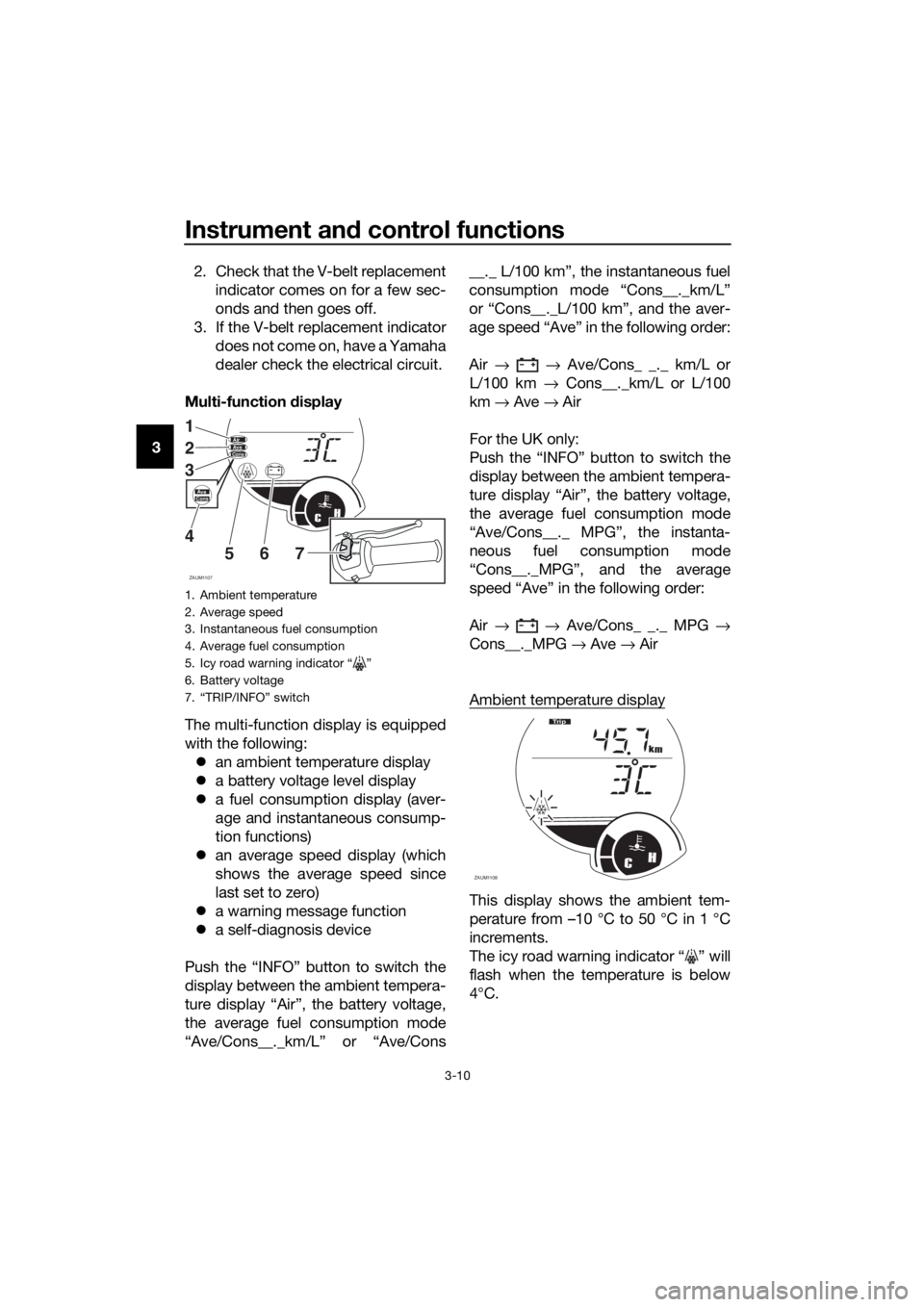
Multi-function display
The multi-function display is equipped
with the following:
an ambient temperature display
a battery voltage level display
a fuel consumption display (aver-
age and instantaneous consump-
tion functions)
an average speed display (which
shows the average speed since
last set to zero)
a warning message function
a self-diagnosis device
Push the “INFO” button to switch the
display between the ambient tempera-
ture display “Air”, the battery voltage,
the average fuel consumption mode
“Ave/Cons__._km/L” or “Ave/Cons__._ L/100 km”, the instantaneous fuel
consumption mode “Cons__._km/L”
or “Cons__._L/100 km”, and the aver-
age speed “Ave” in the following order:
Air → → Ave/Cons_ _._ km/L or
L/100 km → Cons__._km/L or L/100
km → Ave → Air
For the UK only:
Push the “INFO” button to switch the
display between the ambient tempera-
ture display “Air”, the battery voltage,
the average fuel consumption mode
“Ave/Cons__._ MPG”, the instanta-
neous fuel consumption mode
“Cons__._MPG”, and the average
speed “Ave” in the following order:
Air → → Ave/Cons_ _._ MPG →
Cons__._MPG → Ave → Air
Ambient temperature display
This display shows the ambient tem-
perature from –10 °C to 50 °C in 1 °C
increments.
The icy road warning indicator “ ” will
flash when the temperature is below
4°C.
1. Ambient temperature
2. Average speed
3. Instantaneous fuel consumption
4. Average fuel consumption
5. Icy road warning indicator “ ”
6. Battery voltage
7. “TRIP/INFO” switch
ZAUM1107
CH
AirAveCons
1
2
3
4
5
67INFOTRIP
AveCons
ZAUM1108CH
km
Tr i p
U2DME2E0.book Page 10 Tuesday, June 30, 2015 11:38 AM
Page 25 of 96
Instrument and control functions
3-11
3 The temperature displayed may vary
from the ambient temperature. Push-
ing the “INFO” button switches the
ambient temperature display to the
battery voltage, the average fuel con-
sumption, the instantaneous fuel con-
sumption and average speed modes.
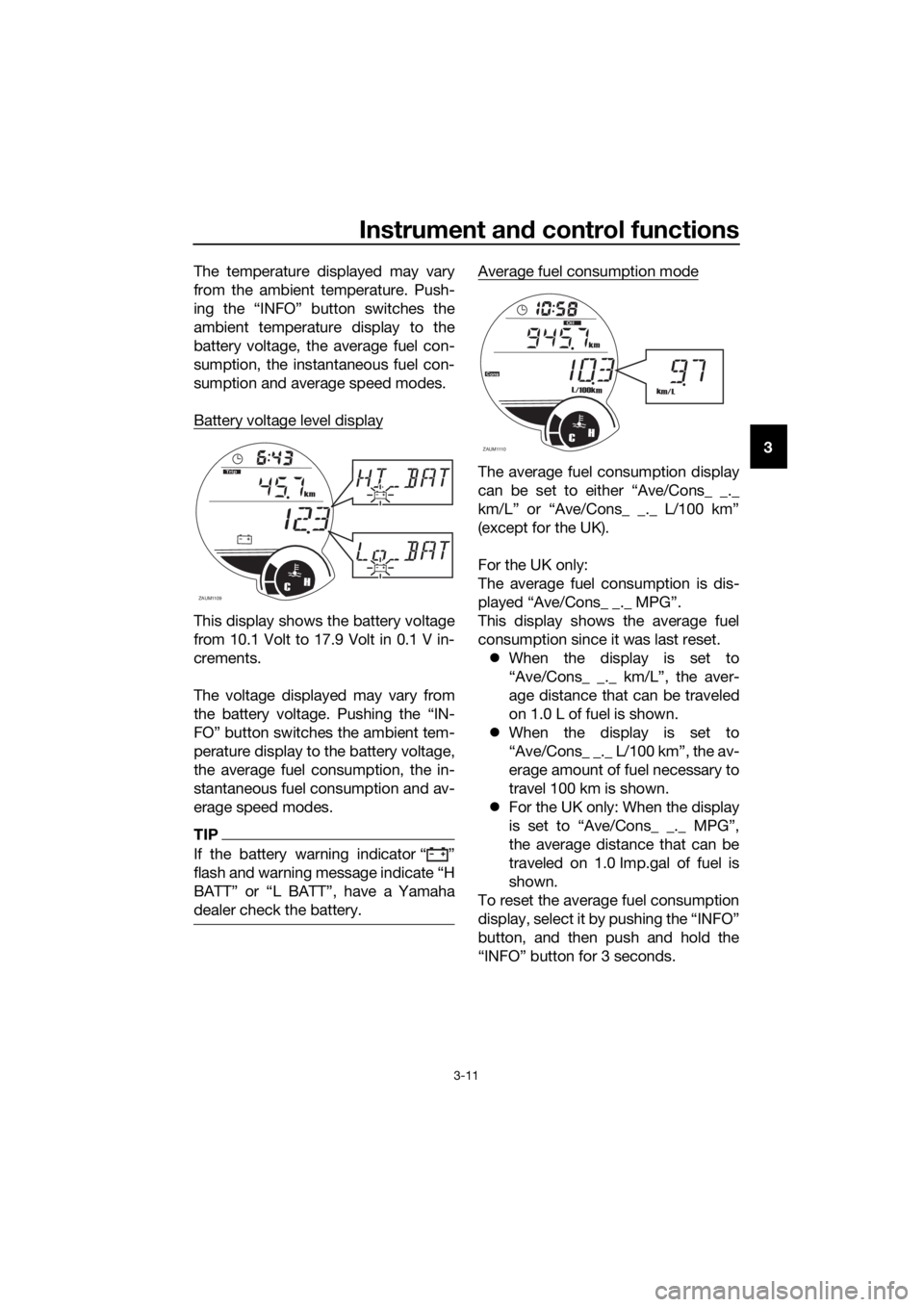
Battery voltage level display
This display shows the battery voltage
from 10.1 Volt to 17.9 Volt in 0.1 V in-
crements.
The voltage displayed may vary from
the battery voltage. Pushing the “IN-
FO” button switches the ambient tem-
perature display to the battery voltage,
the average fuel consumption, the in-
stantaneous fuel consumption and av-
erage speed modes.
TIP
If the battery warning indicator Ž
dealer check the battery.
Average fuel consumption mode
The average fuel consumption display
(except for the UK).
For the UK only:
The average fuel consumption is dis-
This display shows the average fuel
consumption since it was last reset.
When the display is set to
“Ave/Cons_ _._ km/L”, the aver-
age distance that can be traveled
on 1.0 L of fuel is shown.
When the display is set to
“Ave/Cons_ _._ L/100 km”, the av-
erage amount of fuel necessary to
travel 100 km is shown.
For the UK only: When the display
is set to “Ave/Cons_ _._ MPG”,
the average distance that can be
traveled on 1.0 Imp.gal of fuel is
shown.
To reset the average fuel consumption
display, select it by pushing the “INFO”
button, and then push and hold the
“INFO” button for 3 seconds.
ZAUM1109CH
km
T
rip
ZAUM1110CH
km
L/100km
Cons
Oil
km/L
U2DME2E0.book Page 11 Tuesday, June 30, 2015 11:38 AM
Page 26 of 96
Instrument and control functions
3-12
3
TIP
After resetting an average fuel con-
sumption display, “_ _._” is shown for
that display until the vehicle has trav-
eled 1 km (0.6 mi).
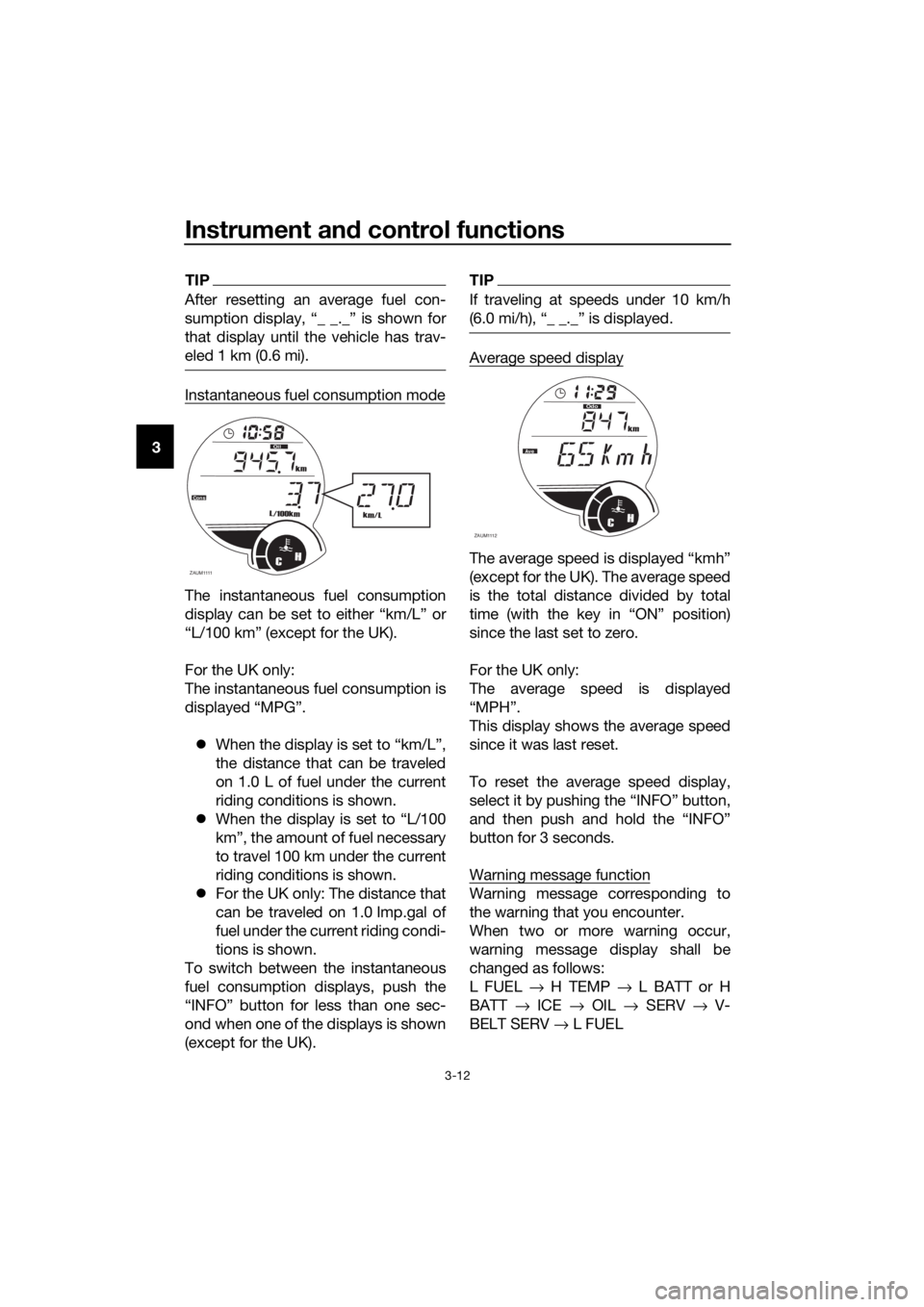
Instantaneous fuel consumption mode
The instantaneous fuel consumption
display can be set to either “km/L” or
“L/100 km” (except for the UK).
For the UK only:
The instantaneous fuel consumption is
displayed “MPG”.
When the display is set to “km/L”,
the distance that can be traveled
on 1.0 L of fuel under the current
riding conditions is shown.
When the display is set to “L/100
km”, the amount of fuel necessary
to travel 100 km under the current
riding conditions is shown.
For the UK only: The distance that
can be traveled on 1.0 Imp.gal of
fuel under the current riding condi-
tions is shown.
To switch between the instantaneous
fuel consumption displays, push the
“INFO” button for less than one sec-
ond when one of the displays is shown
(except for the UK).
TIP
If traveling at speeds under 10 km/h
Average speed display
(except for the UK). The average speed
is the total distance divided by total
since the last set to zero.
For the UK only:
The average speed is displayed
This display shows the average speed
since it was last reset.
To reset the average speed display,
button for 3 seconds.
Warning message function
Warning message corresponding to
the warning that you encounter.
When two or more warning occur,
warning message display shall be
changed as follows:
L FUEL → H TEMP → L BATT or H
BATT → ICE → OIL → SERV → V-
BELT SERV → L FUEL
ZAUM1111CH
km
L/100km
Cons
Oil
km/L
ZAUM1112CH
km
Odo
Ave
Cons
V- B e l tF
U2DME2E0.book Page 12 Tuesday, June 30, 2015 11:38 AM
Page 27 of 96
Instrument and control functions
3-13
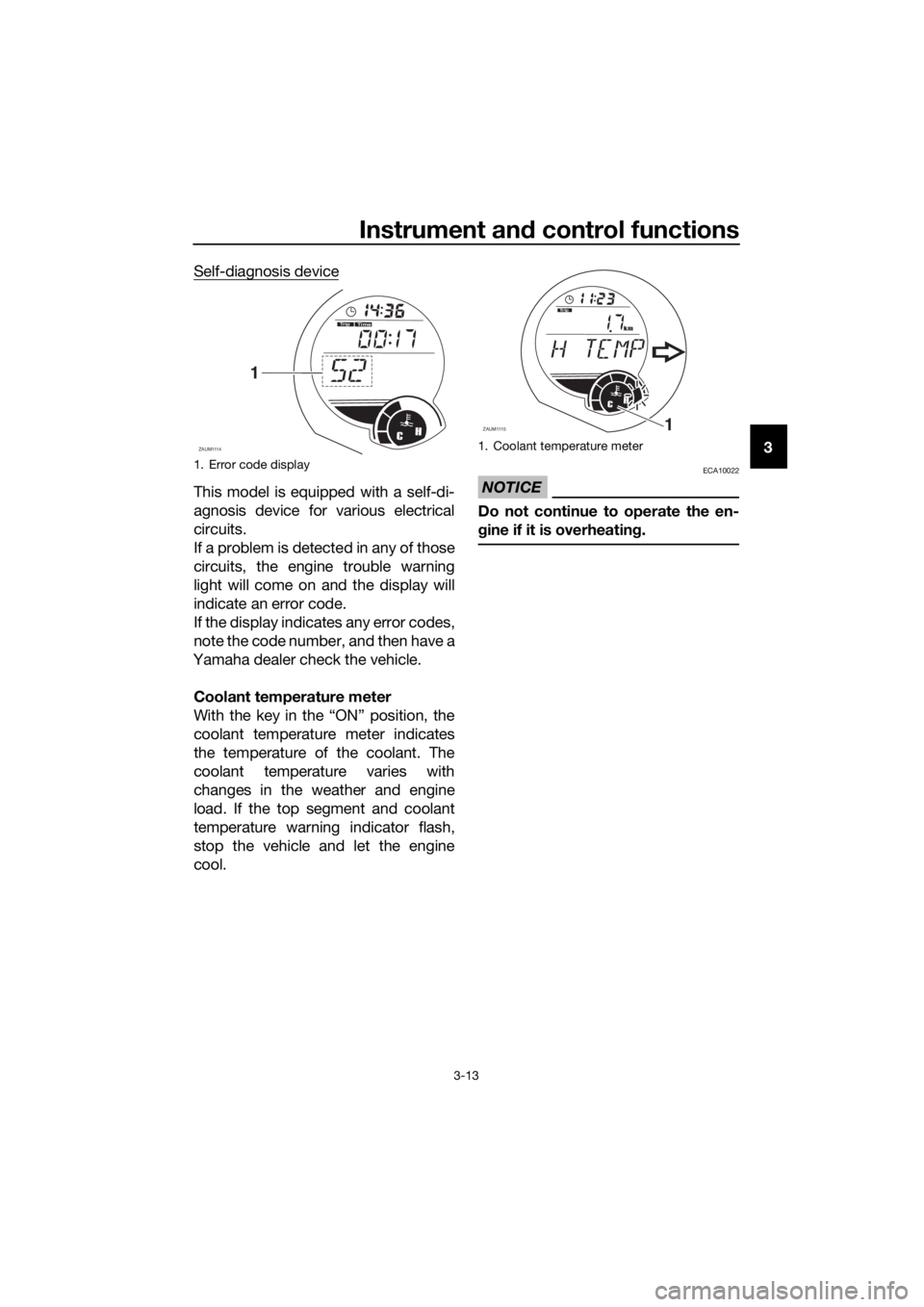
3 Self-diagnosis device
This model is equipped with a self-di-
agnosis device for various electrical
circuits.
If a problem is detected in any of those
circuits, the engine trouble warning
light will come on and the display will
indicate an error code.
If the display indicates any error codes,
note the code number, and then have a
Yamaha dealer check the vehicle.
Coolant temperature meter
With the key in the “ON” position, the
coolant temperature meter indicates
the temperature of the coolant. The
coolant temperature varies with
changes in the weather and engine
load. If the top segment and coolant
temperature warning indicator flash,
stop the vehicle and let the engine
cool.NOTICE
ECA10022
Do not continue to operate the en-
gine if it is overheating.
1. Error code display
ZAUM1114
T
rip
CH
Time
1
1. Coolant temperature meter
ZAUM11151
CH
km
Trip
U2DME2E0.book Page 13 Tuesday, June 30, 2015 11:38 AM
Page 28 of 96
Instrument and control functions
3-14
3
EAU1234H
Handlebar switches
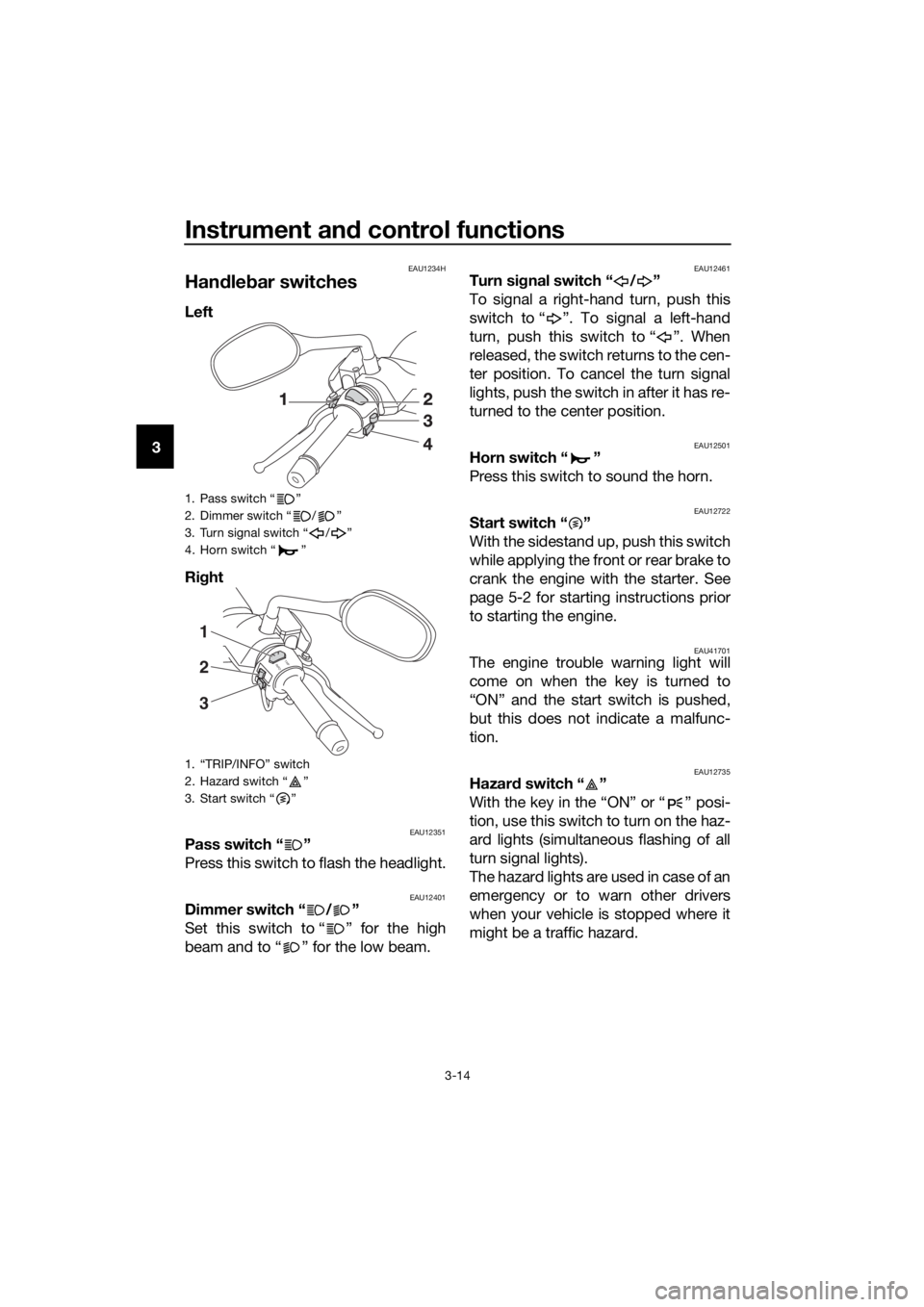
Left
Right
EAU12351Pass switch “ ”
Press this switch to flash the headlight.
EAU12401Dimmer switch “ / ”
Set this switch to “ ” for the high
beam and to “ ” for the low beam.
EAU12461Turn signal switch “ / ”
To signal a right-hand turn, push this
switch to “ ”. To signal a left-hand
turn, push this switch to “ ”. When
released, the switch returns to the cen-
ter position. To cancel the turn signal
lights, push the switch in after it has re-
turned to the center position.
EAU12501Horn switch “ ”
Press this switch to sound the horn.
EAU12722Start switch “ ”
With the sidestand up, push this switch
while applying the front or rear brake to
crank the engine with the starter. See
page 5-2 for starting instructions prior
to starting the engine.
EAU41701The engine trouble warning light will
come on when the key is turned to
“ON” and the start switch is pushed,
but this does not indicate a malfunc-
tion.
EAU12735Hazard switch “ ”
With the key in the “ON” or “ ” posi-
tion, use this switch to turn on the haz-
ard lights (simultaneous flashing of all
turn signal lights).
The hazard lights are used in case of an
emergency or to warn other drivers
when your vehicle is stopped where it
might be a traffic hazard.
1. Pass switch “ ”
2. Dimmer switch “ / ”
3. Turn signal switch “ / ”
4. Horn switch “ ”
1. “TRIP/INFO” switch
2. Hazard switch “ ”
3. Start switch “ ”
I
N
FOTRI
P
1
3 2
U2DME2E0.book Page 14 Tuesday, June 30, 2015 11:38 AM
Page 30 of 96
Instrument and control functions
3-16
3
EAU12952
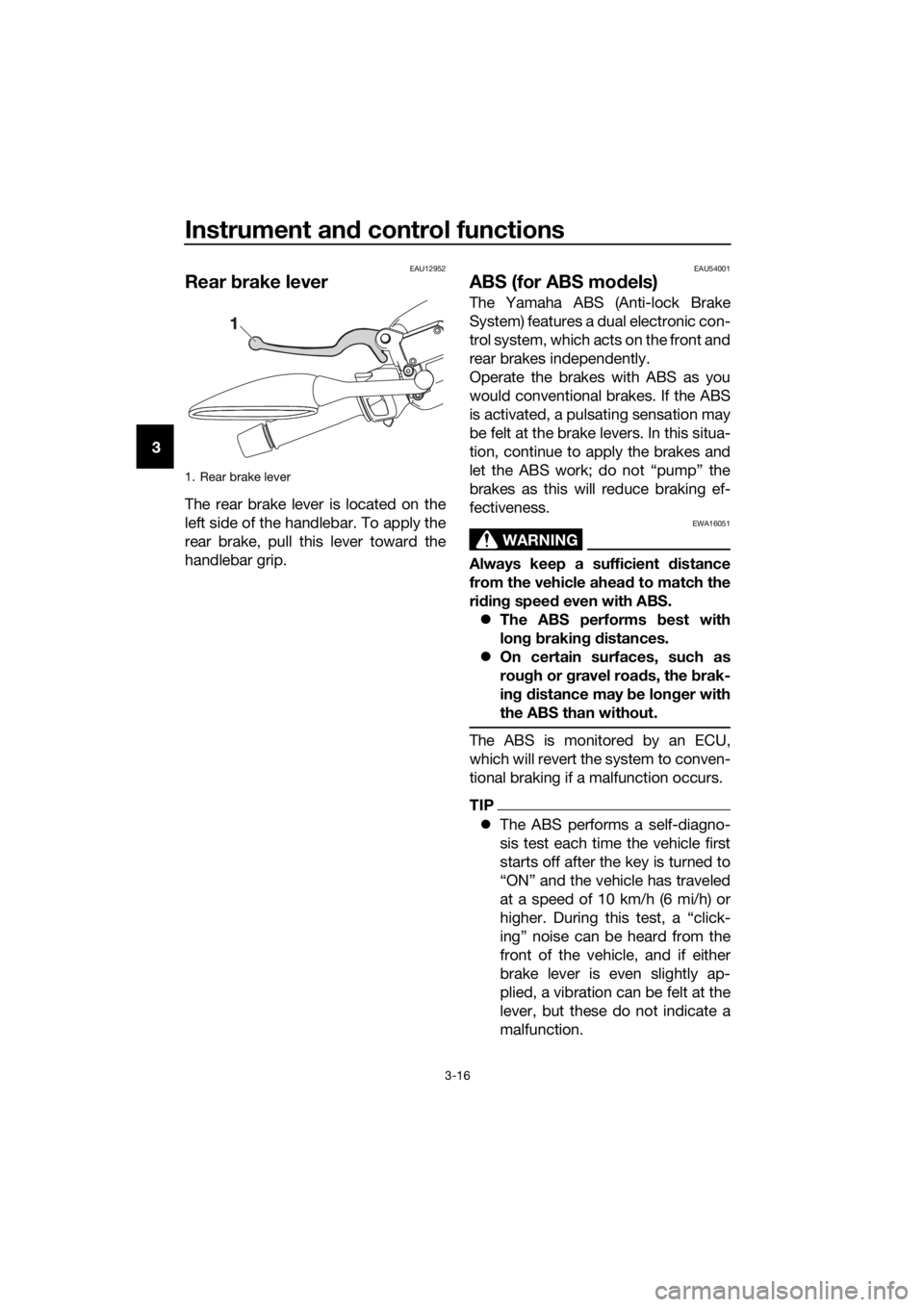
Rear brake lever
The rear brake lever is located on the
left side of the handlebar. To apply the
rear brake, pull this lever toward the
handlebar grip.
EAU54001
ABS (for ABS models)
The Yamaha ABS (Anti-lock Brake
System) features a dual electronic con-
trol system, which acts on the front and
rear brakes independently.
Operate the brakes with ABS as you
would conventional brakes. If the ABS
is activated, a pulsating sensation may
be felt at the brake levers. In this situa-
tion, continue to apply the brakes and
let the ABS work; do not “pump” the
brakes as this will reduce braking ef-
fectiveness.
WARNING
EWA16051
Always keep a sufficient distance
from the vehicle ahead to match the
riding speed even with ABS.
The ABS performs best with
long braking distances.
On certain surfaces, such as
rough or gravel roads, the brak-
ing distance may be longer with
the ABS than without.
The ABS is monitored by an ECU,
which will revert the system to conven-
tional braking if a malfunction occurs.
TIP
The ABS performs a self-diagno-
sis test each time the vehicle first
starts off after the key is turned to
“ON” and the vehicle has traveled
at a speed of 10 km/h (6 mi/h) or
higher. During this test, a “click-
ing” noise can be heard from the
front of the vehicle, and if either
brake lever is even slightly ap-
plied, a vibration can be felt at the
lever, but these do not indicate a
malfunction.
1. Rear brake lever
U2DME2E0.book Page 16 Tuesday, June 30, 2015 11:38 AM
Page 31 of 96
Instrument and control functions
3-17
3 This ABS has a test mode which
allows the owner to experience
the pulsation at the brake levers
when the ABS is operating. How-
ever, special tools are required, so
please consult your Yamaha deal-
er when performing this test.
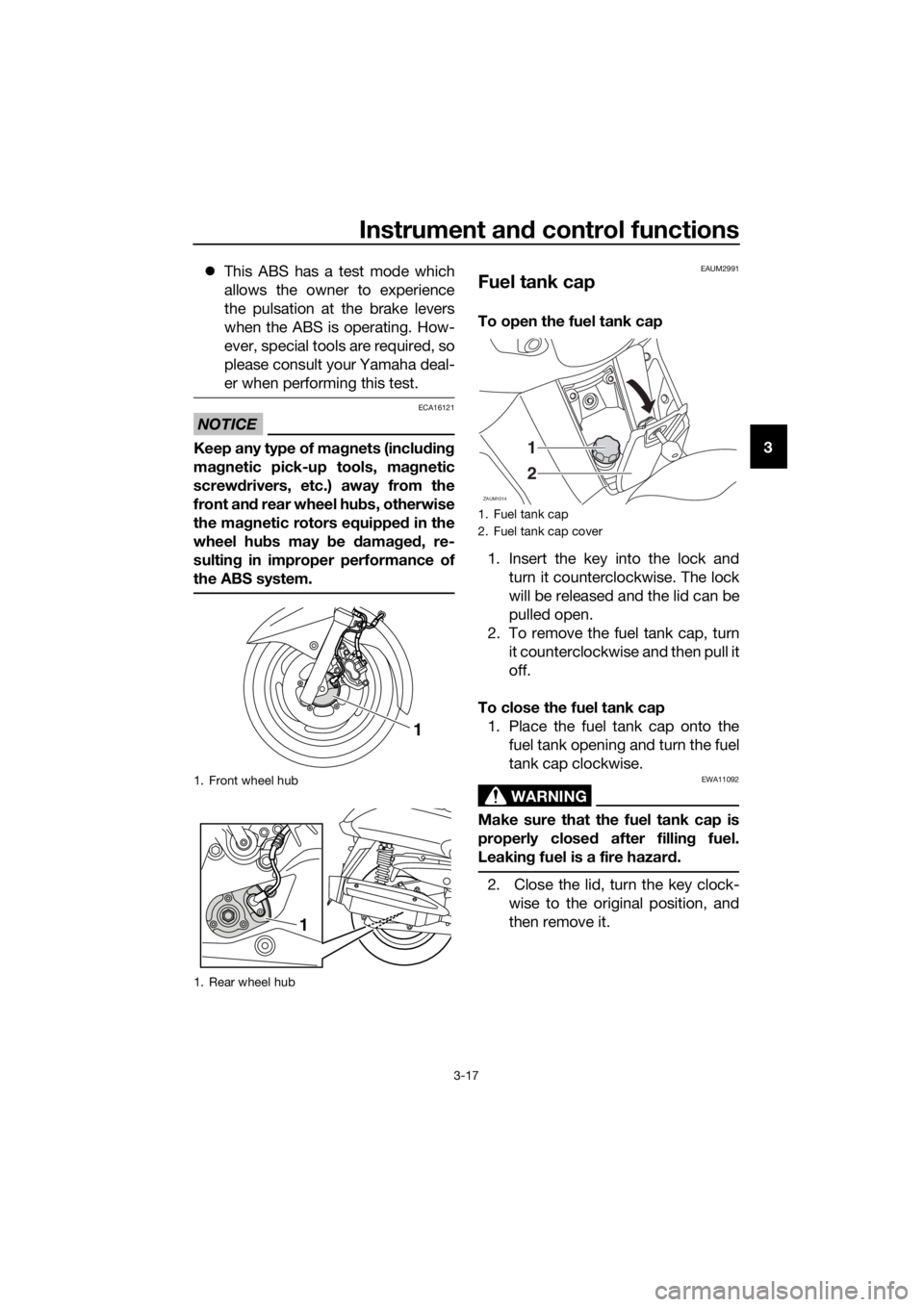
NOTICE
ECA16121
Keep any type of magnets (including
magnetic pick-up tools, magnetic
screwdrivers, etc.) away from the
front and rear wheel hubs, otherwise
the magnetic rotors equipped in the
wheel hubs may be damaged, re-
sulting in improper performance of
the ABS system.
EAUM2991
Fuel tank cap
To open the fuel tank cap
1. Insert the key into the lock and
turn it counterclockwise. The lock
will be released and the lid can be
pulled open.
2. To remove the fuel tank cap, turn
it counterclockwise and then pull it
off.
To close the fuel tank cap
1. Place the fuel tank cap onto the
fuel tank opening and turn the fuel
tank cap clockwise.
WARNING
EWA11092
Make sure that the fuel tank cap is
properly closed after filling fuel.
Leaking fuel is a fire hazard.
2. Close the lid, turn the key clock-
wise to the original position, and
then remove it.
1. Front wheel hub
1. Rear wheel hub
1
1
1. Fuel tank cap
2. Fuel tank cap cover
ZAUM1014
1
2
U2DME2E0.book Page 17 Tuesday, June 30, 2015 11:38 AM
Page 32 of 96
Instrument and control functions
3-18
3
EAU13222
Fuel
Make sure there is sufficient gasoline in
the tank.
WARNING
EWA10882
Gasoline and gasoline vapors are
extremely flammable. To avoid fires
and explosions and to reduce the
risk of injury when refueling, follow
these instructions.
1. Before refueling, turn off the en-
gine and be sure that no one is sit-
ting on the vehicle. Never refuel
while smoking, or while in the vi-
cinity of sparks, open flames, or
other sources of ignition such as
the pilot lights of water heaters
and clothes dryers.
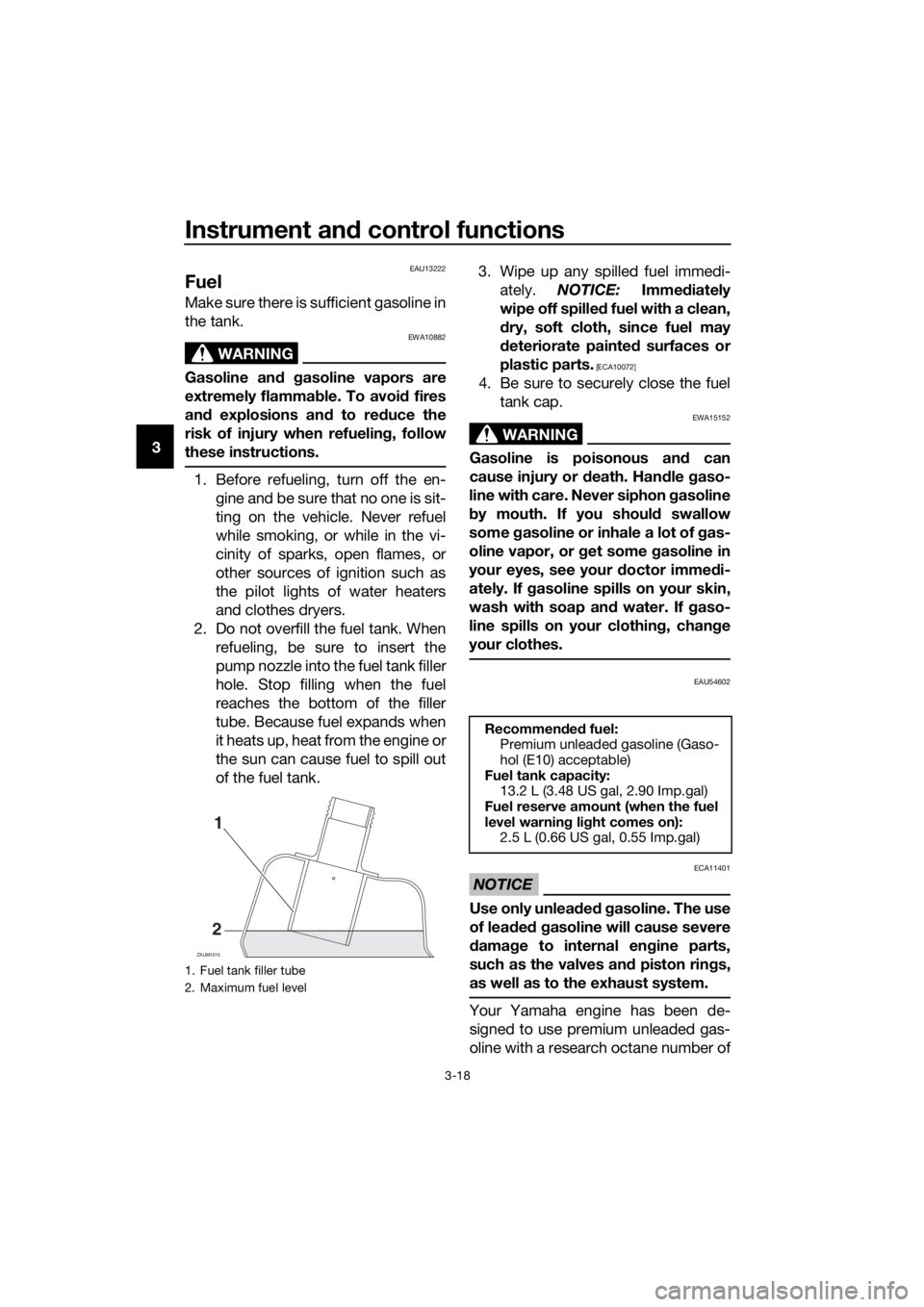
2. Do not overfill the fuel tank. When
refueling, be sure to insert the
pump nozzle into the fuel tank filler
hole. Stop filling when the fuel
reaches the bottom of the filler
tube. Because fuel expands when
it heats up, heat from the engine or
the sun can cause fuel to spill out
of the fuel tank.3. Wipe up any spilled fuel immedi-
ately. NOTICE: Immediately
wipe off spilled fuel with a clean,
dry, soft cloth, since fuel may
deteriorate painted surfaces or
plastic parts.
[ECA10072]
4. Be sure to securely close the fuel
tank cap.
WARNING
EWA15152
Gasoline is poisonous and can
cause injury or death. Handle gaso-
line with care. Never siphon gasoline
by mouth. If you should swallow
some gasoline or inhale a lot of gas-
oline vapor, or get some gasoline in
your eyes, see your doctor immedi-
ately. If gasoline spills on your skin,
wash with soap and water. If gaso-
line spills on your clothing, change
your clothes.
EAU54602
NOTICE
ECA11401
Use only unleaded gasoline. The use
of leaded gasoline will cause severe
damage to internal engine parts,
such as the valves and piston rings,
as well as to the exhaust system.
Your Yamaha engine has been de-
signed to use premium unleaded gas-
oline with a research octane number of
1. Fuel tank filler tube
2. Maximum fuel level
ZAUM1015
1
2
Recommended fuel:
Premium unleaded gasoline (Gaso-
hol (E10) acceptable)
Fuel tank capacity:
13.2 L (3.48 US gal, 2.90 Imp.gal)
Fuel reserve amount (when the fuel
level warning light comes on):
2.5 L (0.66 US gal, 0.55 Imp.gal)
U2DME2E0.book Page 18 Tuesday, June 30, 2015 11:38 AM
Page 33 of 96
Instrument and control functions
3-19
3 95 or higher. If knocking (or pinging)
occurs, use a gasoline of a different
brand. Use of unleaded fuel will extend
spark plug life and reduce mainte-
nance costs.
Gasohol
There are two types of gasohol: gaso-
hol containing ethanol and that con-
taining methanol. Gasohol containing
ethanol can be used if the ethanol con-
tent does not exceed 10% (E10). Gas-
ohol containing methanol is not
recommended by Yamaha because it
can cause damage to the fuel system
or vehicle performance problems.
EAU13447
Catalytic converters
This vehicle is equipped with catalytic
converters in the exhaust system.
WARNING
EWA10863
The exhaust system is hot after op-
eration. To prevent a fire hazard or
burns:
Do not park the vehicle near
possible fire hazards such as
grass or other materials that
easily burn.
Park the vehicle in a place
where pedestrians or children
are not likely to touch the hot
exhaust system.
Make sure that the exhaust sys-
tem has cooled down before
doing any maintenance work.
Do not allow the engine to idle
more than a few minutes. Long
idling can cause a build-up of
heat.
NOTICE
ECA10702
Use only unleaded gasoline. The use
of leaded gasoline will cause unre-
pairable damage to the catalytic
converter.
U2DME2E0.book Page 19 Tuesday, June 30, 2015 11:38 AM
Page 35 of 96
Instrument and control functions
3-21
3
EAUM3002
Storage compartments
Front storage compartment A
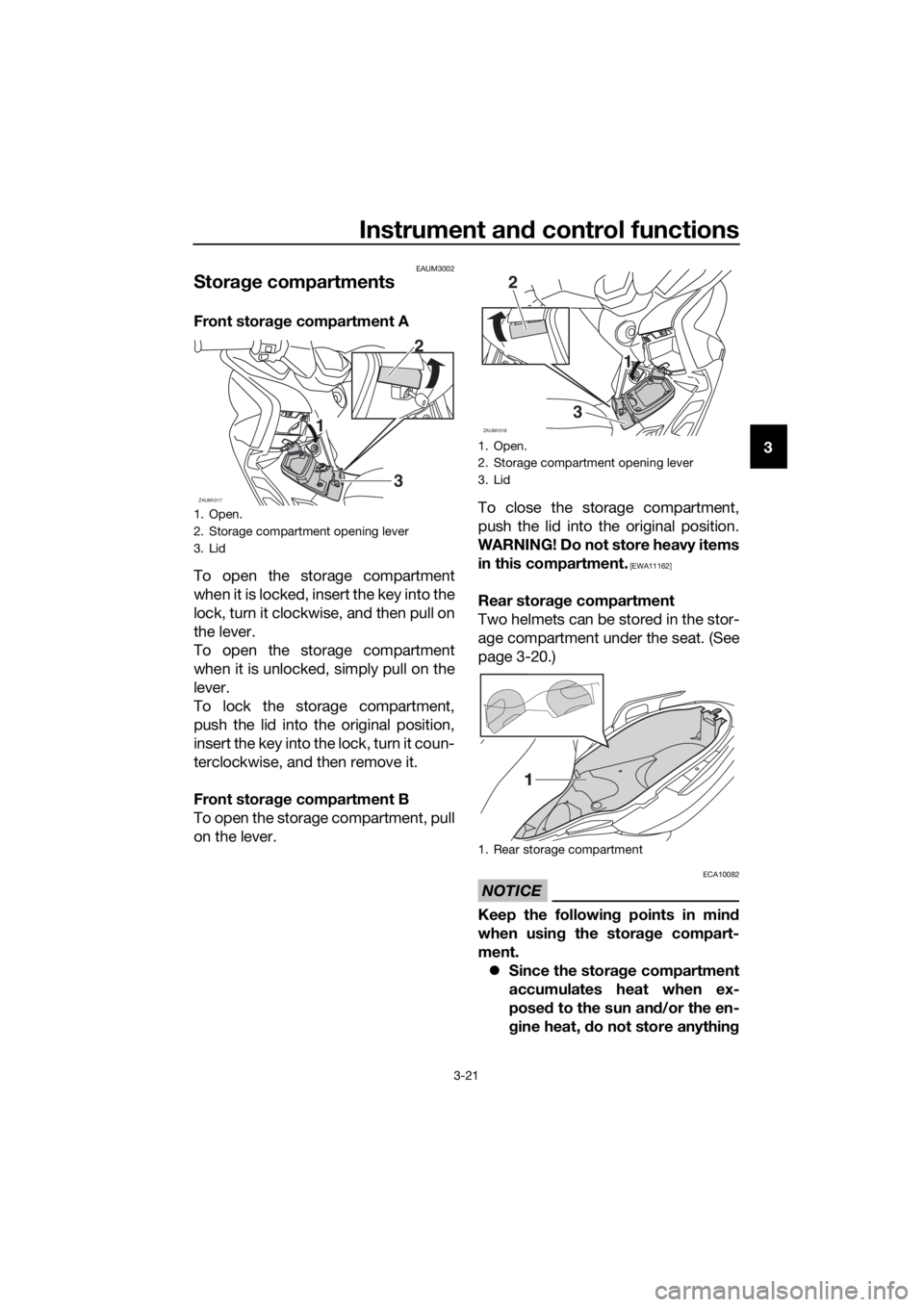
To open the storage compartment
when it is locked, insert the key into the
lock, turn it clockwise, and then pull on
the lever.
To open the storage compartment
when it is unlocked, simply pull on the
lever.
To lock the storage compartment,
push the lid into the original position,
insert the key into the lock, turn it coun-
terclockwise, and then remove it.
Front storage compartment B
To open the storage compartment, pull
on the lever.To close the storage compartment,
push the lid into the original position.
WARNING! Do not store heavy items
in this compartment.
[EWA11162]
Rear storage compartment
Two helmets can be stored in the stor-
age compartment under the seat. (See
page 3-20.)
NOTICE
ECA10082
Keep the following points in mind
when using the storage compart-
ment.
Since the storage compartment
accumulates heat when ex-
posed to the sun and/or the en-
gine heat, do not store anything
1. Open.
2. Storage compartment opening lever
3. Lid
ZAUM10173
1 12
1. Open.
2. Storage compartment opening lever
3. Lid
1. Rear storage compartment
ZAUM1018
2
31 1
U2DME2E0.book Page 21 Tuesday, June 30, 2015 11:38 AM