battery YAMAHA XMAX 125 2018 User Guide
[x] Cancel search | Manufacturer: YAMAHA, Model Year: 2018, Model line: XMAX 125, Model: YAMAHA XMAX 125 2018Pages: 114, PDF Size: 8.24 MB
Page 35 of 114
Instrument and control functions
4-9
4 km”, “Consumption_ _._ km/L”,
and “Consumption_ _._ L/100 km”
are not displayed.
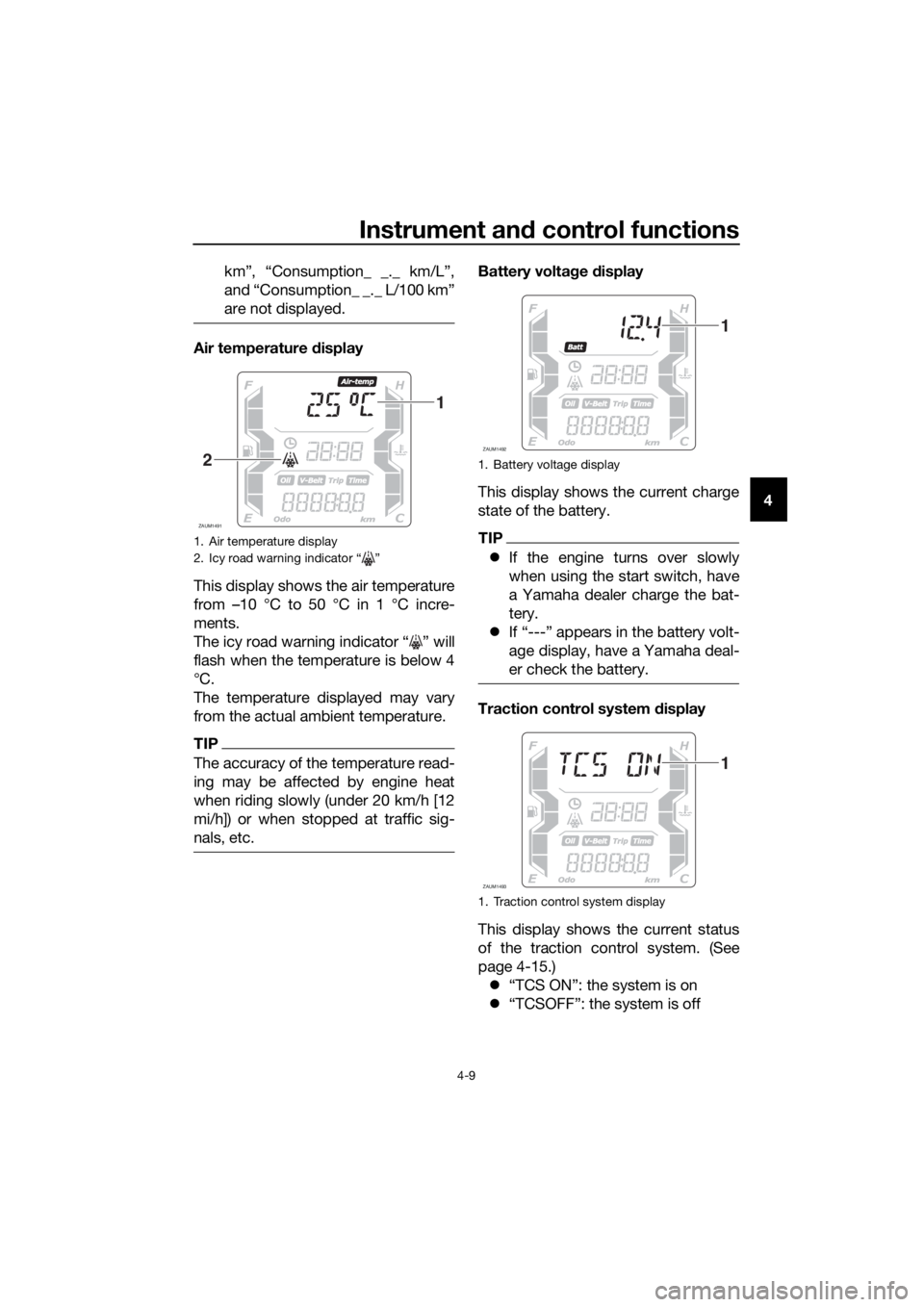
Air temperature display
This display shows the air temperature
from –10 °C to 50 °C in 1 °C incre-
ments.
The icy road warning indicator “ ” will
flash when the temperature is below 4
°C.
The temperature displayed may vary
from the actual ambient temperature.
TIP
The accuracy of the temperature read-
ing may be affected by engine heat
when riding slowly (under 20 km/h [12
mi/h]) or when stopped at traffic sig-
nals, etc.
Battery voltage display
This display shows the current charge
state of the battery.
TIP
If the engine turns over slowly
when using the start switch, have
a Yamaha dealer charge the bat-
tery.
If “---” appears in the battery volt-
age display, have a Yamaha deal-
er check the battery.
Traction control system display
This display shows the current status
of the traction control system. (See
page 4-15.)
“TCS ON”: the system is on
“TCSOFF”: the system is off
1. Air temperature display
2. Icy road warning indicator “ ”
ZAUM1491
1
21. Battery voltage display
1. Traction control system display
ZAUM1492
1
ZAUM1493
1
UBL2E0E0.book Page 9 Friday, June 23, 2017 9:30 AM
Page 55 of 114
Instrument and control functions
4-29
4
EAU78213
Auxiliary DC jack
WARNING
EWA14361
To prevent electrical shock or short-
circuiting, make sure that the cap is
installed when the auxiliary DC jack
is not being used.
NOTICE
ECA15432
The accessory connected to the
auxiliary DC jack should not be used
with the engine turned off, and the
load must never exceed 12 W (1 A),
otherwise the fuse may blow or the
battery may discharge.
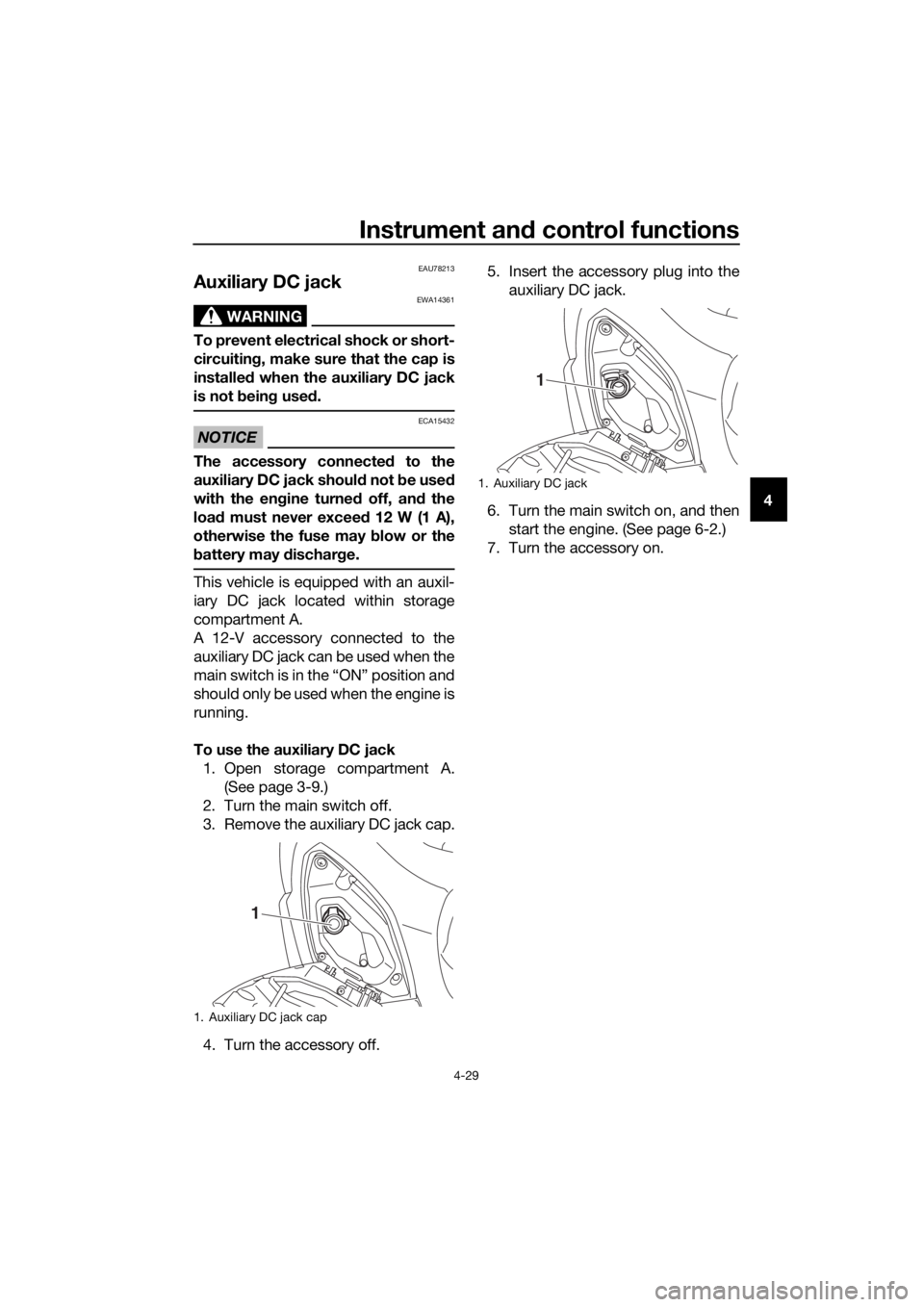
This vehicle is equipped with an auxil-
iary DC jack located within storage
compartment A.
A 12-V accessory connected to the
auxiliary DC jack can be used when the
main switch is in the “ON” position and
should only be used when the engine is
running.
To use the auxiliary DC jack
1. Open storage compartment A.
(See page 3-9.)
2. Turn the main switch off.
3. Remove the auxiliary DC jack cap.
4. Turn the accessory off.5. Insert the accessory plug into the
auxiliary DC jack.
6. Turn the main switch on, and then
start the engine. (See page 6-2.)
7. Turn the accessory on.
1. Auxiliary DC jack cap
1
1. Auxiliary DC jack
1
UBL2E0E0.book Page 29 Friday, June 23, 2017 9:30 AM
Page 59 of 114
Operation and important riding points
6-2
6
EAU78231
Starting the engine
NOTICE
ECA10251
See page 6-5 for engine break-in in-
structions prior to operating the ve-
hicle for the first time.
In order for the ignition circuit cut-off
system to enable starting, the side-
stand must be up. (See page 4-27.)
1. Turn the main switch on and make
sure that the stop/run/start switch
is set to “ ”.
The following warning lights and
indicator lights should come on for
a few seconds, then go off.
Engine trouble warning light
Traction control system indi-
cator light
Smart key system indicator
light
TIP
The ABS warning light should come on
and stay on until the vehicle reaches a
traveling speed of 10 km/h (6 mi/h) or
higher.
NOTICE
ECA22510
If a warning or indicator light does
not work as described above, see
page 4-1 for the corresponding
warning and indicator light circuit
check.
2. Close the throttle.
3. While applying the front or rear
brake, push the “ ” side of the
stop/run/start switch. Release it
when the engine starts.
TIP
If the engine does not start, release the
start switch after 5 seconds. Before
pressing the start switch again, wait 10
seconds to allow battery voltage to re-
store.
NOTICE
ECA11043
For maximum engine life, never ac-
celerate hard when the engine is
cold!
UBL2E0E0.book Page 2 Friday, June 23, 2017 9:30 AM
Page 63 of 114
Operation and important riding points
6-6
6
EAUN1421
Parking
When parking, turn the vehicle power
off, and then turn the smart key off.
TIP
Even when the vehicle is parked in a lo-
cation partitioned by a fence or the
glass window of a shop, if the smart
key is within operating range, other
people will be able to start the engine
and operate the vehicle. Please turn
the smart key off when leaving the ve-
hicle. (See page 3-5.)
If the sidestand is lowered when the
engine is running, the engine will stop
and the beeper will sound for approxi-
mately 1 minute. To stop the beeper,
turn the vehicle power off or raise the
sidestand.
TIP
Before leaving the vehicle, be sure
to turn the main switch to “OFF”
or “ ”. Otherwise, the battery may
discharge.
The sidestand alarm beeper can
be set to not activate. Please con-
tact your Yamaha dealer.
WARNING
EWA10312
Since the engine and exhaust
system can become very hot,
park in a place where pedestri-
ans or children are not likely to
touch them and be burned.
Do not park on a slope or on soft
ground, otherwise the vehicle
may overturn, increasing the
risk of a fuel leak and fire.Do not park near grass or other
flammable materials which
might catch fire.
UBL2E0E0.book Page 6 Friday, June 23, 2017 9:30 AM
Page 89 of 114
Periodic maintenance and adjustment
7-26
7
EAU60691
Battery
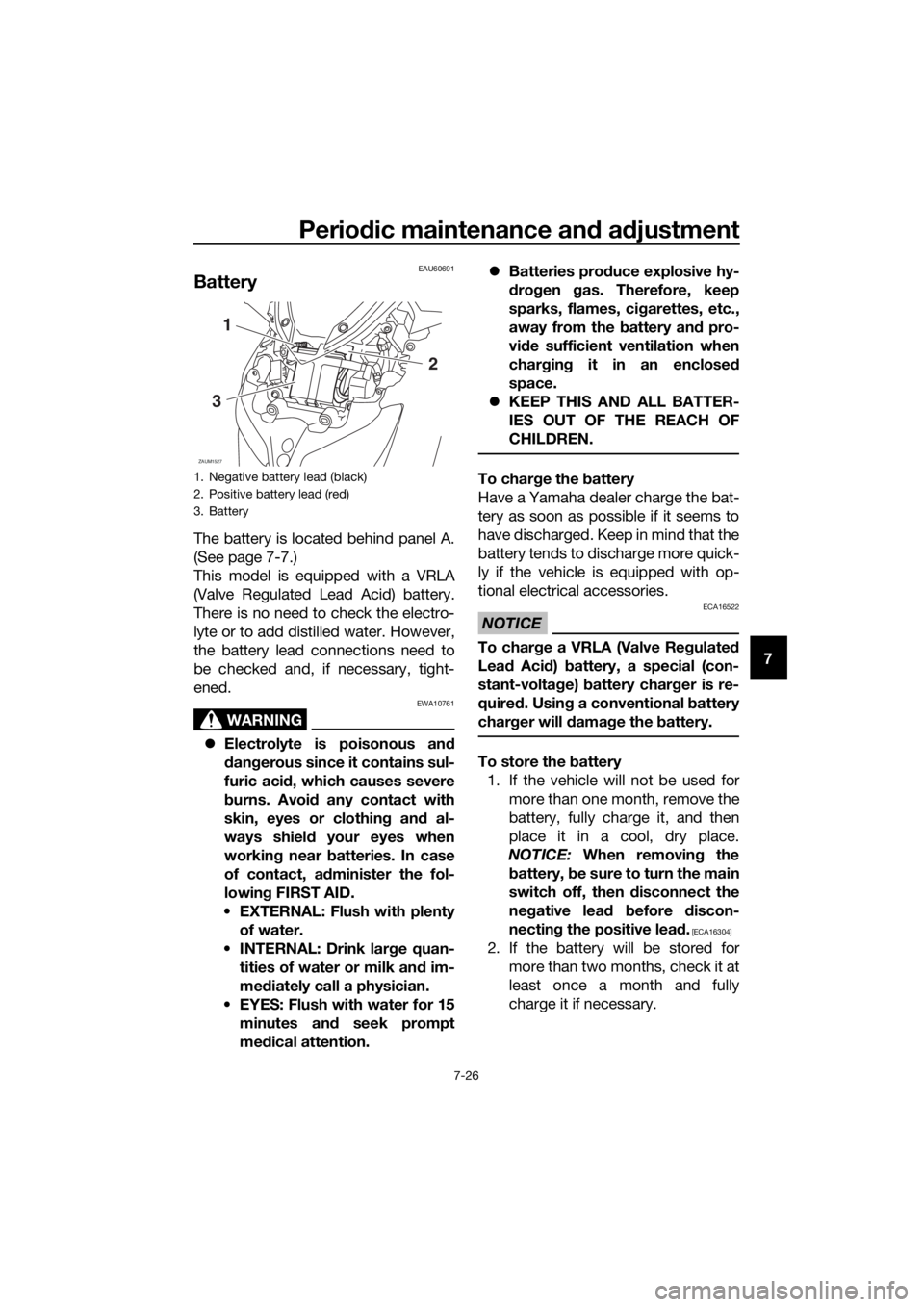
The battery is located behind panel A.
(See page 7-7.)
This model is equipped with a VRLA
(Valve Regulated Lead Acid) battery.
There is no need to check the electro-
lyte or to add distilled water. However,
the battery lead connections need to
be checked and, if necessary, tight-
ened.
WARNING
EWA10761
Electrolyte is poisonous and
dangerous since it contains sul-
furic acid, which causes severe
burns. Avoid any contact with
skin, eyes or clothing and al-
ways shield your eyes when
working near batteries. In case
of contact, administer the fol-
lowing FIRST AID.
EXTERNAL: Flush with plenty
of water.
INTERNAL: Drink large quan-
tities of water or milk and im-
mediately call a physician.
EYES: Flush with water for 15
minutes and seek prompt
medical attention.Batteries produce explosive hy-
drogen gas. Therefore, keep
sparks, flames, cigarettes, etc.,
away from the battery and pro-
vide sufficient ventilation when
charging it in an enclosed
space.
KEEP THIS AND ALL BATTER-
IES OUT OF THE REACH OF
CHILDREN.
To charge the battery
Have a Yamaha dealer charge the bat-
tery as soon as possible if it seems to
have discharged. Keep in mind that the
battery tends to discharge more quick-
ly if the vehicle is equipped with op-
tional electrical accessories.
NOTICE
ECA16522
To charge a VRLA (Valve Regulated
Lead Acid) battery, a special (con-
stant-voltage) battery charger is re-
quired. Using a conventional battery
charger will damage the battery.
To store the battery
1. If the vehicle will not be used for
more than one month, remove the
battery, fully charge it, and then
place it in a cool, dry place.
NOTICE: When removing the
battery, be sure to turn the main
switch off, then disconnect the
negative lead before discon-
necting the positive lead.
[ECA16304]
2. If the battery will be stored for
more than two months, check it at
least once a month and fully
charge it if necessary.
1. Negative battery lead (black)
2. Positive battery lead (red)
3. Battery
ZAUM1527
1
3
2
UBL2E0E0.book Page 26 Friday, June 23, 2017 9:30 AM
Page 90 of 114
Periodic maintenance and adjustment
7-27
73. Fully charge the battery before in-
stallation. NOTICE: When install-
ing the battery, be sure to turn
the main switch off, then con-
nect the positive lead before
connecting the negative lead.
[ECA16842]
4. After installation, make sure that
the battery leads are properly con-
nected to the battery terminals.
NOTICE
ECA16531
Always keep the battery charged.
Storing a discharged battery can
cause permanent battery damage.
EAU78242
Replacing the fuses
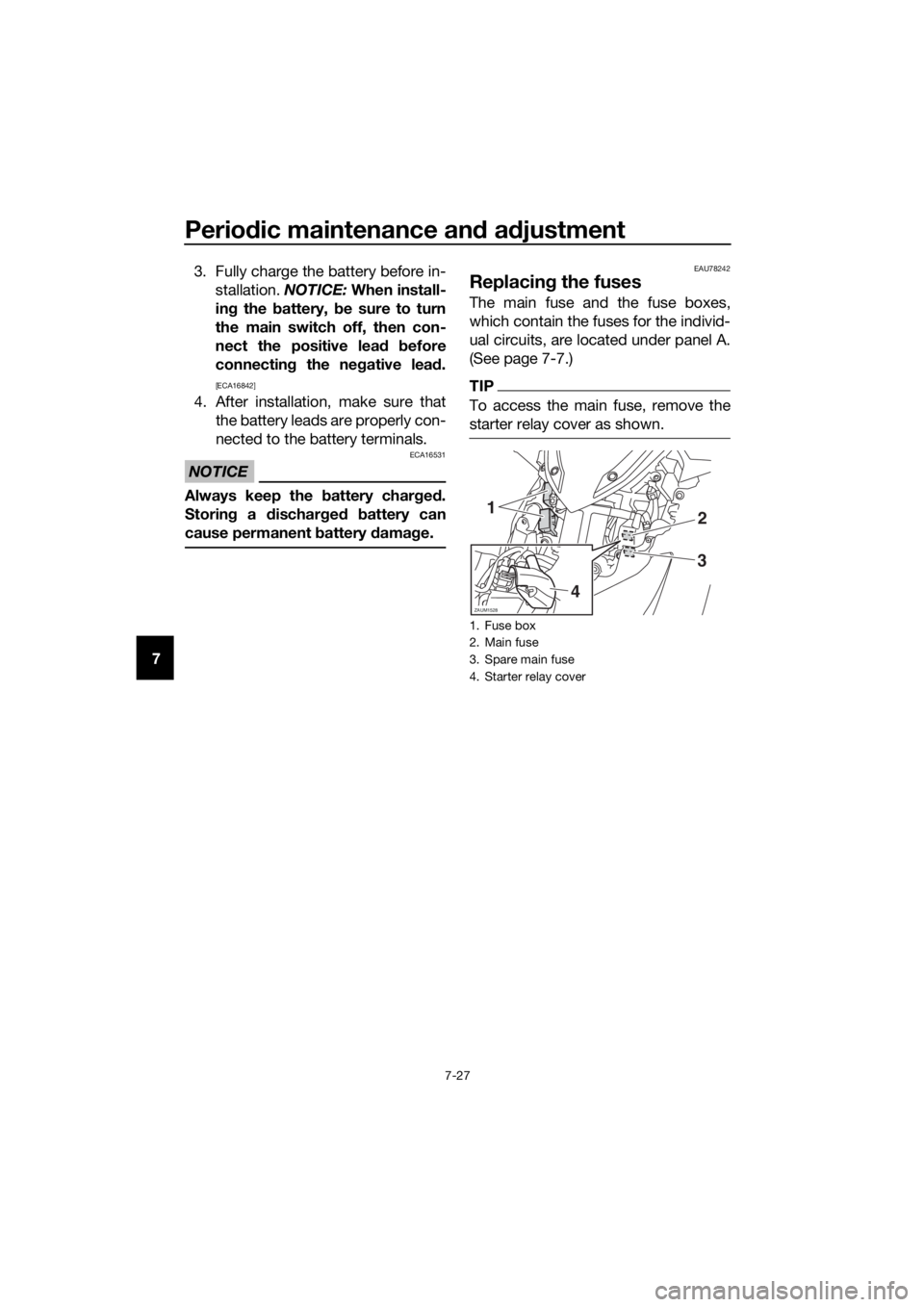
The main fuse and the fuse boxes,
which contain the fuses for the individ-
ual circuits, are located under panel A.
(See page 7-7.)
TIP
To access the main fuse, remove the
starter relay cover as shown.
1. Fuse box
2. Main fuse
3. Spare main fuse
4. Starter relay cover
ZAUM1528
12
3
4
UBL2E0E0.book Page 27 Friday, June 23, 2017 9:30 AM
Page 95 of 114
Periodic maintenance and adjustment
7-32
7
EAU60701
Troubleshooting
Although Yamaha vehicles receive a
thorough inspection before shipment
from the factory, trouble may occur
during operation. Any problem in the
fuel, compression, or ignition systems,
for example, can cause poor starting
and loss of power.
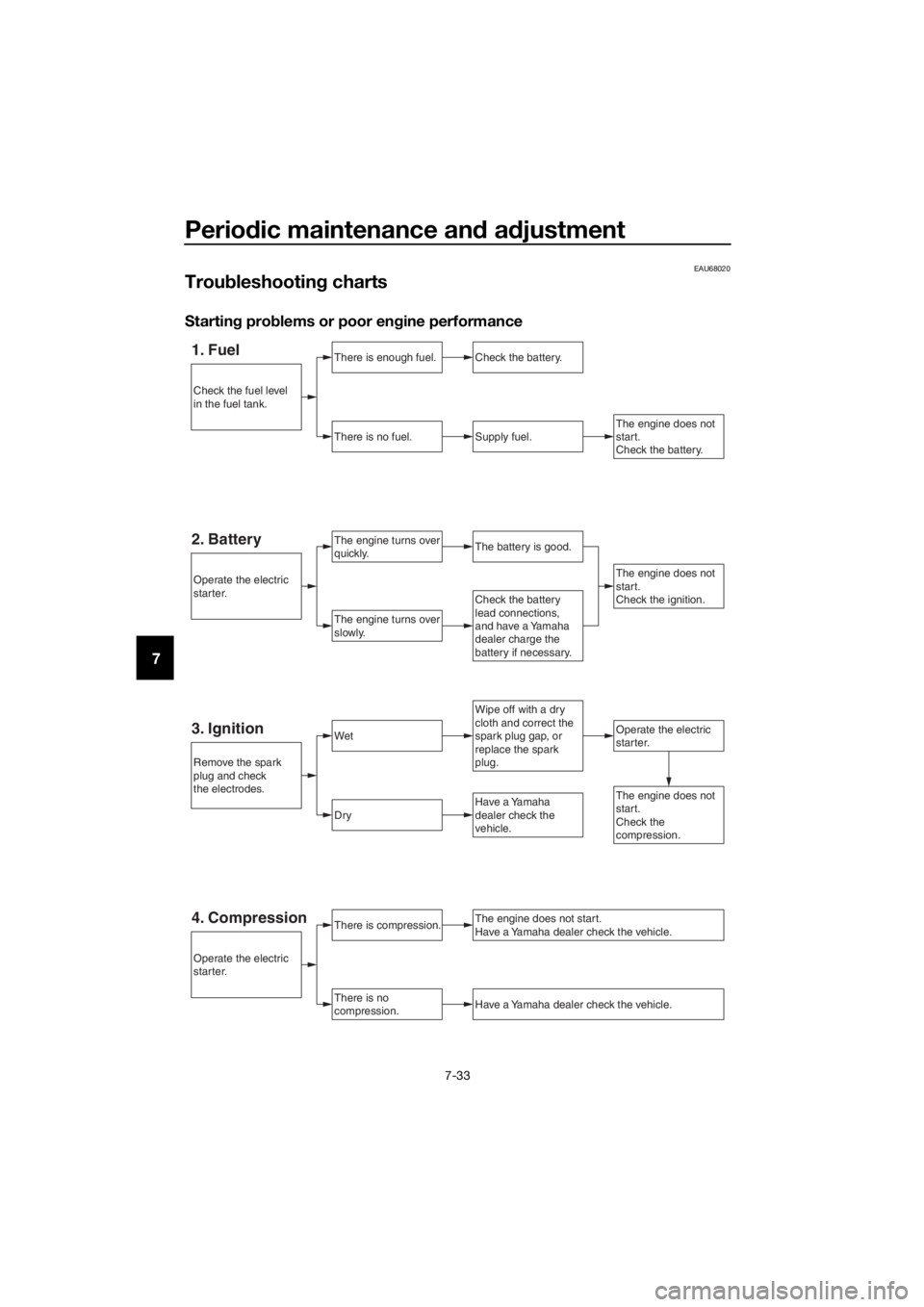
The following troubleshooting charts
represent quick and easy procedures
for checking these vital systems your-
self. However, should your vehicle re-
quire any repair, take it to a Yamaha
dealer, whose skilled technicians have
the necessary tools, experience, and
know-how to service the vehicle prop-
erly.
Use only genuine Yamaha replace-
ment parts. Imitation parts may look
like Yamaha parts, but they are often
inferior, have a shorter service life and
can lead to expensive repair bills.
WARNING
EWA15142
When checking the fuel system, do
not smoke, and make sure there are
no open flames or sparks in the ar-
ea, including pilot lights from water
heaters or furnaces. Gasoline or
gasoline vapors can ignite or ex-
plode, causing severe injury or prop-
erty damage.
EAU76551Smart key system troubleshooting
Please check the following items when
the smart key system does not work.
Is the smart key turned on? (See
page 3-5.)
Is the smart key battery dis-
charged? (See page 3-6.)Is the smart key battery installed
correctly? (See page 3-6.)
Is the smart key being used in a lo-
cation with strong radio waves or
other electromagnetic noise? (See
page 3-1.)
Are you using the smart key that is
registered to the vehicle?
Is the vehicle battery discharged?
When the vehicle battery is dis-
charged, the smart key system will
not operate. Please have the vehi-
cle battery charged or replaced.
(See page 7-26.)
If the smart key system does not work
after checking the above items, have a
Yamaha dealer check the smart key
system.
TIP
See Emergency mode on page 7-35
for information on starting the engine
without the smart key.
UBL2E0E0.book Page 32 Friday, June 23, 2017 9:30 AM
Page 96 of 114
Periodic maintenance and adjustment
7-33
7
EAU68020
Troubleshooting charts
Starting problems or poor engine performance
1. FuelThere is enough fuel.
There is no fuel.
Check the battery.
Supply fuel.
The engine turns over
quickly.
The engine turns over
slowly.
Operate the electric
starter.
The engine does not
start.
Check the battery.
Wipe off with a dry
cloth and correct the
spark plug gap, or
replace the spark
plug.
Check the battery
lead connections,
and have a Yamaha
dealer charge the
battery if necessary.
2. BatteryThe battery is good.
The engine does not
start.
Check the ignition.
3. IgnitionWet
Dry
There is compression.
There is no
compression.
The engine does not start.
Have a Yamaha dealer check the vehicle.
Have a Yamaha dealer check the vehicle.
The engine does not
start.
Check the
compression.Have a Yamaha
dealer check the
vehicle.
Remove the spark
plug and check
the electrodes.
Operate the electric
starter.
Operate the electric
starter.
Check the fuel level
in the fuel tank.
4. Compression
UBL2E0E0.book Page 33 Friday, June 23, 2017 9:30 AM
Page 98 of 114
Periodic maintenance and adjustment
7-35
7
EAU76561
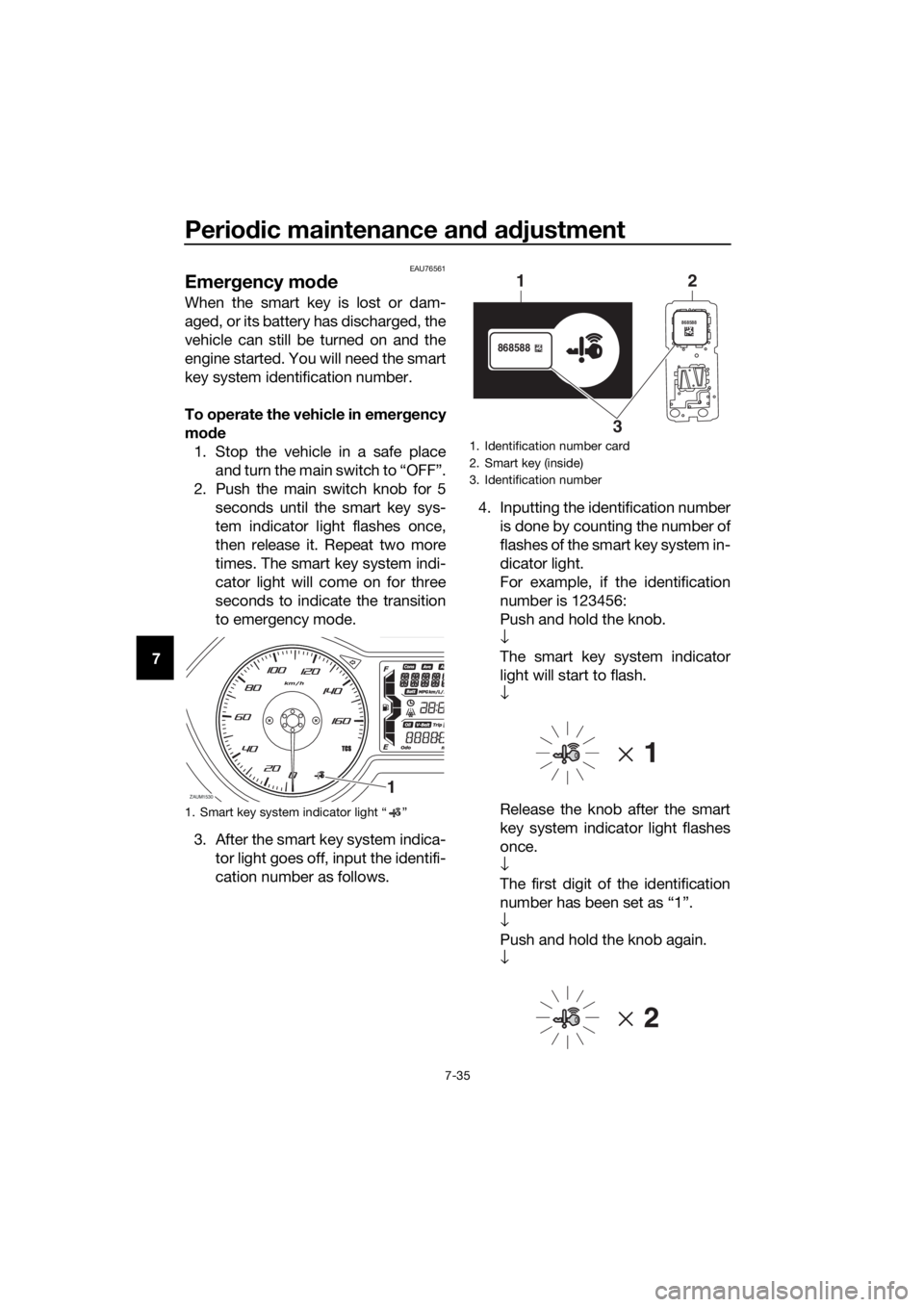
Emergency mode
When the smart key is lost or dam-
aged, or its battery has discharged, the
vehicle can still be turned on and the
engine started. You will need the smart
key system identification number.
To operate the vehicle in emergency
mode
1. Stop the vehicle in a safe place
and turn the main switch to “OFF”.
2. Push the main switch knob for 5
seconds until the smart key sys-
tem indicator light flashes once,
then release it. Repeat two more
times. The smart key system indi-
cator light will come on for three
seconds to indicate the transition
to emergency mode.
3. After the smart key system indica-
tor light goes off, input the identifi-
cation number as follows.4. Inputting the identification number
is done by counting the number of
flashes of the smart key system in-
dicator light.
For example, if the identification
number is 123456:
Push and hold the knob.
↓
The smart key system indicator
light will start to flash.
↓
Release the knob after the smart
key system indicator light flashes
once.
↓
The first digit of the identification
number has been set as “1”.
↓
Push and hold the knob again.
↓
1. Smart key system indicator light “ ”
ZAUM15301
1. Identification number card
2. Smart key (inside)
3. Identification number
868588
868588
1
32
UBL2E0E0.book Page 35 Friday, June 23, 2017 9:30 AM
Page 103 of 114
Scooter care and storage
8-4
8
EAU36564
Storage
Short-term
Always store your scooter in a cool, dry
place and, if necessary, protect it
against dust with a porous cover. Be
sure the engine and the exhaust sys-
tem are cool before covering the
scooter.
NOTICE
ECA10821
Storing the scooter in a poorly
ventilated room or covering it
with a tarp, while it is still wet,
will allow water and humidity to
seep in and cause rust.
To prevent corrosion, avoid
damp cellars, stables (because
of the presence of ammonia)
and areas where strong chemi-
cals are stored.
Long-term
Before storing your scooter for several
months:
1. Follow all the instructions in the
“Care” section of this chapter.
2. Fill up the fuel tank and add fuel
stabilizer (if available) to prevent
the fuel tank from rusting and the
fuel from deteriorating.
3. Perform the following steps to
protect the cylinder, piston rings,
etc. from corrosion.
a. Remove the spark plug cap
and spark plug.
b. Pour a teaspoonful of engine
oil into the spark plug bore.
c. Install the spark plug cap onto
the spark plug, and then place
the spark plug on the cylinderhead so that the electrodes are
grounded. (This will limit spark-
ing during the next step.)
d. Turn the engine over several
times with the starter. (This will
coat the cylinder wall with oil.)
e. Remove the spark plug cap
from the spark plug, and then
install the spark plug and the
spark plug cap. WARNING! To
prevent damage or injury
from sparking, make sure to
ground the spark plug elec-
trodes while turning the en-
gine over.
[EWA10952]
4. Lubricate all control cables and
the pivoting points of all levers and
pedals as well as of the side-
stand/centerstand.
5. Check and, if necessary, correct
the tire air pressure, and then lift
the scooter so that both of its
wheels are off the ground. Alterna-
tively, turn the wheels a little every
month in order to prevent the tires
from becoming degraded in one
spot.
6. Cover the muffler outlet with a
plastic bag to prevent moisture
from entering it.
7. Remove the battery and fully
charge it. Store it in a cool, dry
place and charge it once a month.
Do not store the battery in an ex-
cessively cold or warm place [less
than 0 °C (30 °F) or more than 30
°C (90 °F)]. For more information
on storing the battery, see page
7-26.
UBL2E0E0.book Page 4 Friday, June 23, 2017 9:30 AM