battery YAMAHA XMAX 250 2016 Owners Manual
[x] Cancel search | Manufacturer: YAMAHA, Model Year: 2016, Model line: XMAX 250, Model: YAMAHA XMAX 250 2016Pages: 96, PDF Size: 8.03 MB
Page 5 of 96

Table of contents
Safety information............................1-1
Further safe-riding points ................1-5
Description........................................2-1
Left view ..........................................2-1
Right view........................................2-2
Controls and instruments ................2-3
Instrument and control functions....3-1
Immobilizer system .........................3-1
Main switch/steering lock ...............3-2
Indicator lights and warning
lights ............................................3-4
Multi-function meter unit .................3-6
Handlebar switches.......................3-14
Front brake lever ...........................3-15
Rear brake lever ............................3-16
ABS (for ABS models) ...................3-16
Fuel tank cap.................................3-17
Fuel................................................3-18
Catalytic converters .....................3-19
Seat ...............................................3-20
Storage compartments .................3-21
Adjusting the shock absorber
assemblies .................................3-22
Sidestand ......................................3-23
Ignition circuit cut-off system........3-24
For your safety – pre-operation
checks...............................................4-1
Operation and important riding
points.................................................5-1
Starting the engine ..........................5-2
Starting off.......................................5-3
Acceleration and deceleration.........5-3
Braking ............................................5-4
Tips for reducing fuel
consumption ................................5-5
Engine break-in ...............................5-5
Parking ............................................5-6
Periodic maintenance and
adjustment........................................6-1
Owner’s tool kit ...............................6-2Periodic maintenance chart for the
emission control system.............. 6-3
General maintenance and
lubrication chart........................... 6-4
Removing and installing panels ...... 6-7
Checking the spark plug ................. 6-9
Engine oil ...................................... 6-10
Final transmission oil .................... 6-12
Coolant ......................................... 6-13
Air filter and V-belt case air filter
elements and check hoses........ 6-14
Checking the throttle grip free
play ............................................ 6-16
Valve clearance ............................. 6-16
Tires .............................................. 6-17
Cast wheels .................................. 6-19
Checking the front and rear brake
lever free play ............................ 6-19
Checking the front and rear brake
pads........................................... 6-20
Checking the brake fluid level....... 6-21
Changing the brake fluid............... 6-22
Checking and lubricating the
cables ........................................ 6-23
Checking and lubricating the
throttle grip and cable ............... 6-23
Lubricating the front and rear
brake levers ............................... 6-24
Checking and lubricating the
centerstand and sidestand ........ 6-24
Checking the front fork ................. 6-25
Checking the steering ................... 6-25
Checking the wheel bearings ....... 6-26
Battery .......................................... 6-26
Replacing the fuses ...................... 6-28
Replacing a headlight bulb ........... 6-30
Auxiliary lights ............................... 6-30
Tail/brake light .............................. 6-31
Front turn signal light .................... 6-31
Replacing a rear turn signal light
bulb............................................ 6-32
Replacing the license plate light
bulb............................................ 6-33
Troubleshooting ............................ 6-33
Troubleshooting charts ................. 6-34
U2DLE2E0.book Page 1 Thursday, July 2, 2015 6:20 PM
Page 12 of 96
Description
2-1
2
EAU63371
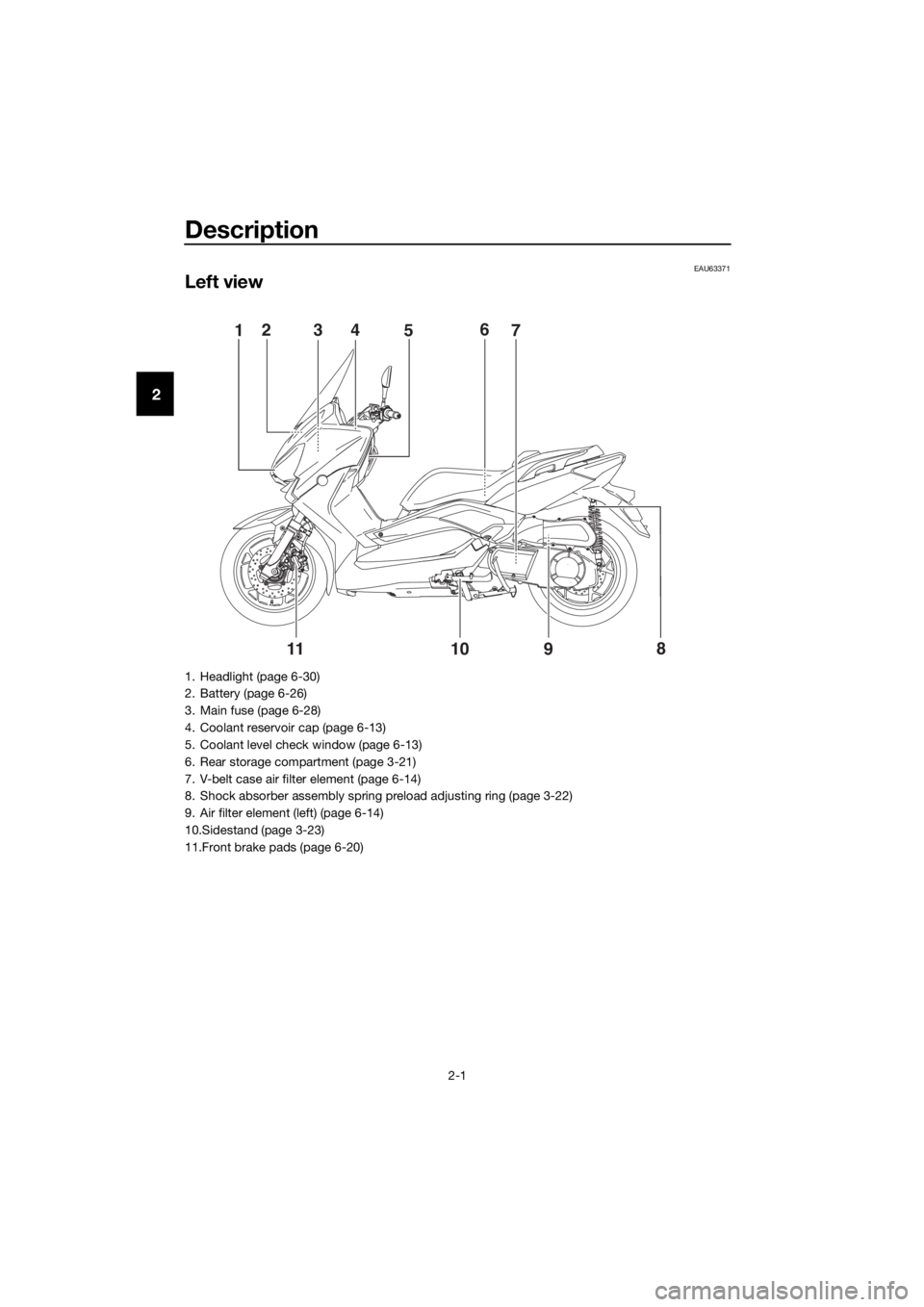
Left view
8
91011
15243
7 6
1. Headlight (page 6-30)
2. Battery (page 6-26)
3. Main fuse (page 6-28)
4. Coolant reservoir cap (page 6-13)
5. Coolant level check window (page 6-13)
6. Rear storage compartment (page 3-21)
7. V-belt case air filter element (page 6-14)
8. Shock absorber assembly spring preload adjusting ring (page 3-22)
9. Air filter element (left) (page 6-14)
10.Sidestand (page 3-23)
11.Front brake pads (page 6-20)
U2DLE2E0.book Page 1 Thursday, July 2, 2015 6:20 PM
Page 17 of 96
Instrument and control functions
3-3
3
WARNING
EWA10062
Never turn the key to “OFF” or
“LOCK” while the vehicle is moving.
Otherwise the electrical systems will
be switched off, which may result in
loss of control or an accident.
EAU10686LOCK
The steering is locked and all electrical
systems are off. The key can be re-
moved.
To lock the steering
1. Turn the handlebars all the way to
the left.
2. With the key in the “OFF” position,
push the key in and turn it to
“LOCK”.
3. Remove the key.
TIP
If the steering will not lock, try turning
the handlebars back to the right slight-
ly.
To unlock the steering
1. Insert the key.
2.
tion, push the key in and turn it to
EAU59680 (Parking)
The hazard lights and turn signal lights
can be turned on, but all other electri-
cal systems are off. The key can be re-
moved.
The steering must be locked before the
key can be turned to “ ”.
NOTICE
ECA20760
Using the hazard or turn signal lights
for an extended length of time may
cause the battery to discharge.
U2DLE2E0.book Page 3 Thursday, July 2, 2015 6:20 PM
Page 24 of 96
Instrument and control functions
3-10
32. Check that the V-belt replacement
indicator comes on for a few sec-
onds and then goes off.
3. If the V-belt replacement indicator
does not come on, have a Yamaha
dealer check the electrical circuit.
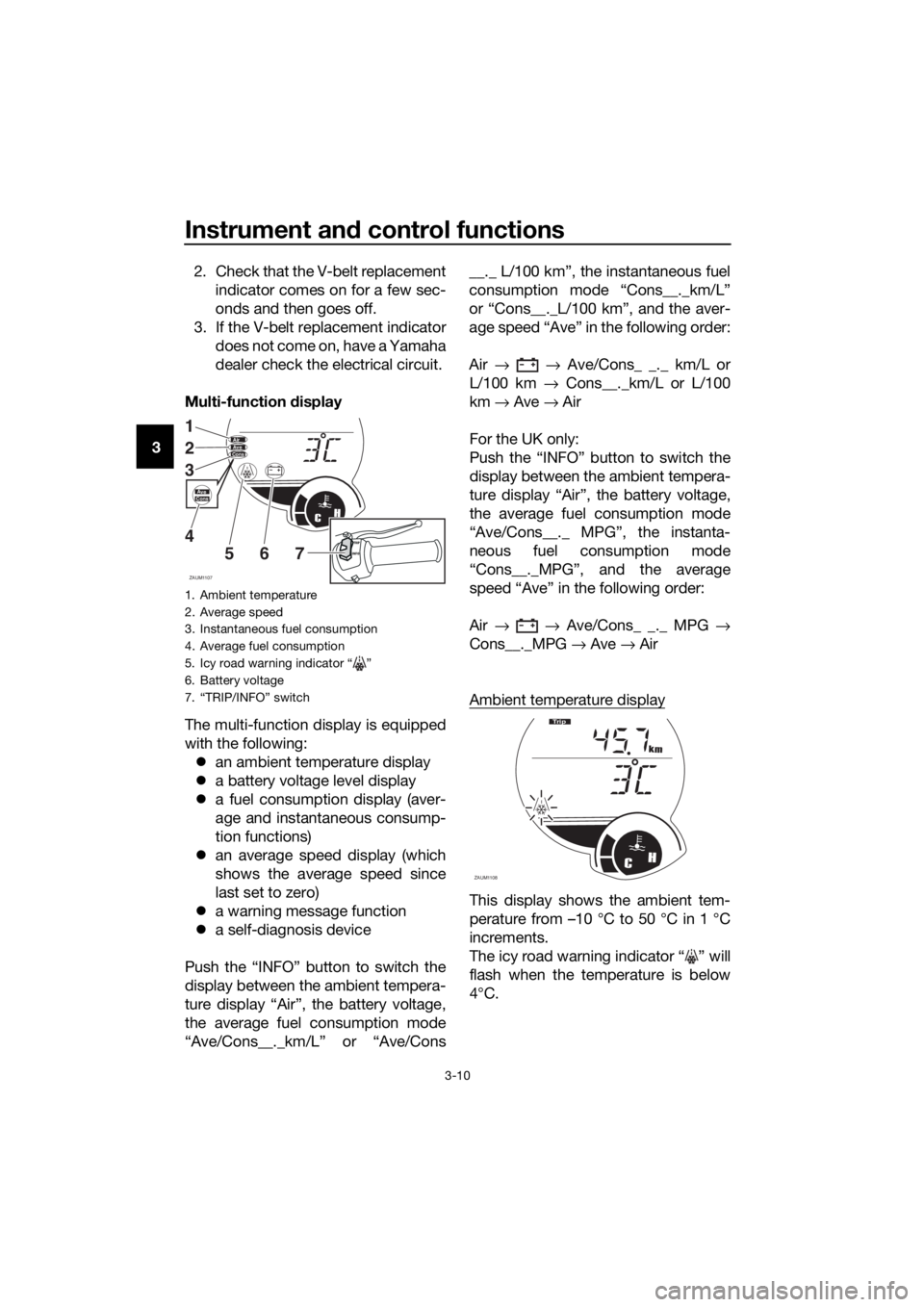
Multi-function display
The multi-function display is equipped
with the following:
an ambient temperature display
a battery voltage level display
a fuel consumption display (aver-
age and instantaneous consump-
tion functions)
an average speed display (which
shows the average speed since
last set to zero)
a warning message function
a self-diagnosis device
Push the “INFO” button to switch the
display between the ambient tempera-
ture display “Air”, the battery voltage,
the average fuel consumption mode
“Ave/Cons__._km/L” or “Ave/Cons__._ L/100 km”, the instantaneous fuel
consumption mode “Cons__._km/L”
or “Cons__._L/100 km”, and the aver-
age speed “Ave” in the following order:
Air → → Ave/Cons_ _._ km/L or
L/100 km → Cons__._km/L or L/100
km → Ave → Air
For the UK only:
Push the “INFO” button to switch the
display between the ambient tempera-
ture display “Air”, the battery voltage,
the average fuel consumption mode
“Ave/Cons__._ MPG”, the instanta-
neous fuel consumption mode
“Cons__._MPG”, and the average
speed “Ave” in the following order:
Air → → Ave/Cons_ _._ MPG →
Cons__._MPG → Ave → Air
Ambient temperature display
This display shows the ambient tem-
perature from –10 °C to 50 °C in 1 °C
increments.
The icy road warning indicator “ ” will
flash when the temperature is below
4°C.
1. Ambient temperature
2. Average speed
3. Instantaneous fuel consumption
4. Average fuel consumption
5. Icy road warning indicator “ ”
6. Battery voltage
7. “TRIP/INFO” switch
ZAUM1107
CH
AirAveCons
1
2
3
4
5
67INFOTRIP
AveCons
ZAUM1108CH
km
Tr i p
U2DLE2E0.book Page 10 Thursday, July 2, 2015 6:20 PM
Page 25 of 96
Instrument and control functions
3-11
3 The temperature displayed may vary
from the ambient temperature. Push-
ing the “INFO” button switches the
ambient temperature display to the
battery voltage, the average fuel con-
sumption, the instantaneous fuel con-
sumption and average speed modes.
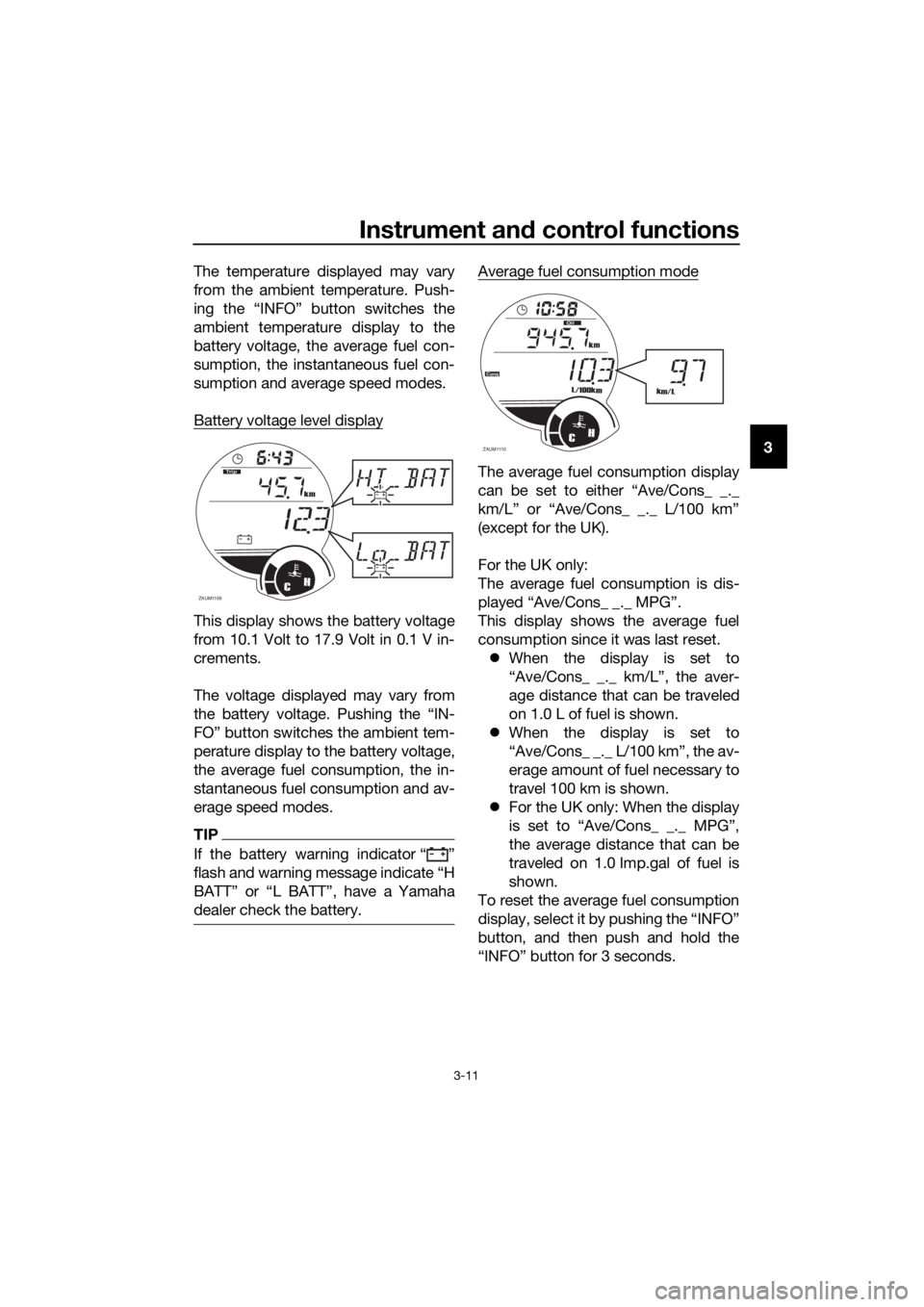
Battery voltage level display
This display shows the battery voltage
from 10.1 Volt to 17.9 Volt in 0.1 V in-
crements.
The voltage displayed may vary from
the battery voltage. Pushing the “IN-
FO” button switches the ambient tem-
perature display to the battery voltage,
the average fuel consumption, the in-
stantaneous fuel consumption and av-
erage speed modes.
TIP
If the battery warning indicator Ž
dealer check the battery.
Average fuel consumption mode
The average fuel consumption display
(except for the UK).
For the UK only:
The average fuel consumption is dis-
This display shows the average fuel
consumption since it was last reset.
When the display is set to
“Ave/Cons_ _._ km/L”, the aver-
age distance that can be traveled
on 1.0 L of fuel is shown.
When the display is set to
“Ave/Cons_ _._ L/100 km”, the av-
erage amount of fuel necessary to
travel 100 km is shown.
For the UK only: When the display
is set to “Ave/Cons_ _._ MPG”,
the average distance that can be
traveled on 1.0 Imp.gal of fuel is
shown.
To reset the average fuel consumption
display, select it by pushing the “INFO”
button, and then push and hold the
“INFO” button for 3 seconds.
ZAUM1109CH
km
T
rip
ZAUM1110CH
km
L/100km
Cons
Oil
km/L
U2DLE2E0.book Page 11 Thursday, July 2, 2015 6:20 PM
Page 43 of 96
Operation and important riding points
5-2
5
EAUM3350
Starting the engine
NOTICE
ECA10251
See page 5-5 for engine break-in in-
structions prior to operating the ve-
hicle for the first time.
In order for the ignition circuit cut-off
system to enable starting, the side-
stand must be up.
See page 3-24 for more information.
1. Turn the key to “ON”.
The following warning light, indi-
cator light and indicators should
come on for a few seconds, then
go off.
Engine trouble warning light
Immobilizer system indicator
light
V-belt replacement indicator
Oil change indicator
Fuel level warning light
NOTICE
ECA11834
If a warning or indicator light does
not come on initially when the key is
turned to “ON”, or if a warning or in-
dicator light remains on, see page
3-4 for the corresponding warning
and indicator light circuit check.
For ABS models:
The ABS warning light should
come on when the main switch is
turned to “ON” and then go off af-
ter traveling at a speed of 10 km/h
(6 mi/h) or higher.
NOTICE
ECA17682
If the ABS warning light does not
come on and then go off as ex-
plained above, see page 3-4 for the
warning light circuit check.
2. Close the throttle completely.
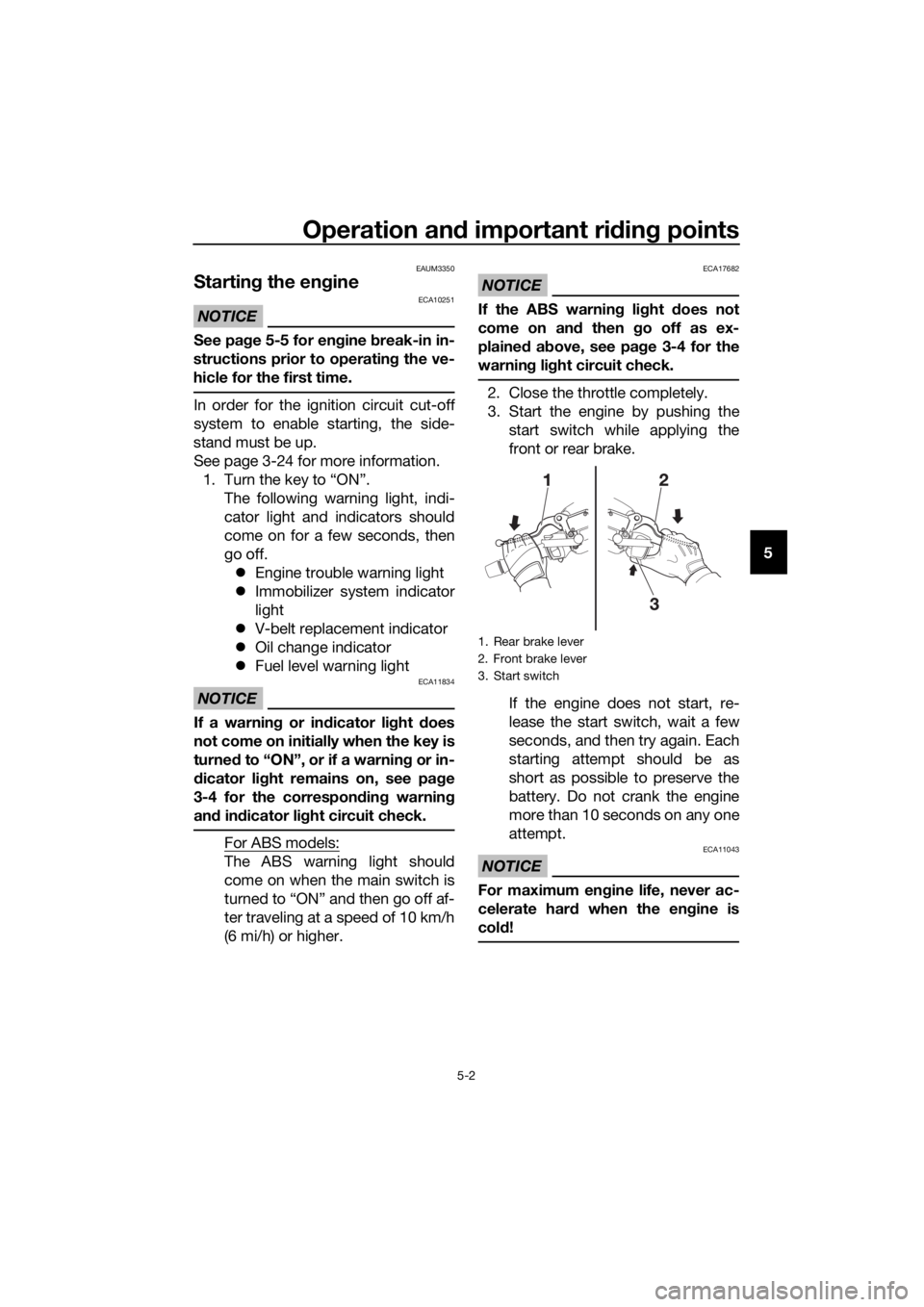
3. Start the engine by pushing the
start switch while applying the
front or rear brake.
If the engine does not start, re-
lease the start switch, wait a few
seconds, and then try again. Each
starting attempt should be as
short as possible to preserve the
battery. Do not crank the engine
more than 10 seconds on any one
attempt.
NOTICE
ECA11043
For maximum engine life, never ac-
celerate hard when the engine is
cold!
1. Rear brake lever
2. Front brake lever
3. Start switch
U2DLE2E0.book Page 2 Thursday, July 2, 2015 6:20 PM
Page 55 of 96
Periodic maintenance and adjustment
6-8
6 Panel C
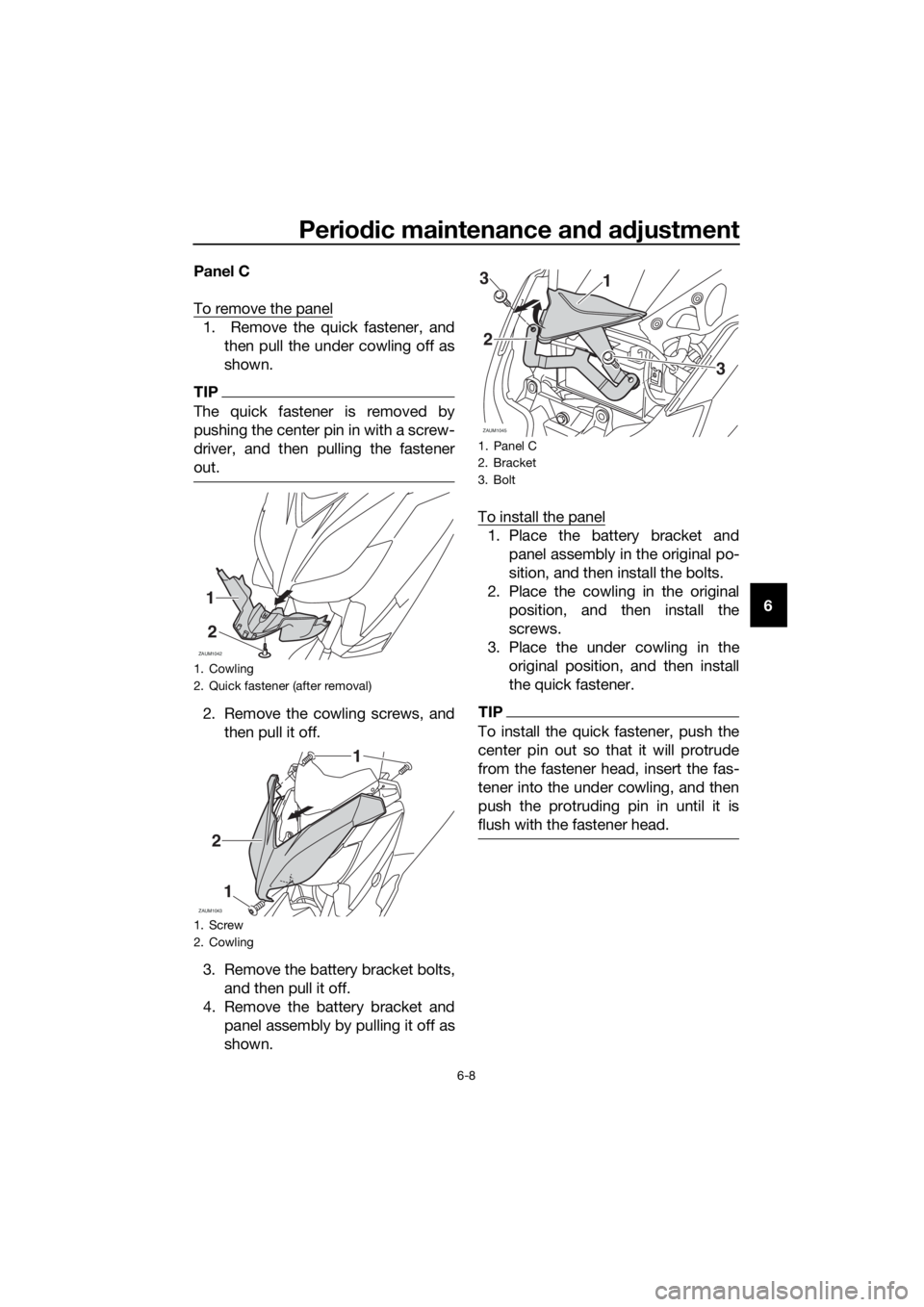
To remove the panel
1. Remove the quick fastener, and
then pull the under cowling off as
shown.
TIP
The quick fastener is removed by
pushing the center pin in with a screw-
driver, and then pulling the fastener
out.
2. Remove the cowling screws, and
then pull it off.
3. Remove the battery bracket bolts,
and then pull it off.
4. Remove the battery bracket and
panel assembly by pulling it off as
shown.To install the panel
1. Place the battery bracket and
panel assembly in the original po-
sition, and then install the bolts.
2. Place the cowling in the original
position, and then install the
screws.
3. Place the under cowling in the
original position, and then install
the quick fastener.
TIP
To install the quick fastener, push the
center pin out so that it will protrude
from the fastener head, insert the fas-
tener into the under cowling, and then
push the protruding pin in until it is
flush with the fastener head.
1. Cowling
2. Quick fastener (after removal)
1. Screw
2. Cowling
ZAUM1042
1
2
ZAUM1043
2
1
1
1. Panel C
2. Bracket
3. Bolt
ZAUM1045
13
2
3
U2DLE2E0.book Page 8 Thursday, July 2, 2015 6:20 PM
Page 73 of 96
Periodic maintenance and adjustment
6-26
6
EAU23292
Checking the wheel bearings
The front and rear wheel bearings must
be checked at the intervals specified in
the periodic maintenance and lubrica-
tion chart. If there is play in the wheel
hub or if the wheel does not turn
smoothly, have a Yamaha dealer
check the wheel bearings.
EAU46345
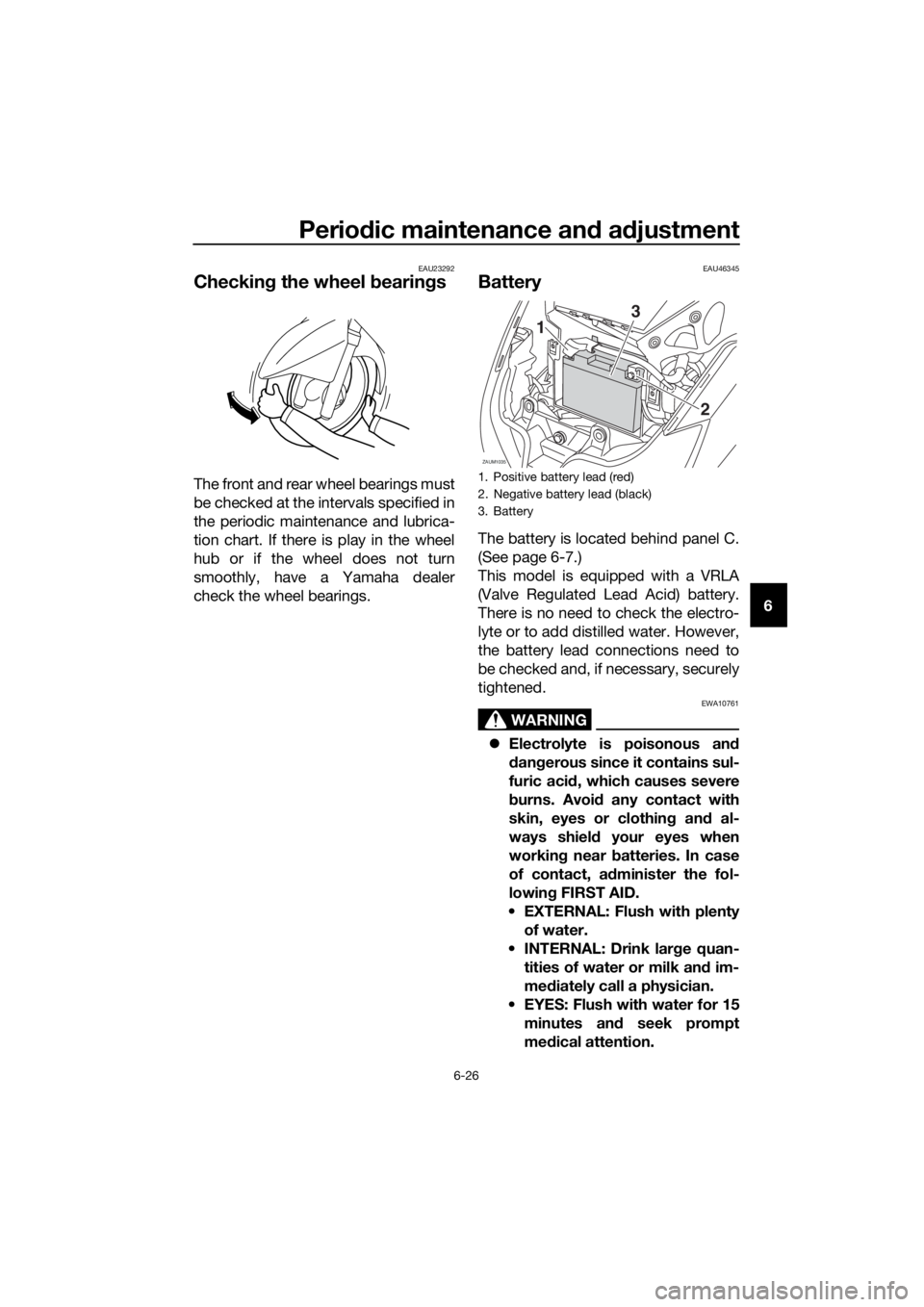
Battery
The battery is located behind panel C.
(See page 6-7.)
This model is equipped with a VRLA
(Valve Regulated Lead Acid) battery.
There is no need to check the electro-
lyte or to add distilled water. However,
the battery lead connections need to
be checked and, if necessary, securely
tightened.
WARNING
EWA10761
Electrolyte is poisonous and
dangerous since it contains sul-
furic acid, which causes severe
burns. Avoid any contact with
skin, eyes or clothing and al-
ways shield your eyes when
working near batteries. In case
of contact, administer the fol-
lowing FIRST AID.
EXTERNAL: Flush with plenty
of water.
INTERNAL: Drink large quan-
tities of water or milk and im-
mediately call a physician.
EYES: Flush with water for 15
minutes and seek prompt
medical attention.
1. Positive battery lead (red)
2. Negative battery lead (black)
3. Battery
ZAUM1035
2
1
3
U2DLE2E0.book Page 26 Thursday, July 2, 2015 6:20 PM
Page 74 of 96
Periodic maintenance and adjustment
6-27
6Batteries produce explosive hy-
drogen gas. Therefore, keep
sparks, flames, cigarettes, etc.,
away from the battery and pro-
vide sufficient ventilation when
charging it in an enclosed
space.
KEEP THIS AND ALL BATTER-
IES OUT OF THE REACH OF
CHILDREN.
To charge the battery
Have a Yamaha dealer charge the bat-
tery as soon as possible if it seems to
have discharged. Keep in mind that the
battery tends to discharge more quick-
ly if the vehicle is equipped with op-
tional electrical accessories.
NOTICE
ECA16522
To charge a VRLA (Valve Regulated
Lead Acid) battery, a special (con-
stant-voltage) battery charger is re-
quired. Using a conventional battery
charger will damage the battery.
To store the battery
1. If the vehicle will not be used for
more than one month, remove the
battery, fully charge it, and then
place it in a cool, dry place.
NOTICE: When removing the
battery, be sure the key is
turned to “OFF”, then discon-
nect the negative lead before
disconnecting the positive lead.
[ECA16303]
2. If the battery will be stored for
more than two months, check it at
least once a month and fully
charge it if necessary.3. Fully charge the battery before in-
stallation. NOTICE: When install-
ing the battery, be sure the key
is turned to “OFF”, then connect
the positive lead before con-
necting the negative lead.
[ECA16841]
NOTICE
ECA16531
Always keep the battery charged.
Storing a discharged battery can
cause permanent battery damage.
U2DLE2E0.book Page 27 Thursday, July 2, 2015 6:20 PM
Page 81 of 96
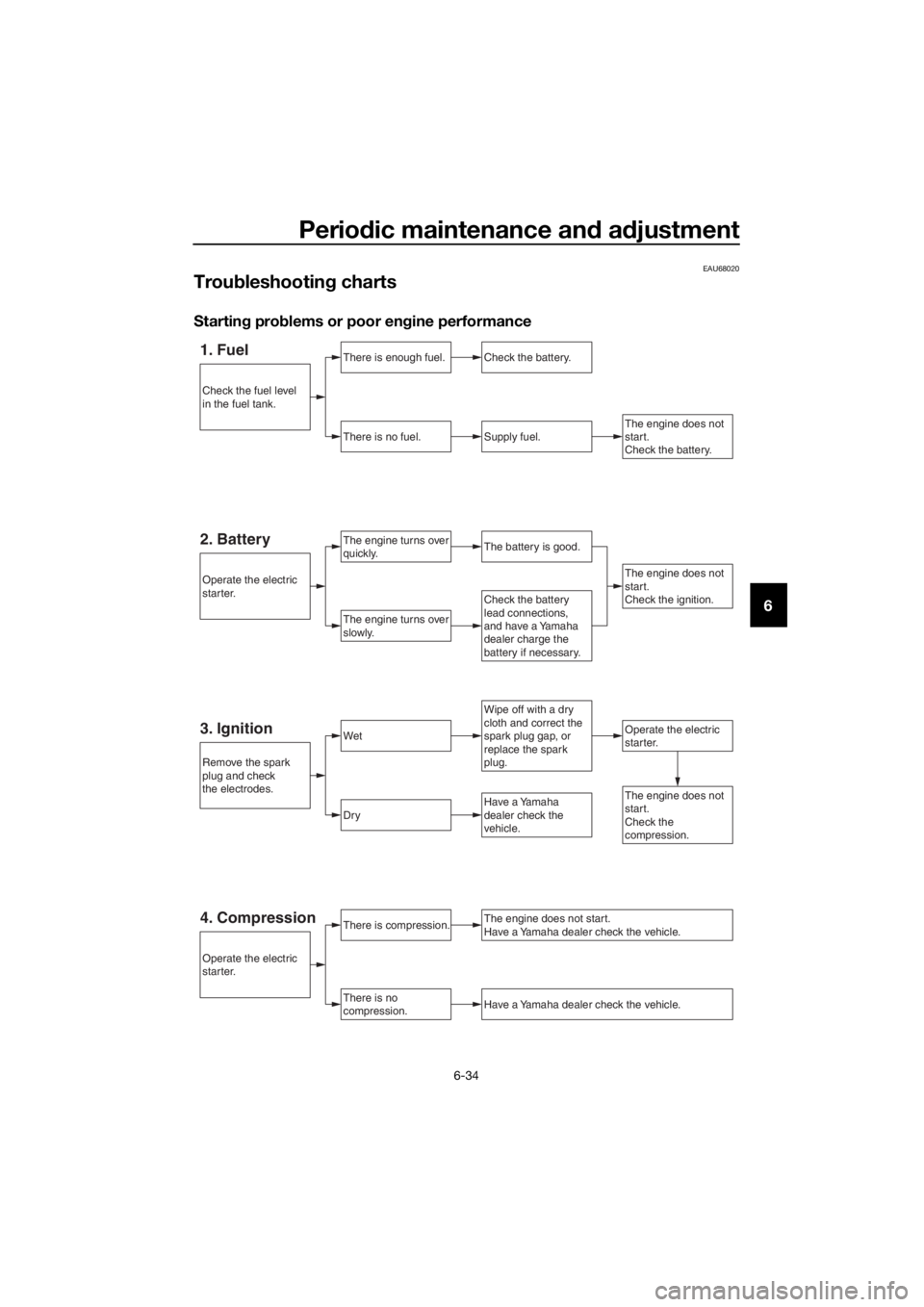
Periodic maintenance and adjustment
6-34
6
EAU68020
Troubleshooting charts
Starting problems or poor engine performance
1. FuelThere is enough fuel.
There is no fuel.
Check the battery.
Supply fuel.
The engine turns over
quickly.
The engine turns over
slowly.
Operate the electric
starter.
The engine does not
start.
Check the battery.
Wipe off with a dry
cloth and correct the
spark plug gap, or
replace the spark
plug.
Check the battery
lead connections,
and have a Yamaha
dealer charge the
battery if necessary.
2. BatteryThe battery is good.
The engine does not
start.
Check the ignition.
3. IgnitionWet
Dry
There is compression.
There is no
compression.
The engine does not start.
Have a Yamaha dealer check the vehicle.
Have a Yamaha dealer check the vehicle.
The engine does not
start.
Check the
compression.Have a Yamaha
dealer check the
vehicle.
Remove the spark
plug and check
the electrodes.
Operate the electric
starter.
Operate the electric
starter.
Check the fuel level
in the fuel tank.
4. Compression
U2DLE2E0.book Page 34 Thursday, July 2, 2015 6:20 PM