maintenance YAMAHA XMAX 300 2018 Service Manual
[x] Cancel search | Manufacturer: YAMAHA, Model Year: 2018, Model line: XMAX 300, Model: YAMAHA XMAX 300 2018Pages: 116, PDF Size: 7.14 MB
Page 100 of 116
Periodic maintenance and adjustment
7-37
7Engine overheating
WARNING
EWAT1041
Do not remove the radiator cap when the engine and radiator are hot.
Scalding hot fluid and steam may be blown out under pressure, which
could cause serious injury. Be sure to wait until the engine has cooled.
Place a thick rag, like a towel, over the radiator cap, and then slowly ro-
tate the cap counterclockwise to the detent to allow any residual pres-
sure to escape. When the hissing sound has stopped, press down on the
cap while turning it counterclockwise, and then remove the cap.
TIP
If coolant is not available, tap water can be temporarily used instead, provided
that it is changed to the recommended coolant as soon as possible.
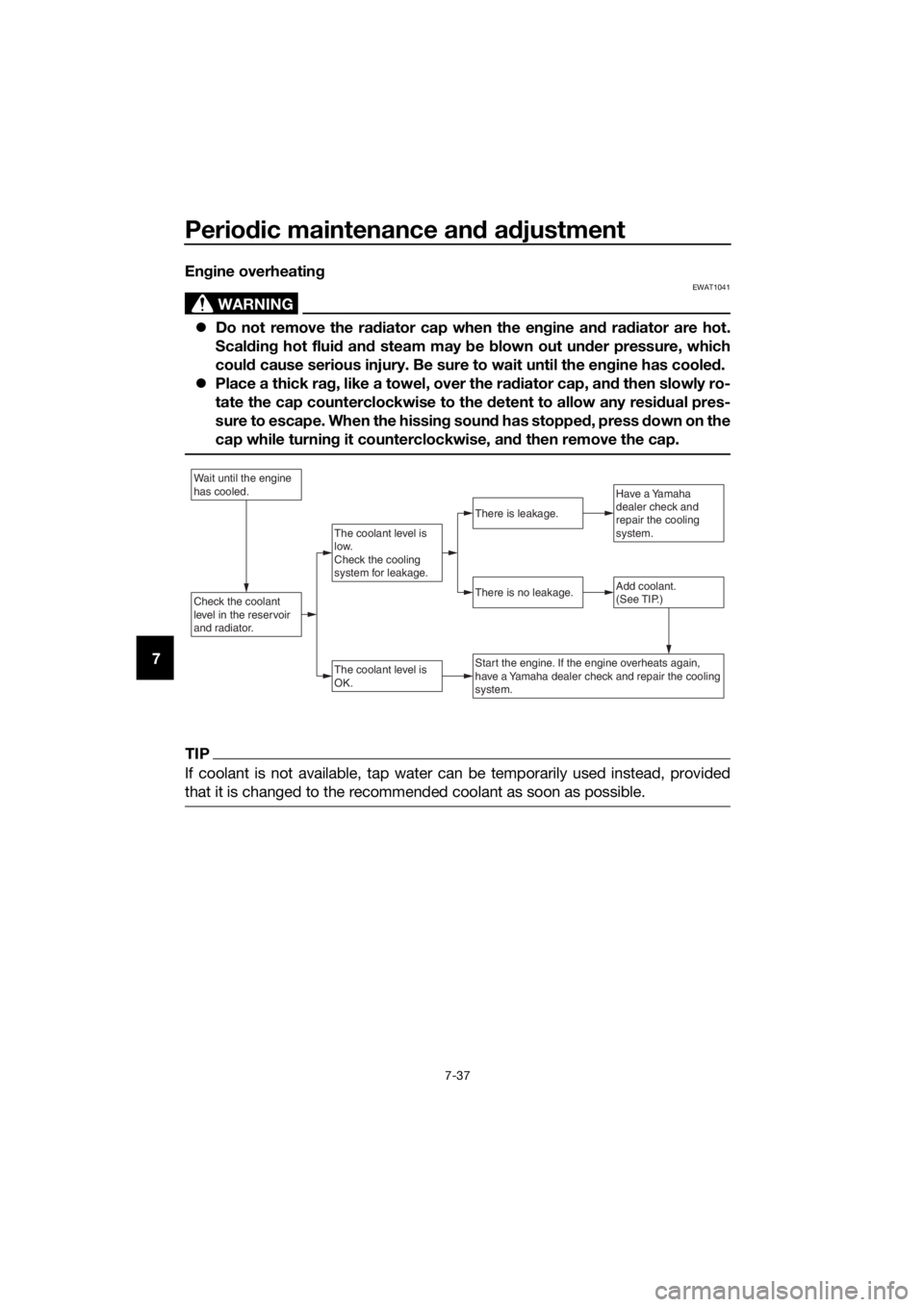
Wait until the engine
has cooled.
Check the coolant
level in the reservoir
and radiator.Add coolant.
(See TIP.)
The coolant level is
OK.
There is no leakage.
There is leakage.
The coolant level is
low.
Check the cooling
system for leakage.
Have a Yamaha
dealer check and
repair the cooling
system.
Start the engine. If the engine overheats again,
have a Yamaha dealer check and repair the cooling
system.
UBY3E0E0.book Page 37 Friday, September 15, 2017 3:59 PM
Page 101 of 116
Periodic maintenance and adjustment
7-38
7
EAU76561
Emergency mode
When the smart key is lost or dam-
aged, or its battery has discharged, the
vehicle can still be turned on and the
engine started. You will need the smart
key system identification number.
To operate the vehicle in emergency
mode
1. Stop the vehicle in a safe place
and turn the main switch to “OFF”.
2. Push the main switch knob for 5
seconds until the smart key sys-
tem indicator light flashes once,
then release it. Repeat two more
times. The smart key system indi-
cator light will come on for three
seconds to indicate the transition
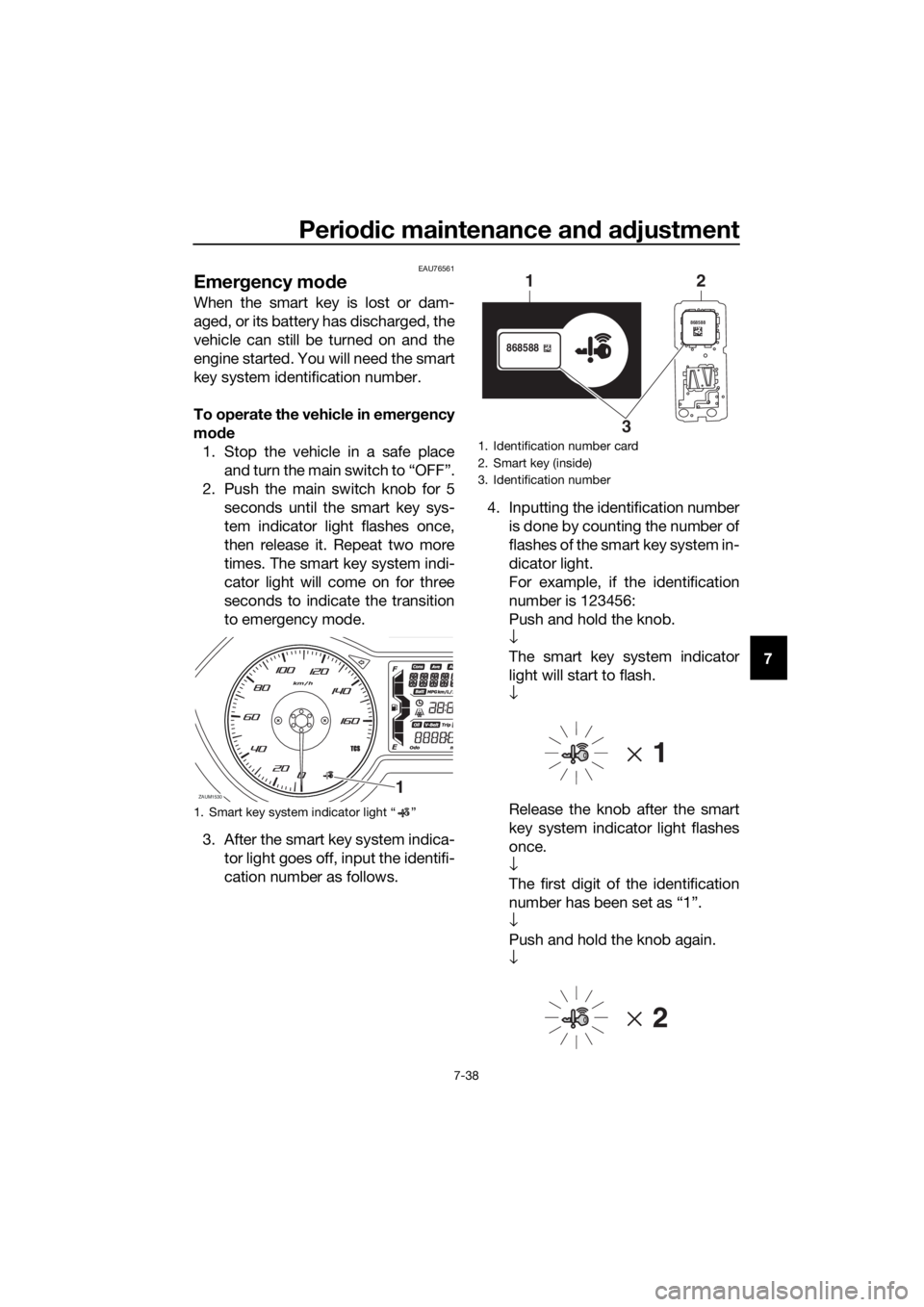
to emergency mode.
3. After the smart key system indica-
tor light goes off, input the identifi-
cation number as follows.4. Inputting the identification number
is done by counting the number of
flashes of the smart key system in-
dicator light.
For example, if the identification
number is 123456:
Push and hold the knob.
↓
The smart key system indicator
light will start to flash.
↓
Release the knob after the smart
key system indicator light flashes
once.
↓
The first digit of the identification
number has been set as “1”.
↓
Push and hold the knob again.
↓
1. Smart key system indicator light “ ”
ZAUM15301
1. Identification number card
2. Smart key (inside)
3. Identification number
868588
868588
1
32
UBY3E0E0.book Page 38 Friday, September 15, 2017 3:59 PM
Page 102 of 116

Periodic maintenance and adjustment
7-39
7Release the knob after the smart
key system indicator light flashes
twice.
↓
The second digit has been set as
“2”.
↓
Repeat the above procedure until
all digits of the identification num-
ber have been set. The smart key
system indicator light will flash for
10 seconds if the correct identifi-
cation number was entered.
TIP
When one of the following situations
applies, emergency mode will be ter-
minated and the smart key system in-
dicator light will flash quickly for 3
seconds. In this case, start over again
from step 2.
When there are no knob opera-
tions for 10 seconds during the
identification number input pro-
cess.
When the smart key system indi-
cator light is allowed to flash nine
or more times.
The identification number is not
entered correctly.
5. While the smart key system indi-
cator light is on, push the knob
once more to complete emergen-
cy mode access. The smart key
indicator light will go off and then
come back on for approximately 4
seconds.
6. While the smart key system indi-
cator light is on, turn the main
switch to “ON”. The vehicle can
now be operated normally.
UBY3E0E0.book Page 39 Friday, September 15, 2017 3:59 PM
Page 112 of 116
Consumer information
10-2
10
EAUM3881
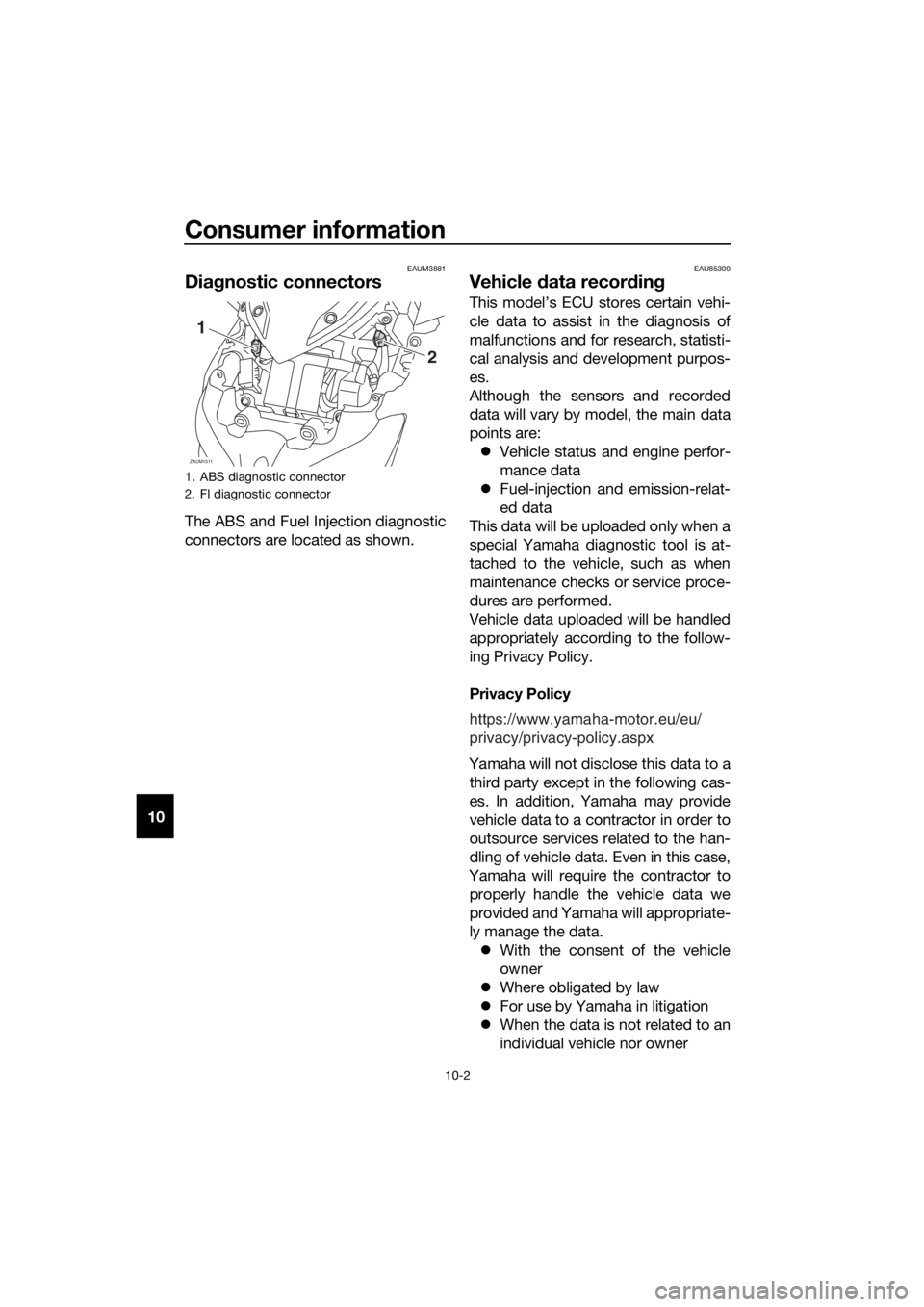
Diagnostic connectors
The ABS and Fuel Injection diagnostic
connectors are located as shown.
EAU85300
Vehicle data recording
This model’s ECU stores certain vehi-
cle data to assist in the diagnosis of
malfunctions and for research, statisti-
cal analysis and development purpos-
es.
Although the sensors and recorded
data will vary by model, the main data
points are: Vehicle status and engine perfor-
mance data
Fuel-injection and emission-relat-
ed data
This data will be uploaded only when a
special Yamaha diagnostic tool is at-
tached to the vehicle, such as when
maintenance checks or service proce-
dures are performed.
Vehicle data uploaded will be handled
appropriately according to the follow-
ing Privacy Policy.
Privacy Policy
Yamaha will not disclose this data to a third party except in the following cas-
es. In addition, Yamaha may provide
vehicle data to a contractor in order to
outsource services related to the han-
dling of vehicle data. Even in this case,
Yamaha will require the contractor to properly handle the vehicle data we
provided and Yamaha will appropriate-
ly manage the data. With the consent of the vehicle
owner
Where obligated by law
For use by Yamaha in litigation
When the data is not related to an
individual vehicle nor owner
1. ABS diagnostic connector
2. FI diagnostic connector
ZAUM1511
2
1
https://www.yamaha-motor.eu/eu/
privacy/privacy-policy.aspx
UBY3E1E0.book Page 2 Monday, June 4, 2018 1:33 PM
Page 113 of 116

11-1
11
Index
A
ABS ...................................................... 4-14
ABS warning light ................................... 4-1
Acceleration and deceleration................ 6-3
Air filter and V-belt case air filter
elements ............................................ 7-14
Auxiliary DC jack .................................. 4-29
Auxiliary lights ...................................... 7-32
B
Battery .................................................. 7-29
Brake fluid, changing ........................... 7-24
Brake fluid level, checking ................... 7-23
Brake lever, front .................................. 4-13
Brake lever, rear ................................... 4-14
Brake levers, lubricating ....................... 7-26
Brake/tail light ...................................... 7-33
Braking ................................................... 6-4
C
Cables, checking and lubricating ......... 7-25
Canister .................................................. 7-9
Care ........................................................ 8-1
Catalytic converters ............................. 4-20
Centerstand and sidestand, checking
and lubricating ................................... 7-27
Coolant ................................................. 7-13
D
Data recording, vehicle ........................ 10-2
Diagnostic connectors ......................... 10-2
Dimmer/Pass switch ............................ 4-12
E
Emergency mode ................................. 7-38
Engine break-in ...................................... 6-5
Engine oil and oil filter element .............. 7-9
Engine serial number............................ 10-1
Engine trouble warning light................... 4-1
F
Final transmission oil ............................ 7-12
Front and rear brake lever free play,
checking............................................. 7-22
Front and rear brake pads, checking ... 7-23
Front fork, checking ............................. 7-27
Front turn signal light ........................... 7-33
Fuel....................................................... 4-18
Fuel consumption, tips for reducing ...... 6-5
Fuel tank cap........................................ 4-17
Fuel tank overflow hose ....................... 4-19
Fuses, replacing ................................... 7-30
H
Handlebar position, adjusting .............. 4-25
Handlebar switches.............................. 4-12Hazard switch ....................................... 4-12
Headlights ............................................. 7-32
High beam indicator light........................ 4-1
Horn switch........................................... 4-12
I
Identification numbers .......................... 10-1
Ignition circuit cut-off system ............... 4-27
Indicator lights and warning lights .......... 4-1
K
Key, handling of smart and mechanical
keys ...................................................... 3-3
L
License plate light bulb, replacing ........ 7-34
M
Main switch............................................. 3-8
Maintenance and lubrication, periodic ... 7-4
Maintenance, emission control
system .................................................. 7-3
Matte color, caution ................................ 8-1
Model label ........................................... 10-1
Multi-function display ............................. 4-3
O
Operating range of the smart key
system .................................................. 3-2
P
Panel, removing and installing ................ 7-7
Parking .................................................... 6-6
Part locations .......................................... 2-1
S
Safe-riding points ................................... 1-5
Safety information................................... 1-1
Shock absorber assemblies,
adjusting ............................................. 4-25
Sidestand .............................................. 4-26
Smart key ................................................ 3-5
Smart key battery, replacing................... 3-6
Smart key system ................................... 3-1
Smart key system indicator light ............ 4-2
Smart key system, troubleshooting ...... 7-35
Spark plug, checking .............................. 7-8
Specifications ......................................... 9-1
Speedometer .......................................... 4-2
Starting off .............................................. 6-3
Starting the engine.................................. 6-2
Steering, checking ................................ 7-28
Stop/Run/Start switch .......................... 4-12
Storage ................................................... 8-4
Storage compartments ......................... 4-20
T
Tachometer............................................. 4-3
UBY3E0E0.book Page 1 Friday, September 15, 2017 3:59 PM