warning YAMAHA XMAX 400 2018 User Guide
[x] Cancel search | Manufacturer: YAMAHA, Model Year: 2018, Model line: XMAX 400, Model: YAMAHA XMAX 400 2018Pages: 118, PDF Size: 9.03 MB
Page 29 of 118
Instrument and control functions
4-3
4
EAU63551
Tachometer
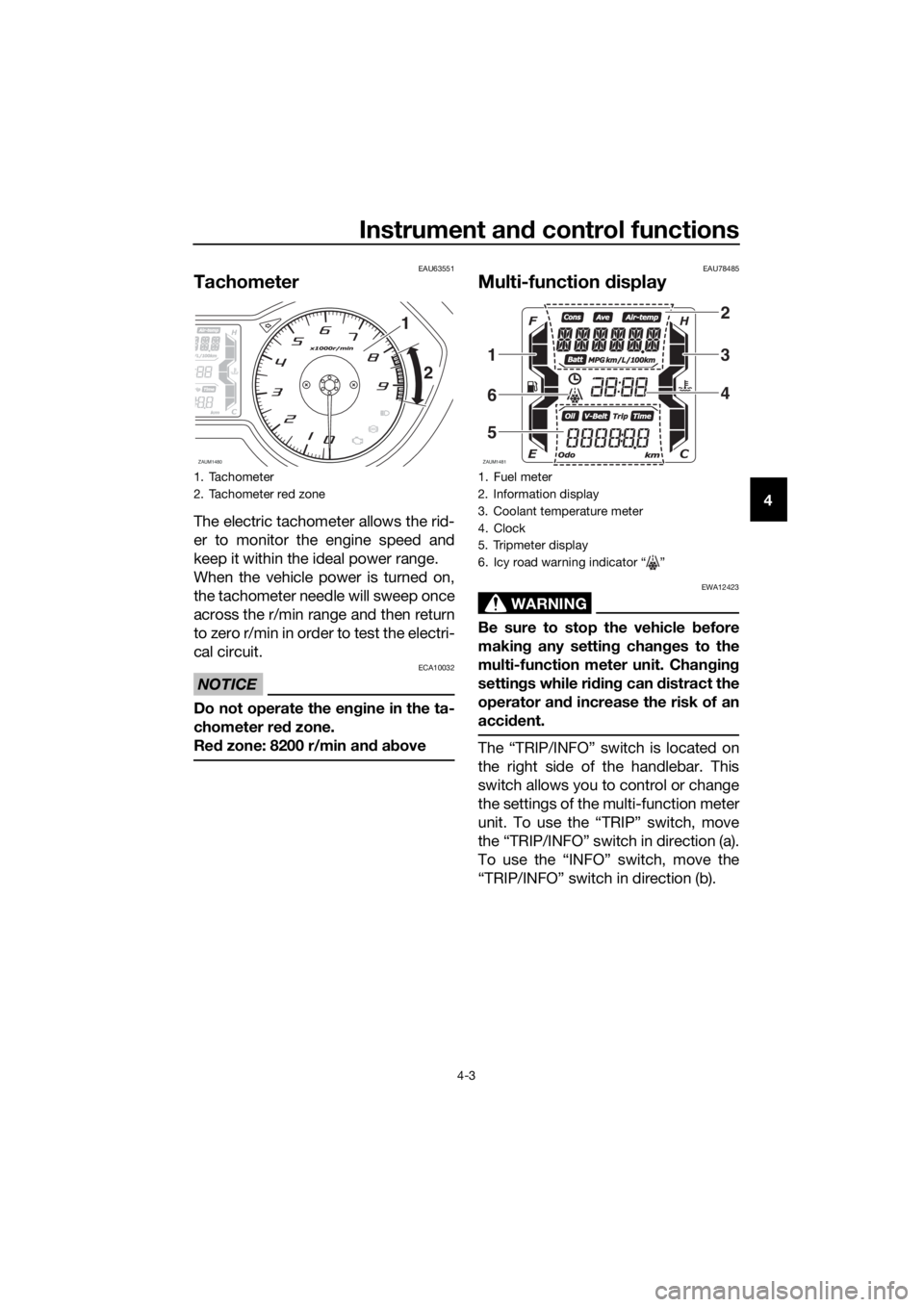
The electric tachometer allows the rid-
er to monitor the engine speed and
keep it within the ideal power range.
When the vehicle power is turned on,
the tachometer needle will sweep once
across the r/min range and then return
to zero r/min in order to test the electri-
cal circuit.
NOTICE
ECA10032
Do not operate the engine in the ta-
chometer red zone.
Red zone: 8200 r/min and above
EAU78485
Multi-function display
WARNING
EWA12423
Be sure to stop the vehicle before
making any setting changes to the
multi-function meter unit. Changing
settings while riding can distract the
operator and increase the risk of an
accident.
The “TRIP/INFO” switch is located on
the right side of the handlebar. This
switch allows you to control or change
the settings of the multi-function meter
unit. To use the “TRIP” switch, move
the “TRIP/INFO” switch in direction (a).
To use the “INFO” switch, move the
“TRIP/INFO” switch in direction (b).
1. Tachometer
2. Tachometer red zone
ZAUM1480
1
2
1. Fuel meter
2. Information display
3. Coolant temperature meter
4. Clock
5. Tripmeter display
6. Icy road warning indicator Ž
ZAUM1481
2
3
4
1
6
5
UBL1E0E0.book Page 3 Thursday, May 11, 2017 8:51 AM
Page 34 of 118
Instrument and control functions
4-8
4Information display
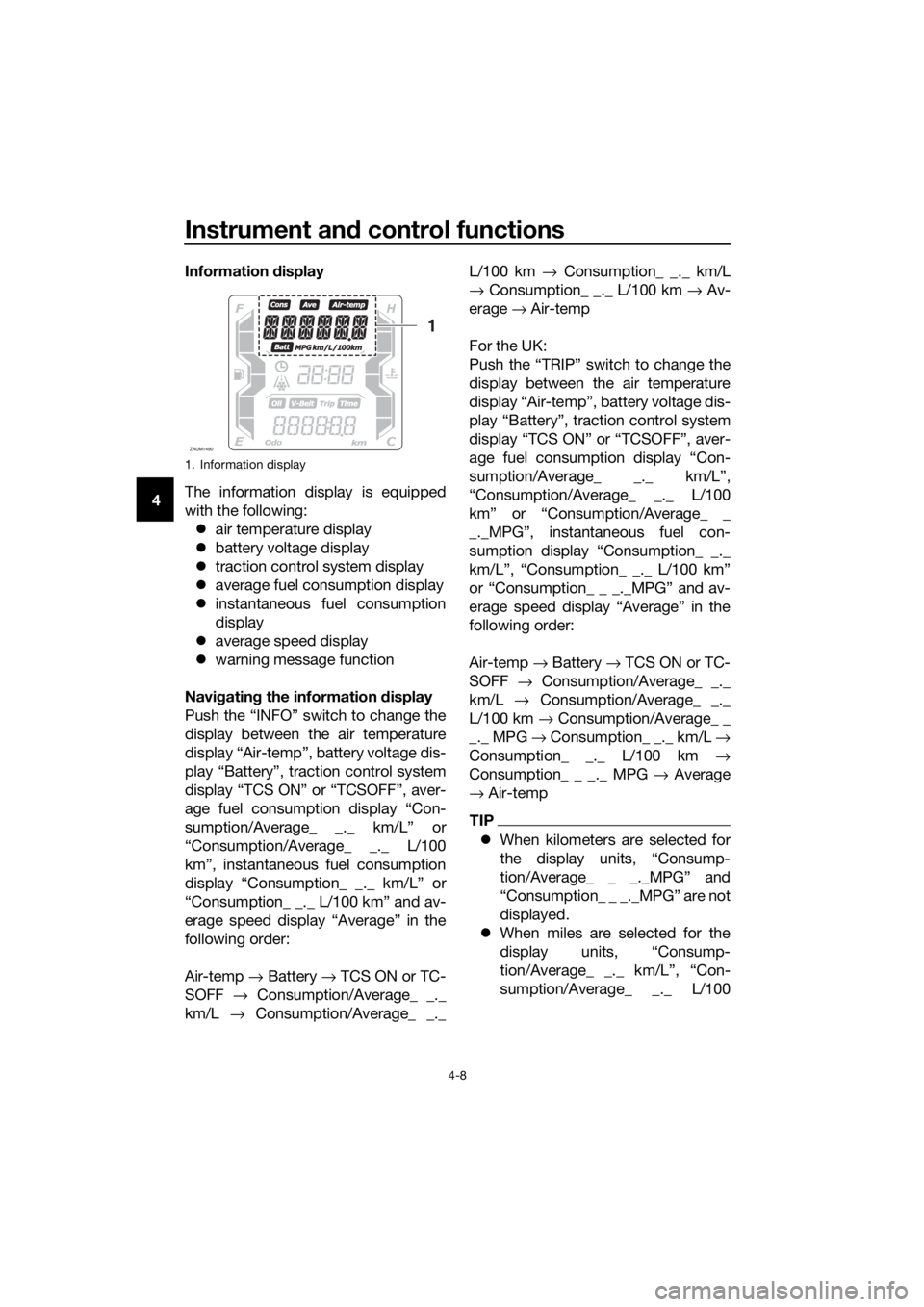
The information display is equipped
with the following:
air temperature display
battery voltage display
traction control system display
average fuel consumption display
instantaneous fuel consumption
display
average speed display
warning message function
Navigating the information display
Push the “INFO” switch to change the
display between the air temperature
display “Air-temp”, battery voltage dis-
play “Battery”, traction control system
display “TCS ON” or “TCSOFF”, aver-
age fuel consumption display “Con-
sumption/Average_ _._ km/L” or
“Consumption/Average_ _._ L/100
km”, instantaneous fuel consumption
display “Consumption_ _._ km/L” or
“Consumption_ _._ L/100 km” and av-
erage speed display “Average” in the
following order:
Air-temp → Battery → TCS ON or TC-
SOFF → Consumption/Average_ _._
km/L → Consumption/Average_ _._L/100 km → Consumption_ _._ km/L
→ Consumption_ _._ L/100 km → Av-
erage → Air-temp
For the UK:
Push the “TRIP” switch to change the
display between the air temperature
display “Air-temp”, battery voltage dis-
play “Battery”, traction control system
display “TCS ON” or “TCSOFF”, aver-
age fuel consumption display “Con-
sumption/Average_ _._ km/L”,
“Consumption/Average_ _._ L/100
km” or “Consumption/Average_ _
_._MPG”, instantaneous fuel con-
sumption display “Consumption_ _._
km/L”, “Consumption_ _._ L/100 km”
or “Consumption_ _ _._MPG” and av-
erage speed display “Average” in the
following order:
Air-temp → Battery → TCS ON or TC-
SOFF → Consumption/Average_ _._
km/L → Consumption/Average_ _._
L/100 km → Consumption/Average_ _
_._ MPG → Consumption_ _._ km/L →
Consumption_ _._ L/100 km →
Consumption_ _ _._ MPG → Average
→ Air-temp
TIP
When kilometers are selected for
the display units, “Consump-
tion/Average_ _ _._MPG” and
“Consumption_ _ _._MPG” are not
displayed.
When miles are selected for the
display units, “Consump-
tion/Average_ _._ km/L”, “Con-
sumption/Average_ _._ L/100
1. Information display
ZAUM1490
1
UBL1E0E0.book Page 8 Thursday, May 11, 2017 8:51 AM
Page 35 of 118
Instrument and control functions
4-9
4 km”, “Consumption_ _._ km/L”,
and “Consumption_ _._ L/100 km”
are not displayed.
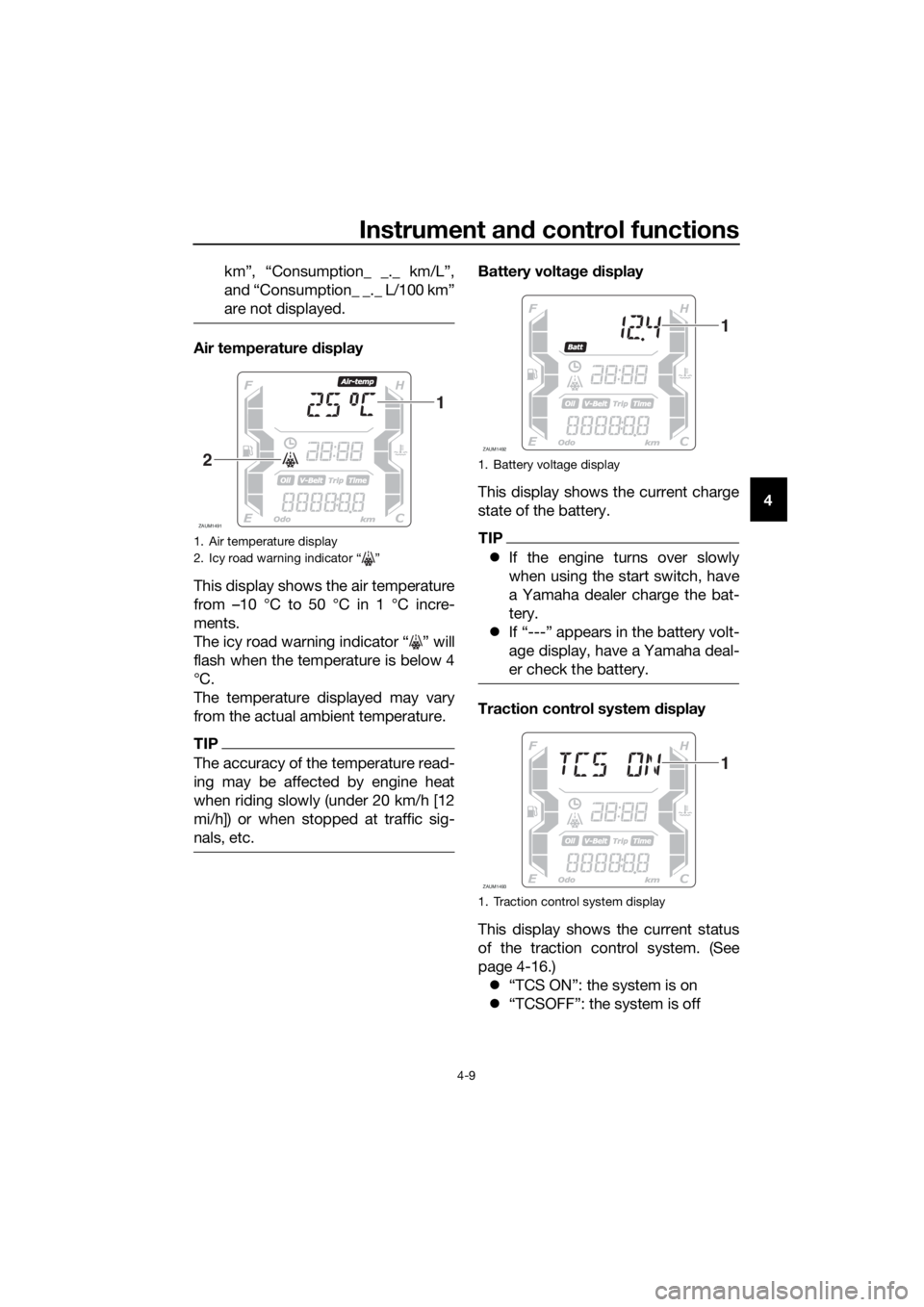
Air temperature display
This display shows the air temperature
from –10 °C to 50 °C in 1 °C incre-
ments.
The icy road warning indicator “ ” will
flash when the temperature is below 4
°C.
The temperature displayed may vary
from the actual ambient temperature.
TIP
The accuracy of the temperature read-
ing may be affected by engine heat
when riding slowly (under 20 km/h [12
mi/h]) or when stopped at traffic sig-
nals, etc.
Battery voltage display
This display shows the current charge
state of the battery.
TIP
If the engine turns over slowly
when using the start switch, have
a Yamaha dealer charge the bat-
tery.
If “---” appears in the battery volt-
age display, have a Yamaha deal-
er check the battery.
Traction control system display
This display shows the current status
of the traction control system. (See
page 4-16.)
“TCS ON”: the system is on
“TCSOFF”: the system is off
1. Air temperature display
2. Icy road warning indicator “ ”
ZAUM1491
1
21. Battery voltage display
1. Traction control system display
ZAUM1492
1
ZAUM1493
1
UBL1E0E0.book Page 9 Thursday, May 11, 2017 8:51 AM
Page 37 of 118
Instrument and control functions
4-11
4
TIP
If traveling at speeds under 10 km/h (6
mi/h), “_ _._” is displayed.
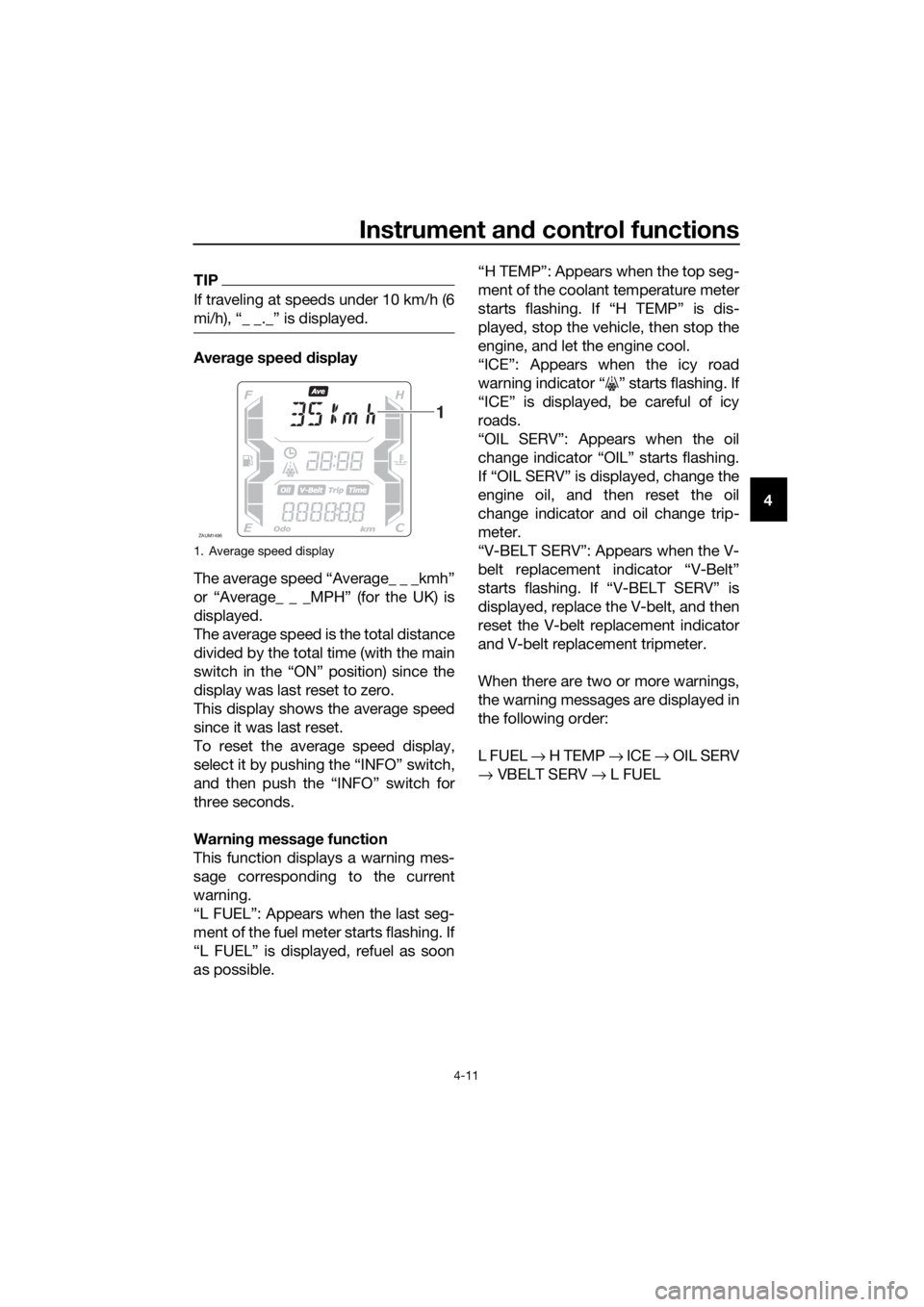
Average speed display
The average speed “Average_ _ _kmh”
or “Average_ _ _MPH” (for the UK) is
displayed.
The average speed is the total distance
divided by the total time (with the main
switch in the “ON” position) since the
display was last reset to zero.
This display shows the average speed
since it was last reset.
To reset the average speed display,
select it by pushing the “INFO” switch,
and then push the “INFO” switch for
three seconds.
Warning message function
This function displays a warning mes-
sage corresponding to the current
warning.
“L FUEL”: Appears when the last seg-
ment of the fuel meter starts flashing. If
“L FUEL” is displayed, refuel as soon
as possible.“H TEMP”: Appears when the top seg-
ment of the coolant temperature meter
starts flashing. If “H TEMP” is dis-
played, stop the vehicle, then stop the
engine, and let the engine cool.
“ICE”: Appears when the icy road
warning indicator “ ” starts flashing. If
“ICE” is displayed, be careful of icy
roads.
“OIL SERV”: Appears when the oil
change indicator “OIL” starts flashing.
If “OIL SERV” is displayed, change the
engine oil, and then reset the oil
change indicator and oil change trip-
meter.
“V-BELT SERV”: Appears when the V-
belt replacement indicator “V-Belt”
starts flashing. If “V-BELT SERV” is
displayed, replace the V-belt, and then
reset the V-belt replacement indicator
and V-belt replacement tripmeter.
When there are two or more warnings,
the warning messages are displayed in
the following order:
L FUEL → H TEMP → ICE → OIL SERV
→ VBELT SERV → L FUEL
1. Average speed display
ZAUM1496
1
UBL1E0E0.book Page 11 Thursday, May 11, 2017 8:51 AM
Page 40 of 118
Instrument and control functions
4-14
4
EAU12952
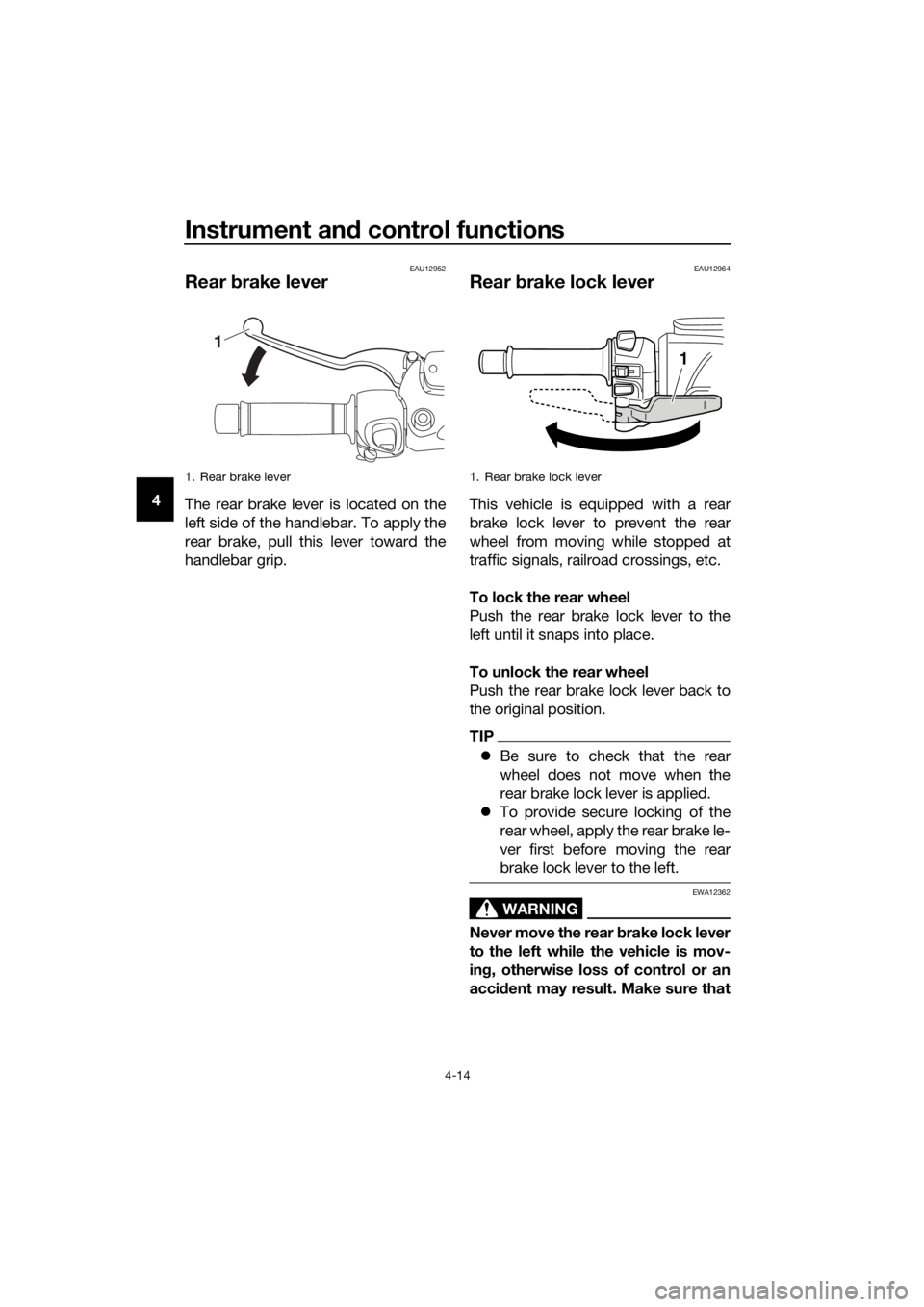
Rear brake lever
The rear brake lever is located on the
left side of the handlebar. To apply the
rear brake, pull this lever toward the
handlebar grip.
EAU12964
Rear brake lock lever
This vehicle is equipped with a rear
brake lock lever to prevent the rear
wheel from moving while stopped at
traffic signals, railroad crossings, etc.
To lock the rear wheel
Push the rear brake lock lever to the
left until it snaps into place.
To unlock the rear wheel
Push the rear brake lock lever back to
the original position.
TIP
Be sure to check that the rear
wheel does not move when the
rear brake lock lever is applied.
To provide secure locking of the
rear wheel, apply the rear brake le-
ver first before moving the rear
brake lock lever to the left.
WARNING
EWA12362
Never move the rear brake lock lever
to the left while the vehicle is mov-
ing, otherwise loss of control or an
accident may result. Make sure that
1. Rear brake lever
1
1. Rear brake lock lever
1
UBL1E0E0.book Page 14 Thursday, May 11, 2017 8:51 AM
Page 41 of 118
Instrument and control functions
4-15
4 the vehicle is stopped before mov-
ing the rear brake lock lever to the
left.
EAU78200
ABS
The Yamaha ABS (Anti-lock Brake
System) features a dual electronic con-
trol system, which acts on the front and
rear brakes independently.
Operate the brakes with ABS as you
would conventional brakes. If the ABS
is activated, a pulsating sensation may
be felt at the brake levers. In this situa-
tion, continue to apply the brakes and
let the ABS work; do not “pump” the
brakes as this will reduce braking ef-
fectiveness.
WARNING
EWA16051
Always keep a sufficient distance
from the vehicle ahead to match the
riding speed even with ABS.
The ABS performs best with
long braking distances.
On certain surfaces, such as
rough or gravel roads, the brak-
ing distance may be longer with
the ABS than without.
The ABS is monitored by an ECU,
which will revert the system to conven-
tional braking if a malfunction occurs.
TIP
The ABS performs a self-diagno-
sis test each time the vehicle first
starts off after the main switch is
turned to “ON” and the vehicle has
traveled at a speed of 10 km/h (6
mi/h) or higher. During this test, a
“clicking” noise can be heard from
the front of the vehicle, and if ei-
ther brake lever is even slightly ap-
plied, a vibration can be felt at the
lever, but these do not indicate a
malfunction.
UBL1E0E0.book Page 15 Thursday, May 11, 2017 8:51 AM
Page 42 of 118
Instrument and control functions
4-16
4This ABS has a test mode which
allows the owner to experience
the pulsation at the brake levers
when the ABS is operating. How-
ever, special tools are required, so
please consult your Yamaha deal-
er.
NOTICE
ECA20100
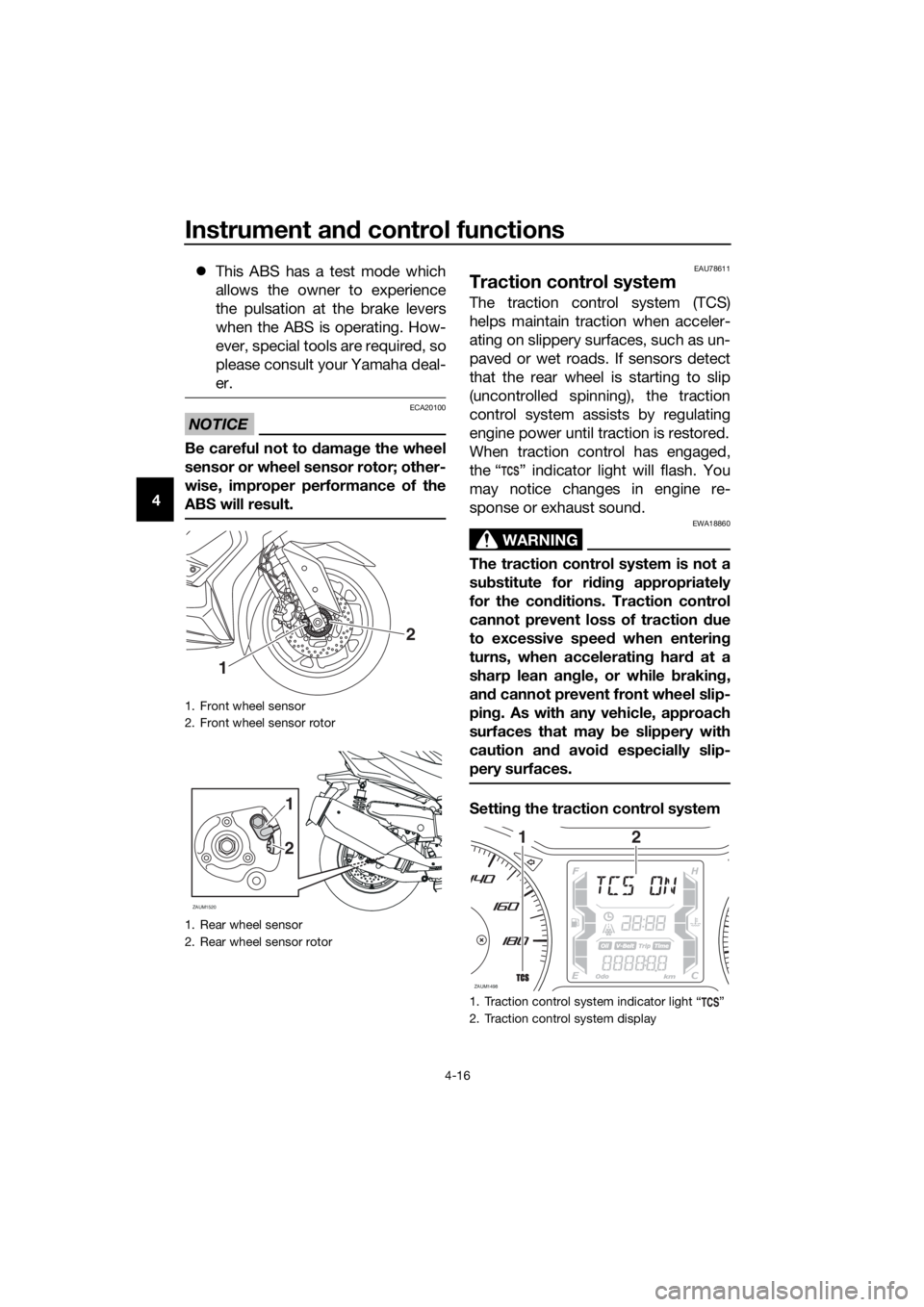
Be careful not to damage the wheel
sensor or wheel sensor rotor; other-
wise, improper performance of the
ABS will result.
EAU78611
Traction control system
The traction control system (TCS)
helps maintain traction when acceler-
ating on slippery surfaces, such as un-
paved or wet roads. If sensors detect
that the rear wheel is starting to slip
(uncontrolled spinning), the traction
control system assists by regulating
engine power until traction is restored.
When traction control has engaged,
the “ ” indicator light will flash. You
may notice changes in engine re-
sponse or exhaust sound.
WARNING
EWA18860
The traction control system is not a
substitute for riding appropriately
for the conditions. Traction control
cannot prevent loss of traction due
to excessive speed when entering
turns, when accelerating hard at a
sharp lean angle, or while braking,
and cannot prevent front wheel slip-
ping. As with any vehicle, approach
surfaces that may be slippery with
caution and avoid especially slip-
pery surfaces.
Setting the traction control system
1. Front wheel sensor
2. Front wheel sensor rotor
1. Rear wheel sensor
2. Rear wheel sensor rotor
2
1
2
1
ZAUM1520
1. Traction control system indicator light Ž
2. Traction control system display
ZAUM1498
12
UBL1E0E0.book Page 16 Thursday, May 11, 2017 8:51 AM
Page 43 of 118
Instrument and control functions
4-17
4 When the vehicle is turned on, traction
control is automatically turned on.
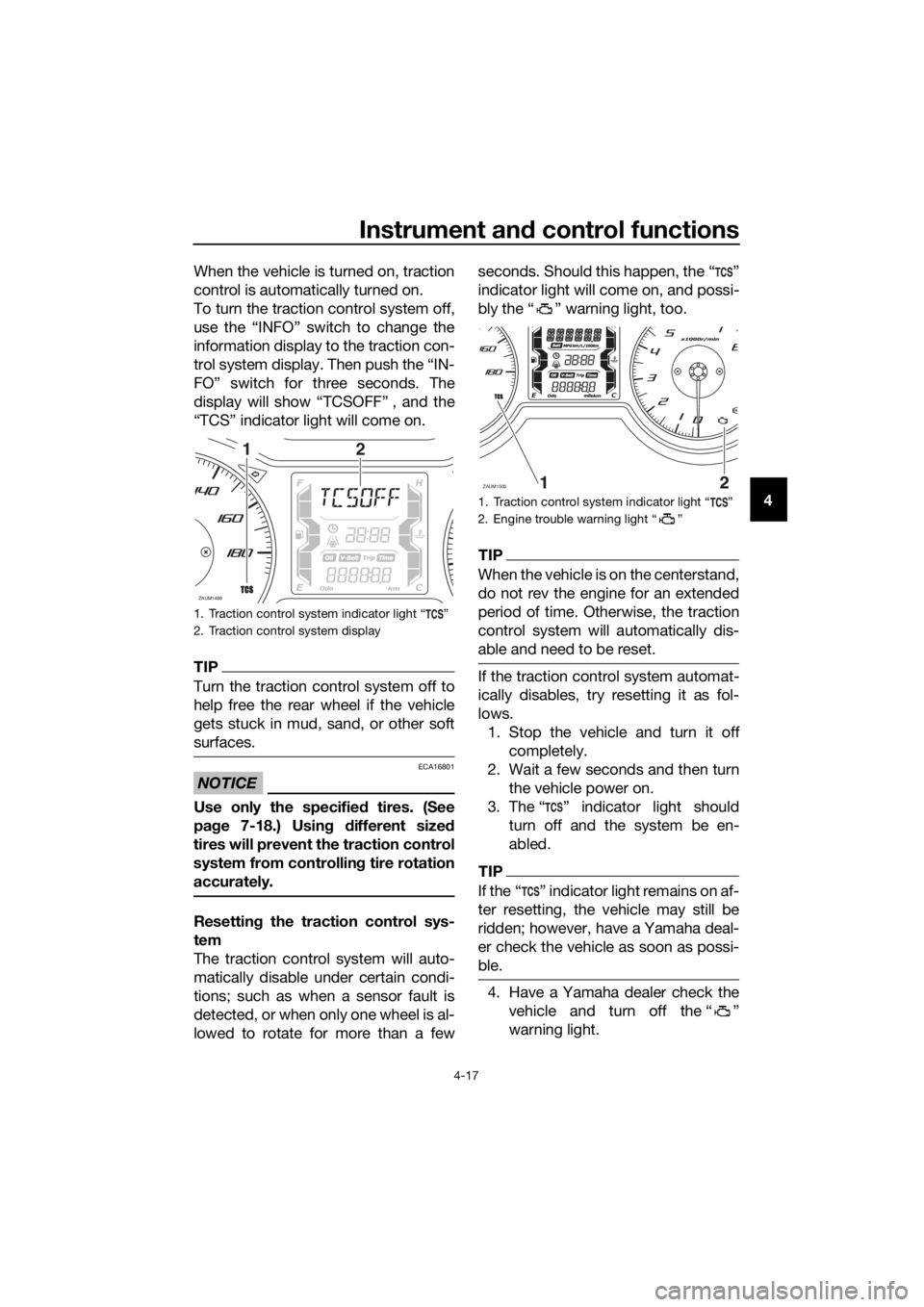
To turn the traction control system off,
use the “INFO” switch to change the
information display to the traction con-
trol system display. Then push the “IN-
FO” switch for three seconds. The
display will show “TCSOFF” , and the
“TCS” indicator light will come on.
TIP
Turn the traction control system off to
help free the rear wheel if the vehicle
gets stuck in mud, sand, or other soft
surfaces.
NOTICE
ECA16801
Use only the specified tires. (See
page 7-18.) Using different sized
tires will prevent the traction control
system from controlling tire rotation
accurately.
Resetting the traction control sys-
tem
The traction control system will auto-
matically disable under certain condi-
tions; such as when a sensor fault is
detected, or when only one wheel is al-
lowed to rotate for more than a fewseconds. Should this happen, the “ ”
indicator light will come on, and possi-
bly the “ ” warning light, too.
TIP
When the vehicle is on the centerstand,
do not rev the engine for an extended
period of time. Otherwise, the traction
control system will automatically dis-
able and need to be reset.
If the traction control system automat-
ically disables, try resetting it as fol-
lows.
1. Stop the vehicle and turn it off
completely.
2. Wait a few seconds and then turn
the vehicle power on.
3. The Ž indicator light should
turn off and the system be en-
abled.
TIP
If the Ž indicator light remains on af-
ter resetting, the vehicle may still be
ridden; however, have a Yamaha deal-
er check the vehicle as soon as possi-
ble.
4. Have a Yamaha dealer check the
vehicle and turn off the Ž
warning light.
1. Traction control system indicator light Ž
2. Traction control system display
ZAUM1499
12
1. Traction control system indicator light Ž
2. Engine trouble warning light Ž
ZAUM1500
UBL1E0E0.book Page 17 Thursday, May 11, 2017 8:51 AM
Page 44 of 118
Instrument and control functions
4-18
4
EAU78502
Fuel tank cap
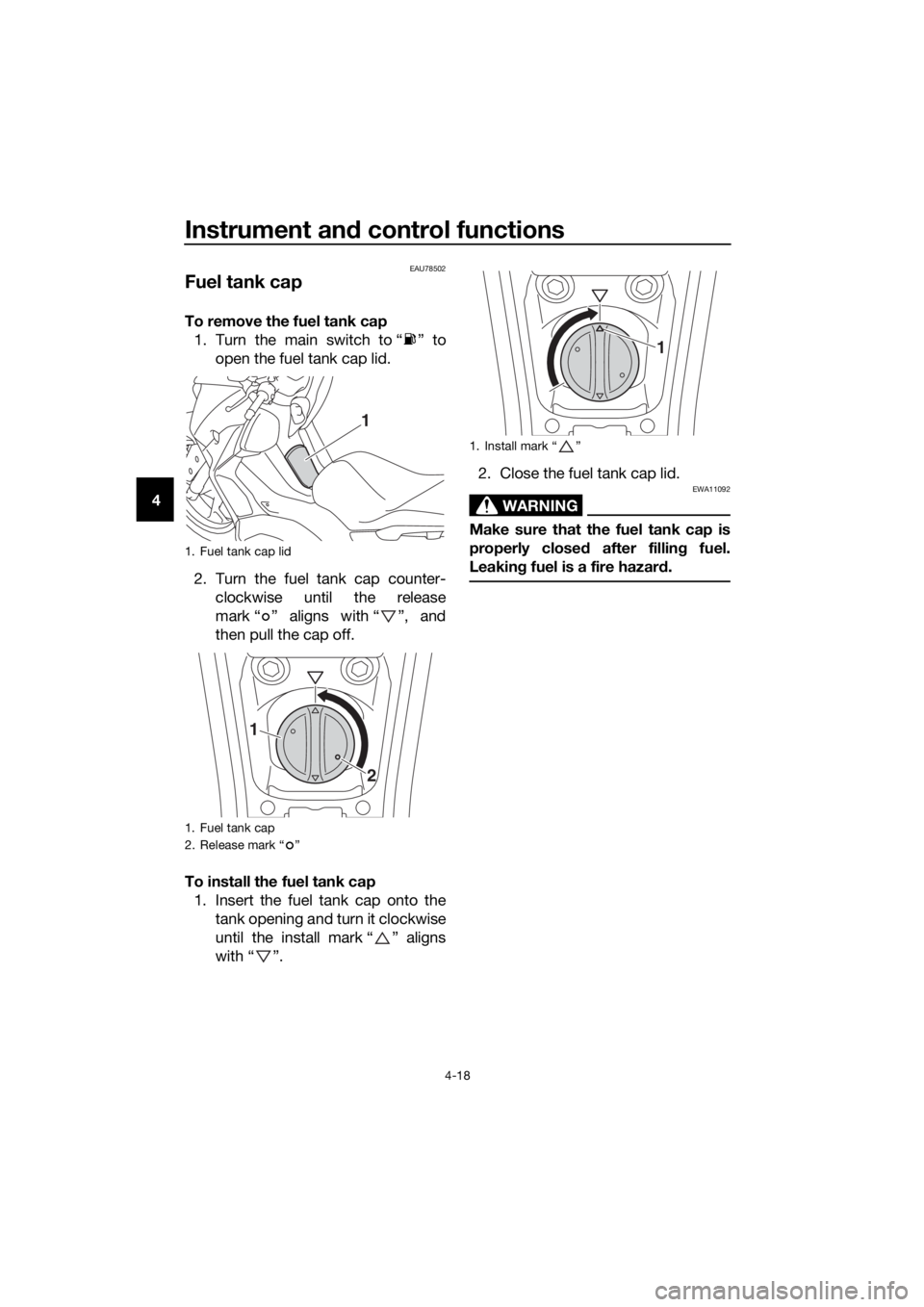
To remove the fuel tank cap
1. Turn the main switch to “ ” to
open the fuel tank cap lid.
2. Turn the fuel tank cap counter-
clockwise until the release
mark “ ” aligns with “ ”, and
then pull the cap off.
To install the fuel tank cap
1. Insert the fuel tank cap onto the
tank opening and turn it clockwise
until the install mark “ ” aligns
with “ ”.2. Close the fuel tank cap lid.
WARNING
EWA11092
Make sure that the fuel tank cap is
properly closed after filling fuel.
Leaking fuel is a fire hazard.
1. Fuel tank cap lid
1. Fuel tank cap
2. Release mark “ ”
1
1
2
1. Install mark Ž
1
UBL1E0E0.book Page 18 Thursday, May 11, 2017 8:51 AM
Page 45 of 118
Instrument and control functions
4-19
4
EAU13213
Fuel
Make sure there is sufficient gasoline in
the tank.
WARNING
EWA10882
Gasoline and gasoline vapors are
extremely flammable. To avoid fires
and explosions and to reduce the
risk of injury when refueling, follow
these instructions.
1. Before refueling, turn off the en-
gine and be sure that no one is sit-
ting on the vehicle. Never refuel
while smoking, or while in the vi-
cinity of sparks, open flames, or
other sources of ignition such as
the pilot lights of water heaters
and clothes dryers.
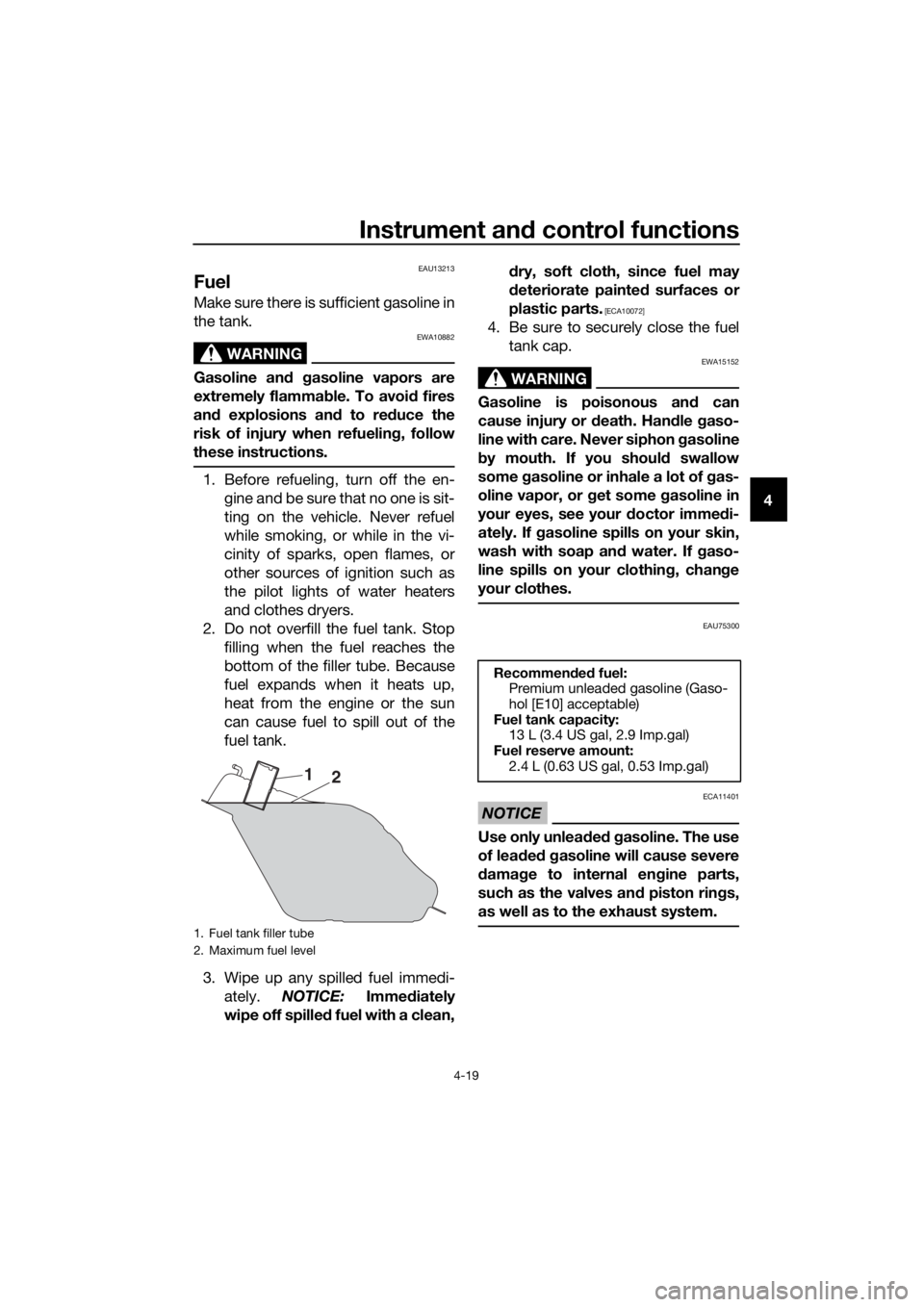
2. Do not overfill the fuel tank. Stop
filling when the fuel reaches the
bottom of the filler tube. Because
fuel expands when it heats up,
heat from the engine or the sun
can cause fuel to spill out of the
fuel tank.
3. Wipe up any spilled fuel immedi-
ately. NOTICE: Immediately
wipe off spilled fuel with a clean,dry, soft cloth, since fuel may
deteriorate painted surfaces or
plastic parts.
[ECA10072]
4. Be sure to securely close the fuel
tank cap.
WARNING
EWA15152
Gasoline is poisonous and can
cause injury or death. Handle gaso-
line with care. Never siphon gasoline
by mouth. If you should swallow
some gasoline or inhale a lot of gas-
oline vapor, or get some gasoline in
your eyes, see your doctor immedi-
ately. If gasoline spills on your skin,
wash with soap and water. If gaso-
line spills on your clothing, change
your clothes.
EAU75300
NOTICE
ECA11401
Use only unleaded gasoline. The use
of leaded gasoline will cause severe
damage to internal engine parts,
such as the valves and piston rings,
as well as to the exhaust system.
1. Fuel tank filler tube
2. Maximum fuel level
1
2
Recommended fuel:
Premium unleaded gasoline (Gaso-
hol [E10] acceptable)
Fuel tank capacity:
13 L (3.4 US gal, 2.9 Imp.gal)
Fuel reserve amount:
2.4 L (0.63 US gal, 0.53 Imp.gal)
UBL1E0E0.book Page 19 Thursday, May 11, 2017 8:51 AM