engine YAMAHA XSR 900 2016 User Guide
[x] Cancel search | Manufacturer: YAMAHA, Model Year: 2016, Model line: XSR 900, Model: YAMAHA XSR 900 2016Pages: 106, PDF Size: 7.68 MB
Page 22 of 106
Instrument and control functions
3-7
1
23
4
5
6
7
8
9
10
11
12
WARNING
EWA12423
Be sure to stop the vehicle before
making any setting changes to the
multi-function meter unit. Changing
settings while riding can distract the
operator and increase the risk of anaccident.
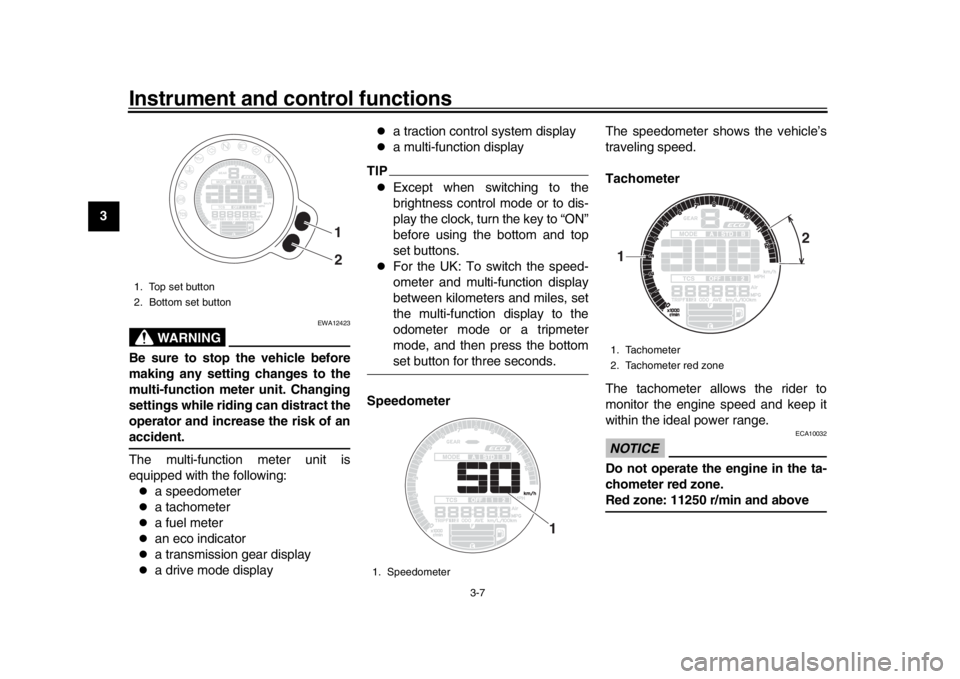
The multi-function meter unit is
equipped with the following:
a speedometer
a tachometer
a fuel meter
an eco indicator
a transmission gear display
a drive mode display
a traction control system display
a multi-function display
TIP
Except when switching to the
brightness control mode or to dis-
play the clock, turn the key to “ON”
before using the bottom and top
set buttons.
For the UK: To switch the speed-
ometer and multi-function display
between kilometers and miles, set
the multi-function display to the
odometer mode or a tripmeter
mode, and then press the bottomset button for three seconds.
Speedometer The speedometer shows the vehicle’s
traveling speed.
Tachometer
The tachometer allows the rider to
monitor the engine speed and keep it
within the ideal power range.
NOTICE
ECA10032
Do not operate the engine in the ta-
chometer red zone.Red zone: 11250 r/min and above
1. Top set button
2. Bottom set button
1
2
1. Speedometer
1
1. Tachometer
2. Tachometer red zone1 2
B90-9-E0_1.book 7 ページ 2015年12月15日 火曜日 午後8時5分
Page 23 of 106
Instrument and control functions
3-8
1
234
5
6
7
8
9
10
11
12
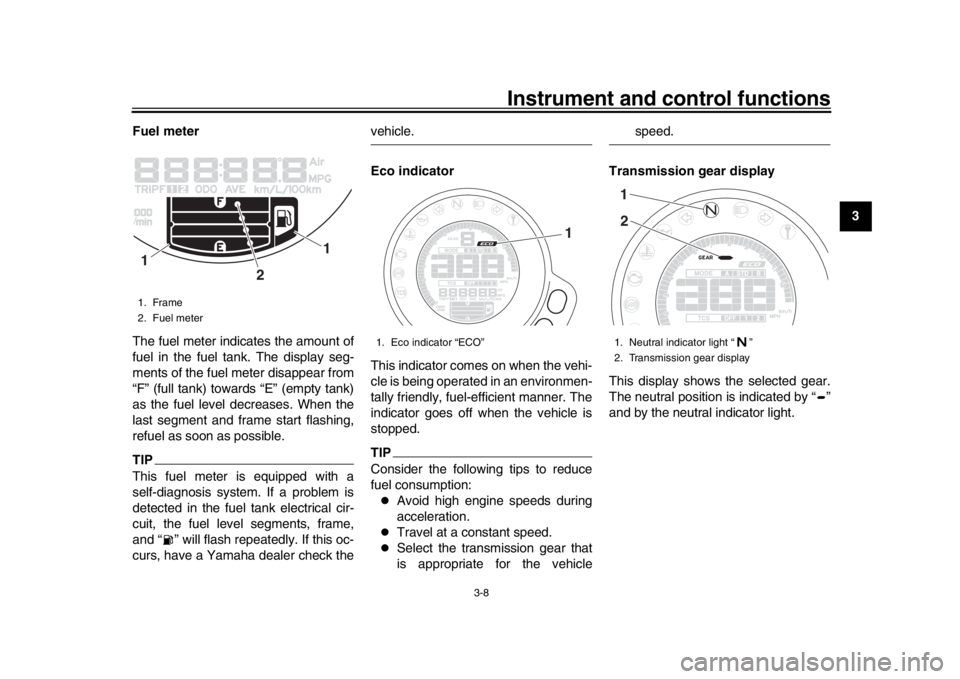
Fuel meter
The fuel meter indicates the amount of
fuel in the fuel tank. The display seg-
ments of the fuel meter disappear from
“F” (full tank) towards “E” (empty tank)
as the fuel level decreases. When the
last segment and frame start flashing,
refuel as soon as possible.
TIPThis fuel meter is equipped with a
self-diagnosis system. If a problem is
detected in the fuel tank electrical cir-
cuit, the fuel level segments, frame,
and “ ” will flash repeatedly. If this oc-
curs, have a Yamaha dealer check the
vehicle.
Eco indicator
This indicator comes on when the vehi-
cle is being operated in an environmen-
tally friendly, fuel-efficient manner. The
indicator goes off when the vehicle is
stopped.TIPConsider the following tips to reduce
fuel consumption:
Avoid high engine speeds during
acceleration.
Travel at a constant speed.
Select the transmission gear that
is appropriate for the vehicle
speed.
Transmission gear display
This display shows the selected gear.
The neutral position is indicated by “ ”
and by the neutral indicator light.
1. Frame
2. Fuel meter
1
1
2
1. Eco indicator “ECO”
1
1. Neutral indicator light “ ”
2. Transmission gear display12
B90-9-E0_1.book 8 ページ 2015年12月15日 火曜日 午後8時5分
Page 27 of 106
Instrument and control functions
3-12
1
234
5
6
7
8
9
10
11
12
ments.
If the message “HI” flashes, stop the
vehicle, then stop the engine and let it
cool. (See page 6-39.)
TIP
When the coolant temperature is
below 40
C, “Lo” will be displayed.
The coolant temperature varies
with changes in the weather andengine load.
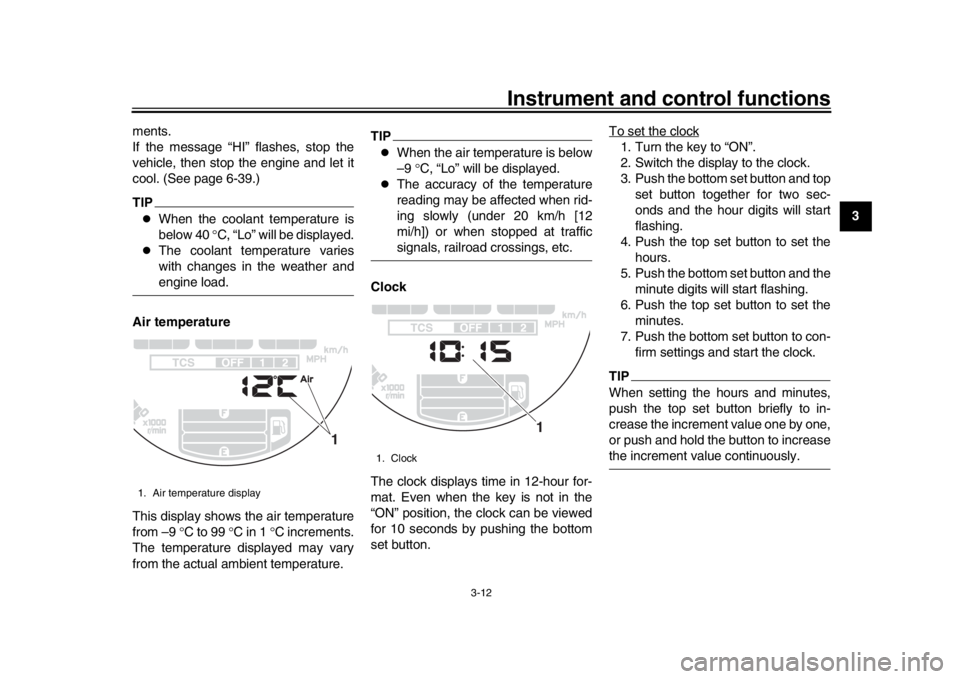
Air temperature
This display shows the air temperature
from –9 C to 99 C in 1 C increments.
The temperature displayed may vary
from the actual ambient temperature.
TIP
When the air temperature is below
–9 C, “Lo” will be displayed.
The accuracy of the temperature
reading may be affected when rid-
ing slowly (under 20 km/h [12
mi/h]) or when stopped at trafficsignals, railroad crossings, etc.
Clock
The clock displays time in 12-hour for-
mat. Even when the key is not in the
“ON” position, the clock can be viewed
for 10 seconds by pushing the bottom
set button. To set the clock
1. Turn the key to “ON”.
2. Switch the display to the clock.
3. Push the bottom set button and top
set button together for two sec-
onds and the hour digits will start
flashing.
4. Push the top set button to set the hours.
5. Push the bottom set button and the minute digits will start flashing.
6. Push the top set button to set the minutes.
7. Push the bottom set button to con- firm settings and start the clock.TIPWhen setting the hours and minutes,
push the top set button briefly to in-
crease the increment value one by one,
or push and hold the button to increasethe increment value continuously.
1. Air temperature display
1
1. Clock
1
B90-9-E0_1.book 12 ページ 2015年12月15日 火曜日 午後8時5分
Page 28 of 106
Instrument and control functions
3-13
1
23
4
5
6
7
8
9
10
11
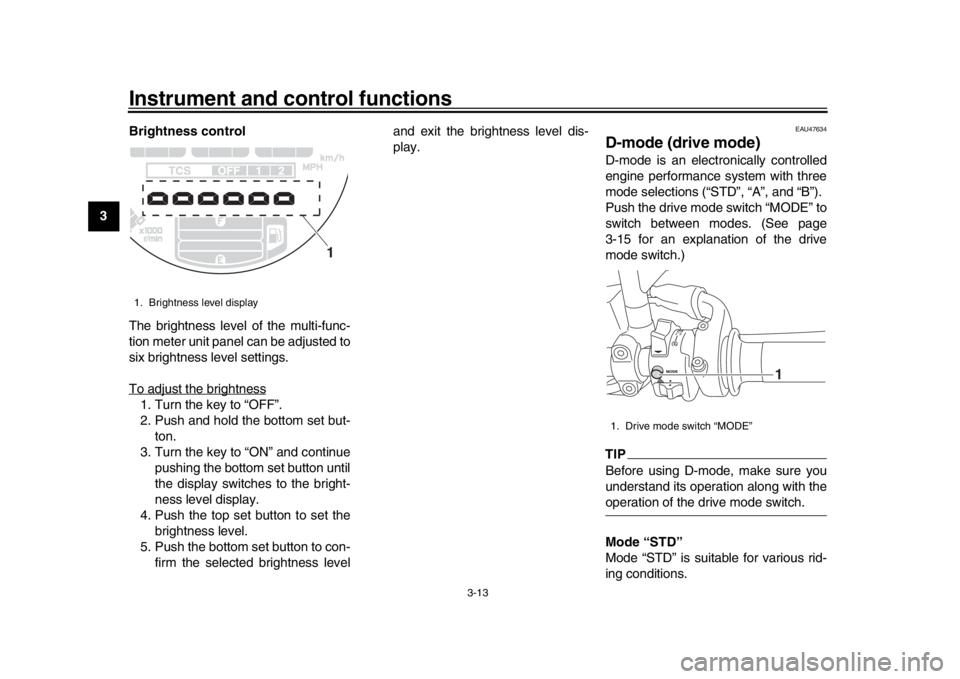
12 Brightness control
The brightness level of the multi-func-
tion meter unit panel can be adjusted to
six brightness level settings.
To adjust the brightness
1. Turn the key to “OFF”.
2. Push and hold the bottom set but-
ton.
3. Turn the key to “ON” and continue pushing the bottom set button until
the display switches to the bright-
ness level display.
4. Push the top set button to set the brightness level.
5. Push the bottom set button to con- firm the selected brightness level and exit the brightness level dis-
play.
EAU47634
D-mode (drive mode)D-mode is an electronically controlled
engine performance system with three
mode selections (“STD”, “A”, and “B”).
Push the drive mode switch “MODE” to
switch between modes. (See page
3-15 for an explanation of the drive
mode switch.)TIPBefore using D-mode, make sure you
understand its operation along with theoperation of the drive mode switch.
Mode “STD”
Mode “STD” is suitable for various rid-
ing conditions.
1. Brightness level display
1
1. Drive mode switch “MODE”
1
B90-9-E0_1.book 13 ページ 2015年12月15日 火曜日 午後8時5分
Page 29 of 106
Instrument and control functions
3-14
1
234
5
6
7
8
9
10
11
12
This mode allows the rider to enjoy
smooth and sporty drivability from the
low-speed range to the high-speed
range.
Mode “A”
Mode “A” offers a sportier engine re-
sponse in the low- to mid-speed range
compared to mode “STD”.
Mode “B”
Mode “B” offers response that is some-
what less sharp compared to mode
“STD” for riding situations that require
especially sensitive throttle operation.
EAU1234K
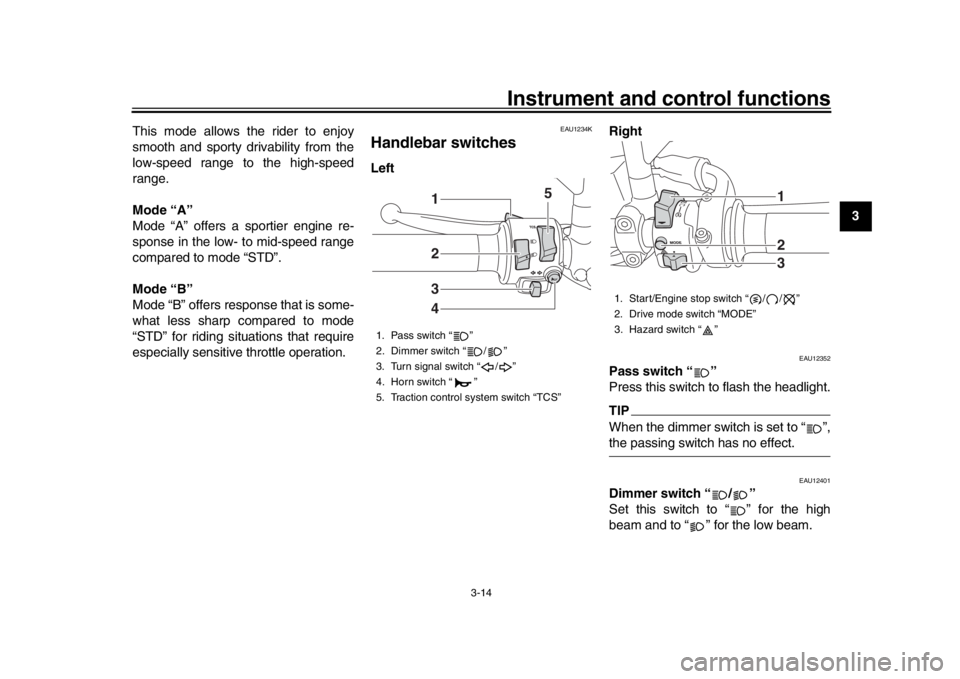
Handlebar switchesLeft
Right
EAU12352
Pass switch “ ”
Press this switch to flash the headlight.TIPWhen the dimmer switch is set to “ ”,the passing switch has no effect.
EAU12401
Dimmer switch “ / ”
Set this switch to “ ” for the high
beam and to “ ” for the low beam.
1. Pass switch “ ”
2. Dimmer switch “ / ”
3. Turn signal switch “ / ”
4. Horn switch “ ”
5. Traction control system switch “TCS”
2341
5
1. Start/Engine stop switch “ / / ”
2. Drive mode switch “MODE”
3. Hazard switch “ ”
123
B90-9-E0_1.book 14 ページ 2015年12月15日 火曜日 午後8時5分
Page 30 of 106
Instrument and control functions
3-15
1
23
4
5
6
7
8
9
10
11
12
EAU12461
Turn signal switch “ / ”
To signal a right-hand turn, push this
switch to “ ”. To signal a left-hand
turn, push this switch to “ ”. When re-
leased, the switch returns to the center
position. To cancel the turn signal
lights, push the switch in after it has re-
turned to the center position.
EAU12501
Horn switch “ ”
Press this switch to sound the horn.
EAU73391
Traction control system switch
“TCS”
With the throttle closed, push this
switch down to change from TCS “1” to
“2”. Push up to change from TCS “2” to
“1”.
With the vehicle stopped, push this
switch up for two seconds to turn the
system off. Push down to turn the sys-
tem on.TIP
The current TCS setting is shown
in the TCS display (page 3-9).
See page 3-18 for an explanation of the traction control system and
the TCS settings.
EAU54212
Stop/Run/Start switch “ / / ”
To crank the engine with the starter, set
this switch to “ ”, and then push the
switch down towards “ ”. See page
5-1 for starting instructions prior to
starting the engine.
Set this switch to “ ” to stop the engine
in case of an emergency, such as when
the vehicle overturns or when the throt-
tle cable is stuck.
EAU12735
Hazard switch “ ”
With the key in the “ON” or “ ” posi-
tion, use this switch to turn on the haz-
ard lights (simultaneous flashing of all
turn signal lights).
The hazard lights are used in case of
an emergency or to warn other drivers
when your vehicle is stopped where it
might be a traffic hazard.NOTICE
ECA10062
Do not use the hazard lights for an
extended length of time with the en- gine not running, otherwise the bat-
tery may discharge.
EAU73320
Drive mode switch “MODE”
WARNING
EWA18440
Do not change the drive mode whilethe vehicle is moving.
With the throttle grip closed, press this
switch to change the drive mode (3-13)
in the following order:
A
B STD ATIP
The current drive mode is shown in
the drive mode display (page 3-9).
The current drive mode is savedwhen the vehicle is turned off.
B90-9-E0_1.book 15 ページ 2015年12月15日 火曜日 午後8時5分
Page 33 of 106
Instrument and control functions
3-18
1
234
5
6
7
8
9
10
11
12
TIP
The ABS performs a self-diagno-
sis test each time the vehicle first
starts off after the key is turned to
“ON” and the vehicle has traveled
at a speed of 10 km/h (6 mi/h) or
higher. During this test, a “clicking”
noise can be heard from the hy-
draulic control unit, and if the brake
lever or brake pedal is even slight-
ly applied, a vibration can be felt at
the lever and pedal, but these do
not indicate a malfunction.
This ABS has a test mode which
allows the owner to experience the
pulsation at the brake lever or
brake pedal when the ABS is oper-
ating. However, special tools are
required, so please consult yourYamaha dealer.
NOTICE
ECA20100
Be careful not to damage the wheel
sensor or wheel sensor rotor; other-
wise, improper performance of theABS will result.
EAU73311
Traction control systemThe traction control system (TCS)
helps maintain traction when accelerat-
ing on slippery surfaces, such as un-
paved or wet roads. If sensors detect
that the rear wheel is starting to slip (un-
controlled spinning), the traction control
system assists by regulating engine
power as needed until traction is re-
stored.
WARNING
EWA15432
The traction control system is not a
substitute for riding appropriately
for the conditions. Traction control
cannot prevent loss of traction due
to excessive speed when entering
turns, when accelerating hard at a
sharp lean angle, or while braking,
and cannot prevent front wheel slip-
ping. As with any motorcycle, ap-
proach surfaces that may be
slippery with caution and avoid es-pecially slippery surfaces.
The “ ” indicator light flashes when
traction control has engaged. You may
notice slight changes in engine and ex-
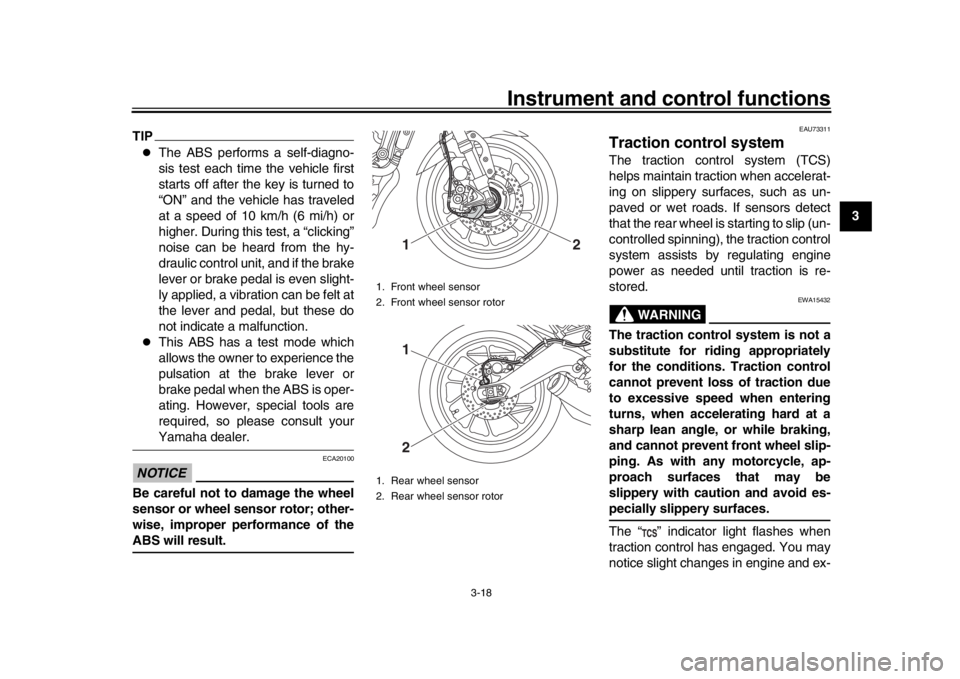
1. Front wheel sensor
2. Front wheel sensor rotor
1. Rear wheel sensor
2. Rear wheel sensor rotor
1
2
12
B90-9-E0_1.book 18 ページ 2015年12月15日 火曜日 午後8時5分
Page 35 of 106
Instrument and control functions
3-20
1
234
5
6
7
8
9
10
11
12
EAU13075
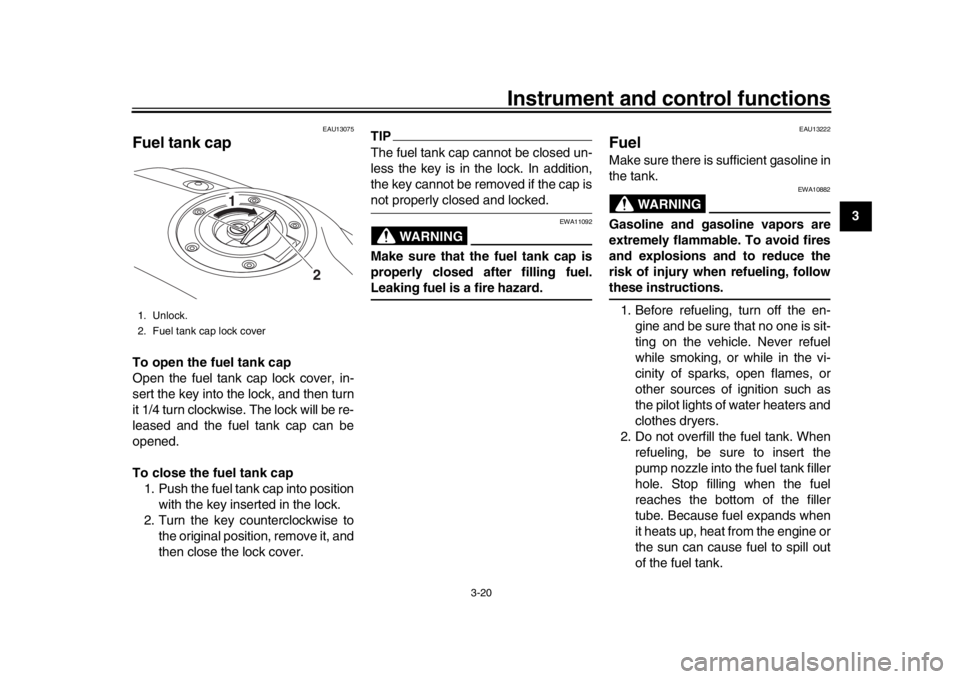
Fuel tank capTo open the fuel tank cap
Open the fuel tank cap lock cover, in-
sert the key into the lock, and then turn
it 1/4 turn clockwise. The lock will be re-
leased and the fuel tank cap can be
opened.
To close the fuel tank cap 1. Push the fuel tank cap into position with the key inserted in the lock.
2. Turn the key counterclockwise to the original position, remove it, and
then close the lock cover.
TIPThe fuel tank cap cannot be closed un-
less the key is in the lock. In addition,
the key cannot be removed if the cap isnot properly closed and locked.
WARNING
EWA11092
Make sure that the fuel tank cap is
properly closed after filling fuel.Leaking fuel is a fire hazard.
EAU13222
FuelMake sure there is sufficient gasoline in
the tank.
WARNING
EWA10882
Gasoline and gasoline vapors are
extremely flammable. To avoid fires
and explosions and to reduce the
risk of injury when refueling, followthese instructions.
1. Before refueling, turn off the en- gine and be sure that no one is sit-
ting on the vehicle. Never refuel
while smoking, or while in the vi-
cinity of sparks, open flames, or
other sources of ignition such as
the pilot lights of water heaters and
clothes dryers.
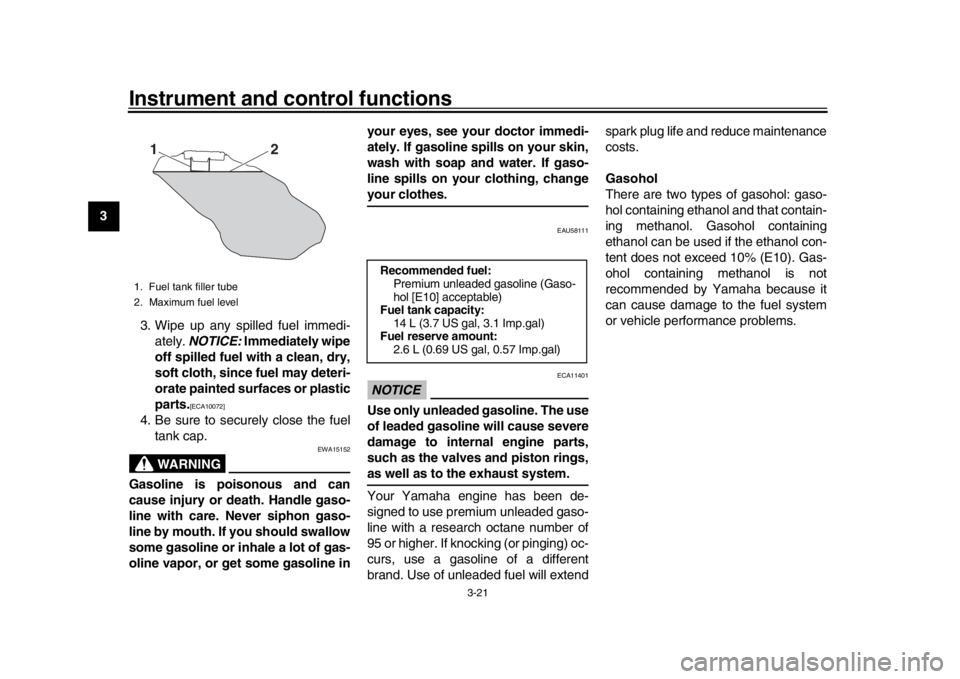
2. Do not overfill the fuel tank. When refueling, be sure to insert the
pump nozzle into the fuel tank filler
hole. Stop filling when the fuel
reaches the bottom of the filler
tube. Because fuel expands when
it heats up, heat from the engine or
the sun can cause fuel to spill out
of the fuel tank.
1. Unlock.
2. Fuel tank cap lock cover
2
1
B90-9-E0_1.book 20 ページ 2015年12月15日 火曜日 午後8時5分
Page 36 of 106
Instrument and control functions
3-21
1
23
4
5
6
7
8
9
10
11
12 3. Wipe up any spilled fuel immedi-
ately. NOTICE: Immediately wipe
off spilled fuel with a clean, dry,
soft cloth, since fuel may deteri-
orate painted surfaces or plastic
parts.
[ECA10072]
4. Be sure to securely close the fuel tank cap.
WARNING
EWA15152
Gasoline is poisonous and can
cause injury or death. Handle gaso-
line with care. Never siphon gaso-
line by mouth. If you should swallow
some gasoline or inhale a lot of gas-
oline vapor, or get some gasoline in your eyes, see your doctor immedi-
ately. If gasoline spills on your skin,
wash with soap and water. If gaso-
line spills on your clothing, change
your clothes.
EAU58111
NOTICE
ECA11401
Use only unleaded gasoline. The use
of leaded gasoline will cause severe
damage to internal engine parts,
such as the valves and piston rings,as well as to the exhaust system.
Your Yamaha engine has been de-
signed to use premium unleaded gaso-
line with a research octane number of
95 or higher. If knocking (or pinging) oc-
curs, use a gasoline of a different
brand. Use of unleaded fuel will extendspark plug life and reduce maintenance
costs.
Gasohol
There are two types of gasohol: gaso-
hol containing ethanol and that contain-
ing methanol. Gasohol containing
ethanol can be used if the ethanol con-
tent does not exceed 10% (E10). Gas-
ohol containing methanol is not
recommended by Yamaha because it
can cause damage to the fuel system
or vehicle performance problems.
1. Fuel tank filler tube
2. Maximum fuel level
2
1
Recommended fuel:
Premium unleaded gasoline (Gaso-
hol [E10] acceptable)
Fuel tank capacity: 14 L (3.7 US gal, 3.1 Imp.gal)
Fuel reserve amount:
2.6 L (0.69 US gal, 0.57 Imp.gal)
B90-9-E0_1.book 21 ページ 2015年12月15日 火曜日 午後8時5分
Page 37 of 106
Instrument and control functions
3-22
1
234
5
6
7
8
9
10
11
12
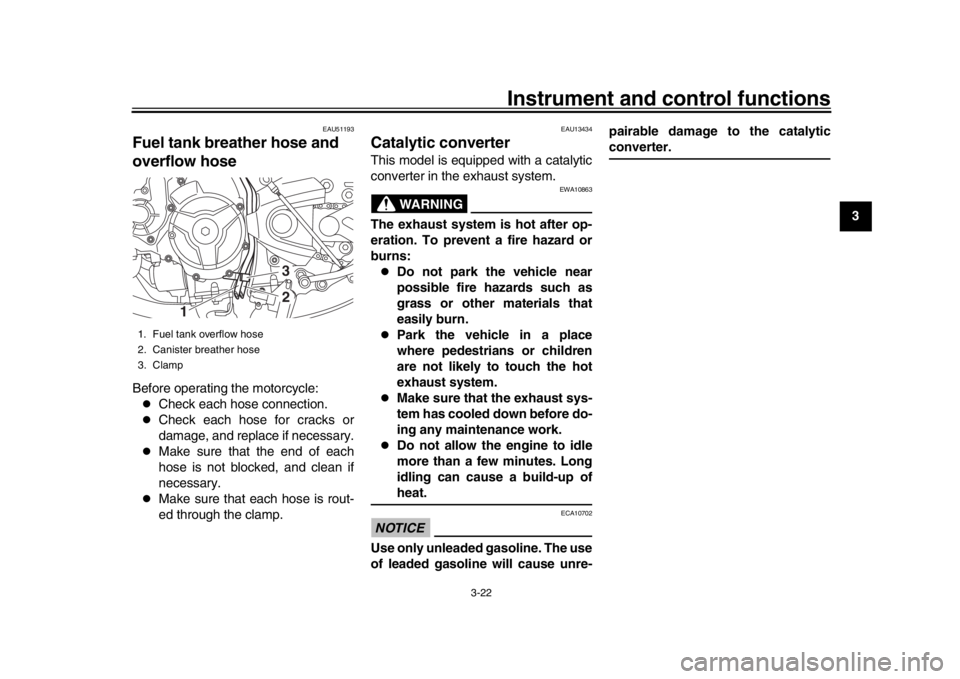
EAU51193
Fuel tank breat her hose and
overflow hoseBefore operating the motorcycle:
Check each hose connection.
Check each hose for cracks or
damage, and replace if necessary.
Make sure that the end of each
hose is not blocked, and clean if
necessary.
Make sure that each hose is rout-
ed through the clamp.
EAU13434
Catalytic converterThis model is equipped with a catalytic
converter in the exhaust system.
WARNING
EWA10863
The exhaust system is hot after op-
eration. To prevent a fire hazard or
burns:
Do not park the vehicle near
possible fire hazards such as
grass or other materials that
easily burn.
Park the vehicle in a place
where pedestrians or children
are not likely to touch the hot
exhaust system.
Make sure that the exhaust sys-
tem has cooled down before do-
ing any maintenance work.
Do not allow the engine to idle
more than a few minutes. Long
idling can cause a build-up ofheat.
NOTICE
ECA10702
Use only unleaded gasoline. The use
of leaded gasoline will cause unre- pairable damage to the catalytic
converter.
1. Fuel tank overflow hose
2. Canister breather hose
3. Clamp
1
32
B90-9-E0_1.book 22 ページ 2015年12月15日 火曜日 午後8時5分