engine YAMAHA XT1200Z 2019 User Guide
[x] Cancel search | Manufacturer: YAMAHA, Model Year: 2019, Model line: XT1200Z, Model: YAMAHA XT1200Z 2019Pages: 118, PDF Size: 3.8 MB
Page 22 of 118
Instrument and control functions
3-8
3
WARNING
EWA16351
It is d angerous to use the resume
function when the previously set
cruisin g speed is too hi gh for current
con ditions.
TIP
Pushing the power switch while the
system is operating will turn the system
off completely and erase the previously
set cruising speed. You will not be able
to use the resume function until a new
cruising speed has been set.
Automatic deactivation of the cruise
control system
The cruise control system for this mod-
el is electronically controlled and is
linked with the other control systems.
The cruise control system will auto-
matically become deactivated under
the following conditions:
The cruise control system is not
able to maintain the set cruising
speed.
Wheel slip or wheel spin is detect-
ed. (If the traction control system
has not been turned off, the trac-
tion control system will work.)
The start/engine stop switch is set
to the “ ” position.
The engine stalls.
The sidestand is lowered.
When traveling with a set cruising
speed, if the cruise control system is
deactivated under the above condi-
tions, the “ ” indicator light will go off
and the “SET” indicator light will flash
for 4 seconds, and then go off. When not traveling with a set cruising
speed, if the start/engine stop switch is
set to the “ ” position, the engine
stalls, or the sidestand is lowered, then
the “ ” indicator light will go off (the
“SET” indicator light will not flash).
If the cruise control system is automat-
ically deactivated, please stop and
confirm that your vehicle is in good op-
erating condition.
Before using the cruise control system
again, activate it using the power
switch.
TIP
In some cases, the cruise control sys-
tem may not be able to maintain the set
cruising speed when the vehicle is
traveling uphill or downhill.
When the vehicle is traveling up-
hill, the actual traveling speed may
become lower than the set cruis-
ing speed. If this occurs, acceler-
ate to the desired traveling speed
using the throttle.
When the vehicle is traveling
downhill, the actual traveling
speed may become higher than
the set cruising speed. If this oc-
curs, the setting switch cannot be
used to adjust the set cruising
speed. To reduce the traveling
speed, apply the brakes. When
the brakes are applied, the cruise
control system will become deac-
tivated.
UBP8E1E0.book Page 8 Friday, September 14, 2018 11:35 AM
Page 24 of 118
Instrument and control functions
3-10
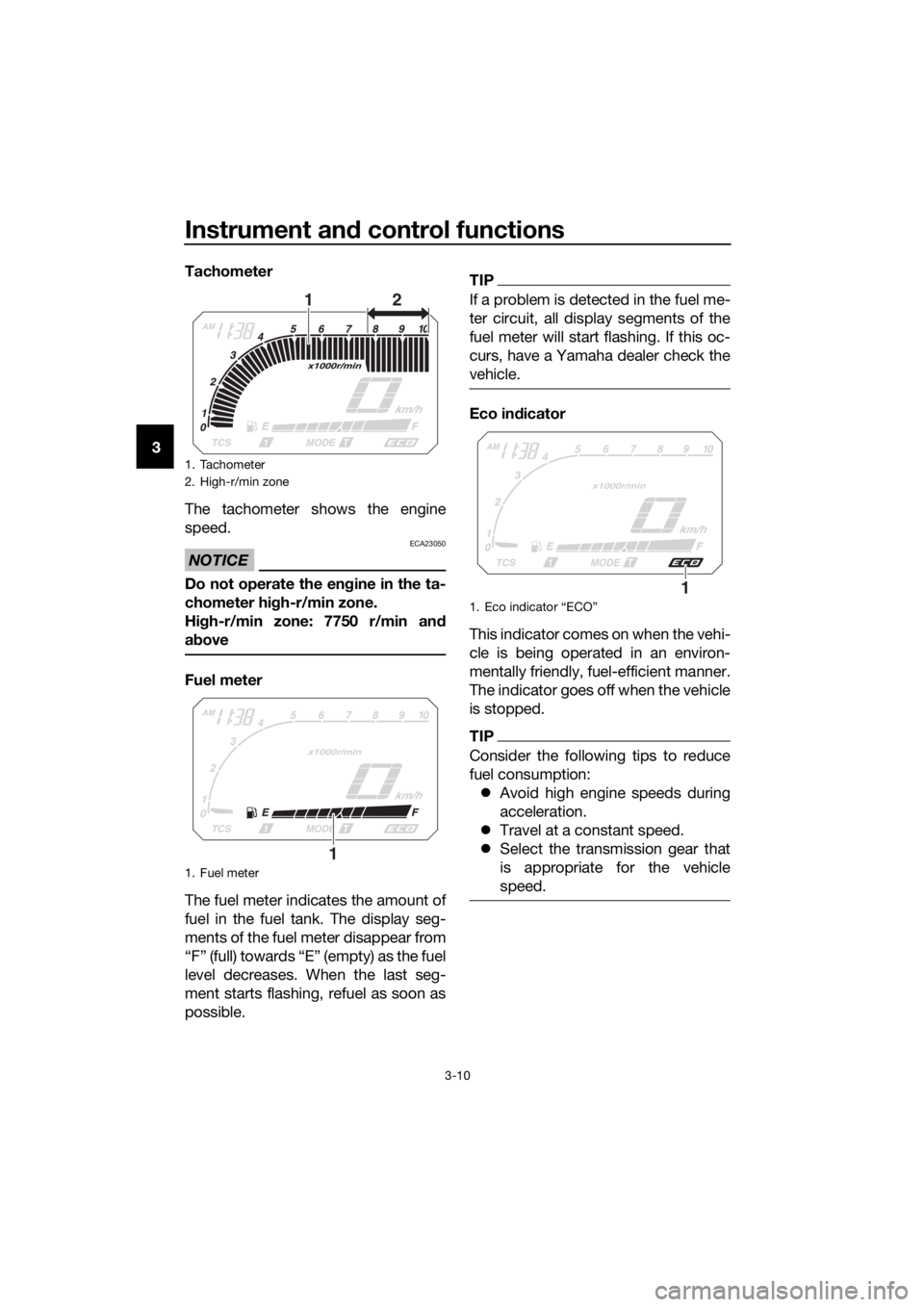
3 Tachometer
The tachometer shows the engine
speed.
NOTICE
ECA23050
Do not operate the en
gine in the ta-
chometer hi gh-r/min zone.
Hi gh-r/min zone: 7750 r/min an d
a b ove
Fuel meter
The fuel meter indicates the amount of
fuel in the fuel tank. The display seg-
ments of the fuel meter disappear from
“F” (full) towards “E” (empty) as the fuel
level decreases. When the last seg-
ment starts flashing, refuel as soon as
possible.
TIP
If a problem is detected in the fuel me-
ter circuit, all display segments of the
fuel meter will start flashing. If this oc-
curs, have a Yamaha dealer check the
vehicle.
Eco in dicator
This indicator comes on when the vehi-
cle is being operated in an environ-
mentally friendly, fuel-efficient manner.
The indicator goes off when the vehicle
is stopped.
TIP
Consider the following tips to reduce
fuel consumption: Avoid high engine speeds during
acceleration.
Travel at a constant speed.
Select the transmission gear that
is appropriate for the vehicle
speed.
1. Tachometer
2. High-r/min zone
1. Fuel meter
12
1
1. Eco indicator “ECO”
1
UBP8E1E0.book Page 10 Friday, September 14, 2018 11:35 AM
Page 27 of 118
Instrument and control functions
3-13
3
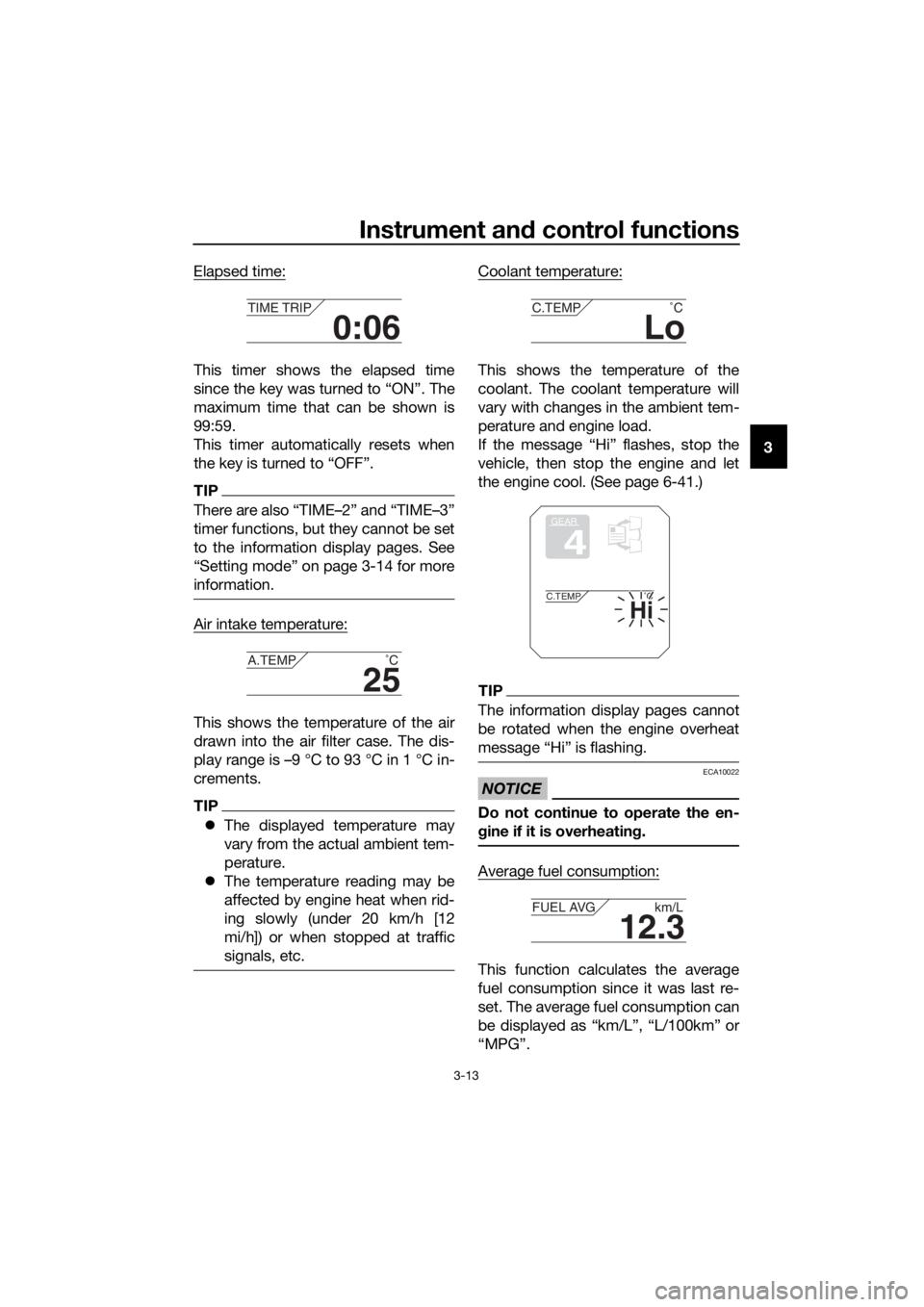
Elapsed time:
This timer shows the elapsed time
since the key was turned to “ON”. The
maximum time that can be shown is
99:59.
This timer automatically resets when
the key is turned to “OFF”.
TIP
There are also “TIME–2” and “TIME–3”
timer functions, but they cannot be set
to the information display pages. See
“Setting mode” on page 3-14 for more
information.
Air intake temperature:
This shows the temperature of the air
drawn into the air filter case. The dis-
play range is –9 °C to 93 °C in 1 °C in-
crements.
TIP
The displayed temperature may
vary from the actual ambient tem-
perature.
The temperature reading may be
affected by engine heat when rid-
ing slowly (under 20 km/h [12
mi/h]) or when stopped at traffic
signals, etc.
Coolant temperature:
This shows the temperature of the
coolant. The coolant temperature will
vary with changes in the ambient tem-
perature and engine load.
If the message “Hi” flashes, stop the
vehicle, then stop the engine and let
the engine cool. (See page 6-41.)
TIP
The information display pages cannot
be rotated when the engine overheat
message “Hi” is flashing.
NOTICE
ECA10022
Do not continue to operate the en-
gine if it is overheatin g.
Average fuel consumption:
This function calculates the average
fuel consumption since it was last re-
set. The average fuel consumption can
be displayed as “km/L”, “L/100km” or
“MPG”.
0:06
TIME TRIP
25
A.TEMP ˚C
Lo
C.TEMP˚C
GEAR
4
Hi
C.TEMP˚C
12.3
FUEL AVG km/L
UBP8E1E0.book Page 13 Friday, September 14, 2018 11:35 AM
Page 33 of 118
Instrument and control functions
3-19
3
6. Push the menu switch “MENU” to
return to the setting mode main
screen.
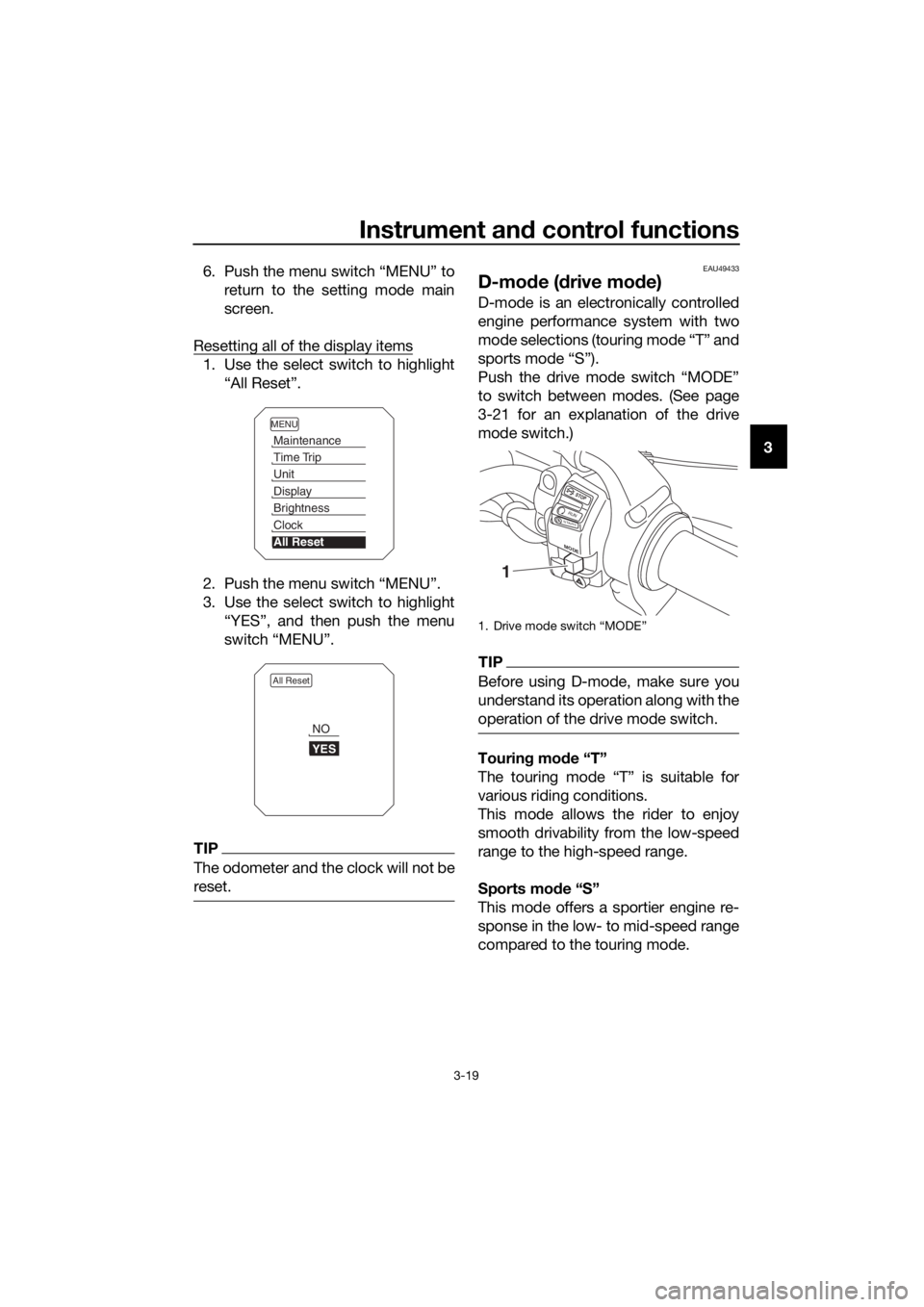
Resetting all of the display items
1. Use the select switch to highlight “All Reset”.
2. Push the menu switch “MENU”.
3. Use the select switch to highlight “YES”, and then push the menu
switch “MENU”.
TIP
The odometer and the clock will not be
reset.
EAU49433
D-mo de ( drive mo de)
D-mode is an electronically controlled
engine performance system with two
mode selections (touring mode “T” and
sports mode “S”).
Push the drive mode switch “MODE”
to switch between modes. (See page
3-21 for an explanation of the drive
mode switch.)
TIP
Before using D-mode, make sure you
understand its operation along with the
operation of the drive mode switch.
Tourin g mo de “T”
The touring mode “T” is suitable for
various riding conditions.
This mode allows the rider to enjoy
smooth drivability from the low-speed
range to the high-speed range.
Sports mod e “S”
This mode offers a sportier engine re-
sponse in the low- to mid-speed range
compared to the touring mode.
MENU
Maintenance
Time Trip
Unit
Display
Brightness
Clock
All Reset
All Reset
YES
NO
1. Drive mode switch “MODE”
M ODE
STOP
RUNSTA R
T
1
UBP8E1E0.book Page 19 Friday, September 14, 2018 11:35 AM
Page 34 of 118
Instrument and control functions
3-20
3
EAU1234M
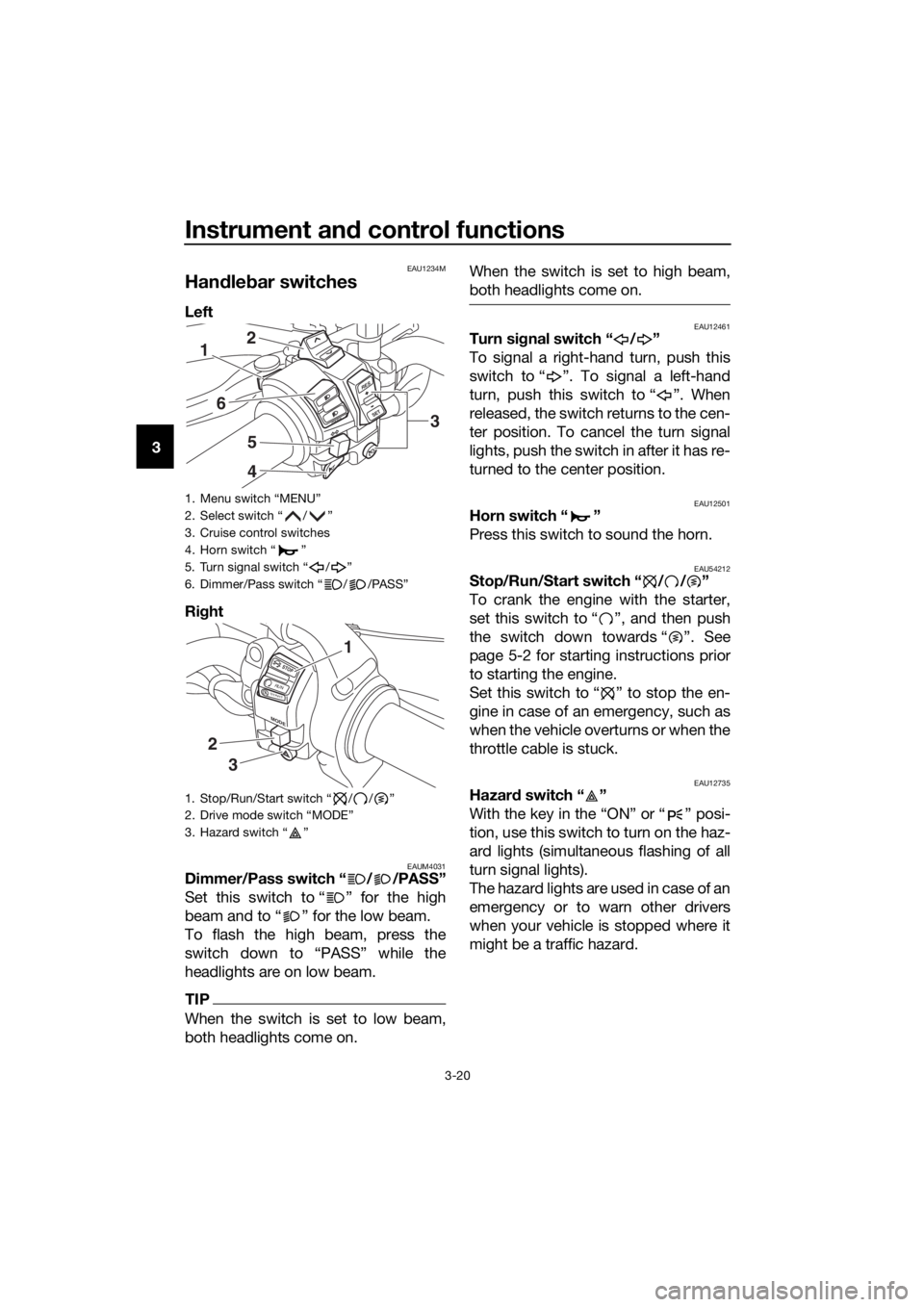
Han dle bar switches
Left
Ri ght
EAUM4031Dimmer/Pass switch “ / /PASS”
Set this switch to “ ” for the high
beam and to “ ” for the low beam.
To flash the high beam, press the
switch down to “PASS” while the
headlights are on low beam.
TIP
When the switch is set to low beam,
both headlights come on. When the switch is set to high beam,
both headlights come on.
EAU12461Turn si
gnal switch “ / ”
To signal a right-hand turn, push this
switch to “ ”. To signal a left-hand
turn, push this switch to “ ”. When
released, the switch returns to the cen-
ter position. To cancel the turn signal
lights, push the switch in after it has re-
turned to the center position.
EAU12501Horn switch “ ”
Press this switch to sound the horn.
EAU54212Stop/Run/Start switch “ / / ”
To crank the engine with the starter,
set this switch to “ ”, and then push
the switch down towards “ ”. See
page 5-2 for starting instructions prior
to starting the engine.
Set this switch to “ ” to stop the en-
gine in case of an emergency, such as
when the vehicle overturns or when the
throttle cable is stuck.
EAU12735Hazar d switch “ ”
With the key in the “ON” or “ ” posi-
tion, use this switch to turn on the haz-
ard lights (simultaneous flashing of all
turn signal lights).
The hazard lights are used in case of an
emergency or to warn other drivers
when your vehicle is stopped where it
might be a traffic hazard.
1. Menu switch “MENU”
2. Select switch “ / ”
3. Cruise control switches
4. Horn switch “ ”
5. Turn signal switch “ / ”
6. Dimmer/Pass switch “ / /PASS”
1. Stop/Run/Start switch “ / / ”
2. Drive mode switch “MODE”
3. Hazard switch “ ”
R ES
SETPA S S
1
6
5
4
2
3
MODE
STOP
RUNSTA R
T
3
2
1
UBP8E1E0.book Page 20 Friday, September 14, 2018 11:35 AM
Page 36 of 118
Instrument and control functions
3-22
3
EAU12833
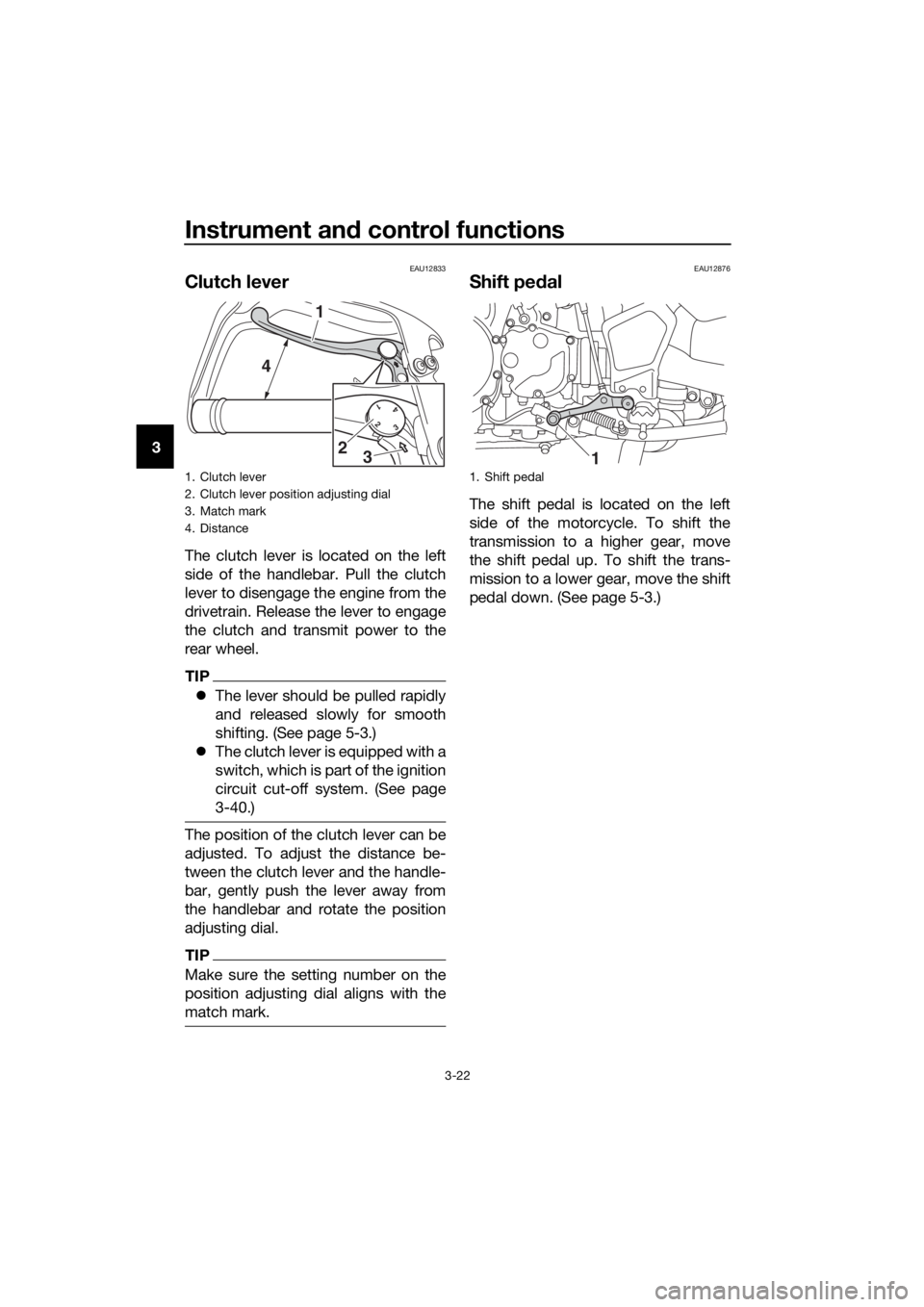
Clutch lever
The clutch lever is located on the left
side of the handlebar. Pull the clutch
lever to disengage the engine from the
drivetrain. Release the lever to engage
the clutch and transmit power to the
rear wheel.
TIP
The lever should be pulled rapidly
and released slowly for smooth
shifting. (See page 5-3.)
The clutch lever is equipped with a
switch, which is part of the ignition
circuit cut-off system. (See page
3-40.)
The position of the clutch lever can be
adjusted. To adjust the distance be-
tween the clutch lever and the handle-
bar, gently push the lever away from
the handlebar and rotate the position
adjusting dial.
TIP
Make sure the setting number on the
position adjusting dial aligns with the
match mark.
EAU12876
Shift pe dal
The shift pedal is located on the left
side of the motorcycle. To shift the
transmission to a higher gear, move
the shift pedal up. To shift the trans-
mission to a lower gear, move the shift
pedal down. (See page 5-3.)
1. Clutch lever
2. Clutch lever position adjusting dial
3. Match mark
4. Distance
1 2 3 4
1
4
32
1. Shift pedal
1
UBP8E1E0.book Page 22 Friday, September 14, 2018 11:35 AM
Page 39 of 118
Instrument and control functions
3-25
3
This ABS has a test mode which
allows the owner to experience
the pulsation at the brake lever or
brake pedal when the ABS is op-
erating. However, special tools are
required, so please consult your
Yamaha dealer.
NOTICE
ECA16831
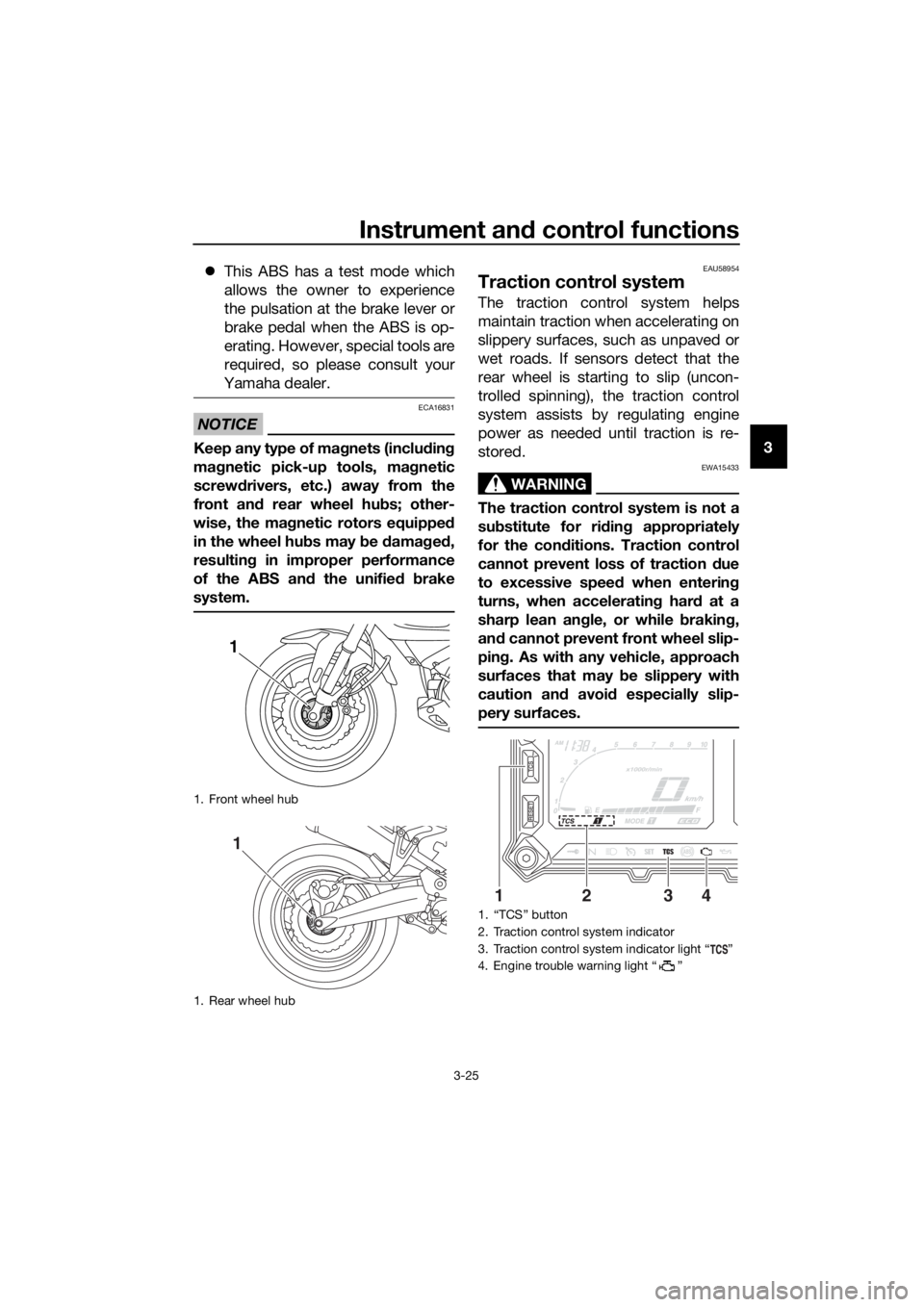
Keep any type of mag nets (includin g
ma gnetic pick-up tools, mag netic
screwd rivers, etc.) away from the
front an d rear wheel hu bs; other-
wise, the ma gnetic rotors equippe d
in the wheel hu bs may b e damag ed ,
resultin g in improper performance
of the ABS an d the unified b rake
system.
EAU58954
Traction control system
The traction control system helps
maintain traction when accelerating on
slippery surfaces, such as unpaved or
wet roads. If sensors detect that the
rear wheel is starting to slip (uncon-
trolled spinning), the traction control
system assists by regulating engine
power as needed until traction is re-
stored.
WARNING
EWA15433
The traction control system is not a
su bstitute for ri din g appropriately
for the con ditions. Traction control
cannot prevent loss of traction d ue
to excessive spee d when enterin g
turns, when acceleratin g har d at a
sharp lean an gle, or while b raking,
an d cannot prevent front wheel slip-
pin g. As with any vehicle, approach
surfaces that may be slippery with
caution an d avoi d especially slip-
pery surfaces.
1. Front wheel hub
1. Rear wheel hub
1
1
1. “TCS” button
2. Traction control system indicator
3. Traction control system indicator light “ ”
4. Engine trouble warning light “ ”
1324
UBP8E1E0.book Page 25 Friday, September 14, 2018 11:35 AM
Page 40 of 118
Instrument and control functions
3-26
3 The traction control system indicator
light flashes when traction control has
engaged. You may notice slight chang-
es in engine and exhaust sounds when
the system has engaged.
When the vehicle is turned on, the trac-
tion control system is turned on and
set to “TCS 1”. The traction control
system modes are as follows.
“TCS 1”
: Default mode
“TCS 2” : Sporty mode
This mode decreases traction control
system assist, allowing the rear wheel
to spin more freely than “TCS 1”.
“TCS OFF” : The traction control sys-
tem is turned off. The system may also
be automatically disabled in some rid-
ing conditions.
TIP
Use the mode “TCS OFF” to help free
the rear wheel if the motorcycle gets
stuck in mud, sand, or other soft sur-
faces.
NOTICE
ECA16801
Use only the specifie d tires. (See
pa ge 6-19.) Usin g different sized
tires will prevent the traction control
system from controllin g tire rotation
accurately.
Settin g the traction control system
WARNING
EWA15441
Be sure to stop the vehicle before
makin g any settin g chan ges to the
traction control system. Chan gin g
settin gs while ri din g can d istract the
operator an d increase the risk of an
acci dent.
The traction control system mode can
be changed only when the vehicle is
stopped.
Push the “TCS” button to change
between modes “1” and “2”.
Push the button for two seconds
to select “TCS OFF” and turn the
traction control system off. Push
the button again to return to the
previously selected mode.
Resetting
The traction control system will disable
in the following conditions: excessive rear wheel spinning
the front or rear wheel comes off
the ground while riding
either wheel is rotated with the key
turned to “ON” (such as when per-
forming maintenance)
If the traction control system has been
disabled, both the traction control sys-
tem indicator light and the engine trou-
ble warning light come on.
Should this occur, try resetting the sys-
tem as follows. 1. Stop the vehicle and turn the key to “OFF”.
2. Wait a few seconds and then turn the key back to “ON”.
3. The traction control system indi- cator light should turn off and the
system be enabled.
TIP
If the traction control system indicator
light remains on after resetting, the mo-
torcycle may still be ridden. However,
have a Yamaha dealer check the vehi-
cle as soon as possible.
UBP8E1E0.book Page 26 Friday, September 14, 2018 11:35 AM
Page 41 of 118
Instrument and control functions
3-27
3
4. Have a Yamaha dealer check the
vehicle and turn off the engine
trouble warning light.
EAU13076
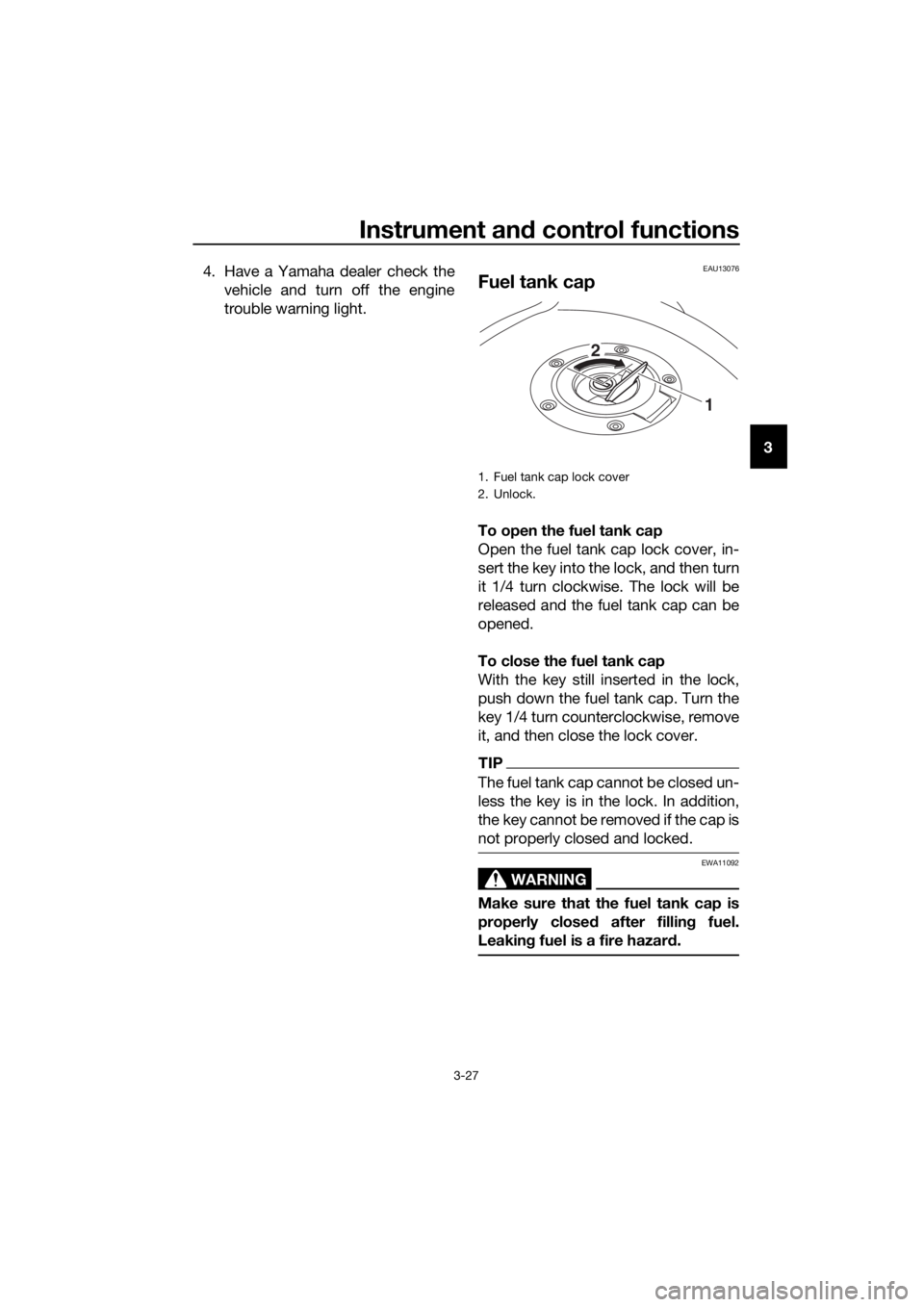
Fuel tank cap
To open the fuel tank cap
Open the fuel tank cap lock cover, in-
sert the key into the lock, and then turn
it 1/4 turn clockwise. The lock will be
released and the fuel tank cap can be
opened.
To close the fuel tank cap
With the key still inserted in the lock,
push down the fuel tank cap. Turn the
key 1/4 turn counterclockwise, remove
it, and then close the lock cover.
TIP
The fuel tank cap cannot be closed un-
less the key is in the lock. In addition,
the key cannot be removed if the cap is
not properly closed and locked.
WARNING
EWA11092
Make sure that the fuel tank cap is
properly close d after fillin g fuel.
Leakin g fuel is a fire hazar d.
1. Fuel tank cap lock cover
2. Unlock.
1
2
UBP8E1E0.book Page 27 Friday, September 14, 2018 11:35 AM
Page 42 of 118
Instrument and control functions
3-28
3
EAU13222
Fuel
Make sure there is sufficient gasoline in
the tank.
WARNING
EWA10882
Gasoline an d g asoline vapors are
extremely flamma ble. To avoi d fires
an d explosions an d to re duce the
risk of injury when refuelin g, follow
these instructions.
1. Before refueling, turn off the en- gine and be sure that no one is sit-
ting on the vehicle. Never refuel
while smoking, or while in the vi-
cinity of sparks, open flames, or
other sources of ignition such as
the pilot lights of water heaters
and clothes dryers.
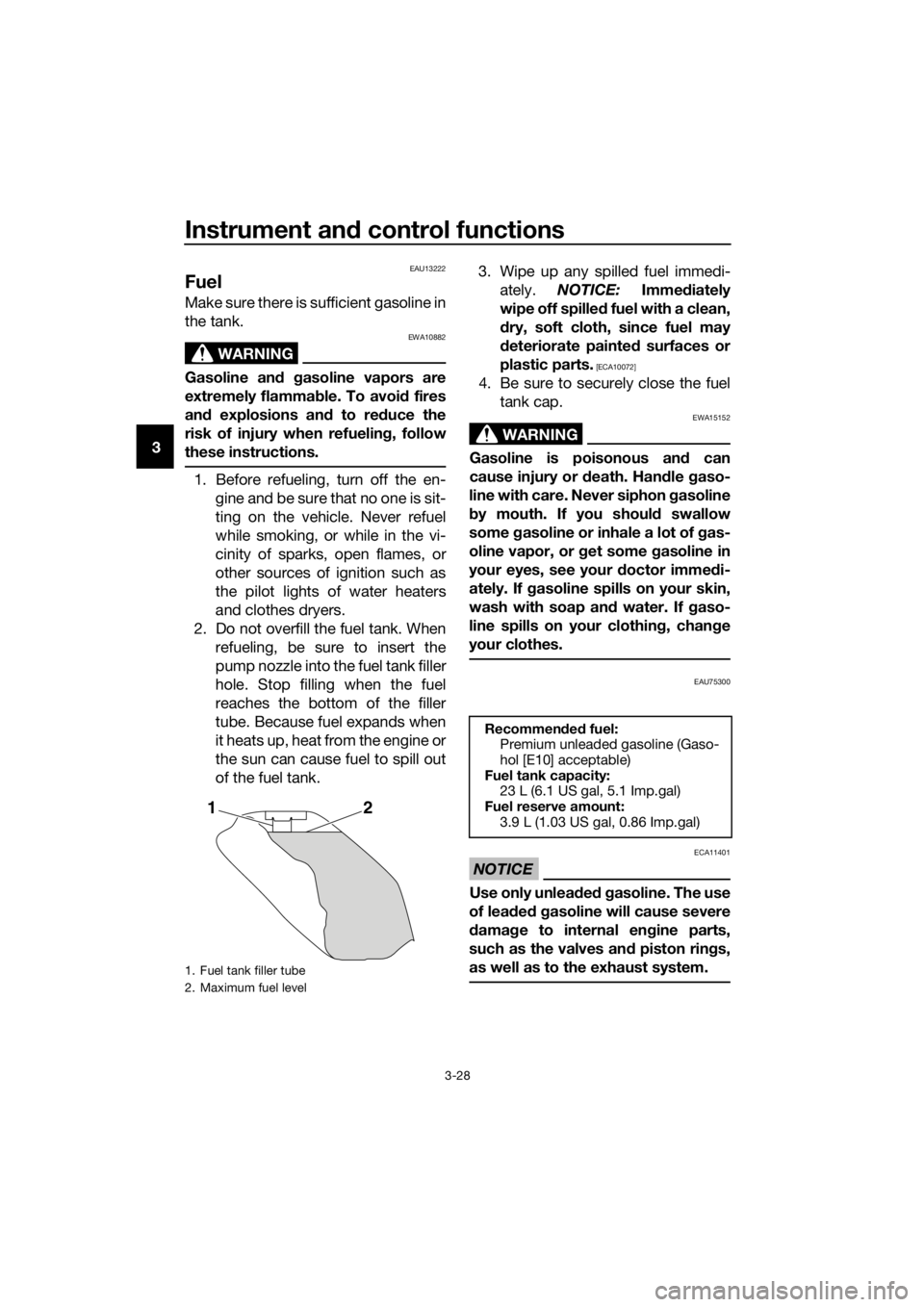
2. Do not overfill the fuel tank. When refueling, be sure to insert the
pump nozzle into the fuel tank filler
hole. Stop filling when the fuel
reaches the bottom of the filler
tube. Because fuel expands when
it heats up, heat from the engine or
the sun can cause fuel to spill out
of the fuel tank. 3. Wipe up any spilled fuel immedi-
ately. NOTICE: Immediately
wipe off spille d fuel with a clean,
d ry, soft cloth, since fuel may
d eteriorate painte d surfaces or
plastic parts.
[ECA10072]
4. Be sure to securely close the fuel tank cap.
WARNING
EWA15152
Gasoline is poisonous an d can
cause injury or death. Han dle gaso-
line with care. Never siphon gasoline
b y mouth. If you shoul d swallow
some gasoline or inhale a lot of gas-
oline vapor, or get some gasoline in
your eyes, see your doctor imme di-
ately. If gasoline spills on your skin,
wash with soap an d water. If gaso-
line spills on your clothin g, chan ge
your clothes.
EAU75300
NOTICE
ECA11401
Use only unlea ded g asoline. The use
of lead ed g asoline will cause severe
d amag e to internal en gine parts,
such as the valves an d piston rin gs,
as well as to the exhaust system.
1. Fuel tank filler tube
2. Maximum fuel level
21
Recommen ded fuel:
Premium unleaded gasoline (Gaso-
hol [E10] acceptable)
Fuel tank capacity: 23 L (6.1 US gal, 5.1 Imp.gal)
Fuel reserve amount:
3.9 L (1.03 US gal, 0.86 Imp.gal)
UBP8E1E0.book Page 28 Friday, September 14, 2018 11:35 AM