brake YAMAHA XT1200Z 2019 Owners Manual
[x] Cancel search | Manufacturer: YAMAHA, Model Year: 2019, Model line: XT1200Z, Model: YAMAHA XT1200Z 2019Pages: 118, PDF Size: 3.8 MB
Page 5 of 118

Table of contents
Safety information ............................1-1
Description ........................................2-1
Left view ..........................................2-1
Right view........................................2-2
Controls and instruments ................2-3
Instrument an d control functions ....3-1
Immobilizer system .........................3-1
Main switch/steering lock ...............3-2
Indicator lights and warning lights ............................................3-3
Cruise control system .....................3-6
Multi-function meter unit .................3-9
D-mode (drive mode) ....................3-19
Handlebar switches.......................3-20
Clutch lever ...................................3-22
Shift pedal .....................................3-22
Brake lever ....................................3-23
Brake pedal ...................................3-24
ABS ...............................................3-24
Traction control system.................3-25
Fuel tank cap.................................3-27
Fuel................................................3-28
Fuel tank overflow hose ................3-29
Catalytic converter ........................3-30
Rider seat ......................................3-30
Adjusting the rider seat height ......3-31
Windshield.....................................3-33
Adjusting the front fork..................3-34
Adjusting the shock absorber assembly....................................3-36
Carriers..........................................3-37
Luggage strap holders ..................3-38
Auxiliary DC jack ...........................3-39
Sidestand ......................................3-40
Ignition circuit cut-off system........3-40
For your safety – pre-operation
checks ...............................................4-1
Operation an d important ri din g
points .................................................5-1
Starting the engine ..........................5-2
Shifting ............................................5-3 Tips for reducing fuel
consumption................................ 5-4
Engine break-in ............................... 5-5
Parking ............................................ 5-6
Perio dic maintenance an d
a d justment ........................................ 6-1
Tool kit ............................................ 6-2
Periodic maintenance charts .......... 6-3
Periodic maintenance chart for the emission control system.............. 6-3
General maintenance and lubrication chart........................... 6-4
Removing and installing
cowlings ...................................... 6-7
Checking the spark plugs ............... 6-9
Canister......................................... 6-10
Engine oil ...................................... 6-10
Why Yamalube .............................. 6-13
Final gear oil.................................. 6-14
Coolant ......................................... 6-16
Air filter element ............................ 6-17
Checking the engine idling speed......................................... 6-18
Checking the throttle grip free play ............................................ 6-18
Valve clearance ............................. 6-19
Tires .............................................. 6-19
Spoke wheels ............................... 6-22
Clutch lever ................................... 6-22
Checking the brake lever free play ............................................ 6-23
Brake light switches ...................... 6-23
Checking the front and rear brake pads................................. 6-24
Checking the brake fluid level....... 6-25
Changing the brake and clutch fluids .......................................... 6-26
Checking and lubricating the throttle grip and cable ............... 6-26
Checking and lubricating the
brake and shift pedals ............... 6-27
Checking and lubricating the brake and clutch levers ............. 6-27
Checking and lubricating the
sidestand ................................... 6-28
UBP8E1E0.book Page 1 Friday, September 14, 2018 11:35 AM
Page 6 of 118

Table of contents
Lubricating the swingarm
pivots ........................................ 6-28
Checking the front fork................. 6-29
Checking the steering................... 6-29
Checking the wheel bearings ....... 6-30
Battery .......................................... 6-30
Replacing the fuses ...................... 6-32
Replacing a headlight bulb ........... 6-33
Replacing an auxiliary light bulb... 6-35
Turn signal light and brake/tail light ........................................... 6-37
Replacing a license plate light bulb ........................................... 6-38
Supporting the motorcycle ........... 6-39
Troubleshooting............................ 6-39
Troubleshooting charts................. 6-40
Motorcycle care an d stora ge.......... 7-1
Matte color caution ........................ 7-1
Care ................................................ 7-1
Storage ........................................... 7-4
Specifications ................................... 8-1
Consumer information ..................... 9-1
Identification numbers .................... 9-1
Diagnostic connector ..................... 9-2
Vehicle data recording.................... 9-3
In dex ................................................ 10-1
UBP8E1E0.book Page 2 Friday, September 14, 2018 11:35 AM
Page 13 of 118
Description
2-2
2
EAU63391
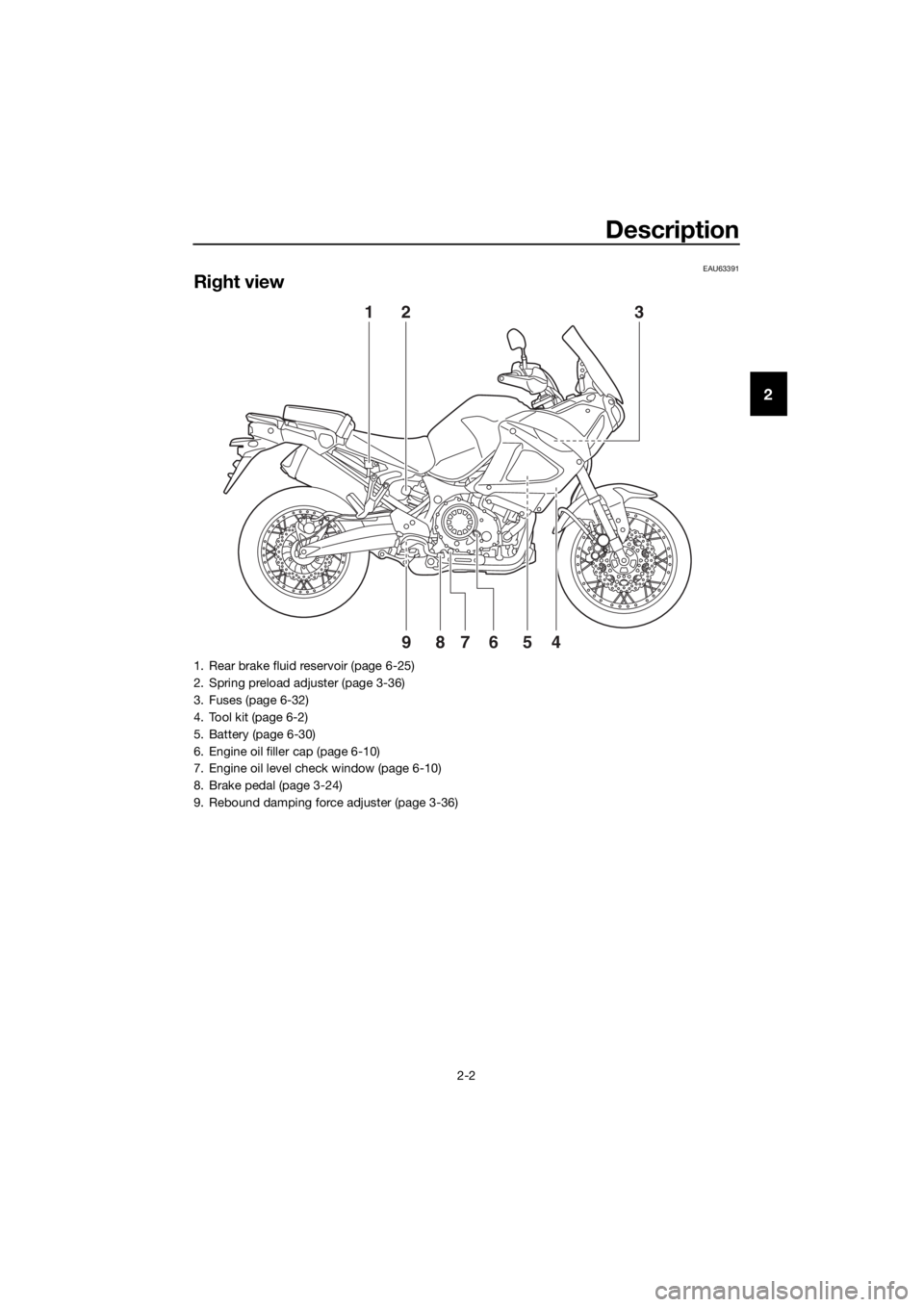
Right view
1
4
58967
23
1. Rear brake fluid reservoir (page 6-25)
2. Spring preload adjuster (page 3-36)
3. Fuses (page 6-32)
4. Tool kit (page 6-2)
5. Battery (page 6-30)
6. Engine oil filler cap (page 6-10)
7. Engine oil level check window (page 6-10)
8. Brake pedal (page 3-24)
9. Rebound damping force adjuster (page 3-36)
UBP8E1E0.book Page 2 Friday, September 14, 2018 11:35 AM
Page 14 of 118
Description
2-3
2
EAU63401
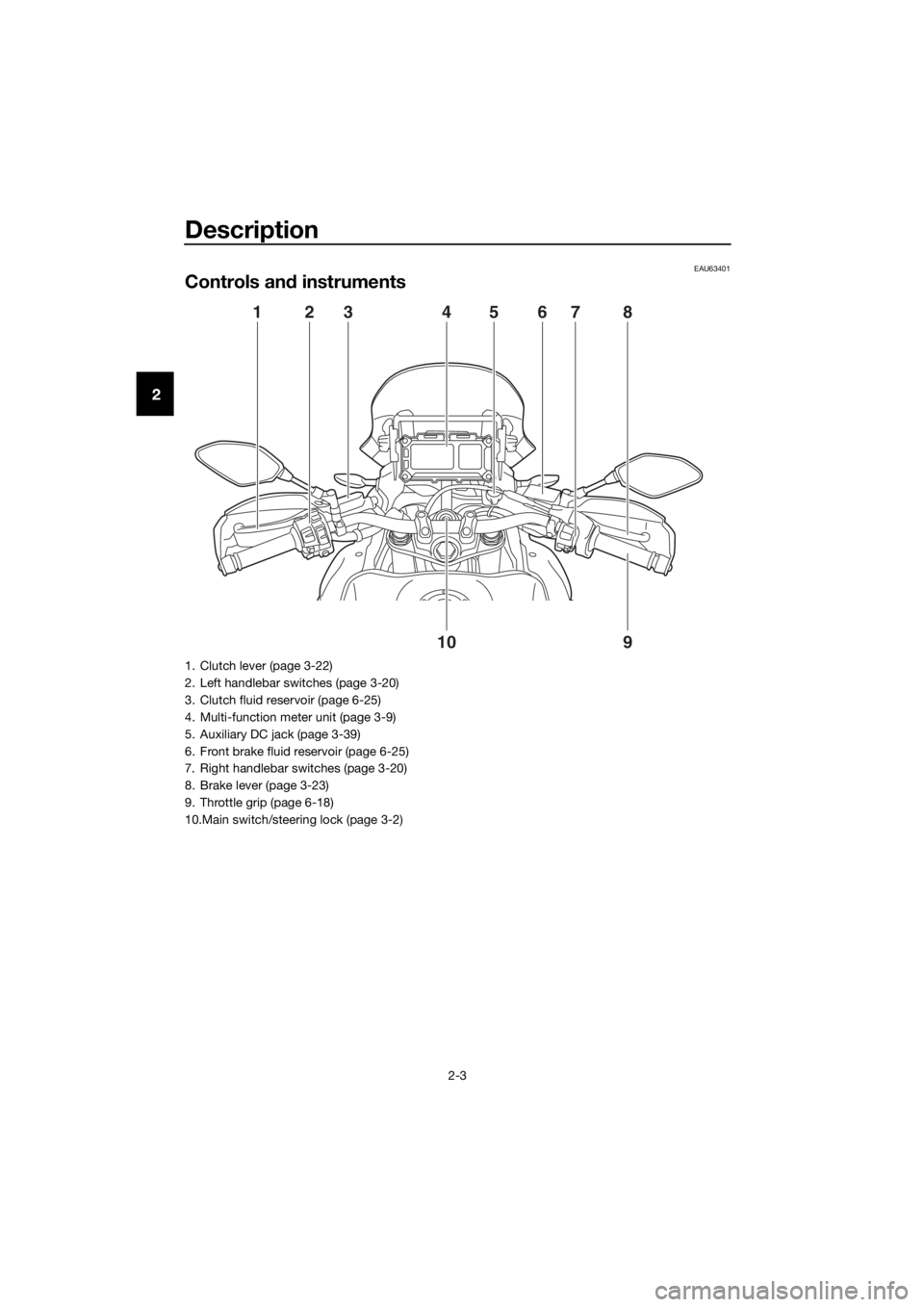
Controls and instruments
1
9
10
2345678
1. Clutch lever (page 3-22)
2. Left handlebar switches (page 3-20)
3. Clutch fluid reservoir (page 6-25)
4. Multi-function meter unit (page 3-9)
5. Auxiliary DC jack (page 3-39)
6. Front brake fluid reservoir (page 6-25)
7. Right handlebar switches (page 3-20)
8. Brake lever (page 3-23)
9. Throttle grip (page 6-18)
10.Main switch/steering lock (page 3-2)
UBP8E1E0.book Page 3 Friday, September 14, 2018 11:35 AM
Page 17 of 118
Instrument and control functions
3-3
3
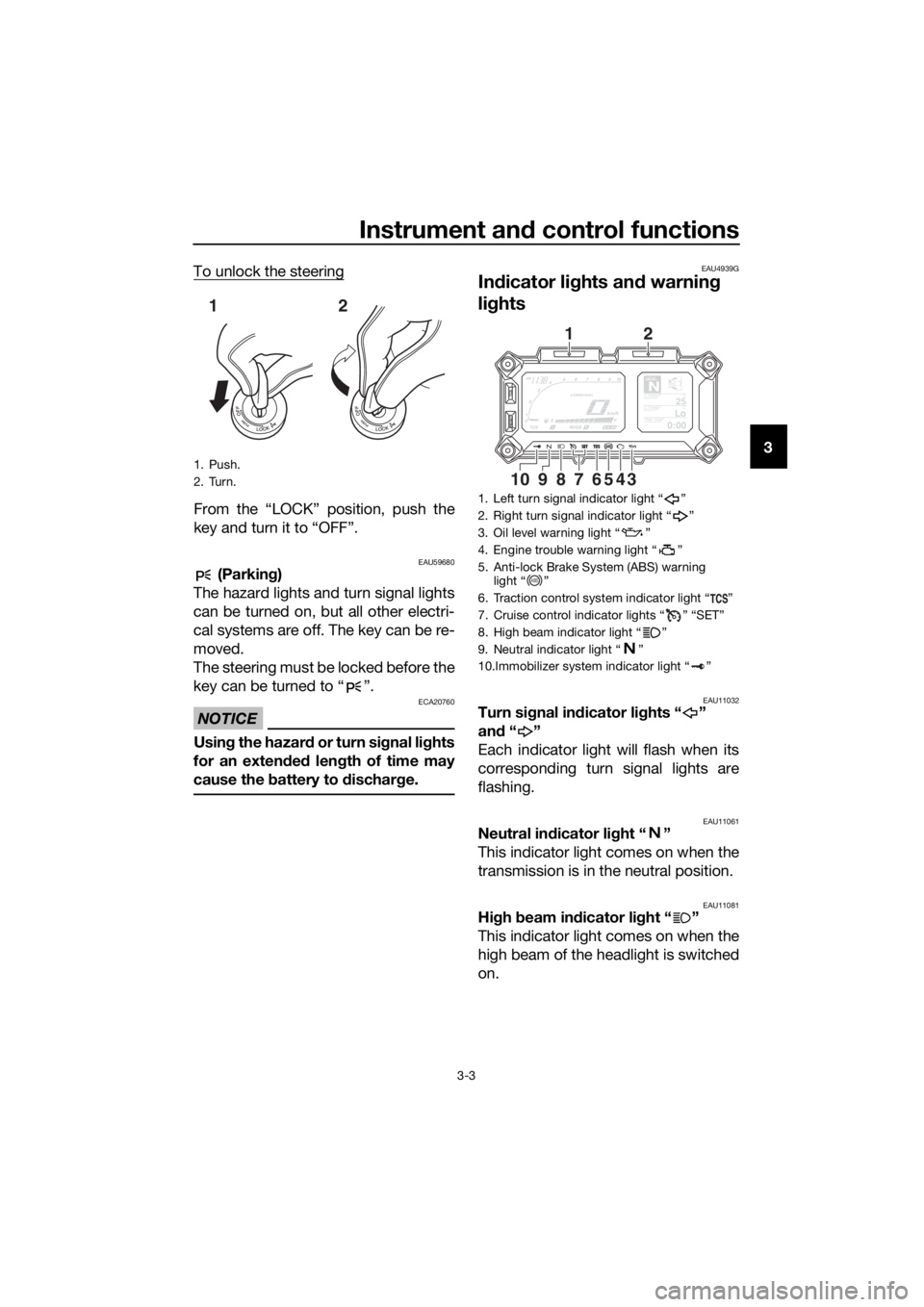
To unlock the steering
From the “LOCK” position, push the
key and turn it to “OFF”.
EAU59680 (Parkin
g)
The hazard lights and turn signal lights
can be turned on, but all other electri-
cal systems are off. The key can be re-
moved.
The steering must be locked before the
key can be turned to “ ”.
NOTICE
ECA20760
Usin g the hazar d o r t u r n s i gnal li ghts
for an exten ded len gth of time may
cause the battery to d ischarge.
EAU4939G
In dicator li ghts an d warnin g
lig hts
EAU11032Turn si gnal in dicator li ghts “ ”
an d“”
Each indicator light will flash when its
corresponding turn signal lights are
flashing.
EAU11061Neutral in dicator li ght “ ”
This indicator light comes on when the
transmission is in the neutral position.
EAU11081Hi gh beam in dicator li ght “ ”
This indicator light comes on when the
high beam of the headlight is switched
on.
1. Push.
2. Turn.
12
1. Left turn signal indicator light “ ”
2. Right turn signal indicator light “ ”
3. Oil level warning light “ ”
4. Engine trouble warning light “ ”
5. Anti-lock Brake System (ABS) warning light “ ”
6. Traction control system indicator light “ ”
7. Cruise control indicator lights “ ” “SET”
8. High beam indicator light “ ”
9. Neutral indicator light “ ”
10.Immobilizer system indicator light “ ”
GEARN25A.TEMP ˚C
LoC.TEMP˚C
0:00TIME TRIP
345687910
12
ABS
UBP8E1E0.book Page 3 Friday, September 14, 2018 11:35 AM
Page 18 of 118

Instrument and control functions
3-4
3
EAU11259Oil level warnin g li ght “ ”
This warning light comes on when the
engine oil level is low. To prevent en-
gine damage, replenish the engine oil
as soon as possible.
Even if the oil level is sufficient, the
warning light may flicker when riding
on a slope or during sudden accelera-
tion or deceleration, but this is not a
malfunction. If a problem is detected in
the oil level detection circuit, the oil lev-
el warning light will flash repeatedly. If
this occurs, have a Yamaha dealer
check the vehicle.
TIP
When the vehicle is turned on, the light
will come on for a few seconds and
then go off. If the light does not come
on, or if the light remains on after con-
firming that the oil level is correct (see
page 6-10), have a Yamaha dealer
check the vehicle.
EAU58402Cruise control in dicator li ghts “ ”
an d “SET”
These indicator lights come on when
the cruise control system is activated.
(See page 3-6.)
TIP
When the vehicle is turned on, these
lights should come on for a few sec-
onds and then go off. If the lights do
not come on, have a Yamaha dealer
check the vehicle.
EAU73172En gine trou ble warnin g lig ht “ ”
This warning light comes on if a prob-
lem is detected in the engine or other
vehicle control system. If this occurs,
have a Yamaha dealer check the on-
board diagnostic system.
TIP
When the vehicle is turned on, the light
will come on for a few seconds and
then go off. If the light does not come
on, or if the light remains on, have a
Yamaha dealer check the vehicle.
EAU69892ABS warnin g li ght “ ”
This warning light comes on when the
vehicle is first turned on, and goes off
after starting riding. If the warning light
comes on while riding, the anti-lock
brake system may not work correctly.
(See page 3-24.)
TIP
If the light does not come at all, or if the
light does not go off after traveling 10
km/h (6 mi/h), have a Yamaha dealer
check the vehicle.
WARNING
EWA16041
If the ABS warnin g li ght does not go
off after travelin g at a speed of 10
km/h (6 mi/h) or hi gher, or if the
warnin g li ght comes on or flashes
while ri din g, the b rake system re-
verts to conventional brakin g. If ei-
ther of the ab ove occurs, or if the
warnin g li ght does not come on at
all, use extra caution to avoi d possi-
b le wheel lock durin g emer gency
ABS
UBP8E1E0.book Page 4 Friday, September 14, 2018 11:35 AM
Page 19 of 118

Instrument and control functions
3-5
3
b
rakin g. Have a Yamaha d ealer
check the brake system an d electri-
cal circuits as soon as possi ble.
EAU74082Traction control system in dicator
li g ht “ ”
This indicator light will flash when trac-
tion control has engaged.
If the traction control system is turned
off, this indicator light will come on.
TIP
When the vehicle is turned on, the light
should come on for a few seconds and
then go off. If the light does not come
on, or if the light remains on, have a
Yamaha dealer check the vehicle.
EAU73120Immo bilizer system in dicator
li g ht “ ”
When the key is turned to “OFF” and
30 seconds have passed, the indicator
light will flash steadily to indicate the
immobilizer system is enabled. After 24
hours have passed, the indicator light
will stop flashing, however the immobi-
lizer system is still enabled.
The electrical circuit of the indicator
light can be checked by turning the key
to “ON”. The indicator light should
come on for a few seconds, and then
go off.
If the indicator light does not come on
initially when the key is turned to “ON”,
if the indicator light remains on, or if the
indicator light flashes in a pattern (if a
problem is detected in the immobilizer
system, the immobilizer system indica-
tor light will flash in a pattern), have a
Yamaha dealer check the vehicle.
TIP
If the immobilizer system indicator light
flashes in the pattern, slowly 5 times
then quickly 2 times, this could be
caused by transponder interference. If
this occurs, try the following.
1. Make sure there are no other im- mobilizer keys close to the main
switch. Other immobilizer system
keys may cause signal interfer-
ence and prevent the engine from
starting.
2. Use the code re-registering key to start the engine.
3. If the engine starts, turn it off, and try starting the engine with the
standard keys.
4. If one or both of the standard keys do not start the engine, take the
vehicle and all 3 keys to a Yamaha
dealer to have the standard keys
re-registered.
UBP8E1E0.book Page 5 Friday, September 14, 2018 11:35 AM
Page 21 of 118
Instrument and control functions
3-7
3
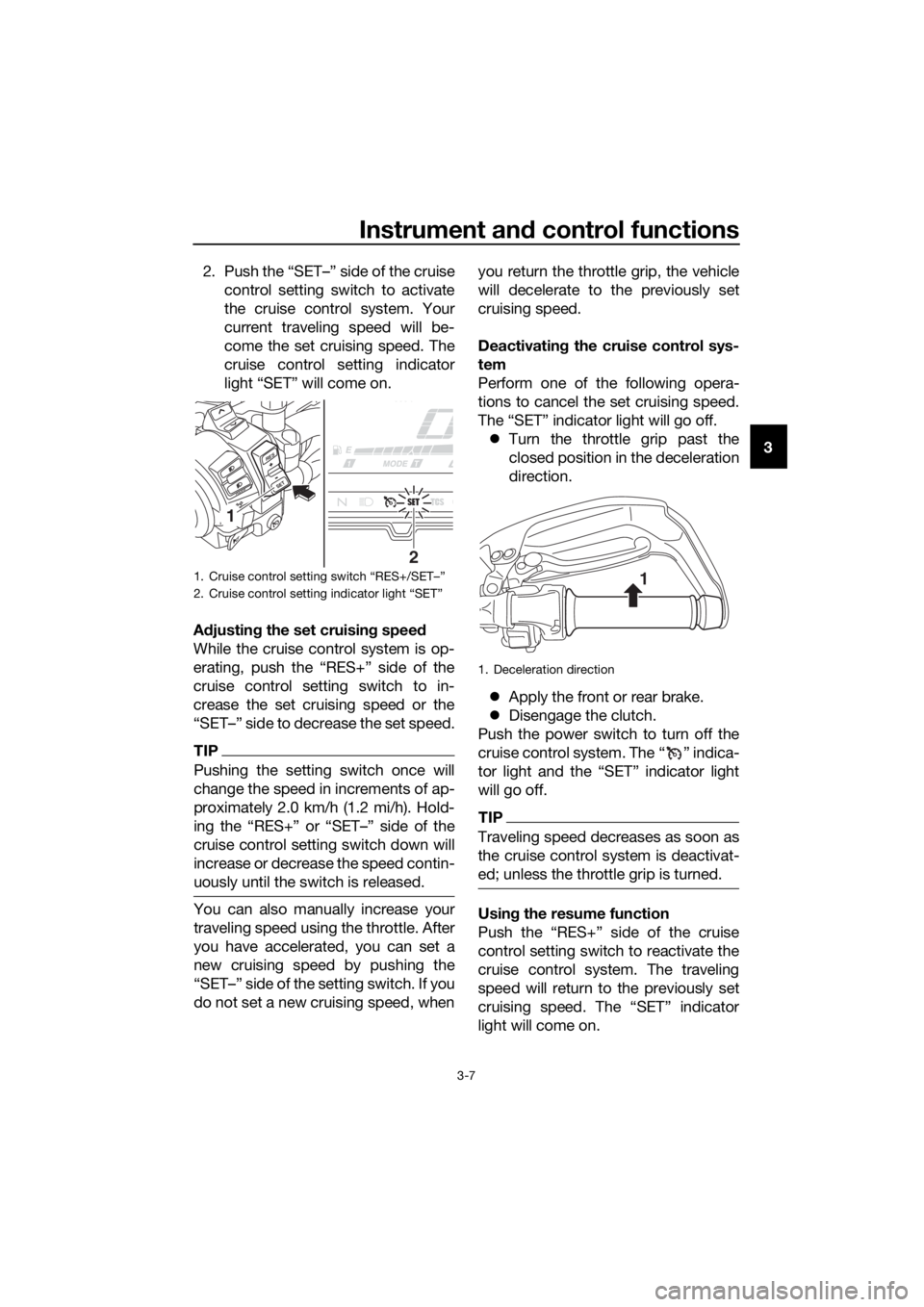
2. Push the “SET–” side of the cruise
control setting switch to activate
the cruise control system. Your
current traveling speed will be-
come the set cruising speed. The
cruise control setting indicator
light “SET” will come on.
A djustin g the set cruisin g speed
While the cruise control system is op-
erating, push the “RES+” side of the
cruise control setting switch to in-
crease the set cruising speed or the
“SET–” side to decrease the set speed.
TIP
Pushing the setting switch once will
change the speed in increments of ap-
proximately 2.0 km/h (1.2 mi/h). Hold-
ing the “RES+” or “SET–” side of the
cruise control setting switch down will
increase or decrease the speed contin-
uously until the switch is released.
You can also manually increase your
traveling speed using the throttle. After
you have accelerated, you can set a
new cruising speed by pushing the
“SET–” side of the setting switch. If you
do not set a new cruising speed, when you return the throttle grip, the vehicle
will decelerate to the previously set
cruising speed.
Deactivatin
g the cruise control sys-
tem
Perform one of the following opera-
tions to cancel the set cruising speed.
The “SET” indicator light will go off. Turn the throttle grip past the
closed position in the deceleration
direction.
Apply the front or rear brake.
Disengage the clutch.
Push the power switch to turn off the
cruise control system. The “ ” indica-
tor light and the “SET” indicator light
will go off.
TIP
Traveling speed decreases as soon as
the cruise control system is deactivat-
ed; unless the throttle grip is turned.
Usin g the resume function
Push the “RES+” side of the cruise
control setting switch to reactivate the
cruise control system. The traveling
speed will return to the previously set
cruising speed. The “SET” indicator
light will come on.
1. Cruise control setting switch “RES+/SET–”
2. Cruise control setting indicator light “SET”
R ES
SETPA S S
2
1
1. Deceleration direction
1
UBP8E1E0.book Page 7 Friday, September 14, 2018 11:35 AM
Page 22 of 118
Instrument and control functions
3-8
3
WARNING
EWA16351
It is d angerous to use the resume
function when the previously set
cruisin g speed is too hi gh for current
con ditions.
TIP
Pushing the power switch while the
system is operating will turn the system
off completely and erase the previously
set cruising speed. You will not be able
to use the resume function until a new
cruising speed has been set.
Automatic deactivation of the cruise
control system
The cruise control system for this mod-
el is electronically controlled and is
linked with the other control systems.
The cruise control system will auto-
matically become deactivated under
the following conditions:
The cruise control system is not
able to maintain the set cruising
speed.
Wheel slip or wheel spin is detect-
ed. (If the traction control system
has not been turned off, the trac-
tion control system will work.)
The start/engine stop switch is set
to the “ ” position.
The engine stalls.
The sidestand is lowered.
When traveling with a set cruising
speed, if the cruise control system is
deactivated under the above condi-
tions, the “ ” indicator light will go off
and the “SET” indicator light will flash
for 4 seconds, and then go off. When not traveling with a set cruising
speed, if the start/engine stop switch is
set to the “ ” position, the engine
stalls, or the sidestand is lowered, then
the “ ” indicator light will go off (the
“SET” indicator light will not flash).
If the cruise control system is automat-
ically deactivated, please stop and
confirm that your vehicle is in good op-
erating condition.
Before using the cruise control system
again, activate it using the power
switch.
TIP
In some cases, the cruise control sys-
tem may not be able to maintain the set
cruising speed when the vehicle is
traveling uphill or downhill.
When the vehicle is traveling up-
hill, the actual traveling speed may
become lower than the set cruis-
ing speed. If this occurs, acceler-
ate to the desired traveling speed
using the throttle.
When the vehicle is traveling
downhill, the actual traveling
speed may become higher than
the set cruising speed. If this oc-
curs, the setting switch cannot be
used to adjust the set cruising
speed. To reduce the traveling
speed, apply the brakes. When
the brakes are applied, the cruise
control system will become deac-
tivated.
UBP8E1E0.book Page 8 Friday, September 14, 2018 11:35 AM
Page 37 of 118
Instrument and control functions
3-23
3
EAU4951B
Brake lever
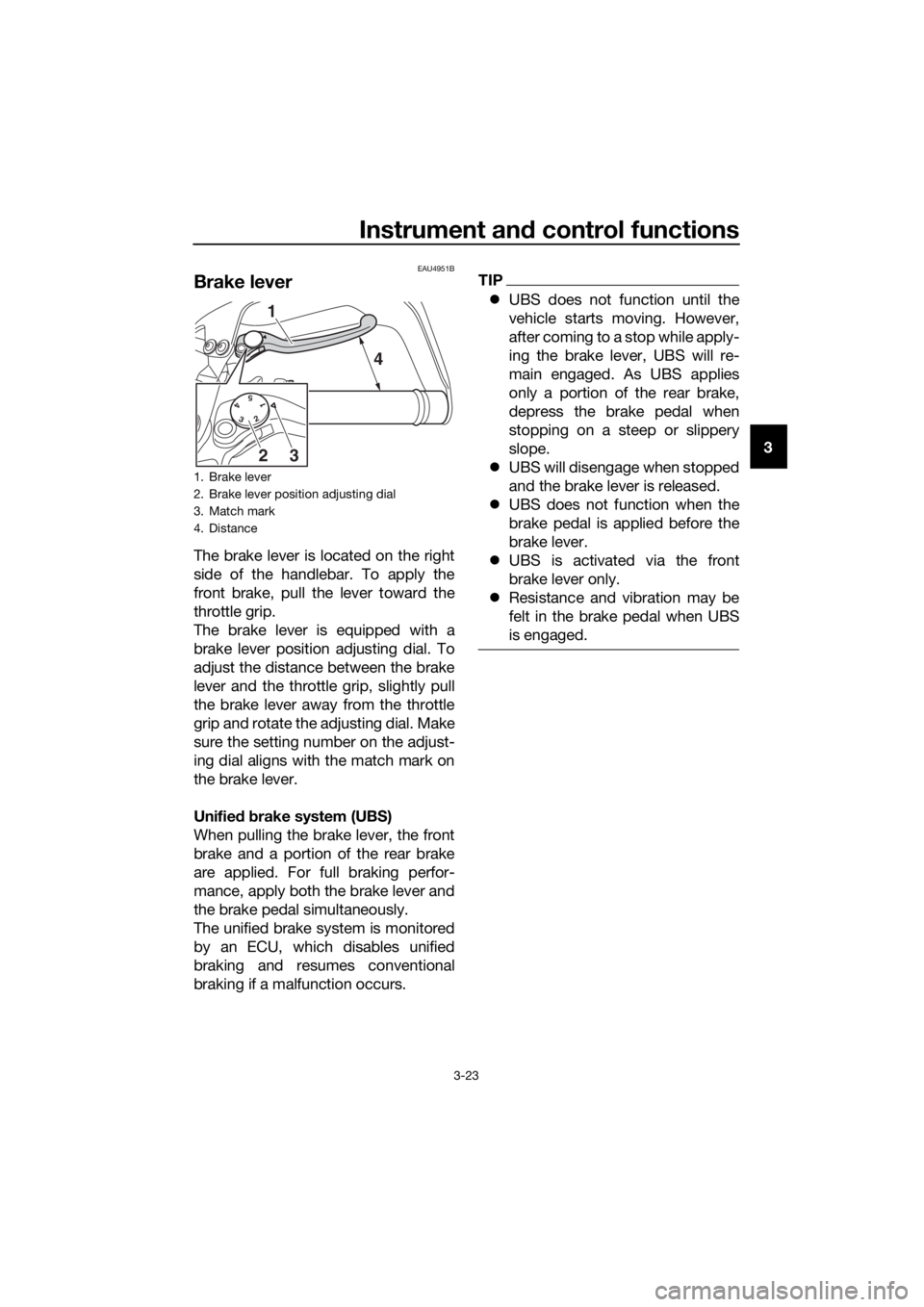
The brake lever is located on the right
side of the handlebar. To apply the
front brake, pull the lever toward the
throttle grip.
The brake lever is equipped with a
brake lever position adjusting dial. To
adjust the distance between the brake
lever and the throttle grip, slightly pull
the brake lever away from the throttle
grip and rotate the adjusting dial. Make
sure the setting number on the adjust-
ing dial aligns with the match mark on
the brake lever.
Unifie d b rake system (UBS)
When pulling the brake lever, the front
brake and a portion of the rear brake
are applied. For full braking perfor-
mance, apply both the brake lever and
the brake pedal simultaneously.
The unified brake system is monitored
by an ECU, which disables unified
braking and resumes conventional
braking if a malfunction occurs.
TIP
UBS does not function until the
vehicle starts moving. However,
after coming to a stop while apply-
ing the brake lever, UBS will re-
main engaged. As UBS applies
only a portion of the rear brake,
depress the brake pedal when
stopping on a steep or slippery
slope.
UBS will disengage when stopped
and the brake lever is released.
UBS does not function when the
brake pedal is applied before the
brake lever.
UBS is activated via the front
brake lever only.
Resistance and vibration may be
felt in the brake pedal when UBS
is engaged.
1. Brake lever
2. Brake lever position adjusting dial
3. Match mark
4. Distance
5 4 3 2 1
1
4
32
UBP8E1E0.book Page 23 Friday, September 14, 2018 11:35 AM