key YAMAHA XT1200ZE 2015 User Guide
[x] Cancel search | Manufacturer: YAMAHA, Model Year: 2015, Model line: XT1200ZE, Model: YAMAHA XT1200ZE 2015Pages: 118, PDF Size: 3.13 MB
Page 33 of 118
INSTRUMENT AND CONTROL FUNCTIONS
3-18
3
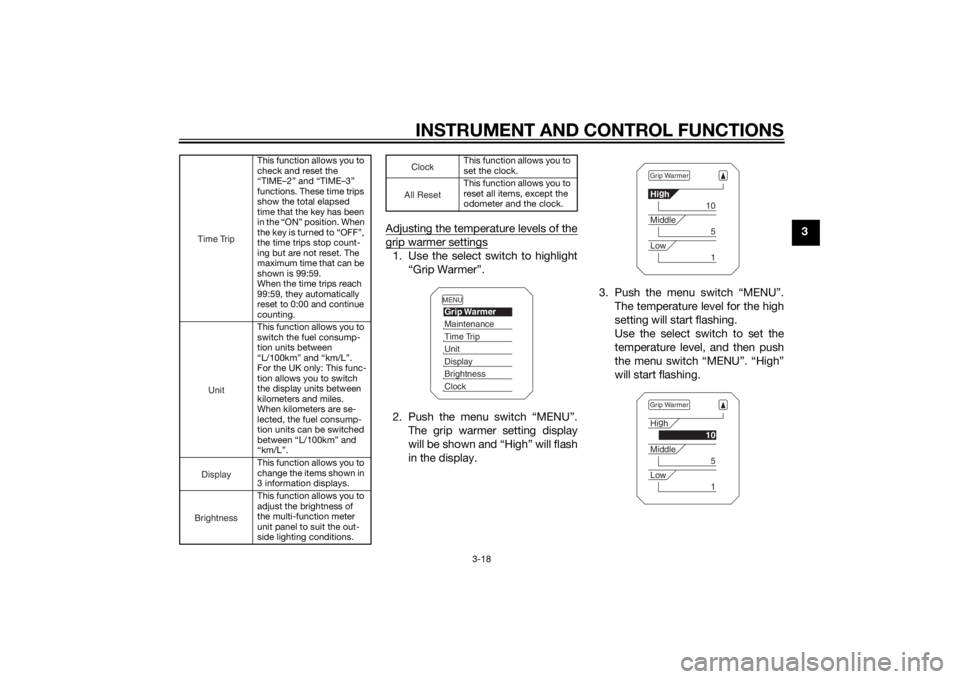
Adjusting the temperature levels of the
grip warmer settings1. Use the select switch to highlight
“Grip Warmer”.
2. Push the menu switch “MENU”. The grip warmer setting display
will be shown and “High” will flash
in the display. 3. Push the menu switch “MENU”.
The temperature level for the high
setting will start flashing.
Use the select switch to set the
temperature level, and then push
the menu switch “MENU”. “High”
will start flashing.
This function allows you to
check and reset the
“TIME–2” and “TIME–3”
functions. These time trips
show the total elapsed
time that the key has been
in the “ON” position. When
the key is turned to “OFF”,
the time trips stop count-
ing but are not reset. The
maximum time that can be
shown is 99:59.
When the time trips reach
99:59, they automatically
reset to 0:00 and continue
counting.
This function allows you to
switch the fuel consump-
tion units between
“L/100km” and “km/L”.
For the UK only: This func-
tion allows you to switch
the display units between
kilometers and miles.
When kilometers are se-
lected, the fuel consump-
tion units can be switched
between “L/100km” and
“km/L”.
This function allows you to
change the items shown in
3 information displays.
This function allows you to
adjust the brightness of
the multi-function meter
unit panel to suit the out-
side lighting conditions.
Time Trip
Unit
DisplayBrightness
This function allows you to
set the clock.
This function allows you to
reset all items, except the
odometer and the clock.
Cloc
k
All Reset
MENUGrip WarmerMaintenanceTime TripUnitDisplayBrightnessClock
Grip WarmerHi g
h
10
Middle
5
Low
1
Grip WarmerHi g
h
10
Middle
5
Low
1
U2KBE1E0.book Page 18 Monday, August 18, 2014 9:42 AM
Page 38 of 118
INSTRUMENT AND CONTROL FUNCTIONS
3-23
3
TIPThe odometer and the clock cannot be
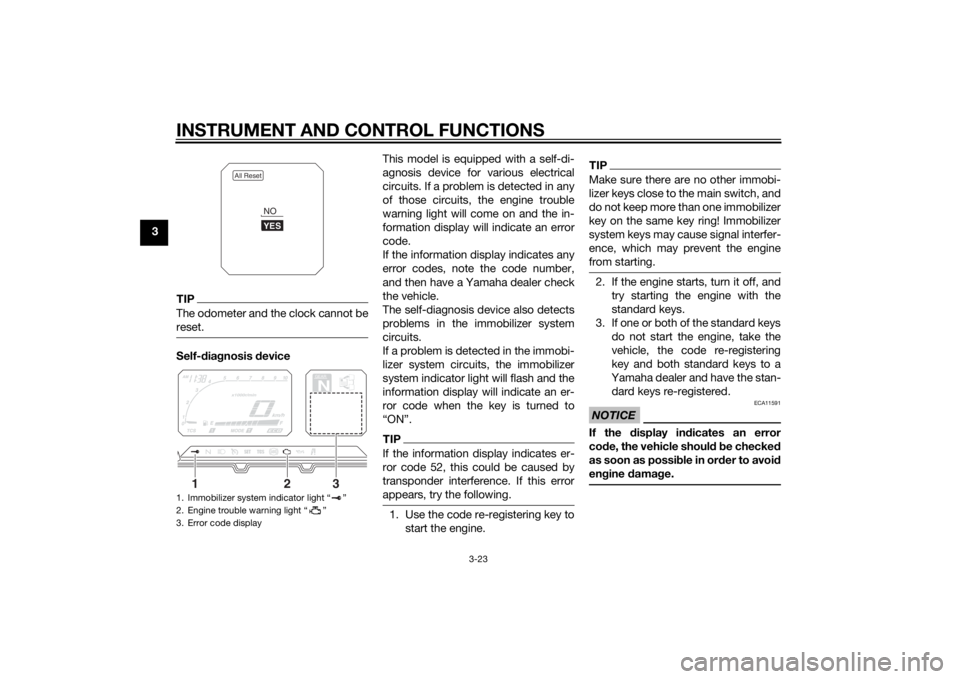
reset.Self-diagnosis device This model is equipped with a self-di-
agnosis device for various electrical
circuits. If a problem is detected in any
of those circuits, the engine trouble
warning light will come on and the in-
formation display will indicate an error
code.
If the information display indicates any
error codes, note the code number,
and then have a Yamaha dealer check
the vehicle.
The self-diagnosis device also detects
problems in the immobilizer system
circuits.
If a problem is detected in the immobi-
lizer system circuits, the immobilizer
system indicator light will flash and the
information display will indicate an er-
ror code when the key is turned to
“ON”.
TIPIf the information display indicates er-
ror code 52, this could be caused by
transponder interference. If this error
appears, try the following.1. Use the code re-registering key to
start the engine.
TIPMake sure there are no other immobi-
lizer keys close to the main switch, and
do not keep more than one immobilizer
key on the same key ring! Immobilizer
system keys may cause signal interfer-
ence, which may prevent the engine
from starting.2. If the engine starts, turn it off, andtry starting the engine with the
standard keys.
3. If one or both of the standard keys do not start the engine, take the
vehicle, the code re-registering
key and both standard keys to a
Yamaha dealer and have the stan-
dard keys re-registered.NOTICE
ECA11591
If the display in dicates an error
co de, the vehicle shoul d b e checked
as soon as possi ble in or der to avoi d
en gine damag e.
1. Immobilizer system indicator light “ ”
2. Engine trouble warning light “ ”
3. Error code display
All Reset
YESNO
GEARN
25
A.TEMP ˚C
Lo
C.TEMP ˚C
0:00
TIME TRIP
1
2
3
U2KBE1E0.book Page 23 Monday, August 18, 2014 9:42 AM
Page 40 of 118
INSTRUMENT AND CONTROL FUNCTIONS
3-25
3Ri
ght
EAU54201
Dimmer/Pass switch “ / /PASS”
Set this switch to “ ” for the high
beam and to “ ” for the low beam.
To flash the high beam, push the pass
side “PASS” of the switch while the
headlights are on low beam.
EAU12461
Turn si gnal switch “ / ”
To signal a right-hand turn, push this
switch to “ ”. To signal a left-hand
turn, push this switch to “ ”. When
released, the switch returns to the cen- ter position. To cancel the turn signal
lights, push the switch in after it has re-
turned to the center position.
EAU12501
Horn switch “ ”
Press this switch to sound the horn.
EAU54211
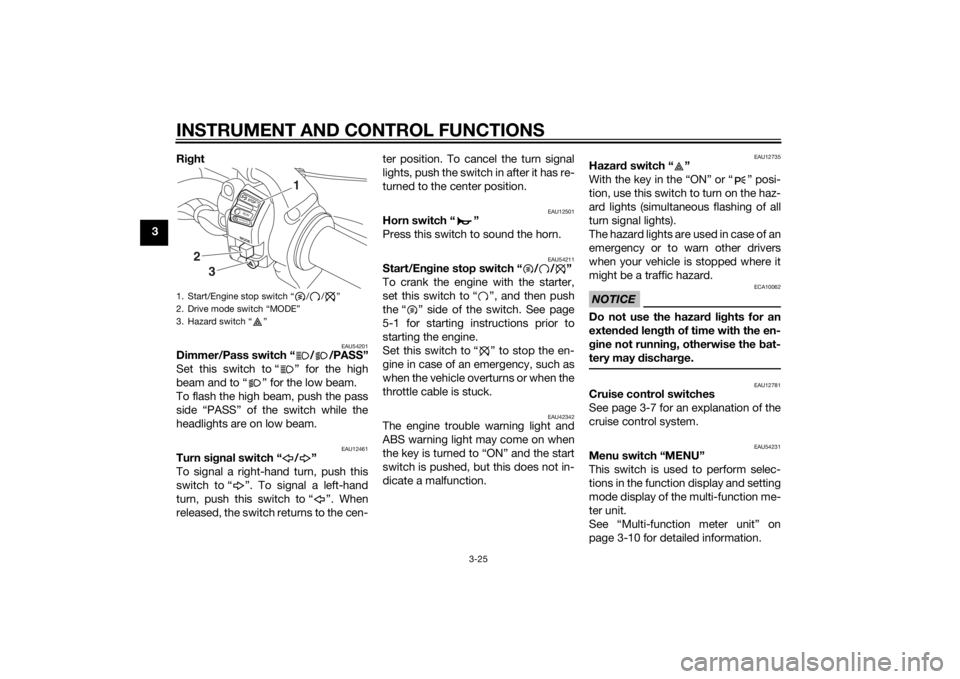
Start/En
gine stop switch “ / / ”
To crank the engine with the starter,
set this switch to “ ”, and then push
the “ ” side of the switch. See page
5-1 for starting instructions prior to
starting the engine.
Set this switch to “ ” to stop the en-
gine in case of an emergency, such as
when the vehicle overturns or when the
throttle cable is stuck.
EAU42342
The engine trouble warning light and
ABS warning light may come on when
the key is turned to “ON” and the start
switch is pushed, but this does not in-
dicate a malfunction.
EAU12735
Hazar d switch “ ”
With the key in the “ON” or “ ” posi-
tion, use this switch to turn on the haz-
ard lights (simultaneous flashing of all
turn signal lights).
The hazard lights are used in case of an
emergency or to warn other drivers
when your vehicle is stopped where it
might be a traffic hazard.NOTICE
ECA10062
Do not use the hazard lights for an
exten ded len gth of time with the en-
g ine not runnin g, otherwise the bat-
tery may dischar ge.
EAU12781
Cruise control switches
See page 3-7 for an explanation of the
cruise control system.
EAU54231
Menu switch “MENU”
This switch is used to perform selec-
tions in the function display and setting
mode display of the multi-function me-
ter unit.
See “Multi-function meter unit” on
page 3-10 for detailed information.
1. Start/Engine stop switch “ / / ”
2. Drive mode switch “MODE”
3. Hazard switch “ ”
MODESTOPRUNS TA R
T
3
2
1
U2KBE1E0.book Page 25 Monday, August 18, 2014 9:42 AM
Page 44 of 118
INSTRUMENT AND CONTROL FUNCTIONS
3-29
3
TIPThe ABS performs a self-diagno-
sis test each time the vehicle first
starts off after the key is turned to
“ON” and the vehicle has traveled
at a speed of 10 km/h (6 mi/h) or
higher. During this test, a “click-
ing” noise can be heard from un-
der the seat, and if the brake lever
or brake pedal is even slightly ap-
plied, a vibration can be felt at the
lever and pedal, but these do not
indicate a malfunction.
This ABS has a test mode which
allows the owner to experience
the pulsation at the brake lever or
brake pedal when the ABS is op-
erating. However, special tools are
required, so please consult your
Yamaha dealer.NOTICE
ECA16831
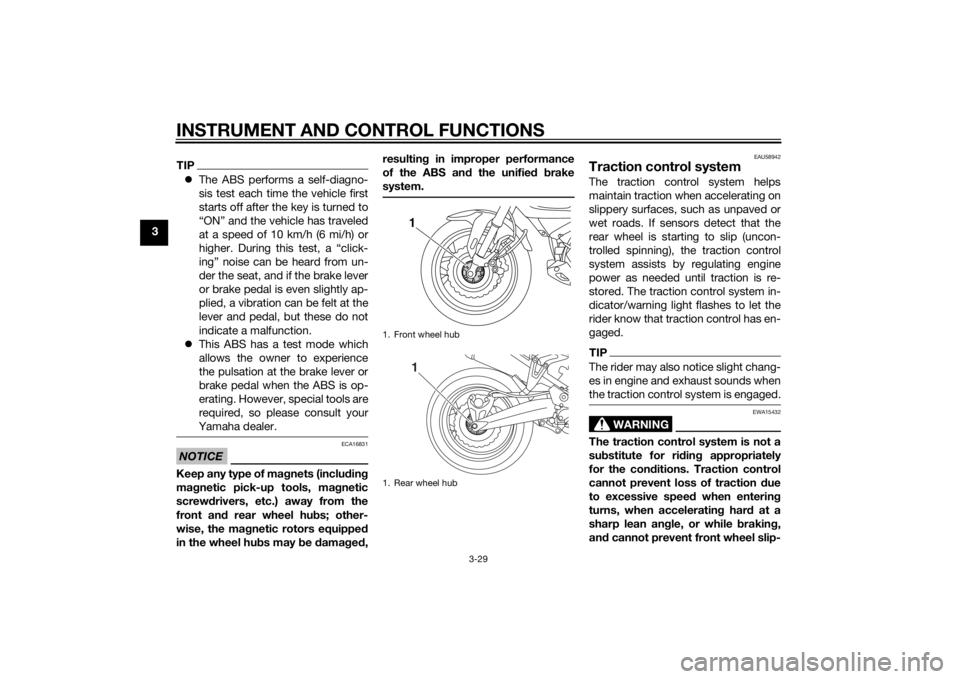
Keep any type of mag nets (includin g
ma gnetic pick-up tools, ma gnetic
screwd rivers, etc.) away from the
front an d rear wheel hu bs; other-
wise, the ma gnetic rotors equippe d
in the wheel hu bs may be damag ed , resultin
g in improper performance
of the ABS an d the unifie d b rake
system.
EAU58942
Traction control systemThe traction control system helps
maintain traction when accelerating on
slippery surfaces, such as unpaved or
wet roads. If sensors detect that the
rear wheel is starting to slip (uncon-
trolled spinning), the traction control
system assists by regulating engine
power as needed until traction is re-
stored. The traction control system in-
dicator/warning light flashes to let the
rider know that traction control has en-
gaged.TIPThe rider may also notice slight chang-
es in engine and exhaust sounds when
the traction control system is engaged.
WARNING
EWA15432
The traction control system is not a
su bstitute for rid ing appropriately
for the con ditions. Traction control
cannot prevent loss of traction due
to excessive speed when entering
turns, when acceleratin g har d at a
sharp lean an gle, or while brakin g,
an d cannot prevent front wheel slip-
1. Front wheel hub
1. Rear wheel hub
11
U2KBE1E0.book Page 29 Monday, August 18, 2014 9:42 AM
Page 45 of 118
INSTRUMENT AND CONTROL FUNCTIONS
3-30
3
pin
g. As with any motorcycle, ap-
proach surfaces that may be
slippery with caution an d avoi d es-
pecially slippery surfaces.
There are three traction control system
modes: “TCS 1”: Default mode
“TCS 2”: Sporty mode
This mode decreases traction
control system assist, allowing the
rear wheel to spin more freely than
“TCS 1”.
“TCS OFF”: The traction control
system is turned off. The system
may also be automatically dis-
abled in some riding conditions
(see “Resetting” on page 3-30).
When the key is turned to “ON”, the
traction control system is enabled and
“TCS 1” is displayed in the multi-func-
tion meter.
The traction control system mode can
be changed only when the key is in the
“ON” position and the vehicle is not
moving.
TIPUse the mode “TCS OFF” to help free
the rear wheel if the motorcycle gets
stuck in mud, sand, or other soft sur-
faces.NOTICE
ECA16801
Use only the specifie d tires. (See
pa ge 6-18.) Usin g different sized
tires will prevent the traction control
system from controllin g tire rotation
accurately.Settin g the traction control system
WARNING
EWA15441
Be sure to stop the vehicle before
makin g any settin g chan ges to the
traction control system. Chan gin g
settin gs while ri din g can distract the
operator an d increase the risk of an
acci dent.Push the “TCS” button on the multi-
function meter for less than one sec-
ond to change between the modes “1”
and “2”. Push the button for at least
two seconds to select the mode “TCS OFF” and turn the traction control sys-
tem off. Push the button again to return
to the previously selected mode “1” or
“2”.
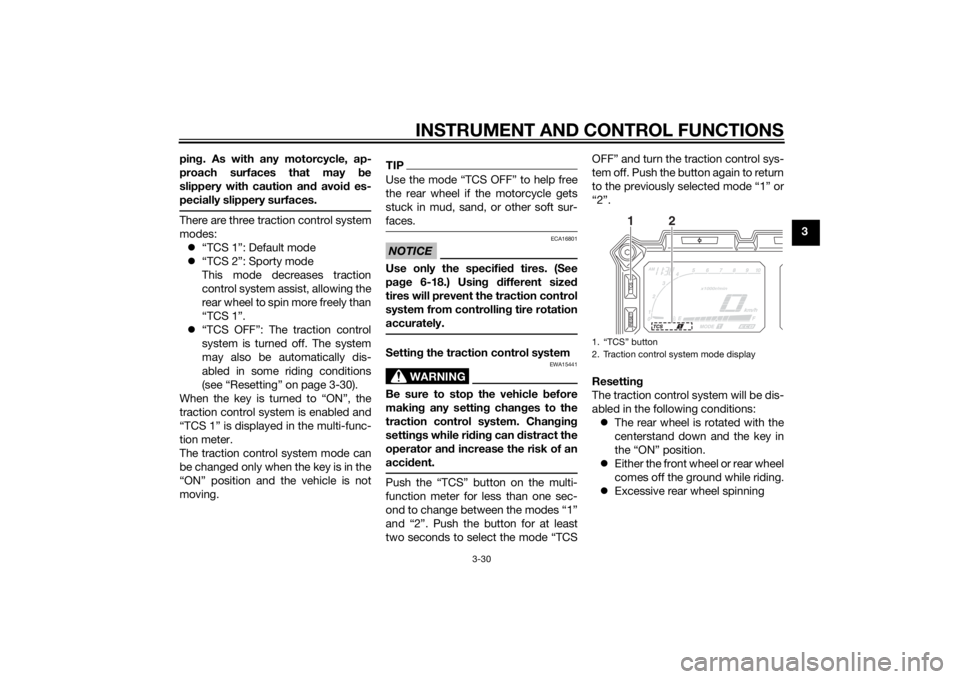
Resettin
g
The traction control system will be dis-
abled in the following conditions: The rear wheel is rotated with the
centerstand down and the key in
the “ON” position.
Either the front wheel or rear wheel
comes off the ground while riding.
Excessive rear wheel spinning
1. “TCS” button
2. Traction control system mode display
1
2
U2KBE1E0.book Page 30 Monday, August 18, 2014 9:42 AM
Page 46 of 118
INSTRUMENT AND CONTROL FUNCTIONS
3-31
3If the traction control system has been
disabled, both the traction control sys-
tem indicator/warning light and the en-
gine trouble warning light come on.
To reset the traction control system:
Turn the key to “OFF”. Wait at least one
second, then turn the key back to
“ON”. The traction control system indi-
cator/warning light should go off and
the system will be enabled. The engine
trouble warning light should go off after
the motorcycle reaches at least 20
km/h (12 mi/h). If the traction control
system indicator/warning light or the
engine trouble warning light remains
on after resetting, the motorcycle may
still be ridden; however, have a
Yamaha dealer check the motorcycle as soon as possible.
EAU13075
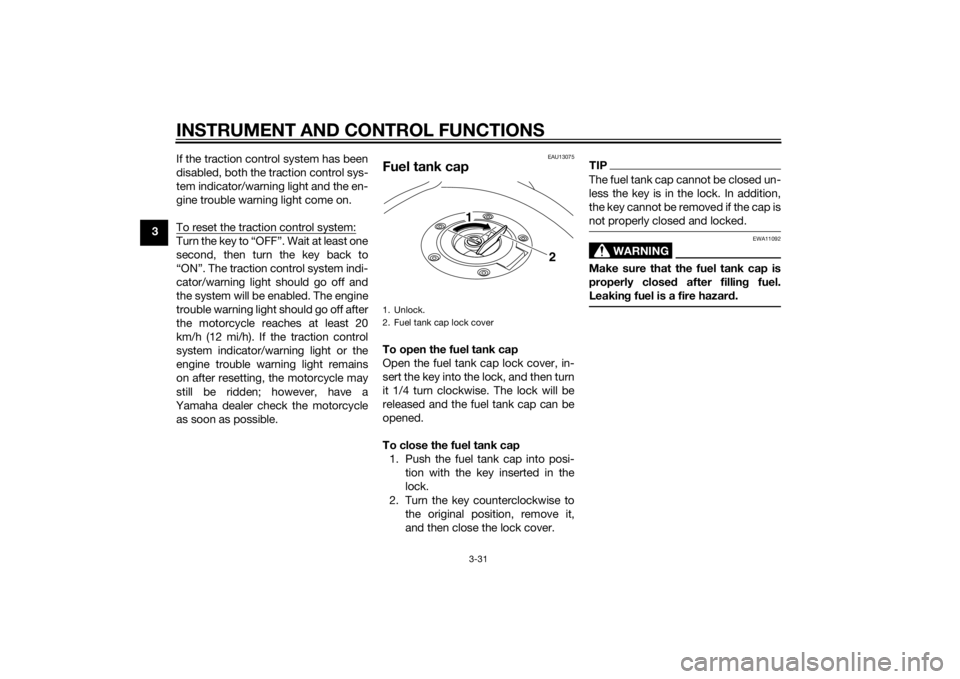
Fuel tank capTo open the fuel tank cap
Open the fuel tank cap lock cover, in-
sert the key into the lock, and then turn
it 1/4 turn clockwise. The lock will be
released and the fuel tank cap can be
opened.
To close the fuel tank cap 1. Push the fuel tank cap into posi- tion with the key inserted in the
lock.
2. Turn the key counterclockwise to the original position, remove it,
and then close the lock cover.
TIPThe fuel tank cap cannot be closed un-
less the key is in the lock. In addition,
the key cannot be removed if the cap is
not properly closed and locked.
WARNING
EWA11092
Make sure that the fuel tank cap is
properly close d after fillin g fuel.
Leakin g fuel is a fire hazar d.
1. Unlock.
2. Fuel tank cap lock cover
2
1
U2KBE1E0.book Page 31 Monday, August 18, 2014 9:42 AM
Page 49 of 118
INSTRUMENT AND CONTROL FUNCTIONS
3-34
3
NOTICE
ECA10702
Use only unleaded g asoline. The use
of lead ed g asoline will cause unre-
paira ble damag e to the catalytic
converter.
EAU49444
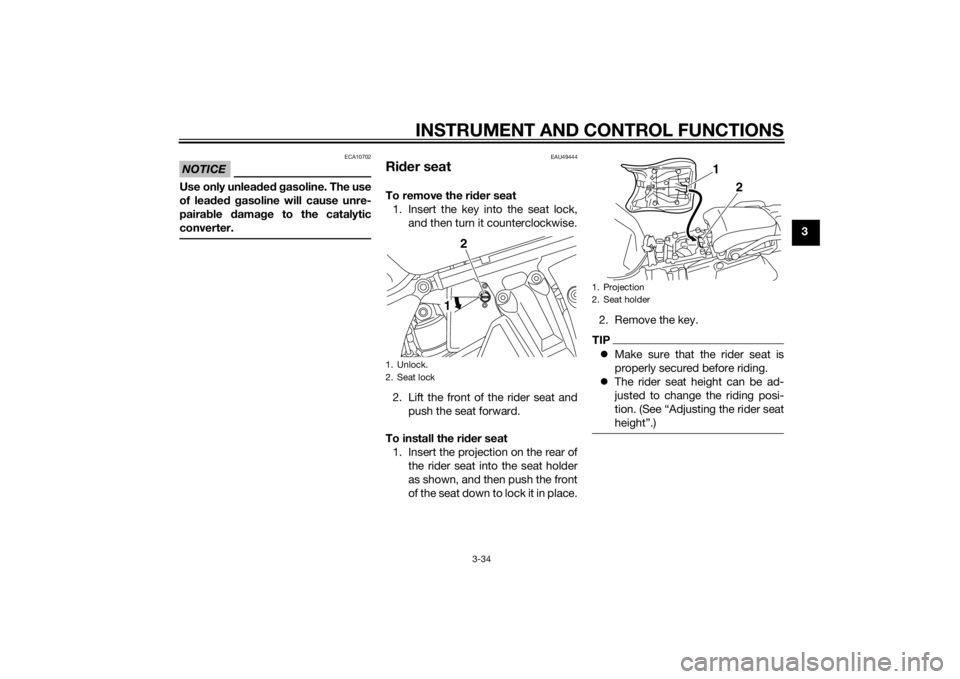
Ri der seatTo remove the ri der seat
1. Insert the key into the seat lock, and then turn it counterclockwise.
2. Lift the front of the rider seat and push the seat forward.
To install the ri der seat
1. Insert the projection on the rear of the rider seat into the seat holder
as shown, and then push the front
of the seat down to lock it in place. 2. Remove the key.
TIP
Make sure that the rider seat is
properly secured before riding.
The rider seat height can be ad-
justed to change the riding posi-
tion. (See “Adjusting the rider seat
height”.)
1. Unlock.
2. Seat lock
2
1
1. Projection
2. Seat holder
1
2
U2KBE1E0.book Page 34 Monday, August 18, 2014 9:42 AM
Page 53 of 118
INSTRUMENT AND CONTROL FUNCTIONS
3-38
3
Changing the preload setting will
also adjust the front and rear sus-
pension damping forces accord-
ingly. See “Damping force” on
page 3-40 for more information.
About cold temperature opera-
tion:
• When using the preload adjust- ing function, there should be no
weight on the vehicle.
• When using the preload adjust- ing function at ambient temper-
atures near or below 0 °C (32
°F), to protect the preload ad-
justing function motor, the elec-
tronically adjustable suspension
system warning light may come
on.
• The suspension will still operate as normal, only the preload ad-
justing function cannot be used.
• To reset the electronically ad- justable suspension system
warning light, wait approximate-
ly 6 minutes and then turn the
key to “OFF” or immediately
turn the key to “OFF” and then
wait 6 minutes. • If the electronically adjustable
suspension system warning
light remains on, have a
Yamaha dealer check the sus- pension system.
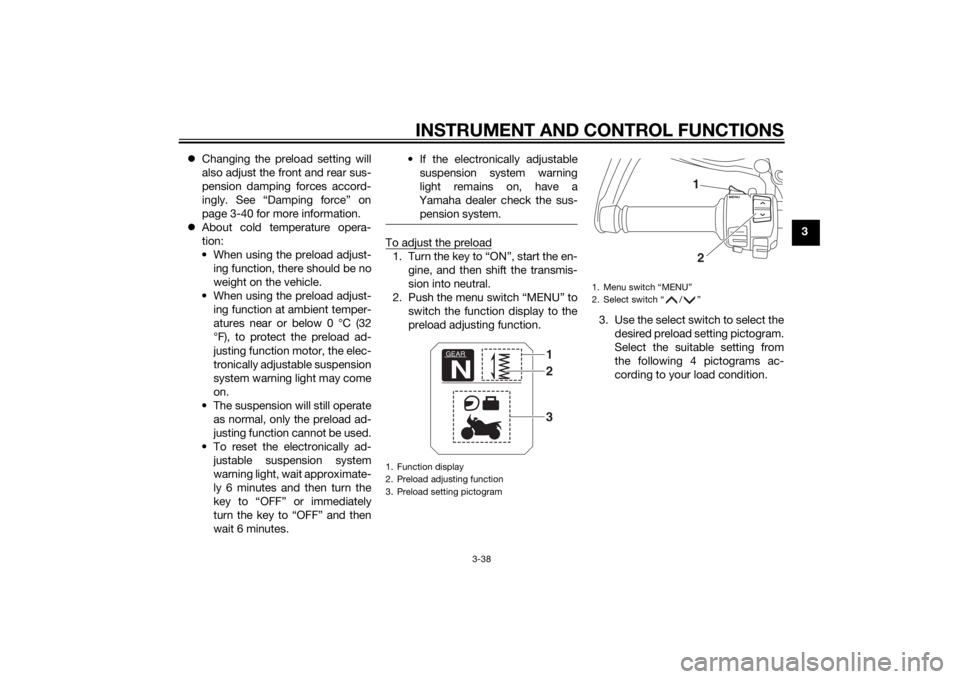
To adjust the preload1. Turn the key to “ON”, start the en- gine, and then shift the transmis-
sion into neutral.
2. Push the menu switch “MENU” to switch the function display to the
preload adjusting function. 3. Use the select switch to select the
desired preload setting pictogram.
Select the suitable setting from
the following 4 pictograms ac-
cording to your load condition.1. Function display
2. Preload adjusting function
3. Preload setting pictogram
GEARN
132
1. Menu switch “MENU”
2. Select switch “ / ”
12
U2KBE1E0.book Page 38 Monday, August 18, 2014 9:42 AM
Page 54 of 118
INSTRUMENT AND CONTROL FUNCTIONS
3-39
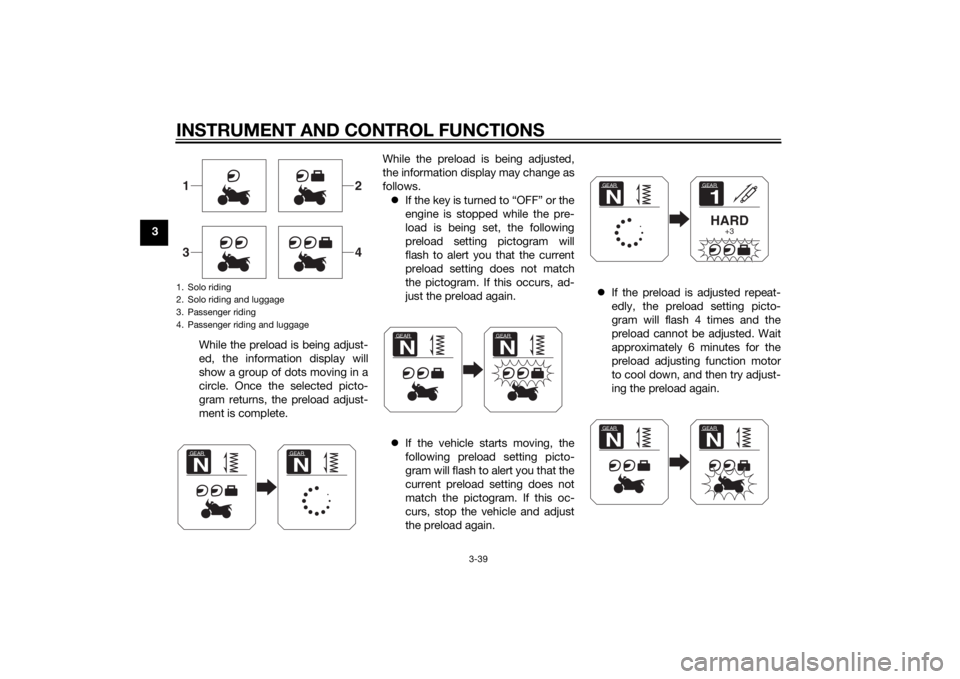
3While the preload is being adjust-
ed, the information display will
show a group of dots moving in a
circle. Once the selected picto-
gram returns, the preload adjust-
ment is complete. While the preload is being adjusted,
the information display may change as
follows.
If the key is turned to “OFF” or the
engine is stopped while the pre-
load is being set, the following
preload setting pictogram will
flash to alert you that the current
preload setting does not match
the pictogram. If this occurs, ad-
just the preload again.
If the vehicle starts moving, the
following preload setting picto-
gram will flash to alert you that the
current preload setting does not
match the pictogram. If this oc-
curs, stop the vehicle and adjust
the preload again.
If the preload is adjusted repeat-
edly, the preload setting picto-
gram will flash 4 times and the
preload cannot be adjusted. Wait
approximately 6 minutes for the
preload adjusting function motor
to cool down, and then try adjust-
ing the preload again.
1. Solo riding
2. Solo riding and luggage
3. Passenger riding
4. Passenger riding and luggage1
2
3
4
GEARN
GEARN
GEARN
GEARN
GEAR1HARD
+3
GEARNGEARN
GEARN
U2KBE1E0.book Page 39 Monday, August 18, 2014 9:42 AM
Page 55 of 118
INSTRUMENT AND CONTROL FUNCTIONS
3-40
3
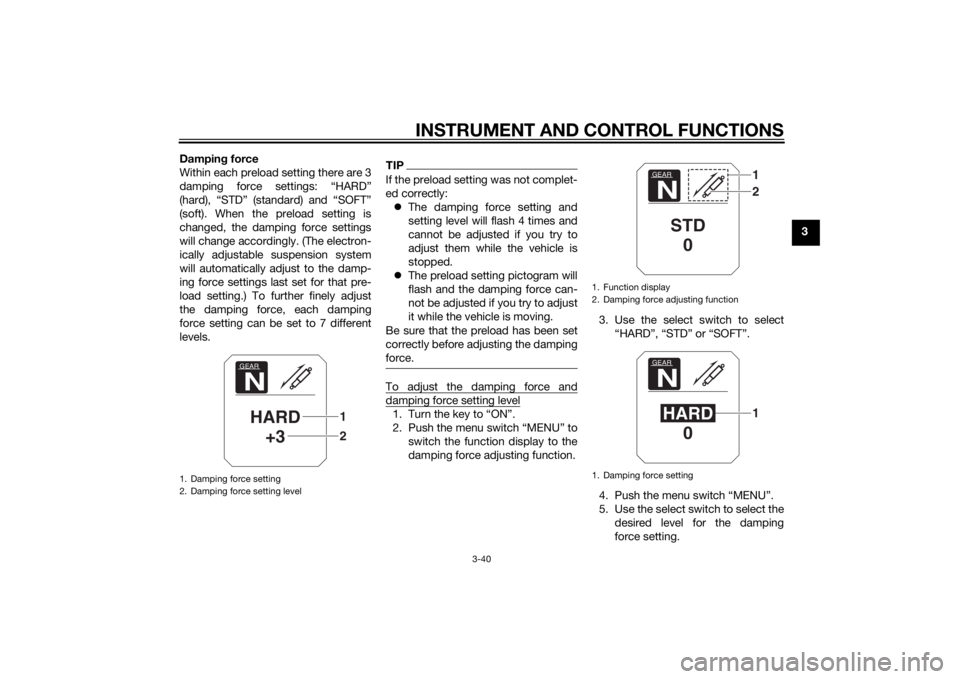
Dampin
g force
Within each preload setting there are 3
damping force settings: “HARD”
(hard), “STD” (standard) and “SOFT”
(soft). When the preload setting is
changed, the damping force settings
will change accordingly. (The electron-
ically adjustable suspension system
will automatically adjust to the damp-
ing force settings last set for that pre-
load setting.) To further finely adjust
the damping force, each damping
force setting can be set to 7 different
levels.
TIPIf the preload setting was not complet-
ed correctly: The damping force setting and
setting level will flash 4 times and
cannot be adjusted if you try to
adjust them while the vehicle is
stopped.
The preload setting pictogram will
flash and the damping force can-
not be adjusted if you try to adjust
it while the vehicle is moving.
Be sure that the preload has been set
correctly before adjusting the damping
force.To adjust the damping force anddamping force setting level1. Turn the key to “ON”.
2. Push the menu switch “MENU” to switch the function display to the
damping force adjusting function. 3. Use the select switch to select
“HARD”, “STD” or “SOFT”.
4. Push the menu switch “MENU”.
5. Use the select switch to select the desired level for the damping
force setting.
1. Damping force setting
2. Damping force setting level
GEARNHARD+3
21
1. Function display
2. Damping force adjusting function
1. Damping force setting
GEARN
STD0
12
GEARNHARD 0
1
U2KBE1E0.book Page 40 Monday, August 18, 2014 9:42 AM