change time YAMAHA XT1200ZE 2017 Owners Manual
[x] Cancel search | Manufacturer: YAMAHA, Model Year: 2017, Model line: XT1200ZE, Model: YAMAHA XT1200ZE 2017Pages: 122, PDF Size: 3.36 MB
Page 24 of 122
Instrument and control functions
3-10
3
EAU80550
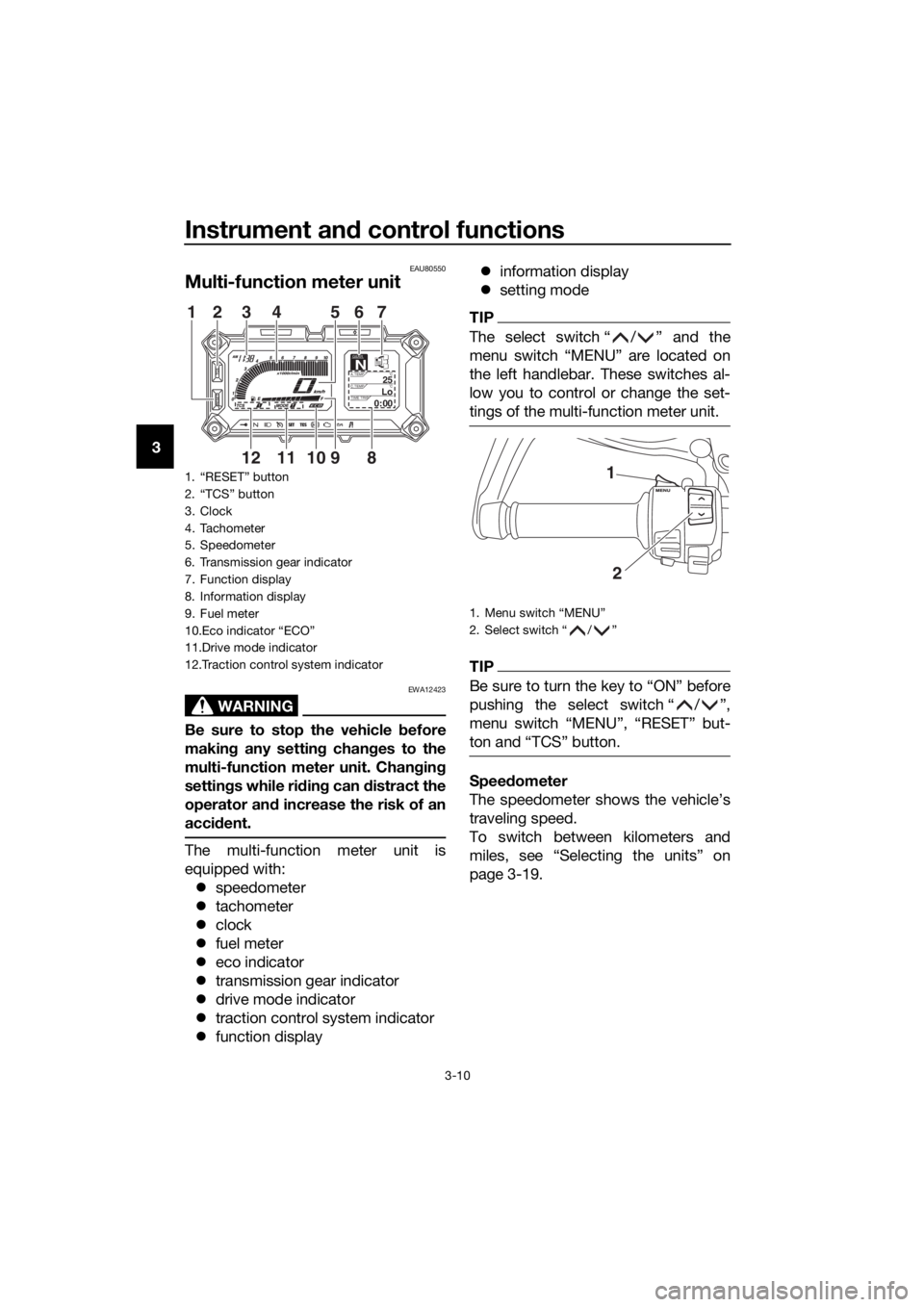
Multi-function meter unit
WARNING
EWA12423
Be sure to stop the vehicle before
makin g any settin g chan ges to the
multi-function meter unit. Chang ing
settin gs while ri din g can d istract the
operator an d increase the risk of an
acci dent.
The multi-function meter unit is
equipped with:
speedometer
tachometer
clock
fuel meter
eco indicator
transmission gear indicator
drive mode indicator
traction control system indicator
function display
information display
setting mode
TIP
The select switch “ / ” and the
menu switch “MENU” are located on
the left handlebar. These switches al-
low you to control or change the set-
tings of the multi-function meter unit.
TIP
Be sure to turn the key to “ON” before
pushing the select switch “ / ”,
menu switch “MENU”, “RESET” but-
ton and “TCS” button.
Speed ometer
The speedometer shows the vehicle’s
traveling speed.
To switch between kilometers and
miles, see “Selecting the units” on
page 3-19.
1. “RESET” button
2. “TCS” button
3. Clock
4. Tachometer
5. Speedometer
6. Transmission gear indicator
7. Function display
8. Information display
9. Fuel meter
10.Eco indicator “ECO”
11.Drive mode indicator
12.Traction control system indicator
GEARN25A.TEMP ˚C
LoC.TEMP˚C
0:00TIME TRIP
89101112
12 3 56
74
1. Menu switch “MENU”
2. Select switch “ / ”
1
2
UBP9E0E0.book Page 10 Wednesday, February 8, 2017 8:34 AM
Page 27 of 122
Instrument and control functions
3-13
3
Push the menu switch “MENU” to
switch the display between the follow-
ing functions. The display changes
each time the switch is pushed.
Grip warmer adjusting function
Information display selection
function
Damping force adjusting function
Preload adjusting functionTIP
The preload adjusting function will ap-
pear only when the vehicle is stopped
with the engine running.
The following pages contain explana-
tion of the grip warmer and information
display functions. See page 3-37 for an
explanation of the preload and damp-
ing force adjusting functions.
Adjustin g the g rip warmer
This vehicle is equipped with grip
warmers, which can only be used
when the engine is running. There are 4
grip warmer settings.
To increase the grip warmer tempera-
ture, push the “ ” side of the select
switch. To decrease the grip warmer
temperature, push the “ ” side of the
select switch.
NOTICE
ECA17931
Be sure to wear g loves when
usin g the g rip warmers.
If the am bient temperature is 20
°C (68 °F) or hi gher, do not set
the grip warmer to the hi gh set-
tin g.
If the han dle bar grip or throttle
g rip becomes worn or dam-
a g ed , stop usin g the g rip warm-
ers an d replace the grips.
Selectin g the information display
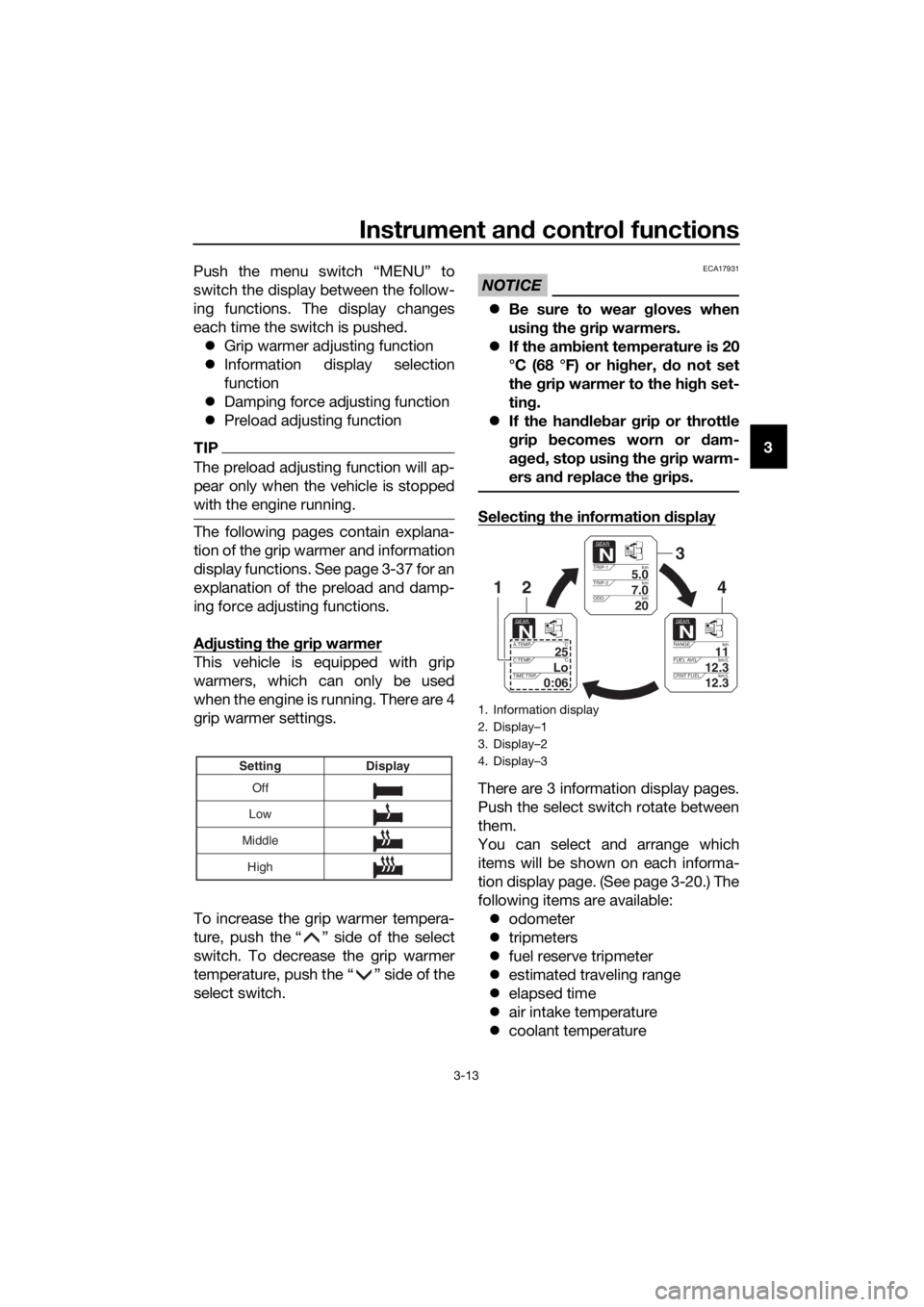
There are 3 information display pages.
Push the select switch rotate between
them.
You can select and arrange which
items will be shown on each informa-
tion display page. (See page 3-20.) The
following items are available:
odometer
tripmeters
fuel reserve tripmeter
estimated traveling range
elapsed time
air intake temperature
coolant temperatureOff
Low
Middle Display
Setting
High
1. Information display
2. Display–1
3. Display–2
4. Display–3
GEARN
5.0TRIP-1 km
7.0TRIP-2km
km
20ODO
GEARN
11RANGEkm
12.3FUEL AVG km/L
km/L
12.3CRNT FUEL
GEARN
25A.TEMP ˚C
LoC.TEMP ˚C
0:06TIME TRIP
3
421
UBP9E0E0.book Page 13 Wednesday, February 8, 2017 8:34 AM
Page 28 of 122
Instrument and control functions
3-14
3
average fuel consumption
instantaneous fuel consumption
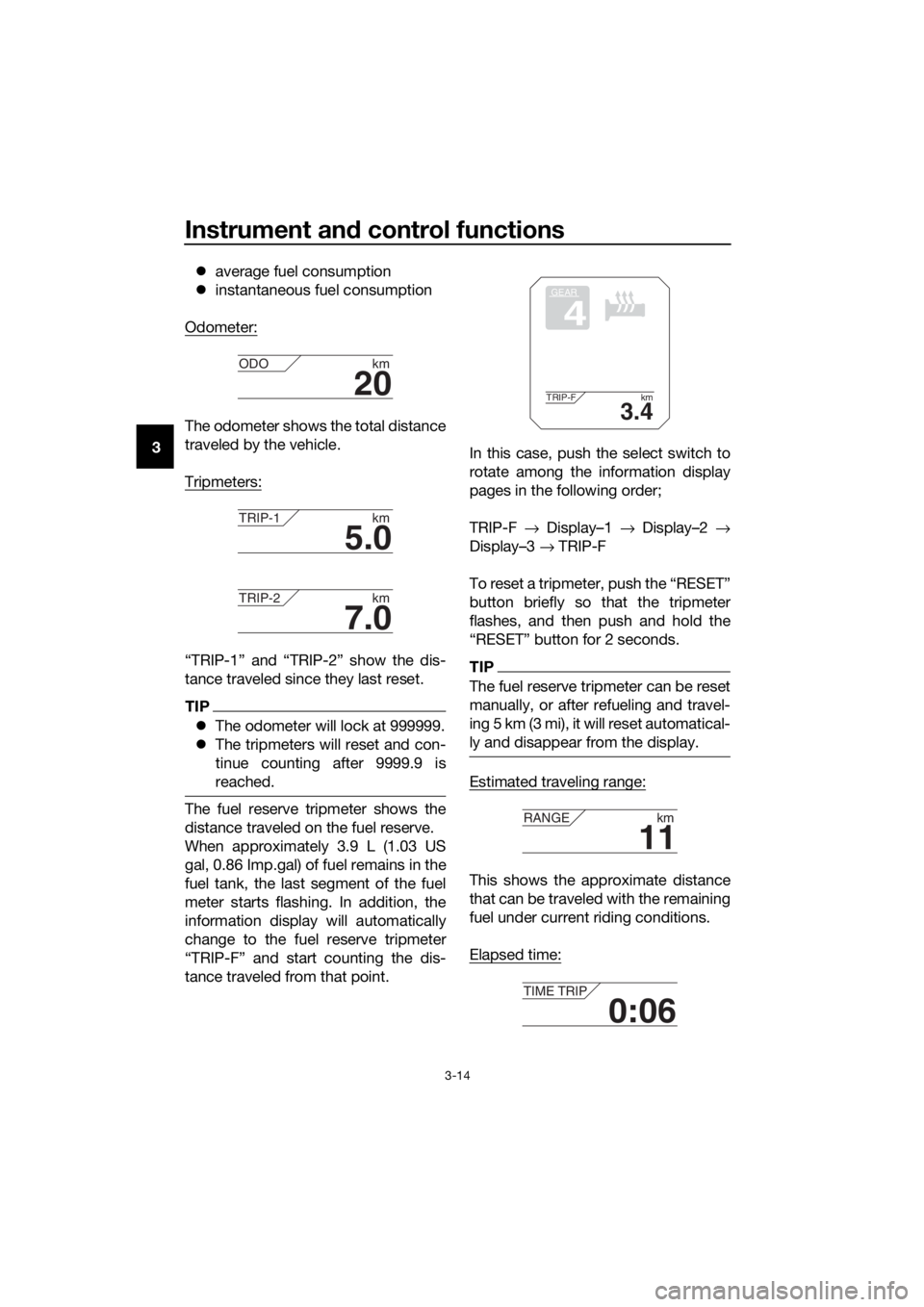
Odometer:
The odometer shows the total distance
traveled by the vehicle.
Tripmeters:
“TRIP-1” and “TRIP-2” show the dis-
tance traveled since they last reset.
TIP
The odometer will lock at 999999.
The tripmeters will reset and con-
tinue counting after 9999.9 is
reached.
The fuel reserve tripmeter shows the
distance traveled on the fuel reserve.
When approximately 3.9 L (1.03 US
gal, 0.86 Imp.gal) of fuel remains in the
fuel tank, the last segment of the fuel
meter starts flashing. In addition, the
information display will automatically
change to the fuel reserve tripmeter
“TRIP-F” and start counting the dis-
tance traveled from that point. In this case, push the select switch to
rotate among the information display
pages in the following order;
TRIP-F
→ Display–1 → Display–2 →
Display–3 → TRIP-F
To reset a tripmeter, push the “RESET”
button briefly so that the tripmeter
flashes, and then push and hold the
“RESET” button for 2 seconds.
TIP
The fuel reserve tripmeter can be reset
manually, or after refueling and travel-
ing 5 km (3 mi), it will reset automatical-
ly and disappear from the display.
Estimated traveling range:
This shows the approximate distance
that can be traveled with the remaining
fuel under current riding conditions.
Elapsed time:
20
ODO km
5.0
TRIP-1km
7.0
TRIP-2km
GEAR
4
3.4
TRIP-F km
11
RANGEkm
0:06
TIME TRIP
UBP9E0E0.book Page 14 Wednesday, February 8, 2017 8:34 AM
Page 29 of 122
Instrument and control functions
3-15
3
This timer shows the elapsed time
since the key was turned to “ON”. The
maximum time that can be shown is
99:59.
This timer automatically resets when
the key is turned to “OFF”.
TIP
There are also “TIME–2” and “TIME–3”
timer functions, but they cannot be set
to the information display pages. See
“Setting mode” on page 3-16 for more
information.
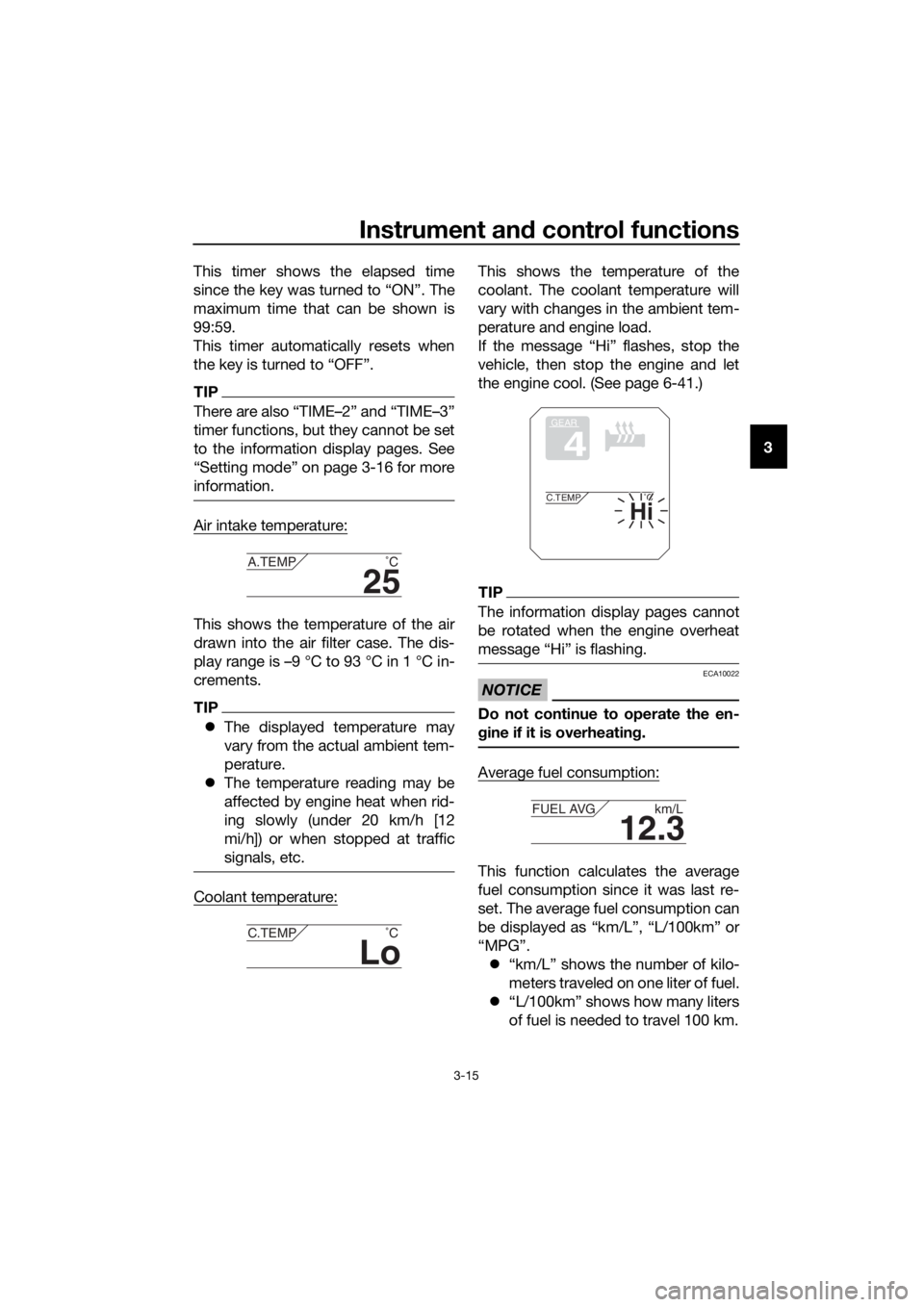
Air intake temperature:
This shows the temperature of the air
drawn into the air filter case. The dis-
play range is –9 °C to 93 °C in 1 °C in-
crements.
TIP
The displayed temperature may
vary from the actual ambient tem-
perature.
The temperature reading may be
affected by engine heat when rid-
ing slowly (under 20 km/h [12
mi/h]) or when stopped at traffic
signals, etc.
Coolant temperature:
This shows the temperature of the
coolant. The coolant temperature will
vary with changes in the ambient tem-
perature and engine load.
If the message “Hi” flashes, stop the
vehicle, then stop the engine and let
the engine cool. (See page 6-41.)
TIP
The information display pages cannot
be rotated when the engine overheat
message “Hi” is flashing.
NOTICE
ECA10022
Do not continue to operate the en-
gine if it is overheatin g.
Average fuel consumption:
This function calculates the average
fuel consumption since it was last re-
set. The average fuel consumption can
be displayed as “km/L”, “L/100km” or
“MPG”.
“km/L” shows the number of kilo-
meters traveled on one liter of fuel.
“L/100km” shows how many liters
of fuel is needed to travel 100 km.
25
A.TEMP ˚C
Lo
C.TEMP˚C
GEAR
4
Hi
C.TEMP˚C
12.3
FUEL AVG km/L
UBP9E0E0.book Page 15 Wednesday, February 8, 2017 8:34 AM
Page 30 of 122
Instrument and control functions
3-16
3
“MPG” shows the number of miles
traveled per Imp.gallon of fuel.
TIP
See “Selecting the units” on page 3-19
to change the kilometer-based fuel
consumption units or to switch to
miles.
To reset the average fuel consumption,
push the “RESET” button briefly so
that the average fuel consumption dis-
play flashes, and then push and hold
the “RESET” button for 2 seconds.
TIP
After resetting the average fuel con-
sumption, “_ _._” will be shown until
the vehicle has traveled 1 km (0.6 mi).
NOTICE
ECA15474
If there is a malfunction, “– –.–” will
be continuously displaye d. Have a
Yamaha dealer check the vehicle.
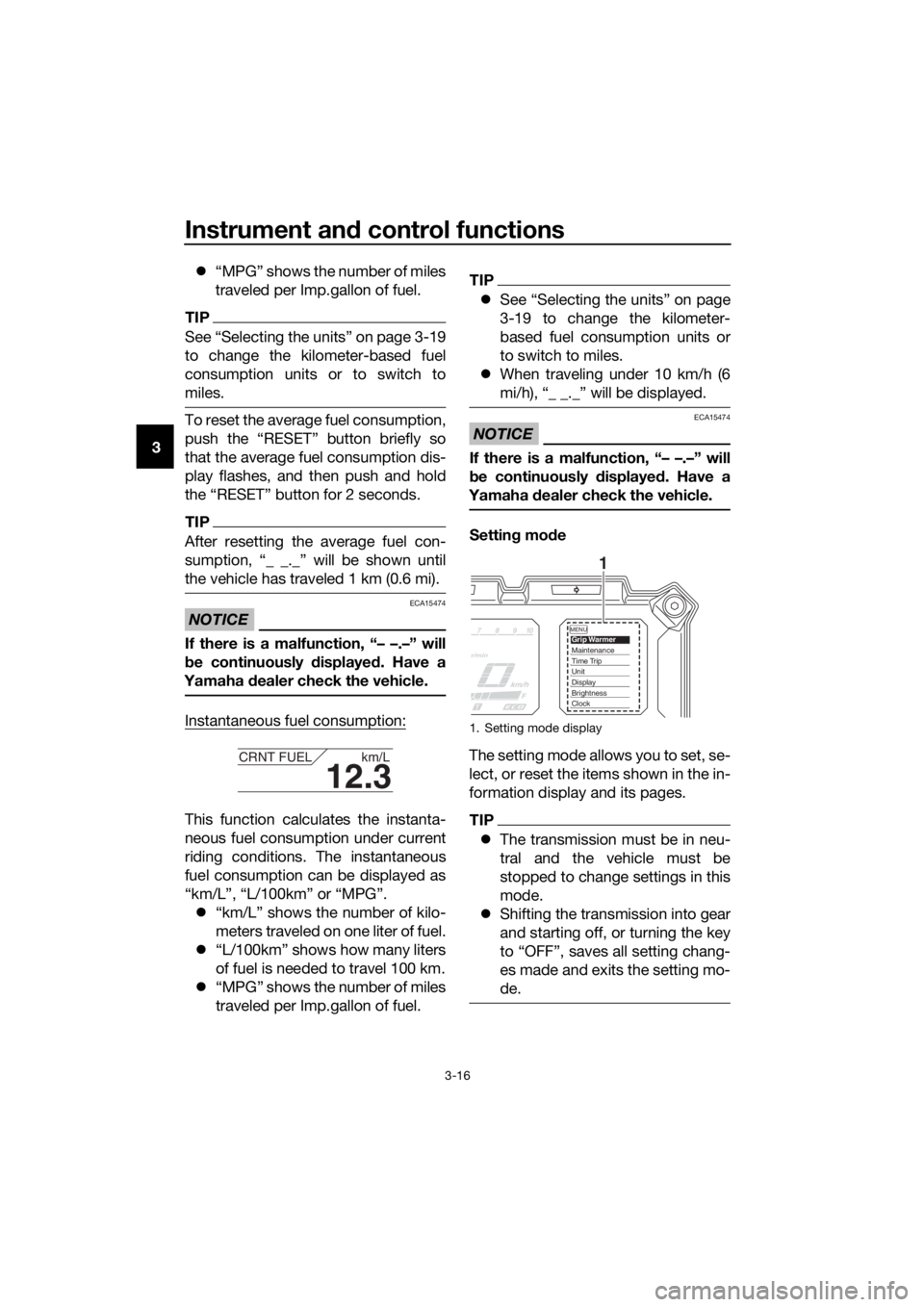
Instantaneous fuel consumption:
This function calculates the instanta-
neous fuel consumption under current
riding conditions. The instantaneous
fuel consumption can be displayed as
“km/L”, “L/100km” or “MPG”.
“km/L” shows the number of kilo-
meters traveled on one liter of fuel.
“L/100km” shows how many liters
of fuel is needed to travel 100 km.
“MPG” shows the number of miles
traveled per Imp.gallon of fuel.
TIP
See “Selecting the units” on page
3-19 to change the kilometer-
based fuel consumption units or
to switch to miles.
When traveling under 10 km/h (6
mi/h), “_ _._” will be displayed.
NOTICE
ECA15474
If there is a malfunction, “– –.–” will
be continuously displaye d. Have a
Yamaha dealer check the vehicle.
Settin g mo de
The setting mode allows you to set, se-
lect, or reset the items shown in the in-
formation display and its pages.
TIP
The transmission must be in neu-
tral and the vehicle must be
stopped to change settings in this
mode.
Shifting the transmission into gear
and starting off, or turning the key
to “OFF”, saves all setting chang-
es made and exits the setting mo-
de.
12.3
CRNT FUEL km/L
1. Setting mode display
MENUGrip WarmerMaintenanceTime TripUnitDisplayBrightnessClock
1
UBP9E0E0.book Page 16 Wednesday, February 8, 2017 8:34 AM
Page 31 of 122
Instrument and control functions
3-17
3
Push and hold the menu switch
“MENU” for 2 seconds to enter the set-
ting mode. To exit the setting mode
and return to the normal display, push
and hold the menu switch “MENU”
again for 2 seconds.
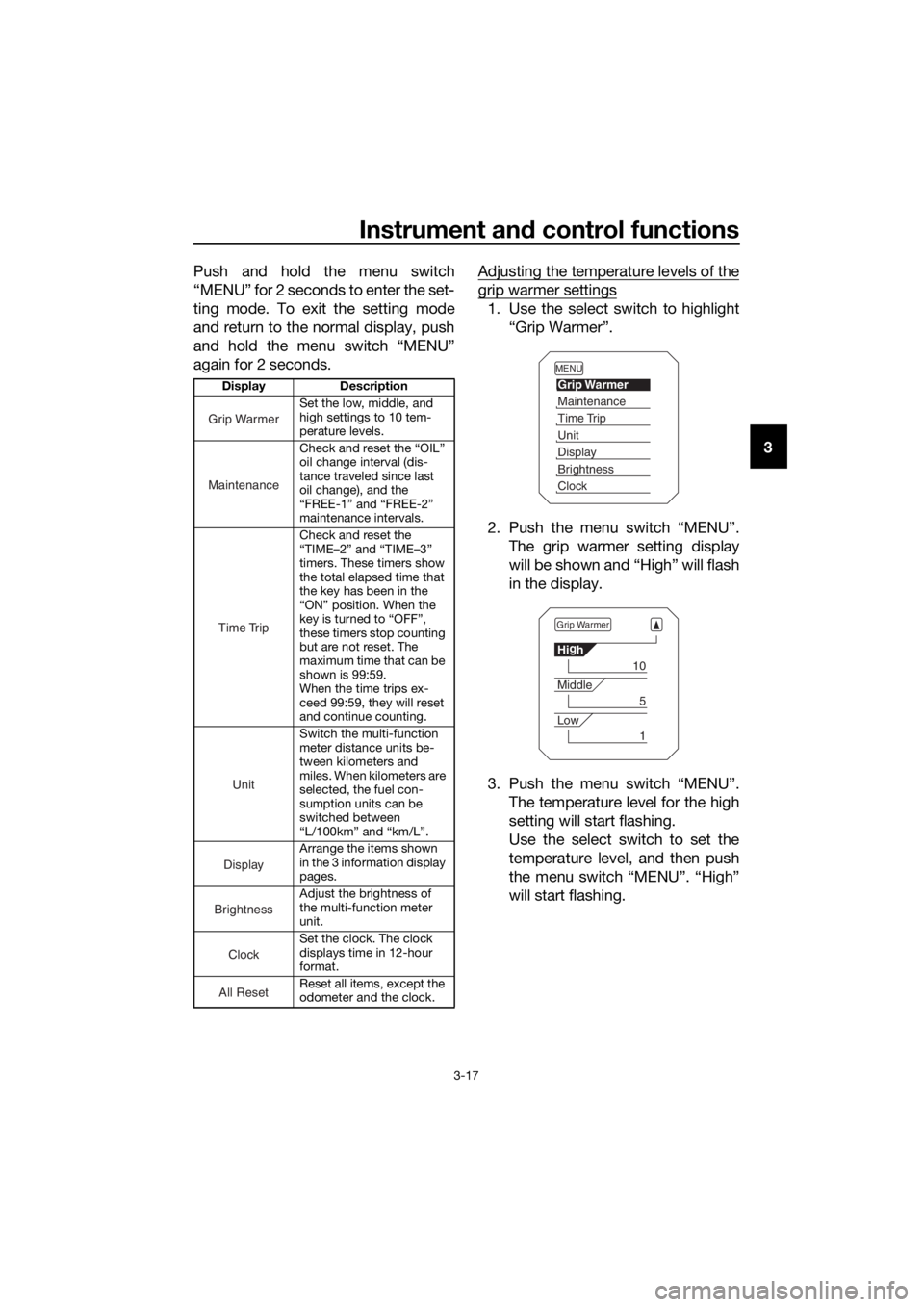
Adjusting the temperature levels of the
grip warmer settings
1. Use the select switch to highlight
“Grip Warmer”.
2. Push the menu switch “MENU”. The grip warmer setting display
will be shown and “High” will flash
in the display.
3. Push the menu switch “MENU”. The temperature level for the high
setting will start flashing.
Use the select switch to set the
temperature level, and then push
the menu switch “MENU”. “High”
will start flashing.
Display Description
Set the low, middle, and
high settings to 10 tem-
perature levels.
Check and reset the “OIL”
oil change interval (dis-
tance traveled since last
oil change), and the
“FREE-1” and “FREE-2”
maintenance intervals.
Check and reset the
“TIME–2” and “TIME–3”
timers. These timers show
the total elapsed time that
the key has been in the
“ON” position. When the
key is turned to “OFF”,
these timers stop counting
but are not reset. The
maximum time that can be
shown is 99:59.
When the time trips ex-
ceed 99:59, they will reset
and continue counting.
Switch the multi-function
meter distance units be-
tween kilometers and
miles. When kilometers are
selected, the fuel con-
sumption units can be
switched between
“L/100km” and “km/L”.
Arrange the items shown
in the 3 information display
pages.
Adjust the brightness of
the multi-function meter
unit.
Set the clock. The clock
displays time in 12-hour
format.
Reset all items, except the
odometer and the clock.
Grip Warmer
Maintenance
Time Trip
Unit
Display
Brightness
Clock
All Reset
MENU
Grip Warmer
Maintenance
Time Trip
Unit
Display
Brightness
Clock
Grip Warmer
Hi g
h
10
Middle
5
Low
1
UBP9E0E0.book Page 17 Wednesday, February 8, 2017 8:34 AM
Page 34 of 122
Instrument and control functions
3-20
3
TIP
When “km” is selected, “L/100km” or
“km/L” can be set as the fuel con-
sumption units. To set the fuel con-
sumption units, proceed as follows. If
“mile” was selected, skip steps 5 and
6.
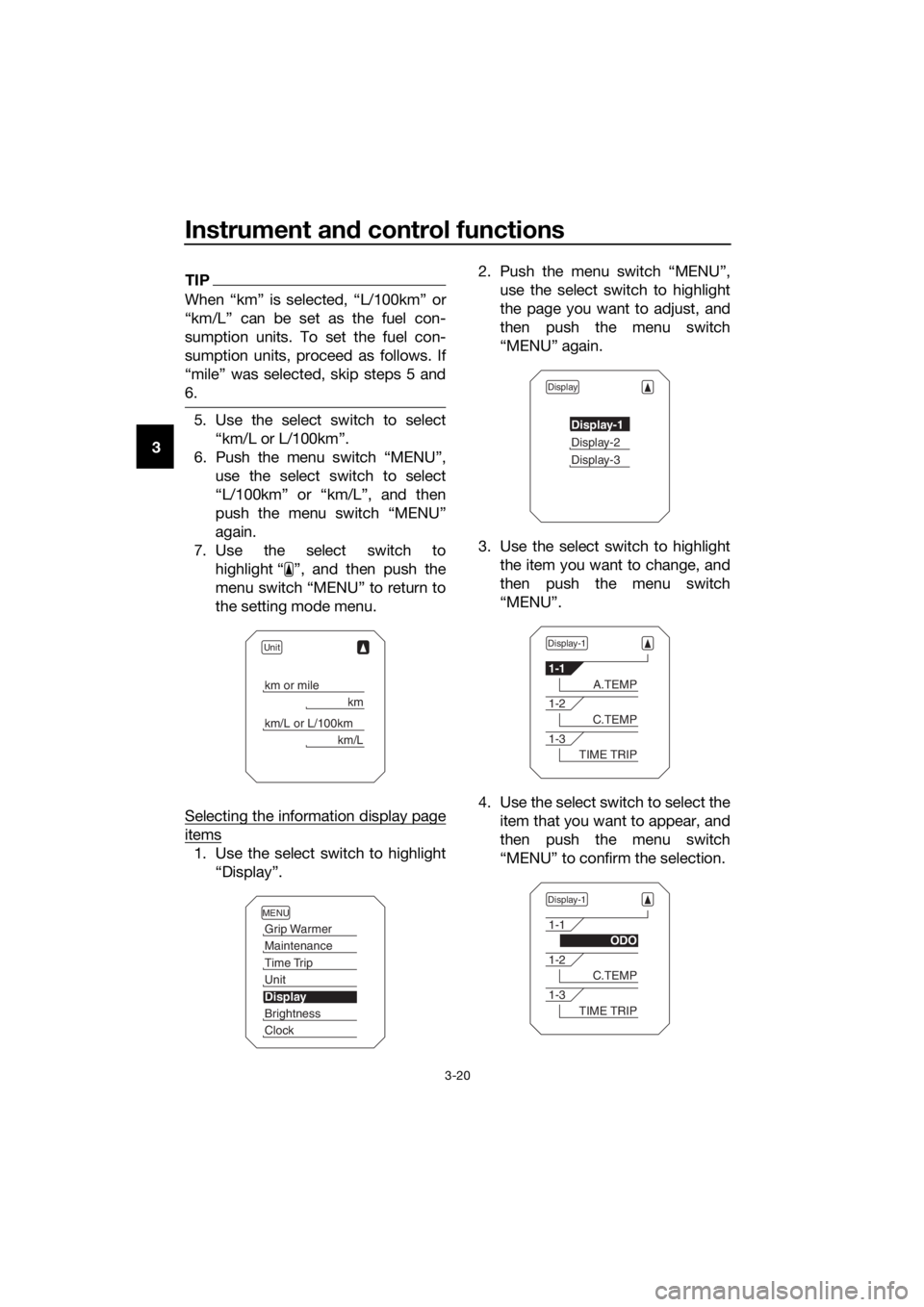
5. Use the select switch to select
“km/L or L/100km”.
6. Push the menu switch “MENU”, use the select switch to select
“L/100km” or “km/L”, and then
push the menu switch “MENU”
again.
7. Use the select switch to highlight “ ”, and then push the
menu switch “MENU” to return to
the setting mode menu.
Selecting the information display page
items
1. Use the select switch to highlight “Display”. 2. Push the menu switch “MENU”,
use the select switch to highlight
the page you want to adjust, and
then push the menu switch
“MENU” again.
3. Use the select switch to highlight the item you want to change, and
then push the menu switch
“MENU”.
4. Use the select switch to select the item that you want to appear, and
then push the menu switch
“MENU” to confirm the selection.
Unit
km or mile
km
km/L or L/100km
km/L
MENU
Grip Warmer
Maintenance
Time Trip
Unit
Display
Brightness
Clock
Display
Display-1
Display-2
Display-3
Display-1
1-1
A.TEMP
1-2
C.TEMP
1-3
TIME TRIP
Display-1
1-1
ODO
1-2
C.TEMP
1-3
TIME TRIP
UBP9E0E0.book Page 20 Wednesday, February 8, 2017 8:34 AM
Page 35 of 122
Instrument and control functions
3-21
3
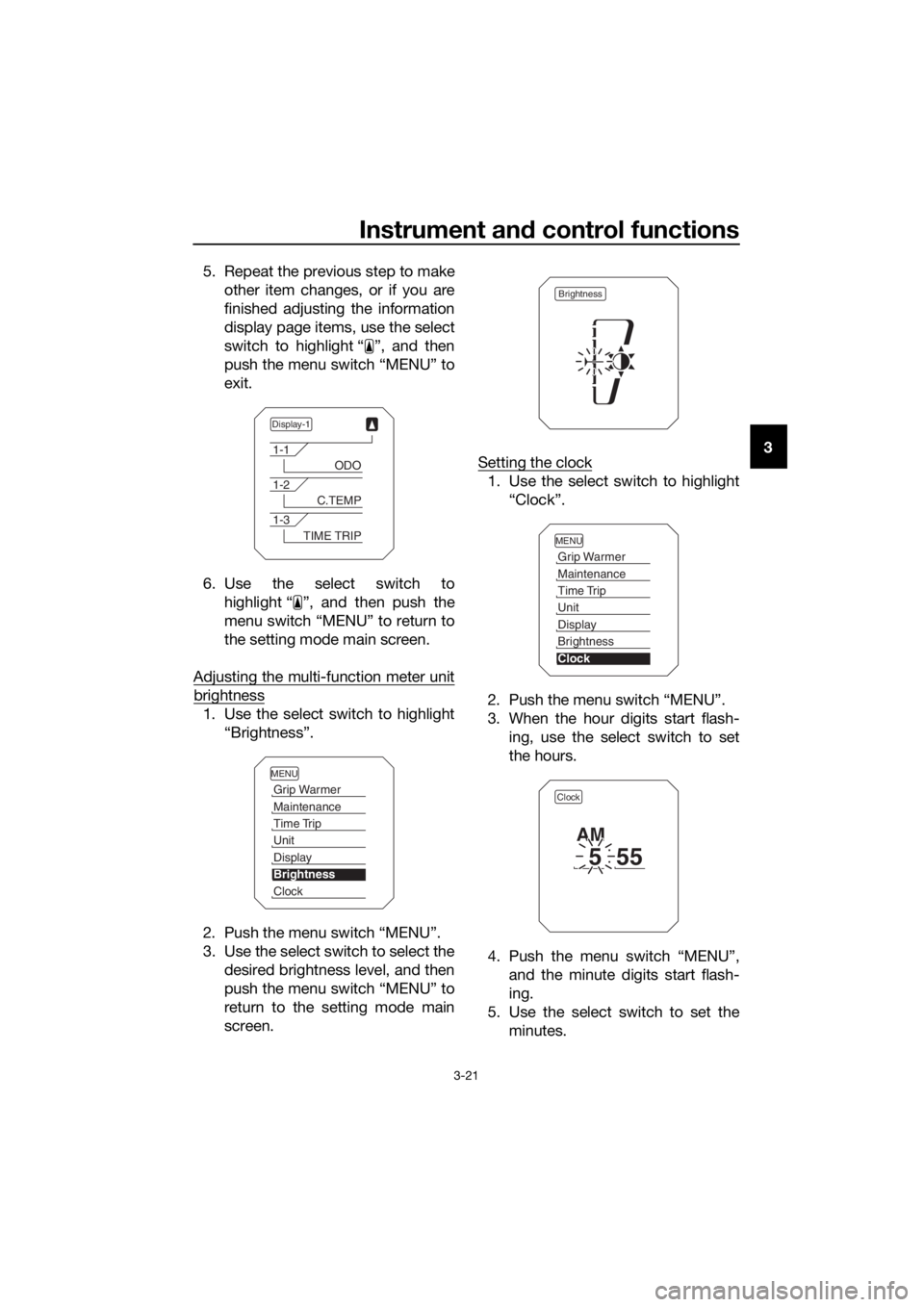
5. Repeat the previous step to make
other item changes, or if you are
finished adjusting the information
display page items, use the select
switch to highlight “ ”, and then
push the menu switch “MENU” to
exit.
6. Use the select switch to highlight “ ”, and then push the
menu switch “MENU” to return to
the setting mode main screen.
Adjusting the multi-function meter unit
brightness
1. Use the select switch to highlight “Brightness”.
2. Push the menu switch “MENU”.
3. Use the select switch to select the desired brightness level, and then
push the menu switch “MENU” to
return to the setting mode main
screen. Setting the clock
1. Use the select switch to highlight
“Clock”.
2. Push the menu switch “MENU”.
3. When the hour digits start flash- ing, use the select switch to set
the hours.
4. Push the menu switch “MENU”, and the minute digits start flash-
ing.
5. Use the select switch to set the minutes.
Display-1
1-1
ODO
1-2
C.TEMP
1-3
TIME TRIP
MENU
Grip Warmer
Maintenance
Time Trip
Unit
Display
Brightness
Clock
Brightness
MENU
Grip Warmer
Maintenance
Time Trip
Unit
Display
Brightness
Clock
Clock
555
AM
UBP9E0E0.book Page 21 Wednesday, February 8, 2017 8:34 AM
Page 53 of 122
Instrument and control functions
3-39
3
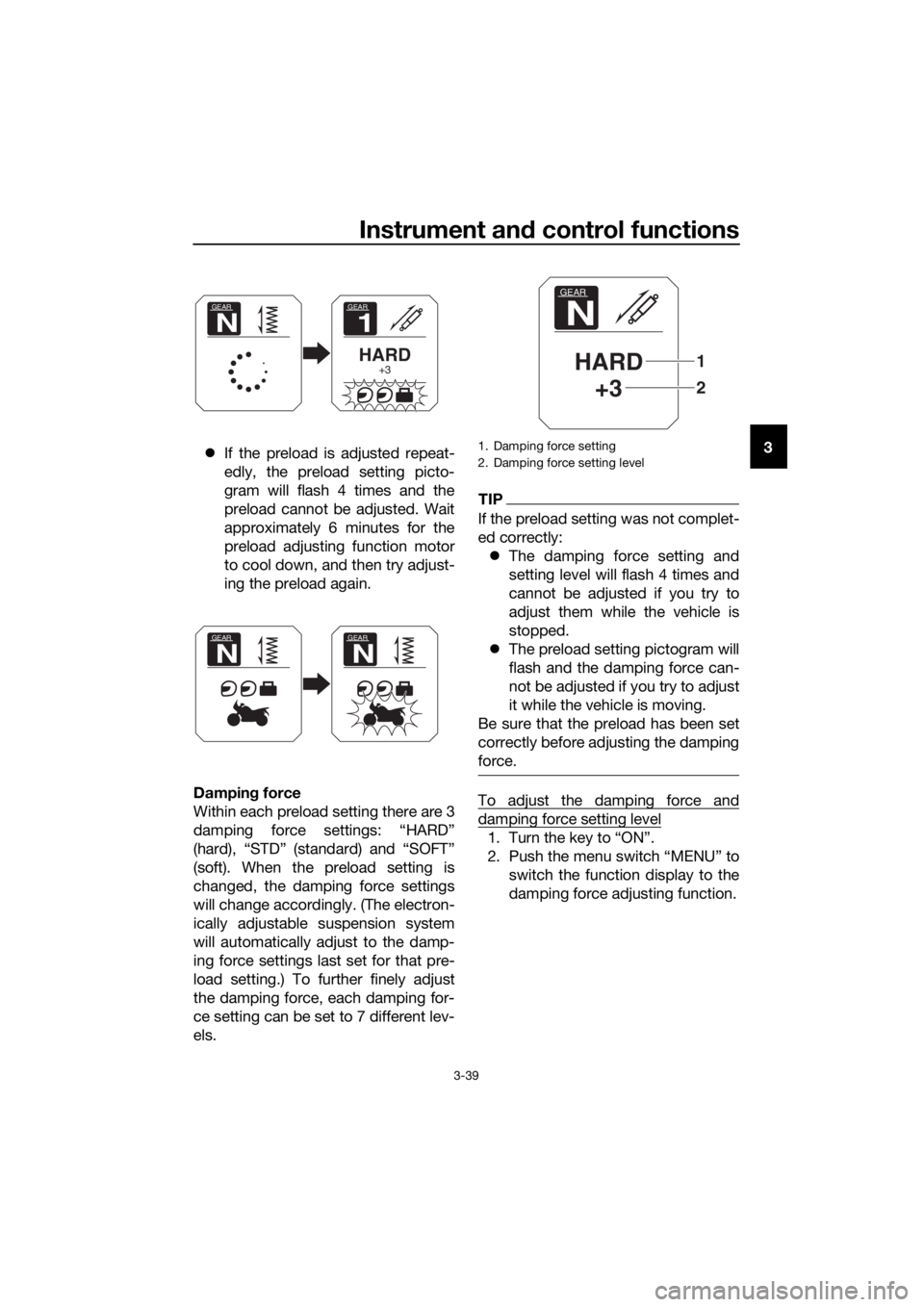
If the preload is adjusted repeat-
edly, the preload setting picto-
gram will flash 4 times and the
preload cannot be adjusted. Wait
approximately 6 minutes for the
preload adjusting function motor
to cool down, and then try adjust-
ing the preload again.
Dampin g force
Within each preload setting there are 3
damping force settings: “HARD”
(hard), “STD” (standard) and “SOFT”
(soft). When the preload setting is
changed, the damping force settings
will change accordingly. (The electron-
ically adjustable suspension system
will automatically adjust to the damp-
ing force settings last set for that pre-
load setting.) To further finely adjust
the damping force, each damping for-
ce setting can be set to 7 different lev-
els.
TIP
If the preload setting was not complet-
ed correctly: The damping force setting and
setting level will flash 4 times and
cannot be adjusted if you try to
adjust them while the vehicle is
stopped.
The preload setting pictogram will
flash and the damping force can-
not be adjusted if you try to adjust
it while the vehicle is moving.
Be sure that the preload has been set
correctly before adjusting the damping
force.
To adjust the damping force and
damping force setting level
1. Turn the key to “ON”.
2. Push the menu switch “MENU” to switch the function display to the
damping force adjusting function.
GEAR
1
HARD+3
GEAR
N
GEAR
N
GEAR
N
1. Damping force setting
2. Damping force setting level
GEAR
N
HARD+3
2
1
UBP9E0E0.book Page 39 Wednesday, February 8, 2017 8:34 AM
Page 85 of 122
Periodic maintenance an d a djustment
6-19
6
EAU21402
Valve clearance
The valve clearance changes with use,
resulting in improper air-fuel mixture
and/or engine noise. To prevent this
from occurring, the valve clearance
must be adjusted by a Yamaha dealer
at the intervals specified in the periodic
maintenance and lubrication chart.
EAU64410
Tires
Tires are the only contact between the
vehicle and the road. Safety in all con-
ditions of riding depends on a relatively
small area of road contact. Therefore, it
is essential to maintain the tires in good
condition at all times and replace them
at the appropriate time with the speci-
fied tires.
Tire air pressure
The tire air pressure should be
checked and, if necessary, adjusted
before each ride.
WARNING
EWA10504
Operation of this vehicle with im-
proper tire pressure may cause se-
vere injury or d eath from loss of
control. The tire air pressure must b e
checked and a djuste d on col d
tires (i.e., when the temperature
of the tires equals the am bient
temperature).
The tire air pressure must b e
a d juste d in accor dance with the
ri din g speed and with the total
wei ght of ri der, passen ger, car-
g o, an d accessories approve d
for this mo del.
UBP9E0E0.book Page 19 Wednesday, February 8, 2017 8:34 AM