fuel YAMAHA XVS1300A 2014 Owners Manual
[x] Cancel search | Manufacturer: YAMAHA, Model Year: 2014, Model line: XVS1300A, Model: YAMAHA XVS1300A 2014Pages: 92, PDF Size: 2.05 MB
Page 6 of 92

TABLE OF CONTENTSSAFETY INFORMATION.................. 1-1
DESCRIPTION .................................. 2-1
Left view ......................................... 2-1
Right view ....................................... 2-2
Controls and instruments ............... 2-3
INSTRUMENT AND CONTROL
FUNCTIONS ...................................... 3-1
Immobilizer system......................... 3-1
Main switch/steering lock............... 3-2
Indicator lights and warning lights............................................ 3-4
Multi-function meter unit ................ 3-6
Handlebar switches ........................ 3-9
Clutch lever .................................. 3-11
Shift pedal .................................... 3-11
Brake lever.................................... 3-12
Brake pedal .................................. 3-12
Fuel tank cap ................................ 3-12
Fuel ............................................... 3-13
Fuel tank breather hose and overflow hose ............................ 3-14
Catalytic converter ....................... 3-15
Rider seat ..................................... 3-15
Helmet holder ............................... 3-16
Adjusting the shock absorber assembly ................................... 3-17
Sidestand ..................................... 3-18
Ignition circuit cut-off system ....... 3-18 FOR YOUR SAFETY –
PRE-OPERATION CHECKS
............. 4-1
OPERATION AND IMPORTANT
RIDING POINTS ................................ 5-1
Starting the engine .......................... 5-1
Shifting ............................................ 5-2
Tips for reducing fuel consumption ................................ 5-3
Engine break-in ............................... 5-3
Parking ............................................ 5-4
PERIODIC MAINTENANCE AND
ADJUSTMENT ................................... 6-1
Owner’s tool kit ............................... 6-2
Periodic maintenance chart for the emission control system .............. 6-3
General maintenance and lubrication chart ........................... 6-4
Removing and installing the
panel ............................................ 6-8
Checking the spark plugs ............... 6-8
Engine oil and oil filter cartridge.... 6-10
Coolant.......................................... 6-13
Replacing the air filter element ..... 6-14
Checking the throttle grip free play ............................................ 6-15
Valve clearance ............................. 6-15
Tires .............................................. 6-15
Cast wheels................................... 6-17 Adjusting the clutch lever free
play ............................................ 6-18
Checking the brake lever free play ............................................ 6-19
Brake light switches ..................... 6-19
Checking the front and rear brake
pads .......................................... 6-20
Checking the brake fluid level ...... 6-21
Changing the brake fluid .............. 6-22
Drive belt slack ............................. 6-22
Checking and lubricating the
cables ........................................ 6-23
Checking and lubricating the throttle grip and cable ............... 6-24
Checking and lubricating the brake and shift pedals............... 6-24
Checking and lubricating the
brake and clutch levers ............. 6-25
Checking and lubricating the sidestand................................... 6-25
Lubricating the rear suspension ... 6-26
Lubricating the swingarm pivots......................................... 6-26
Checking the front fork ................. 6-26
Checking the steering................... 6-27
Checking the wheel bearings ....... 6-28
Battery .......................................... 6-28
Replacing the fuses ...................... 6-29
Replacing the headlight bulb ........ 6-31
Replacing a turn signal light bulb or the tail/brake light bulb ......... 6-32U1CSE1E0.book Page 1 Friday, September 13, 2013 9:33 AM
Page 12 of 92
SAFETY INFORMATION
1-5
1operator and may limit control
ability, therefore, such accesso-
ries are not recommended.
Use caution when adding electri-
cal accessories. If electrical ac-
cessories exceed the capacity of
the motorcycle’s electrical sys-
tem, an electric failure could re-
sult, which could cause a
dangerous loss of lights or engine
power.
Aftermarket Tires an d Rims
The tires and rims that came with your
motorcycle were designed to match
the performance capabilities and to
provide the best combination of han-
dling, braking, and comfort. Other
tires, rims, sizes, and combinations
may not be appropriate. Refer to page
6-15 for tire specifications and more in-
formation on replacing your tires.
Transportin g the Motorcycle
Be sure to observe following instruc-
tions before transporting the motorcy-
cle in another vehicle. Remove all loose items from the
motorcycle.
Check that the fuel cock (if
equipped) is in the “OFF” position
and that there are no fuel leaks.
Point the front wheel straight
ahead on the trailer or in the truck
bed, and choke it in a rail to pre-
vent movement.
Shift the transmission in gear (for
models with a manual transmis-
sion).
Secure the motorcycle with tie-
downs or suitable straps that are
attached to solid parts of the mo-
torcycle, such as the frame or up-
per front fork triple clamp (and not,
for example, to rubber-mounted
handlebars or turn signals, or
parts that could break). Choose
the location for the straps carefully
so the straps will not rub against
painted surfaces during transport.
The suspension should be com-
pressed somewhat by the tie-
downs, if possible, so that the mo-
torcycle will not bounce exces-
sively during transport.
U1CSE1E0.book Page 5 Friday, September 13, 2013 9:33 AM
Page 13 of 92
DESCRIPTION
2-1
2
EAU10411
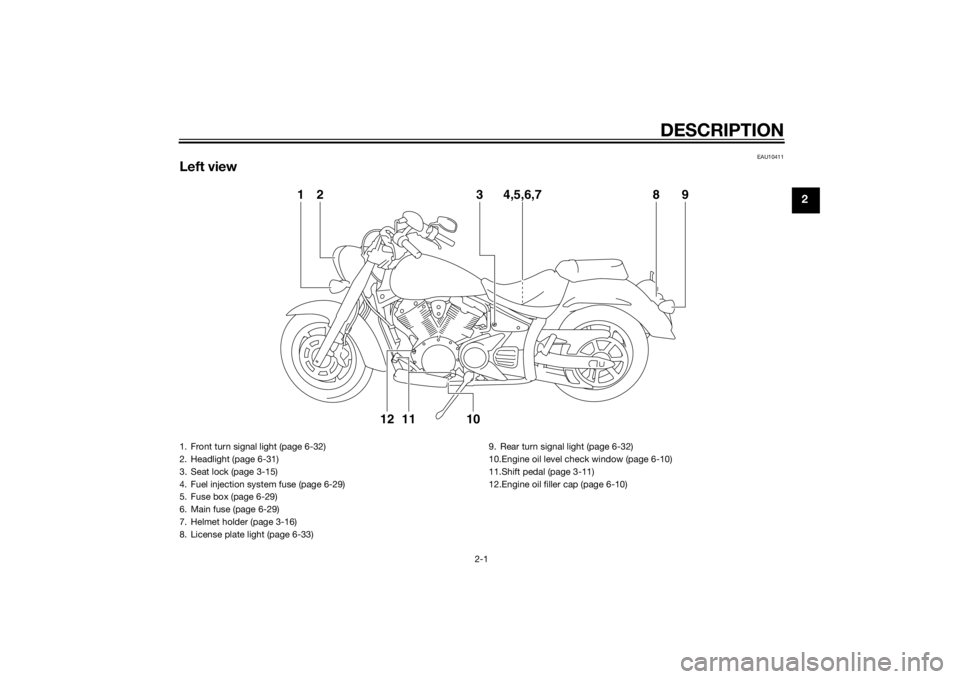
Left view
1238 9
4,5,6,7
10
1112
1. Front turn signal light (page 6-32)
2. Headlight (page 6-31)
3. Seat lock (page 3-15)
4. Fuel injection system fuse (page 6-29)
5. Fuse box (page 6-29)
6. Main fuse (page 6-29)
7. Helmet holder (page 3-16)
8. License plate light (page 6-33) 9. Rear turn signal light (page 6-32)
10.Engine oil level check window (page 6-10)
11.Shift pedal (page 3-11)
12.Engine oil filler cap (page 6-10)
U1CSE1E0.book Page 1 Friday, September 13, 2013 9:33 AM
Page 14 of 92
DESCRIPTION
2-2
2
EAU10421
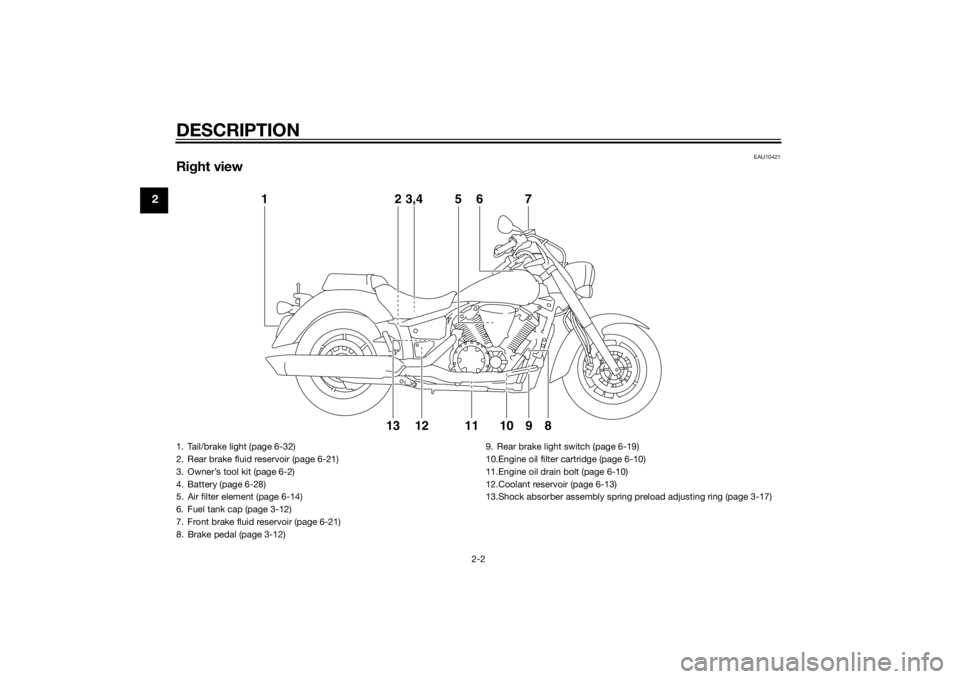
Right view
12
121310 9 8
3,4 5 6 7
11
1. Tail/brake light (page 6-32)
2. Rear brake fluid reservoir (page 6-21)
3. Owner’s tool kit (page 6-2)
4. Battery (page 6-28)
5. Air filter element (page 6-14)
6. Fuel tank cap (page 3-12)
7. Front brake fluid reservoir (page 6-21)
8. Brake pedal (page 3-12) 9. Rear brake light switch (page 6-19)
10.Engine oil filter cartridge (page 6-10)
11.Engine oil drain bolt (page 6-10)
12.Coolant reservoir (page 6-13)
13.Shock absorber assembly spring preload adjusting ring (page 3-17)U1CSE1E0.book Page 2 Friday, September 13, 2013 9:33 AM
Page 19 of 92
INSTRUMENT AND CONTROL FUNCTIONS
3-4
3
EAU49394
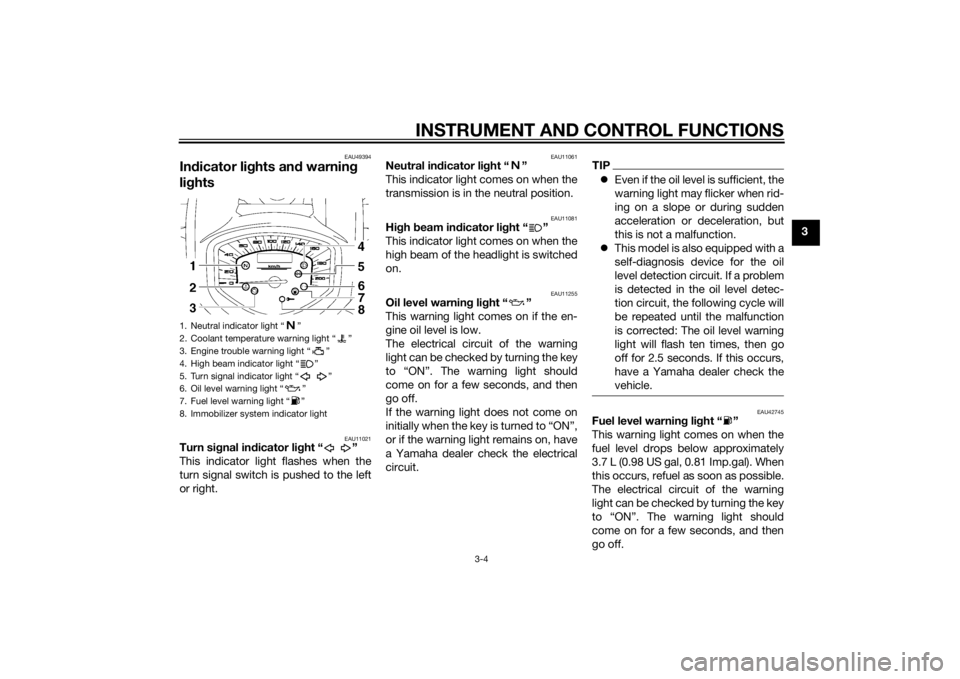
Indicator lig hts and warning
lig hts
EAU11021
Turn si gnal in dicator li ght “ ”
This indicator light flashes when the
turn signal switch is pushed to the left
or right.
EAU11061
Neutral in dicator li ght “ ”
This indicator light comes on when the
transmission is in the neutral position.
EAU11081
Hi gh beam in dicator li ght “ ”
This indicator light comes on when the
high beam of the headlight is switched
on.
EAU11255
Oil level warnin g lig ht “ ”
This warning light comes on if the en-
gine oil level is low.
The electrical circuit of the warning
light can be checked by turning the key
to “ON”. The warning light should
come on for a few seconds, and then
go off.
If the warning light does not come on
initially when the key is turned to “ON”,
or if the warning light remains on, have
a Yamaha dealer check the electrical
circuit.
TIP Even if the oil level is sufficient, the
warning light may flicker when rid-
ing on a slope or during sudden
acceleration or deceleration, but
this is not a malfunction.
This model is also equipped with a
self-diagnosis device for the oil
level detection circuit. If a problem
is detected in the oil level detec-
tion circuit, the following cycle will
be repeated until the malfunction
is corrected: The oil level warning
light will flash ten times, then go
off for 2.5 seconds. If this occurs,
have a Yamaha dealer check the
vehicle.
EAU42745
Fuel level warnin g li ght “ ”
This warning light comes on when the
fuel level drops below approximately
3.7 L (0.98 US gal, 0.81 Imp.gal). When
this occurs, refuel as soon as possible.
The electrical circuit of the warning
light can be checked by turning the key
to “ON”. The warning light should
come on for a few seconds, and then
go off.
1. Neutral indicator light “ ”
2. Coolant temperature warning light “ ”
3. Engine trouble warning light “ ”
4. High beam indicator light “ ”
5. Turn signal indicator light “ ”
6. Oil level warning light “ ”
7. Fuel level warning light “ ”
8. Immobilizer system indicator light
U1CSE1E0.book Page 4 Friday, September 13, 2013 9:33 AM
Page 20 of 92
INSTRUMENT AND CONTROL FUNCTIONS
3-5
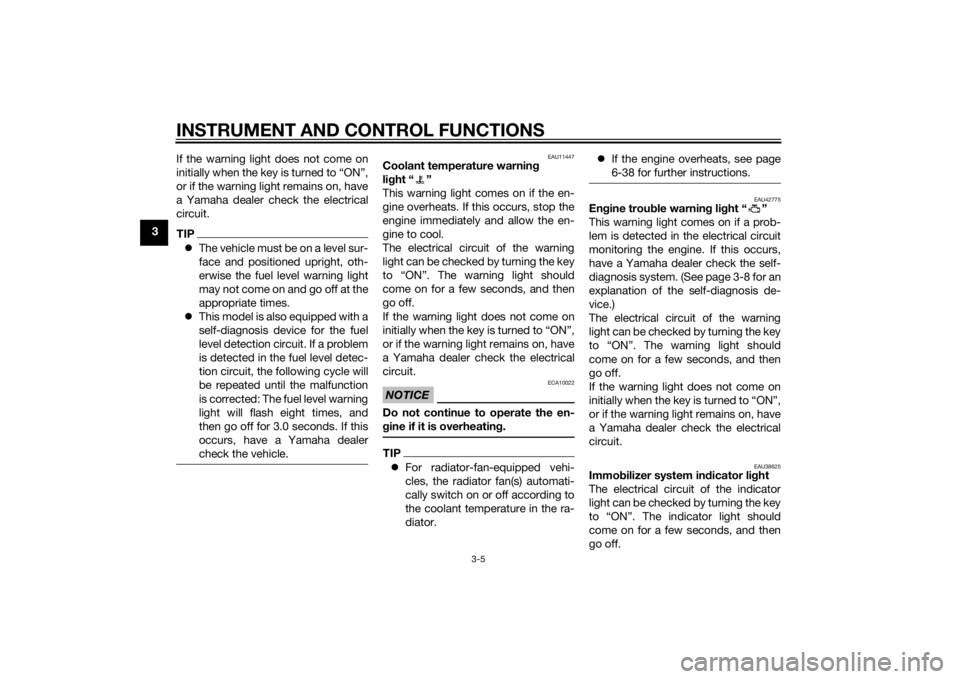
3If the warning light does not come on
initially when the key is turned to “ON”,
or if the warning light remains on, have
a Yamaha dealer check the electrical
circuit.
TIP
The vehicle must be on a level sur-
face and positioned upright, oth-
erwise the fuel level warning light
may not come on and go off at the
appropriate times.
This model is also equipped with a
self-diagnosis device for the fuel
level detection circuit. If a problem
is detected in the fuel level detec-
tion circuit, the following cycle will
be repeated until the malfunction
is corrected: The fuel level warning
light will flash eight times, and
then go off for 3.0 seconds. If this
occurs, have a Yamaha dealer
check the vehicle.
EAU11447
Coolant temperature warnin g
li g ht “ ”
This warning light comes on if the en-
gine overheats. If this occurs, stop the
engine immediately and allow the en-
gine to cool.
The electrical circuit of the warning
light can be checked by turning the key
to “ON”. The warning light should
come on for a few seconds, and then
go off.
If the warning light does not come on
initially when the key is turned to “ON”,
or if the warning light remains on, have
a Yamaha dealer check the electrical
circuit.NOTICE
ECA10022
Do not continue to operate the en-
g ine if it is overheatin g.TIP For radiator-fan-equipped vehi-
cles, the radiator fan(s) automati-
cally switch on or off according to
the coolant temperature in the ra-
diator.
If the engine overheats, see page
6-38 for further instructions.
EAU42775
Engine trou ble warnin g lig ht “ ”
This warning light comes on if a prob-
lem is detected in the electrical circuit
monitoring the engine. If this occurs,
have a Yamaha dealer check the self-
diagnosis system. (See page 3-8 for an
explanation of the self-diagnosis de-
vice.)
The electrical circuit of the warning
light can be checked by turning the key
to “ON”. The warning light should
come on for a few seconds, and then
go off.
If the warning light does not come on
initially when the key is turned to “ON”,
or if the warning light remains on, have
a Yamaha dealer check the electrical
circuit.
EAU38625
Immo bilizer system in dicator li ght
The electrical circuit of the indicator
light can be checked by turning the key
to “ON”. The indicator light should
come on for a few seconds, and then
go off.
U1CSE1E0.book Page 5 Friday, September 13, 2013 9:33 AM
Page 21 of 92
INSTRUMENT AND CONTROL FUNCTIONS
3-6
3
If the indicator light does not come on
initially when the key is turned to “ON”,
or if the indicator light remains on, have
a Yamaha dealer check the electrical
circuit.
When the key is turned to “OFF” and
30 seconds have passed, the indicator
light will start flashing indicating the im-
mobilizer system is enabled. After 24
hours have passed, the indicator light
will stop flashing, however the immobi-
lizer system is still enabled.
The self-diagnosis device also detects
problems in the immobilizer system
circuits. (See page 3-8 for an explana-
tion of the self-diagnosis device.)
EAU4290A
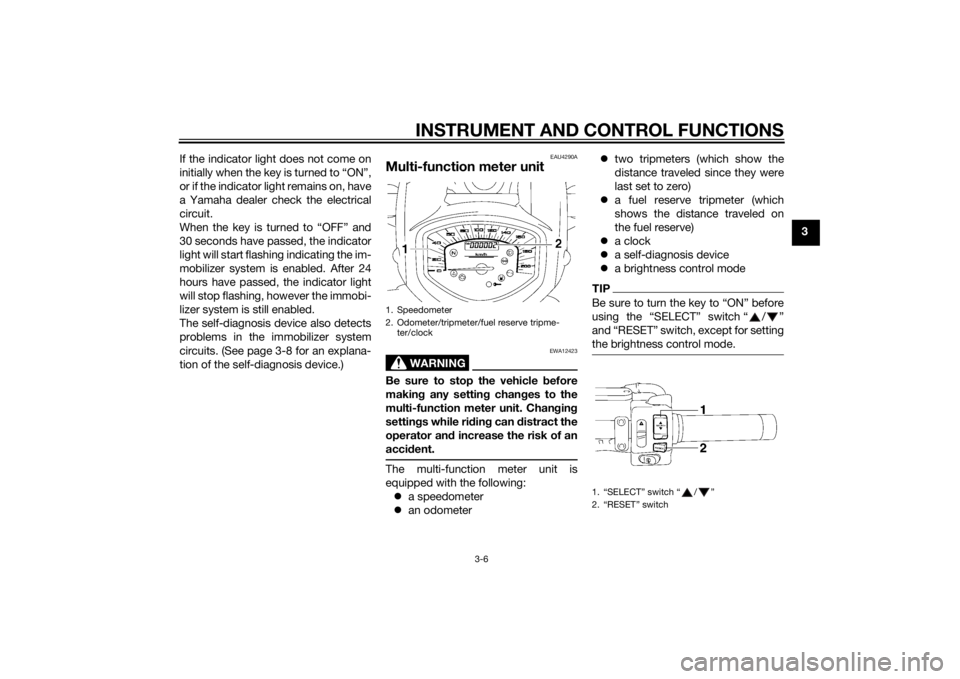
Multi-function meter unit
WARNING
EWA12423
Be sure to stop the vehicle
before
makin g any settin g chan ges to the
multi-function meter unit. Chan gin g
settin gs while ri din g can distract the
operator an d increase the risk of an
acci dent.The multi-function meter unit is
equipped with the following:
a speedometer
an odometer
two tripmeters (which show the
distance traveled since they were
last set to zero)
a fuel reserve tripmeter (which
shows the distance traveled on
the fuel reserve)
a clock
a self-diagnosis device
a brightness control mode
TIPBe sure to turn the key to “ON” before
using the “SELECT” switch “ / ”
and “RESET” switch, except for setting
the brightness control mode.
1. Speedometer
2. Odometer/tripmeter/fuel reserve tripme-
ter/clock
1. “SELECT” switch “ / ”
2. “RESET” switch
U1CSE1E0.book Page 6 Friday, September 13, 2013 9:33 AM
Page 22 of 92
INSTRUMENT AND CONTROL FUNCTIONS
3-7
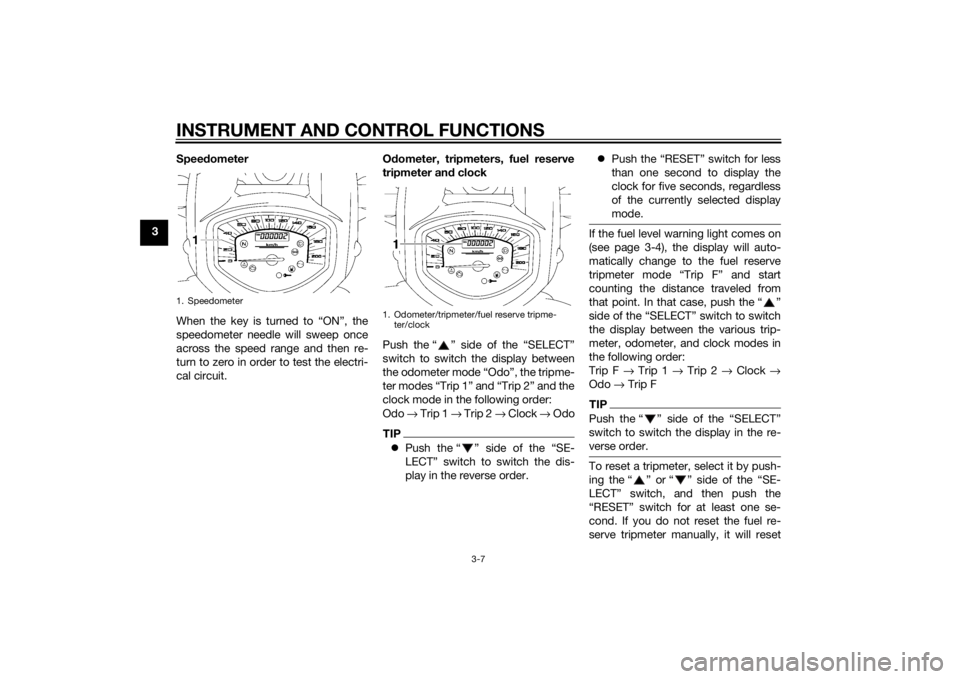
3Speed
ometer
When the key is turned to “ON”, the
speedometer needle will sweep once
across the speed range and then re-
turn to zero in order to test the electri-
cal circuit. O
dometer, tripmeters, fuel reserve
tripmeter an d clock
Push the “ ” side of the “SELECT”
switch to switch the display between
the odometer mode “Odo”, the tripme-
ter modes “Trip 1” and “Trip 2” and the
clock mode in the following order:
Odo → Trip 1 → Trip 2 → Clock → Odo
TIPPush the “ ” side of the “SE-
LECT” switch to switch the dis-
play in the reverse order.
Push the “RESET” switch for less
than one second to display the
clock for five seconds, regardless
of the currently selected display
mode.
If the fuel level warning light comes on
(see page 3-4), the display will auto-
matically change to the fuel reserve
tripmeter mode “Trip F” and start
counting the distance traveled from
that point. In that case, push the “ ”
side of the “SELECT” switch to switch
the display between the various trip-
meter, odometer, and clock modes in
the following order:
Trip F → Trip 1 → Trip 2 → Clock →
Odo → Trip FTIPPush the “ ” side of the “SELECT”
switch to switch the display in the re-
verse order.To reset a tripmeter, select it by push-
ing the “ ” or “ ” side of the “SE-
LECT” switch, and then push the
“RESET” switch for at least one se-
cond. If you do not reset the fuel re-
serve tripmeter manually, it will reset
1. Speedometer
1. Odometer/tripmeter/fuel reserve tripme-
ter/clock
U1CSE1E0.book Page 7 Friday, September 13, 2013 9:33 AM
Page 23 of 92
INSTRUMENT AND CONTROL FUNCTIONS
3-8
3
itself automatically, and the display will
return to the prior mode after refueling
and traveling 5 km (3 mi).
To set the clock
1. Push the “ ” or “ ” side of the
“SELECT” switch to change the
display to the clock mode.
2. Push the “ ” side of the “SE- LECT” switch and the “RESET”
switch together for at least two
seconds.
3. When the hour digits start flash- ing, push the “ ” or “ ” side of
the “SELECT” switch to set the
hours.
4. Push the “RESET” switch, and the minute digits will start flashing. 5. Push the “ ” or “ ” side of the
“SELECT” switch to set the minu-
tes.
6. Push the “RESET” switch and then release it to start the clock.
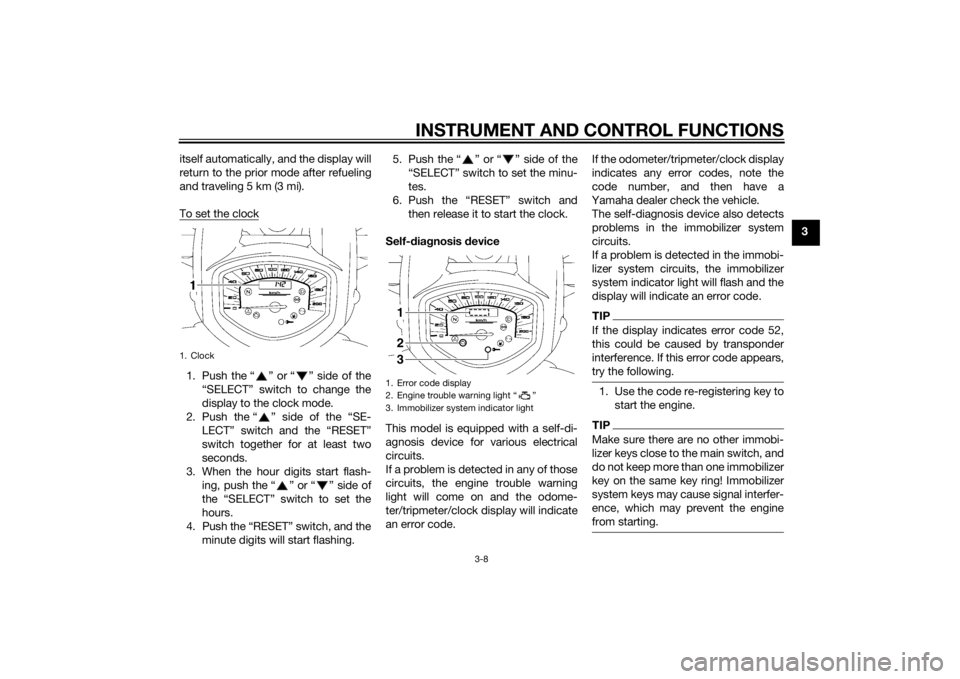
Self-d iagnosis device
This model is equipped with a self-di-
agnosis device for various electrical
circuits.
If a problem is detected in any of those
circuits, the engine trouble warning
light will come on and the odome-
ter/tripmeter/clock display will indicate
an error code. If the odometer/tripmeter/clock display
indicates any error codes, note the
code number, and then have a
Yamaha dealer check the vehicle.
The self-diagnosis device also detects
problems in the immobilizer system
circuits.
If a problem is detected in the immobi-
lizer system circuits, the immobilizer
system indicator light will flash and the
display will indicate an error code.
TIPIf the display indicates error code 52,
this could be caused by transponder
interference. If this error code appears,
try the following.1. Use the code re-registering key to
start the engine.TIPMake sure there are no other immobi-
lizer keys close to the main switch, and
do not keep more than one immobilizer
key on the same key ring! Immobilizer
system keys may cause signal interfer-
ence, which may prevent the engine
from starting.
1. Clock
1. Error code display
2. Engine trouble warning light “ ”
3. Immobilizer system indicator light123
U1CSE1E0.book Page 8 Friday, September 13, 2013 9:33 AM
Page 27 of 92
INSTRUMENT AND CONTROL FUNCTIONS
3-12
3
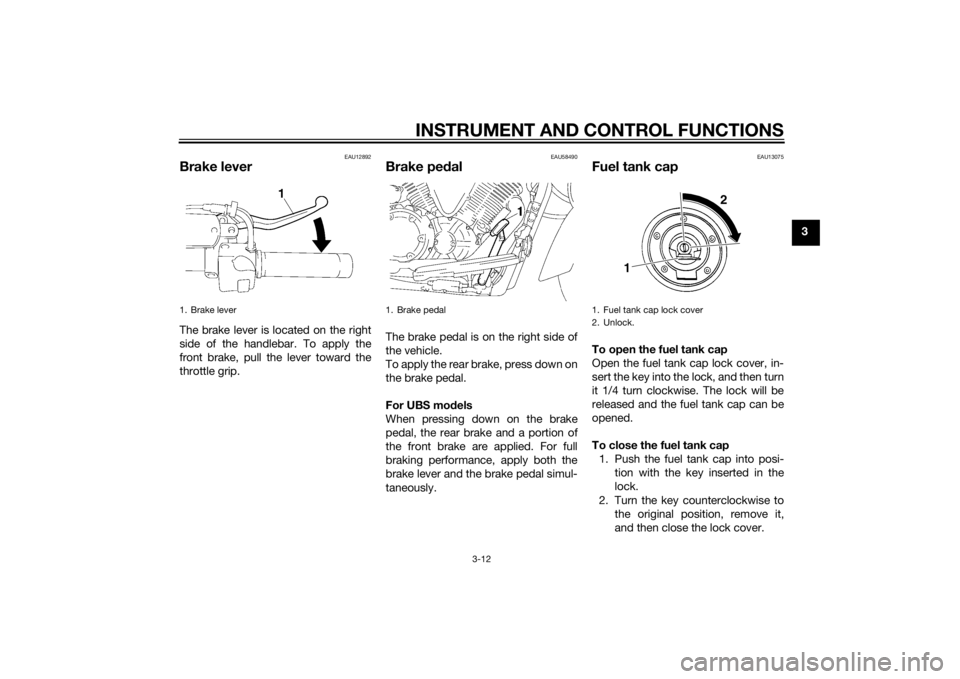
EAU12892
Brake leverThe brake lever is located on the right
side of the handlebar. To apply the
front brake, pull the lever toward the
throttle grip.
EAU58490
Brake pedalThe brake pedal is on the right side of
the vehicle.
To apply the rear brake, press down on
the brake pedal.
For UBS mo dels
When pressing down on the brake
pedal, the rear brake and a portion of
the front brake are applied. For full
braking performance, apply both the
brake lever and the brake pedal simul-
taneously.
EAU13075
Fuel tank capTo open the fuel tank cap
Open the fuel tank cap lock cover, in-
sert the key into the lock, and then turn
it 1/4 turn clockwise. The lock will be
released and the fuel tank cap can be
opened.
To close the fuel tank cap 1. Push the fuel tank cap into posi- tion with the key inserted in the
lock.
2. Turn the key counterclockwise to the original position, remove it,
and then close the lock cover.
1. Brake lever
1. Brake pedal
1. Fuel tank cap lock cover
2. Unlock.
2
1
U1CSE1E0.book Page 12 Friday, September 13, 2013 9:33 AM