audio YAMAHA XVZ1300TF 2000 Owners Manual
[x] Cancel search | Manufacturer: YAMAHA, Model Year: 2000, Model line: XVZ1300TF, Model: YAMAHA XVZ1300TF 2000Pages: 121, PDF Size: 19.23 MB
Page 6 of 121
TABLE OF CONTENTS
1 GIVE SAFETY THE RIGHT OF WAY
1
2 DESCRIPTION
2
3 INSTRUMENT AND CONTROL FUNCTIONS
3
4 AUDIO SYSTEM
4
5 PRE-OPERATION CHECKS
5
6 OPERATION AND IMPORTANT RIDING POINTS
6
7 PERIODIC MAINTENANCE AND MINOR REPAIR
7
8 MOTORCYCLE CARE AND STORAGE
8
9 SPECIFICATIONS
9
10 CONSUMER INFORMATION
10
INDEX
E_5jc_Toc0.fm Page 1 Saturday, October 16, 1999 1:06 PM
Page 13 of 121
DESCRIPTION
2-3
2
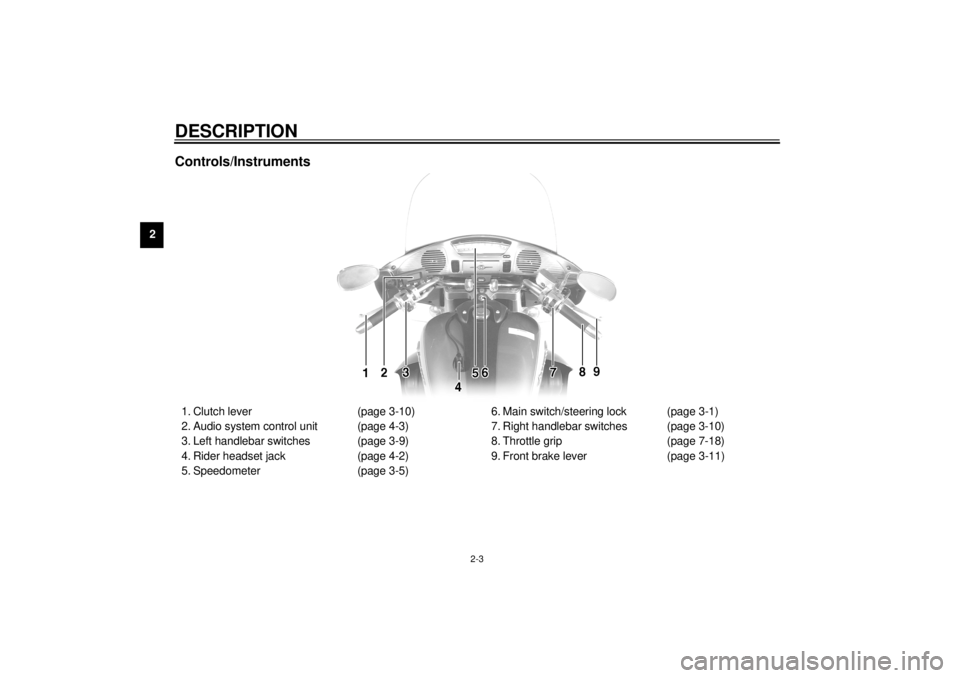
Controls/Instruments1. Clutch lever (page 3-10)
2. Audio system control unit (page 4-3)
3. Left handlebar switches (page 3-9)
4. Rider headset jack (page 4-2)
5. Speedometer (page 3-5)6. Main switch/steering lock (page 3-1)
7. Right handlebar switches (page 3-10)
8. Throttle grip (page 7-18)
9. Front brake lever (page 3-11)
E_5jc_Description.fm Page 3 Saturday, October 16, 1999 1:07 PM
Page 15 of 121
3-1
3
EAU00027
3-INSTRUMENT AND CONTROL FUNCTIONS
EAU00029*
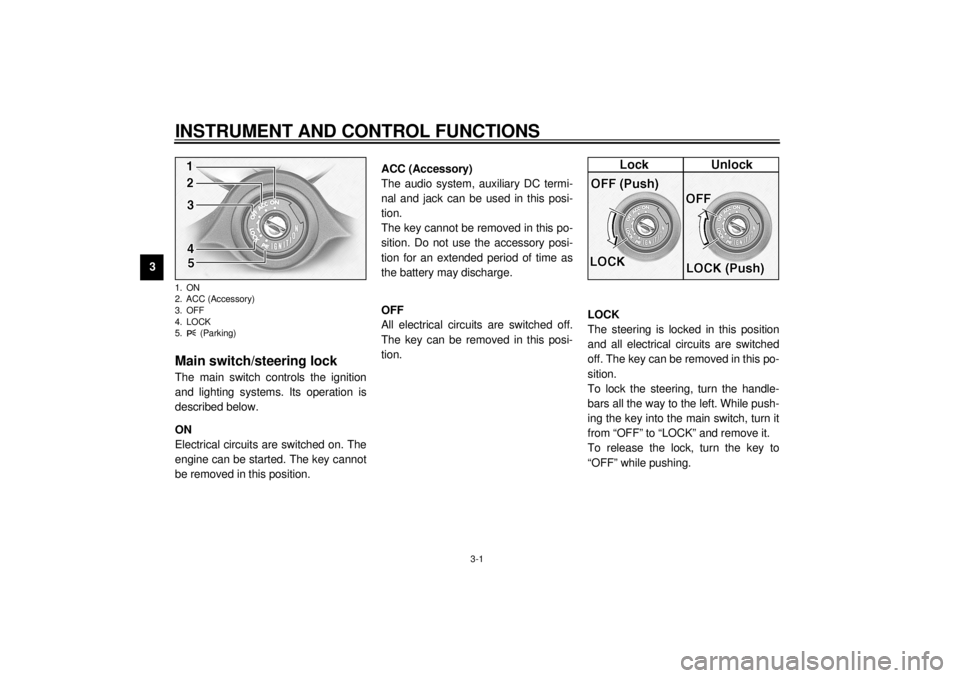
Main switch/steering lockThe main switch controls the ignition
and lighting systems. Its operation is
described below.
EAU00036
ON
Electrical circuits are switched on. The
engine can be started. The key cannot
be removed in this position.
EAU01842
ACC (Accessory)
The audio system, auxiliary DC termi-
nal and jack can be used in this posi-
tion.
The key cannot be removed in this po-
sition. Do not use the accessory posi-
tion for an extended period of time as
the battery may discharge.
EAU00038
OFF
All electrical circuits are switched off.
The key can be removed in this posi-
tion.
EAU00040*
LOCK
The steering is locked in this position
and all electrical circuits are switched
off. The key can be removed in this po-
sition.
To lock the steering, turn the handle-
bars all the way to the left. While push-
ing the key into the main switch, turn it
from “OFF” to “LOCK” and remove it.
To release the lock, turn the key to
“OFF” while pushing.
1. ON
2. ACC (Accessory)
3. OFF
4. LOCK
5. (Parking)E_5jc_Functions.fm Page 1 Saturday, October 16, 1999 1:08 PM
Page 38 of 121
AUDIO SYSTEM
4
Location of parts ................................................................................ 4-1
Headsets (optional) ............................................................................ 4-2
Control unit ......................................................................................... 4-3
Making basic settings ......................................................................... 4-4
Making mode settings ........................................................................ 4-5
Cassette deck operation..................................................................... 4-8
Radio operation ................................................................................ 4-12
CD changer (optional) operation ...................................................... 4-16
Auxiliary audio source operation ...................................................... 4-17
E_5jc_AudioTOC.fm Page 1 Saturday, October 16, 1999 1:08 PM
Page 39 of 121
4-1
4
EAU02933*
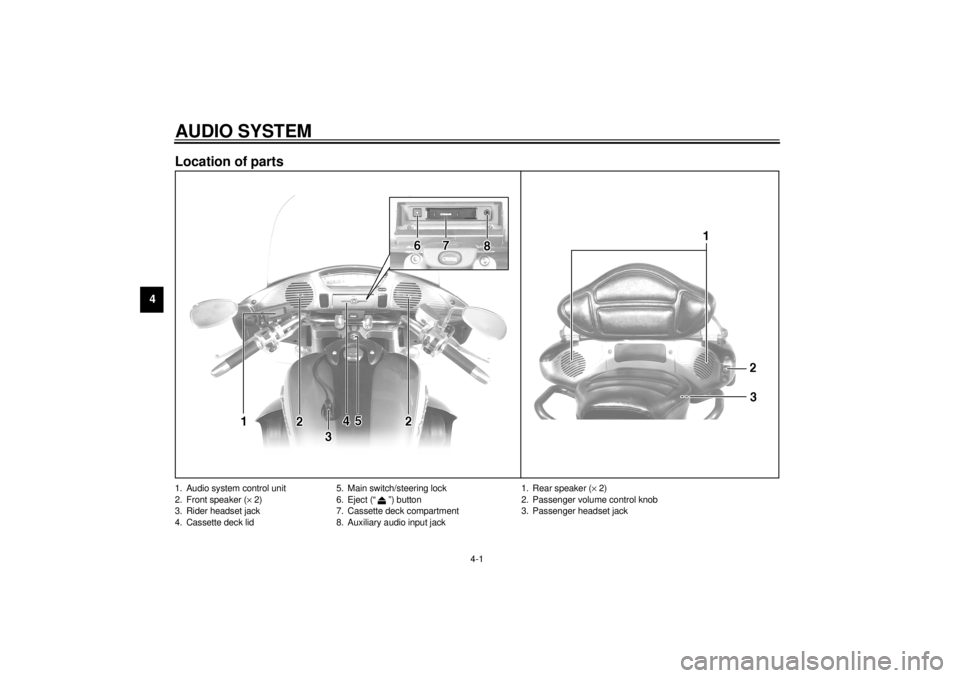
4-AUDIO SYSTEMLocation of parts1. Audio system control unit
2. Front speaker (´ 2)
3. Rider headset jack
4. Cassette deck lid5. Main switch/steering lock
6. Eject (“ ”) button
7. Cassette deck compartment
8. Auxiliary audio input jack
1. Rear speaker (´ 2)
2. Passenger volume control knob
3. Passenger headset jack
E_5jc_Audio.fm Page 1 Saturday, October 16, 1999 1:09 PM
Page 40 of 121
AUDIO SYSTEM
4-2
4
WARNING
@ l
It is dangerous to operate the
audio system controls while
riding. Never take your hands
off the handlebars while riding.
l
Keep the volume at a low
enough level to be aware of traf-
fic conditions and ensure safety.
@CAUTION:@ l
Do not use the audio system for
a long period of time when the
engine is not running as the bat-
tery may discharge.
l
The control unit, cassette deck
and speakers are water-resis-
tant; however, it is good prac-
tice to cover them with plastic
bags when washing the motor-
cycle.
l
When cleaning the control unit
display, use a neutral detergent.
Never use strong abrasive
cleaning products, fuel (gaso-
line), thinner, etc.
@
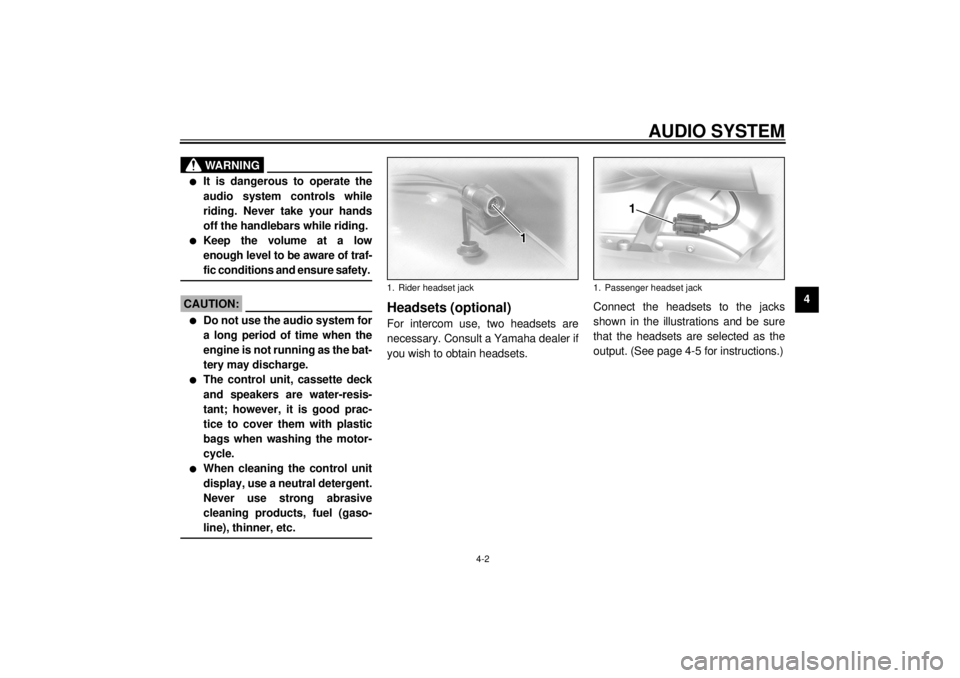
Headsets (optional)For intercom use, two headsets are
necessary. Consult a Yamaha dealer if
you wish to obtain headsets.Connect the headsets to the jacks
shown in the illustrations and be sure
that the headsets are selected as the
output. (See page 4-5 for instructions.)1. Rider headset jack
1. Passenger headset jack
E_5jc_Audio.fm Page 2 Saturday, October 16, 1999 1:09 PM
Page 41 of 121
AUDIO SYSTEM
4
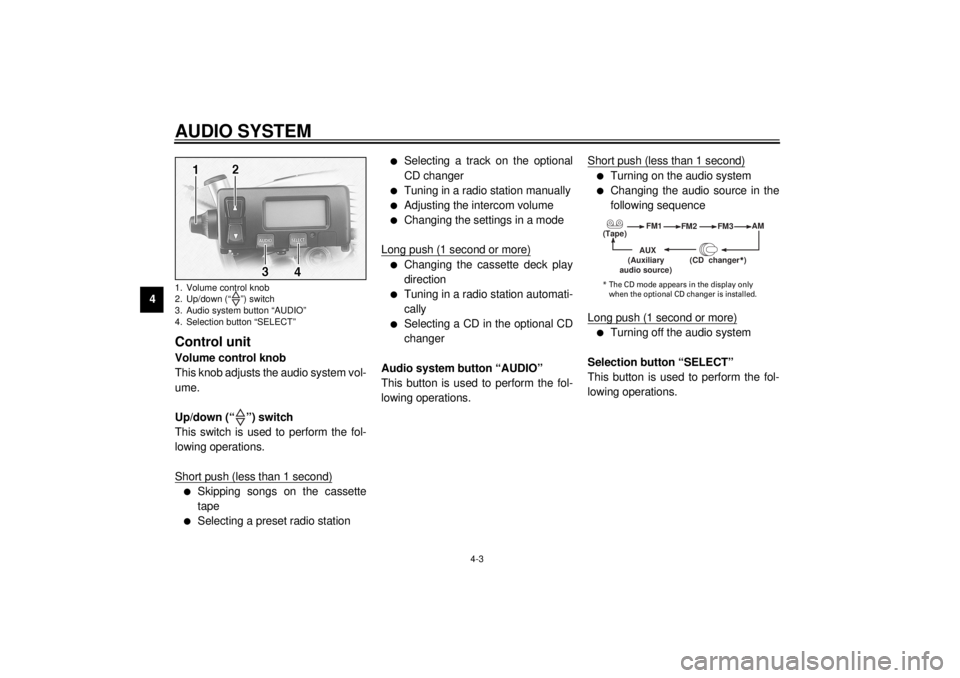
lSkipping songs on the cassette
lChanging the cassette deck play
lTurning on the audio system
lTurning off the audio system
(Tape)
(Auxiliary
* The CD mode appears in the display only
E_5jc_Audio.fm Page 3 Saturday, October 16, 1999 1:09 PM
Page 42 of 121
AUDIO SYSTEM
4-4
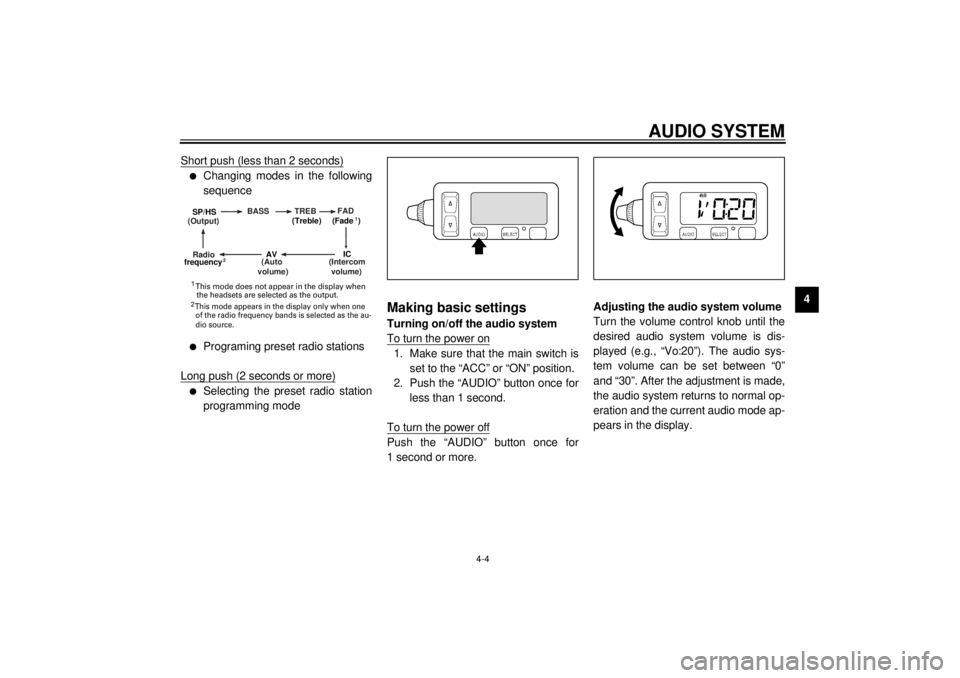
4 Short push (less than 2 seconds)
l
Changing modes in the following
sequence
l
Programing preset radio stations
Long push (2 seconds or more)
l
Selecting the preset radio station
programming mode
Making basic settingsTurning on/off the audio system
To turn the power on1. Make sure that the main switch is
set to the “ACC” or “ON” position.
2. Push the “AUDIO” button once for
less than 1 second.
To turn the power offPush the “AUDIO” button once for
1 second or more.Adjusting the audio system volume
Turn the volume control knob until the
desired audio system volume is dis-
played (e.g., “Vo:20”). The audio sys-
tem volume can be set between “0”
and “30”. After the adjustment is made,
the audio system returns to normal op-
eration and the current audio mode ap-
pears in the display.
(Output)BASS TREBFAD
(Auto
volume)
(Intercom
volume)
Radio SP/HS
(Treble)
frequency(Fade )
1
2
IC
AV
1
2 This mode does not appear in the display when
the headsets are selected as the output. This mode appears in the display only when one
of the radio frequency bands is selected as the au-
dio source.
E_5jc_Audio.fm Page 4 Saturday, October 16, 1999 1:09 PM
Page 43 of 121
AUDIO SYSTEM
4-5
4
Making mode settingsGeneral procedure
The following setting procedure applies
to the audio system and optional CD
changer.
1. Push the “AUDIO” button for less
than 1 second.
2. Repeatedly push the “SELECT”
button for less than 1 second until
the desired mode appears in the
display. With each press of the
button, the mode changes in the
following sequence.3. While the selected mode is dis-
played (for about 5 seconds), re-
peatedly push either side of the
up/down switch for less than
1 second until the desired setting
is displayed.
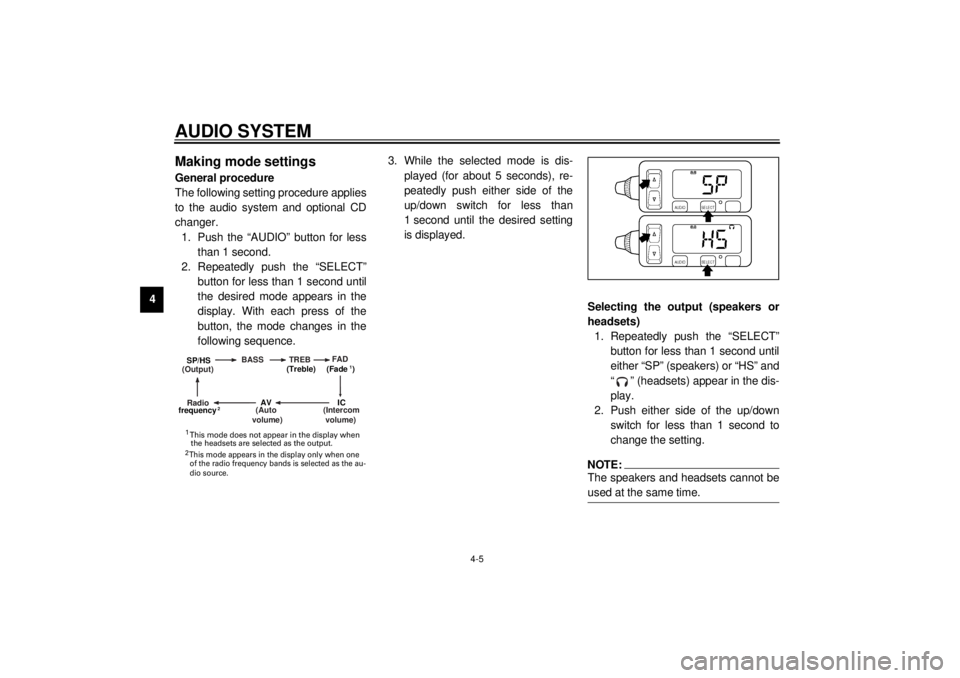
Selecting the output (speakers or
headsets)
1. Repeatedly push the “SELECT”
button for less than 1 second until
either “SP” (speakers) or “HS” and
“ ” (headsets) appear in the dis-
play.
2. Push either side of the up/down
switch for less than 1 second to
change the setting.
NOTE:@ The speakers and headsets cannot be
used at the same time. @
(Output)BASS TREBFAD
(Auto
volume)
(Intercom
volume)
Radio SP/HS
(Treble)
frequency(Fade )
1
2
IC
AV
1
2 This mode does not appear in the display when
the headsets are selected as the output. This mode appears in the display only when one
of the radio frequency bands is selected as the au-
dio source.
E_5jc_Audio.fm Page 5 Saturday, October 16, 1999 1:09 PM
Page 44 of 121
AUDIO SYSTEM
4-6
4
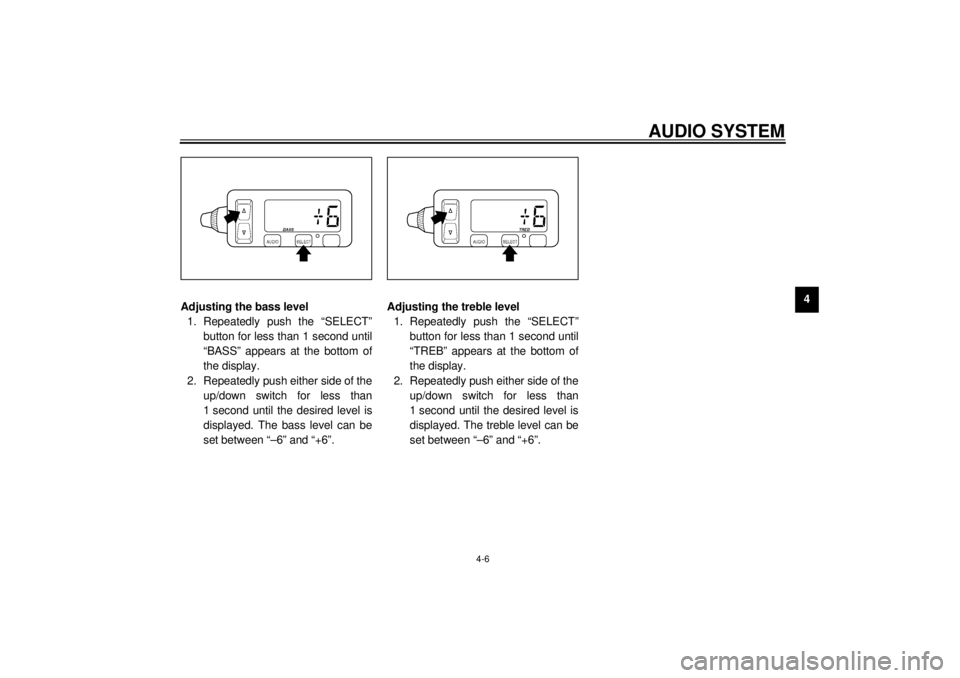
Adjusting the bass level
1. Repeatedly push the “SELECT”
button for less than 1 second until
“BASS” appears at the bottom of
the display.
2. Repeatedly push either side of the
up/down switch for less than
1 second until the desired level is
displayed. The bass level can be
set between “–6” and “+6”.Adjusting the treble level
1. Repeatedly push the “SELECT”
button for less than 1 second until
“TREB” appears at the bottom of
the display.
2. Repeatedly push either side of the
up/down switch for less than
1 second until the desired level is
displayed. The treble level can be
set between “–6” and “+6”.
E_5jc_Audio.fm Page 6 Saturday, October 16, 1999 1:09 PM