lock YAMAHA YFM350R-W 2012 Owner's Manual
[x] Cancel search | Manufacturer: YAMAHA, Model Year: 2012, Model line: YFM350R-W, Model: YAMAHA YFM350R-W 2012Pages: 136, PDF Size: 6.59 MB
Page 105 of 136
8-28
8 The brake light switch for the brake pedal can be
adjusted as follows, but the front brake light switch
should be adjusted by a Yamaha dealer.
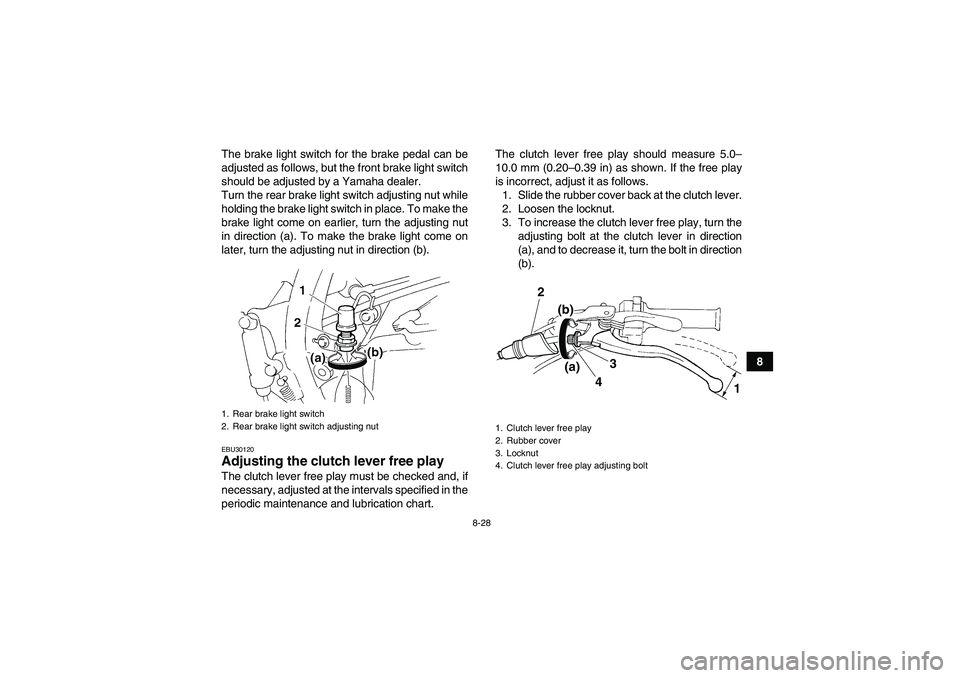
Turn the rear brake light switch adjusting nut while
holding the brake light switch in place. To make the
brake light come on earlier, turn the adjusting nut
in direction (a). To make the brake light come on
later, turn the adjusting nut in direction (b).
EBU30120Adjusting the clutch lever free play The clutch lever free play must be checked and, if
necessary, adjusted at the intervals specified in the
periodic maintenance and lubrication chart.The clutch lever free play should measure 5.0–
10.0 mm (0.20–0.39 in) as shown. If the free play
is incorrect, adjust it as follows.
1. Slide the rubber cover back at the clutch lever.
2. Loosen the locknut.
3. To increase the clutch lever free play, turn the
adjusting bolt at the clutch lever in direction
(a), and to decrease it, turn the bolt in direction
(b).1. Rear brake light switch
2. Rear brake light switch adjusting nut
1. Clutch lever free play
2. Rubber cover
3. Locknut
4. Clutch lever free play adjusting bolt
3 2
4 (a) (b)
1
U10P70E0.book Page 28 Thursday, July 21, 2011 8:51 AM
Page 106 of 136
8-29
8
TIPIf the specified clutch lever free play could be ob-
tained as described above, skip steps 4–8.4. Fully turn the adjusting bolt at the clutch lever
in direction (a) to loosen the clutch cable.
5. Slide the rubber cover back at the crankcase.
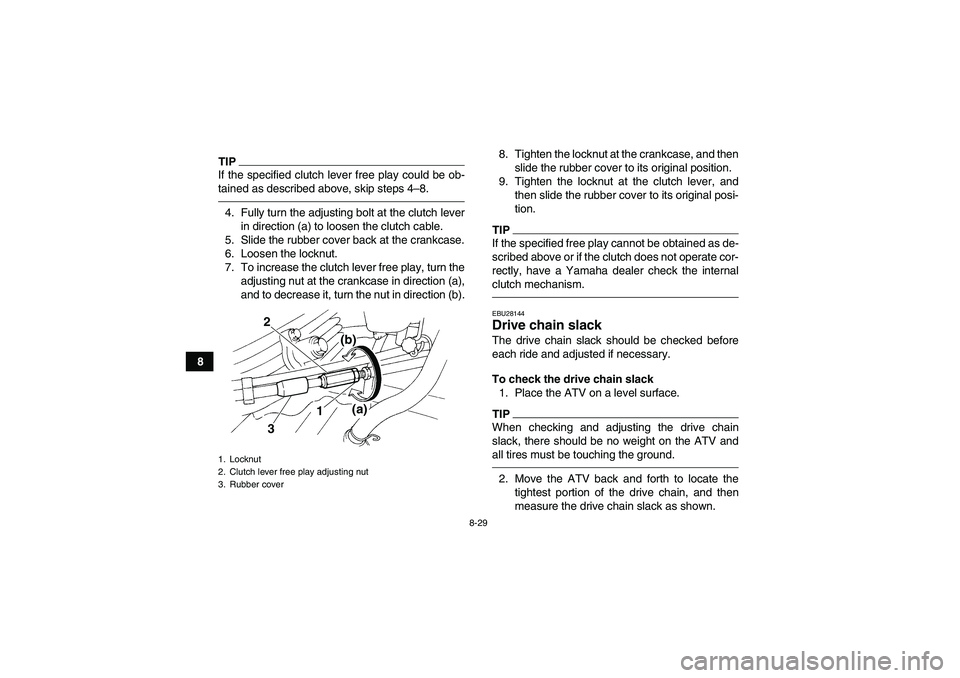
6. Loosen the locknut.
7. To increase the clutch lever free play, turn the
adjusting nut at the crankcase in direction (a),
and to decrease it, turn the nut in direction (b).8. Tighten the locknut at the crankcase, and then
slide the rubber cover to its original position.
9. Tighten the locknut at the clutch lever, and
then slide the rubber cover to its original posi-
tion.
TIPIf the specified free play cannot be obtained as de-
scribed above or if the clutch does not operate cor-
rectly, have a Yamaha dealer check the internal
clutch mechanism.EBU28144Drive chain slack The drive chain slack should be checked before
each ride and adjusted if necessary.
To check the drive chain slack
1. Place the ATV on a level surface.TIPWhen checking and adjusting the drive chain
slack, there should be no weight on the ATV and
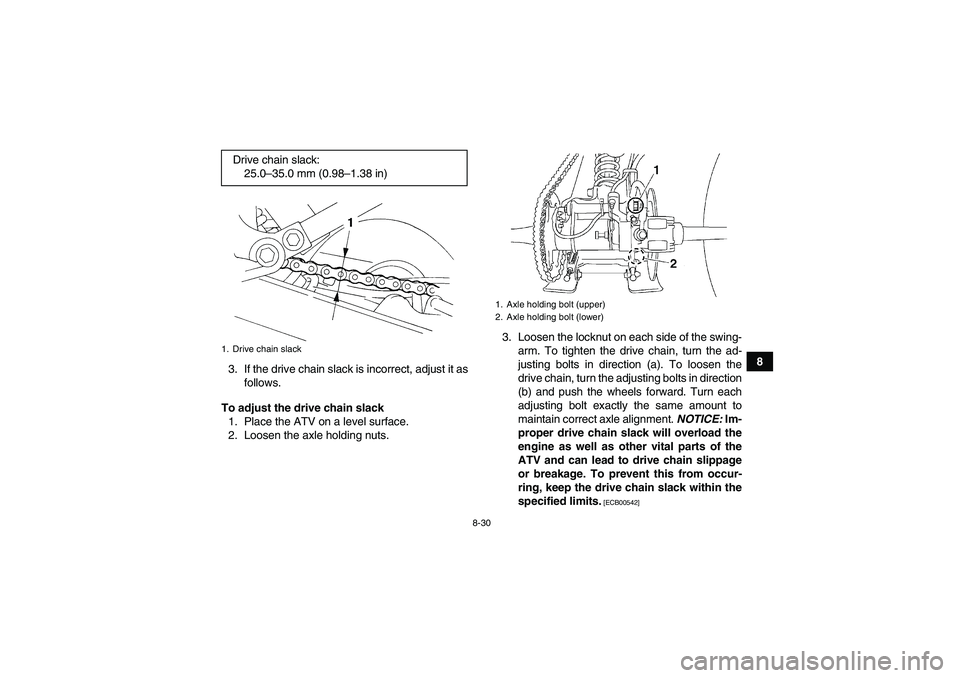
all tires must be touching the ground.2. Move the ATV back and forth to locate the
tightest portion of the drive chain, and then
measure the drive chain slack as shown.
1. Locknut
2. Clutch lever free play adjusting nut
3. Rubber cover
2
(a)
(b)
3
1
U10P70E0.book Page 29 Thursday, July 21, 2011 8:51 AM
Page 107 of 136
8-30
8
3. If the drive chain slack is incorrect, adjust it as
follows.
To adjust the drive chain slack
1. Place the ATV on a level surface.
2. Loosen the axle holding nuts.3. Loosen the locknut on each side of the swing-
arm. To tighten the drive chain, turn the ad-
justing bolts in direction (a). To loosen the
drive chain, turn the adjusting bolts in direction
(b) and push the wheels forward. Turn each
adjusting bolt exactly the same amount to
maintain correct axle alignment. NOTICE: Im-
proper drive chain slack will overload the
engine as well as other vital parts of the
ATV and can lead to drive chain slippage
or breakage. To prevent this from occur-
ring, keep the drive chain slack within the
specified limits.
[ECB00542]
Drive chain slack:
25.0–35.0 mm (0.98–1.38 in)1. Drive chain slack
1. Axle holding bolt (upper)
2. Axle holding bolt (lower)
U10P70E0.book Page 30 Thursday, July 21, 2011 8:51 AM
Page 108 of 136
8-31
8
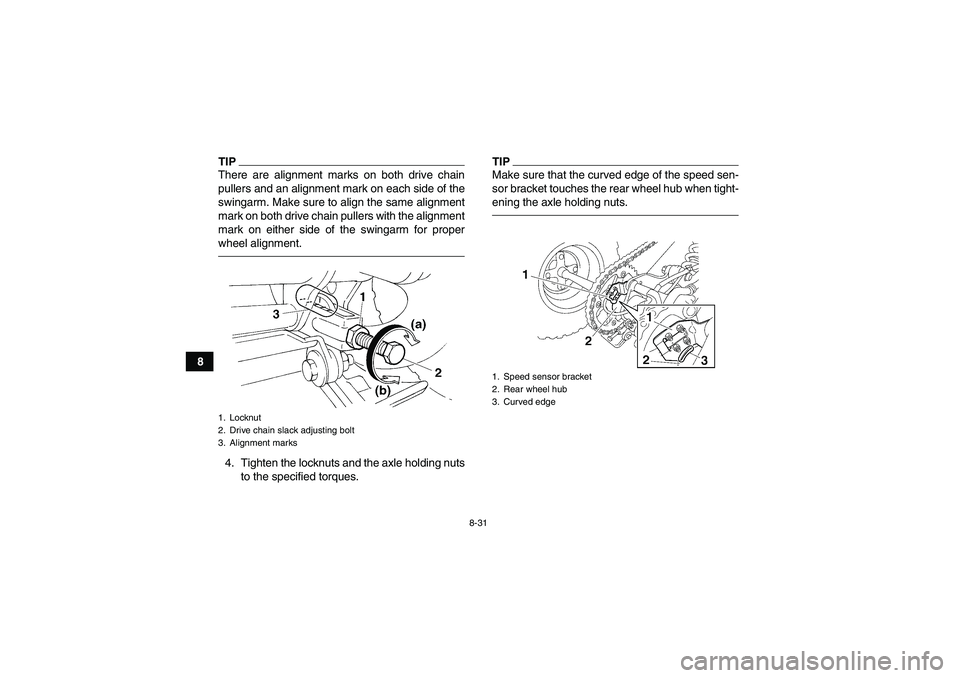
TIPThere are alignment marks on both drive chain
pullers and an alignment mark on each side of the
swingarm. Make sure to align the same alignment
mark on both drive chain pullers with the alignment
mark on either side of the swingarm for proper
wheel alignment.4. Tighten the locknuts and the axle holding nuts
to the specified torques.
TIPMake sure that the curved edge of the speed sen-
sor bracket touches the rear wheel hub when tight-
ening the axle holding nuts.
1. Locknut
2. Drive chain slack adjusting bolt
3. Alignment marks
1. Speed sensor bracket
2. Rear wheel hub
3. Curved edge
U10P70E0.book Page 31 Thursday, July 21, 2011 8:51 AM
Page 109 of 136
8-32
8
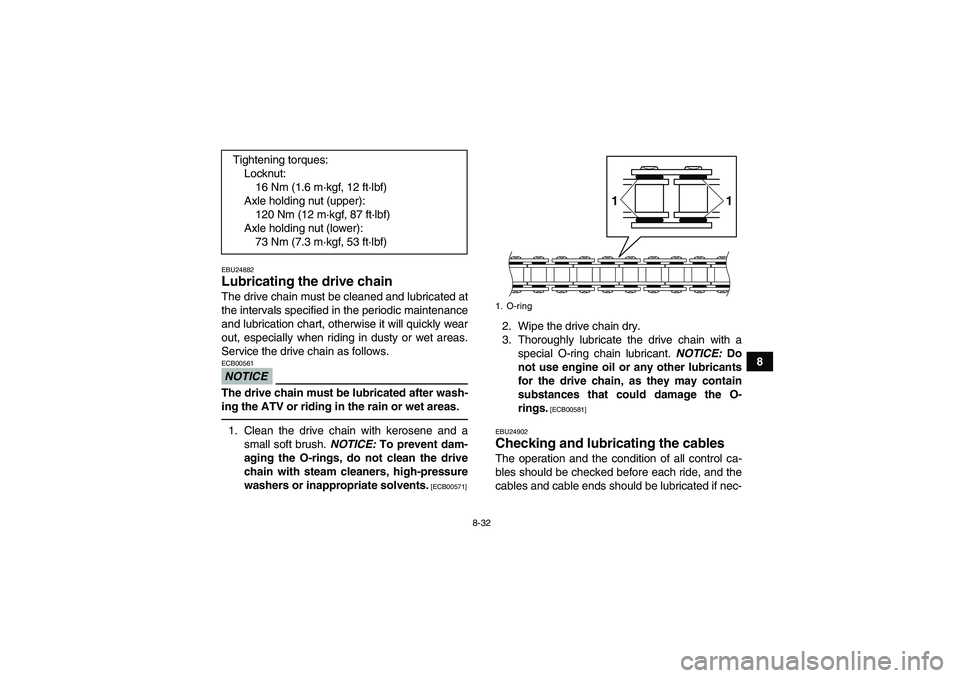
EBU24882Lubricating the drive chain The drive chain must be cleaned and lubricated at
the intervals specified in the periodic maintenance
and lubrication chart, otherwise it will quickly wear
out, especially when riding in dusty or wet areas.
Service the drive chain as follows.NOTICEECB00561The drive chain must be lubricated after wash-
ing the ATV or riding in the rain or wet areas.1. Clean the drive chain with kerosene and a
small soft brush. NOTICE: To prevent dam-
aging the O-rings, do not clean the drive
chain with steam cleaners, high-pressure
washers or inappropriate solvents.
[ECB00571]
2. Wipe the drive chain dry.
3. Thoroughly lubricate the drive chain with a
special O-ring chain lubricant. NOTICE: Do
not use engine oil or any other lubricants
for the drive chain, as they may contain
substances that could damage the O-
rings.
[ECB00581]
EBU24902
Checking and lubricating the cables The operation and the condition of all control ca-
bles should be checked before each ride, and the
cables and cable ends should be lubricated if nec- Tightening torques:
Locknut:
16 Nm (1.6 m·kgf, 12 ft·lbf)
Axle holding nut (upper):
120 Nm (12 m·kgf, 87 ft·lbf)
Axle holding nut (lower):
73 Nm (7.3 m·kgf, 53 ft·lbf)1. O-ring
1 1
U10P70E0.book Page 32 Thursday, July 21, 2011 8:51 AM
Page 118 of 136
8-41
82. Remove the blown fuse, and then install a
new fuse of the specified amperage.
WARNING! Always use a fuse of the spec-
ified rating, and never use a substitute ob-
ject in place of the proper fuse. An
improper fuse or a substitute object can
cause damage to the electrical system,
which could lead to a fire.
[EWB02172]
3. Turn the key to “ON” and turn on the electrical
circuits to check if the devices operate.
4. If the fuse immediately blows again, have a
Yamaha dealer check the electrical system.EBU28160Headlight bulb If the headlight bulb burns out, have a Yamaha
dealer replace it.
EBU28170Headlight beam If a headlight beam adjustment is necessary, have
a Yamaha dealer perform it.EBU25601Replacing the tail/brake light bulb If the tail/brake light bulb burns out, replace it as
follows.
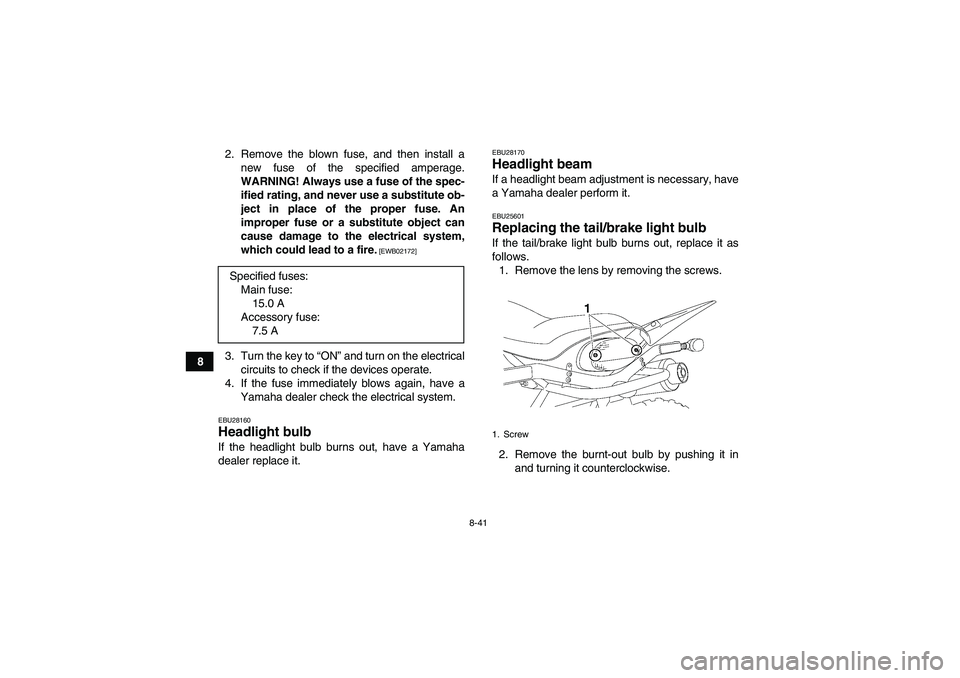
1. Remove the lens by removing the screws.
2. Remove the burnt-out bulb by pushing it in
and turning it counterclockwise. Specified fuses:
Main fuse:
15.0 A
Accessory fuse:
7.5 A1. Screw
U10P70E0.book Page 41 Thursday, July 21, 2011 8:51 AM
Page 119 of 136
8-42
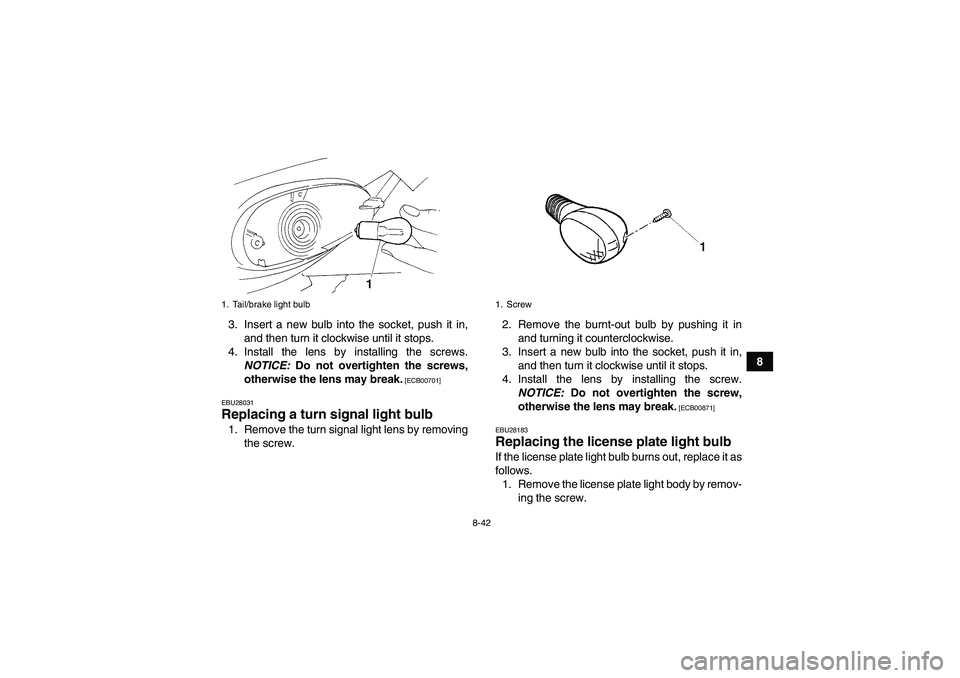
8 3. Insert a new bulb into the socket, push it in,
and then turn it clockwise until it stops.
4. Install the lens by installing the screws.
NOTICE: Do not overtighten the screws,
otherwise the lens may break.
[ECB00701]
EBU28031
Replacing a turn signal light bulb 1. Remove the turn signal light lens by removing
the screw.2. Remove the burnt-out bulb by pushing it in
and turning it counterclockwise.
3. Insert a new bulb into the socket, push it in,
and then turn it clockwise until it stops.
4. Install the lens by installing the screw.
NOTICE: Do not overtighten the screw,
otherwise the lens may break.
[ECB00871]
EBU28183
Replacing the license plate light bulb If the license plate light bulb burns out, replace it as
follows.
1. Remove the license plate light body by remov-
ing the screw.
1. Tail/brake light bulb
1. Screw
U10P70E0.book Page 42 Thursday, July 21, 2011 8:51 AM
Page 124 of 136
9-1
9
EBU25860
CLEANING AND STORAGE
EBU28191Cleaning Frequent, thorough cleaning of your ATV will not
only enhance its appearance but will improve its
general performance and extend the useful life of
many components.
1. Before cleaning the ATV:
a. Block off the end of the exhaust pipe to
prevent water entry. A plastic bag and
strong rubber band may be used.
b. Make sure the spark plug and all filler caps
are properly installed.
c. Make sure the steering lock cap is properly
installed.
2. If the engine case is excessively greasy, apply
degreaser with a paint brush. Do not apply de-
greaser to the chain, sprockets or wheel ax-
les.
3. Rinse the dirt and degreaser off with a garden
hose. Use only enough pressure to do the job.
WARNING! Wet brakes may have reduced
stopping ability, increasing the chance of
an accident. Test the brakes after washing.
Apply the brakes several times at slowspeeds to let friction dry out the linings.
[EWB02311]
NOTICE: Excessive water pressure
may cause water seepage and deteriora-
tion of wheel bearings, brakes, transmis-
sion seals and electrical devices. Many
expensive repair bills have resulted from
improper high-pressure detergent applica-
tions such as those available in coin-oper-
ated car washers.
[ECB00711]
4. Once most of the dirt has been hosed off,
wash all surfaces with warm water and mild,
detergent-type soap. An old toothbrush or bot-
tle brush is handy for hard-to-reach places.
5. Rinse the ATV off immediately with clean wa-
ter and dry all surfaces with a chamois, clean
towel or soft absorbing cloth.
6. Dry the chain and lubricate it to prevent it from
rusting.
7. Clean the seat with a vinyl upholstery cleaner
to keep the cover pliable and glossy.
8. Automotive type wax may be applied to all
painted and chrome plated surfaces. Avoid
combination cleaner-waxes. Many contain
U10P70E0.book Page 1 Thursday, July 21, 2011 8:51 AM
Page 126 of 136
9-3
97. Check and, if necessary, correct the tire air
pressure, and then block up the ATV so that
all of its wheels are off the ground. Alternative-
ly, turn the wheels a little every month in order
to prevent the tires from becoming degraded
in one spot.
8. Cover the muffler outlet with a plastic bag to
prevent moisture from entering it.
9. Remove the battery and fully charge it. Store
it in a cool, dry place and charge it once a
month. Do not store the battery in an exces-
sively cold or warm place [less than 0 °C (30
°F) or more than 30 °C (90 °F)]. For more in-
formation on storing the battery, see page
8-38.
TIPMake any necessary repairs before storing the
ATV.U10P70E0.book Page 3 Thursday, July 21, 2011 8:51 AM
Page 134 of 136
LLabel locations ............................................................... 1-1
License plate light bulb, replacing ................................ 8-42
Light switch .................................................................... 4-4MMain switch .................................................................... 4-1
Maintenance and lubrication chart ................................. 8-5
Maintenance chart, emission control system ................. 8-3
Model label ................................................................... 11-1NNeutral indicator light ..................................................... 4-2OOwner’s manual and tool kit ........................................... 8-2PParking ........................................................................... 6-7
Parking brake free play, adjusting ................................ 8-26
Parking brake lever ........................................................ 4-7
Parking on a slope ......................................................... 6-7
Part locations ................................................................. 3-1RReverse indicator light .................................................... 4-2
Riding your ATV ............................................................. 7-1SSafety information .......................................................... 2-1
Seat .............................................................................. 4-14
Shifting ........................................................................... 6-4
Shift pedal ...................................................................... 4-8
Shock absorber assemblies, adjusting the front .......... 4-14
Shock absorber assembly, adjusting the rear .............. 4-16
Spark arrester, cleaning ............................................... 8-18
Spark plug, checking ...................................................... 8-9
Specifications ............................................................... 10-1Speed limiter .................................................................. 4-5
Speedometer .................................................................. 4-2
Starter (choke) ............................................................. 4-12
Start switch ..................................................................... 4-3
Steering lock ................................................................ 4-13
Steering shaft, lubricating ............................................. 8-37
Storage ........................................................................... 9-2
Suspension, lubricating the upper and
lower arm pivots ......................................................... 8-36
Suspension relay arm and connecting arm pivoting
points, lubricating the rear ......................................... 8-35
Swingarm pivots, lubricating ........................................ 8-35
TTail/brake light bulb, replacing ..................................... 8-41
Throttle lever ........................................................... 4-4, 5-3
Throttle lever free play, adjusting ................................. 8-21
Tires ............................................................................... 5-4
Troubleshooting ........................................................... 8-45
Troubleshooting chart .................................................. 8-46
Turn signal indicator light ............................................... 4-2
Turn signal light bulb, replacing ................................... 8-42
Turn signal switch .......................................................... 4-4VValve clearance ............................................................ 8-22
Vehicle identification number ....................................... 11-1WWheel hub bearings, checking ..................................... 8-35
Wheel, installing ........................................................... 8-44
Wheel, removing .......................................................... 8-44
U10P70E0.book Page 2 Thursday, July 21, 2011 8:51 AM