wheel YAMAHA YXZ1000R 2017 User Guide
[x] Cancel search | Manufacturer: YAMAHA, Model Year: 2017, Model line: YXZ1000R, Model: YAMAHA YXZ1000R 2017Pages: 218, PDF Size: 5.08 MB
Page 32 of 218
2-5
2
• Drive straight up and down inclines, not across them. If crossing a hill is unavoidable, drive
slowly and turn downhill immediately if you feel the vehicle may tip.
• Avoid paved surfaces. Turn gradually and go slowly if you must drive on pavement. This vehicle is designed for off-road use only.
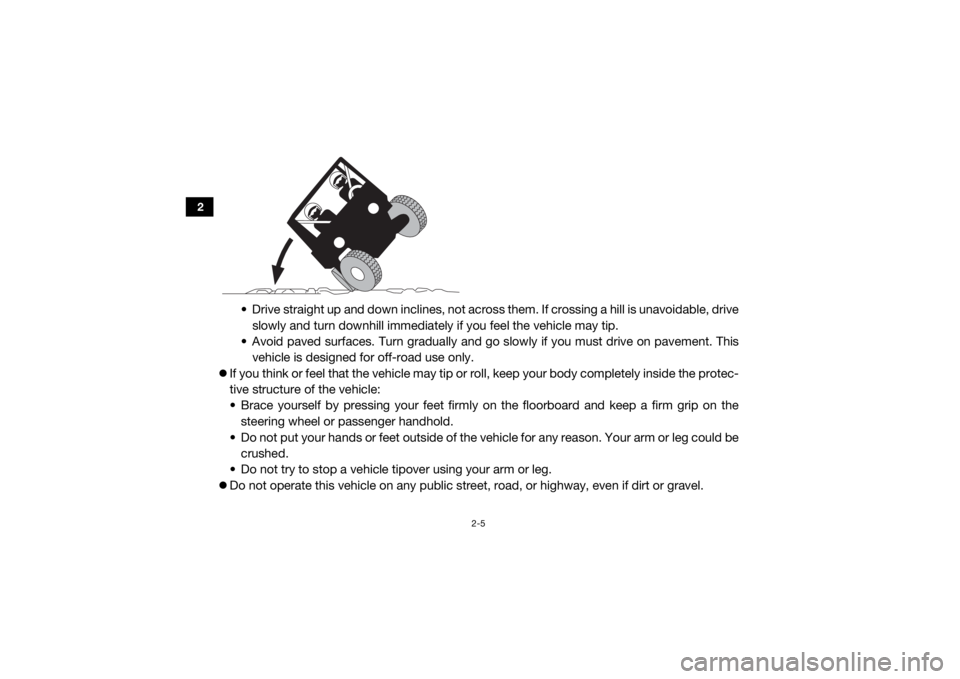
If you think or feel that the vehicle may tip or ro ll, keep your body completely inside the protec-
tive structure of the vehicle:
• Brace yourself by pressing your feet firmly on the floorboard and keep a firm grip on the
steering wheel or passenger handhold.
• Do not put your hands or feet outside of the vehicle for any reason. Your arm or leg could be
crushed.
• Do not try to stop a vehicle tipover using your arm or leg.
Do not operate this vehicle on any public street, road, or highway, even if dirt or gravel.
UB577AE0.book Page 5 Wednesday, June 8, 2016 9:35 AM
Page 38 of 218
3-3
3
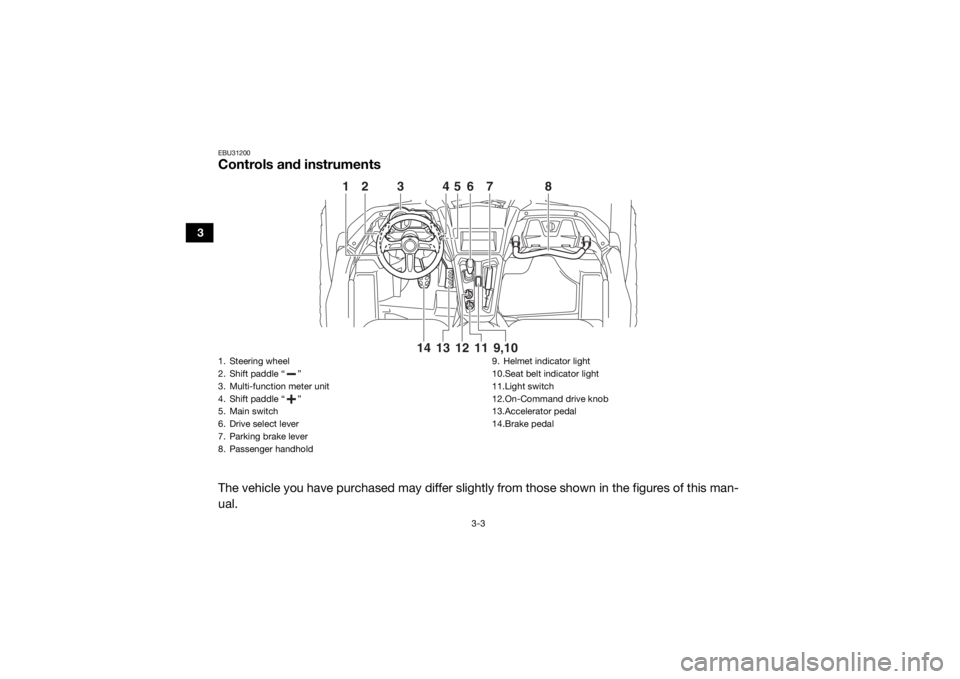
EBU31200Controls and instrumentsThe vehicle you have purchased may differ slightly from those shown in the figures of this man-
ual.
36
7
8
1
2
4
5
13
11
9,10
14 12
1. Steering wheel
2. Shift paddle “ ”
3. Multi-function meter unit
4. Shift paddle “ ”
5. Main switch
6. Drive select lever
7. Parking brake lever
8. Passenger handhold
9. Helmet indicator light
10.Seat belt indicator light
11.Light switch
12.On-Command drive knob
13.Accelerator pedal
14.Brake pedal
UB577AE0.book Page 3 Wednesday, June 8, 2016 9:35 AM
Page 41 of 218

4-3
4
EBU34910Parking brake indicator light “(P)”
This indicator light comes on when the park-
ing brake is applied.EBU36450High beam indicator light “ ”
This indicator light comes on when the high
beam of the headlight is switched on.EBU35850Differential gear lock indicator light “DIFF
LOCK”
This indicator light comes on when the front
differential gear is locked.EBU34921Drivetrain icon “ / ”
The drivetrain icon indicates what type of
drive mode is currently selected. When 2WD
is selected, the icon will turn off. When 4WD
is selected, “ ” is displayed. And when 4WD
with differential lock is selected “ ” is dis-
played.
TIP See pages 4-20 and 6-9 for more informa-
tion on selecting the drive mode.
Due to the synchronizing mechanism in the
differential gear case, the drivetrain icon
may not come on until the vehicle starts
moving.
When the On-Command drive knob is set
to “DIFF LOCK” or “4WD”, the drivetrain
icon and the differential gear lock indicator
light will flash until the differential gear is
completely locked or unlocked. If the icon
and the indicator light continue to flash, the
differential is not completely locked or un-
locked. In this case, start moving slowly
and/or turn the steering wheel back and
forth to help the differential to lock or un-
lock.
UB577AE0.book Page 3 Wednesday, June 8, 2016 9:35 AM
Page 58 of 218
4-20
4
that the electric starter will not have
enough power to crank the engine. If this
should happen, remove the battery and re-
charge it. EBU31400On-Command drive knob
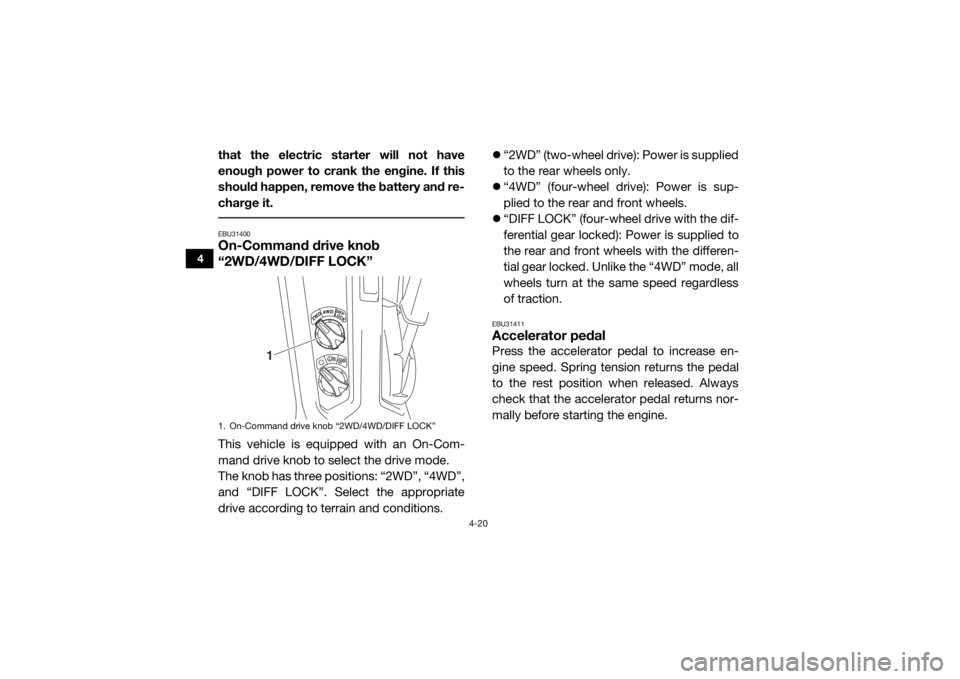
“2WD/4WD/DIFF LOCK”This vehicle is equipped with an On-Com-
mand drive knob to select the drive mode.
The knob has three positions: “2WD”, “4WD”,
and “DIFF LOCK”. Select the appropriate
drive according to terrain and conditions.
“2WD” (two-wheel drive): Power is supplied
to the rear wheels only.
“4WD” (four-wheel drive): Power is sup-
plied to the rear and front wheels.
“DIFF LOCK” (four-wheel drive with the dif-
ferential gear locked): Power is supplied to
the rear and front wheels with the differen-
tial gear locked. Unlike the “4WD” mode, all
wheels turn at the same speed regardless
of traction.
EBU31411Accelerator pedalPress the accelerator pedal to increase en-
gine speed. Spring tension returns the pedal
to the rest position when released. Always
check that the accelerator pedal returns nor-
mally before starting the engine.
1. On-Command drive knob “2WD/4WD/DIFF LOCK”
1
UB577AE0.book Page 20 Wednesday, June 8, 2016 9:35 AM
Page 65 of 218
4-27
4
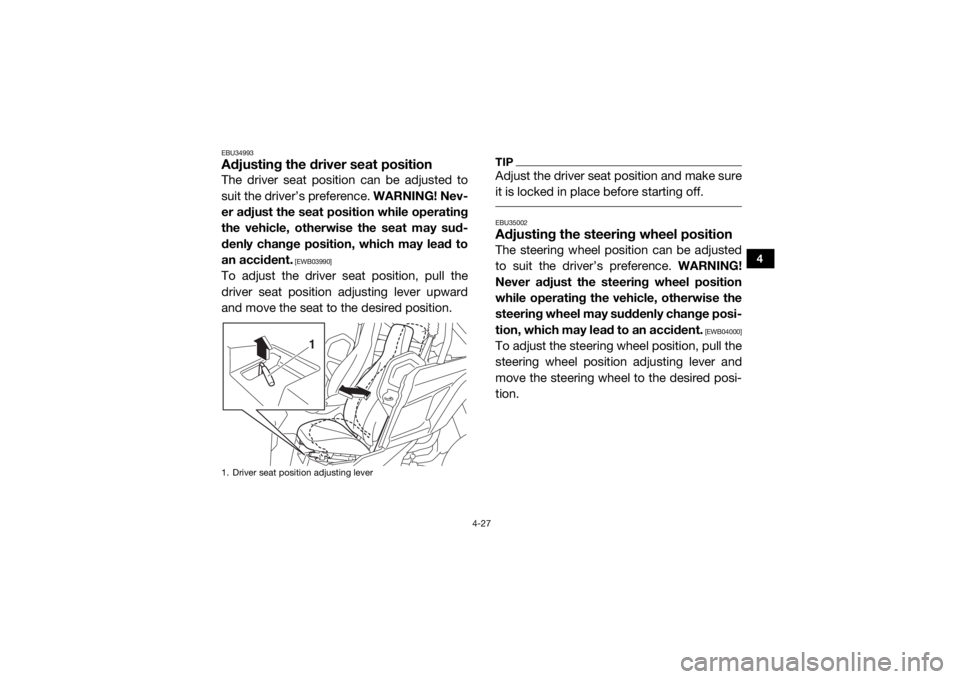
EBU34993Adjusting the driver seat positionThe driver seat position can be adjusted to
suit the driver’s preference. WARNING! Nev-
er adjust the seat position while operating
the vehicle, otherwise the seat may sud-
denly change position, which may lead to
an accident.
[EWB03990]
To adjust the driver seat position, pull the
driver seat position adjusting lever upward
and move the seat to the desired position.
TIPAdjust the driver seat position and make sure
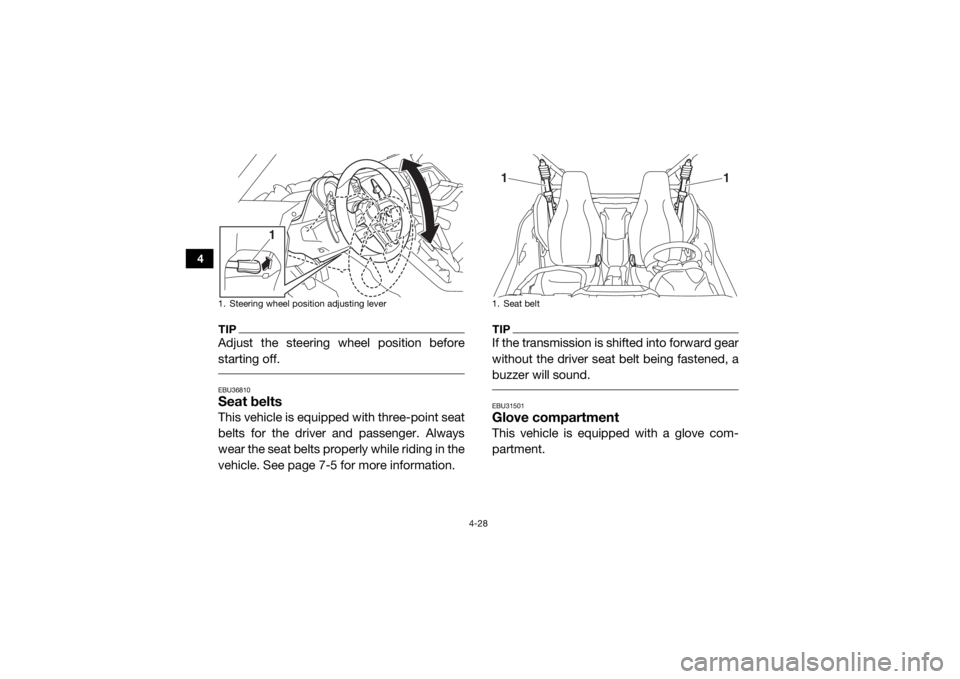
it is locked in place before starting off. EBU35002Adjusting the steeri ng wheel positionThe steering wheel position can be adjusted
to suit the driver’s preference. WARNING!
Never adjust the steering wheel position
while operating the vehicle, otherwise the
steering wheel may suddenly change posi-
tion, which may lead to an accident.
[EWB04000]
To adjust the steering wheel position, pull the
steering wheel position adjusting lever and
move the steering wheel to the desired posi-
tion.
1. Driver seat position adjusting lever
1
UB577AE0.book Page 27 Wednesday, June 8, 2016 9:35 AM
Page 66 of 218
4-28
4
TIPAdjust the steering wheel position before
starting off. EBU36810Seat beltsThis vehicle is equipped with three-point seat
belts for the driver and passenger. Always
wear the seat belts properly while riding in the
vehicle. See page 7-5 for more information.
TIPIf the transmission is shifted into forward gear
without the driver seat belt being fastened, a
buzzer will sound. EBU31501Glove compartmentThis vehicle is equipped with a glove com-
partment.
1. Steering wheel position adjusting lever
1
1. Seat belt
1
1
UB577AE0.book Page 28 Wednesday, June 8, 2016 9:35 AM
Page 95 of 218

5-2
5
Drivetrain• Check front differential, transmission case, and rear final
gear for leakage. 5-6, 5-6, 5-6, 8-26,
8-29, 8-31
Coolant • Check coolant level in reservoir.
• Fill with coolant if necessary. 5-6, 8-33
Accelerator pedal • Check free play and for proper operation. 5-6
Seat belts • Check for proper operation and belt wear. 5-7
Passenger handhold • Check for stability and proper fastening. 5-7, 7-8
Steering • Check for proper operation. 5-7
Drive select lever and
shift paddles • Check for proper operation. 5-7
YCC-S clutch • Check operation.
• Check fluid level in reservoir.
• If necessary, add specified brake fluid to specified level.
• Check hydraulic system for leakage.
5-8
Fittings and fasteners • Check all fittings and fasteners. 5-8
Instruments, lights and
switches • Check operation, and correct if necessary. 5-8, 8-63, 8-63
Wheels and tires • Check tire pressure and for wear and damage. 5-8, 8-54, 8-56
Axle boots • Check for damage. 8-35
ITEM ROUTINE PAGE
UB577AE0.book Page 2 Wednesday, June 8, 2016 9:35 AM
Page 100 of 218

5-7
5
EBU31800Seat beltsMake sure that the seat belts are not frayed,
torn, stretched, or damaged. The seat belts
must move smoothly when pulled out and re-
tract on its own when released. The seat belts
must also lock up when quickly pulled out.
The latch plate should click securely into the
buckle and release when the release button is
pushed firmly. Wash off any dirt or mud that
could affect operation. Have a Yamaha dealer
repair as necessary for proper operation.
A crash can damage the restraint systems in
your vehicle. A damaged restraint system
may not properly protect the person using it,
resulting in serious injury or death in a crash.
To help make sure your restraint systems are
working properly after a crash, have them in-
spected and any necessary replacements
made as soon as possible.
EBU31810Passenger handholdCheck that the handhold bar and its supports
are in good condition. Confirm that the lock-
ing pins are securely fastened, and then push
and pull on the handhold to make sure that it
is not loose.EBU31820SteeringPark on level ground. Turn the steering wheel
right and left. Check for excessive free play,
abnormal noises, or a rough feeling. Have a
Yamaha dealer repair as necessary for proper operation.EBU36691Drive select lever and shift paddlesThe drive select lever and shift paddles
should move smoothly and return to their
original position.
UB577AE0.book Page 7 Wednesday, June 8, 2016 9:35 AM
Page 101 of 218

5-8
5
EBU36672YCC-S clutchCheck the YCC-S clutch fluid level and cor-
rect if necessary. (See page 8-45.)
Check the operation of the drive select lever
and shift paddles at the start of each drive.TIPIf the YCC-S clutch fluid level was low, be
sure to check the clutch system for leak-
age.
If any leakage is found, or if shifting is not
smooth, have a Yamaha dealer service the
vehicle. EBU35700Fittings and fastenersAlways check the tightness of chassis and
wheel fittings and fasteners before starting
off. Take the vehicle to a Yamaha dealer or re-
fer to the Service Manual for correct tighten-
ing torque.
EBU31840Instruments, lights and switchesCheck that all instrument s, lights and switch-
es are working properly. Correct if necessary.EBU31851Control cablesWhen driving in cold weather, always make
sure all control cables work smoothly before
starting off. WARNING! Control cables can
freeze in cold weather and you could be
unable to control the vehicle.
[EWB03280]
EBU35331
TiresCheck tire pressure regularly to make sure it
is at the recommended specifications. Also
check for wear and damage.
Tire pressure
Use the tire pressure gauge to check and ad-
just tire pressures when the tires are cold. Tire
pressures must be equal on both sides.
WARNING! Operation of this vehicle with improper tire pressure may cause severe
UB577AE0.book Page 8 Wednesday, June 8, 2016 9:35 AM
Page 108 of 218
6-5
6
5. When vehicle speed has sufficiently in-creased, use the shift paddle “ ” to shift
into second gear (“2”).
6. Follow the same procedure when shifting to the next higher gear.
To decelerate
When slowing down, release the accelerator
pedal and apply the brake pedal smoothly. As
you slow down, shift to a lower gear. Be sure
that the engine has sufficiently slowed before
engaging a lower gear. Improper use of the
brake pedal or shift paddles can cause the
tires to lose traction, reducing control and in-
creasing the possibility of an accident.
WARNING
EWB00712Make sure the engine has sufficiently
slowed before shifting to a lower gear. En-
gaging a lower gear when the engine
speed is too high could make the wheels
stop rotating and lose traction. This could cause loss of control, an accident and inju-
ry. It could also cause engine or drivetrain
damage.
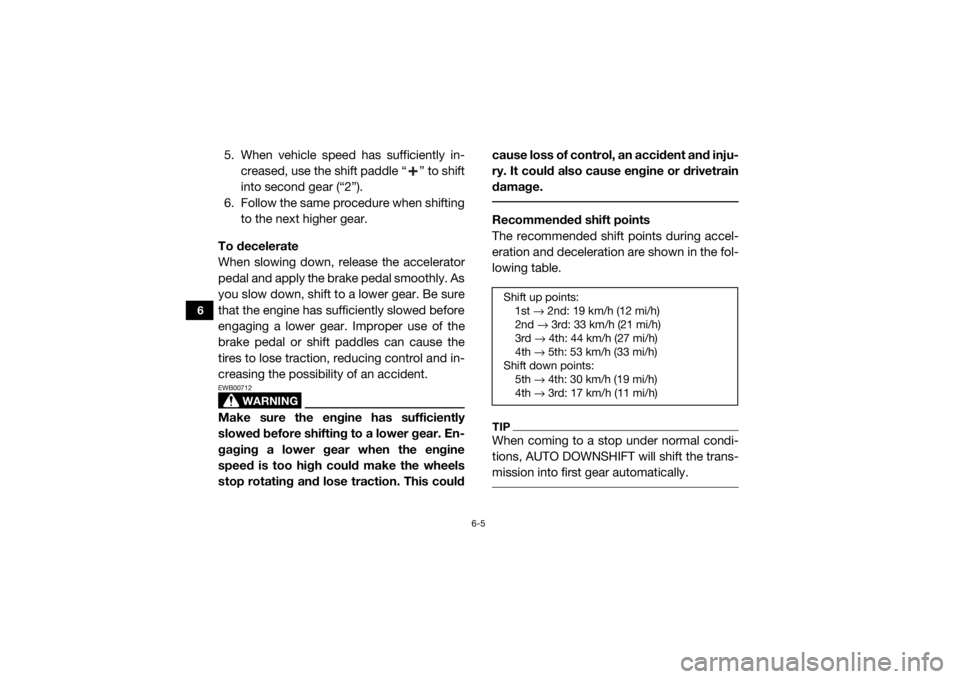
Recommended shift points
The recommended shift points during accel-
eration and deceleration are shown in the fol-
lowing table.TIPWhen coming to a stop under normal condi-
tions, AUTO DOWNSHIFT will shift the trans-
mission into first gear automatically. Shift up points:
1st → 2nd: 19 km/h (12 mi/h)
2nd → 3rd: 33 km/h (21 mi/h)
3rd → 4th: 44 km/h (27 mi/h)
4th → 5th: 53 km/h (33 mi/h)
Shift down points: 5th → 4th: 30 km/h (19 mi/h)
4th → 3rd: 17 km/h (11 mi/h)
UB577AE0.book Page 5 Wednesday, June 8, 2016 9:35 AM