light YAMAHA YZ450F 2015 User Guide
[x] Cancel search | Manufacturer: YAMAHA, Model Year: 2015, Model line: YZ450F, Model: YAMAHA YZ450F 2015Pages: 360, PDF Size: 10.82 MB
Page 212 of 360
CAMSHAFT
5-17
TIP
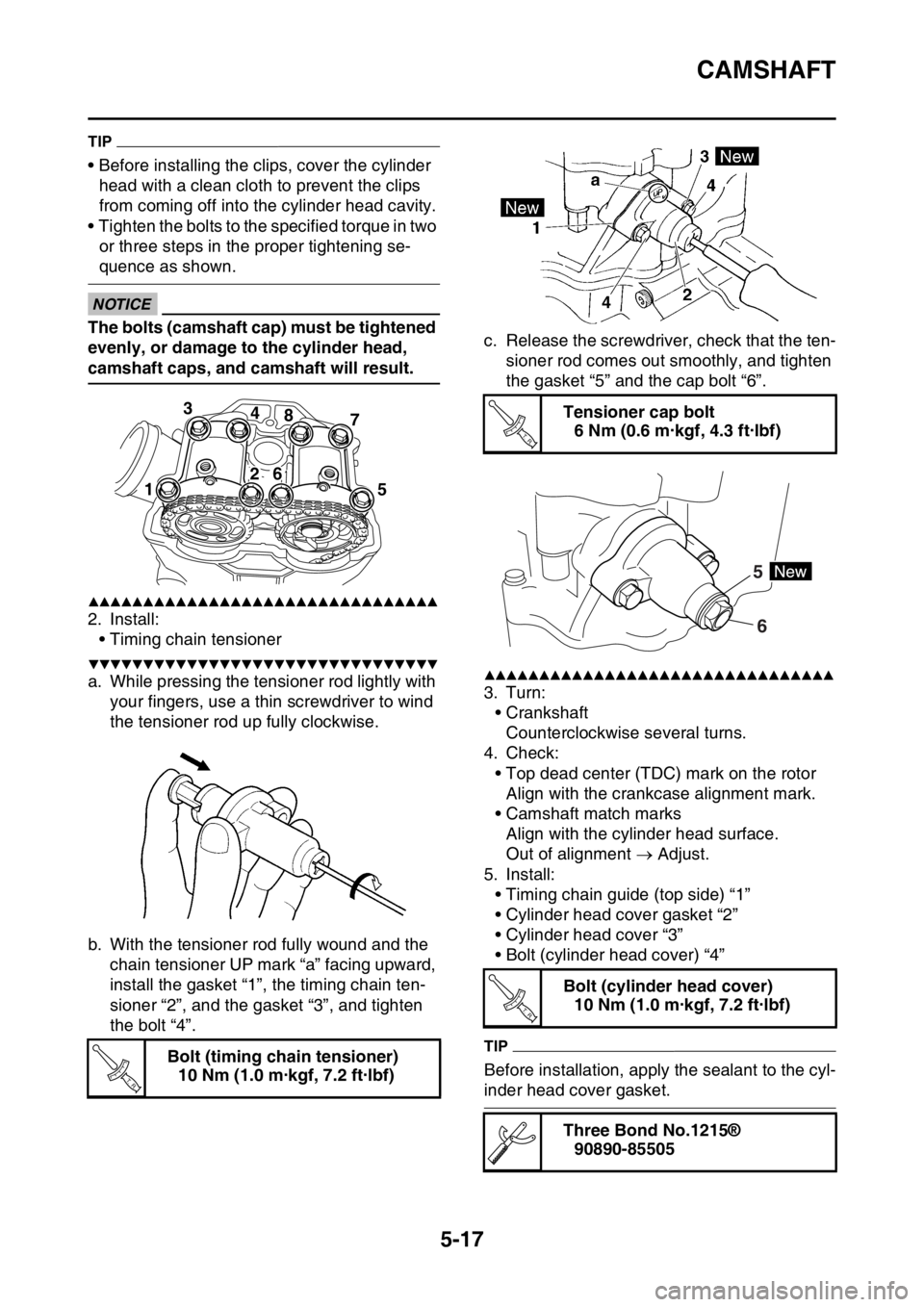
• Before installing the clips, cover the cylinder
head with a clean cloth to prevent the clips
from coming off into the cylinder head cavity.
• Tighten the bolts to the specified torque in two
or three steps in the proper tightening se-
quence as shown.
ECA33DD030
NOTICE
The bolts (camshaft cap) must be tightened
evenly, or damage to the cylinder head,
camshaft caps, and camshaft will result.
▲▲▲▲▲▲▲▲▲▲▲▲▲▲▲▲▲▲▲▲▲▲▲▲▲▲▲▲▲▲▲▲
2. Install:
• Timing chain tensioner
▼▼▼▼▼▼▼▼▼▼▼▼▼▼▼▼▼▼▼▼▼▼▼▼▼▼▼▼▼▼▼▼
a. While pressing the tensioner rod lightly with
your fingers, use a thin screwdriver to wind
the tensioner rod up fully clockwise.
b. With the tensioner rod fully wound and the
chain tensioner UP mark “a” facing upward,
install the gasket “1”, the timing chain ten-
sioner “2”, and the gasket “3”, and tighten
the bolt “4”.c. Release the screwdriver, check that the ten-
sioner rod comes out smoothly, and tighten
the gasket “5” and the cap bolt “6”.▲▲▲▲▲▲▲▲▲▲▲▲▲▲▲▲▲▲▲▲▲▲▲▲▲▲▲▲▲▲▲▲
3. Turn:
• Crankshaft
Counterclockwise several turns.
4. Check:
• Top dead center (TDC) mark on the rotor
Align with the crankcase alignment mark.
• Camshaft match marks
Align with the cylinder head surface.
Out of alignment Adjust.
5. Install:
• Timing chain guide (top side) “1”
• Cylinder head cover gasket “2”
• Cylinder head cover “3”
• Bolt (cylinder head cover) “4”
TIP
Before installation, apply the sealant to the cyl-
inder head cover gasket. Bolt (timing chain tensioner)
10 Nm (1.0 m·kgf, 7.2 ft·lbf)
3
4
8
7
15
26
T R..
Tensioner cap bolt
6 Nm (0.6 m·kgf, 4.3 ft·lbf)
Bolt (cylinder head cover)
10 Nm (1.0 m·kgf, 7.2 ft·lbf)
Three Bond No.1215®
90890-85505
T R..
6 5
T R..
Page 225 of 360
VALVES AND VALVE SPRINGS
5-30
EAS1SL5226INSTALLING THE VALVES
1. Clean:
• Valve stem end
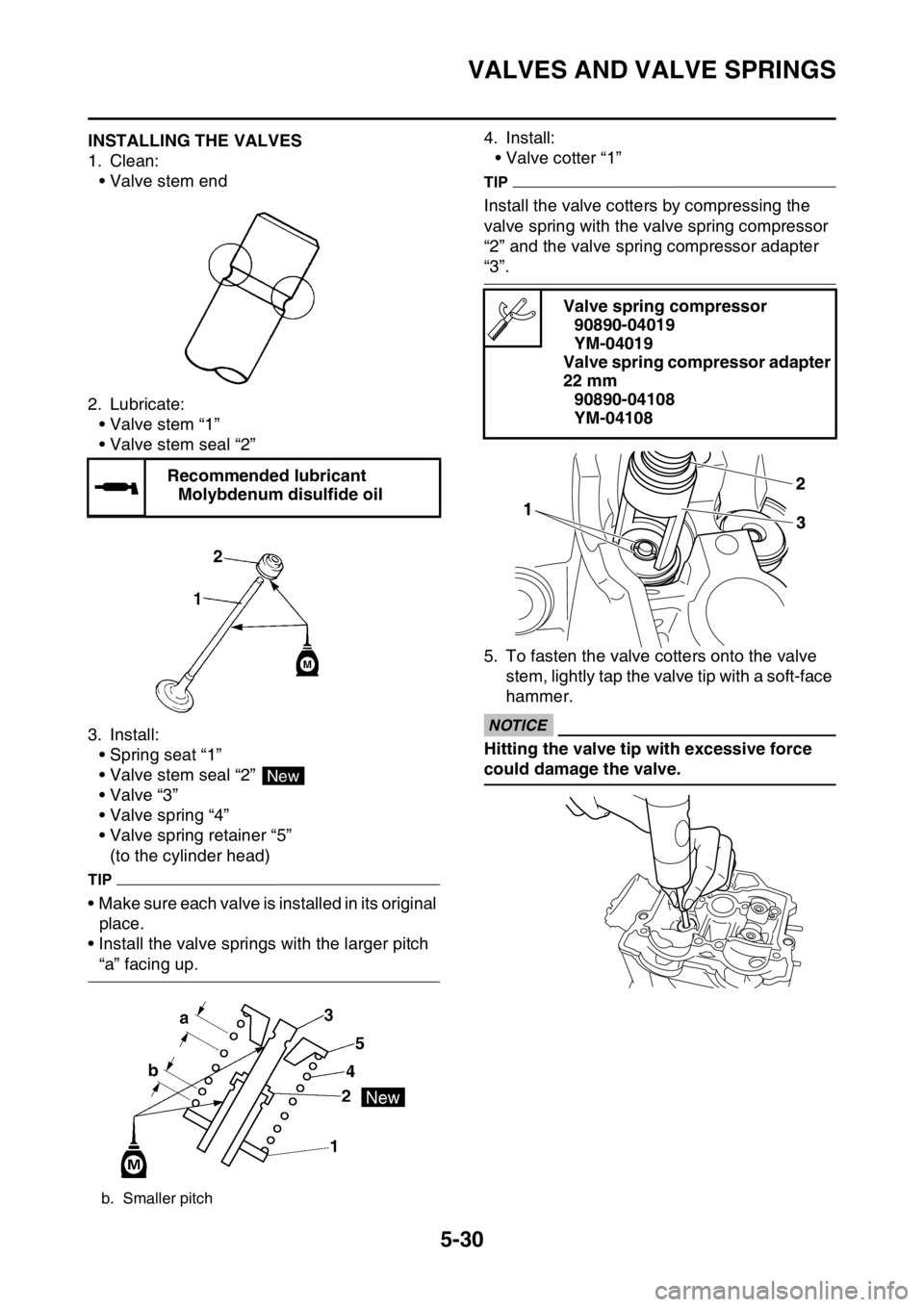
2. Lubricate:
• Valve stem “1”
• Valve stem seal “2”
3. Install:
• Spring seat “1”
• Valve stem seal “2”
•Valve “3”
• Valve spring “4”
• Valve spring retainer “5”
(to the cylinder head)
TIP
• Make sure each valve is installed in its original
place.
• Install the valve springs with the larger pitch
“a” facing up.4. Install:
• Valve cotter “1”
TIP
Install the valve cotters by compressing the
valve spring with the valve spring compressor
“2” and the valve spring compressor adapter
“3”.
5. To fasten the valve cotters onto the valve
stem, lightly tap the valve tip with a soft-face
hammer.
ECA13800
NOTICE
Hitting the valve tip with excessive force
could damage the valve. Recommended lubricant
Molybdenum disulfide oil
b. Smaller pitch
New
Valve spring compressor
90890-04019
YM-04019
Valve spring compressor adapter
22 mm
90890-04108
YM-04108
Page 260 of 360
CRANKCASE
5-65
EAS1SL5279DISASSEMBLING THE CRANKCASE
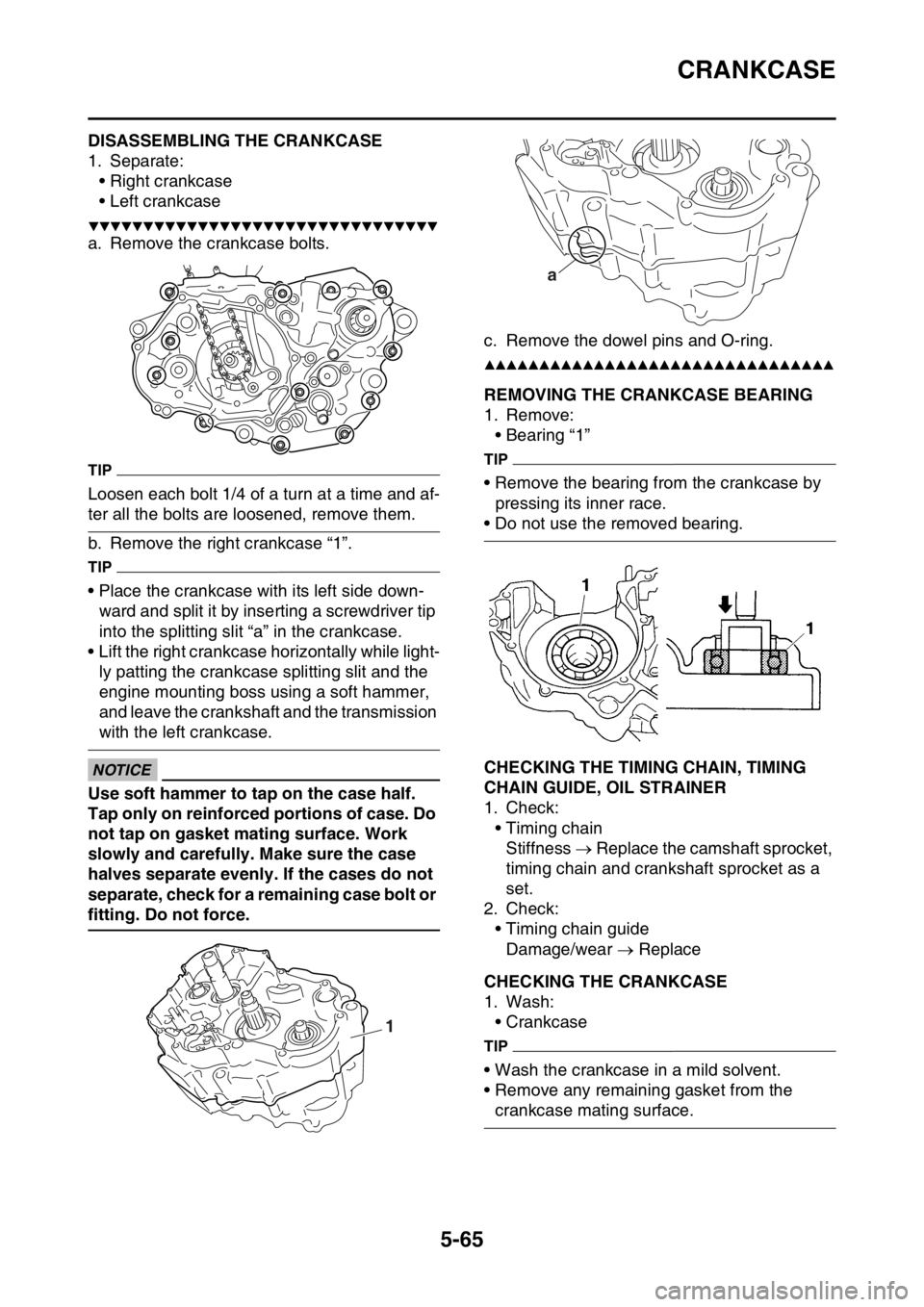
1. Separate:
• Right crankcase
• Left crankcase
▼▼▼▼▼▼▼▼▼▼▼▼▼▼▼▼▼▼▼▼▼▼▼▼▼▼▼▼▼▼▼▼
a. Remove the crankcase bolts.
TIP
Loosen each bolt 1/4 of a turn at a time and af-
ter all the bolts are loosened, remove them.
b. Remove the right crankcase “1”.
TIP
• Place the crankcase with its left side down-
ward and split it by inserting a screwdriver tip
into the splitting slit “a” in the crankcase.
• Lift the right crankcase horizontally while light-
ly patting the crankcase splitting slit and the
engine mounting boss using a soft hammer,
and leave the crankshaft and the transmission
with the left crankcase.
ECA33DD041
NOTICE
Use soft hammer to tap on the case half.
Tap only on reinforced portions of case. Do
not tap on gasket mating surface. Work
slowly and carefully. Make sure the case
halves separate evenly. If the cases do not
separate, check for a remaining case bolt or
fitting. Do not force.c. Remove the dowel pins and O-ring.
▲▲▲▲▲▲▲▲▲▲▲▲▲▲▲▲▲▲▲▲▲▲▲▲▲▲▲▲▲▲▲▲
EAS1SL5280REMOVING THE CRANKCASE BEARING
1. Remove:
• Bearing “1”
TIP
• Remove the bearing from the crankcase by
pressing its inner race.
• Do not use the removed bearing.
EAS1SL5281CHECKING THE TIMING CHAIN, TIMING
CHAIN GUIDE, OIL STRAINER
1. Check:
• Timing chain
Stiffness Replace the camshaft sprocket,
timing chain and crankshaft sprocket as a
set.
2. Check:
• Timing chain guide
Damage/wear Replace
EAS1SL5282CHECKING THE CRANKCASE
1. Wash:
• Crankcase
TIP
• Wash the crankcase in a mild solvent.
• Remove any remaining gasket from the
crankcase mating surface.
1
a
Page 261 of 360
CRANKCASE
5-66
2. Check:
• Crankcase
Crack/damage Replace.
• Oil delivery passages
Obstruction Blow out with compressed
air.
EAS1SL5283ASSEMBLING THE CRANKCASE
1. Install:
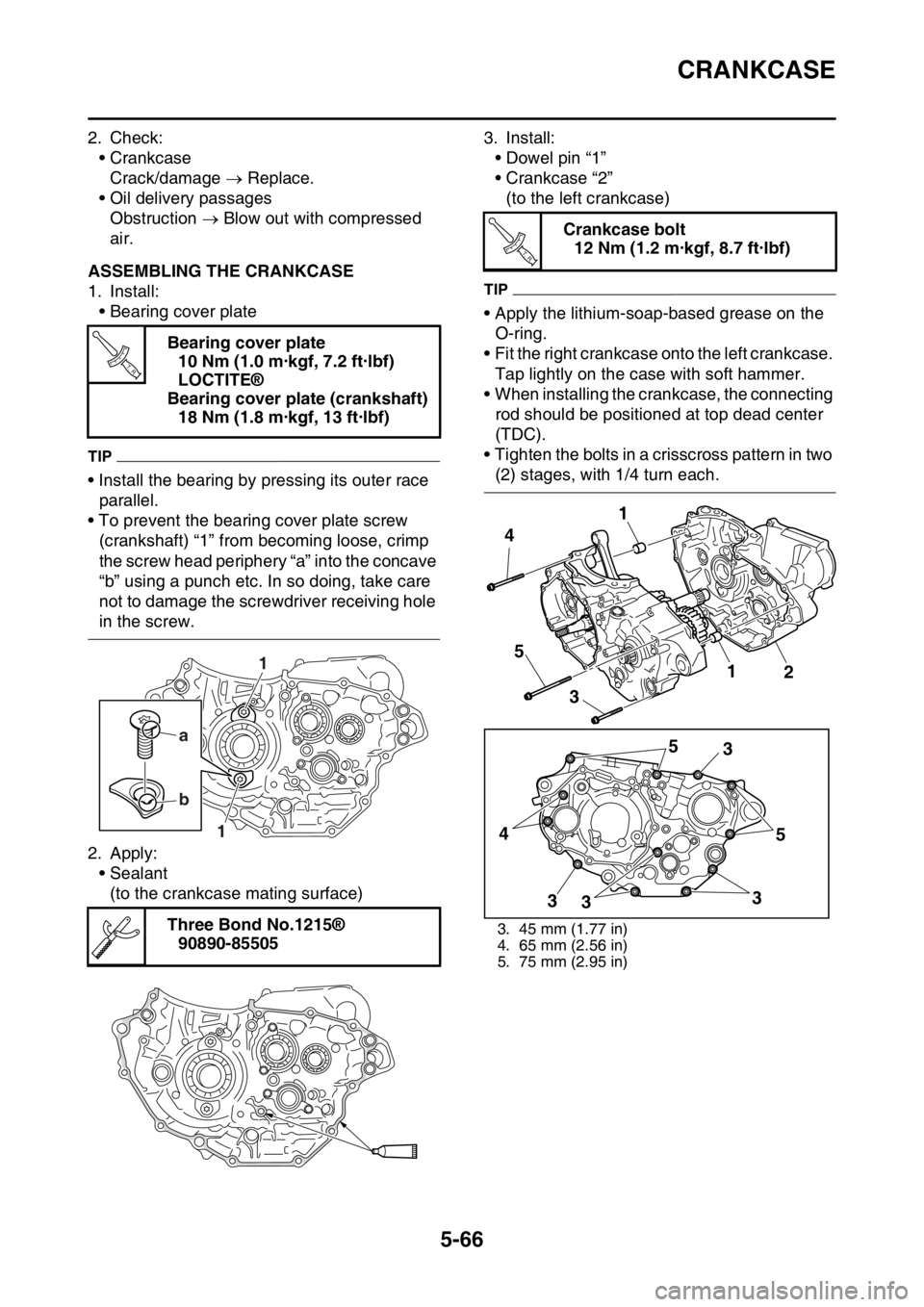
• Bearing cover plate
TIP
• Install the bearing by pressing its outer race
parallel.
• To prevent the bearing cover plate screw
(crankshaft) “1” from becoming loose, crimp
the screw head periphery “a” into the concave
“b” using a punch etc. In so doing, take care
not to damage the screwdriver receiving hole
in the screw.
2. Apply:
• Sealant
(to the crankcase mating surface)3. Install:
• Dowel pin “1”
• Crankcase “2”
(to the left crankcase)
TIP
• Apply the lithium-soap-based grease on the
O-ring.
• Fit the right crankcase onto the left crankcase.
Tap lightly on the case with soft hammer.
• When installing the crankcase, the connecting
rod should be positioned at top dead center
(TDC).
• Tighten the bolts in a crisscross pattern in two
(2) stages, with 1/4 turn each. Bearing cover plate
10 Nm (1.0 m·kgf, 7.2 ft·lbf)
LOCTITE®
Bearing cover plate (crankshaft)
18 Nm (1.8 m·kgf, 13 ft·lbf)
Three Bond No.1215®
90890-85505
T R..
a
b
1
1
Crankcase bolt
12 Nm (1.2 m·kgf, 8.7 ft·lbf)
3. 45 mm (1.77 in)
4. 65 mm (2.56 in)
5. 75 mm (2.95 in)
T R..
5
3
5
3
3 3 45 4
3
1
12
Page 266 of 360
TRANSMISSION
5-71
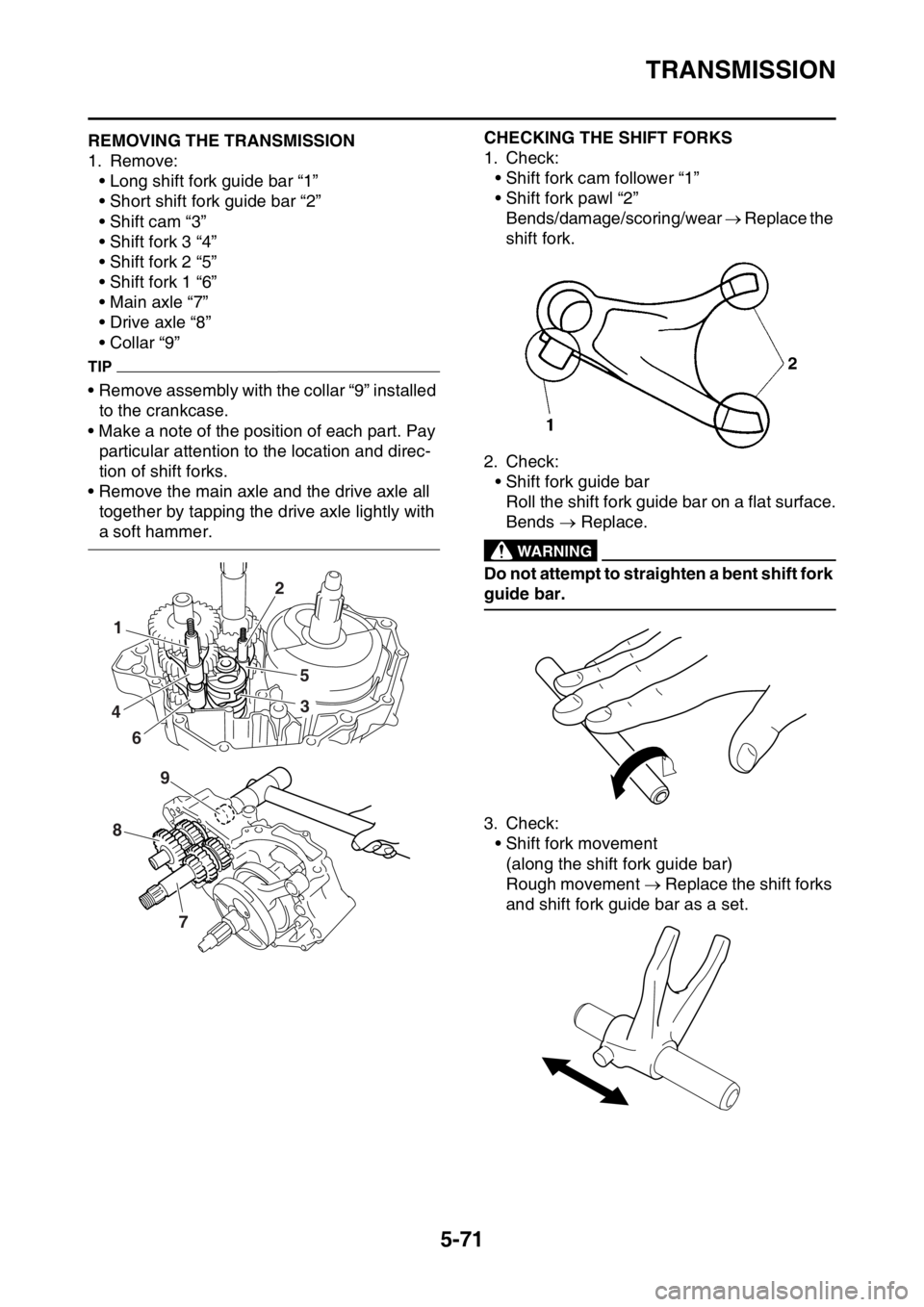
EAS1SL5290REMOVING THE TRANSMISSION
1. Remove:
• Long shift fork guide bar “1”
• Short shift fork guide bar “2”
• Shift cam “3”
• Shift fork 3 “4”
• Shift fork 2 “5”
• Shift fork 1 “6”
• Main axle “7”
• Drive axle “8”
• Collar “9”
TIP
• Remove assembly with the collar “9” installed
to the crankcase.
• Make a note of the position of each part. Pay
particular attention to the location and direc-
tion of shift forks.
• Remove the main axle and the drive axle all
together by tapping the drive axle lightly with
a soft hammer.
EAS1SL5291
CHECKING THE SHIFT FORKS
1. Check:
• Shift fork cam follower “1”
• Shift fork pawl “2”
Bends/damage/scoring/wear Replace the
shift fork.
2. Check:
• Shift fork guide bar
Roll the shift fork guide bar on a flat surface.
Bends Replace.
EWA12840
WARNING
Do not attempt to straighten a bent shift fork
guide bar.
3. Check:
• Shift fork movement
(along the shift fork guide bar)
Rough movement Replace the shift forks
and shift fork guide bar as a set.
1
4
62
5
3
8
7
9
Page 269 of 360
TRANSMISSION
5-74
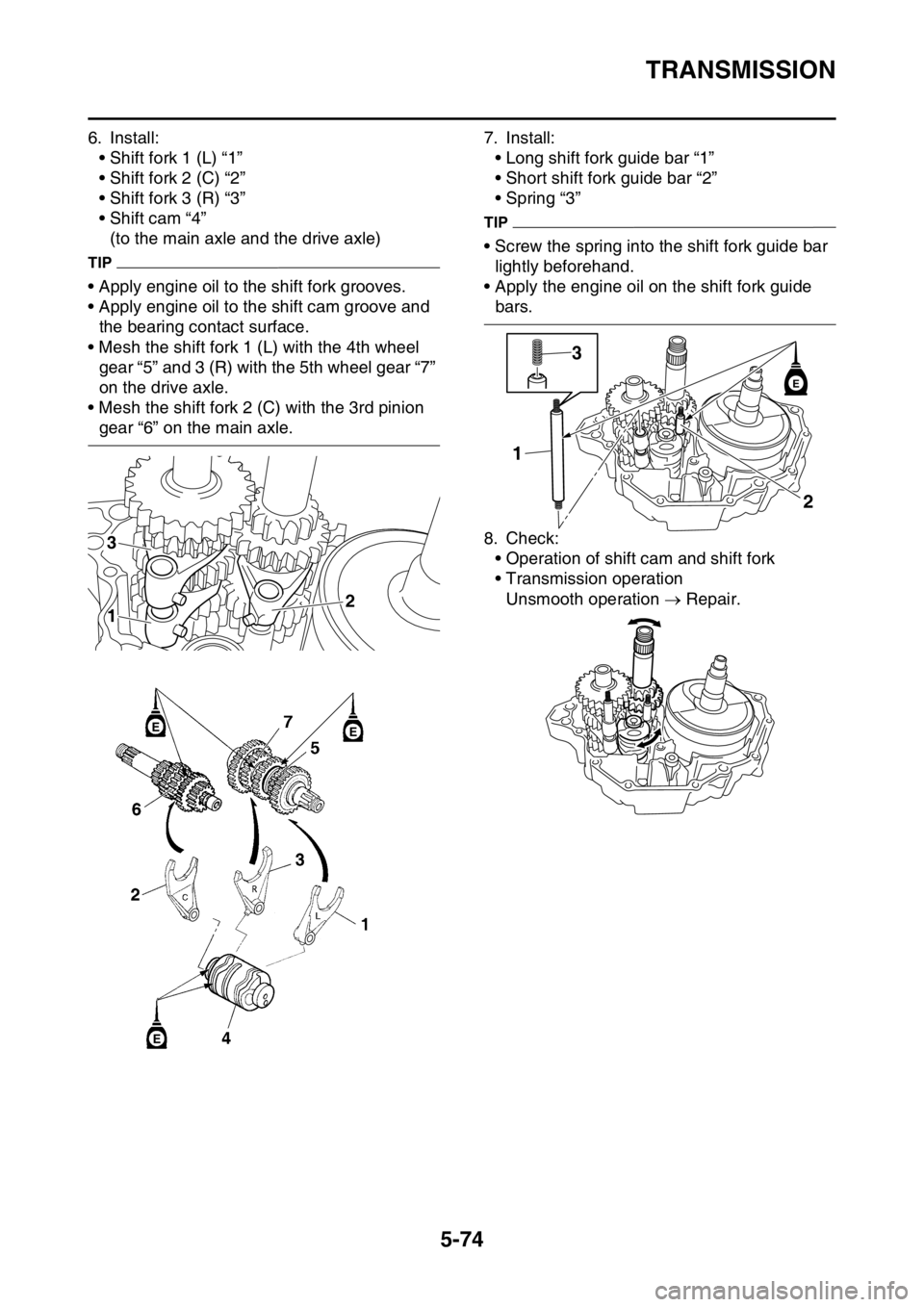
6. Install:
• Shift fork 1 (L) “1”
• Shift fork 2 (C) “2”
• Shift fork 3 (R) “3”
• Shift cam “4”
(to the main axle and the drive axle)
TIP
• Apply engine oil to the shift fork grooves.
• Apply engine oil to the shift cam groove and
the bearing contact surface.
• Mesh the shift fork 1 (L) with the 4th wheel
gear “5” and 3 (R) with the 5th wheel gear “7”
on the drive axle.
• Mesh the shift fork 2 (C) with the 3rd pinion
gear “6” on the main axle.7. Install:
• Long shift fork guide bar “1”
• Short shift fork guide bar “2”
• Spring “3”
TIP
• Screw the spring into the shift fork guide bar
lightly beforehand.
• Apply the engine oil on the shift fork guide
bars.
8. Check:
• Operation of shift cam and shift fork
• Transmission operation
Unsmooth operation Repair.
3
12
EE
E
2 13
E
Page 318 of 360

FUEL INJECTION SYSTEM
8-28
Fault code 50
Symptom ECU: faulty ECU memory
Fail-safe systemUnable to start engine
Unable to drive vehicle
Diagnostic code No.—
Diagnostic tool display—
Procedure—
Or-
derProbable cause of malfunc-
tion and checkMaintenance job Reinstatement method
1 Faulty ECU Replace the ECU. Turn “ON” the switch on the
FI diagnostic tool sub-lead.
Check that the fault code
number is not displayed.
Fault code Waiting for connection
Symptom No communication signal is received from the ECU.
Fail-safe systemAble to start engine (Unable when ECU is malfunctioning)
Able to drive vehicle (Unable when ECU is malfunctioning)
Diagnostic code No.—
Diagnostic tool display—
Procedure—
Or-
derProbable cause of malfunc-
tion and checkMaintenance job Reinstatement method
1 Connection of Yamaha diag-
nostic tool coupler.
Check the locking condition
of the coupler.
Disconnect the coupler, and
check the pins (for bent or
broken terminals and locking
condition of the pins).Improperly connected
Connect the coupler secure-
ly, or repair/replace the wire
harness.Turn “ON” the switch on the
FI diagnostic tool sub-lead.
Fault code No. is not dis-
played Repair is finished.
Fault code No. is displayed
Go to next order.
2 Connection of wire harness
ECU coupler.
Check the locking condition
of the coupler.
Disconnect the coupler, and
check the pins (for bent or
broken terminals and locking
condition of the pins).Improperly connected
Connect the coupler secure-
ly, or repair/replace the wire
harness.Turn “ON” the switch on the
FI diagnostic tool sub-lead.
Fault code No. is not dis-
played Repair is finished.
Fault code No. is displayed
Go to next order.
3 Wire harness continuity. Open or short circuit Re-
place the wire harness.
light green–light greenTurn “ON” the switch on the
FI diagnostic tool sub-lead.
Fault code No. is not dis-
played Repair is finished.
Fault code No. is displayed
Go to next order.
Page 319 of 360

FUEL INJECTION SYSTEM
8-29
4 Yamaha diagnostic tool mal-
functionReplace the Yamaha diag-
nostic tool.Turn “ON” the switch on the
FI diagnostic tool sub-lead.
Fault code No. is not dis-
played Repair is finished.
Fault code No. is displayed
Go to next order.
5 Faulty ECU Replace the ECU.
Fault code Er-2
SymptomSignals from the ECU cannot be received within the specified
period of time.
Fail-safe systemAble to start engine
Able to drive vehicle
Diagnostic code No.—
Diagnostic tool display—
Procedure—
Or-
derProbable cause of malfunc-
tion and checkMaintenance job Reinstatement method
1 Connection of Yamaha diag-
nostic tool coupler.
Check the locking condition
of the coupler.
Disconnect the coupler, and
check the pins (for bent or
broken terminals and locking
condition of the pins).Improperly connected
Connect the coupler secure-
ly, or repair/replace the wire
harness.Turn “ON” the switch on the
FI diagnostic tool sub-lead.
Fault code No. is not dis-
played Repair is finished.
Fault code No. is displayed
Go to next order.
2 Connection of wire harness
ECU coupler.
Check the locking condition
of the coupler.
Disconnect the coupler, and
check the pins (for bent or
broken terminals and locking
condition of the pins).Improperly connected
Connect the coupler secure-
ly, or repair/replace the wire
harness.Turn “ON” the switch on the
FI diagnostic tool sub-lead.
Fault code No. is not dis-
played Repair is finished.
Fault code No. is displayed
Go to next order.
3 Wire harness continuity. Open or short circuit Re-
place the wire harness.
light green–light greenTurn “ON” the switch on the
FI diagnostic tool sub-lead.
Fault code No. is not dis-
played Repair is finished.
Fault code No. is displayed
Go to next order.
4 Yamaha diagnostic tool mal-
functionReplace the Yamaha diag-
nostic tool.Turn “ON” the switch on the
FI diagnostic tool sub-lead.
Fault code No. is not dis-
played Repair is finished.
Fault code No. is displayed
Go to next order.
5 Faulty ECU Replace the ECU. Fault code Waiting for connection
Symptom No communication signal is received from the ECU.
Page 320 of 360

FUEL INJECTION SYSTEM
8-30
Fault code Er-3
Symptom Data from the ECU cannot be received correctly.
Fail-safe systemAble to start engine
Able to drive vehicle
Diagnostic code No.—
Diagnostic tool display—
Procedure—
Or-
derProbable cause of malfunc-
tion and checkMaintenance job Reinstatement method
1 Connection of Yamaha diag-
nostic tool coupler.
Check the locking condition
of the coupler.
Disconnect the coupler, and
check the pins (for bent or
broken terminals and locking
condition of the pins).Improperly connected
Connect the coupler secure-
ly, or repair/replace the wire
harness.Turn “ON” the switch on the
FI diagnostic tool sub-lead.
Fault code No. is not dis-
played Repair is finished.
Fault code No. is displayed
Go to next order.
2 Connection of wire harness
ECU coupler.
Check the locking condition
of the coupler.
Disconnect the coupler, and
check the pins (for bent or
broken terminals and locking
condition of the pins).Improperly connected
Connect the coupler secure-
ly, or repair/replace the wire
harness.Turn “ON” the switch on the
FI diagnostic tool sub-lead.
Fault code No. is not dis-
played Repair is finished.
Fault code No. is displayed
Go to next order.
3 Wire harness continuity. Open or short circuit Re-
place the wire harness.
light green–light greenTurn “ON” the switch on the
FI diagnostic tool sub-lead.
Fault code No. is not dis-
played Repair is finished.
Fault code No. is displayed
Go to next order.
4 Yamaha diagnostic tool mal-
functionReplace the Yamaha diag-
nostic tool.Turn “ON” the switch on the
FI diagnostic tool sub-lead.
Fault code No. is not dis-
played Repair is finished.
Fault code No. is displayed
Go to next order.
5 Faulty ECU Replace the ECU.
Page 321 of 360

FUEL INJECTION SYSTEM
8-31
Fault code Er-4
SymptomRegistered data cannot be received from the Yamaha diagnos-
tic tool.
Fail-safe systemAble to start engine
Able to drive vehicle
Diagnostic code No.—
Diagnostic tool display—
Procedure—
Or-
derProbable cause of malfunc-
tion and checkMaintenance job Reinstatement method
1 Connection of Yamaha diag-
nostic tool coupler.
Check the locking condition
of the coupler.
Disconnect the coupler, and
check the pins (for bent or
broken terminals and locking
condition of the pins).Improperly connected
Connect the coupler secure-
ly, or repair/replace the wire
harness.Turn “ON” the switch on the
FI diagnostic tool sub-lead.
Fault code No. is not dis-
played Repair is finished.
Fault code No. is displayed
Go to next order.
2 Connection of wire harness
ECU coupler.
Check the locking condition
of the coupler.
Disconnect the coupler, and
check the pins (for bent or
broken terminals and locking
condition of the pins).Improperly connected
Connect the coupler secure-
ly, or repair/replace the wire
harness.Turn “ON” the switch on the
FI diagnostic tool sub-lead.
Fault code No. is not dis-
played Repair is finished.
Fault code No. is displayed
Go to next order.
3 Wire harness continuity. Open or short circuit Re-
place the wire harness.
light green–light greenTurn “ON” the switch on the
FI diagnostic tool sub-lead.
Fault code No. is not dis-
played Repair is finished.
Fault code No. is displayed
Go to next order.
4 Yamaha diagnostic tool mal-
functionReplace the Yamaha diag-
nostic tool.Turn “ON” the switch on the
FI diagnostic tool sub-lead.
Fault code No. is not dis-
played Repair is finished.
Fault code No. is displayed
Go to next order.
5 Faulty ECU Replace the ECU.