lock YAMAHA YZ450F 2015 Service Manual
[x] Cancel search | Manufacturer: YAMAHA, Model Year: 2015, Model line: YZ450F, Model: YAMAHA YZ450F 2015Pages: 360, PDF Size: 10.82 MB
Page 204 of 360
ENGINE REMOVAL
5-9
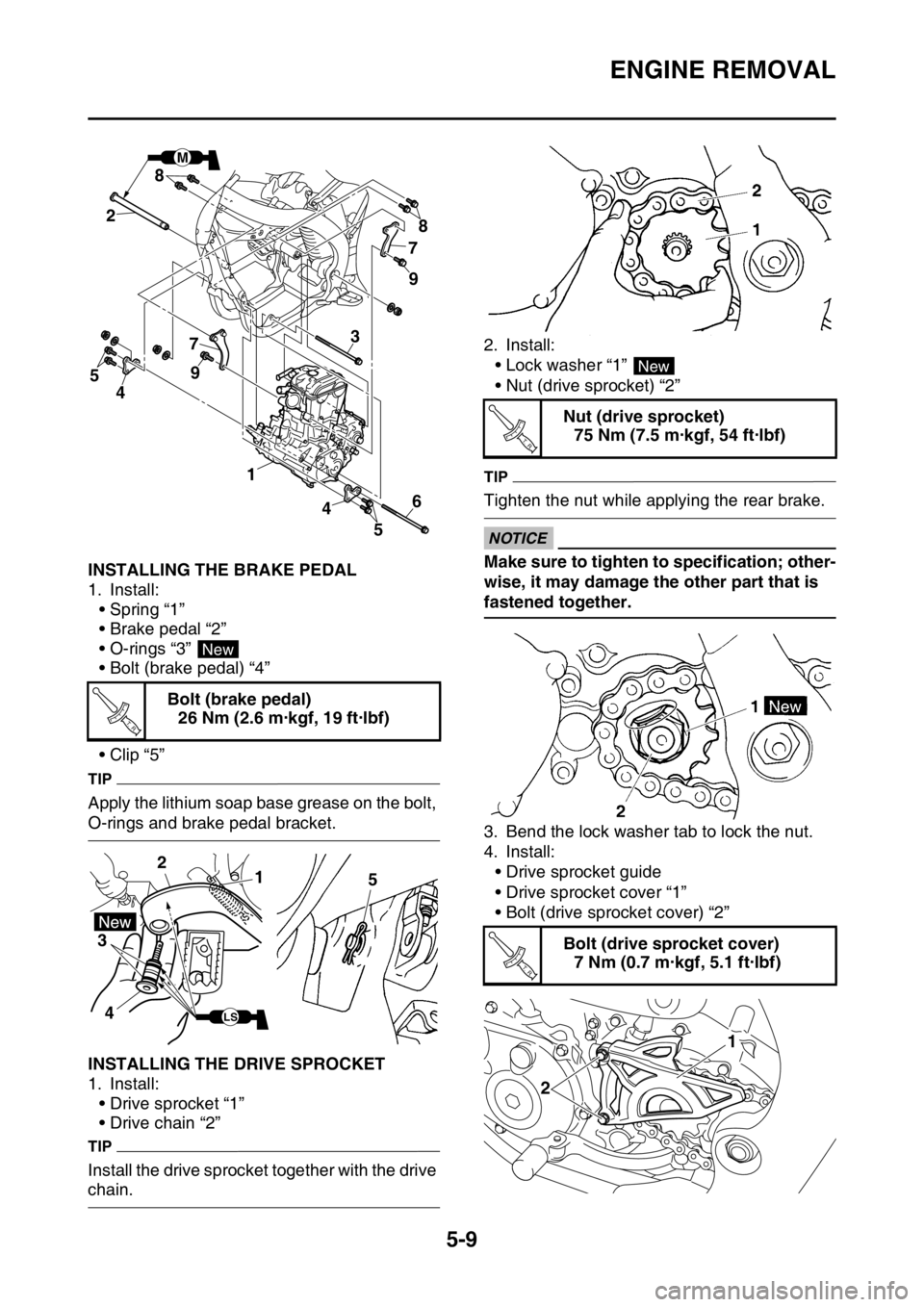
EAS1SL5205INSTALLING THE BRAKE PEDAL
1. Install:
• Spring “1”
• Brake pedal “2”
• O-rings “3”
• Bolt (brake pedal) “4”
•Clip “5”
TIP
Apply the lithium soap base grease on the bolt,
O-rings and brake pedal bracket.
EAS1SL5206INSTALLING THE DRIVE SPROCKET
1. Install:
• Drive sprocket “1”
• Drive chain “2”
TIP
Install the drive sprocket together with the drive
chain.2. Install:
• Lock washer “1”
• Nut (drive sprocket) “2”
TIP
Tighten the nut while applying the rear brake.
ECA33DD040
NOTICE
Make sure to tighten to specification; other-
wise, it may damage the other part that is
fastened together.
3. Bend the lock washer tab to lock the nut.
4. Install:
• Drive sprocket guide
• Drive sprocket cover “1”
• Bolt (drive sprocket cover) “2” Bolt (brake pedal)
26 Nm (2.6 m·kgf, 19 ft·lbf)
M
78
9
9 8
7
4 1
2
43
5
56
New
T R..
1 2
3
45
LS
Nut (drive sprocket)
75 Nm (7.5 m·kgf, 54 ft·lbf)
Bolt (drive sprocket cover)
7 Nm (0.7 m·kgf, 5.1 ft·lbf)
New
T R..
T R..
21
Page 208 of 360
CAMSHAFT
5-13
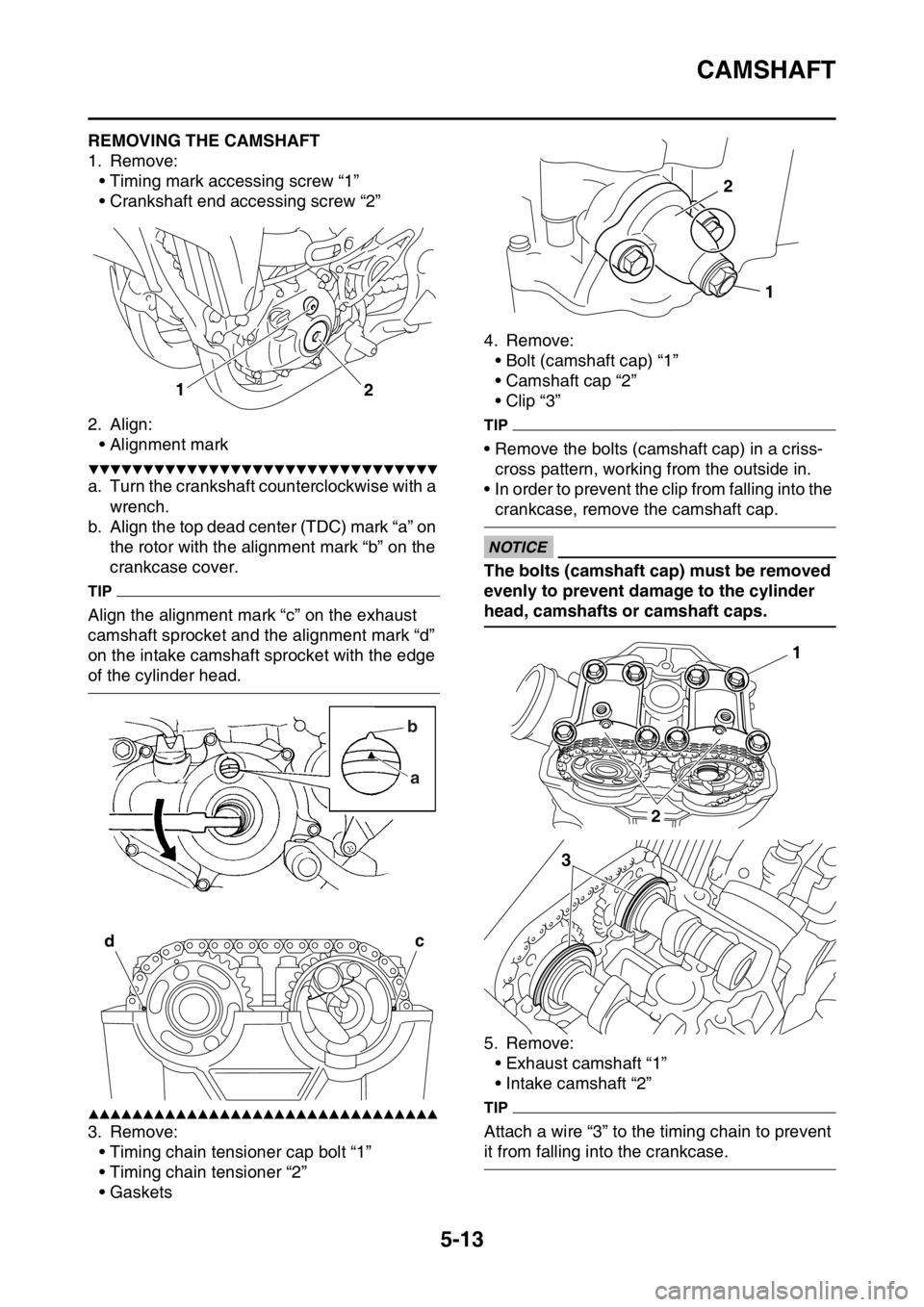
EAS1SL5209REMOVING THE CAMSHAFT
1. Remove:
• Timing mark accessing screw “1”
• Crankshaft end accessing screw “2”
2. Align:
• Alignment mark
▼▼▼▼▼▼▼▼▼▼▼▼▼▼▼▼▼▼▼▼▼▼▼▼▼▼▼▼▼▼▼▼
a. Turn the crankshaft counterclockwise with a
wrench.
b. Align the top dead center (TDC) mark “a” on
the rotor with the alignment mark “b” on the
crankcase cover.
TIP
Align the alignment mark “c” on the exhaust
camshaft sprocket and the alignment mark “d”
on the intake camshaft sprocket with the edge
of the cylinder head.
▲▲▲▲▲▲▲▲▲▲▲▲▲▲▲▲▲▲▲▲▲▲▲▲▲▲▲▲▲▲▲▲
3. Remove:
• Timing chain tensioner cap bolt “1”
• Timing chain tensioner “2”
•Gaskets4. Remove:
• Bolt (camshaft cap) “1”
• Camshaft cap “2”
• Clip “3”
TIP
• Remove the bolts (camshaft cap) in a criss-
cross pattern, working from the outside in.
• In order to prevent the clip from falling into the
crankcase, remove the camshaft cap.
ECA33DD027
NOTICE
The bolts (camshaft cap) must be removed
evenly to prevent damage to the cylinder
head, camshafts or camshaft caps.
5. Remove:
• Exhaust camshaft “1”
• Intake camshaft “2”
TIP
Attach a wire “3” to the timing chain to prevent
it from falling into the crankcase.
1
2
b
a
dc
1 2
1
2
3
Page 210 of 360
CAMSHAFT
5-15
c. Install the dowel pins and the camshaft
caps.
TIP
• Tighten the camshaft cap bolts in a crisscross
pattern from innermost to outer caps.
• Do not turn the camshaft when measuring the
camshaft journal-to-camshaft cap clearance.
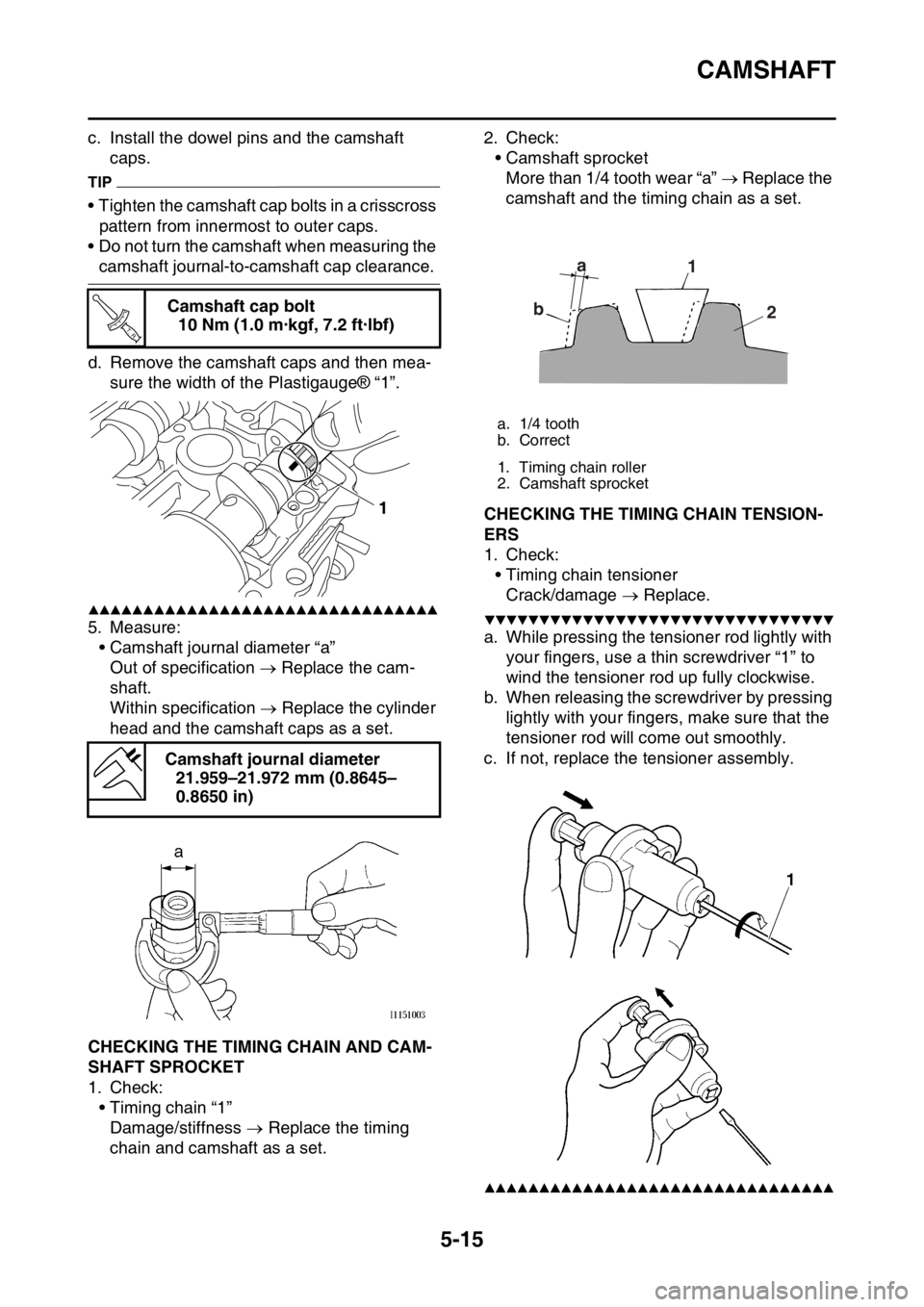
d. Remove the camshaft caps and then mea-
sure the width of the Plastigauge® “1”.
▲▲▲▲▲▲▲▲▲▲▲▲▲▲▲▲▲▲▲▲▲▲▲▲▲▲▲▲▲▲▲▲
5. Measure:
• Camshaft journal diameter “a”
Out of specification Replace the cam-
shaft.
Within specification Replace the cylinder
head and the camshaft caps as a set.
EAS1SL5211CHECKING THE TIMING CHAIN AND CAM-
SHAFT SPROCKET
1. Check:
• Timing chain “1”
Damage/stiffness Replace the timing
chain and camshaft as a set.2. Check:
• Camshaft sprocket
More than 1/4 tooth wear “a” Replace the
camshaft and the timing chain as a set.
EAS1SL5212CHECKING THE TIMING CHAIN TENSION-
ERS
1. Check:
• Timing chain tensioner
Crack/damage Replace.
▼▼▼▼▼▼▼▼▼▼▼▼▼▼▼▼▼▼▼▼▼▼▼▼▼▼▼▼▼▼▼▼
a. While pressing the tensioner rod lightly with
your fingers, use a thin screwdriver “1” to
wind the tensioner rod up fully clockwise.
b. When releasing the screwdriver by pressing
lightly with your fingers, make sure that the
tensioner rod will come out smoothly.
c. If not, replace the tensioner assembly.
▲▲▲▲▲▲▲▲▲▲▲▲▲▲▲▲▲▲▲▲▲▲▲▲▲▲▲▲▲▲▲▲
Camshaft cap bolt
10 Nm (1.0 m·kgf, 7.2 ft·lbf)
Camshaft journal diameter
21.959–21.972 mm (0.8645–
0.8650 in)
T R..
1
a. 1/4 tooth
b. Correct
1. Timing chain roller
2. Camshaft sprocket
a
b1
2
Page 211 of 360
CAMSHAFT
5-16
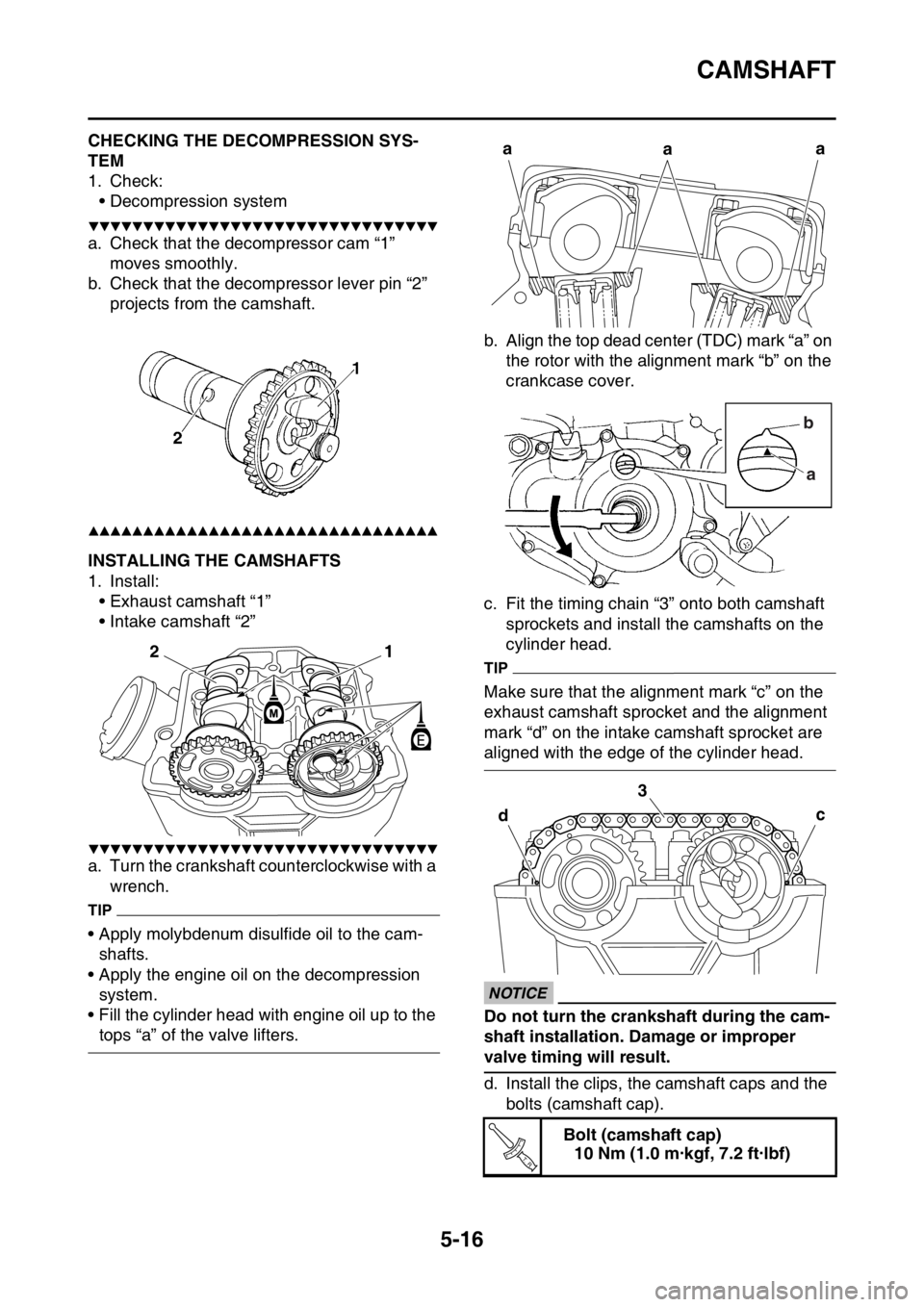
EAS1SL5213CHECKING THE DECOMPRESSION SYS-
TEM
1. Check:
• Decompression system
▼▼▼▼▼▼▼▼▼▼▼▼▼▼▼▼▼▼▼▼▼▼▼▼▼▼▼▼▼▼▼▼
a. Check that the decompressor cam “1”
moves smoothly.
b. Check that the decompressor lever pin “2”
projects from the camshaft.
▲▲▲▲▲▲▲▲▲▲▲▲▲▲▲▲▲▲▲▲▲▲▲▲▲▲▲▲▲▲▲▲
EAS1SL5214INSTALLING THE CAMSHAFTS
1. Install:
• Exhaust camshaft “1”
• Intake camshaft “2”
▼▼▼▼▼▼▼▼▼▼▼▼▼▼▼▼▼▼▼▼▼▼▼▼▼▼▼▼▼▼▼▼
a. Turn the crankshaft counterclockwise with a
wrench.
TIP
• Apply molybdenum disulfide oil to the cam-
shafts.
• Apply the engine oil on the decompression
system.
• Fill the cylinder head with engine oil up to the
tops “a” of the valve lifters.b. Align the top dead center (TDC) mark “a” on
the rotor with the alignment mark “b” on the
crankcase cover.
c. Fit the timing chain “3” onto both camshaft
sprockets and install the camshafts on the
cylinder head.
TIP
Make sure that the alignment mark “c” on the
exhaust camshaft sprocket and the alignment
mark “d” on the intake camshaft sprocket are
aligned with the edge of the cylinder head.
ECA33DD029
NOTICE
Do not turn the crankshaft during the cam-
shaft installation. Damage or improper
valve timing will result.
d. Install the clips, the camshaft caps and the
bolts (camshaft cap).
1
2
Bolt (camshaft cap)
10 Nm (1.0 m·kgf, 7.2 ft·lbf)
a
aa
b
a
c 3
d
T R..
Page 212 of 360
CAMSHAFT
5-17
TIP
• Before installing the clips, cover the cylinder
head with a clean cloth to prevent the clips
from coming off into the cylinder head cavity.
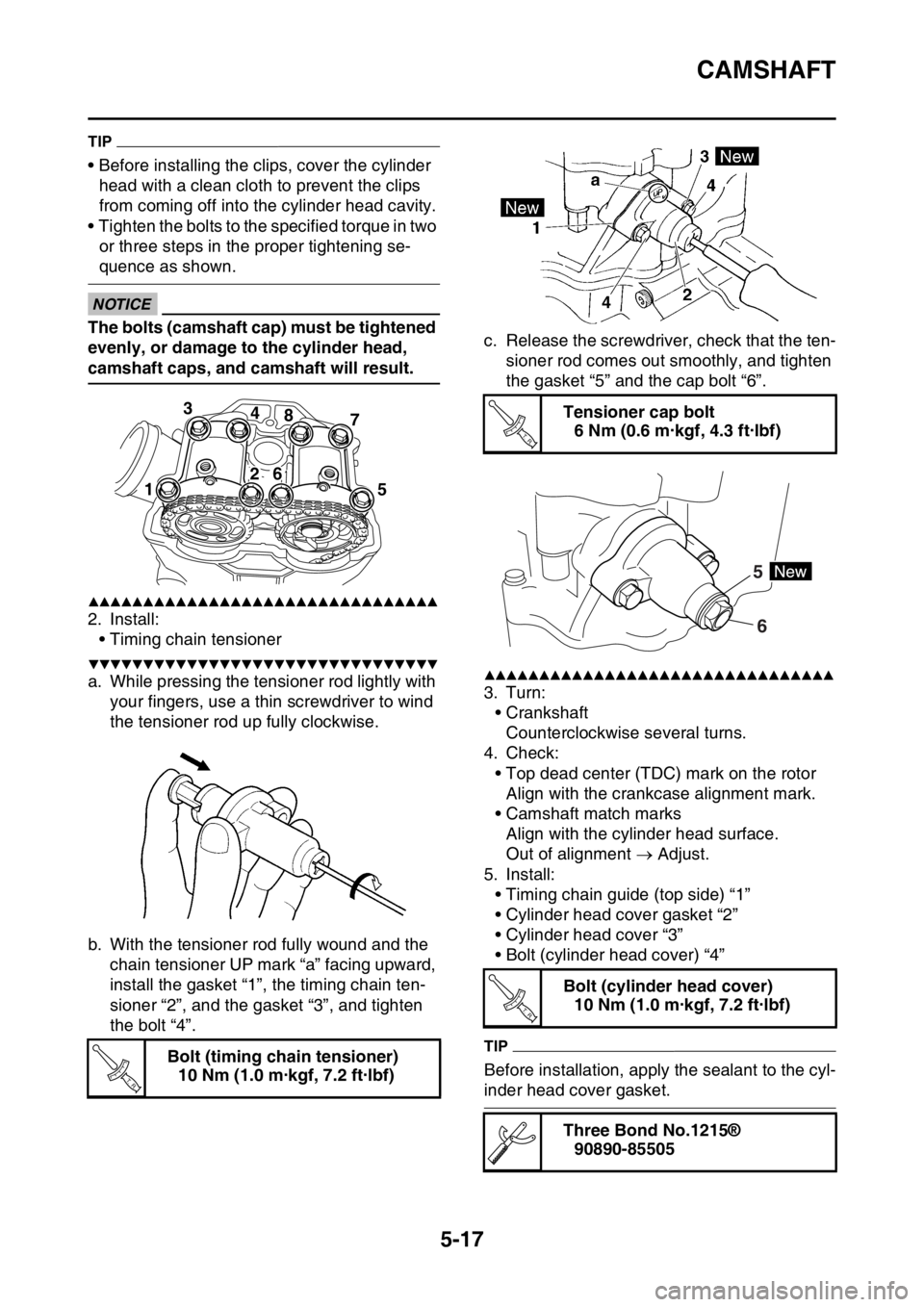
• Tighten the bolts to the specified torque in two
or three steps in the proper tightening se-
quence as shown.
ECA33DD030
NOTICE
The bolts (camshaft cap) must be tightened
evenly, or damage to the cylinder head,
camshaft caps, and camshaft will result.
▲▲▲▲▲▲▲▲▲▲▲▲▲▲▲▲▲▲▲▲▲▲▲▲▲▲▲▲▲▲▲▲
2. Install:
• Timing chain tensioner
▼▼▼▼▼▼▼▼▼▼▼▼▼▼▼▼▼▼▼▼▼▼▼▼▼▼▼▼▼▼▼▼
a. While pressing the tensioner rod lightly with
your fingers, use a thin screwdriver to wind
the tensioner rod up fully clockwise.
b. With the tensioner rod fully wound and the
chain tensioner UP mark “a” facing upward,
install the gasket “1”, the timing chain ten-
sioner “2”, and the gasket “3”, and tighten
the bolt “4”.c. Release the screwdriver, check that the ten-
sioner rod comes out smoothly, and tighten
the gasket “5” and the cap bolt “6”.▲▲▲▲▲▲▲▲▲▲▲▲▲▲▲▲▲▲▲▲▲▲▲▲▲▲▲▲▲▲▲▲
3. Turn:
• Crankshaft
Counterclockwise several turns.
4. Check:
• Top dead center (TDC) mark on the rotor
Align with the crankcase alignment mark.
• Camshaft match marks
Align with the cylinder head surface.
Out of alignment Adjust.
5. Install:
• Timing chain guide (top side) “1”
• Cylinder head cover gasket “2”
• Cylinder head cover “3”
• Bolt (cylinder head cover) “4”
TIP
Before installation, apply the sealant to the cyl-
inder head cover gasket. Bolt (timing chain tensioner)
10 Nm (1.0 m·kgf, 7.2 ft·lbf)
3
4
8
7
15
26
T R..
Tensioner cap bolt
6 Nm (0.6 m·kgf, 4.3 ft·lbf)
Bolt (cylinder head cover)
10 Nm (1.0 m·kgf, 7.2 ft·lbf)
Three Bond No.1215®
90890-85505
T R..
6 5
T R..
Page 243 of 360
KICKSTATER
5-48
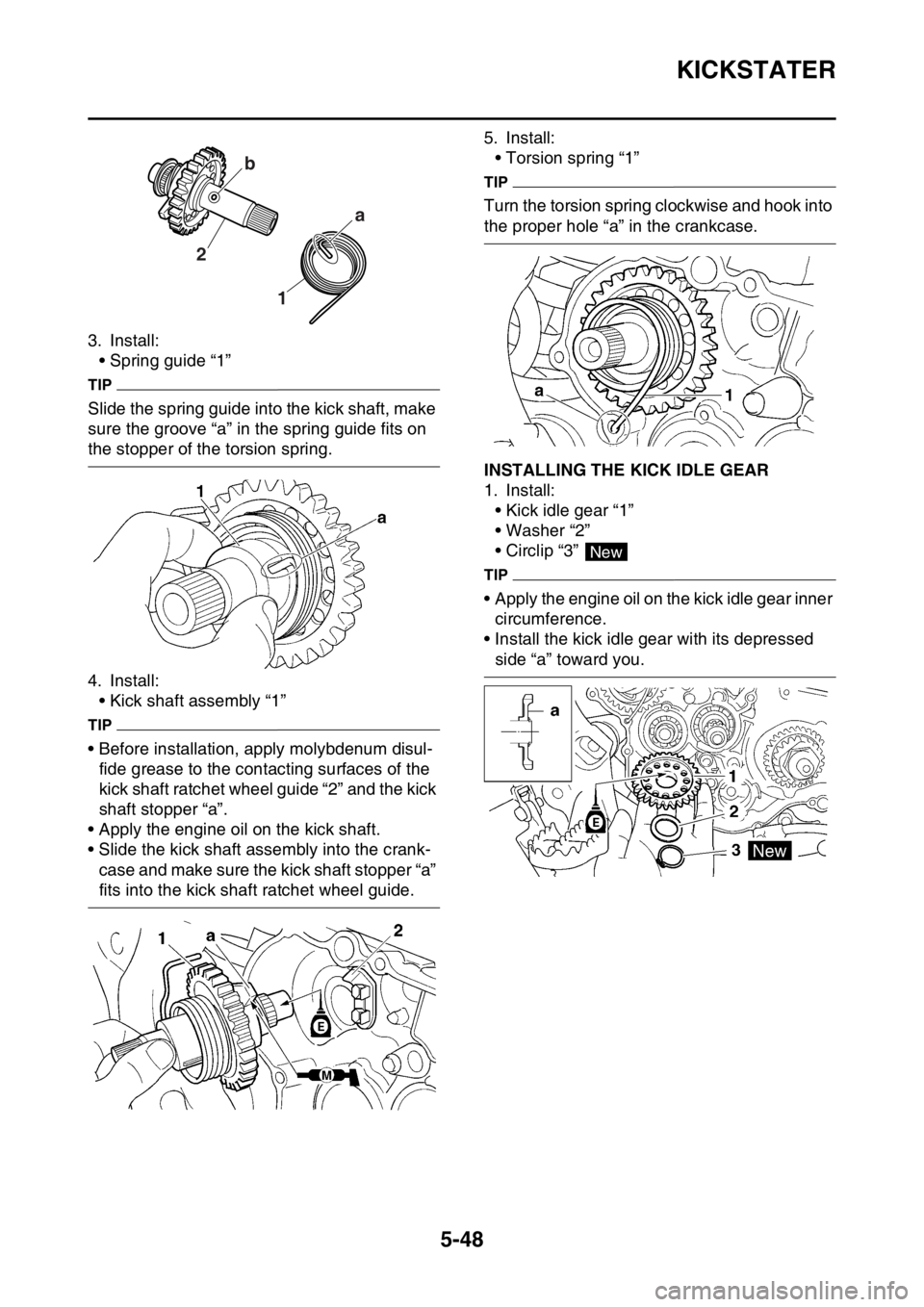
3. Install:
• Spring guide “1”
TIP
Slide the spring guide into the kick shaft, make
sure the groove “a” in the spring guide fits on
the stopper of the torsion spring.
4. Install:
• Kick shaft assembly “1”
TIP
• Before installation, apply molybdenum disul-
fide grease to the contacting surfaces of the
kick shaft ratchet wheel guide “2” and the kick
shaft stopper “a”.
• Apply the engine oil on the kick shaft.
• Slide the kick shaft assembly into the crank-
case and make sure the kick shaft stopper “a”
fits into the kick shaft ratchet wheel guide.5. Install:
• Torsion spring “1”
TIP
Turn the torsion spring clockwise and hook into
the proper hole “a” in the crankcase.
EAS1SL5254INSTALLING THE KICK IDLE GEAR
1. Install:
• Kick idle gear “1”
• Washer “2”
• Circlip “3”
TIP
• Apply the engine oil on the kick idle gear inner
circumference.
• Install the kick idle gear with its depressed
side “a” toward you.
1 2a b
New
Page 246 of 360
SHIFT SHAFT
5-51
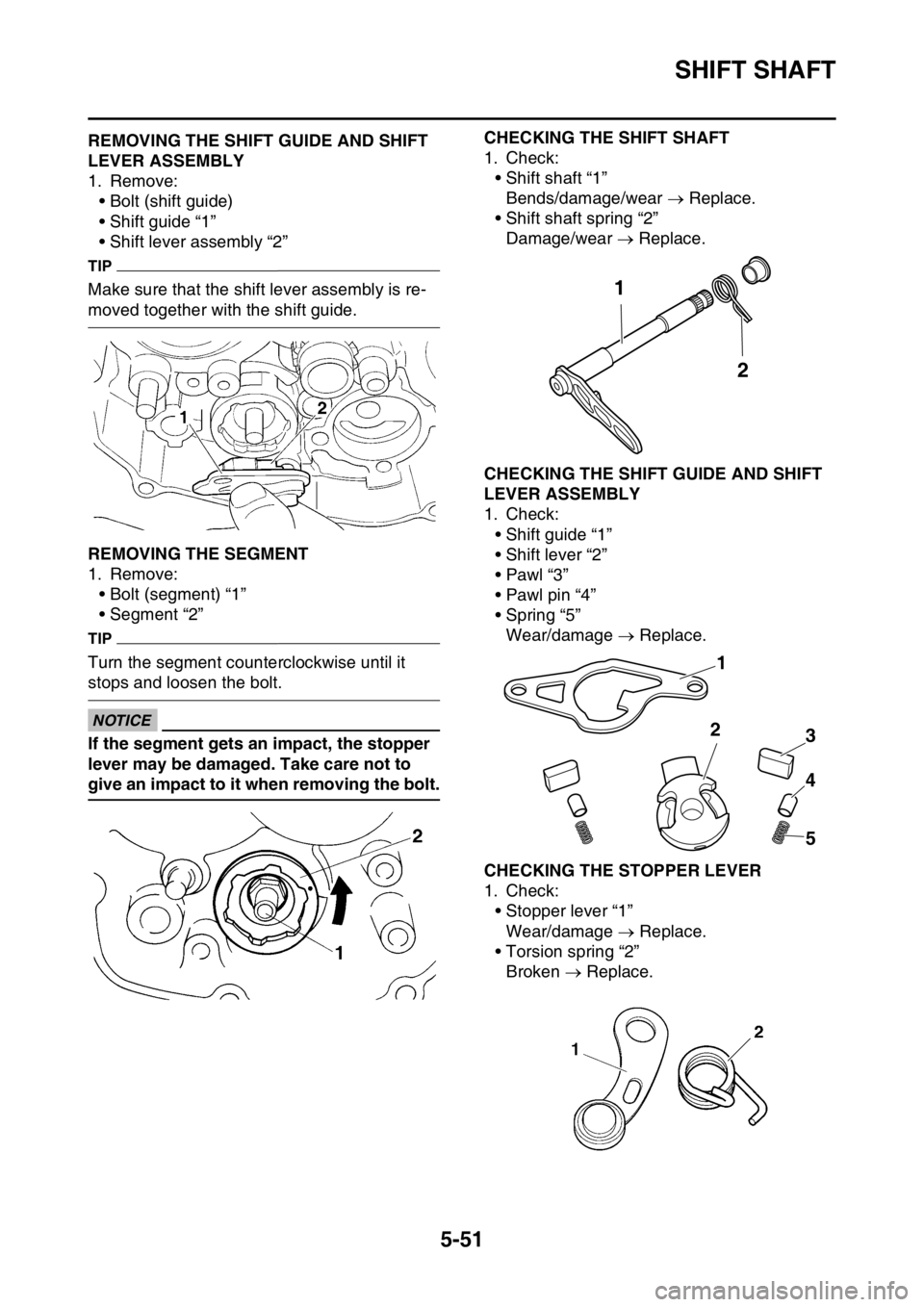
EAS1SL5256REMOVING THE SHIFT GUIDE AND SHIFT
LEVER ASSEMBLY
1. Remove:
• Bolt (shift guide)
• Shift guide “1”
• Shift lever assembly “2”
TIP
Make sure that the shift lever assembly is re-
moved together with the shift guide.
EAS1SL5257REMOVING THE SEGMENT
1. Remove:
• Bolt (segment) “1”
• Segment “2”
TIP
Turn the segment counterclockwise until it
stops and loosen the bolt.
ECA1DX1021
NOTICE
If the segment gets an impact, the stopper
lever may be damaged. Take care not to
give an impact to it when removing the bolt.
EAS1SL5258
CHECKING THE SHIFT SHAFT
1. Check:
• Shift shaft “1”
Bends/damage/wear Replace.
• Shift shaft spring “2”
Damage/wear Replace.
EAS1SL5259CHECKING THE SHIFT GUIDE AND SHIFT
LEVER ASSEMBLY
1. Check:
• Shift guide “1”
• Shift lever “2”
•Pawl “3”
• Pawl pin “4”
• Spring “5”
Wear/damage Replace.
EAS1SL5260CHECKING THE STOPPER LEVER
1. Check:
• Stopper lever “1”
Wear/damage Replace.
• Torsion spring “2”
Broken Replace.
1
2
1
2
3
4
5
Page 250 of 360
OIL PUMP AND BALANCER GEAR
5-55
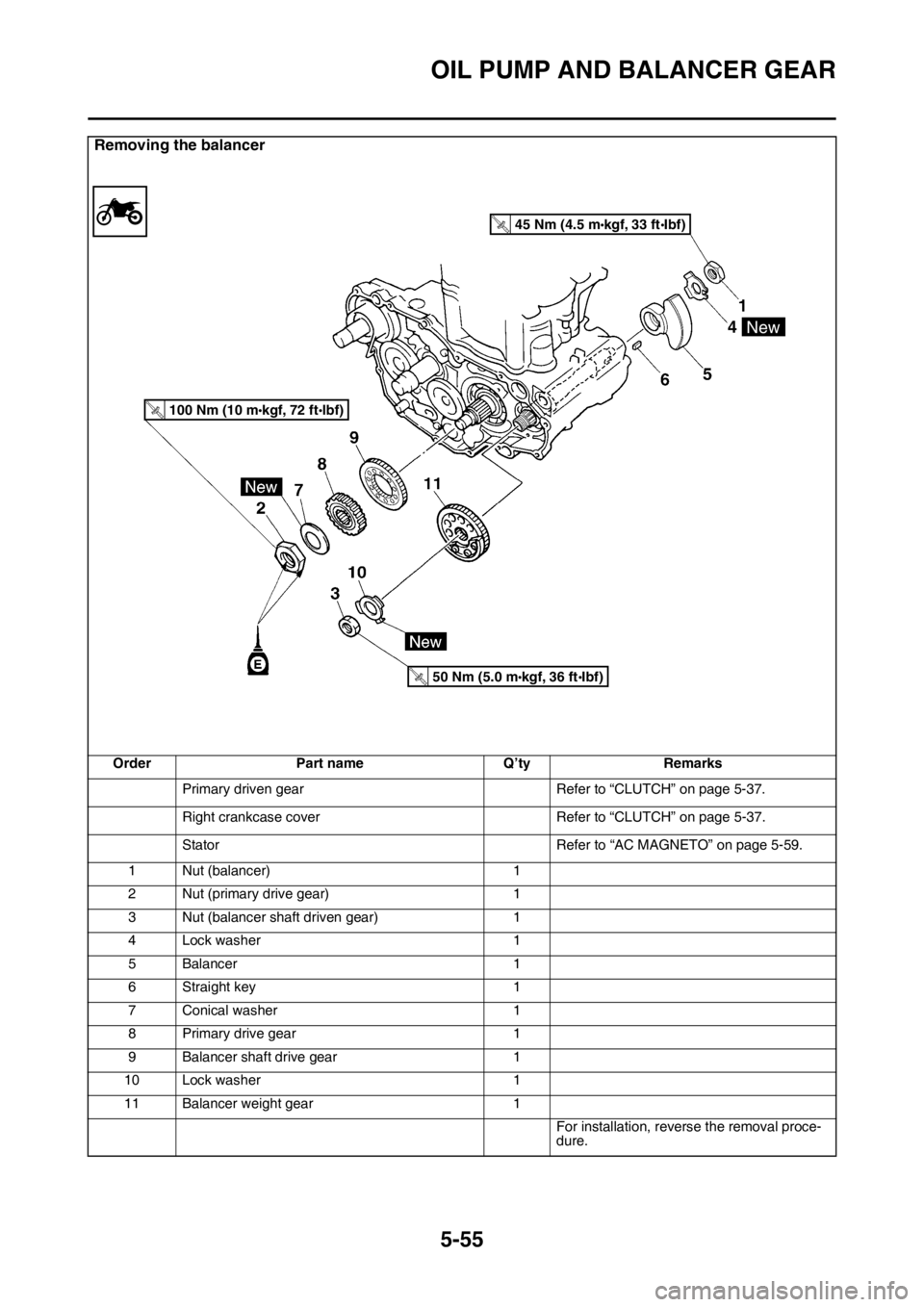
Removing the balancer
Order Part name Q’ty Remarks
Primary driven gear Refer to “CLUTCH” on page 5-37.
Right crankcase cover Refer to “CLUTCH” on page 5-37.
Stator Refer to “AC MAGNETO” on page 5-59.
1 Nut (balancer) 1
2 Nut (primary drive gear) 1
3 Nut (balancer shaft driven gear) 1
4 Lock washer 1
5Balancer 1
6 Straight key 1
7 Conical washer 1
8 Primary drive gear 1
9 Balancer shaft drive gear 1
10 Lock washer 1
11 Balancer weight gear 1
For installation, reverse the removal proce-
dure.
45 Nm (4.5 mkgf, 33 ftIbf)T.R
.
100 Nm (10 mkgf, 72 ftlbf)T.R.
50 Nm (5.0 mkgf, 36 ftIbf)T.R
.
New
Page 251 of 360
OIL PUMP AND BALANCER GEAR
5-56
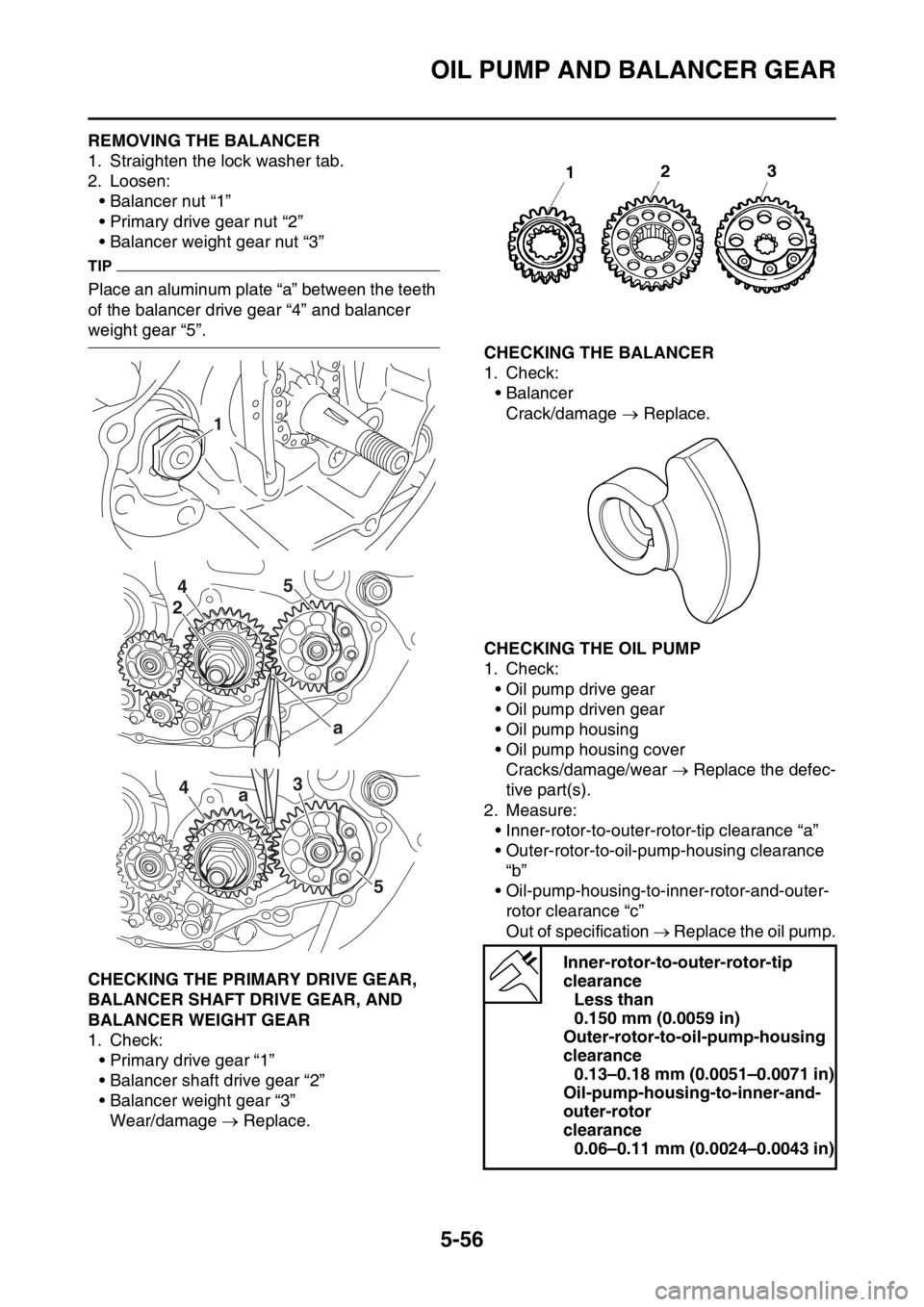
EAS1SL5267REMOVING THE BALANCER
1. Straighten the lock washer tab.
2. Loosen:
• Balancer nut “1”
• Primary drive gear nut “2”
• Balancer weight gear nut “3”
TIP
Place an aluminum plate “a” between the teeth
of the balancer drive gear “4” and balancer
weight gear “5”.
EAS1SL5268CHECKING THE PRIMARY DRIVE GEAR,
BALANCER SHAFT DRIVE GEAR, AND
BALANCER WEIGHT GEAR
1. Check:
• Primary drive gear “1”
• Balancer shaft drive gear “2”
• Balancer weight gear “3”
Wear/damage Replace.
EAS1SL5269CHECKING THE BALANCER
1. Check:
•Balancer
Crack/damage Replace.
EAS1SL5270CHECKING THE OIL PUMP
1. Check:
• Oil pump drive gear
• Oil pump driven gear
• Oil pump housing
• Oil pump housing cover
Cracks/damage/wear Replace the defec-
tive part(s).
2. Measure:
• Inner-rotor-to-outer-rotor-tip clearance “a”
• Outer-rotor-to-oil-pump-housing clearance
“b”
• Oil-pump-housing-to-inner-rotor-and-outer-
rotor clearance “c”
Out of specification Replace the oil pump.
1
5
4
2
a
43
a
5
Inner-rotor-to-outer-rotor-tip
clearance
Less than
0.150 mm (0.0059 in)
Outer-rotor-to-oil-pump-housing
clearance
0.13–0.18 mm (0.0051–0.0071 in)
Oil-pump-housing-to-inner-and-
outer-rotor
clearance
0.06–0.11 mm (0.0024–0.0043 in)
Page 253 of 360
OIL PUMP AND BALANCER GEAR
5-58
NOTICE
After tightening the bolts, make sure that
the oil pump turns smoothly.
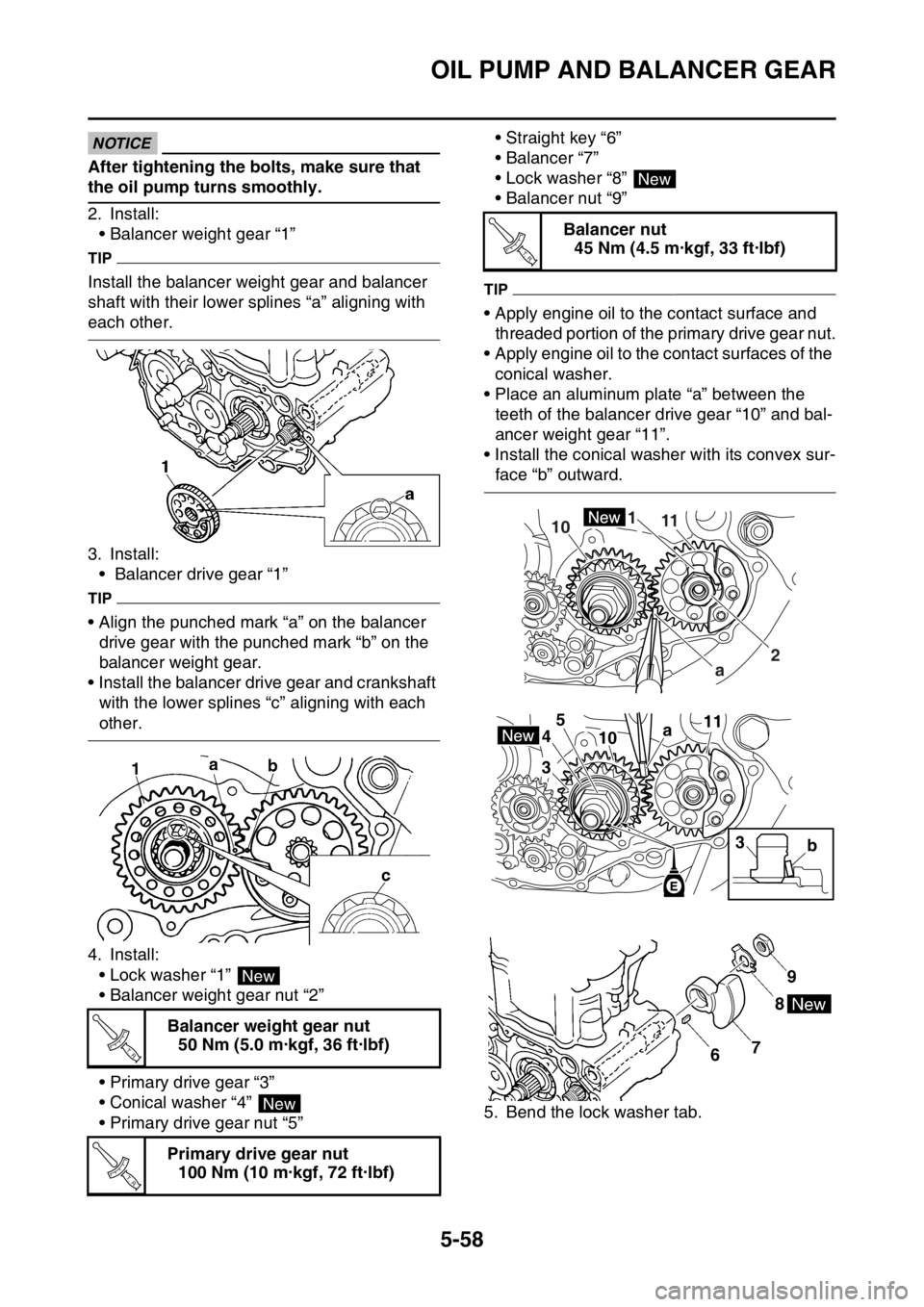
2. Install:
• Balancer weight gear “1”
TIP
Install the balancer weight gear and balancer
shaft with their lower splines “a” aligning with
each other.
3. Install:
• Balancer drive gear “1”
TIP
• Align the punched mark “a” on the balancer
drive gear with the punched mark “b” on the
balancer weight gear.
• Install the balancer drive gear and crankshaft
with the lower splines “c” aligning with each
other.
4. Install:
• Lock washer “1”
• Balancer weight gear nut “2”
• Primary drive gear “3”
• Conical washer “4”
• Primary drive gear nut “5”• Straight key “6”
•Balancer “7”
• Lock washer “8”
• Balancer nut “9”
TIP
• Apply engine oil to the contact surface and
threaded portion of the primary drive gear nut.
• Apply engine oil to the contact surfaces of the
conical washer.
• Place an aluminum plate “a” between the
teeth of the balancer drive gear “10” and bal-
ancer weight gear “11”.
• Install the conical washer with its convex sur-
face “b” outward.
5. Bend the lock washer tab. Balancer weight gear nut
50 Nm (5.0 m·kgf, 36 ft·lbf)
Primary drive gear nut
100 Nm (10 m·kgf, 72 ft·lbf)
New
T R..
New
T R..
Balancer nut
45 Nm (4.5 m·kgf, 33 ft·lbf)
New
T R..
1
2 11
10
a
3 45
1011
a
b
3