reset YAMAHA YZF-R1 2013 User Guide
[x] Cancel search | Manufacturer: YAMAHA, Model Year: 2013, Model line: YZF-R1, Model: YAMAHA YZF-R1 2013Pages: 112, PDF Size: 2.79 MB
Page 37 of 112
INSTRUMENT AND CONTROL FUNCTIONS
3-22
3
TIP●
The traction control may engage
when the vehicle travels over a
bump.
●
The rider may notice slight chang-
es in engine and exhaust sounds
when the traction control system is
engaged.
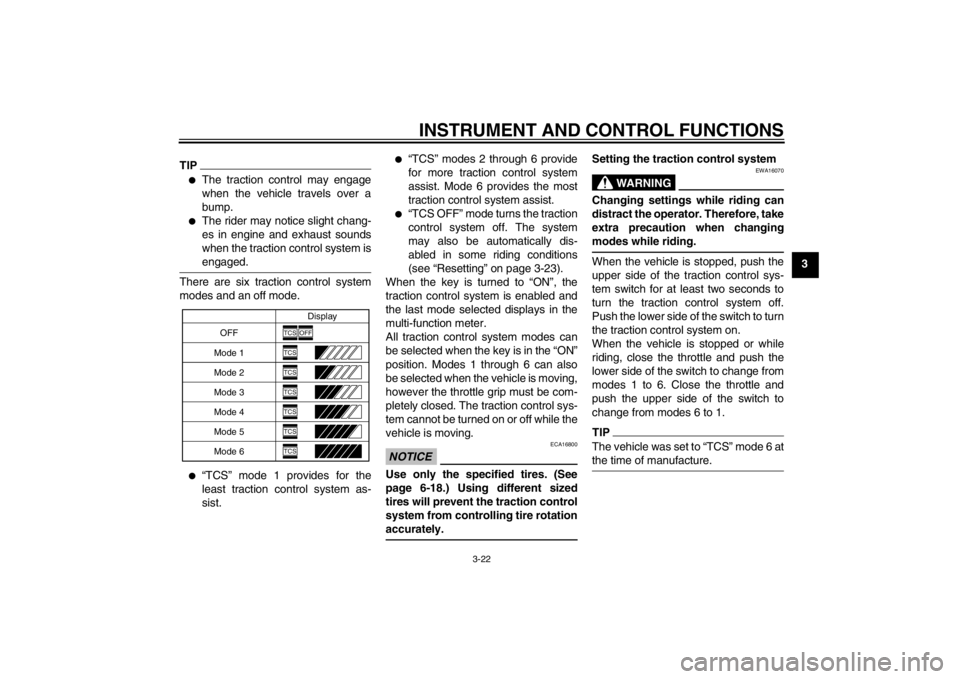
There are six traction control system
modes and an off mode.●
“TCS” mode 1 provides for the
least traction control system as-
sist.
●
“TCS” modes 2 through 6 provide
for more traction control system
assist. Mode 6 provides the most
traction control system assist.
●
“TCS OFF” mode turns the traction
control system off. The system
may also be automatically dis-
abled in some riding conditions
(see “Resetting” on page 3-23).
When the key is turned to “ON”, the
traction control system is enabled and
the last mode selected displays in the
multi-function meter.
All traction control system modes can
be selected when the key is in the “ON”
position. Modes 1 through 6 can also
be selected when the vehicle is moving,
however the throttle grip must be com-
pletely closed. The traction control sys-
tem cannot be turned on or off while the
vehicle is moving.
NOTICE
ECA16800
Use only the specified tires. (See
page 6-18.) Using different sized
tires will prevent the traction control
system from controlling tire rotation
accurately.
Setting the traction control system
WARNING
EWA16070
Changing settings while riding can
distract the operator. Therefore, take
extra precaution when changing
modes while riding.When the vehicle is stopped, push the
upper side of the traction control sys-
tem switch for at least two seconds to
turn the traction control system off.
Push the lower side of the switch to turn
the traction control system on.
When the vehicle is stopped or while
riding, close the throttle and push the
lower side of the switch to change from
modes 1 to 6. Close the throttle and
push the upper side of the switch to
change from modes 6 to 1.TIPThe vehicle was set to “TCS” mode 6 at
the time of manufacture.
OFF Display
Mode 1
Mode 2
Mode 3
Mode 4
Mode 5
Mode 6
TCS
OFF
TCSTCSTCSTCSTCSTCS
U1KBE1E0.book Page 22 Monday, July 9, 2012 1:05 PM
Page 38 of 112
INSTRUMENT AND CONTROL FUNCTIONS
3-23
3Resetting
The traction control system may be dis-
abled in the following conditions:
●
Either the front wheel or rear wheel
comes off the ground while riding
●
Excessive rear wheel spinning If the traction control system has been
disabled, both the traction control sys-
tem indicator/warning light and the en-
gine trouble warning light come on.
To reset the traction control system:
Turn the key to “OFF”. Wait at least one
second, then turn the key back to “ON”.
The traction control system indica-
tor/warning light should go off and the
system will be enabled. The engine
trouble warning light should go off after
the motorcycle reaches at least 20
km/h (12 mi/h). If the traction control
system indicator/warning light and/or
engine trouble warning light still remain
on after resetting, the motorcycle may
still be ridden; however, have a
Yamaha dealer check the motorcycle as soon as possible.NOTICE
ECA17731
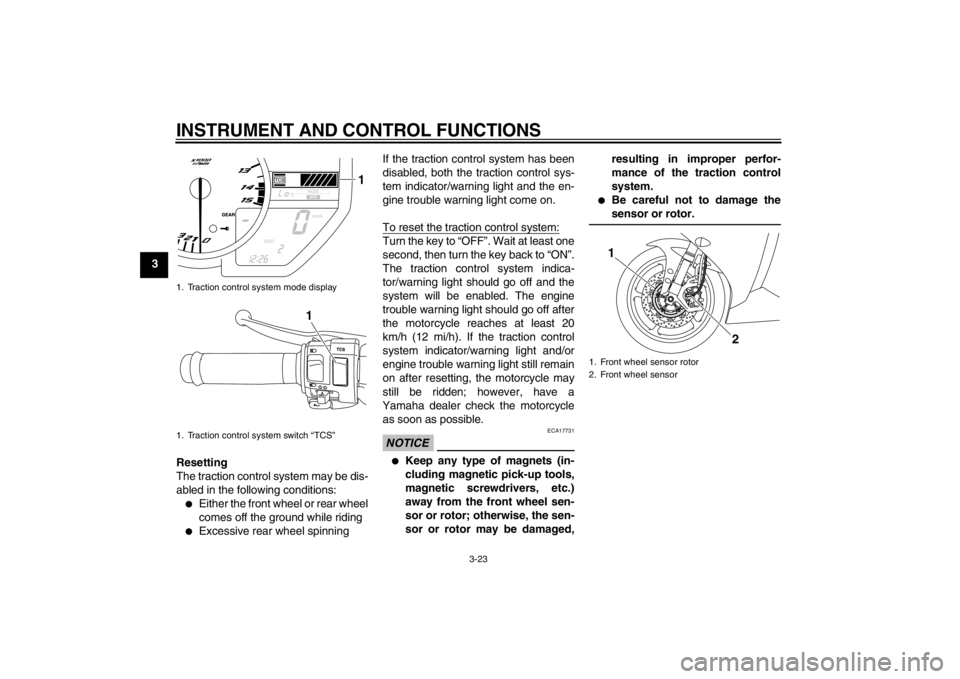
●
Keep any type of magnets (in-
cluding magnetic pick-up tools,
magnetic screwdrivers, etc.)
away from the front wheel sen-
sor or rotor; otherwise, the sen-
sor or rotor may be damaged, resulting in improper perfor-
mance of the traction control
system.
●
Be careful not to damage the
sensor or rotor.
1. Traction control system mode display
1. Traction control system switch “TCS”
1
1
1. Front wheel sensor rotor
2. Front wheel sensor
2
1
U1KBE1E0.book Page 23 Monday, July 9, 2012 1:05 PM