lock YAMAHA YZF-R1 2020 User Guide
[x] Cancel search | Manufacturer: YAMAHA, Model Year: 2020, Model line: YZF-R1, Model: YAMAHA YZF-R1 2020Pages: 136, PDF Size: 16.15 MB
Page 36 of 136
Instrument and control functions
4-13
4 change the registered ERS mode or
adjust ERS setting levels.) If the ERS
mode disappears from the ERS indica-
tor (the icon turns blank), stop the vehi-
cle and wait a few seconds until the
mode reappears.
TIP
The suspension will remain fixed
at its most recent settings until
self-reset has completed.
If the ERS indicator does not re-
turn to normal, have a Yamaha
dealer inspect the vehicle.GPS in dicator “ ”
(CCU-equippe d mo dels)
This icon comes on when a GPS unit is
synched with your vehicle.
Lo gg ing in dicator “ ”
(CCU-equipped models)
This icon comes on when vehicle data
is being recorded via the logging func-
tion.
Clock
The clock uses a 12-hour time system. Lap timer
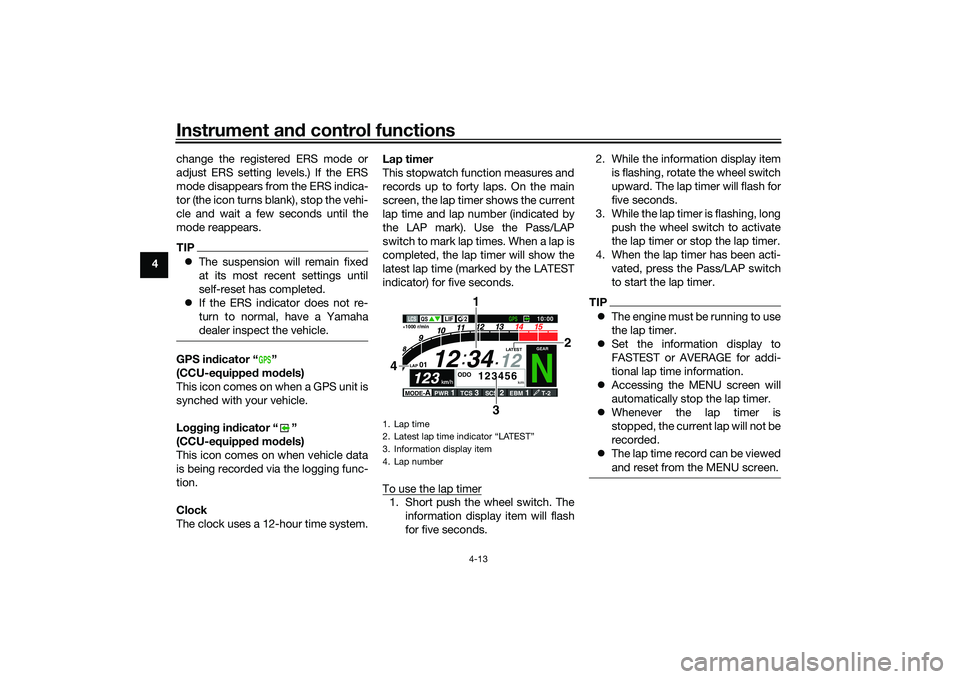
This stopwatch function measures and
records up to forty laps. On the main
screen, the lap timer shows the current
lap time and lap number (indicated by
the LAP mark). Use the Pass/LAP
switch to mark lap times. When a lap is
completed, the lap timer will show the
latest lap time (marked by the LATEST
indicator) for five seconds.
To use the lap timer
1. Short push the wheel switch. The
information display item will flash
for five seconds. 2. While the information display item
is flashing, rotate the wheel switch
upward. The lap timer will flash for
five seconds.
3. While the lap timer is flashing, long push the wheel switch to activate
the lap timer or stop the lap timer.
4. When the lap timer has been acti- vated, press the Pass/LAP switch
to start the lap timer.
TIPThe engine must be running to use
the lap timer.
Set the information display to
FASTEST or AVERAGE for addi-
tional lap time information.
Accessing the MENU screen will
automatically stop the lap timer.
Whenever the lap timer is
stopped, the current lap will not be
recorded.
The lap time record can be viewed
and reset from the MENU screen.
GPS
1. Lap time
2. Latest lap time indicator “LATEST”
3. Information display item
4. Lap number
N
12
12 34
LAP 01
ODO
km
123456
LATEST
1000 r/min
km/h
123
km/h
123
GEAR
GPS
LCS
QS
LIF
10:
00
MODE-
APWR
1
TCS
3
SCS
2
EBM
1
T-2
3
4
1
22
UB3LE0E0.book Page 13 Tuesday, July 23, 2019 12:05 PM
Page 38 of 136
Instrument and control functions
4-15
4
EAU79297
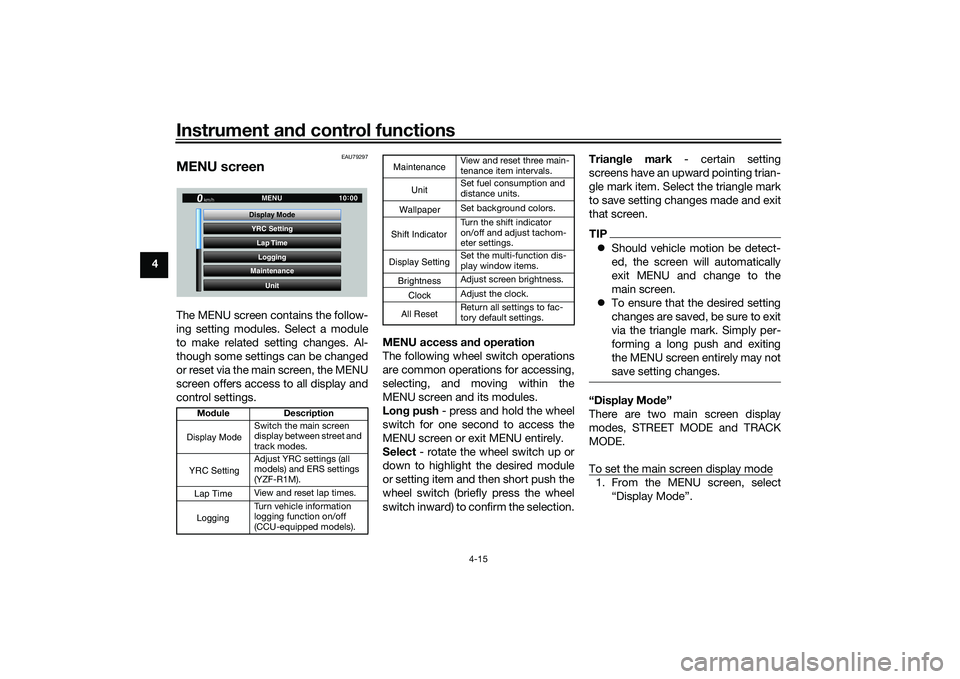
MENU screenThe MENU screen contains the follow-
ing setting modules. Select a module
to make related setting changes. Al-
though some settings can be changed
or reset via the main screen, the MENU
screen offers access to all display and
control settings. MENU access an
d operation
The following wheel switch operations
are common operations for accessing,
selecting, and moving within the
MENU screen and its modules.
Lon g push - press and hold the wheel
switch for one second to access the
MENU screen or exit MENU entirely.
Select - rotate the wheel switch up or
down to highlight the desired module
or setting item and then short push the
wheel switch (briefly press the wheel
switch inward) to confirm the selection. Trian
gle mark - certain setting
screens have an upward pointing trian-
gle mark item. Select the triangle mark
to save setting changes made and exit
that screen.
TIP Should vehicle motion be detect-
ed, the screen will automatically
exit MENU and change to the
main screen.
To ensure that the desired setting
changes are saved, be sure to exit
via the triangle mark. Simply per-
forming a long push and exiting
the MENU screen entirely may not
save setting changes.“Display Mo de”
There are two main screen display
modes, STREET MODE and TRACK
MODE.
To set the main screen display mode1. From the MENU screen, select “Display Mode”.
Mo dule Description
Switch the main screen
display between street and
track modes.
Adjust YRC settings (all
models) and ERS settings
(YZF-R1M).
View and reset lap times.
Turn vehicle information
logging function on/off
(CCU-equipped models).
YRC Setting
Lap TimeLogging
Maintenance
Unit
Display ModeMENU
km/h
GPS
10
:
00
Display ModeYRC SettingLogging
View and reset three main-
tenance item intervals.
Set fuel consumption and
distance units.
Set background colors.
Turn the shift indicator
on/off and adjust tachom-
eter settings.
Set the multi-function dis-
play window items.
Adjust screen brightness.
Adjust the clock.
Return all settings to fac-
tory default settings.
Maintenance
Unit
WallpaperShift IndicatorDisplay SettingBrightnessClockAll Reset
UB3LE0E0.book Page 15 Tuesday, July 23, 2019 12:05 PM
Page 54 of 136
Instrument and control functions
4-31
4 “Clock”
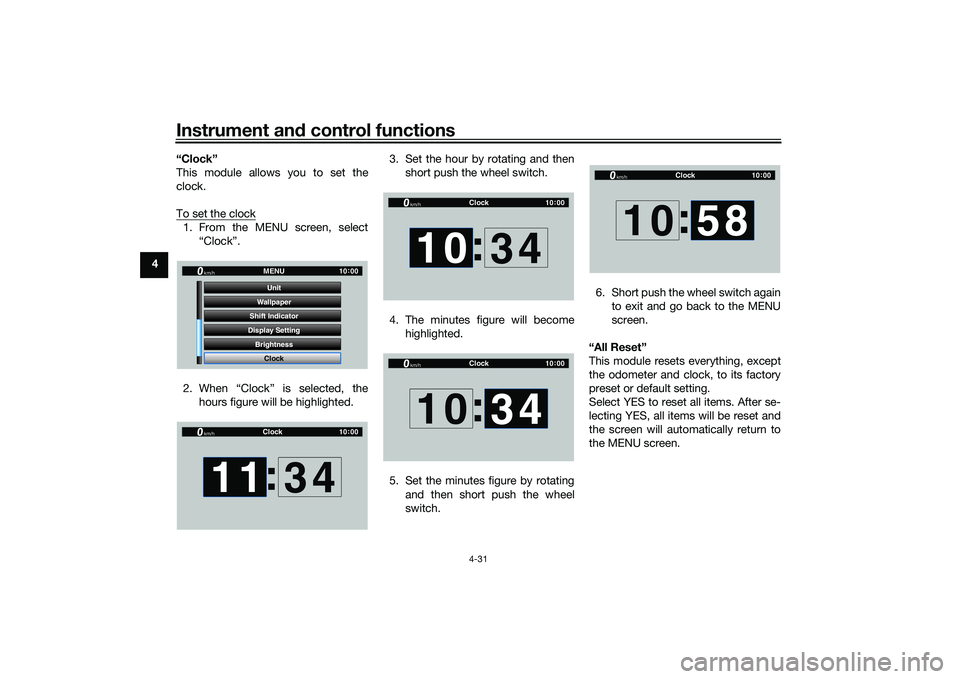
This module allows you to set the
clock.
To set the clock
1. From the MENU screen, select
“Clock”.
2. When “Clock” is selected, the hours figure will be highlighted. 3. Set the hour by rotating and then
short push the wheel switch.
4. The minutes figure will become highlighted.
5. Set the minutes figure by rotating and then short push the wheel
switch. 6. Short push the wheel switch again
to exit and go back to the MENU
screen.
“All Reset”
This module resets everything, except
the odometer and clock, to its factory
preset or default setting.
Select YES to reset all items. After se-
lecting YES, all items will be reset and
the screen will automatically return to
the MENU screen.
GP GPS
Shift Indicator Wallpaper
Display Setting Brightness MENU
Unit
Clock
km/h
10 :
00
Clock
km/h
10 :
00
11 :
34
Clock
km/h
10 :
00
10 :
34
Clock
km/h
10 :
00
10 34
:
Clock
km/h
10 :
00
10 :
58
UB3LE0E0.book Page 31 Tuesday, July 23, 2019 12:05 PM
Page 56 of 136

Instrument and control functions
4-33
4
EAU26827
Brake leverThe brake lever is located on the right
side of the handlebar. To apply the
front brake, pull the lever toward the
throttle grip.
The brake lever is equipped with a
brake lever position adjusting dial. To
adjust the distance between the brake
lever and the throttle grip, push the
brake lever away from the throttle grip
and rotate the adjusting dial. Make
sure the setting number on the adjust-
ing dial aligns with the match mark on
the brake lever.
EAU12944
Brake ped alThe brake pedal is located on the right
side of the motorcycle. To apply the
rear brake, press down on the brake
pedal.
EAU88462
Brake control system (BC)The brake control system regulates hy-
draulic brake pressure for the front and
rear wheels independently when the
respective brake lever or brake pedal is
applied and wheel lock is detected.
There are two settings, BC1 and BC2.
BC1 is standard ABS, which adjusts
brake pressure based on vehicle
speed and wheel speed data. BC1 is
designed to engage and maximize
braking when the vehicle is upright.
Regarding ABS, operate the brakes as
you would conventional brakes. When
the brake control system engages, a
pulsating sensation may be felt at the
brake lever or brake pedal as the hy-
draulic unit rapidly applies and reduces
brake pressure. In this situation, con-
tinue to apply the brake lever and
brake pedal to allow the ABS to work—
do not “pump the brakes” as this will
reduce braking effectiveness.
WARNING
EWA16051
Always keep a sufficient d istance
from the vehicle ahea d to match the
ri din g spee d even with ABS.
1. Brake lever
2. Distance
3. Match mark
4. Adjusting dial
1
2
4
3
1. Brake pedal
UB3LE0E0.book Page 33 Tuesday, July 23, 2019 12:05 PM
Page 58 of 136
Instrument and control functions
4-35
4
EAU13076
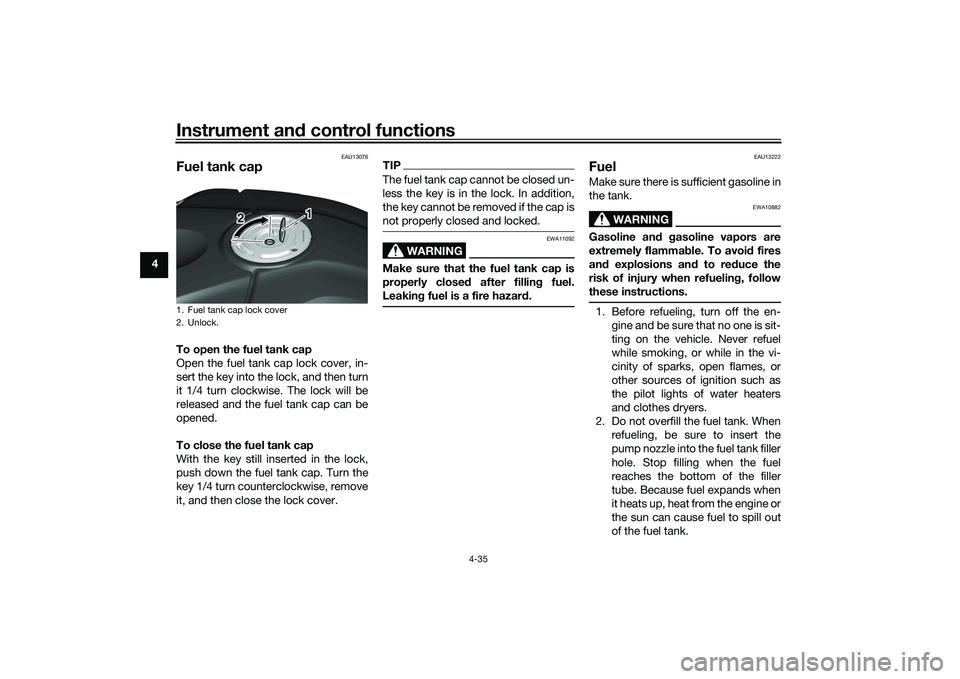
Fuel tank capTo open the fuel tank cap
Open the fuel tank cap lock cover, in-
sert the key into the lock, and then turn
it 1/4 turn clockwise. The lock will be
released and the fuel tank cap can be
opened.
To close the fuel tank cap
With the key still inserted in the lock,
push down the fuel tank cap. Turn the
key 1/4 turn counterclockwise, remove
it, and then close the lock cover.
TIPThe fuel tank cap cannot be closed un-
less the key is in the lock. In addition,
the key cannot be removed if the cap is
not properly closed and locked.
WARNING
EWA11092
Make sure that the fuel tank cap is
properly close d after fillin g fuel.
Leakin g fuel is a fire hazar d.
EAU13222
FuelMake sure there is sufficient gasoline in
the tank.
WARNING
EWA10882
Gasoline an d g asoline vapors are
extremely flamma ble. To avoi d fires
an d explosions an d to re duce the
risk of injury when refuelin g, follow
these instructions.1. Before refueling, turn off the en- gine and be sure that no one is sit-
ting on the vehicle. Never refuel
while smoking, or while in the vi-
cinity of sparks, open flames, or
other sources of ignition such as
the pilot lights of water heaters
and clothes dryers.
2. Do not overfill the fuel tank. When refueling, be sure to insert the
pump nozzle into the fuel tank filler
hole. Stop filling when the fuel
reaches the bottom of the filler
tube. Because fuel expands when
it heats up, heat from the engine or
the sun can cause fuel to spill out
of the fuel tank.
1. Fuel tank cap lock cover
2. Unlock.
1
2
UB3LE0E0.book Page 35 Tuesday, July 23, 2019 12:05 PM
Page 60 of 136

Instrument and control functions
4-37
4
NOTICE
ECA11401
Use only unlea ded g asoline. The use
of lead ed g asoline will cause severe
d amag e to internal en gine parts,
such as the valves an d piston rin gs,
as well as to the exhaust system.
EAU86160
Fuel tank overflow hoseThe overflow hose drains excess gaso-
line and directs it safely away from the
vehicle.
Before operating the vehicle: Check the fuel tank overflow hose
connection.
Check the fuel tank overflow hose
for cracks or damage, and replace
it if necessary.
Make sure that the fuel tank over-
flow hose is not blocked, and
clean it if necessary.
Make sure that the fuel tank over-
flow hose is positioned as shown.
TIPSee page 7-13 for canister information.
1. Fuel tank overflow hose
2. White mark
1
2
UB3LE0E0.book Page 37 Tuesday, July 23, 2019 12:05 PM
Page 61 of 136
Instrument and control functions
4-38
4
EAU13435
Catalytic converterThe exhaust system contains catalytic
converter(s) to reduce harmful exhaust
emissions.
WARNING
EWA10863
The exhaust system is hot after op-
eration. To prevent a fire hazar d or
b urns:
Do not park the vehicle near
possi ble fire hazar ds such as
g rass or other materials that
easily burn.
Park the vehicle in a place
where pe destrians or chil dren
are not likely to touch the hot
exhaust system.
Make sure that the exhaust sys-
tem has coole d down before
d oin g any maintenance work.
Do not allow the en gine to i dle
more than a few minutes. Lon g
i d lin g can cause a buil d-up of
heat.
EAU79902
SeatsPassen ger seat
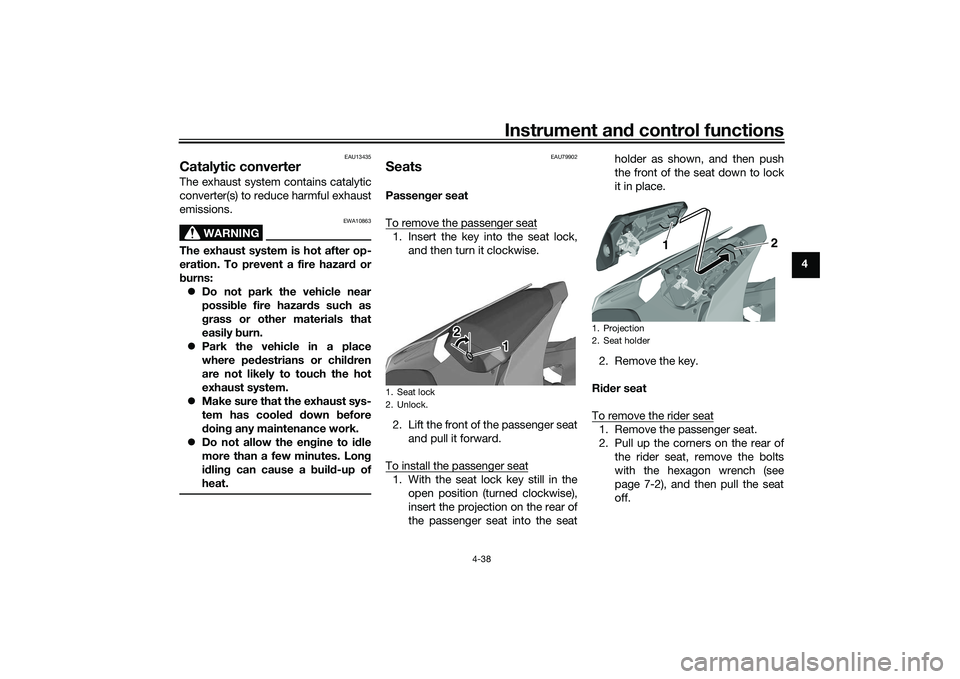
To remove the passenger seat1. Insert the key into the seat lock, and then turn it clockwise.
2. Lift the front of the passenger seat and pull it forward.
To install the passenger seat1. With the seat lock key still in the open position (turned clockwise),
insert the projection on the rear of
the passenger seat into the seat holder as shown, and then push
the front of the seat down to lock
it in place.
2. Remove the key.
Ri der seat
To remove the rider seat
1. Remove the passenger seat.
2. Pull up the corners on the rear of the rider seat, remove the bolts
with the hexagon wrench (see
page 7-2), and then pull the seat
off.
1. Seat lock
2. Unlock.
1
2
1. Projection
2. Seat holder
2
1
UB3LE0E0.book Page 38 Tuesday, July 23, 2019 12:05 PM
Page 68 of 136
Instrument and control functions
4-45
4
EAU66497
A djustin g the shock a bsorb er
assem bly
WARNING
EWA10222
This shock a bsor ber assem bly con-
tains hi ghly pressurize d nitro gen
g as. Rea d an d un derstan d the fol-
lowin g information before han dlin g
the shock a bsor ber assem bly.
Do not tamper with or attempt
to open the cylind er assembly.
Do not su bject the shock a b-
sor ber assem bly to an open
flame or other hi gh heat source.
This may cause the unit to ex-
plo de due to excessive gas
pressure.
Do not d eform or d amage the
cylin der in any way. Cylin der
d amag e will result in poor
d ampin g performance.
Do not dispose of a damag ed or
worn-out shock a bsor ber as-
sem bl
y yourself. Take the shock
a b sor ber assem bly to a Yamaha
d ealer for any service.
For YZF-R1
This model is equipped with adjustable
suspension. The spring preload, re-
bound damping force, fast compres-
sion damping force, and slow
compression damping force can be
adjusted.NOTICE
ECA10102
To avoi d d amag ing the mechanism,
d o not attempt to turn b eyond the
maximum or minimum settin gs.Sprin g preloa d
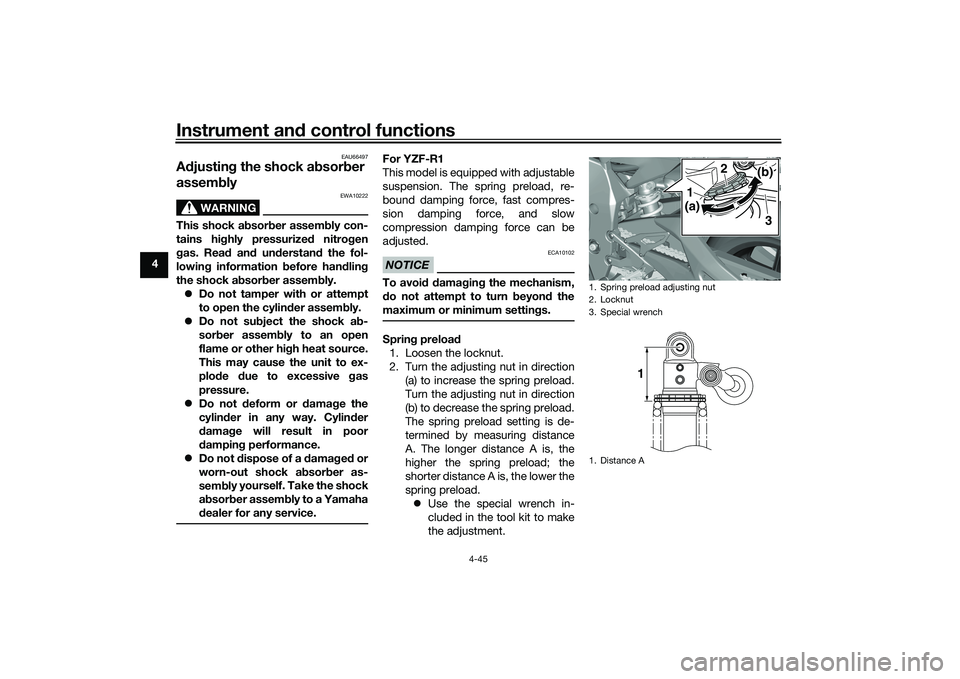
1. Loosen the locknut.
2. Turn the adjusting nut in direction (a) to increase the spring preload.
Turn the adjusting nut in direction
(b) to decrease the spring preload.
The spring preload setting is de-
termined by measuring distance
A. The longer distance A is, the
higher the spring preload; the
shorter distance A is, the lower the
spring preload. Use the special wrench in-
cluded in the tool kit to make
the adjustment.
1. Spring preload adjusting nut
2. Locknut
3. Special wrench
1. Distance A
(a)
(b)
1
2
3
1
UB3LE0E0.book Page 45 Tuesday, July 23, 2019 12:05 PM
Page 69 of 136

Instrument and control functions
4-46
4
3. Tighten the locknut to the speci-
fied torque. NOTICE: Always
ti g hten the locknut ag ainst the
a d justin g rin g, an d then ti ghten
the locknut to the specified
torque.
[ECA22760]
Re boun d d ampin g force
Turn the adjusting bolt in direction (a)
to increase the rebound damping
force.
Turn the adjusting bolt in direction (b)
to decrease the rebound damping
force.
To set the rebound damping force, turn
the adjuster in direction (a) until it
stops, and then count the clicks in di-
rection (b).
TIP When turning the damping force
adjuster in direction (a), the 0 click
position and the 1 click position
may be the same.
When turning the damping force
adjuster in direction (b), it may
click beyond the stated specifica- tions, however such adjustments
are ineffective and may damage
the suspension.
Compression
dampin g force
Fast compression damping forceTurn the adjusting bolt in direction (a)
to increase the compression damping
force.
Turn the adjusting bolt in direction (b)
to decrease the compression damping
force.
To set the compression damping
force, turn the adjuster in direction (a)
until it stops, and then count the turns
in direction (b).
Sprin g preloa d:
Minimum (soft):
Distance A = 77.5 mm (3.05 in)
Standard:
Distance A = 78.5 mm (3.09 in)
Maximum (hard): Distance A = 85.5 mm (3.37 in)
Ti ghtenin g torque:
Locknut:
28 N·m (2.8 kgf·m, 21 lb·ft)
1. Rebound damping force adjusting bolt
Re boun d d ampin g settin g:
Minimum (soft): 23 click(s) in direction (b)
Standard: 12 click(s) in direction (b)
Maximum (hard):
1 click(s) in direction (b)
(a) (b)
1
1. Fast compression damping force adjusting
bolt
1
(a) (b)
UB3LE0E0.book Page 46 Tuesday, July 23, 2019 12:05 PM
Page 70 of 136
Instrument and control functions
4-47
4
TIPWhen turning the damping force ad-
juster in direction (b), it may turn be-
yond the stated specifications,
however such adjustments are ineffec-
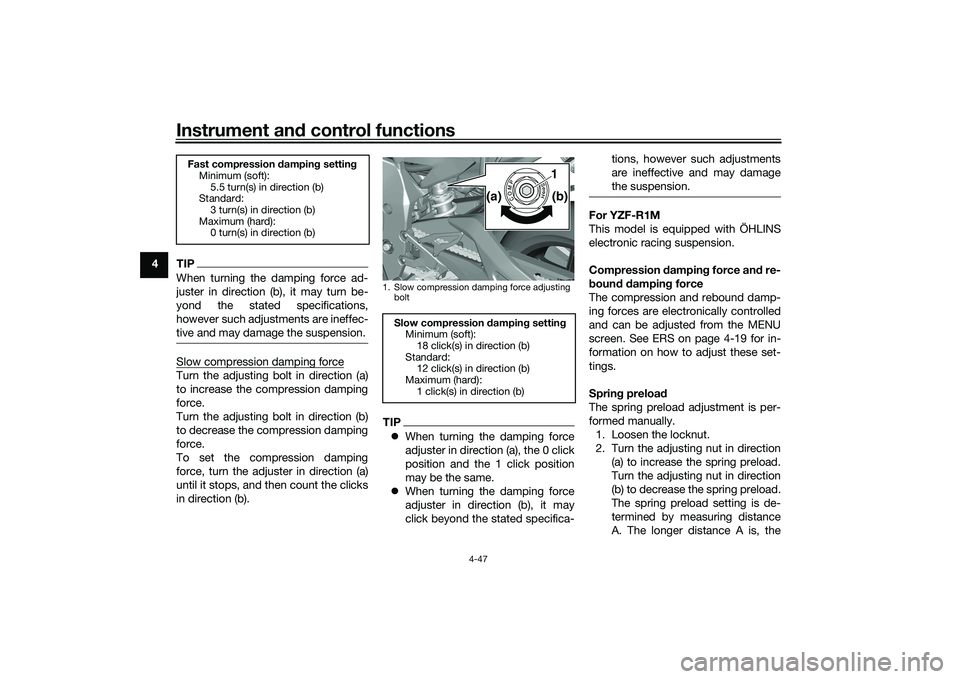
tive and may damage the suspension.Slow compression damping forceTurn the adjusting bolt in direction (a)
to increase the compression damping
force.
Turn the adjusting bolt in direction (b)
to decrease the compression damping
force.
To set the compression damping
force, turn the adjuster in direction (a)
until it stops, and then count the clicks
in direction (b).
TIP When turning the damping force
adjuster in direction (a), the 0 click
position and the 1 click position
may be the same.
When turning the damping force
adjuster in direction (b), it may
click beyond the stated specifica- tions, however such adjustments
are ineffective and may damage
the suspension.
For YZF-R1M
This model is equipped with ÖHLINS
electronic racing suspension.
Compression
dampin g force an d re-
b oun d d ampin g force
The compression and rebound damp-
ing forces are electronically controlled
and can be adjusted from the MENU
screen. See ERS on page 4-19 for in-
formation on how to adjust these set-
tings.
Sprin g preloa d
The spring preload adjustment is per-
formed manually. 1. Loosen the locknut.
2. Turn the adjusting nut in direction (a) to increase the spring preload.
Turn the adjusting nut in direction
(b) to decrease the spring preload.
The spring preload setting is de-
termined by measuring distance
A. The longer distance A is, the
Fast compression dampin g settin g
Minimum (soft):
5.5 turn(s) in direction (b)
Standard:
3 turn(s) in direction (b)
Maximum (hard): 0 turn(s) in direction (b)
1. Slow compression damping force adjusting
boltSlow compression dampin g settin g
Minimum (soft): 18 click(s) in direction (b)
Standard: 12 click(s) in direction (b)
Maximum (hard):
1 click(s) in direction (b)
1
(a) (b)
UB3LE0E0.book Page 47 Tuesday, July 23, 2019 12:05 PM