brake YAMAHA YZF-R1 2020 Owners Manual
[x] Cancel search | Manufacturer: YAMAHA, Model Year: 2020, Model line: YZF-R1, Model: YAMAHA YZF-R1 2020Pages: 136, PDF Size: 16.15 MB
Page 8 of 136
Table of contentsSafety information ............................ 1-1
Description ....................................... 2-1
Left view ......................................... 2-1
Right view ....................................... 2-2
Controls and instruments ............... 2-3
Special features ............................... 3-1
YRC (Yamaha Ride Control) ........... 3-1
Glossary ......................................... 3-5
YRC functions visual guide ............ 3-6
Instrument an d control functions ... 4-1
Immobilizer system......................... 4-1
Main switch/steering lock............... 4-2
Handlebar switches ........................ 4-3
Indicator lights and warning
lights............................................ 4-5
Display ............................................ 4-9
MENU screen ............................... 4-15
Clutch lever .................................. 4-32
Shift pedal .................................... 4-32
Brake lever.................................... 4-33
Brake pedal .................................. 4-33
Brake control system (BC)............ 4-33
Fuel tank cap ................................ 4-35
Fuel ............................................... 4-35
Fuel tank overflow hose ............... 4-37
Catalytic converter ....................... 4-38
Seats ............................................ 4-38
CCU (for equipped models).......... 4-39 Seat cover (for equipped
models) ...................................... 4-40
Document storage ........................ 4-41
Rear view mirrors .......................... 4-41
Adjusting the front fork ................. 4-42
Adjusting the shock absorber assembly.................................... 4-45
EXUP system ................................ 4-48
Auxiliary DC connector ................. 4-49
Sidestand ...................................... 4-49
Ignition circuit cut-off system ....... 4-50
For your safety – pre-operation
checks ............................................... 5-1
Operation an d important ri din g
points ................................................. 6-1
Engine break-in ............................... 6-1
Starting the engine .......................... 6-2
Shifting ............................................ 6-3
Tips for reducing fuel consumption ................................ 6-4
Parking ............................................ 6-4
Perio dic maintenance an d
a d justment ........................................ 7-1
Tool kit ............................................ 7-2
Periodic maintenance charts .......... 7-3
Periodic maintenance chart for the emission control system .............. 7-3 General maintenance and
lubrication chart .......................... 7-5
Removing and installing cowlings and panels ................................... 7-9
Checking the spark plugs ............. 7-12
Canister ........................................ 7-13
Engine oil and oil filter cartridge ... 7-14
Why Yamalube.............................. 7-17
Coolant ......................................... 7-17
Air filter element ............................ 7-18
Checking the engine idling
speed ........................................ 7-19
Valve clearance............................. 7-19
Tires .............................................. 7-19
Cast magnesium wheels .............. 7-22
Adjusting the clutch lever free play ............................................ 7-23
Checking the brake lever free play ............................................ 7-24
Brake light switches ..................... 7-24
Checking the front and rear
brake pads ................................ 7-25
Checking the brake fluid level ...... 7-25
Changing the brake fluid .............. 7-26
Drive chain slack........................... 7-27
Cleaning and lubricating the
drive chain ................................. 7-28
Checking and lubricating the cables ........................................ 7-29
Checking and lubricating the throttle grip ................................ 7-29UB3LE0E0.book Page 1 Tuesday, July 23, 2019 12:05 PM
Page 9 of 136
Table of contents
Checking and lubricating the
brake and shift pedals ...............7-30
Checking and lubricating the brake and clutch levers ..............7-30
Checking and lubricating the
sidestand ...................................7-31
Lubricating the swingarm pivots ...7-31
Checking the front fork..................7-32
Checking the steering ...................7-32
Checking the wheel bearings ........7-33
Battery ...........................................7-33
Replacing the fuses .......................7-35
Vehicle lights .................................7-37
Supporting the motorcycle............7-38
Troubleshooting ............................7-38
Troubleshooting chart ...................7-39
Motorcycle care an d stora ge ..........8-1
Matte color caution .........................8-1
Care .................................................8-1
Storage ............................................8-4
Specifications ....................................9-1
Consumer information ...................10-1
Identification numbers ...................10-1
Diagnostic connector ....................10-2
Vehicle data recording ..................10-2
In dex ................................................11-1
UB3LE0E0.book Page 2 Tuesday, July 23, 2019 12:05 PM
Page 16 of 136

Description
2-2
2
EAU10421
Right view
1 2,3,4
5
7
8
6
9
1. Battery (page 7-33)
2. Spring preload adjuster (page 4-42)
3. Rebound damping force adjuster (YZF-R1) (page 4-42)
4. Compression damping force adjuster (YZF-R1) (page 4-42)
5. Coolant reservoir (page 7-17)
6. Document storage space (page 4-41)
7. Engine oil filler cap (page 7-14)
8. Brake pedal (page 4-33) 9. Rear brake fluid reservoir (page 7-25)UB3LE0E0.book Page 2 Tuesday, July 23, 2019 12:05 PM
Page 17 of 136

Description
2-3
2
EAU10431
Controls and instruments
1
2
4
5
6
7
8
3
1. Clutch lever (page 4-32)
2. Left handlebar switches (page 4-3)
3. Main switch/steering lock (page 4-2)
4. Instrument panel (page 4-5, 4-9)
5. Front brake fluid reservoir (page 7-25)
6. Right handlebar switches (page 4-3)
7. Brake lever (page 4-33)
8. Throttle grip
UB3LE0E0.book Page 3 Tuesday, July 23, 2019 12:05 PM
Page 19 of 136
Special features
3-2
3
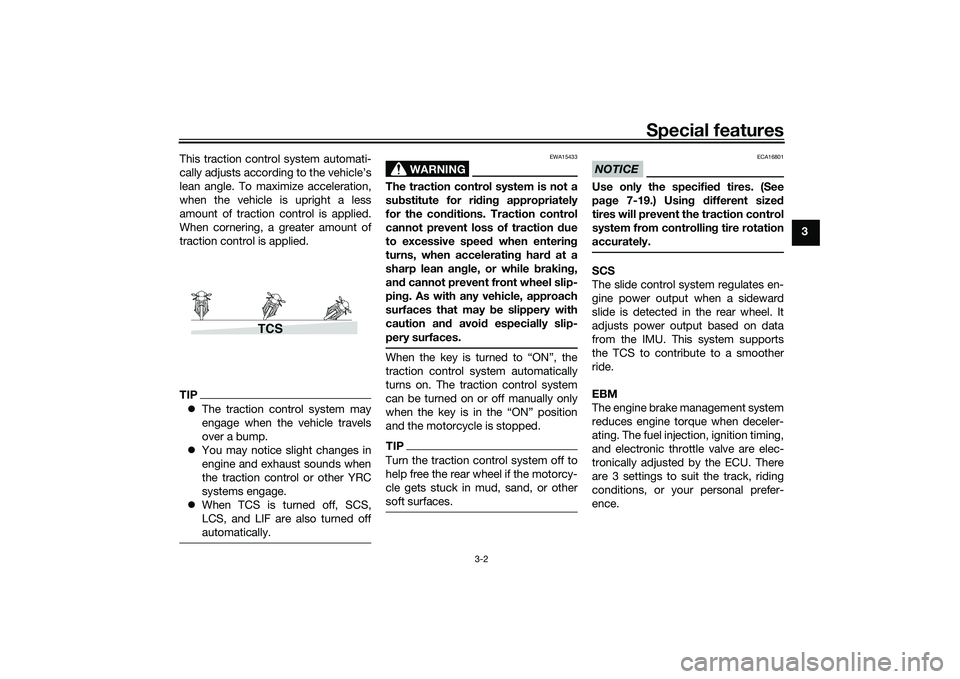
This traction control system automati-
cally adjusts according to the vehicle’s
lean angle. To maximize acceleration,
when the vehicle is upright a less
amount of traction control is applied.
When cornering, a greater amount of
traction control is applied.
TIP
The traction control system may
engage when the vehicle travels
over a bump.
You may notice slight changes in
engine and exhaust sounds when
the traction control or other YRC
systems engage.
When TCS is turned off, SCS,
LCS, and LIF are also turned off
automatically.
WARNING
EWA15433
The traction control system is not a
substitute for ri din g appropriately
for the con ditions. Traction control
cannot prevent loss of traction d ue
to excessive spee d when enterin g
turns, when acceleratin g har d at a
sharp lean an gle, or while brakin g,
an d cannot prevent front wheel slip-
pin g. As with any vehicle, approach
surfaces that may be slippery with
caution an d avoi d especially slip-
pery surfaces.When the key is turned to “ON”, the
traction control system automatically
turns on. The traction control system
can be turned on or off manually only
when the key is in the “ON” position
and the motorcycle is stopped.TIPTurn the traction control system off to
help free the rear wheel if the motorcy-
cle gets stuck in mud, sand, or other
soft surfaces.
NOTICE
ECA16801
Use only the specifie d tires. (See
pa ge 7-19.) Usin g different size d
tires will prevent the traction control
system from controllin g tire rotation
accurately.SCS
The slide control system regulates en-
gine power output when a sideward
slide is detected in the rear wheel. It
adjusts power output based on data
from the IMU. This system supports
the TCS to contribute to a smoother
ride.
EBM
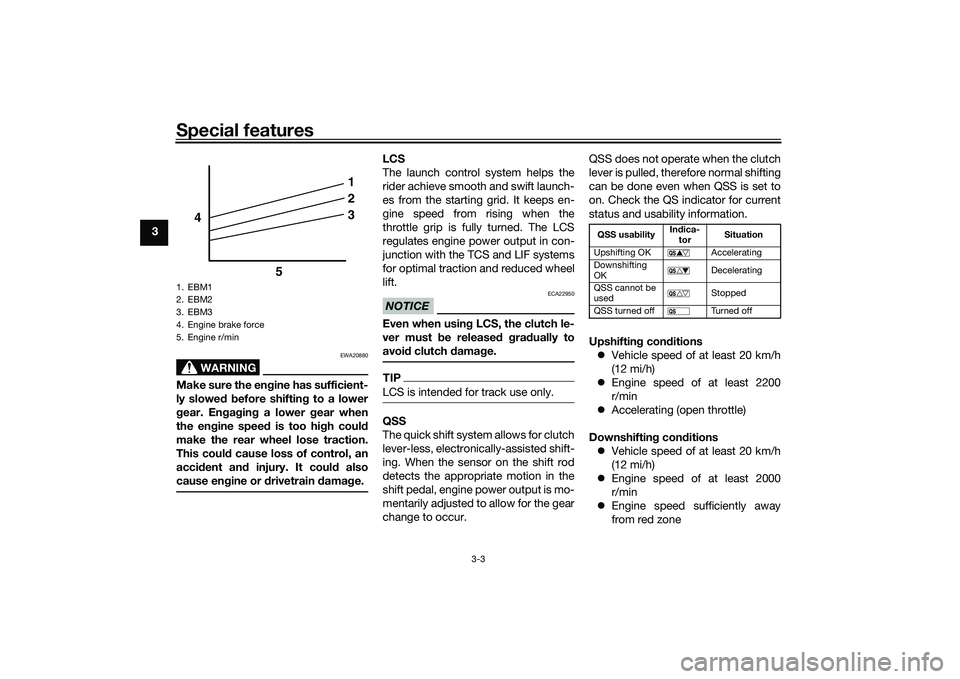
The engine brake management system
reduces engine torque when deceler-
ating. The fuel injection, ignition timing,
and electronic throttle valve are elec-
tronically adjusted by the ECU. There
are 3 settings to suit the track, riding
conditions, or your personal prefer-
ence.
TCS
UB3LE0E0.book Page 2 Tuesday, July 23, 2019 12:05 PM
Page 20 of 136
Special features
3-3
3
WARNING
EWA20880
Make sure the engine has sufficient-
ly slowe d b efore shiftin g to a lower
g ear. En gag in g a lower gear when
the en gine speed is too high coul d
make the rear wheel lose traction.
This coul d cause loss of control, an
acci dent an d injury. It coul d also
cause en gine or d rivetrain damag e.
LCS
The launch control system helps the
rider achieve smooth and swift launch-
es from the starting grid. It keeps en-
gine speed from rising when the
throttle grip is fully turned. The LCS
regulates engine power output in con-
junction with the TCS and LIF systems
for optimal traction and reduced wheel
lift.NOTICE
ECA22950
Even when usin g LCS, the clutch le-
ver must b e released g ra dually to
avoi d clutch damag e.TIPLCS is intended for track use only.QSS
The quick shift system allows for clutch
lever-less, electronically-assisted shift-
ing. When the sensor on the shift rod
detects the appropriate motion in the
shift pedal, engine power output is mo-
mentarily adjusted to allow for the gear
change to occur. QSS does not operate when the clutch
lever is pulled, therefore normal shifting
can be done even when QSS is set to
on. Check the QS indicator for current
status and usability information.
Upshiftin
g con ditions
Vehicle speed of at least 20 km/h
(12 mi/h)
Engine speed of at least 2200
r/min
Accelerating (open throttle)
Downshiftin g con ditions
Vehicle speed of at least 20 km/h
(12 mi/h)
Engine speed of at least 2000
r/min
Engine speed sufficiently away
from red zone
1. EBM1
2. EBM2
3. EBM3
4. Engine brake force
5. Engine r/min
1
2
3
4
5
QSS usability In
dica-
tor Situation
Upshifting OK Accelerating
Downshifting
OK Decelerating
QSS cannot be
used Stopped
QSS turned off Turned off
UB3LE0E0.book Page 3 Tuesday, July 23, 2019 12:05 PM
Page 21 of 136
Special features
3-4
3
Decelerating and throttle fully-
closed
TIPQS and QS can be individ-
ually set.
Shifting into or out of neutral must
be done using the clutch lever.LIF
The lift control system reduces the rate
at which the front wheel will continue to
rise during extreme acceleration, such
as during starts or out-of-corner exits.
When front-wheel lift is detected, en-
gine power is regulated to slow front-
wheel lift while still providing good ac-
celeration.
BC
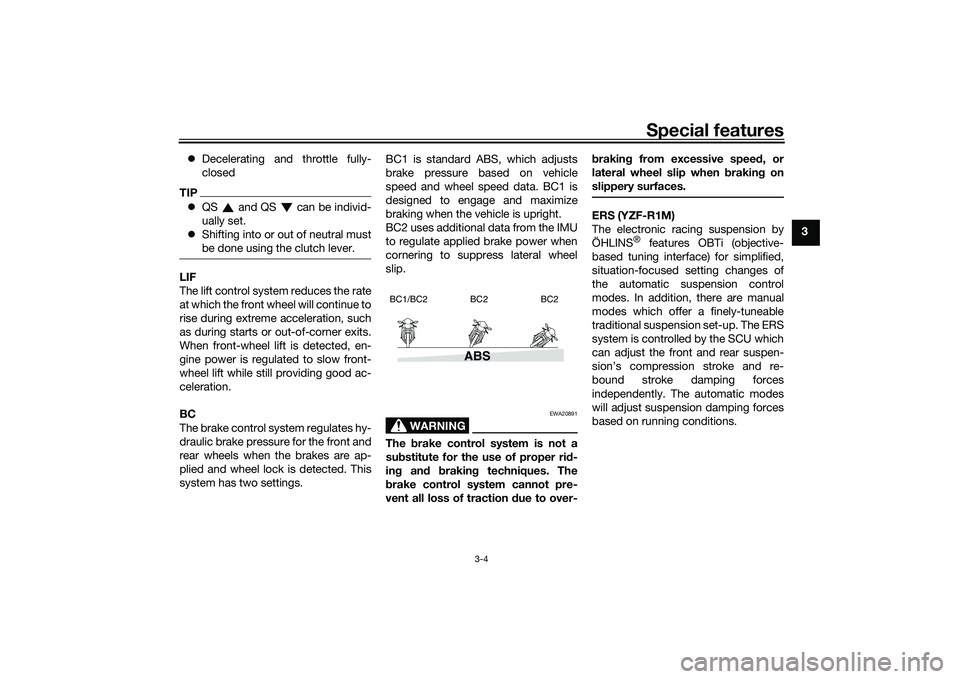
The brake control system regulates hy-
draulic brake pressure for the front and
rear wheels when the brakes are ap-
plied and wheel lock is detected. This
system has two settings. BC1 is standard ABS, which adjusts
brake pressure based on vehicle
speed and wheel speed data. BC1 is
designed to engage and maximize
braking when the vehicle is upright.
BC2 uses additional data from the IMU
to regulate applied brake power when
cornering to suppress lateral wheel
slip.
WARNING
EWA20891
The
brake control system is not a
su bstitute for the use of proper ri d-
in g an d brakin g techniques. The
b rake control system cannot pre-
vent all loss of traction due to over- b
rakin g from excessive spee d, or
lateral wheel slip when brakin g on
slippery surfaces.
ERS (YZF-R1M)
The electronic racing suspension by
ÖHLINS
® features OBTi (objective-
based tuning interface) for simplified,
situation-focused setting changes of
the automatic suspension control
modes. In addition, there are manual
modes which offer a finely-tuneable
traditional suspension set-up. The ERS
system is controlled by the SCU which
can adjust the front and rear suspen-
sion’s compression stroke and re-
bound stroke damping forces
independently. The automatic modes
will adjust suspension damping forces
based on running conditions.
ABS
BC1/BC2 BC2 BC2
UB3LE0E0.book Page 4 Tuesday, July 23, 2019 12:05 PM
Page 22 of 136
Special features
3-5
3
EAU66313
GlossaryABS - Anti-lock Brake System
ABS ECU - Anti-lock Brake System
Electronic Control Unit
BC - Brake Control
CCU - Communication Control Unit
EBM - Engine Brake Management
ECU - Engine Control Unit
ERS - Electronic Racing Suspension
GPS - Global Positioning System
IMU - Inertial Measurement Unit
LCS - Launch Control System
LIF - Lift Control System
PWR - Power delivery mode
QS - Quick Shift
QSS - Quick Shift System
SC - Stability Control
SCS - Slide Control System
SCU - Suspension Control Unit
TCS - Traction Control System
YRC - Yamaha Ride ControlUB3LE0E0.book Page 5 Tuesday, July 23, 2019 12:05 PM
Page 30 of 136

Instrument and control functions
4-7
4
Maintain correct tire pressure.
Maintain proper brake pedal
height to prevent rear brake from
dragging.
Do not operate the vehicle in an
extreme manner. For example, re-
peated or excessive opening and
closing of the throttle, racing,
burnouts, wheelies, extended
half-clutch use, etc.
EAU88342
ABS warnin g li ght “ ”
In normal operation, the ABS warning
light comes on when the vehicle is
turned on, and goes off after traveling
at a speed of 10 km/h (6 mi/h) or high-
er.TIPIf the warning light does not work as
described above, or if the warning light
comes on while riding, the ABS may
not work correctly. Have a Yamaha
dealer check the vehicle as soon as
possible.
WARNING
EWA16043
If the ABS warnin g lig ht does not
turn off after reachin g 10 km/h (6
mi/h), or if the warnin g li ght comes
on while ri din g:
Use extra caution to avoi d pos-
si ble wheel lock durin g emer-
g ency brakin g.
Have a Yamaha dealer check
the vehicle as soon as possi ble.
EAU67433
Shift in dicator li ght “ ”
This indicator light comes on when it is
time to shift to the next higher gear.
The engine speeds at which it comes
on or goes off can be adjusted. (See
page 4-25.)TIPWhen the vehicle is turned on, this light
should come on for a few seconds and
then go off. If the light does not come
on, or if the light remains on, have a
Yamaha dealer check the vehicle.
EAU88350
Immo bilizer system in dicator
li g ht “ ”
When the main switch is turned off and
30 seconds have passed, the indicator
light will flash steadily to indicate the
immobilizer system is enabled. After 24
hours have passed, the indicator light
will stop flashing, however the immobi-
lizer system is still enabled.TIPWhen the vehicle is turned on, this light
should come on for a few seconds and
then go off. If the light does not come
on, or if the light remains on, have a
Yamaha dealer check the vehicle.Transpon der interference
If the immobilizer system indicator light
flashes in the pattern, slowly 5 times
then quickly 2 times, this could be
caused by transponder interference. If
this occurs, try the following. 1. Make sure there are no other im- mobilizer keys close to the main
switch.
2. Use the code re-registering key to start the engine.
UB3LE0E0.book Page 7 Tuesday, July 23, 2019 12:05 PM
Page 32 of 136

Instrument and control functions
4-9
4
EAU79285
DisplayThe display has two different main
screen display modes, STREET MODE
and TRACK MODE. Most of the func-
tions are viewable in either mode, but
the layout differs slightly. The following
items can be found on the display.
Speedometer
Tachometer
Information display
Transmission gear display
Front brake pressure indicator
Acceleration indicator
YRC setting display
MODE/PWR/TCS/SCS/EBM
YRC setting display
LCS/QS/LIF/BC
ERS indicator (YZF-R1M)
GPS indicator (CCU-equipped
models)
Logging indicator (CCU-equipped
models)
Clock
Revolution peak hold indicator
Lap timer
Various warning icons
Error mode warning “Err”
TIPThis model uses a thin-film-transistor
liquid-crystal display (TFT LCD) for
good contrast and readability in vari-
ous lighting conditions. However, due
to the nature of this technology, it is
normal for a small number of pixels to
be inactive.
STREET MODE1. YRC items LCS/QS/LIF/BC
2. Speedometer
3. GPS indicator (CCU-equipped models)
4. Logging indicator (CCU-equipped models)
5. Clock
6. Revolution peak hold indicator
7. Front brake pressure indicator
8. Acceleration indicator
9. Transmission gear display
10.ERS indicator (YZF-R1M)
11.YRC items MODE/PWR/TCS/SCS/EBM
12.Information display
13.Tachometer
1
2
GPS
N
LCS
QS
LIF 2
ODO
123456
TRIP-1
1234.5
1000 r/min
km
km
km/h
10:
00
MODE-
APWR
1
TCS
3
SCS
2
EBM
1
T-2
6
11 978
3
1
10
25
4
13
12
UB3LE0E0.book Page 9 Tuesday, July 23, 2019 12:05 PM