lock YAMAHA YZF-R1 2022 User Guide
[x] Cancel search | Manufacturer: YAMAHA, Model Year: 2022, Model line: YZF-R1, Model: YAMAHA YZF-R1 2022Pages: 136, PDF Size: 6.01 MB
Page 34 of 136
Instrument and control functions
4-11
4 Information
display
This section of the main screen is used
to show additional riding related infor-
mation such as air and coolant temper-
ature readings, tripmeters, and fuel
consumption statistics. The informa-
tion display items can be set into four
groups via the MENU screen.
The information display items are:
A.TEMP: air temperature
C.TEMP: coolant temperature
TRIP-1: tripmeter 1
TRIP-2: tripmeter 2
F-TRIP: fuel tripmeter
ODO: odometer
FUEL CON: the amount of fuel con-
sumed
FUEL AVG: average fuel consumption
CRNT FUEL: current fuel consumption
TIP ODO will lock at 999999 and can-
not be reset.
TRIP-1 and TRIP-2 will reset to 0
and begin counting again after
9999.9 has been reached.
When the fuel tank reserve level
has been reached, F-TRIP ap-
pears automatically and begins
recording distance traveled from
that point.
After refueling and traveling some
distance, F-TRIP will automatically
disappear.
See “Unit” on page 4-24 to chan-
ge the fuel consumption units.
The air temperature displayed
may vary from the actual ambient
temperature.
In TRACK MODE, information dis-
play items FASTEST (fastest lap
time) and AVERAGE (average lap
time) are also available.
TRIP-1, TRIP-2, F-TRIP, FUEL CON,
and FUEL AVE items can be individual-
ly reset.
To reset information display items1. Use the wheel switch to scroll
through the display items until the
item you want to reset appears.
2. Short push the wheel switch and the item will flash for five seconds.
(For STREET MODE, if both items are resettable items, the top item
will flash first. Scroll down to se-
lect the bottom item.)
3. While the item is flashing, press and hold the wheel switch for one
second.
Transmission gear display
This shows which gear the transmis-
sion is in. This model has 6 gears and a
neutral position. The neutral position is
indicated by the neutral indicator
light “ ” and by the transmission gear
display “ ”.
Front brake pressure in dicator
This shows how much braking power
is being applied to the front brakes.
Acceleration in dicator
This shows the vehicle’s forward ac-
celeration and deceleration forces.
Revolution peak hol d in dicator
This small bar momentarily appears
within the tachometer to mark the most
recent peak engine speed.
UB3LE1E0.book Page 11 Tuesday, August 10, 2021 2:28 PM
Page 36 of 136
Instrument and control functions
4-13
4
TIPTurning off the traction control system
will turn off the SCS, LCS, and LIF sys-
tems for all YRC modes.YRC items LCS/QS/LIF/BC
The on/off status of YRC items LCS,
QSS, LIF, and BC is shown here. When
any of these systems are registered
(not set to OFF) for the currently select-
ed YRC mode, its respective icon will
appear.
When LCS is registered for the current-
ly selected YRC mode, its icon will be
grey. To activate the launch control
system, press and hold the center but-
ton until the LCS icon stops flashing
and turns white.TIPLCS, QSS, LIF, and BC system setting
levels can only be adjusted from the
MENU screen.ERS in dicator “ ” (YZF-R1M)
This icon shows the current ERS mo-
de. (See “YRC Setting” on page 4-16
and “ERS” on page 4-20 to change the registered ERS mode or adjust ERS
setting levels.) If the ERS mode disap-
pears from the ERS indicator (the icon
turns blank), stop the vehicle and wait
a few seconds until the mode reap-
pears.
TIP
The suspension will remain fixed
at its most recent settings until
self-reset has completed.
If the ERS indicator does not re-
turn to normal, have a Yamaha
dealer inspect the vehicle.GPS in dicator “ ”
(CCU-equippe d mo dels)
This icon comes on when a GPS unit is
synched with your vehicle.
Lo ggin g in dicator “ ”
(CCU-equippe d mo dels)
This icon comes on when vehicle data
is being recorded via the logging func-
tion.
Clock
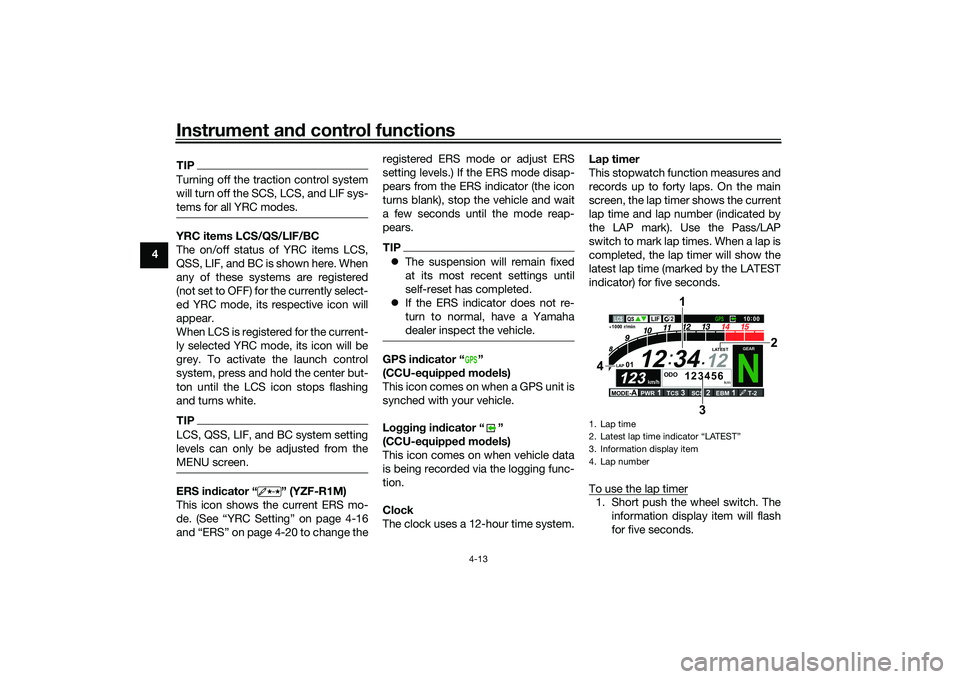
The clock uses a 12-hour time system. Lap timer
This stopwatch function measures and
records up to forty laps. On the main
screen, the lap timer shows the current
lap time and lap number (indicated by
the LAP mark). Use the Pass/LAP
switch to mark lap times. When a lap is
completed, the lap timer will show the
latest lap time (marked by the LATEST
indicator) for five seconds.
To use the lap timer
1. Short push the wheel switch. The
information display item will flash
for five seconds.
GPS
1. Lap time
2. Latest lap time indicator
Page 37 of 136
Instrument and control functions
4-14
4
2. While the information display item
is flashing, rotate the wheel switch
upward. The lap timer will flash for
five seconds.
3. While the lap timer is flashing, long push the wheel switch to activate
the lap timer or stop the lap timer.
4. When the lap timer has been acti- vated, press the Pass/LAP switch
to start the lap timer.
TIPThe engine must be running to use
the lap timer.
Set the information display to
FASTEST or AVERAGE for addi-
tional lap time information.
Accessing the MENU screen will
automatically stop the lap timer.
Whenever the lap timer is
stopped, the current lap will not be
recorded.
The lap time record can be viewed
and reset from the MENU screen.
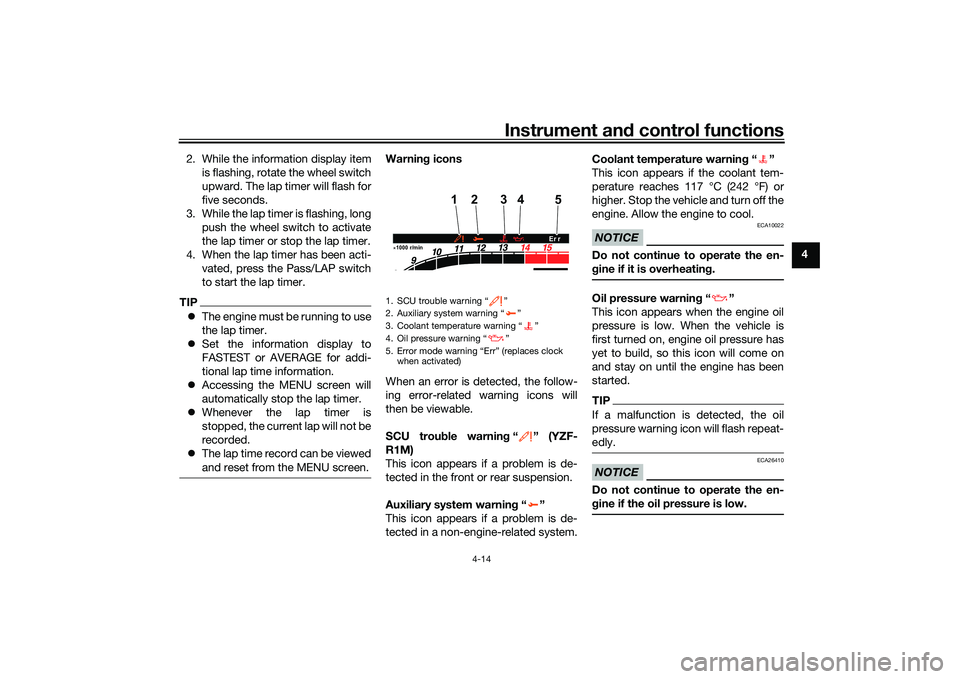
Warnin g icons
When an error is detected, the follow-
ing error-related warning icons will
then be viewable.
SCU trou ble warnin g“” (YZF-
R1M)
This icon appears if a problem is de-
tected in the front or rear suspension.
Auxiliary system warnin g“”
This icon appears if a problem is de-
tected in a non-engine-related system. Coolant temperature warnin
g“”
This icon appears if the coolant tem-
perature reaches 117 °C (242 °F) or
higher. Stop the vehicle and turn off the
engine. Allow the engine to cool.
NOTICE
ECA10022
Do not continue to operate the en-
g ine if it is overheatin g.Oil pressure warnin g“”
This icon appears when the engine oil
pressure is low. When the vehicle is
first turned on, engine oil pressure has
yet to build, so this icon will come on
and stay on until the engine has been
started.TIPIf a malfunction is detected, the oil
pressure warning icon will flash repeat-
edly.NOTICE
ECA26410
Do not continue to operate the en-
g ine if the oil pressure is low.
1. SCU trouble warning “ ”
2. Auxiliary system warning “ ”
3. Coolant temperature warning “ ”
4. Oil pressure warning “ ”
5. Error mode warning “Err” (replaces clock
when activated)1000 r/min
4
12
5
3
Er r
UB3LE1E0.book Page 14 Tuesday, August 10, 2021 2:28 PM
Page 38 of 136
Instrument and control functions
4-15
4 Error mo
de warnin g “Err”
When an internal error occurs (e.g.,
communication with a system control-
ler has been cut off), the error mode
warning will appear as follows.
“Err” and “ ” indicates an ECU error.
“Err” and “ ” indicates an SCU error.
“Err” only indicates an ABS ECU error.
TIPDepending on the nature of the error,
the display may not function properly
and YRC settings may be impossible
to change. Additionally, ABS may not
function properly. Use extra care when
braking and have a Yamaha dealer
check the vehicle immediately.
EAU7929B
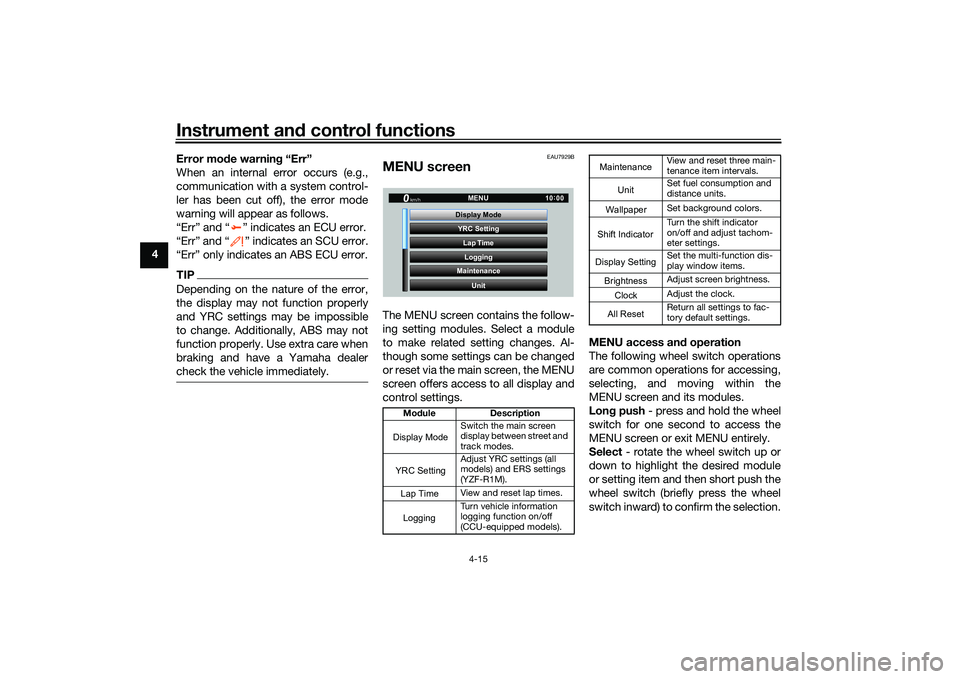
MENU screenThe MENU screen contains the follow-
ing setting modules. Select a module
to make related setting changes. Al-
though some settings can be changed
or reset via the main screen, the MENU
screen offers access to all display and
control settings. MENU access an
d operation
The following wheel switch operations
are common operations for accessing,
selecting, and moving within the
MENU screen and its modules.
Lon g push - press and hold the wheel
switch for one second to access the
MENU screen or exit MENU entirely.
Select - rotate the wheel switch up or
down to highlight the desired module
or setting item and then short push the
wheel switch (briefly press the wheel
switch inward) to confirm the selection.
Mo dule Description
Switch the main screen
display between street and
track modes.
Adjust YRC settings (all
models) and ERS settings
(YZF-R1M).
View and reset lap times.
Turn vehicle information
logging function on/off
(CCU-equipped models).
YRC Setting
Lap TimeLogging
Maintenance
Unit
Display ModeMENU
km/h
GPS
10
:
00
Display ModeYRC SettingLogging
View and reset three main-
tenance item intervals.
Set fuel consumption and
distance units.
Set background colors.
Turn the shift indicator
on/off and adjust tachom-
eter settings.
Set the multi-function dis-
play window items.
Adjust screen brightness.
Adjust the clock.
Return all settings to fac-
tory default settings.
Maintenance
Unit
WallpaperShift IndicatorDisplay SettingBrightnessClockAll Reset
UB3LE1E0.book Page 15 Tuesday, August 10, 2021 2:28 PM
Page 54 of 136

Instrument and control functions
4-31
4 To set the brightness
1. From the MENU screen, select
“Brightness”.
2. Select the desired brightness level by rotating the wheel switch, and
then short push the wheel switch
to fix the setting. “Clock”
This module allows you to set the
clock.
To set the clock
1. From the MENU screen, select
“Clock”.
2. When “Clock” is selected, the hours figure will be highlighted. 3. Set the hour by rotating and then
short push the wheel switch.
4. The minutes figure will become highlighted.
5. Set the minutes figure by rotating and then short push the wheel
switch.
GP GPS
Wallpaper Unit
Shift Indicator
Display Setting MENU
Maintenance
Brightness
km/h
10 :
00
Brightness
km/h
GPS
10 :
00
2
GP GPS
Shift Indicator Wallpaper
Display Setting Brightness MENU
Unit
Clock
km/h
10 :
00
Clock
km/h
10 :
00
11 :
34
Clock
km/h
10 :
00
10 :
34
Clock
km/h
10 :
00
10 34
:
UB3LE1E0.book Page 31 Tuesday, August 10, 2021 2:28 PM
Page 55 of 136
Instrument and control functions
4-32
4
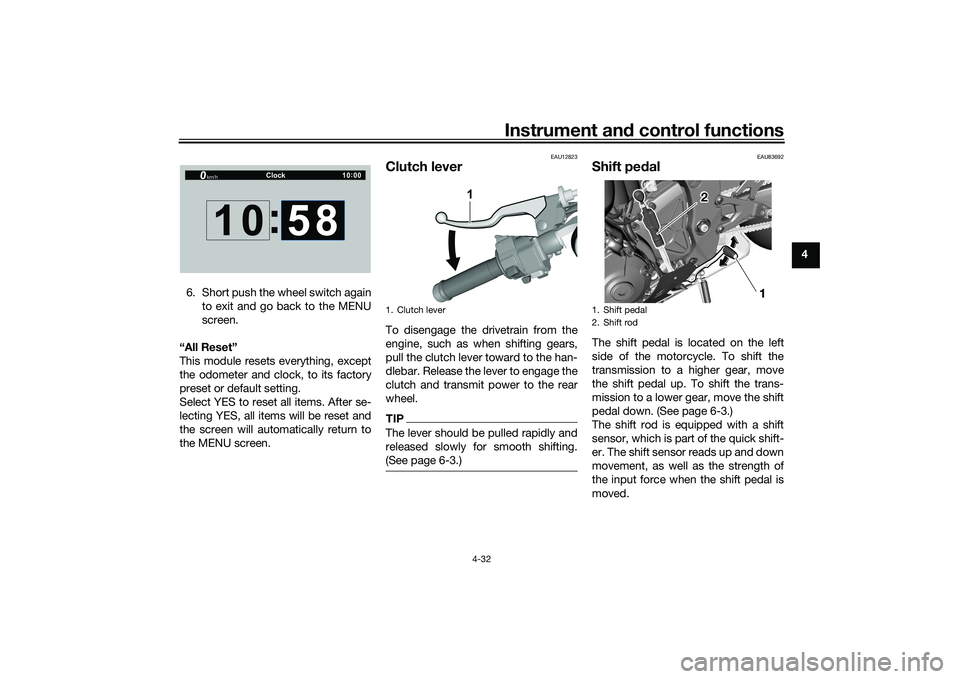
6. Short push the wheel switch again to exit and go back to the MENU
screen.
“All Reset”
This module resets everything, except
the odometer and clock, to its factory
preset or default setting.
Select YES to reset all items. After se-
lecting YES, all items will be reset and
the screen will automatically return to
the MENU screen.
EAU12823
Clutch leverTo disengage the drivetrain from the
engine, such as when shifting gears,
pull the clutch lever toward to the han-
dlebar. Release the lever to engage the
clutch and transmit power to the rear
wheel.TIPThe lever should be pulled rapidly and
released slowly for smooth shifting.
(See page 6-3.)
EAU83692
Shift pe dalThe shift pedal is located on the left
side of the motorcycle. To shift the
transmission to a higher gear, move
the shift pedal up. To shift the trans-
mission to a lower gear, move the shift
pedal down. (See page 6-3.)
The shift rod is equipped with a shift
sensor, which is part of the quick shift-
er. The shift sensor reads up and down
movement, as well as the strength of
the input force when the shift pedal is
moved.
Clock
km/h
10 :
00
10 :
58
1. Clutch lever
1
1. Shift pedal
2. Shift rod
1
2
UB3LE1E0.book Page 32 Tuesday, August 10, 2021 2:28 PM
Page 57 of 136
Instrument and control functions
4-34
4
EAU88462
Brake control system (BC)The brake control system regulates hy-
draulic brake pressure for the front and
rear wheels independently when the
respective brake lever or brake pedal is
applied and wheel lock is detected.
There are two settings, BC1 and BC2.
BC1 is standard ABS, which adjusts
brake pressure based on vehicle
speed and wheel speed data. BC1 is
designed to engage and maximize
braking when the vehicle is upright.
Regarding ABS, operate the brakes as
you would conventional brakes. When
the brake control system engages, a
pulsating sensation may be felt at the
brake lever or brake pedal as the hy-
draulic unit rapidly applies and reduces
brake pressure. In this situation, conti-
nue to apply the brake lever and brake
pedal to allow the ABS to work—do
not “pump the brakes” as this will re-
duce braking effectiveness.
WARNING
EWA16051
Always keep a sufficient distance
from the vehicle ahead to match the
riding speed even with ABS.
The ABS performs best with
long braking distances.
On certain surfaces, such as
rough or gravel roads, the brak-
ing distance may be longer with
the ABS than without.
BC2 incorporates standard ABS and in
addition regulates braking power when
cornering to suppress lateral wheel
slip.
WARNING
EWA20891
The brake control system is not a
substitute for the use of proper rid-
ing and braking techniques. The
brake control system cannot pre-
vent all loss of traction due to over-
braking from excessive speed, or
lateral wheel slip when braking on
slippery surfaces.The ABS hydraulic unit is monitored by
the ABS ECU, which will revert the sys-
tem to conventional braking if a mal-
function occurs.
TIPThe ABS performs a self-diagnosis test
when the vehicle is started and reach-
es a speed of 10 km/h (6 mi/h). During
this test, a clicking noise may be audi-
ble from the hydraulic control unit, and
a vibration may be felt at the brake le-
ver or pedal, but this is normal.NOTICE
ECA20100
Be careful not to damage the wheel
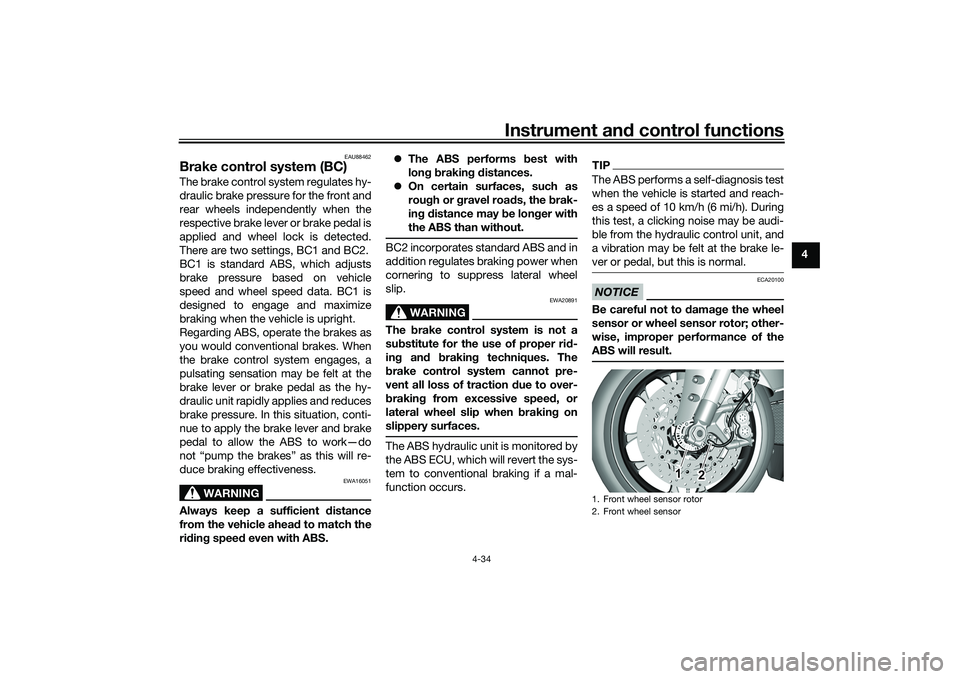
sensor or wheel sensor rotor; other-
wise, improper performance of the
ABS will result.1. Front wheel sensor rotor
2. Front wheel sensor
1
2
UB3LE1E0.book Page 34 Tuesday, August 10, 2021 2:28 PM
Page 58 of 136

Instrument and control functions
4-35
4
EAU13077
Fuel tank capTo open the fuel tank cap
Open the fuel tank cap lock cover, in-
sert the key, and then turn it 1/4 turn
clockwise. The lock will be released
and the fuel tank cap can be opened.
To close the fuel tank cap
With the key still inserted, push down
the fuel tank cap. Turn the key 1/4 turn
counterclockwise, remove it, and then
close the lock cover.
TIPThe fuel tank cap cannot be closed un-
less the key is in the lock. In addition,
the key cannot be removed if the cap is
not properly closed and locked.
WARNING
EWA11092
Make sure that the fuel tank cap is
properly closed after filling fuel.
Leaking fuel is a fire hazard.
1. Rear wheel sensor rotor
2. Rear wheel sensor
12
1. Fuel tank cap lock cover
2. UnlockK
1
2
UB3LE1E0.book Page 35 Tuesday, August 10, 2021 2:28 PM
Page 60 of 136

Instrument and control functions
4-37
4
TIPThis mark identifies the recom-
mended fuel for this vehicle as
specified by European regulation
(EN228).
Confirm the gasoline pump nozzle
has the same fuel identification
mark.Gasohol
There are two types of gasohol: gaso-
hol containing ethanol and that con-
taining methanol. Gasohol containing
ethanol can be used if the ethanol con-
tent does not exceed 10% (E10). Gas-
ohol containing methanol is not
recommended by Yamaha because it
can cause damage to the fuel system
or vehicle performance problems.
NOTICE
ECA11401
Use only unleaded gasoline. The use
of leaded gasoline will cause severe
damage to internal engine parts,
such as the valves and piston rings,
as well as to the exhaust system.
EAU86160
Fuel tank overflow hoseThe overflow hose drains excess gaso-
line and directs it safely away from the
vehicle.
Before operating the vehicle:
Check the fuel tank overflow hose
connection.
Check the fuel tank overflow hose
for cracks or damage, and replace
it if necessary.
Make sure that the fuel tank over-
flow hose is not blocked, and
clean it if necessary.
Make sure that the fuel tank over-
flow hose is positioned as shown.
E5
E10
1. Fuel tank overflow hose
2. White mark
1
2
UB3LE1E0.book Page 37 Tuesday, August 10, 2021 2:28 PM
Page 61 of 136

Instrument and control functions
4-38
4
TIPSee page 7-13 for canister information.
EAU13435
Catalytic converterThe exhaust system contains catalytic
converter(s) to reduce harmful exhaust
emissions.
WARNING
EWA10863
The exhaust system is hot after op-
eration. To prevent a fire hazard or
burns: Do not park the vehicle near
possible fire hazards such as
grass or other materials that
easily burn.
Park the vehicle in a place
where pedestrians or children
are not likely to touch the hot
exhaust system.
Make sure that the exhaust sys-
tem has cooled down before
doing any maintenance work.
Do not allow the engine to idle
more than a few minutes. Long
idling can cause a build-up of
heat.
EAU79902
SeatsPassenger seat
To remove the passenger seat1. Insert the key into the seat lock,
and then turn it clockwise.
2. Lift the front of the passenger seat and pull it forward.
To install the passenger seat1. With the seat lock key still in the open position (turned clockwise),
insert the projection on the rear of
the passenger seat into the seat1. Seat lock
2. Unlock.
1
2
UB3LE1E0.book Page 38 Tuesday, August 10, 2021 2:28 PM