ECO mode YAMAHA YZF-R125 2021 Owners Manual
[x] Cancel search | Manufacturer: YAMAHA, Model Year: 2021, Model line: YZF-R125, Model: YAMAHA YZF-R125 2021Pages: 94, PDF Size: 3.34 MB
Page 12 of 94

Safety information
1-5
1operator and may limit control
ability, therefore, such accesso-
ries are not recommended.
Use caution when adding electri-
cal accessories. If electrical ac-
cessories exceed the capacity of
the motorcycle’s electrical sys-
tem, an electric failure could re-
sult, which could cause a
dangerous loss of lights or engine
power.
Aftermarket Tires an d Rims
The tires and rims that came with your
motorcycle were designed to match
the performance capabilities and to
provide the best combination of han-
dling, braking, and comfort. Other
tires, rims, sizes, and combinations
may not be appropriate. See page 6-17
for tire specifications and for informa-
tion on servicing and replacing your
tires.
Transportin g the Motorcycle
Be sure to observe following instruc-
tions before transporting the motorcy-
cle in another vehicle.
Remove all loose items from the
motorcycle.
Check that the fuel cock (if
equipped) is in the off position and
that there are no fuel leaks.
Shift the transmission into gear
(for models with a manual trans-
mission).
Secure the motorcycle with tie-
downs or suitable straps that are
attached to solid parts of the mo-
torcycle, such as the frame or up-
per front fork triple clamp (and not,
for example, to rubber-mounted
handlebars or turn signals, or
parts that could break). Choose
the location for the straps carefully
so the straps will not rub against
painted surfaces during transport.
The suspension should be com-
pressed somewhat by the tie-
downs, if possible, so that the mo-
torcycle will not bounce exces-
sively during transport.
UB5GE2E0.book Page 5 Thursday, July 30, 2020 3:08 PM
Page 19 of 94
Instrument and control functions
3-4
3
TIPWhen the vehicle is turned on, the light
will come on for a few seconds and
then go off. If the light does not come
on, have a Yamaha dealer check the
vehicle.
EAUM4011
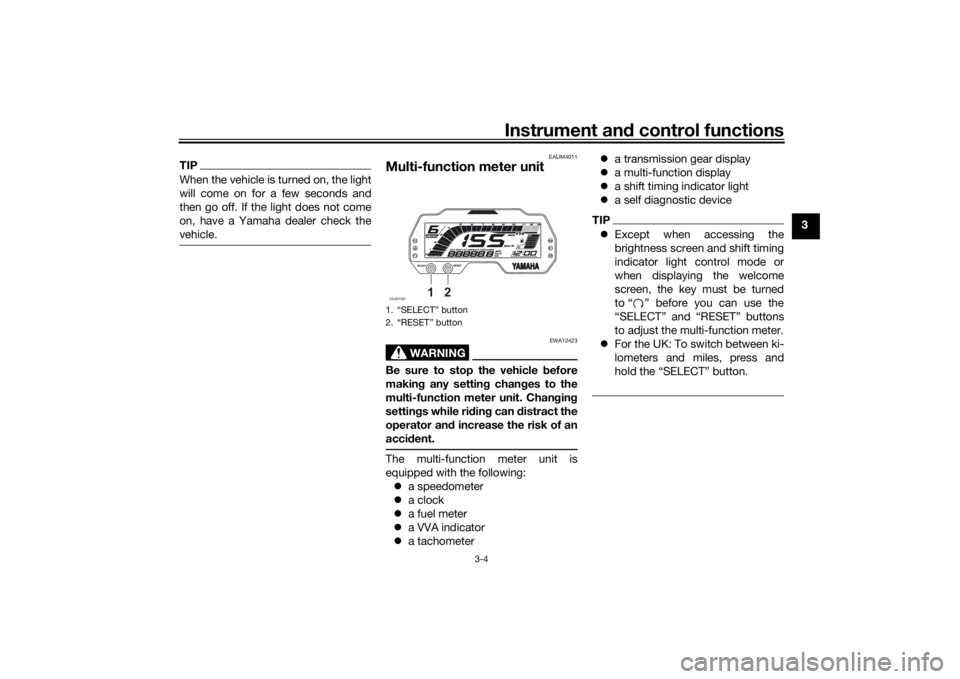
Multi-function meter unit
WARNING
EWA12423
Be sure to stop the vehicle before
makin g any settin g chan ges to the
multi-function meter unit. Chan gin g
settin gs while ri din g can distract the
operator an d increase the risk of an
acci dent.The multi-function meter unit is
equipped with the following:
a speedometer
a clock
a fuel meter
a VVA indicator
a tachometer
a transmission gear display
a multi-function display
a shift timing indicator light
a self diagnostic device
TIPExcept when accessing the
brightness screen and shift timing
indicator light control mode or
when displaying the welcome
screen, the key must be turned
to “ ” before you can use the
“SELECT” and “RESET” buttons
to adjust the multi-function meter.
For the UK: To switch between ki-
lometers and miles, press and
hold the “SELECT” button.
1. “SELECT” button
2. “RESET” buttonZAUM1567
1
2
UB5GE2E0.book Page 4 Thursday, July 30, 2020 3:08 PM
Page 21 of 94
Instrument and control functions
3-6
3
This model is equipped with variable
valve actuation (VVA) for good fuel
economy and acceleration in both the
low-speed and high-speed ranges.
The VVA indicator comes on when the
variable valve actuation system has
switched to the high-speed range.
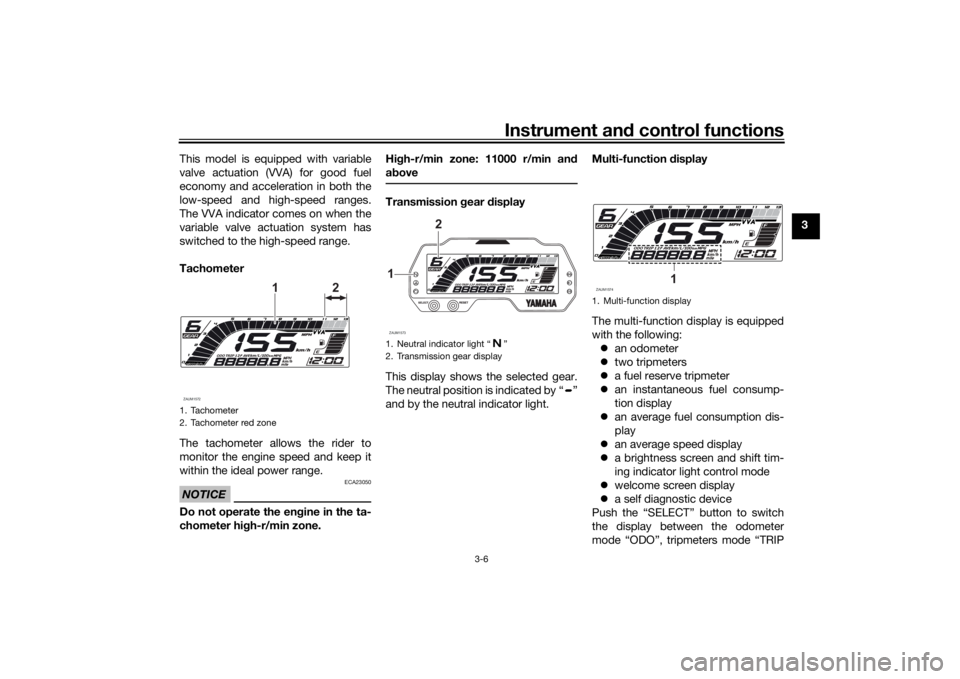
Tachometer
The tachometer allows the rider to
monitor the engine speed and keep it
within the ideal power range.
NOTICE
ECA23050
Do not operate the en
gine in the ta-
chometer hi gh-r/min zone. Hi
gh-r/min zone: 11000 r/min an d
a b ove
Transmission gear display
This display shows the selected gear.
The neutral position is indicated by “ ”
and by the neutral indicator light. Multi-function
display
The multi-function display is equipped
with the following: an odometer
two tripmeters
a fuel reserve tripmeter
an instantaneous fuel consump-
tion display
an average fuel consumption dis-
play
an average speed display
a brightness screen and shift tim-
ing indicator light control mode
welcome screen display
a self diagnostic device
Push the “SELECT” button to switch
the display between the odometer
mode “ODO”, tripmeters mode “TRIP
1. Tachometer
2. Tachometer red zoneZAUM1572
1 2
1. Neutral indicator light “ ”
2. Transmission gear displayZAUM15731
2
1. Multi-function displayZAUM1574
1
UB5GE2E0.book Page 6 Thursday, July 30, 2020 3:08 PM
Page 25 of 94
Instrument and control functions
3-10
3
Bri
ghtness screen an d shift timin g
in dicator li ght control mo de
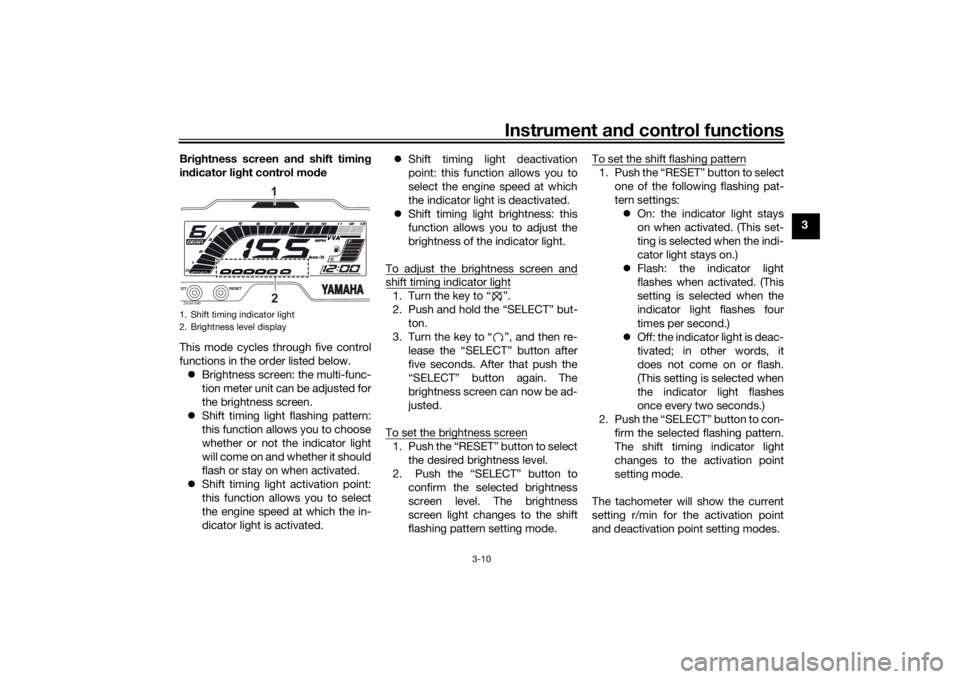
This mode cycles through five control
functions in the order listed below. Brightness screen: the multi-func-
tion meter unit can be adjusted for
the brightness screen.
Shift timing light flashing pattern:
this function allows you to choose
whether or not the indicator light
will come on and whether it should
flash or stay on when activated.
Shift timing light activation point:
this function allows you to select
the engine speed at which the in-
dicator light is activated.
Shift timing light deactivation
point: this function allows you to
select the engine speed at which
the indicator light is deactivated.
Shift timing light brightness: this
function allows you to adjust the
brightness of the indicator light.
To adjust the brightness screen and
shift timing indicator light1. Turn the key to “ ”.
2. Push and hold the “SELECT” but- ton.
3. Turn the key to “ ”, and then re- lease the “SELECT” button after
five seconds. After that push the
“SELECT” button again. The
brightness screen can now be ad-
justed.
To set the brightness screen1. Push the “RESET” button to select the desired brightness level.
2. Push the “SELECT” button to confirm the selected brightness
screen level. The brightness
screen light changes to the shift
flashing pattern setting mode. To set the shift flashing pattern
1. Push the “RESET” button to select
one of the following flashing pat-
tern settings: On: the indicator light stays
on when activated. (This set-
ting is selected when the indi-
cator light stays on.)
Flash: the indicator light
flashes when activated. (This
setting is selected when the
indicator light flashes four
times per second.)
Off: the indicator light is deac-
tivated; in other words, it
does not come on or flash.
(This setting is selected when
the indicator light flashes
once every two seconds.)
2. Push the “SELECT” button to con- firm the selected flashing pattern.
The shift timing indicator light
changes to the activation point
setting mode.
The tachometer will show the current
setting r/min for the activation point
and deactivation point setting modes.
1. Shift timing indicator light
2. Brightness level displayZAUM1580
21
UB5GE2E0.book Page 10 Thursday, July 30, 2020 3:08 PM
Page 26 of 94
Instrument and control functions
3-11
3 To set the shift activation point
TIPThe shift timing indicator light activa-
tion point can be set between 9000
r/min and 13000 r/min. The indicator
light can be set in increments of 500
r/min.1. Push the “RESET” button to select
the desired engine speed for acti-
vating the indicator light.
2. Push the “SELECT” button to con- firm the selected engine speed.
The control mode changes to the
deactivation point setting mode.
To set the shift deactivation pointTIP The shift timing indicator light de-
activation point can be set be-
tween 9000 r/min and 13000
r/min. The indicator light can be
set in increments of 500 r/min.
Be sure to set the deactivation
point to a higher engine speed
than for the activation point, other-
wise the shift timing indicator light
will not come on.
1. Push the “RESET” button to select
the desired engine speed for de-
activating the indicator light.
2. Push the “SELECT” button to con- firm the selected engine speed.
The control mode changes to the
brightness setting mode.
To adjust the shift brightness1. Push the “RESET” button to select the desired shift indicator light
brightness level.
2. Push the “SELECT” button to con- firm the selected brightness level.
The display exits the shift timing
light control mode and returns to
the standard multi-function dis-
play mode.
Welcome screen
The welcome screen greets the rider
when the key is turned to “ ” with the
messages “Hi Buddy” and “see you”
when the key is turned to “ ”. The
user name “Buddy” is set as the facto-
ry default, but it can be set to your
name. To set the user name
1. Turn the key to “ ”.
2. Push and hold the “RESET” but-
ton.
3. Turn the key to “ ”, and then re- lease the “RESET” button after
four seconds.
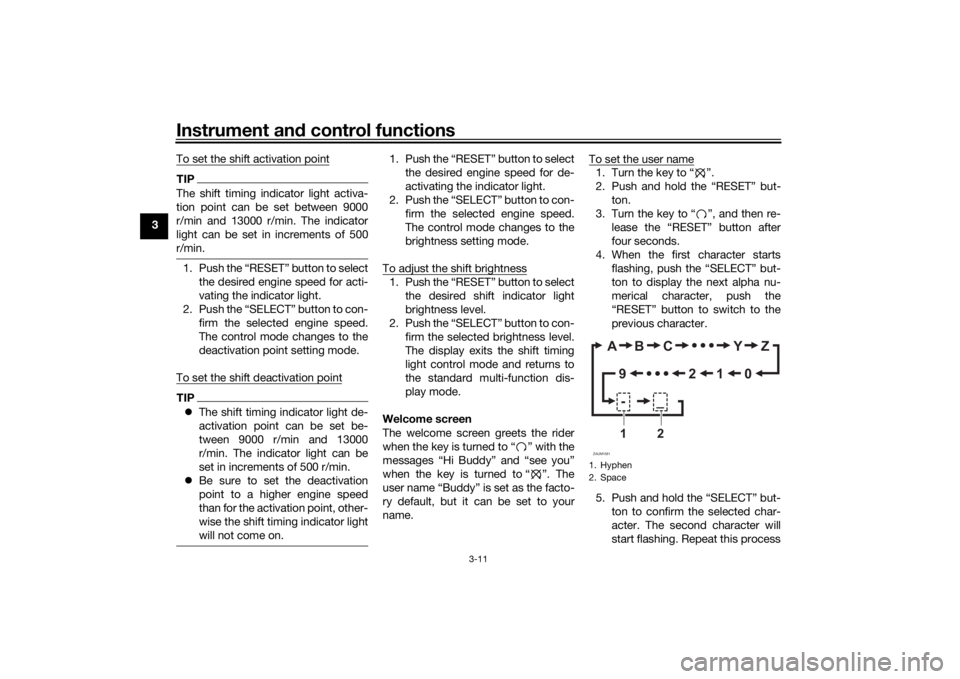
4. When the first character starts flashing, push the “SELECT” but-
ton to display the next alpha nu-
merical character, push the
“RESET” button to switch to the
previous character.
5. Push and hold the “SELECT” but- ton to confirm the selected char-
acter. The second character will
start flashing. Repeat this process1. Hyphen
2. SpaceZAUM1581
AB C Y Z
012
9
-_
1
2
UB5GE2E0.book Page 11 Thursday, July 30, 2020 3:08 PM
Page 42 of 94
Operation and important rid ing points
5-2
5
EAU86690
Startin g the eng ineThe ignition circuit cut-off system will
enable starting when:
the transmission is in the neutral
position or
the transmission is in gear, the
sidestand is up, and the clutch le-
ver is pulled.
To start the engine1. Turn the main switch on and set the engine stop switch to the run
position.
2. Confirm the indicator and warning light(s) come on for a few sec-
onds, and the go off. (See page
3-2.)TIPDo not start the engine if the en-
gine trouble warning light remains
on.
The ABS warning light should
come on and stay on until the ve-
hicle reaches a speed of 10 km/h
(6 mi/h).
NOTICE
ECA24110
If a warnin g or in dicator li ght does
not work as d escribed a bove, have a
Yamaha dealer check the vehicle.3. Shift the transmission into the
neutral position.
4. Start the engine by pushing the start switch.
5. Release the start switch when the engine starts, or after 5 seconds.
Wait 10 seconds before pressing
the switch again to allow battery
voltage to restore.NOTICE
ECA11043
For maximum en gine life, never ac-
celerate har d when the en gine is
col d!
EAU45312
TIPThis model is equipped with a lean an-
gle sensor to stop the engine in case of
a turnover. In this case, turn the main
switch off and then on. Failing to do so
will prevent the engine from starting
even though the engine will crank
when pushing the start switch.
UB5GE2E0.book Page 2 Thursday, July 30, 2020 3:08 PM
Page 86 of 94
Specifications
8-1
8
Dimensions:Overall length:1990 mm (78.3 in)
Overall width:
755 mm (29.7 in)
Overall height: 1140 mm (44.9 in)
Seat height: 820 mm (32.3 in)
Wheelbase:
1325 mm (52.2 in)
Ground clearance: 160 mm (6.30 in)
Minimum turning radius: 2.9 m (9.51 ft)Wei ght:Curb weight:
144 kg (319 lb)Engine:Combustion cycle:
4-stroke
Cooling system: Liquid cooled
Valve train: SOHC
Number of cylinders:
Single cylinder
Displacement: 124 cm³
Bore × stroke:
52.0 × 58.6 mm (2.05 × 2.31 in)
Starting system:
Electric starter
Engine oil:Recommended brand:
SAE viscosity grades:
10W-40
Recommended engine oil grade: API service SG type or higher, JASO
standard MA
Engine oil quantity: Oil change: 0.85 L (0.90 US qt, 0.75 Imp.qt)
With oil filter removal: 0.95 L (1.00 US qt, 0.84 Imp.qt)Coolant quantity:Coolant reservoir (up to the maximum level
mark):
0.15 L (0.16 US qt, 0.13 Imp.qt)
Radiator (including all routes): 0.49 L (0.52 US qt, 0.43 Imp.qt)Fuel:Recommended fuel:
Unleaded gasoline (E10 acceptable)
Octane number (RON): 95
Fuel tank capacity: 11 L (2.9 US gal, 2.4 Imp.gal)
Fuel reserve amount:
3.0 L (0.79 US gal, 0.66 Imp.gal)
Fuel injection:Throttle body:ID mark: BK71 00Drivetrain:Gear ratio:
1st:2.833 (34/12)
2nd:
1.875 (30/16)
3rd: 1.364 (30/22)
4th: 1.143 (24/21)
5th:
0.957 (22/23)
6th: 0.840 (21/25)Front tire:Type:
Tubeless
Size: 100/80-17M/C 52S
Manufacturer/model: MICHELIN PILOT STREETRear tire:Type:Tubeless
Size: 140/70-17M/C 66S
Manufacturer/model:
MICHELIN PILOT STREET
UB5GE2E0.book Page 1 Thursday, July 30, 2020 3:08 PM
Page 88 of 94
Consumer information
9-1
9
EAU53562
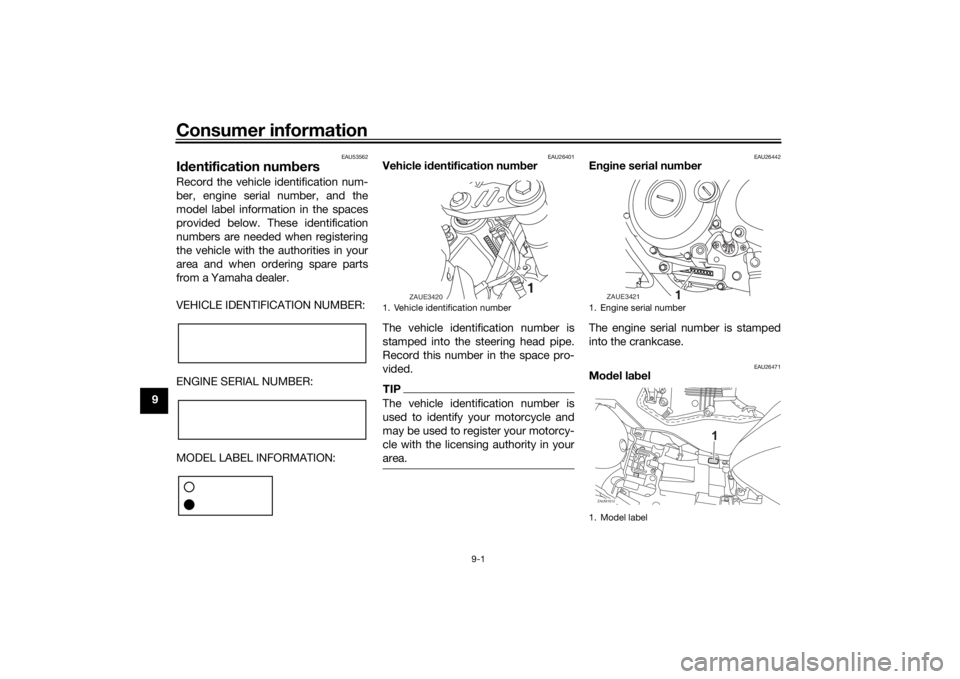
Id entification num bersRecord the vehicle identification num-
ber, engine serial number, and the
model label information in the spaces
provided below. These identification
numbers are needed when registering
the vehicle with the authorities in your
area and when ordering spare parts
from a Yamaha dealer.
VEHICLE IDENTIFICATION NUMBER:
ENGINE SERIAL NUMBER:
MODEL LABEL INFORMATION:
EAU26401
Vehicle i dentification num ber
The vehicle identification number is
stamped into the steering head pipe.
Record this number in the space pro-
vided.TIPThe vehicle identification number is
used to identify your motorcycle and
may be used to register your motorcy-
cle with the licensing authority in your
area.
EAU26442
En gine serial num ber
The engine serial number is stamped
into the crankcase.
EAU26471
Mo del la bel
1. Vehicle identification number
1
ZAUE3420
1. Engine serial number
1. Model label
1
xxxxxxx
ZAUE3421ZAUM1612
1
UB5GE2E0.book Page 1 Thursday, July 30, 2020 3:08 PM
Page 89 of 94
Consumer information
9-2
9
The model label is affixed to the frame
under the rider seat. (See page 3-19.)
Record the information on this label in
the space provided. This information
will be needed when ordering spare
parts from a Yamaha dealer.
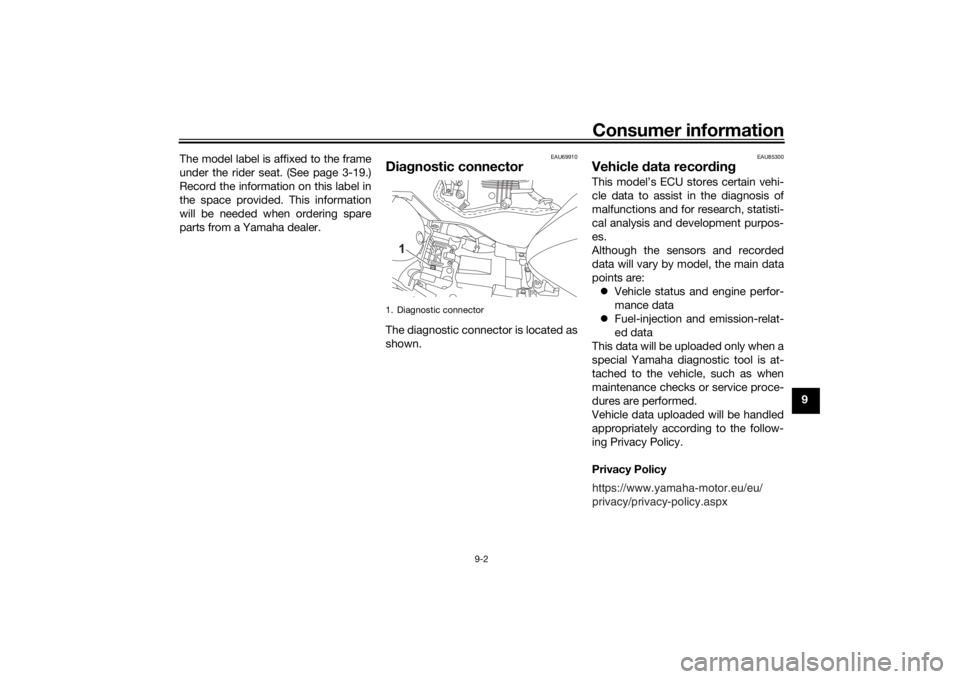
EAU69910
Dia
gnostic connectorThe diagnostic connector is located as
shown.
EAU85300
Vehicle data recor din gThis model’s ECU stores certain vehi-
cle data to assist in the diagnosis of
malfunctions and for research, statisti-
cal analysis and development purpos-
es.
Although the sensors and recorded
data will vary by model, the main data
points are:
Vehicle status and engine perfor-
mance data
Fuel-injection and emission-relat-
ed data
This data will be uploaded only when a
special Yamaha diagnostic tool is at-
tached to the vehicle, such as when
maintenance checks or service proce-
dures are performed.
Vehicle data uploaded will be handled
appropriately according to the follow-
ing Privacy Policy.
Privacy Policy
1. Diagnostic connector
1
https://www.yamaha-motor.eu/eu/
privacy/privacy-policy.aspx
UB5GE2E0.book Page 2 Thursday, July 30, 2020 3:08 PM
Page 91 of 94

10-1
10
Index
AABS....................................................... 3-15
ABS warning light ................................... 3-3
Air filter element and check hose,
replacing and cleaning ....................... 6-15BBattery .................................................. 6-31
Brake and clutch levers, checking and lubricating........................................... 6-28
Brake and shift pedals, checking and lubricating........................................... 6-27
Brake fluid, changing............................ 6-24
Brake fluid level, checking.................... 6-23
Brake lever............................................ 3-14
Brake light switches ............................. 6-22
Brake pedal .......................................... 3-14
Brake pedal free play, adjusting ........... 6-21CCables, checking and lubricating ......... 6-27
Canister ................................................ 6-10
Care ........................................................ 7-1
Catalytic converter ............................... 3-19
Clutch lever........................................... 3-13
Clutch lever free play, adjusting ........... 6-20
Coolant ................................................. 6-14
Coolant temperature warning light ......... 3-2
Cowlings, removing and installing.......... 6-8DData recording, vehicle........................... 9-2
Diagnostic connector ............................. 9-2
Dimmer/Pass switch............................. 3-13
Drive chain, cleaning and lubricating ... 6-26
Drive chain slack .................................. 6-25
EEngine break-in ...................................... 5-1
Engine idling speed.............................. 6-16
Engine oil and oil filter element ............ 6-11
Engine overheating .............................. 6-37
Engine serial number ............................. 9-1
Engine stop switch............................... 3-13FFront and rear brake pads, checking ... 6-22
Front brake lever free play, checking ... 6-21
Front fork, checking ............................. 6-29
Fuel ...................................................... 3-16
Fuel consumption, tips for reducing ...... 5-4
Fuel tank breather hose and overflow hose ................................................... 3-18
Fuel tank cap........................................ 3-16
Fuses, replacing ................................... 6-32HHandlebar switches ............................. 3-12
High beam indicator light ....................... 3-2
Horn switch .......................................... 3-13IIdentification numbers ........................... 9-1
Ignition circuit cut-off system .............. 3-21
Indicator lights and warning lights ......... 3-2LLicense plate light bulb, replacing ....... 6-34MMain switch/steering lock ...................... 3-1
Maintenance and lubrication, periodic... 6-4
Maintenance, emission control system ................................................. 6-3
Malfunction indicator light (MIL)............. 3-3
Matte color, caution ............................... 7-1 Model label ............................................. 9-1
Multi-function meter unit ........................ 3-4
NNeutral indicator light ............................. 3-2PParking.................................................... 5-4
Part locations.......................................... 2-1RRear suspension, lubricating ................ 6-29SSafety information................................... 1-1
Seats ..................................................... 3-19
Shifting.................................................... 5-3
Shift light ................................................. 3-3
Shift pedal............................................. 3-14
Sidestand.............................................. 3-20
Sidestand, checking and lubricating .... 6-29
Spark plug, checking .............................. 6-9
Specifications ......................................... 8-1
Starting the engine ................................. 5-2
Start switch ........................................... 3-13
Steering, checking ................................ 6-30
Storage ................................................... 7-3
Supporting the motorcycle ................... 6-34TTail/brake light ...................................... 6-33
Throttle grip and cable, checking and
lubricating ........................................... 6-27
Throttle grip free play, adjusting ........... 6-16
Tires ...................................................... 6-17
Tool kit .................................................... 6-2
Troubleshooting .................................... 6-35
Troubleshooting chart........................... 6-36
Turn signal indicator light ....................... 3-2
UB5GE2E0.book Page 1 Thursday, July 30, 2020 3:08 PM