brake YAMAHA YZF-R1M 2020 User Guide
[x] Cancel search | Manufacturer: YAMAHA, Model Year: 2020, Model line: YZF-R1M, Model: YAMAHA YZF-R1M 2020Pages: 136, PDF Size: 16.15 MB
Page 34 of 136

Instrument and control functions
4-11
4
When the fuel tank reserve level
has been reached, F-TRIP ap-
pears automatically and begins
recording distance traveled from
that point.
After refueling and traveling some
distance, F-TRIP will automatically
disappear.
See “Unit” on page 4-24 to
change the fuel consumption
units.
The air temperature displayed
may vary from the actual ambient
temperature.
In TRACK MODE, information dis-
play items FASTEST (fastest lap
time) and AVERAGE (average lap
time) are also available.
TRIP-1, TRIP-2, F-TRIP, FUEL CON,
and FUEL AVE items can be individual-
ly reset.
To reset information display items1. Use the wheel switch to scroll
through the display items until the
item you want to reset appears. 2. Short push the wheel switch and
the item will flash for five seconds.
(For STREET MODE, if both items
are resettable items, the top item
will flash first. Scroll down to se-
lect the bottom item.)
3. While the item is flashing, press and hold the wheel switch for one
second.
Transmission gear display
This shows which gear the transmis-
sion is in. This model has 6 gears and a
neutral position. The neutral position is
indicated by the neutral indicator
light “ ” and by the transmission gear
display “ ”.
Front brake pressure in dicator
This shows how much braking power
is being applied to the front brakes.
Acceleration in dicator
This shows the vehicle’s forward ac-
celeration and deceleration forces. Revolution peak hol
d in dicator
This small bar momentarily appears
within the tachometer to mark the most
recent peak engine speed.
YRC items
MODE/PWR/TCS/SCS/EBM
The current MODE (YRC mode) and its
related PWR, TCS, SCS, and EBM set-
tings are shown here.
The individual settings for YRC items
PWR, TCS, SCS, LCS, QSS, LIF, EBM,
and BC can be organized into four
groups and set independently for each
group. These groups of settings are the
YRC modes MODE-A, MODE-B,
MODE-C, and MODE-D. Use the mode
switch to change YRC modes or make
YRC item setting changes from the
main screen.
TIPThe YRC modes come preset from the
factory for different riding conditions.
When using the factory presets, the
suggested YRC modes are as follows.
MODE-A: suitable for track riding
MODE-B: softer track-riding setting
MODE-C: suitable for road use
UB3LE0E0.book Page 11 Tuesday, July 23, 2019 12:05 PM
Page 41 of 136

Instrument and control functions
4-18
4
respective upshift or downshift func-
tion off, and the clutch lever must then
be used when shifting in that direction.
TIP
Set QS to 1 for track or sporty
riding.
Set QS to 2 for touring or
around town-riding.LIF
LIF can be set to 1, 2, 3, or OFF. Set-
ting level 3 most strongly reduces
wheel lift, and setting level 1 provides
the least amount of system interven-
tion. OFF turns LIF off and LCS will be
disabled for the selected YRC mode. EBM
This system has three settings. Level 1
provides the least amount of engine
brake management intervention, and
therefore the strongest amount of en-
gine braking. Level 3 provides the
greatest amount of engine brake man-
agement intervention, and therefore
the least amount of engine braking.
BC
Select BC1 when only standard ABS is
desired. Select BC2 to have the brake
control system regulate brake pressure
while cornering to suppress lateral
wheel slip.
TIPFor skilled riders and when riding at the
track, due to varying conditions BC2
brake system engagement may come
on sooner than expected relative to
your desired cornering speed or in-
tended cornering line.To customize a YRC mode or adjust aYRC item1. From the MENU screen, select
“YRC Setting”. 2. The “YRC Setting” screen is dis-
played, and the YRC mode box
“YRC” is highlighted. Short push
the wheel switch to enter the box
and then select the YRC mode A,
B, C, or D that you want to adjust.
1. System intervention
2. Wheel lift
1 3
2
1
LIF
2
YRC SettingLap TimeLogging
Maintenance
Unit
Display ModeMENU
km/h
GPS
10
:
00
UB3LE0E0.book Page 18 Tuesday, July 23, 2019 12:05 PM
Page 42 of 136
Instrument and control functions
4-19
4
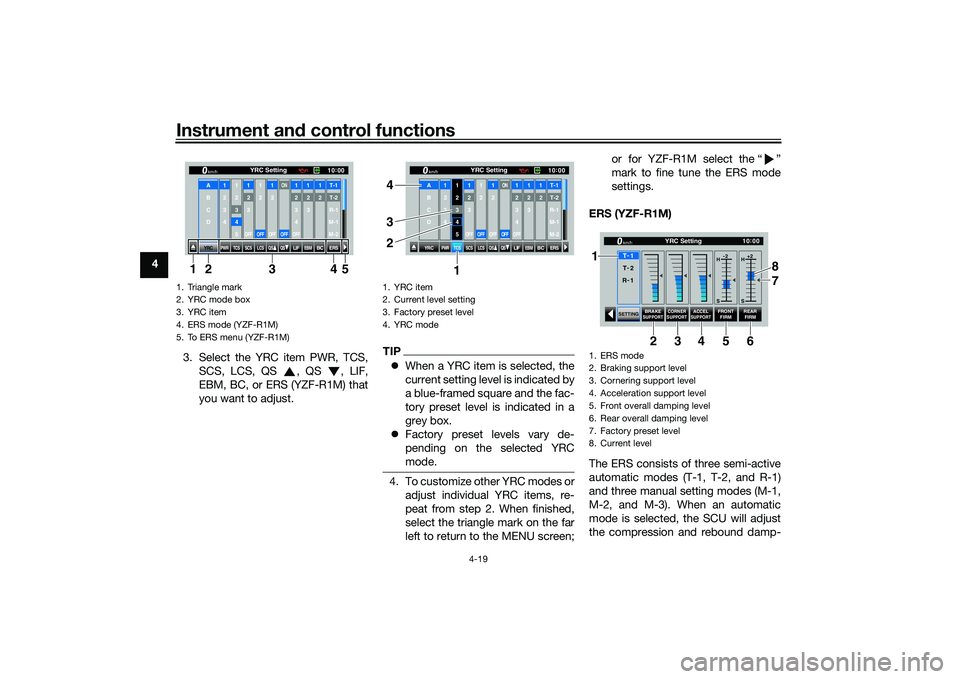
3. Select the YRC item PWR, TCS,SCS, LCS, QS , QS , LIF,
EBM, BC, or ERS (YZF-R1M) that
you want to adjust.
TIPWhen a YRC item is selected, the
current setting level is indicated by
a blue-framed square and the fac-
tory preset level is indicated in a
grey box.
Factory preset levels vary de-
pending on the selected YRC
mode.4. To customize other YRC modes or
adjust individual YRC items, re-
peat from step 2. When finished,
select the triangle mark on the far
left to return to the MENU screen; or for YZF-R1M select the “ ”
mark to fine tune the ERS mode
settings.
ERS (YZF-R1M)
The ERS consists of three semi-active
automatic modes (T-1, T-2, and R-1)
and three manual setting modes (M-1,
M-2, and M-3). When an automatic
mode is selected, the SCU will adjust
the compression and rebound damp-
1. Triangle mark
2. YRC mode box
3. YRC item
4. ERS mode (YZF-R1M)
5. To ERS menu (YZF-R1M)
YRC
PWR
TCS
SCS
LCSQS
QS
LIFEBM
BC
ERS10 :
00
YRC Setting
km/hA
B
C
D
1
2
3
4
1 2345
12
3OFF
1 2OFF
12OFF
ON
OFF
12
3
4OFF
12
3
12T-1T-2
R-1
M-1
M-2
134 5
2
1. YRC item
2. Current level setting
3. Factory preset level
4. YRC mode
YRC
PWR
TCS
SCS
LCSQS
QS
LIFEBM
BC
ERS10:
00
YRC Setting
km/hA
B
C
D
1
2
3
4
1 2345
12
3OFF
1 2OFF
12OFF
ON
OFF
12
3
4OFF
12
3
12T-1T-2
R-1
M-1
M-2
1
3 4
2
1. ERS mode
2. Braking support level
3. Cornering support level
4. Acceleration support level
5. Front overall damping level
6. Rear overall damping level
7. Factory preset level
8. Current level
SETTING
BRAKE
SUPPORT CORNER
SUPPORT
ACCELSUPPORT
FRONT FIRM REAR
FIRM
10 :
00
YRC Setting
km/hT -
1
H -2
S H
+2
S
T -
2
R -
1
1
34 8
5 7
6
2
UB3LE0E0.book Page 19 Tuesday, July 23, 2019 12:05 PM
Page 43 of 136

Instrument and control functions
4-20
4
ing forces based on running condi-
tions. For all modes and models,
spring preload is physically adjusted
by hand. (See pages 4-42 and 4-45.)
For track modes T-1 and T-2, the fol-
lowing settings can be adjusted:
BRAKE SUPPORT: reduces nosedive
(front-end pitch from braking)
CORNER SUPPORT: increases damp-
ing to absorb chassis fluctuations for
smooth cornering. Reduce this setting
for increased rear wheel grip.
ACCEL SUPPORT: reduces rear-end
squat (rear-end pitch due to accelera-
tion)
FRONT FIRM: hardens (H) or softens
(S) overall damping of the front sus-
pension
REAR FIRM: hardens (H) or softens (S)
overall damping of the rear suspension
For the road mode R-1, the following
settings can be adjusted:
BRAKE SUPPORT: reduces nosedive
(front-end pitch from braking)
FRONT FIRM: hardens (H) or softens
(S) overall damping of the front sus-
pension
REAR FIRM: hardens (H) or softens (S)
overall damping of the rear suspension
TIP
T-1 is preset for track use with
racing slick tires.
T-2 is preset for track use with
street tires.
R-1 is preset for road use with
street tires.
For the manual setting modes M-1, M-
2, and M-3, the following settings can
be adjusted:
Fr COM: front compression damping
Fr REB: front rebound damping
Rr COM: rear compression damping
Rr REB: rear rebound damping
1. ERS mode
2. Braking support level
3. Front overall damping level
4. Rear overall damping level
5. Factory preset level
6. Current level
SETTING BRAKE
SUPPORT
FRONT
FIRM REAR
FIRM
10 :
00
YRC Setting
km/hR -
1
H -2
S H
+2
S
T -
1
T -
2
34
2
6
5
1
1. ERS mode
2. Front compression damping force
3. Front rebound damping force
4. Rear compression damping force
5. Rear rebound damping force
6. Factory preset level
7. Current level setting
10 :
00
YRC Setting
km/hM -
2
M -
3
Fr COM Rr COM
Fr REB Rr REB
SETTING
18
8 22 22
M -
134 7
5 6
2
1
UB3LE0E0.book Page 20 Tuesday, July 23, 2019 12:05 PM
Page 56 of 136

Instrument and control functions
4-33
4
EAU26827
Brake leverThe brake lever is located on the right
side of the handlebar. To apply the
front brake, pull the lever toward the
throttle grip.
The brake lever is equipped with a
brake lever position adjusting dial. To
adjust the distance between the brake
lever and the throttle grip, push the
brake lever away from the throttle grip
and rotate the adjusting dial. Make
sure the setting number on the adjust-
ing dial aligns with the match mark on
the brake lever.
EAU12944
Brake ped alThe brake pedal is located on the right
side of the motorcycle. To apply the
rear brake, press down on the brake
pedal.
EAU88462
Brake control system (BC)The brake control system regulates hy-
draulic brake pressure for the front and
rear wheels independently when the
respective brake lever or brake pedal is
applied and wheel lock is detected.
There are two settings, BC1 and BC2.
BC1 is standard ABS, which adjusts
brake pressure based on vehicle
speed and wheel speed data. BC1 is
designed to engage and maximize
braking when the vehicle is upright.
Regarding ABS, operate the brakes as
you would conventional brakes. When
the brake control system engages, a
pulsating sensation may be felt at the
brake lever or brake pedal as the hy-
draulic unit rapidly applies and reduces
brake pressure. In this situation, con-
tinue to apply the brake lever and
brake pedal to allow the ABS to work—
do not “pump the brakes” as this will
reduce braking effectiveness.
WARNING
EWA16051
Always keep a sufficient d istance
from the vehicle ahea d to match the
ri din g spee d even with ABS.
1. Brake lever
2. Distance
3. Match mark
4. Adjusting dial
1
2
4
3
1. Brake pedal
UB3LE0E0.book Page 33 Tuesday, July 23, 2019 12:05 PM
Page 57 of 136
Instrument and control functions
4-34
4
The ABS performs best with
lon g b rakin g d istances.
On certain surfaces, such as
rou gh or g ravel roa ds, the b rak-
in g d istance may be lon ger with
the ABS than without.
BC2 incorporates standard ABS and in
addition regulates braking power when
cornering to suppress lateral wheel
slip.
WARNING
EWA20891
The brake control system is not a
su bstitute for the use of proper ri d-
in g an d brakin g techniques. The
b rake control system cannot pre-
vent all loss of traction due to over-
b rakin g from excessive spee d, or
lateral wheel slip when brakin g on
slippery surfaces.The ABS hydraulic unit is monitored by
the ABS ECU, which will revert the sys-
tem to conventional braking if a mal-
function occurs.
TIPThe ABS performs a self-diagnosis test
when the vehicle is started and reach-
es a speed of 10 km/h (6 mi/h). During
this test, a clicking noise may be audi-
ble from the hydraulic control unit, and
a vibration may be felt at the brake le-
ver or pedal, but this is normal.NOTICE
ECA20100
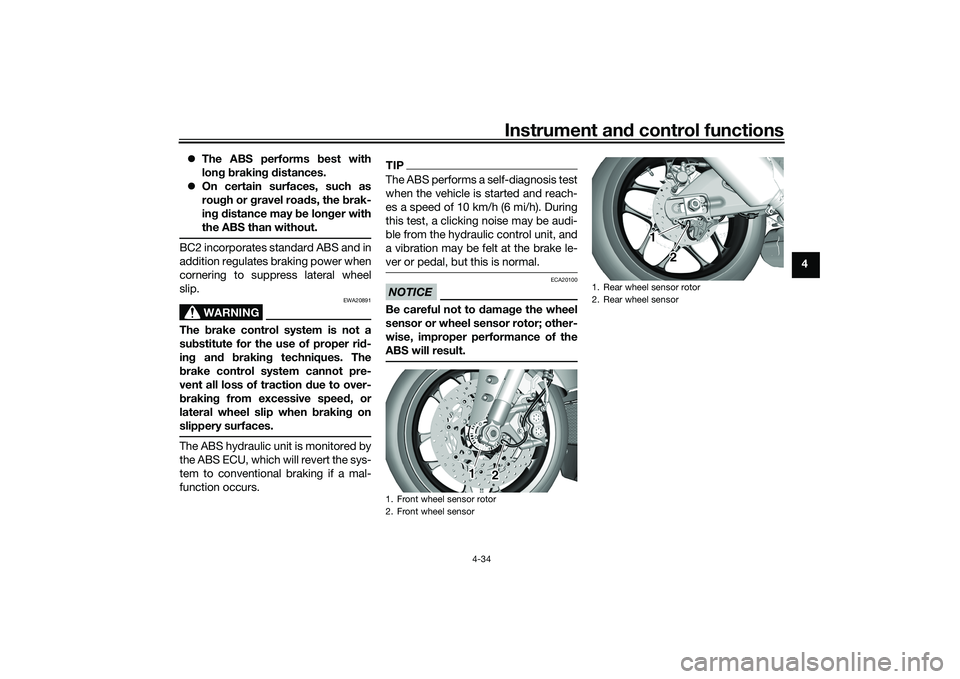
Be careful not to d amage the wheel
sensor or wheel sensor rotor; other-
wise, improper performance of the
ABS will result.1. Front wheel sensor rotor
2. Front wheel sensor
1
2
1. Rear wheel sensor rotor
2. Rear wheel sensor
1
2
UB3LE0E0.book Page 34 Tuesday, July 23, 2019 12:05 PM
Page 75 of 136

For your safety – pre-operation checks
5-1
5
EAU15599
Inspect your vehicle each time you use it to make sure the vehicle is in safe operating condition. Always follow the inspection
and maintenance procedures and schedules described in the Owner’s Manual.
WARNING
EWA11152
Failure to inspect or maintain the vehicle properly increases the possibility of an acci dent or equipment damag e.
Do not operate the vehicle if you fin d any pro blem. If a pro blem cannot be corrected b y the proce dures provi ded in
this manual, have the vehicle inspecte d b y a Yamaha dealer.Before using this vehicle, check the following points:
ITEM CHECKS PAGE
Fuel • Check fuel level in fuel tank.
• Refuel if necessary.
• Check fuel line for leakage.
• Check fuel tank overflow hose for obstructions, cracks or damage, and check
hose connection. 4-35, 4-37
En gine oil • Check oil level in engine.
• If necessary, add recommended oil to specified level.
• Check vehicle for oil leakage. 7-14
Coolant • Check coolant level in reservoir.
• If necessary, add recommended coolant to specified level.
• Check cooling system for leakage. 7-17
Front brake • Check operation.
• If soft or spongy, have Yamaha dealer bleed hydraulic system.
• Check brake pads for wear.
• Replace if necessary.
• Check fluid level in reservoir.
• If necessary, add specified brake fluid to specified level.
• Check hydraulic system for leakage. 7-25, 7-25
UB3LE0E0.book Page 1 Tuesday, July 23, 2019 12:05 PM
Page 76 of 136
For your safety – pre-operation checks
5-2
5
Rear brake • Check operation.
• If soft or spongy, have Yamaha dealer bleed hydraulic system.
• Check brake pads for wear.
• Replace if necessary.
• Check fluid level in reservoir.
• If necessary, add specified brake fluid to specified level.
• Check hydraulic system for leakage. 7-25, 7-25
Clutch • Check operation.
• Lubricate cable if necessary.
• Check lever free play.
• Adjust if necessary.
7-23
Throttle g rip • Check for smooth rotation and automatic return. 7-29
Control ca bles • Make sure that operation is smooth.
• Lubricate if necessary. 7-29
Drive chain • Check chain slack.
• Adjust if necessary.
• Check chain condition.
• Lubricate if necessary.
7-27, 7-28
Wheels an d tires •Check for damage.
• Check tire condition and tread depth.
• Check air pressure.
• Correct if necessary.
7-19, 7-22
Brake an d shift pe dals • Make sure that operation is smooth.
• Lubricate pedal pivoting points if necessary. 7-30
Brake an d clutch levers • Make sure that operation is smooth.
• Lubricate lever pivoting points if necessary.
7-30
Si destan d • Make sure that operation is smooth.
• Lubricate pivot if necessary.
7-31
Chassis fasteners • Make sure that all nuts, bolts and screws are properly tightened.
• Tighten if necessary. —
ITEM
CHECKS PAGE
UB3LE0E0.book Page 2 Tuesday, July 23, 2019 12:05 PM
Page 80 of 136

Operation and important rid ing points
6-3
6
EAU67082
Shiftin gShifting gears lets you control the
amount of engine power available for
starting off, accelerating, climbing hills,
etc.
This model is equipped with QSS. See
pages 3-3 and 4-17.TIPTo shift into neutral ( ), gently de-
press the shift pedal from 2nd gear, or
slightly raise it while in 1st gear.
NOTICE
ECA22521
Even with the transmission in
the neutral position, do not
coast for lon g period s of time
with the en gine off, nor tow the
motorcycle for lon g d istances.
The transmission is properly lu-
b ricate d only when the en gine is
runnin g. Ina dequate lu brication
may damag e the transmission.
Except when usin g the quick
shift system, always pull the
clutch lever when chan gin g
g ears to avoi d d amag ing the en-
g ine, transmission, an d drive-
train.
EAU85370
To start out an d accelerate
1. Pull the clutch lever to disengage the clutch.
2. Shift the transmission into first gear. The neutral indicator light
should go out.
3. Open the throttle gradually, and at the same time, release the clutch
lever slowly. 4. After starting out, close the throt-
tle, and at the same time, quickly
pull the clutch lever in.
5. Shift the transmission into second gear. (Make sure not to shift the
transmission into the neutral posi-
tion.)
6. Open the throttle part way and gradually release the clutch lever.
7. Follow the same procedure when shifting to the next higher gear.
EAU85380
To decelerate
1. Release the throttle and apply both the front and the rear brakes
smoothly to slow the motorcycle.
2. As the vehicle decelerates, shift to a lower gear.
3. When the engine is about to stall or runs roughly, pull the clutch le-
ver in, use the brakes to slow the
motorcycle, and continue to
downshift as necessary.
4. Once the motorcycle has stopped, the transmission can be
shifted into the neutral position.
1. Gear positions
2. Shift pedal
2
1 1
1
N 2 3
4
5
6
UB3LE0E0.book Page 3 Tuesday, July 23, 2019 12:05 PM
Page 81 of 136

Operation and important ri din g points
6-4
6
The neutral indicator light should
come on and then the clutch lever
can be released.
WARNING
EWA17380
Improper brakin g can cause
loss of control or traction. Al-
ways use both brakes an d apply
them smoothly.
Make sure that the motorcycle
and the en gine have sufficiently
slowe d b efore shiftin g to a low-
er gear. En gag in g a lower gear
when the vehicle or en gine
spee d is too hi gh coul d make
the rear wheel lose traction or
the en gine to over-rev. This
coul d cause loss of control, an
acci dent an d injury. It coul d also
cause en gine or d rive train dam-
a g e.
EAU16811
Tips for re ducin g fuel con-
sumptionFuel consumption depends largely on
your riding style. Consider the follow-
ing tips to reduce fuel consumption:
Shift up swiftly, and avoid high en-
gine speeds during acceleration.
Do not rev the engine while shift-
ing down, and avoid high engine
speeds with no load on the en-
gine.
Turn the engine off instead of let-
ting it idle for an extended length
of time (e.g., in traffic jams, at traf-
fic lights or at railroad crossings).
EAU17214
Parkin gWhen parking, stop the engine, and
then remove the key from the main
switch.
WARNING
EWA10312
Since the en gine an d exhaust
system can become very hot,
park in a place where pe destri-
ans or chil dren are not likely to
touch them and b e burne d.
Do not park on a slope or on soft
groun d, otherwise the vehicle
may overturn, increasin g the
risk of a fuel leak an d fire.
Do not park near grass or other
flammab le materials which
mi ght catch fire.
UB3LE0E0.book Page 4 Tuesday, July 23, 2019 12:05 PM