wheel YAMAHA YZF-R1M 2022 User Guide
[x] Cancel search | Manufacturer: YAMAHA, Model Year: 2022, Model line: YZF-R1M, Model: YAMAHA YZF-R1M 2022Pages: 136, PDF Size: 6.01 MB
Page 36 of 136
Instrument and control functions
4-13
4
TIPTurning off the traction control system
will turn off the SCS, LCS, and LIF sys-
tems for all YRC modes.YRC items LCS/QS/LIF/BC
The on/off status of YRC items LCS,
QSS, LIF, and BC is shown here. When
any of these systems are registered
(not set to OFF) for the currently select-
ed YRC mode, its respective icon will
appear.
When LCS is registered for the current-
ly selected YRC mode, its icon will be
grey. To activate the launch control
system, press and hold the center but-
ton until the LCS icon stops flashing
and turns white.TIPLCS, QSS, LIF, and BC system setting
levels can only be adjusted from the
MENU screen.ERS in dicator “ ” (YZF-R1M)
This icon shows the current ERS mo-
de. (See “YRC Setting” on page 4-16
and “ERS” on page 4-20 to change the registered ERS mode or adjust ERS
setting levels.) If the ERS mode disap-
pears from the ERS indicator (the icon
turns blank), stop the vehicle and wait
a few seconds until the mode reap-
pears.
TIP
The suspension will remain fixed
at its most recent settings until
self-reset has completed.
If the ERS indicator does not re-
turn to normal, have a Yamaha
dealer inspect the vehicle.GPS in dicator “ ”
(CCU-equippe d mo dels)
This icon comes on when a GPS unit is
synched with your vehicle.
Lo ggin g in dicator “ ”
(CCU-equippe d mo dels)
This icon comes on when vehicle data
is being recorded via the logging func-
tion.
Clock
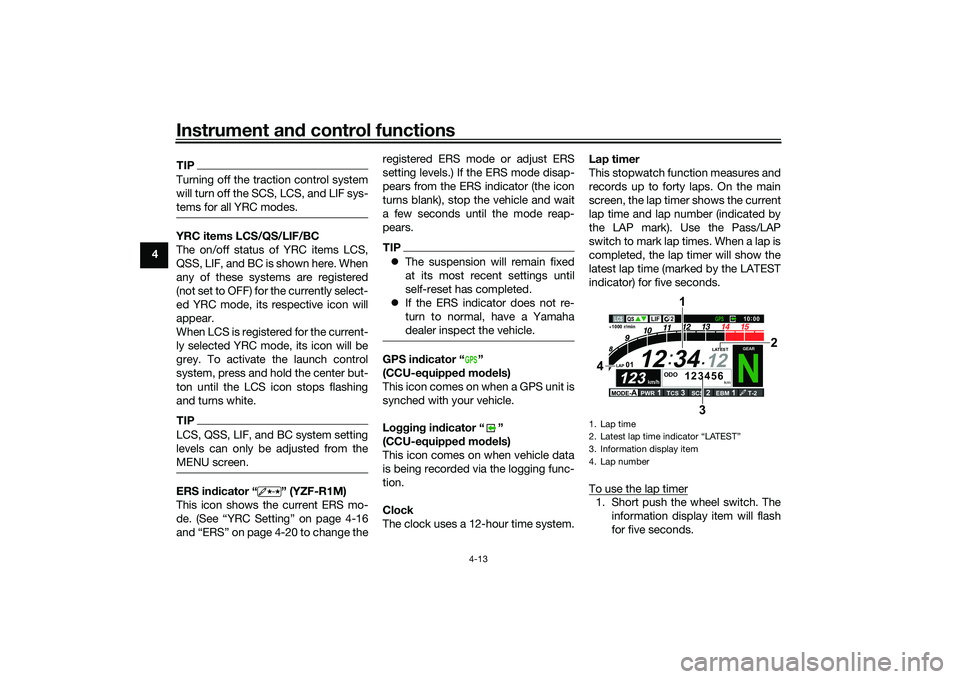
The clock uses a 12-hour time system. Lap timer
This stopwatch function measures and
records up to forty laps. On the main
screen, the lap timer shows the current
lap time and lap number (indicated by
the LAP mark). Use the Pass/LAP
switch to mark lap times. When a lap is
completed, the lap timer will show the
latest lap time (marked by the LATEST
indicator) for five seconds.
To use the lap timer
1. Short push the wheel switch. The
information display item will flash
for five seconds.
GPS
1. Lap time
2. Latest lap time indicator
Page 37 of 136
Instrument and control functions
4-14
4
2. While the information display item
is flashing, rotate the wheel switch
upward. The lap timer will flash for
five seconds.
3. While the lap timer is flashing, long push the wheel switch to activate
the lap timer or stop the lap timer.
4. When the lap timer has been acti- vated, press the Pass/LAP switch
to start the lap timer.
TIPThe engine must be running to use
the lap timer.
Set the information display to
FASTEST or AVERAGE for addi-
tional lap time information.
Accessing the MENU screen will
automatically stop the lap timer.
Whenever the lap timer is
stopped, the current lap will not be
recorded.
The lap time record can be viewed
and reset from the MENU screen.
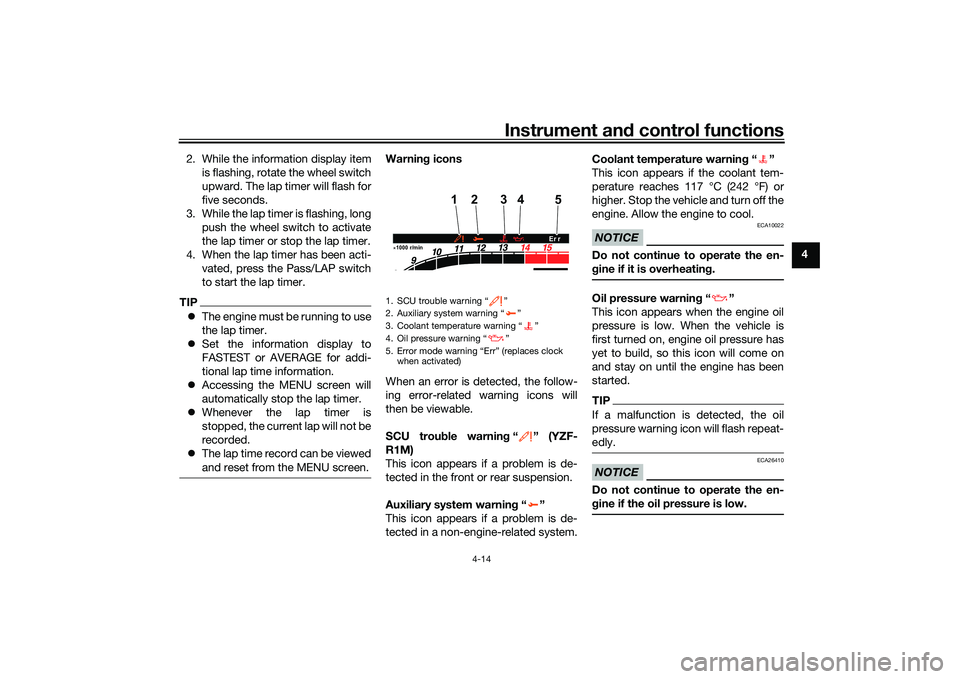
Warnin g icons
When an error is detected, the follow-
ing error-related warning icons will
then be viewable.
SCU trou ble warnin g“” (YZF-
R1M)
This icon appears if a problem is de-
tected in the front or rear suspension.
Auxiliary system warnin g“”
This icon appears if a problem is de-
tected in a non-engine-related system. Coolant temperature warnin
g“”
This icon appears if the coolant tem-
perature reaches 117 °C (242 °F) or
higher. Stop the vehicle and turn off the
engine. Allow the engine to cool.
NOTICE
ECA10022
Do not continue to operate the en-
g ine if it is overheatin g.Oil pressure warnin g“”
This icon appears when the engine oil
pressure is low. When the vehicle is
first turned on, engine oil pressure has
yet to build, so this icon will come on
and stay on until the engine has been
started.TIPIf a malfunction is detected, the oil
pressure warning icon will flash repeat-
edly.NOTICE
ECA26410
Do not continue to operate the en-
g ine if the oil pressure is low.
1. SCU trouble warning “ ”
2. Auxiliary system warning “ ”
3. Coolant temperature warning “ ”
4. Oil pressure warning “ ”
5. Error mode warning “Err” (replaces clock
when activated)1000 r/min
4
12
5
3
Er r
UB3LE1E0.book Page 14 Tuesday, August 10, 2021 2:28 PM
Page 38 of 136
Instrument and control functions
4-15
4 Error mo
de warnin g “Err”
When an internal error occurs (e.g.,
communication with a system control-
ler has been cut off), the error mode
warning will appear as follows.
“Err” and “ ” indicates an ECU error.
“Err” and “ ” indicates an SCU error.
“Err” only indicates an ABS ECU error.
TIPDepending on the nature of the error,
the display may not function properly
and YRC settings may be impossible
to change. Additionally, ABS may not
function properly. Use extra care when
braking and have a Yamaha dealer
check the vehicle immediately.
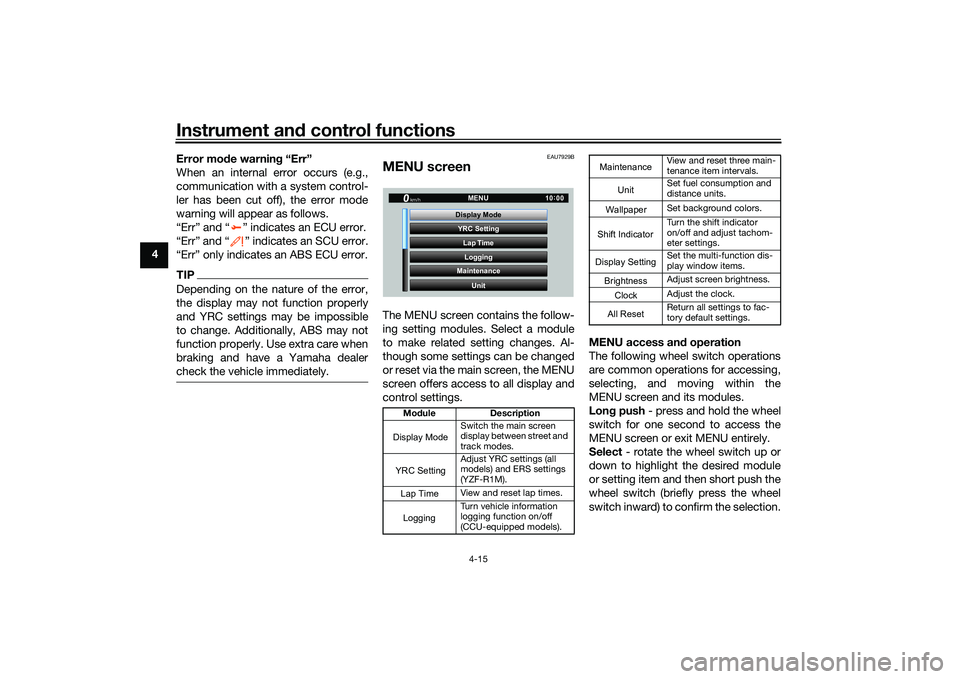
EAU7929B
MENU screenThe MENU screen contains the follow-
ing setting modules. Select a module
to make related setting changes. Al-
though some settings can be changed
or reset via the main screen, the MENU
screen offers access to all display and
control settings. MENU access an
d operation
The following wheel switch operations
are common operations for accessing,
selecting, and moving within the
MENU screen and its modules.
Lon g push - press and hold the wheel
switch for one second to access the
MENU screen or exit MENU entirely.
Select - rotate the wheel switch up or
down to highlight the desired module
or setting item and then short push the
wheel switch (briefly press the wheel
switch inward) to confirm the selection.
Mo dule Description
Switch the main screen
display between street and
track modes.
Adjust YRC settings (all
models) and ERS settings
(YZF-R1M).
View and reset lap times.
Turn vehicle information
logging function on/off
(CCU-equipped models).
YRC Setting
Lap TimeLogging
Maintenance
Unit
Display ModeMENU
km/h
GPS
10
:
00
Display ModeYRC SettingLogging
View and reset three main-
tenance item intervals.
Set fuel consumption and
distance units.
Set background colors.
Turn the shift indicator
on/off and adjust tachom-
eter settings.
Set the multi-function dis-
play window items.
Adjust screen brightness.
Adjust the clock.
Return all settings to fac-
tory default settings.
Maintenance
Unit
WallpaperShift IndicatorDisplay SettingBrightnessClockAll Reset
UB3LE1E0.book Page 15 Tuesday, August 10, 2021 2:28 PM
Page 39 of 136
Instrument and control functions
4-16
4
Trian
gle mark - certain setting
screens have an upward pointing trian-
gle mark item. Select the triangle mark
to save setting changes made and exit
that screen.
TIP Should vehicle motion be detect-
ed, the screen will automatically
exit MENU and change to the
main screen.
To ensure that the desired setting
changes are saved, be sure to exit
via the triangle mark. Simply per-
forming a long push and exiting
the MENU screen entirely may not
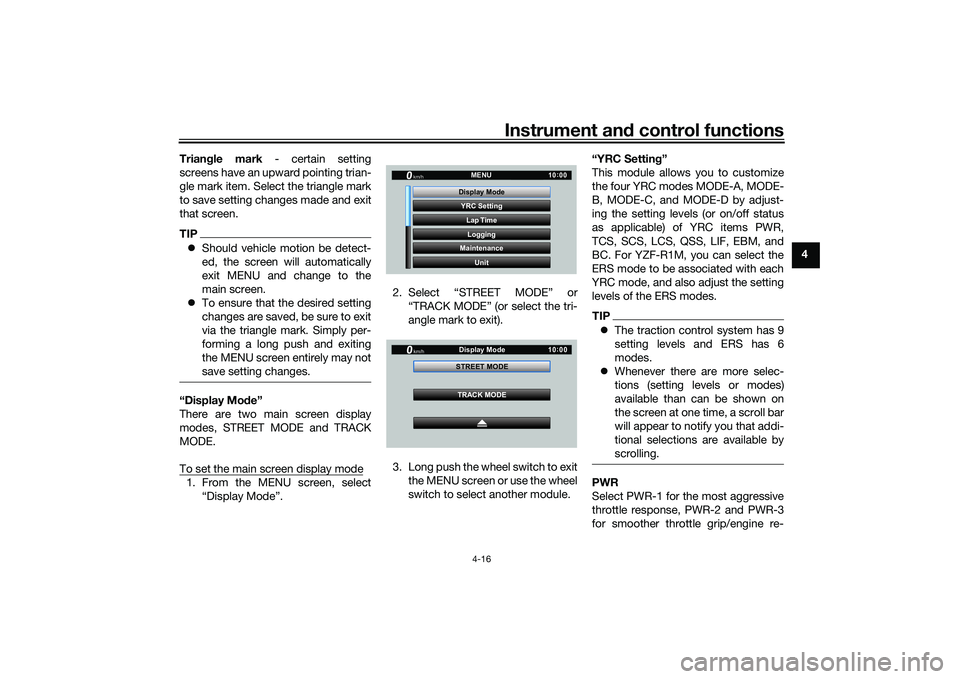
save setting changes.“Display Mo de”
There are two main screen display
modes, STREET MODE and TRACK
MODE.
To set the main screen display mode1. From the MENU screen, select “Display Mode”. 2. Select “STREET MODE” or
“TRACK MODE” (or select the tri-
angle mark to exit).
3. Long push the wheel switch to exit the MENU screen or use the wheel
switch to select another module. “YRC Settin
g”
This module allows you to customize
the four YRC modes MODE-A, MODE-
B, MODE-C, and MODE-D by adjust-
ing the setting levels (or on/off status
as applicable) of YRC items PWR,
TCS, SCS, LCS, QSS, LIF, EBM, and
BC. For YZF-R1M, you can select the
ERS mode to be associated with each
YRC mode, and also adjust the setting
levels of the ERS modes.
TIP The traction control system has 9
setting levels and ERS has 6
modes.
Whenever there are more selec-
tions (setting levels or modes)
available than can be shown on
the screen at one time, a scroll bar
will appear to notify you that addi-
tional selections are available by
scrolling.PWR
Select PWR-1 for the most aggressive
throttle response, PWR-2 and PWR-3
for smoother throttle grip/engine re-
YRC Setting
Lap TimeLogging
Maintenance
Unit
Display ModeMENU
km/h
GPS
10
:
00
km/h
10 :
00
TRACK MODE
STREET MODE
Display Mode
UB3LE1E0.book Page 16 Tuesday, August 10, 2021 2:28 PM
Page 41 of 136
Instrument and control functions
4-18
4
(the LCS icon will not appear and the
launch control function cannot be acti-
vated).
When LCS has been set to level 1 or 2
for the selected YRC mode, the LCS
indicator on the main screen will ap-
pear in a grey color to indicate that
LCS is available. When the launch con-
trol system has been activated (made
ready for use via the mode switch), the
LCS indicator will turn white.
TIPLCS works in conjunction with the LIF
system. LCS cannot be used if LIF is
turned off.Quick shifter
The quick shifter is divided into QS
(upshift) and QS (downshift) sec-
tions. QS and QS are not linked
and can be independently turned on or
off.
QS can be set to 1, 2, or OFF. Set-
ting level 1 is designed for maximum
acceleration, while setting level 2 is de-
signed to give smooth shifts at halfway
or less throttle openings. OFF turns the respective upshift or downshift func-
tion off, and the clutch lever must then
be used when shifting in that direction.
TIP
Set QS to 1 for track or sporty
riding.
Set QS to 2 for touring or
around town-riding.LIF
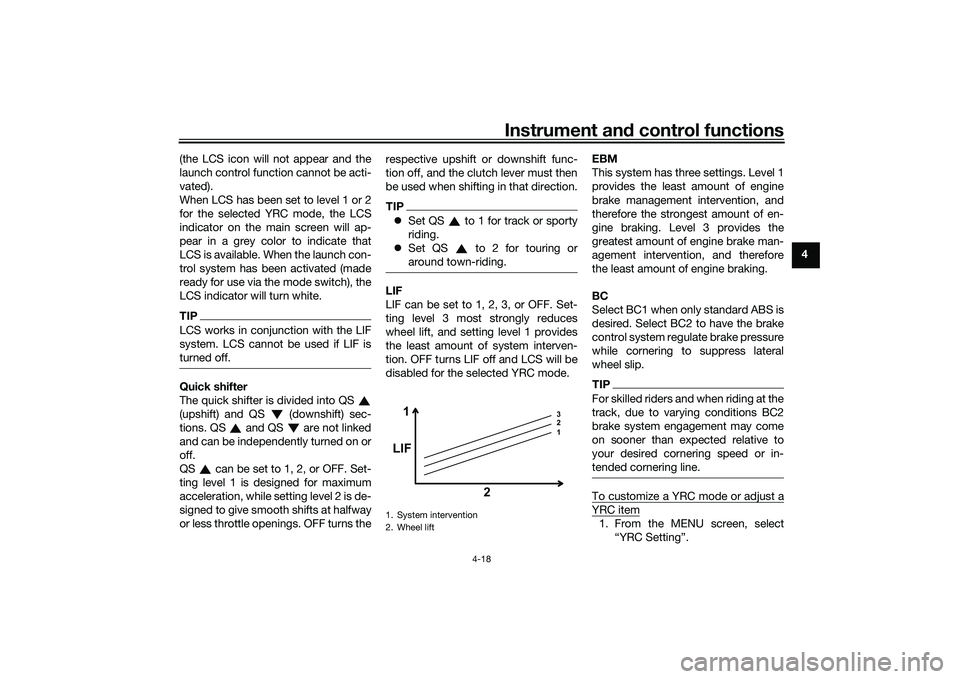
LIF can be set to 1, 2, 3, or OFF. Set-
ting level 3 most strongly reduces
wheel lift, and setting level 1 provides
the least amount of system interven-
tion. OFF turns LIF off and LCS will be
disabled for the selected YRC mode. EBM
This system has three settings. Level 1
provides the least amount of engine
brake management intervention, and
therefore the strongest amount of en-
gine braking. Level 3 provides the
greatest amount of engine brake man-
agement intervention, and therefore
the least amount of engine braking.
BC
Select BC1 when only standard ABS is
desired. Select BC2 to have the brake
control system regulate brake pressure
while cornering to suppress lateral
wheel slip.
TIPFor skilled riders and when riding at the
track, due to varying conditions BC2
brake system engagement may come
on sooner than expected relative to
your desired cornering speed or in-
tended cornering line.To customize a YRC mode or adjust aYRC item1. From the MENU screen, select
1. System intervention
2. Wheel lift
1 3
2
1
LIF
2
UB3LE1E0.book Page 18 Tuesday, August 10, 2021 2:28 PM
Page 42 of 136
Instrument and control functions
4-19
4
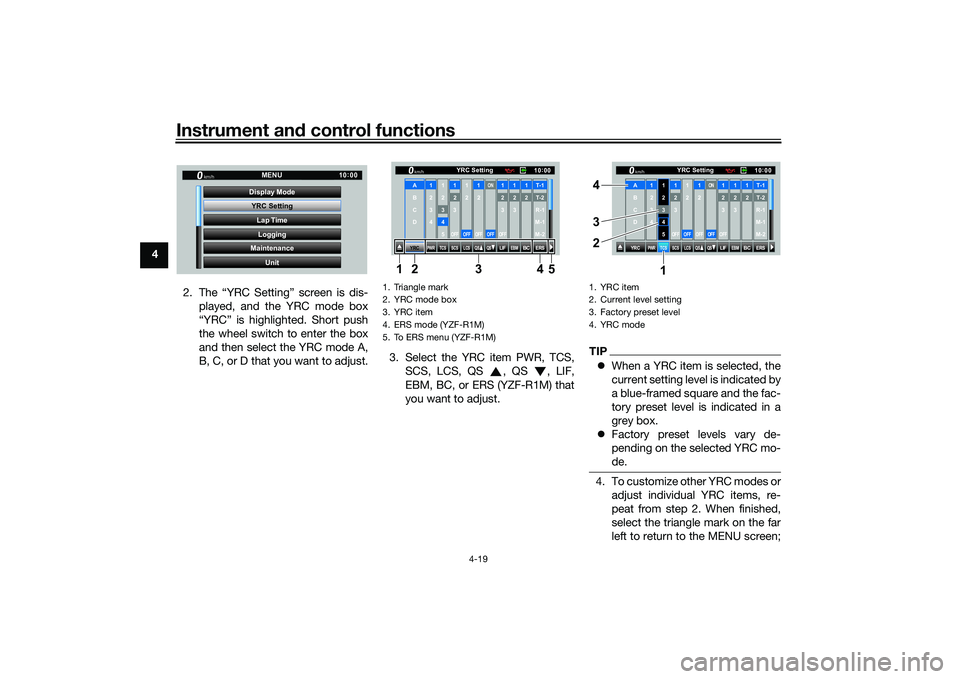
2. The “YRC Setting” screen is dis-played, and the YRC mode box
“YRC” is highlighted. Short push
the wheel switch to enter the box
and then select the YRC mode A,
B, C, or D that you want to adjust. 3. Select the YRC item PWR, TCS,
SCS, LCS, QS , QS , LIF,
EBM, BC, or ERS (YZF-R1M) that
you want to adjust.
TIPWhen a YRC item is selected, the
current setting level is indicated by
a blue-framed square and the fac-
tory preset level is indicated in a
grey box.
Factory preset levels vary de-
pending on the selected YRC mo-
de.4. To customize other YRC modes or
adjust individual YRC items, re-
peat from step 2. When finished,
select the triangle mark on the far
left to return to the MENU screen;
YRC Setting
Lap TimeLogging
Maintenance
Unit
Display ModeMENU
km/h
GPS
10
:
00
1. Triangle mark
2. YRC mode box
3. YRC item
4. ERS mode (YZF-R1M)
5. To ERS menu (YZF-R1MF
YRC
PWR
TCS
SCS
LCSQS
QS
LIFEBM
BC
ERS10 :
00
YRC Setting
km/hA
B
C
D
1
2
3
4
1 2345
12
3OFF
1 2OFF
12OFF
ON
OFF
12
3OFF
12
3
12T-1T-2
R-1
M-1
M-2
134 5
2
1. YRC item
2. Current level setting
3. Factory preset level
4. YRC mode
YRC
PWR
TCS
SCS
LCSQS
QS
LIFEBM
BC
ERS10:
00
YRC Setting
km/hA
B
C
D
1
2
3
4
1 2345
12
3OFF
1 2OFF
12OFF
ON
OFF
12
3OFF
12
3
12T-1T-2
R-1
M-1
M-2
1
3 4
2
UB3LE1E0.book Page 19 Tuesday, August 10, 2021 2:28 PM
Page 43 of 136
Instrument and control functions
4-20
4
or for YZF-R1M select the “ ”
mark to fine tune the ERS mode
settings.
ERS (YZF-R1M)
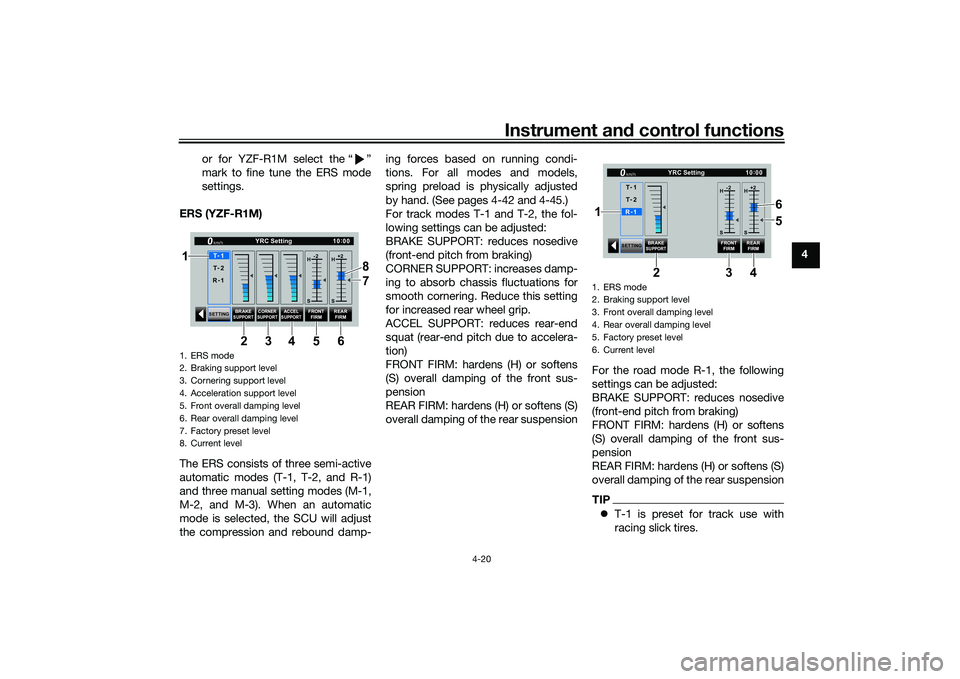
The ERS consists of three semi-active
automatic modes (T-1, T-2, and R-1)
and three manual setting modes (M-1,
M-2, and M-3). When an automatic
mode is selected, the SCU will adjust
the compression and rebound damp- ing forces based on running condi-
tions. For all modes and models,
spring preload is physically adjusted
by hand. (See pages 4-42 and 4-45.)
For track modes T-1 and T-2, the fol-
lowing settings can be adjusted:
BRAKE SUPPORT: reduces nosedive
(front-end pitch from braking)
CORNER SUPPORT: increases damp-
ing to absorb chassis fluctuations for
smooth cornering. Reduce this setting
for increased rear wheel grip.
ACCEL SUPPORT: reduces rear-end
squat (rear-end pitch due to accelera-
tion)
FRONT FIRM: hardens (H) or softens
(S) overall damping of the front sus-
pension
REAR FIRM: hardens (H) or softens (S)
overall damping of the rear suspension
For the road mode R-1, the following
settings can be adjusted:
BRAKE SUPPORT: reduces nosedive
(front-end pitch from braking)
FRONT FIRM: hardens (H) or softens
(S) overall damping of the front sus-
pension
REAR FIRM: hardens (H) or softens (S)
overall damping of the rear suspension
TIP
T-1 is preset for track use with
racing slick tires.
1. ERS mode
2. Braking support level
3. Cornering support level
4. Acceleration support level
5. Front overall damping level
6. Rear overall damping level
7. Factory preset level
8. Current level
SETTING BRAKE
SUPPORT CORNER
SUPPORT
ACCELSUPPORT
FRONT FIRM REAR
FIRM
10 :
00
YRC Setting
km/hT -
1
H -2
S H
+2
S
T -
2
R -
1
1
34 8
5 7
6
2
1. ERS mode
2. Braking support level
3. Front overall damping level
4. Rear overall damping level
5. Factory preset level
6. Current level
SETTING
BRAKE
SUPPORT
FRONT
FIRM REAR
FIRM
10 :
00
YRC Setting
km/hR -
1
H -2
S H
+2
S
T -
1
T -
2
34
2
6
5
1
UB3LE1E0.book Page 20 Tuesday, August 10, 2021 2:28 PM
Page 44 of 136
Instrument and control functions
4-21
4
T-2 is preset for track use with
street tires.
R-1 is preset for road use with
street tires.
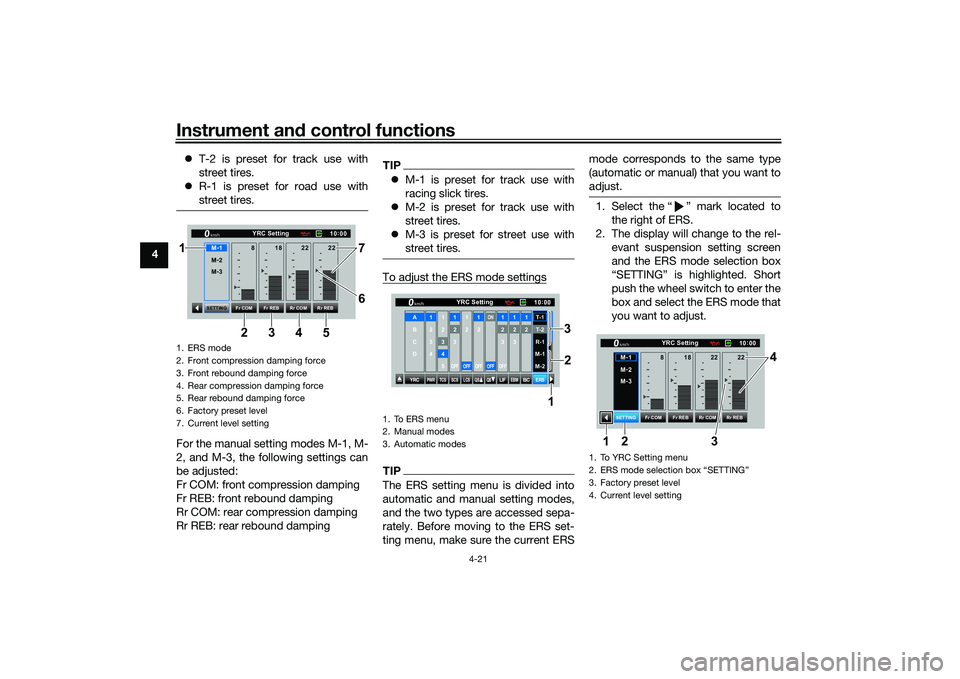
For the manual setting modes M-1, M-
2, and M-3, the following settings can
be adjusted:
Fr COM: front compression damping
Fr REB: front rebound damping
Rr COM: rear compression damping
Rr REB: rear rebound damping
TIPM-1 is preset for track use with
racing slick tires.
M-2 is preset for track use with
street tires.
M-3 is preset for street use with
street tires.To adjust the ERS mode settingsTIPThe ERS setting menu is divided into
automatic and manual setting modes,
and the two types are accessed sepa-
rately. Before moving to the ERS set-
ting menu, make sure the current ERS mode corresponds to the same type
(automatic or manual) that you want to
adjust.
1. Select the Ž mark located to
the right of ERS.
2. The display will change to the rel- evant suspension setting screen
and the ERS mode selection box
push the wheel switch to enter the
box and select the ERS mode that
you want to adjust.
1. ERS mode
2. Front compression damping force
3. Front rebound damping force
4. Rear compression damping force
5. Rear rebound damping force
6. Factory preset level
7. Current level setting
10:
00
YRC Setting
km/hM -
2
M -
3
Fr COM Rr COM
Fr REB Rr REB
SETTING
18
8 22 22
M -
134 7
5 6
2
1
1. To ERS menu
2. Manual modes
3. Automatic modes
YRC
PWR
TCS
SCS
LCSQS
QS
LIFEBM
BC
ERS10
:
00
YRC Setting
km/hA
B
C
D
1
2
3
4
1 2345
12
3OFF
1 2OFF
12OFF
ON
OFF
12
3OFF
12
3
12T-1T-2
R-1
M-1
M-2
1
2
3
1. To YRC Setting menu
2. ERS mode selection box
Page 45 of 136
Instrument and control functions
4-22
4
3. Select the suspension item that
you want to adjust, and then ro-
tate the wheel switch to adjust the
setting level.
TIPAll ERS modes regardless of type are
independent. Offset level setting
changes made in one mode are not
transferred to another mode.4. To adjust other ERS modes of thesame type, repeat from step 1. To
switch types or when finished, se-
lect the Ž mark to return to the
“Lap Time”
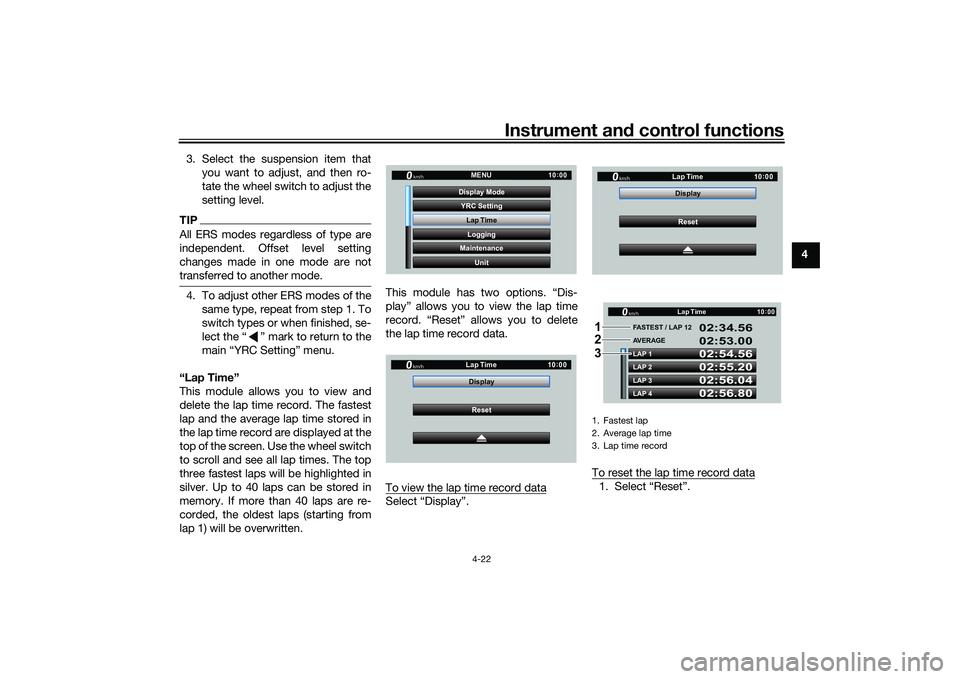
This module allows you to view and
delete the lap time record. The fastest
lap and the average lap time stored in
the lap time record are displayed at the
top of the screen. Use the wheel switch
to scroll and see all lap times. The top
three fastest laps will be highlighted in
silver. Up to 40 laps can be stored in
memory. If more than 40 laps are re-
corded, the oldest laps (starting from
lap 1) will be overwritten. This module has two options. “Dis-
play” allows you to view the lap time
record. “Reset” allows you to delete
the lap time record data.
To view the lap time record data
Select “Display”.
To reset the lap time record data
1. Select “Reset”.
YRC Setting
Lap TimeLogging
Maintenance
Unit
Display ModeMENU
km/h
GPS
10
:
00
km/h
10 :
00
Reset
Display
Lap Time
1. Fastest lap
2. Average lap time
3. Lap time record
km/h
10
:
00
Reset
Display
Lap Time
LAP 1
LAP 2
LAP 3
LAP 4 FASTEST / LAP 12
02:54.56
02:55.20
02:56.04
02:56.80 02:34.56
02:53.00
AVERAGE Lap Timekm/h
GP GPS
10
:
00
1
2
3
UB3LE1E0.book Page 22 Tuesday, August 10, 2021 2:28 PM
Page 47 of 136
Instrument and control functions
4-24
4
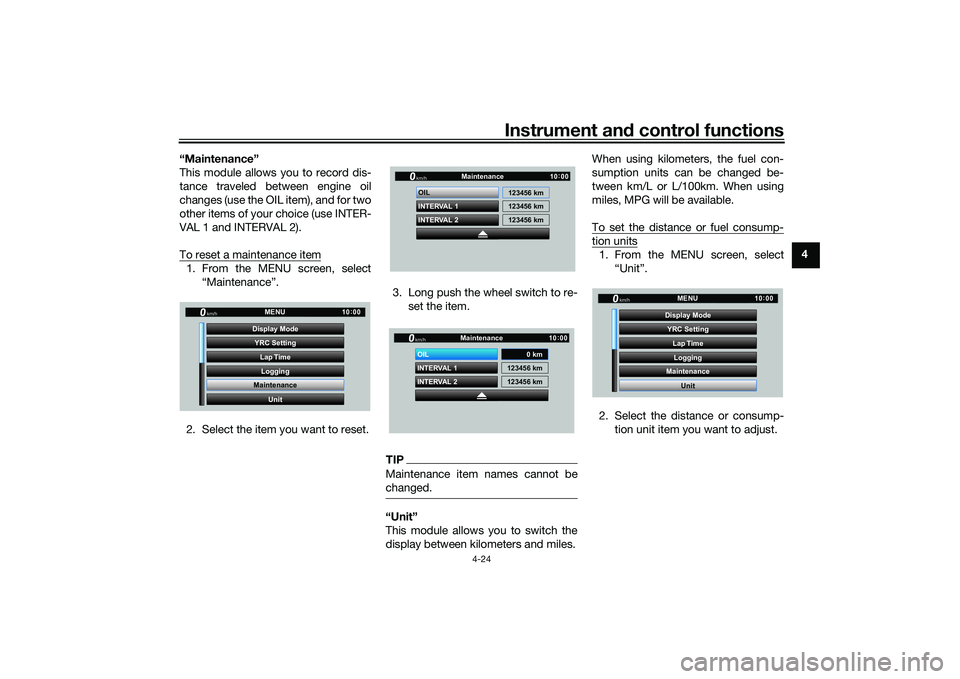
“Maintenance”
This module allows you to record dis-
tance traveled between engine oil
changes (use the OIL item), and for two
other items of your choice (use INTER-
VAL 1 and INTERVAL 2).
To reset a maintenance item
1. From the MENU screen, select
“Maintenance”.
2. Select the item you want to reset. 3. Long push the wheel switch to re-
set the item.
TIPMaintenance item names cannot be
changed.“Unit”
This module allows you to switch the
display between kilometers and miles. When using kilometers, the fuel con-
sumption units can be changed be-
tween km/L or L/100km. When using
miles, MPG will be available.
To set the distance or fuel consump-
tion units1. From the MENU screen, select
“Unit”.
2. Select the distance or consump- tion unit item you want to adjust.
YRC Setting
Lap TimeLogging
Maintenance
Unit
Display ModeMENU
km/h
GPS
10
:
00
INTERVAL 2 OIL
INTERVAL 1 123456 km
123456 km
123456 km
Maintenancekm/h
GPS
10
:
00
INTERVAL 2 OIL
INTERVAL 1 123456 km
123456 km
Maintenancekm/h
GPS
10
:
00
0 km
YRC Setting
Lap TimeLogging
Maintenance
Unit
Display ModeMENU
km/h
GPS
10
:
00
UB3LE1E0.book Page 24 Tuesday, August 10, 2021 2:28 PM