fuel YAMAHA YZF-R3 2018 Owners Manual
[x] Cancel search | Manufacturer: YAMAHA, Model Year: 2018, Model line: YZF-R3, Model: YAMAHA YZF-R3 2018Pages: 100, PDF Size: 3.79 MB
Page 5 of 100

Table of contents
Safety information ............................1-1
Description ........................................2-1
Left view ..........................................2-1
Right view........................................2-2
Controls and instruments ................2-3
Instrument an d control functions ....3-1
Main switch/steering lock ...............3-1
Indicator lights and warning lights ............................................3-2
Multi-function meter unit .................3-4
Handlebar switches.......................3-11
Clutch lever ...................................3-12
Shift pedal .....................................3-13
Brake lever ....................................3-13
Brake pedal ...................................3-14
ABS ...............................................3-14
Fuel tank cap.................................3-15
Fuel................................................3-16
Fuel tank overflow hose ................3-17
Catalytic converter ........................3-18
Seats .............................................3-18
Helmet holders ..............................3-20
Storage compartment ...................3-21
Rear view mirrors ..........................3-21
Adjusting the shock absorber assembly....................................3-22
Luggage strap holders ..................3-23
Sidestand ......................................3-23
Ignition circuit cut-off system........3-24
For your safety – pre-operation
checks ...............................................4-1
Operation an d important ri din g
points .................................................5-1
Starting the engine ..........................5-2
Shifting ............................................5-3
Engine break-in ...............................5-4
Parking ............................................5-4
Perio dic maintenance an d
a d justment ........................................6-1
Owner’s tool kit ...............................6-2 Periodic maintenance chart for
the emission control system........ 6-3
General maintenance and lubrication chart........................... 6-4
Checking the spark plugs ............... 6-7
Canister........................................... 6-8
Engine oil and oil filter cartridge ..... 6-8
Coolant ......................................... 6-11
Replacing the air filter element
and cleaning the check hose..... 6-13
Checking the throttle grip free
play ............................................ 6-15
Valve clearance ............................. 6-15
Tires .............................................. 6-16
Cast wheels .................................. 6-18
Adjusting the clutch lever free play ..................................... 6-18
Checking the brake lever free play ..................................... 6-20
Brake light switches ...................... 6-20
Checking the front and rear
brake pads................................. 6-21
Checking the brake fluid level....... 6-22
Changing the brake fluid............... 6-23
Drive chain slack ........................... 6-23
Cleaning and lubricating the
drive chain ................................. 6-25
Checking and lubricating the cables ........................................ 6-25
Checking and lubricating the throttle grip and cable ............... 6-26
Checking and lubricating the
brake and shift pedals ............... 6-26
Checking and lubricating the brake and clutch levers ............. 6-27
Checking and lubricating the sidestand ................................... 6-27
Lubricating the swingarm pivots... 6-28
Checking the front fork ................. 6-28
Checking the steering ................... 6-29
Checking the wheel bearings ....... 6-29
Battery .......................................... 6-30
Replacing the fuses ...................... 6-31
Replacing a headlight bulb ........... 6-33
Auxiliary light bulb......................... 6-35
Tail/brake light .............................. 6-35
UBR5E0E0.book Page 1 Wednesday, July 5, 2017 11:10 AM
Page 11 of 100

Safety information
1-5
1
operator and may limit control
ability, therefore, such accesso-
ries are not recommended.
Use caution when adding electri-
cal accessories. If electrical ac-
cessories exceed the capacity of
the motorcycle’s electrical sys-
tem, an electric failure could re-
sult, which could cause a
dangerous loss of lights or engine
power.
Aftermarket Tires an d Rims
The tires and rims that came with your
motorcycle were designed to match
the performance capabilities and to
provide the best combination of han-
dling, braking, and comfort. Other
tires, rims, sizes, and combinations
may not be appropriate. See page 6-16
for tire specifications and for informa-
tion on servicing and replacing your
tires.
Transportin g the Motorcycle
Be sure to observe following instruc-
tions before transporting the motorcy-
cle in another vehicle. Remove all loose items from the
motorcycle.
Check that the fuel cock (if
equipped) is in the off position and
that there are no fuel leaks.
Shift the transmission into gear
(for models with a manual trans-
mission).
Secure the motorcycle with tie-
downs or suitable straps that are
attached to solid parts of the mo-
torcycle, such as the frame or up-
per front fork triple clamp (and not,
for example, to rubber-mounted handlebars or turn signals, or
parts that could break). Choose
the location for the straps carefully
so the straps will not rub against
painted surfaces during transport.
The suspension should be com-
pressed somewhat by the tie-
downs, if possible, so that the mo-
torcycle will not bounce exces-
sively during transport.
UBR5E0E0.book Page 5 Wednesday, July 5, 2017 11:10 AM
Page 13 of 100
Description
2-2
2
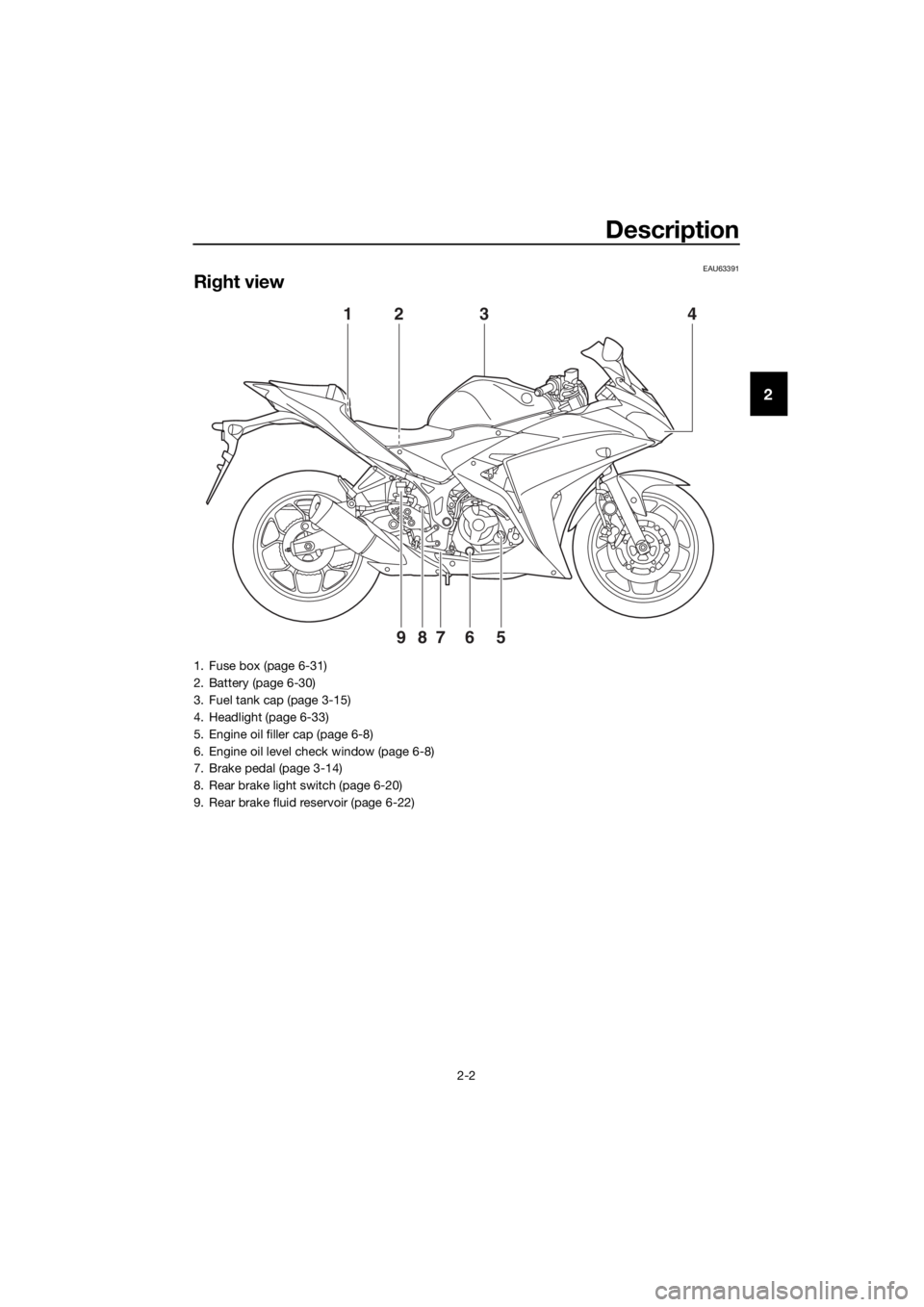
EAU63391
Right view
4
9
123
8765
1. Fuse box (page 6-31)
2. Battery (page 6-30)
3. Fuel tank cap (page 3-15)
4. Headlight (page 6-33)
5. Engine oil filler cap (page 6-8)
6. Engine oil level check window (page 6-8)
7. Brake pedal (page 3-14)
8. Rear brake light switch (page 6-20)
9. Rear brake fluid reservoir (page 6-22)
UBR5E0E0.book Page 2 Wednesday, July 5, 2017 11:10 AM
Page 18 of 100

Instrument and control functions
3-4
3 b
rakin g. Have a Yamaha dealer
check the brake system an d electri-
cal circuits as soon as possi ble.
TIP
If the start switch is pushed while the
engine is running, the ABS warning
light will come on, but this is not a mal-
function.
EAU62470Shift timin g in dicator li ght
This indicator light can be set to come
on and go off at the desired engine
speeds and is used to inform the rider
when it is time to shift to the next high-
er gear. (See page 3-9 for a more de-
tailed explanation of this indicator light
and on how to set it.)
The electrical circuit of the indicator
light can be checked by turning the key
to “ ”. The indicator light should
come on for a few seconds, and then
go off.
If the indicator light does not come on
initially when the key is turned to “ ”,
or if the indicator light remains on, have
a Yamaha dealer check the electrical
circuit.
EAUN1470
Multi-function meter unit
WARNING
EWA12423
Be sure to stop the vehicle before
makin g any settin g chan ges to the
multi-function meter unit. Chang ing
settin gs while ri din g can d istract the
operator an d increase the risk of an
acci dent.
The multi-function meter unit is
equipped with the following:
a speedometer
a tachometer
a clock
a fuel meter
a coolant temperature meter
a transmission gear display
a multi-function display
a shift timing indicator light
1. “SEL” button
2. “RES” button
3. Tachometer
4. Fuel meter
5. Shift timing indicator light
6. Clock
7. Transmission gear display
8. Speedometer
9. Multi-function display
10.Coolant temperature meter
1091 3
246578
km/hkm/L
L/100kmMPH
mileMPG
UBR5E0E0.book Page 4 Wednesday, July 5, 2017 11:10 AM
Page 19 of 100

Instrument and control functions
3-5
3
Speed
ometer
The speedometer shows the vehicle’s
traveling speed.
TIP
For the UK: to switch the speedometer
and multi-function displays between
kilometers and miles, press the “SEL”
button for one second.
Tachometer
The tachometer allows the rider to
monitor the engine speed and keep it
within the ideal power range.
When the key is turned to “ ”, the ta-
chometer will sweep across the r/min
range and then return to zero r/min in
order to test the electrical circuit.
NOTICE
ECA10032
Do not operate the en gine in the ta-
chometer re d zone.
Re d zone: 12500 r/min an d a bove
Clock
The clock displays time in 12-hour for-
mat.
To set the clock
1. Turn the key to “ ”.
2. Push the “SEL” button and “RES”
button together for at least two
seconds.
3. When the hour digits start flash- ing, push the “RES” button to set
the hours.
4. Push the “SEL” button, and the minute digits will start flashing.
5. Push the “RES” button to set the minutes.
6. Push the “SEL” button and then release it to start the clock.
Fuel meter
1. Tachometer
2. Tachometer red zone
21
km/hkm/L
L/100kmMPH
mileMPG
1. Clock
1. Fuel meter
1
1
UBR5E0E0.book Page 5 Wednesday, July 5, 2017 11:10 AM
Page 20 of 100

Instrument and control functions
3-6
3 The fuel meter indicates the amount of
fuel in the fuel tank.
When the key is turned to “ ”, the dis-
play segments of the fuel meter will
sweep once across the fuel level range
and then return to the current amount
in order to test the electrical circuit.
The display segments of the fuel meter
disappear from “F” (full) towards “E”
(empty) as the fuel level decreases.
When the last segment starts flashing,
refuel as soon as possible.
TIP
If a problem is detected in the fuel me-
ter electrical circuit, the fuel meter will
flash repeatedly.
Coolant temperature meter
The coolant temperature meter indi-
cates the temperature of the coolant.
When the key is turned to “ ”, the dis-
play segments of the digital coolant
temperature meter will sweep once
across the temperature range and then
return to “C” in order to test the electri-
cal circuit.
If the last segment on the right flashes,
stop the vehicle, then stop the engine,
and let the engine cool. (See page
6-40.)
NOTICE
ECA10022
Do not continue to operate the en-
g
ine if it is overheatin g.
TIP
The coolant temperature varies with
changes in the weather and engine
load.
Transmission gear display
This display shows the selected gear.
The neutral position is indicated by “ ”
and by the neutral indicator light.
Multi-function display
The multi-function display is equipped
with the following: an odometer
1. Coolant temperature meter
1
1. Neutral indicator light “ ”
2. Transmission gear display
1. Multi-function display
12
MPH
km/h
km
1
UBR5E0E0.book Page 6 Wednesday, July 5, 2017 11:10 AM
Page 21 of 100

Instrument and control functions
3-7
3
two tripmeters
a fuel reserve tripmeter
an instantaneous fuel consump-
tion display
an average fuel consumption dis-
play
an oil change tripmeter
an oil change indicator
The odometer shows the total distance
traveled by the vehicle.
The tripmeters show the distance trav-
eled since they were last reset.
The fuel reserve tripmeter shows the
distance traveled since the fuel level
warning light came on.
For Europe:
Push the “SEL” button to switch the
display between the odometer mode
“ODO”, tripmeter modes “TRIP 1” and
“TRIP 2”, instantaneous fuel consump-
tion mode “L/100 km” or “km/L”, aver-
age fuel consumption mode “AVE_ _._
L/100 km” or “AVE_ _._ km/L” and oil
change tripmeter mode “OIL TRIP” in
the following order:
ODO → TRIP 1 → TRIP 2 → L/100 km
or km/L → AVE_ _._ L/100 km or AVE_
_._ km/L → OIL TRIP → ODO
If the left segment of the fuel meter
starts flashing, the display automati-
cally changes to the fuel reserve trip-
meter mode “TRIP F” and starts
counting the distance traveled from
that point. In that case, push the “SEL”
button to switch the display between
the various tripmeter, odometer, in- stantaneous fuel consumption and av-
erage fuel consumption modes in the
following order:
TRIP F
→ L/100 km or km/L → AVE_
_._ L/100 km or AVE_ _._ km/L → OIL
TRIP → ODO → TRIP 1 → TRIP 2 →
TRIP F
To reset a tripmeter, select it by push-
ing the “SEL” button, and then push
the “RES” button for at least one se-
cond.
If you do not reset the fuel reserve trip-
meter manually, it resets itself auto-
matically and the display returns to the
prior mode after refueling and traveling
5 km (3 mi).
For the UK:
Push the “SEL” button to switch the
display between the odometer mode
“ODO”, tripmeter modes “TRIP 1” and
“TRIP 2”, instantaneous fuel consump-
tion mode “MPG”, “L/100 km” or
“km/L”, average fuel consumption
mode “AVE_ _._ MPG”, “AVE_ _._
L/100 km” or “AVE_ _._ km/L” and oil
change tripmeter mode “OIL TRIP” in
the following order:
ODO → TRIP 1 → TRIP 2 → MPG,
L/100 km or km/L → AVE_ _._ MPG,
AVE_ _._ L/100 km or AVE_ _._ km/L →
OIL TRIP → ODO
If the left segment of the fuel meter
starts flashing, the display automati-
cally changes to the fuel reserve trip-
meter mode “TRIP F” and starts
counting the distance traveled from
UBR5E0E0.book Page 7 Wednesday, July 5, 2017 11:10 AM
Page 22 of 100

Instrument and control functions
3-8
3 that point. In that case, push the “SEL”
button to switch the display between
the various tripmeter, odometer, in-
stantaneous fuel consumption and av-
erage fuel consumption modes in the
following order:
TRIP F
→ MPG, L/100 km or km/L →
AVE_ _._ MPG, AVE_ _._ L/100 km or
AVE_ _._ km/L → OIL TRIP → ODO →
TRIP 1 → TRIP 2 → TRIP F
To reset a tripmeter, select it by push-
ing the “SEL” button, and then push
the “RES” button for at least one se-
cond.
If you do not reset the fuel reserve trip-
meter manually, it resets itself auto-
matically and the display returns to the
prior mode after refueling and traveling
5 km (3 mi).
TIP
The odometer will lock at 999999.
The tripmeters will reset and con-
tinue counting after 9999.9 is
reached.
Instantaneous fuel consumption
display
The instantaneous fuel consumption
display can be set to either “L/100 km”,
“km/L” or “MPG” (for the UK).
“L/100 km”: The amount of fuel
necessary to travel 100 km under
the current riding conditions is
shown.
“km/L”: The distance that can be
traveled on 1.0 L of fuel under the
current riding conditions is shown.
“MPG” (for the UK): The distance
that can be traveled on 1.0 Imp.
gal of fuel under the current riding
conditions is shown.
To switch between the instantaneous
fuel consumption displays, push the
“SEL” button for one second.
TIP
If traveling at speeds under 20 km/h
(12 mi/h), “_ _._” is displayed.
Avera ge fuel consumption display
The average fuel consumption display
can be set to either “AVE_ _._ L/100
km”, “AVE_ _._ km/L” or “AVE_ _._
MPG” (for the UK).
This display shows the average fuel
consumption since it was last reset. “AVE_ _._ L/100 km”: The average
amount of fuel necessary to travel
100 km is shown.
“AVE_ _._ km/L”: The average dis-
tance that can be traveled on 1.0 L
of fuel is shown.
1. Instantaneous fuel consumption display
MPH
km/h
km/L
11. Average fuel consumption display
MPH
km/h
km/L
1
UBR5E0E0.book Page 8 Wednesday, July 5, 2017 11:10 AM
Page 23 of 100

Instrument and control functions
3-9
3
“AVE_ _._ MPG” (for the UK): The
average distance that can be trav-
eled on 1.0 Imp. gal of fuel is
shown.
To switch between the average fuel
consumption displays, push the “SEL”
button for one second.
To reset the average fuel consumption
display, push the “RES” button for at
least one second.
TIP
After resetting the average fuel con-
sumption display, “_ _._” is shown until
the vehicle has traveled 1 km (0.6 mi).
Oil chan ge tripmeter
The oil change tripmeter shows the
distance traveled since it was last reset
(i.e., since the last oil change).
The oil change indicator “OIL” will flash
at the initial 1000 km (600 mi), then at
5000 km (3000 mi) and every 5000 km
(3000 mi) thereafter to indicate that the
engine oil should be changed.
After changing the engine oil, reset the
oil change tripmeter and the oil change
indicator. To reset them both, select
the oil change tripmeter, and then push
the “RES” button for one second.
Then, while “OIL” and the oil change tripmeter are flashing, push the “RES”
button for three seconds. The oil chan-
ge indicator will be reset.
If the engine oil is changed before the
oil change indicator comes on (i.e., be-
fore the periodic oil change interval has
been reached), the oil change tripmeter
must be reset for the next periodic oil
change to be indicated at the correct
time.
Shift timin
g in dicator li ght
The shift timing indicator light has four
settings which can be adjusted. Flashing pattern: this function al-
lows you to choose whether or not
the indicator light will come on and
whether it should flash or stay on
when activated.
Activation point: this function al-
lows you to select the engine
speed at which the indicator light
is activated.
Deactivation point: this function
allows you to select the engine
speed at which the indicator light
is deactivated.
Brightness: this function allows
you to adjust the brightness of the
indicator light.
1. Oil change indicator “OIL”
2. Oil change tripmeter
MPH
km/h
km
21
1. Shift timing indicator light
2. Brightness level display
1
2
km/hMPH
UBR5E0E0.book Page 9 Wednesday, July 5, 2017 11:10 AM
Page 29 of 100

Instrument and control functions
3-15
3
This ABS has a test mode which
allows the owner to experience
the pulsation at the brake lever or
brake pedal when the ABS is op-
erating. However, special tools are
required, so please consult your
Yamaha dealer.
NOTICE
ECA20100
Be careful not to damag e the wheel
sensor or wheel sensor rotor; other-
wise, improper performance of the
ABS will result.
EAU13075
Fuel tank cap
To open the fuel tank cap
Open the fuel tank cap lock cover, in-
sert the key into the lock, and then turn
it 1/4 turn clockwise. The lock will be
released and the fuel tank cap can be
opened.
To close the fuel tank cap 1. Push the fuel tank cap into posi- tion with the key inserted in the
lock.
2. Turn the key counterclockwise to the original position, remove it,
and then close the lock cover.
TIP
The fuel tank cap cannot be closed un-
less the key is in the lock. In addition,
the key cannot be removed if the cap is
not properly closed and locked.
WARNING
EWA11092
Make sure that the fuel tank cap is
properly close d after fillin g fuel.
Leakin g fuel is a fire hazar d.
1. Front wheel sensor
2. Front wheel sensor rotor
1. Rear wheel sensor
2. Rear wheel sensor rotor
1
2
1
2
1. Fuel tank cap lock cover
2. Unlock.
2 1
UBR5E0E0.book Page 15 Wednesday, July 5, 2017 11:10 AM