key YAMAHA YZF-R6 2013 User Guide
[x] Cancel search | Manufacturer: YAMAHA, Model Year: 2013, Model line: YZF-R6, Model: YAMAHA YZF-R6 2013Pages: 110, PDF Size: 2.43 MB
Page 26 of 110

INSTRUMENT AND CONTROL FUNCTIONS
3-11
3
●
When the air intake temperature
display is selected, “A” is displayed
before the temperature.
Self-diagnosis device
This model is equipped with a self-diag-
nosis device for various electrical cir-
cuits.
If a problem is detected in any of those
circuits, the engine trouble warning light
will come on and the right display will in-
dicate an error code.
If the right display indicates any error
codes, note the code number, and then
have a Yamaha dealer check the vehi-
cle.The self-diagnosis device also detects
problems in the immobilizer system cir-
cuits.
If a problem is detected in the immobi-
lizer system circuits, the immobilizer
system indicator light will flash and the
right display will indicate an error code.
TIPIf the right display indicates error code
52, this could be caused by transpon-
der interference. If this error code ap-
pears, try the following.1. Use the code re-registering key to
start the engine.TIPMake sure there are no other immobi-
lizer keys close to the main switch, and
do not keep more than one immobilizer
key on the same key ring! Immobilizer
system keys may cause signal interfer-
ence, which may prevent the engine
from starting.2. If the engine starts, turn it off andtry starting the engine with the
standard keys. 3. If one or both of the standard keys
do not start the engine, take the
vehicle, the code re-registering
key and both standard keys to a
Yamaha dealer and have the stan-
dard keys re-registered.
NOTICE
ECA11590
If the display indicates an error
code, the vehicle should be checked
as soon as possible in order to avoid
engine damage.Display brightness and shift timing
indicator light control mode
1. Immobilizer system indicator light
2. Engine trouble warning light “ ”
3. Error code display
321
1. Shift timing indicator light activation range
2. Brightness adjustable displays
3. Brightness level display
4. Shift timing indicator light
km/h
1
2
3
4
2
U1JSE1E0.book Page 11 Wednesday, June 6, 2012 10:05 AM
Page 27 of 110

INSTRUMENT AND CONTROL FUNCTIONS
3-12
3
This mode cycles through five control
functions, allowing you to make the fol-
lowing settings in the order listed be-
low.
●
Display brightness:
This function allows you to adjust
the brightness of the displays and
tachometer to suit the outside
lighting conditions.
●
Shift timing indicator light activity:
This function allows you to choose
whether or not the indicator light
should be activated and whether it
should flash or stay on when acti-
vated.
●
Shift timing indicator light activa-
tion:
This function allows you to select
the engine speed at which the indi-
cator light will be activated.
●
Shift timing indicator light deactiva-
tion:
This function allows you to select
the engine speed at which the indi-
cator light will be deactivated.
●
Shift timing indicator light bright-
ness:
This function allows you to adjust
the brightness of the indicator light
to suit your preference.
TIPIn this mode, the right display shows
the current setting for each function
(except the shift timing indicator light
activity function).To adjust the brightness of the multi-function meter displays and tachometer1. Turn the key to “OFF”.
2. Push and hold the “SELECT” but-
ton.
3. Turn the key to “ON”, and then re- lease the “SELECT” button after
five seconds.
4. Push the “RESET” button to select the desired brightness level.
5. Push the “SELECT” button to con- firm the selected brightness level.
The control mode changes to the
shift timing indicator light activity
function. To set the shift timing indicator light ac-
tivity function1. Push the “RESET” button to select
one of the following indicator light
activity settings:
●
The indicator light will stay on
when activated. (This setting
is selected when the indicator
light stays on.)
●
The indicator light will flash
when activated. (This setting
is selected when the indicator
light flashes four times per
second.)
●
The indicator light is deacti-
vated; in other words, it will
not come on or flash. (This
setting is selected when the
indicator light flashes once
every two seconds.)
2. Push the “SELECT” button to con- firm the selected indicator light ac-
tivity. The control mode changes to
the shift timing indicator light acti-
vation function.
U1JSE1E0.book Page 12 Wednesday, June 6, 2012 10:05 AM
Page 29 of 110
INSTRUMENT AND CONTROL FUNCTIONS
3-14
3
EAU1234A
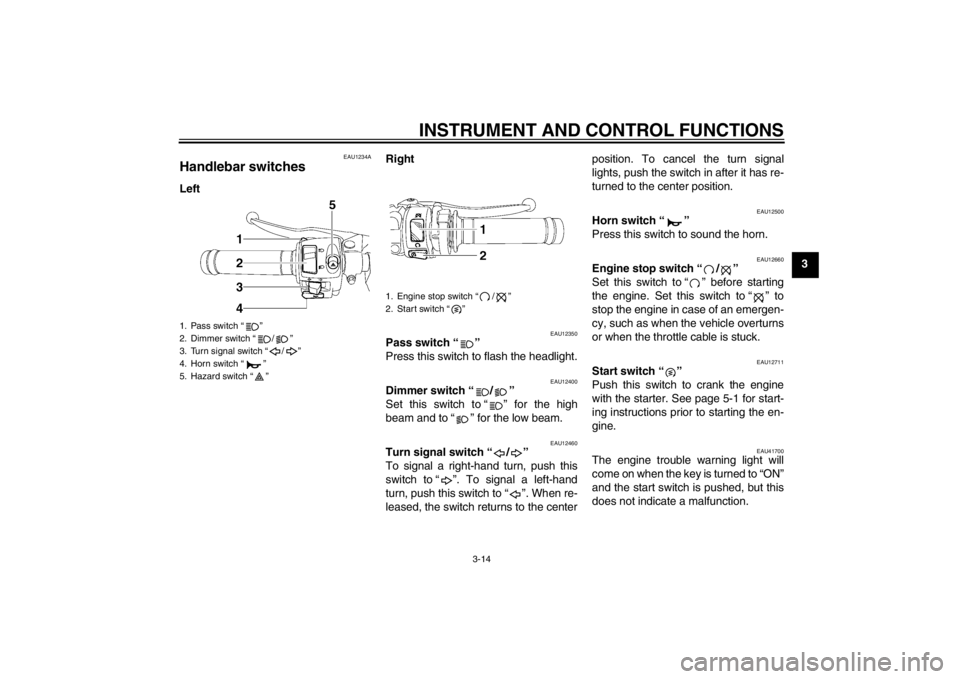
Handlebar switches LeftRight
EAU12350
Pass switch “ ”
Press this switch to flash the headlight.
EAU12400
Dimmer switch “ / ”
Set this switch to “ ” for the high
beam and to “ ” for the low beam.
EAU12460
Turn signal switch “ / ”
To signal a right-hand turn, push this
switch to “ ”. To signal a left-hand
turn, push this switch to “ ”. When re-
leased, the switch returns to the center position. To cancel the turn signal
lights, push the switch in after it has re-
turned to the center position.
EAU12500
Horn switch “ ”
Press this switch to sound the horn.
EAU12660
Engine stop switch “ / ”
Set this switch to “ ” before starting
the engine. Set this switch to “ ” to
stop the engine in case of an emergen-
cy, such as when the vehicle overturns
or when the throttle cable is stuck.
EAU12711
Start switch “ ”
Push this switch to crank the engine
with the starter. See page 5-1 for start-
ing instructions prior to starting the en-
gine.
EAU41700
The engine trouble warning light will
come on when the key is turned to “ON”
and the start switch is pushed, but this
does not indicate a malfunction.
1. Pass switch “ ”
2. Dimmer switch “ / ”
3. Turn signal switch “ / ”
4. Horn switch “ ”
5. Hazard switch “ ”
1. Engine stop switch “ / ”
2. Start switch “ ”
U1JSE1E0. book Page 14 Wednesday , June 6, 2012 10: 05 A M
Page 30 of 110
INSTRUMENT AND CONTROL FUNCTIONS
3-15
3
EAU12733
Hazard switch “ ”
With the key in the “ON” or “ ” posi-
tion, use this switch to turn on the haz-
ard lights (simultaneous flashing of all
turn signal lights).
The hazard lights are used in case of
an emergency or to warn other drivers
when your vehicle is stopped where it
might be a traffic hazard.NOTICE
ECA10061
Do not use the hazard lights for an
extended length of time with the en-
gine not running, otherwise the bat-
tery may discharge.
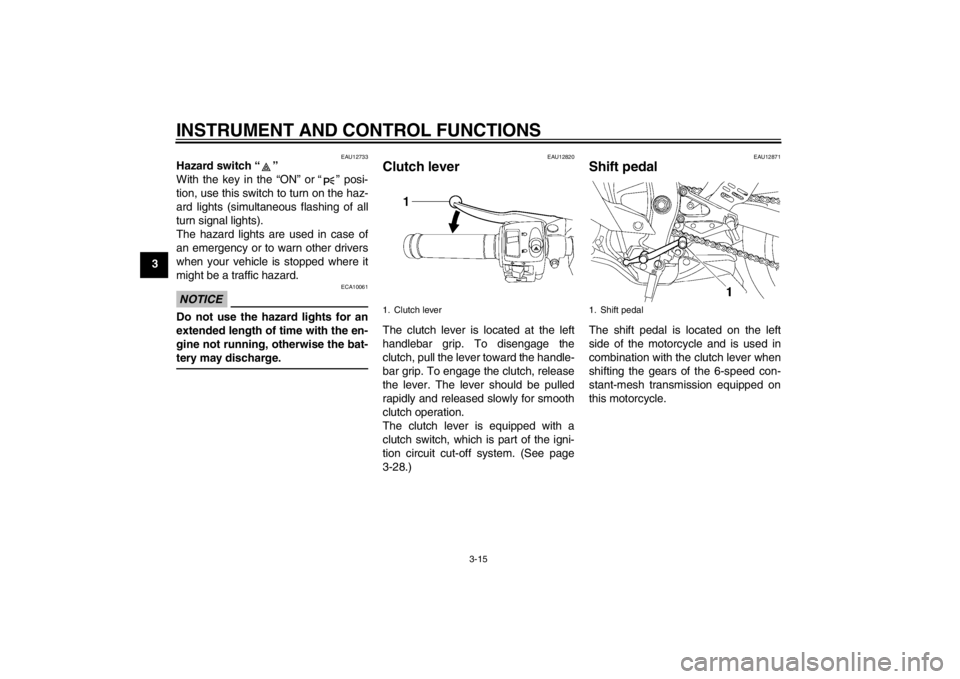
EAU12820
Clutch lever The clutch lever is located at the left
handlebar grip. To disengage the
clutch, pull the lever toward the handle-
bar grip. To engage the clutch, release
the lever. The lever should be pulled
rapidly and released slowly for smooth
clutch operation.
The clutch lever is equipped with a
clutch switch, which is part of the igni-
tion circuit cut-off system. (See page
3-28.)
EAU12871
Shift pedal The shift pedal is located on the left
side of the motorcycle and is used in
combination with the clutch lever when
shifting the gears of the 6-speed con-
stant-mesh transmission equipped on
this motorcycle.
1. Clutch lever
1. Shift pedal
U1JSE1E0.book Page 15 Wednesday, June 6, 2012 10:05 AM
Page 32 of 110
INSTRUMENT AND CONTROL FUNCTIONS
3-17
3
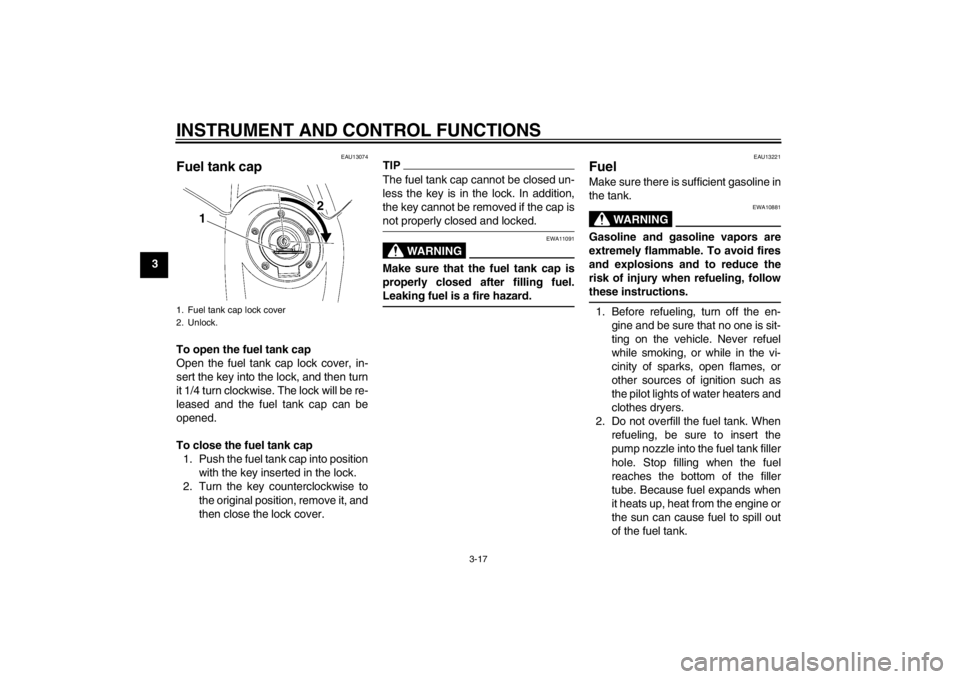
EAU13074
Fuel tank cap To open the fuel tank cap
Open the fuel tank cap lock cover, in-
sert the key into the lock, and then turn
it 1/4 turn clockwise. The lock will be re-
leased and the fuel tank cap can be
opened.
To close the fuel tank cap1. Push the fuel tank cap into position with the key inserted in the lock.
2. Turn the key counterclockwise to the original position, remove it, and
then close the lock cover.
TIPThe fuel tank cap cannot be closed un-
less the key is in the lock. In addition,
the key cannot be removed if the cap is
not properly closed and locked.
WARNING
EWA11091
Make sure that the fuel tank cap is
properly closed after filling fuel.
Leaking fuel is a fire hazard.
EAU13221
Fuel Make sure there is sufficient gasoline in
the tank.
WARNING
EWA10881
Gasoline and gasoline vapors are
extremely flammable. To avoid fires
and explosions and to reduce the
risk of injury when refueling, follow
these instructions.1. Before refueling, turn off the en-gine and be sure that no one is sit-
ting on the vehicle. Never refuel
while smoking, or while in the vi-
cinity of sparks, open flames, or
other sources of ignition such as
the pilot lights of water heaters and
clothes dryers.
2. Do not overfill the fuel tank. When refueling, be sure to insert the
pump nozzle into the fuel tank filler
hole. Stop filling when the fuel
reaches the bottom of the filler
tube. Because fuel expands when
it heats up, heat from the engine or
the sun can cause fuel to spill out
of the fuel tank.
1. Fuel tank cap lock cover
2. Unlock.
1 2
U1JSE1E0.book Page 17 Wednesday, June 6, 2012 10:05 AM
Page 35 of 110
INSTRUMENT AND CONTROL FUNCTIONS
3-20
3
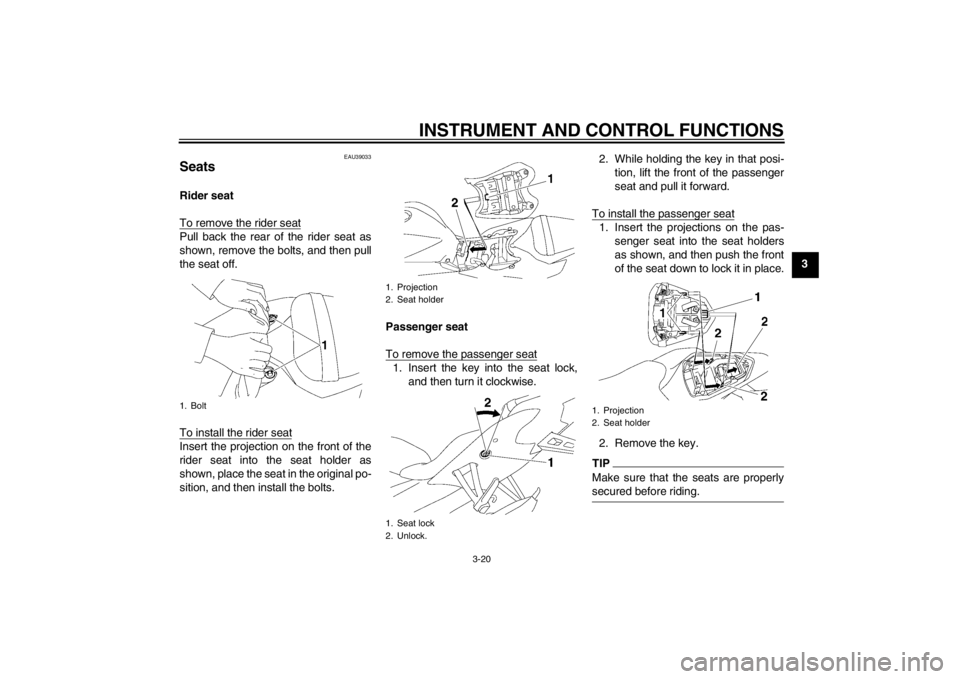
EAU39033
Seats Rider seat
To remove the rider seatPull back the rear of the rider seat as
shown, remove the bolts, and then pull
the seat off.
To install the rider seatInsert the projection on the front of the
rider seat into the seat holder as
shown, place the seat in the original po-
sition, and then install the bolts.Passenger seat
To remove the passenger seat
1. Insert the key into the seat lock,
and then turn it clockwise. 2. While holding the key in that posi-
tion, lift the front of the passenger
seat and pull it forward.
To install the passenger seat
1. Insert the projections on the pas- senger seat into the seat holders
as shown, and then push the front
of the seat down to lock it in place.
2. Remove the key.TIPMake sure that the seats are properly
secured before riding.
1. Bolt
1. Projection
2. Seat holder
1. Seat lock
2. Unlock.
1. Projection
2. Seat holder
U1JSE1E0.book Page 20 Wednesday, June 6, 2012 10:05 AM
Page 44 of 110

INSTRUMENT AND CONTROL FUNCTIONS
3-29
3
With the engine turned off:
1. Move the sidestand down.
2. Make sure that the engine stop switch is set to “
3. Turn the key on.
4. Shift the transmission into the neutral position.
5. Push the start switch.
Does the engine start?
With the engine still running:
6. Move the sidestand up.
7. Keep the clutch lever pulled.
8. Shift the transmission into gear.
9. Move the sidestand down.
Does the engine stall?
After the engine has stalled:
10. Move the sidestand up.
11. Keep the clutch lever pulled.
12. Push the start switch.
Does the engine start?
The system is OK. The motorcycle can be ridden. The neutral switch may not be working correctly.
The motorcycle should not be ridden
until
checked by a Yamaha dealer.
The sidestand switch may not be working correctly.
The motorcycle should not be ridden until
checked by a Yamaha dealer.
The clutch switch may not be working correctly.
The motorcycle should not be ridden until
checked by a Yamaha dealer.
YES NO YES NO YES NO
If a malfunction is noted, have a Yamaha
dealer check the system before riding.
WARNING
”.
U1JSE1E0.book Page 29 Wednesday, June 6, 2012 10:05 AM
Page 48 of 110
OPERATION AND IMPORTANT RIDING POINTS
5-1
5
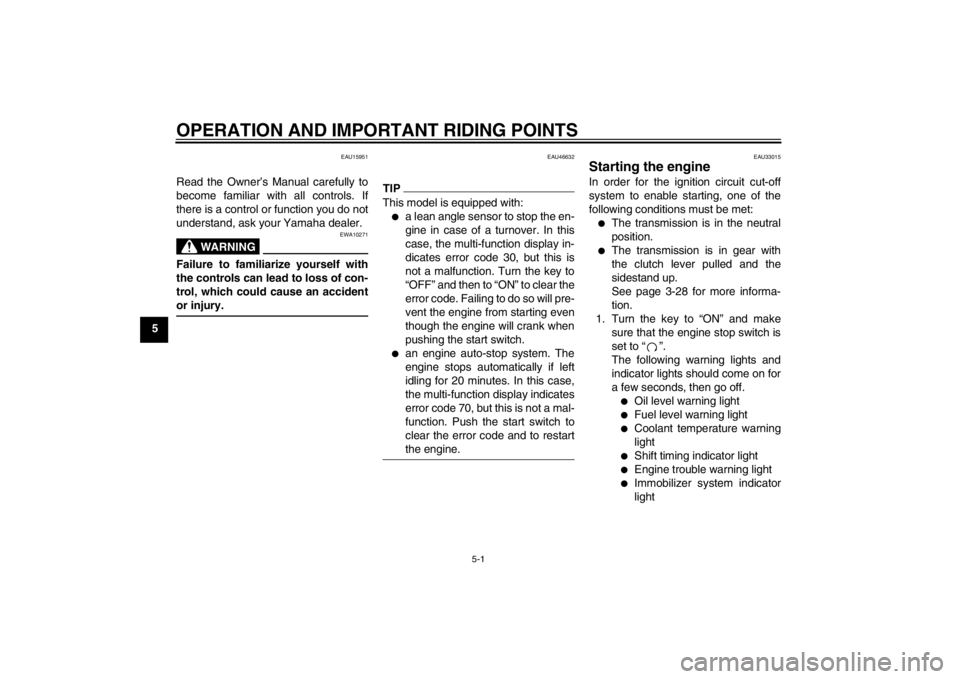
EAU15951
Read the Owner’s Manual carefully to
become familiar with all controls. If
there is a control or function you do not
understand, ask your Yamaha dealer.
WARNING
EWA10271
Failure to familiarize yourself with
the controls can lead to loss of con-
trol, which could cause an accident
or injury.
EAU46632
TIPThis model is equipped with:●
a lean angle sensor to stop the en-
gine in case of a turnover. In this
case, the multi-function display in-
dicates error code 30, but this is
not a malfunction. Turn the key to
“OFF” and then to “ON” to clear the
error code. Failing to do so will pre-
vent the engine from starting even
though the engine will crank when
pushing the start switch.
●
an engine auto-stop system. The
engine stops automatically if left
idling for 20 minutes. In this case,
the multi-function display indicates
error code 70, but this is not a mal-
function. Push the start switch to
clear the error code and to restart
the engine.
EAU33015
Starting the engine In order for the ignition circuit cut-off
system to enable starting, one of the
following conditions must be met:●
The transmission is in the neutral
position.
●
The transmission is in gear with
the clutch lever pulled and the
sidestand up.
See page 3-28 for more informa-
tion.
1. Turn the key to “ON” and make sure that the engine stop switch is
set to “ ”.
The following warning lights and
indicator lights should come on for
a few seconds, then go off.●
Oil level warning light
●
Fuel level warning light
●
Coolant temperature warning
light
●
Shift timing indicator light
●
Engine trouble warning light
●
Immobilizer system indicator
light
U1JSE1E0.book Page 1 Wednesday, June 6, 2012 10:05 AM
Page 49 of 110

OPERATION AND IMPORTANT RIDING POINTS
5-2
5
NOTICE
ECA11833
If a warning or indicator light does
not come on initially when the key is
turned to “ON”, or if a warning or in-
dicator light remains on, see page
3-4 for the corresponding warning
and indicator light circuit check.2. Shift the transmission into the neu-tral position. The neutral indicator
light should come on. If not, ask a
Yamaha dealer to check the elec- trical circuit.
3. Start the engine by pushing the start switch.
If the engine fails to start, release
the start switch, wait a few sec-
onds, and then try again. Each
starting attempt should be as short
as possible to preserve the bat-
tery. Do not crank the engine more
than 10 seconds on any one at-
tempt.NOTICE
ECA11042
For maximum engine life, never ac-
celerate hard when the engine is
cold!
EAU16671
Shifting Shifting gears lets you control the
amount of engine power available for
starting off, accelerating, climbing hills,
etc.
The gear positions are shown in the il-
lustration.TIPTo shift the transmission into the neu-
tral position, press the shift pedal down
repeatedly until it reaches the end of its
travel, and then slightly raise it.
NOTICE
ECA10260
●
Even with the transmission in
the neutral position, do not
coast for long periods of time
with the engine off, and do not
tow the motorcycle for long dis-
tances. The transmission is
properly lubricated only when
the engine is running. Inade-
quate lubrication may damage
the transmission.
●
Always use the clutch while
changing gears to avoid damag-
ing the engine, transmission,
and drive train, which are not
designed to withstand the
shock of forced shifting.
1. Shift pedal
2. Neutral position
U1JSE1E0.book Page 2 Wednesday, June 6, 2012 10:05 AM
Page 51 of 110
OPERATION AND IMPORTANT RIDING POINTS
5-4
5
EAU17213
Parking When parking, stop the engine, and
then remove the key from the main
switch.
WARNING
EWA10311
●
Since the engine and exhaust
system can become very hot,
park in a place where pedestri-
ans or children are not likely to
touch them and be burned.
●
Do not park on a slope or on soft
ground, otherwise the vehicle
may overturn, increasing the
risk of a fuel leak and fire.
●
Do not park near grass or other
flammable materials which
might catch fire.
U1JSE1E0.book Page 4 Wednesday, June 6, 2012 10:05 AM