instrument YAMAHA YZF-R6 2018 Owners Manual
[x] Cancel search | Manufacturer: YAMAHA, Model Year: 2018, Model line: YZF-R6, Model: YAMAHA YZF-R6 2018Pages: 114, PDF Size: 4.36 MB
Page 5 of 114

Table of contents
Safety information ............................1-1
Description ........................................2-1
Left view ..........................................2-1
Right view........................................2-2
Controls and instruments ................2-3
Special features ................................3-1
D-mode (drive mode) ......................3-1
Traction control system...................3-2
Quick shift system ...........................3-4
Instrument an d control functions ....4-1
Immobilizer system .........................4-1
Main switch/steering lock ...............4-2
Handlebar switches.........................4-4
Indicator lights and warning
lights ............................................4-5
Multi-function meter unit .................4-8
Clutch lever ...................................4-17
Shift pedal .....................................4-17
Brake lever ....................................4-18
Brake pedal ...................................4-18
ABS ...............................................4-19
Fuel tank cap.................................4-20
Fuel................................................4-20
Fuel tank overflow hose ................4-22
Catalytic converters .....................4-22
Seats .............................................4-23
Rear view mirrors ..........................4-24
Adjusting the front fork..................4-25
Adjusting the shock absorber assembly....................................4-27
EXUP system ................................4-29
Auxiliary DC connector .................4-30
Sidestand ......................................4-30
Ignition circuit cut-off system........4-31
For your safety – pre-operation
checks ...............................................5-1
Operation an d important ri din g
points .................................................6-1
Starting the engine ..........................6-2
Shifting ............................................6-3 Tips for reducing fuel
consumption................................ 6-4
Engine break-in ............................... 6-4
Parking ............................................ 6-5
Perio dic maintenance an d
a d justment ........................................ 7-1
Owner’s tool kit ............................... 7-2
Periodic maintenance charts .......... 7-3
Periodic maintenance chart for the emission control system.............. 7-3
General maintenance and lubrication chart........................... 7-4
Removing and installing cowlings
and panels ................................... 7-7
Checking the spark plugs ............. 7-11
Canister......................................... 7-12
Engine oil and oil filter cartridge ... 7-13
Coolant ......................................... 7-17
Air filter element ............................ 7-18
Checking the engine idling speed......................................... 7-19
Checking the throttle grip free
play ............................................ 7-19
Valve clearance ............................. 7-20
Tires .............................................. 7-20
Cast wheels .................................. 7-23
Adjusting the clutch lever free play ............................................ 7-23
Checking the brake lever free play ............................................ 7-24
Brake light switches ...................... 7-25
Checking the front and rear
brake pads................................. 7-25
Checking the brake fluid level....... 7-26
Changing the brake fluid............... 7-27
Drive chain slack ........................... 7-28
Cleaning and lubricating the
drive chain ................................. 7-29
Checking and lubricating the cables ........................................ 7-30
Checking and lubricating the throttle grip and cable ............... 7-30
Checking and lubricating the brake and shift pedals ............... 7-31
UBN6E1E0.book Page 1 Thursday, October 5, 2017 2:48 PM
Page 14 of 114

Description
2-3
2
EAU63401
Controls and instruments
12 4 35678
1. Clutch lever (page 4-17)
2. Left handlebar switches (page 4-4)
3. Main switch/steering lock (page 4-2)
4. Multi-function meter unit (page 4-8)
5. Front brake fluid reservoir (page 7-26)
6. Right handlebar switches (page 4-4)
7. Brake lever (page 4-18)
8. Throttle grip (page 7-19)
UBN6E1E0.book Page 3 Thursday, October 5, 2017 2:48 PM
Page 19 of 114
Instrument and control functions
4-1
4
EAU10978
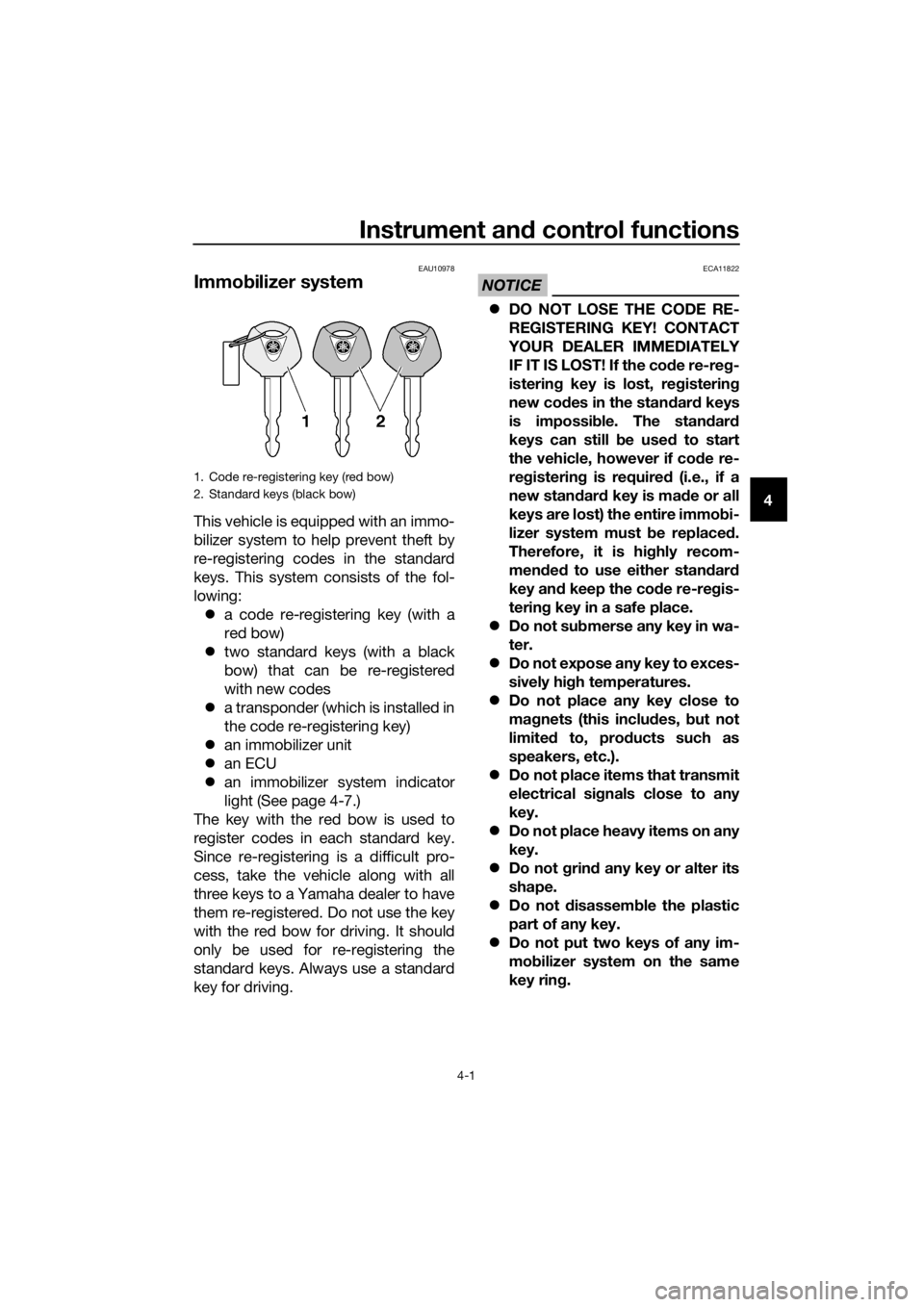
Immo bilizer system
This vehicle is equipped with an immo-
bilizer system to help prevent theft by
re-registering codes in the standard
keys. This system consists of the fol-
lowing:
a code re-registering key (with a
red bow)
two standard keys (with a black
bow) that can be re-registered
with new codes
a transponder (which is installed in
the code re-registering key)
an immobilizer unit
an ECU
an immobilizer system indicator
light (See page 4-7.)
The key with the red bow is used to
register codes in each standard key.
Since re-registering is a difficult pro-
cess, take the vehicle along with all
three keys to a Yamaha dealer to have
them re-registered. Do not use the key
with the red bow for driving. It should
only be used for re-registering the
standard keys. Always use a standard
key for driving.
NOTICE
ECA11822
DO NOT LOSE THE CODE RE-
REGISTERING KEY! CONTACT
YOUR DEALER IMMEDIATELY
IF IT IS LOST! If the co de re-reg -
isterin g key is lost, reg istering
new co des in the stan dar d keys
is impossi ble. The stan dar d
keys can still be used to start
the vehicle, however if co de re-
re gisterin g is require d (i.e., if a
new stan dar d key is ma de or all
keys are lost) the entire immob i-
lizer system must be replaced .
Therefore, it is hi ghly recom-
mend ed to use either stan dar d
key an d keep the co de re-re gis-
tering key in a safe place.
Do not su bmerse any key in wa-
ter.
Do not expose any key to exces-
sively hig h temperatures.
Do not place any key close to
ma gnets (this inclu des, but not
limite d to, pro ducts such as
speakers, etc.).
Do
not place items that transmit
electrical si gnals close to any
key.
Do not place heavy items on any
key.
Do not g rind any key or alter its
shape.
Do not d isassemble the plastic
part of any key.
Do not put two keys of any im-
mo bilizer system on the same
key rin g.
1. Code re-registering key (red bow)
2. Standard keys (black bow)
UBN6E1E0.book Page 1 Thursday, October 5, 2017 2:48 PM
Page 20 of 114

Instrument and control functions
4-2
4
Keep the stan dar d keys as well
as keys of other immo bilizer
systems away from this vehi-
cle’s co de re-reg istering key.
Keep other immo bilizer system
keys away from the main switch
as they may cause si gnal inter-
ference.
EAU10474
Main switch/steerin g lock
The main switch/steering lock controls
the ignition and lighting systems, and is
used to lock the steering. The various
positions are described below.
TIP
Be sure to use the standard key (black
bow) for regular use of the vehicle. To
minimize the risk of losing the code re-
registering key (red bow), keep it in a
safe place and only use it for code re-
registering.
EAU58321ON
All electrical circuits are supplied with
power, and the engine can be started.
The key cannot be removed.
TIP
The headlight comes on automatically
when the engine is started. The head-
light will stay on until the key is turned
to “OFF”, even if the engine stalls.
EAU10662OFF
All electrical systems are off. The key
can be removed.
ON
OFF
LOCK
P
UBN6E1E0.book Page 2 Thursday, October 5, 2017 2:48 PM
Page 21 of 114
Instrument and control functions
4-3
4
WARNING
EWA10062
Never turn the key to “OFF” or
“LOCK” while the vehicle is movin g.
Otherwise the electrical systems will
b e switche d off, which may result in
loss of control or an acci dent.
EAU1068BLOCK
The steering is locked and all electrical
systems are off. The key can be re-
moved.
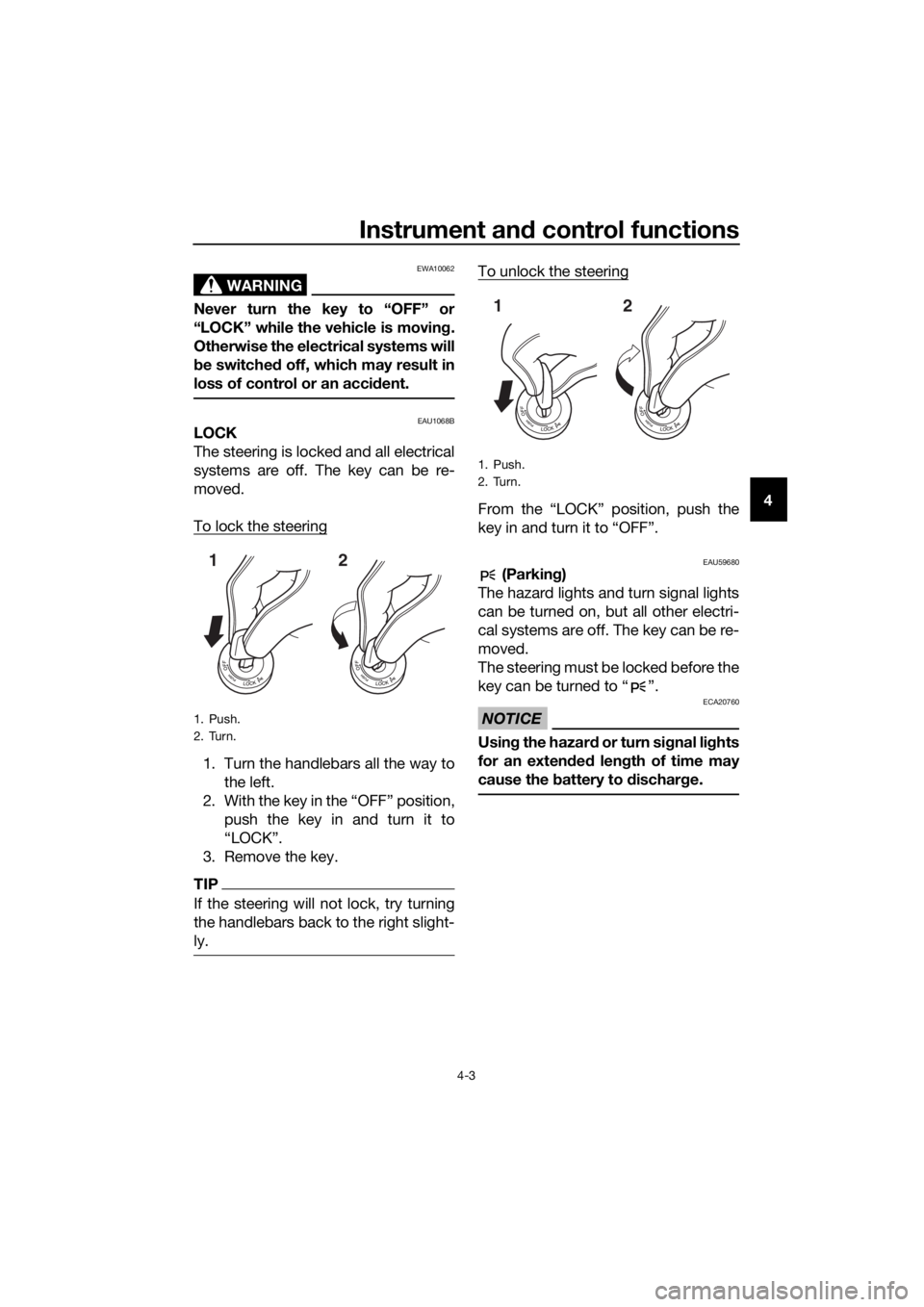
To lock the steering
1. Turn the handlebars all the way to
the left.
2. With the key in the “OFF” position, push the key in and turn it to
“LOCK”.
3. Remove the key.
TIP
If the steering will not lock, try turning
the handlebars back to the right slight-
ly.
To unlock the steering
From the “LOCK” position, push the
key in and turn it to “OFF”.
EAU59680 (Parkin g)
The hazard lights and turn signal lights
can be turned on, but all other electri-
cal systems are off. The key can be re-
moved.
The steering must be locked before the
key can be turned to “ ”.
NOTICE
ECA20760
Usin g the hazar d or turn si gnal li ghts
for an exten ded len gth of time may
cause the battery to d ischarge.
1. Push.
2. Turn.
12
1. Push.
2. Turn.
12
UBN6E1E0.book Page 3 Thursday, October 5, 2017 2:48 PM
Page 22 of 114

Instrument and control functions
4-4
4
EAU66055
Han dle bar switches
Left
Ri ght
EAU79740Pass switch “ ”
Press this switch to flash the headlight
and to mark the start of each lap when
using the lap timer.
TIP
When the dimmer switch is set
to “ ”, the passing switch has no ef-
fect.
EAU79871Dimmer switch “ / ”
Set this switch to “ ” for the high
beam and to “ ” for the low beam.
TIP
When the switch is set to low beam,
only the left headlight comes on.
EAU66040Turn si gnal switch “ / ”
To signal a right-hand turn, push this
switch to “ ”. To signal a left-hand
turn, push this switch to “ ”. When
released, the switch returns to the cen-
ter position. To cancel the turn signal
lights, push the switch in after it has re-
turned to the center position.
EAU66030Horn switch “ ”
Press this switch to sound the horn.
EAU73961Traction control system switch
“TCS”
See page 3-2 for an explanation of the
traction control system.
EAU66060Stop/Run/Start switch “ / / ”
To crank the engine with the starter,
set this switch to “ ”, and then push
the switch down towards “ ”. See
page 6-2 for starting instructions prior
to starting the engine.
Set this switch to “ ” to stop the en-
gine in case of an emergency, such as
when the vehicle overturns or when the
throttle cable is stuck.
1. Dimmer switch “ / ”
2. Pass switch “ ”
3. Traction control system switch “TCS”
4. Turn signal switch “ / ”
5. Horn switch “ ”
1. Stop/Run/Start switch “ / / ”
2. Drive mode switch “MODE”
3. Hazard switch “ ”
54
231
2
3
1
UBN6E1E0.book Page 4 Thursday, October 5, 2017 2:48 PM
Page 23 of 114

Instrument and control functions
4-5
4
EAU66010Hazar d switch “ ”
With the key in the “ON” or “ ” posi-
tion, use this switch to turn on the haz-
ard lights (simultaneous flashing of all
turn signal lights).
The hazard lights are used in case of an
emergency or to warn other drivers
when your vehicle is stopped where it
might be a traffic hazard.
NOTICE
ECA10062
Do not use the hazar d lig hts for an
exten ded len gth of time with the en-
g ine not runnin g, otherwise the bat-
tery may dischar ge.
EAU73931Drive mo de switch “MODE”
See page 3-1 for an explanation of the
drive mode.
EAU4939D
In dicator li ghts an d warnin g
lig hts
EAU11022Turn si gnal in dicator li ght “ ”
This indicator light flashes when a turn
signal light is flashing.
EAU11061Neutral in dicator li ght “ ”
This indicator light comes on when the
transmission is in the neutral position.
EAU11081Hi gh beam in dicator li ght “ ”
This indicator light comes on when the
high beam of the headlight is switched
on.
EAU11257Oil level warnin g lig ht “ ”
This warning light comes on if the en-
gine oil level is low.
1. Shift light
2. Engine trouble warning light “ ”
3. Oil level warning light “ ”
4. Coolant temperature warning light “ ”
5. Traction control system indicator light “ ”
6. Turn signal indicator light “ ”
7. High beam indicator light “ ”
8. Neutral indicator light “ ”
9. Fuel level warning light “ ”
10.ABS warning light “ ”
11.Immobilizer system indicator light
2345
109876
11
1
ABS
UBN6E1E0.book Page 5 Thursday, October 5, 2017 2:48 PM
Page 24 of 114

Instrument and control functions
4-6
4 When the vehicle is turned on, the light
will perform a circuit check (come on
for a few seconds and then go off).
If the warning light remains on after
confirming that the oil level is correct
(page 7-13), have a Yamaha dealer
check the vehicle.
TIP
Even if the oil level is sufficient, the
warning light may flicker when rid-
ing up or downhill, or during sud-
den acceleration or deceleration,
but this is not a malfunction.
If a malfunction is detected, the oil
level warning light will flash re-
peatedly. Have a Yamaha dealer
check the vehicle.
EAU11369Fuel level warnin g lig ht “ ”
This warning light comes on when you
are low on fuel. When the fuel level
drops below approximately 3.4 L (0.90
US gal, 0.75 Imp.gal), the light will
come on to remind you to refuel as
soon as possible.
When the vehicle is turned on, the light
will perform a circuit check (come on
for a few seconds and then go off).
If the warning light does not come on
during the circuit check, or if the warn-
ing light remains on after refueling,
have a Yamaha dealer check the vehi-
cle.
TIP
If a malfunction is detected, the fuel
level warning light will flash repeatedly.
Have a Yamaha dealer check the vehi-
cle.
EAU72930Coolant temperature warnin g
li g ht “ ”
This warning light comes on if the en-
gine overheats. If this occurs, reduce
the load on the engine immediately. If
message “HI” flashes in the coolant
temperature display, stop the vehicle,
then stop the engine and let the engine
cool.
The electrical circuit of the warning
light can be checked by turning the key
to “ON”. The warning light should
come on for a few seconds, and then
go off.
If the warning light does not come on
initially when the key is turned to “ON”,
or if the warning light remains on, have
a Yamaha dealer check the electrical
circuit.
NOTICE
ECA10022
Do not continue to operate the en-
g ine if it is overheatin g.
TIP
For radiator-fan-equipped vehi-
cles, the radiator fan(s) automati-
cally switch on or off according to
the coolant temperature in the ra-
diator.
If the engine overheats, see page
7-41 for further instructions.
EAU73171Engine trou ble warnin g lig ht “ ”
This warning light comes on if a prob-
lem is detected in the engine or other
vehicle control system. If this occurs,
have a Yamaha dealer check the on-
board diagnostic system.
UBN6E1E0.book Page 6 Thursday, October 5, 2017 2:48 PM
Page 25 of 114

Instrument and control functions
4-7
4
The electrical circuit of the warning
light can be checked by turning the key
to “ON”. The warning light should
come on for a few seconds, and then
go off.
If the warning light does not come on
initially when the key is turned to “ON”,
or if the warning light remains on, have
a Yamaha dealer check the vehicle.
EAU69891ABS warnin
g li ght “ ”
In normal operation, this warning light
comes on when the key is turned to
“ON”, and goes off after traveling at a
speed of 10 km/h (6 mi/h) or higher.
If the ABS warning light: does not come on when the key is
turned to “ON”
comes on or flashes while riding
does not go off after traveling at a
speed of 10 km/h (6 mi/h) or high-
er
The ABS may not work correctly. If any
of the above occurs, have a Yamaha
dealer check the system as soon as
possible. (See page 4-19 for an expla-
nation of the ABS.)
WARNING
EWA16041
If the ABS warnin g li ght does not go
off after travelin g at a speed of 10
km/h (6 mi/h) or hi gher, or if the
warnin g li ght comes on or flashes
while ri din g, the b rake system re-
verts to conventional brakin g. If ei-
ther of the ab ove occurs, or if the
warnin g li ght does not come on at
all, use extra caution to avoi d possi-
b le wheel lock durin g emer gency b
rakin g. Have a Yamaha d ealer
check the brake system an d electri-
cal circuits as soon as possi ble.
EAU77002Traction control system in dicator
li g ht “ ”
This indicator light flashes when trac-
tion control has engaged. If the traction
control system is turned off, the indica-
tor light will come on.
When the vehicle is turned on, the light
will perform a circuit check (come on
for a few seconds and then go off). If
the light does not come on during the
circuit check, or if the light remains on,
Yamaha dealer check the vehicle.
EAU80370Shift li ght
This light can be set to come on and go
off at select engine speeds. (See page
4-15.)
When the vehicle is turned on, the light
will perform a circuit check (come on
for a few seconds and then go off).
If the light does not come on during the
circuit check, have a Yamaha dealer
check the vehicle.
EAU80300Immo bilizer system in dicator li ght
When the key is turned to “OFF” and
30 seconds have passed, the indicator
light will flash steadily to indicate the
immobilizer system is enabled. After 24
hours have passed, the indicator light
will stop flashing, however the immobi-
lizer system is still enabled.
The electrical circuit of the indicator
light can be checked by turning the key
to “ON”. The indicator light should
come on for a few seconds, and then
go off.
ABS
UBN6E1E0.book Page 7 Thursday, October 5, 2017 2:48 PM
Page 26 of 114

Instrument and control functions
4-8
4 If the indicator light does not come on
initially when the key is turned to “ON”,
if the indicator light remains on, or if the
indicator light flashes in a pattern (if a
problem is detected in the immobilizer
system, the immobilizer system indica-
tor light will flash in a pattern), have a
Yamaha dealer check the vehicle.
TIP
If the immobilizer system indicator light
flashes in the pattern, slowly 5 times
then quickly 2 times, this could be
caused by transponder interference. If
this occurs, try the following.
1. Make sure there are no other im- mobilizer keys close to the main
switch. Other immobilizer system
keys may cause signal interfer-
ence and prevent the engine from
starting.
2. Use the code re-registering key to start the engine.
3. If the engine starts, turn it off, and try starting the engine with the
standard keys.
4. If one or both of the standard keys do not start the engine, take the
vehicle and all 3 keys to a Yamaha
dealer to have the standard keys
re-registered.
EAU3904F
Multi-function meter unit
WARNING
EWA12423
Be sure to stop the vehicle before
makin g any settin g chan ges to the
multi-function meter unit. Chang ing
settin gs while ri din g can d istract the
operator an d increase the risk of an
acci dent.
The multi-function meter unit is
equipped with the following:
speedometer
tachometer
clock
lap timer
coolant temperature display
air intake temperature display
transmission gear display
drive mode display
TCS display
1. Tachometer
2. Shift light
3. TCS display
4. Coolant/Air intake temperature display
5. Quick shift icon “QS”
6. Drive mode display
7. Speedometer
8. Multi-function display
9. Clock/Lap timer
10.Transmission gear display
11.“RESET” button
12.“SELECT” button
6
5
7
8
9
2
34
101112
1
UBN6E1E0.book Page 8 Thursday, October 5, 2017 2:48 PM