reset Acura ILX 2015 User Guide
[x] Cancel search | Manufacturer: ACURA, Model Year: 2015, Model line: ILX, Model: Acura ILX 2015Pages: 353, PDF Size: 16.19 MB
Page 88 of 353
87
uuGauges and Multi-Information Display uMulti-Information Display
Continued
Instrument Panel
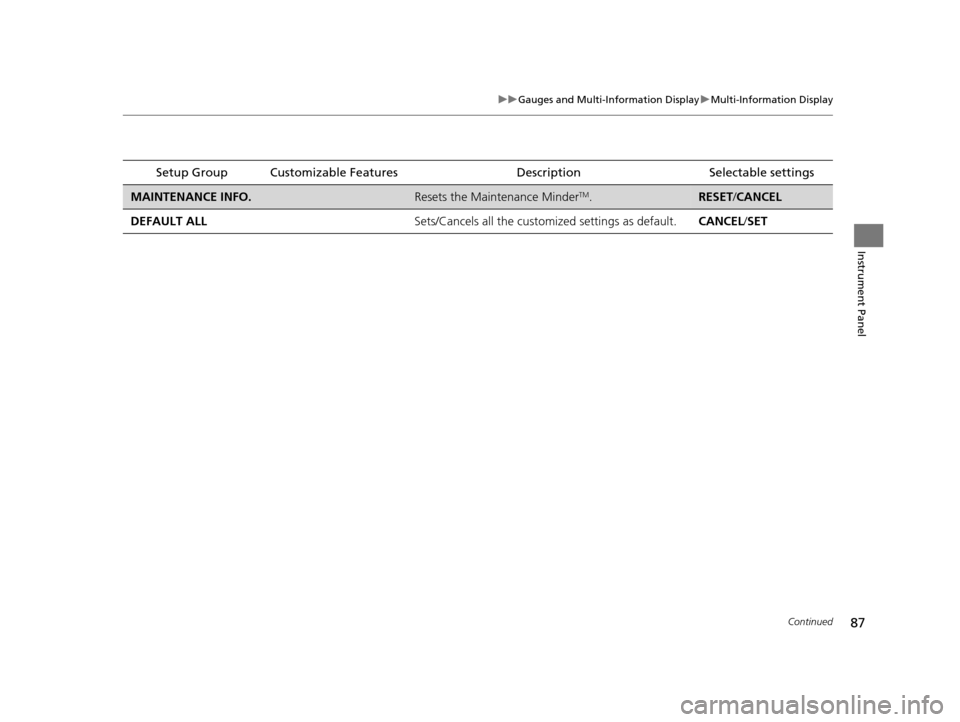
Setup Group Customizable Features Description Selectable settings
MAINTENANCE INFO.Resets the Maintenance MinderTM.RESET/CANCEL
DEFAULT ALL Sets/Cancels all the customized settings as default.CANCEL/SET
15 ACURA ILX-31TX66200.book 87 ページ 2014年3月27日 木曜日 午前10時34分
Page 89 of 353
88
uuGauges and Multi-Information Display uMulti-Information Display
Instrument Panel
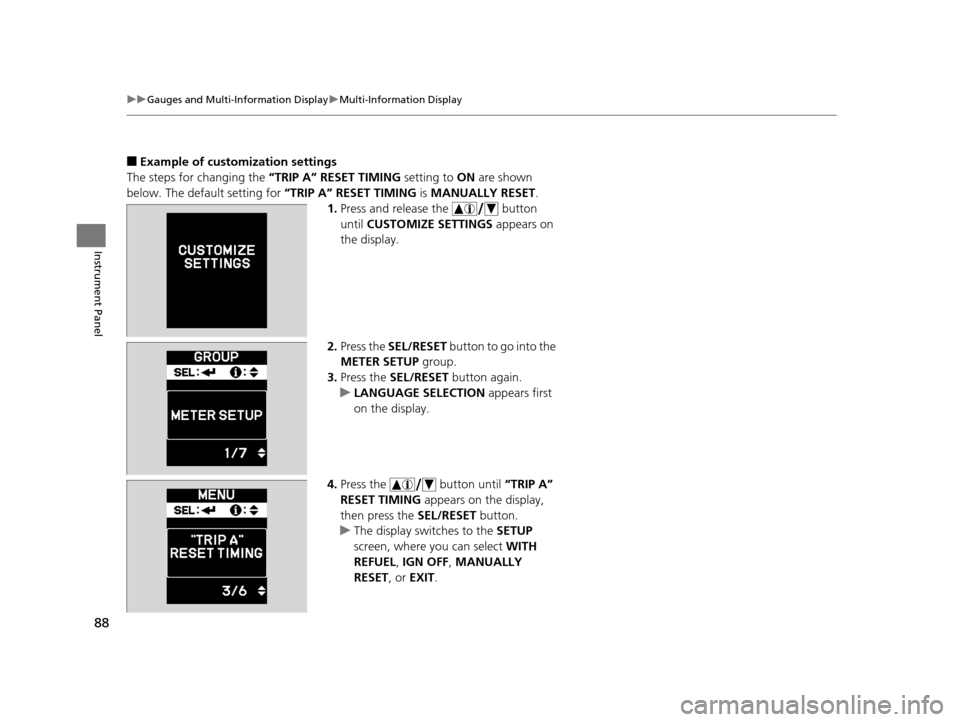
■Example of customization settings
The steps for changing the “TRIP A” RESET TIMING setting to ON are shown
below. The default setting for “TRIP A” RESET TIMING is MANUALLY RESET .
1. Press and release the button
until CUSTOMIZE SETTINGS appears on
the display.
2. Press the SEL/RESET button to go into the
METER SETUP group.
3. Press the SEL/RESET button again.
u LANGUAGE SELECTION appears first
on the display.
4. Press the button until “TRIP A”
RESET TIMING appears on the display,
then press the SEL/RESET button.
u The display switches to the SETUP
screen, where you can select WITH
REFUEL , IGN OFF , MANUALLY
RESET , or EXIT .
15 ACURA ILX-31TX66200.book 88 ページ 2014年3月27日 木曜日 午前10時34分
Page 90 of 353
89
uuGauges and Multi-Information Display uMulti-Information Display
Instrument Panel
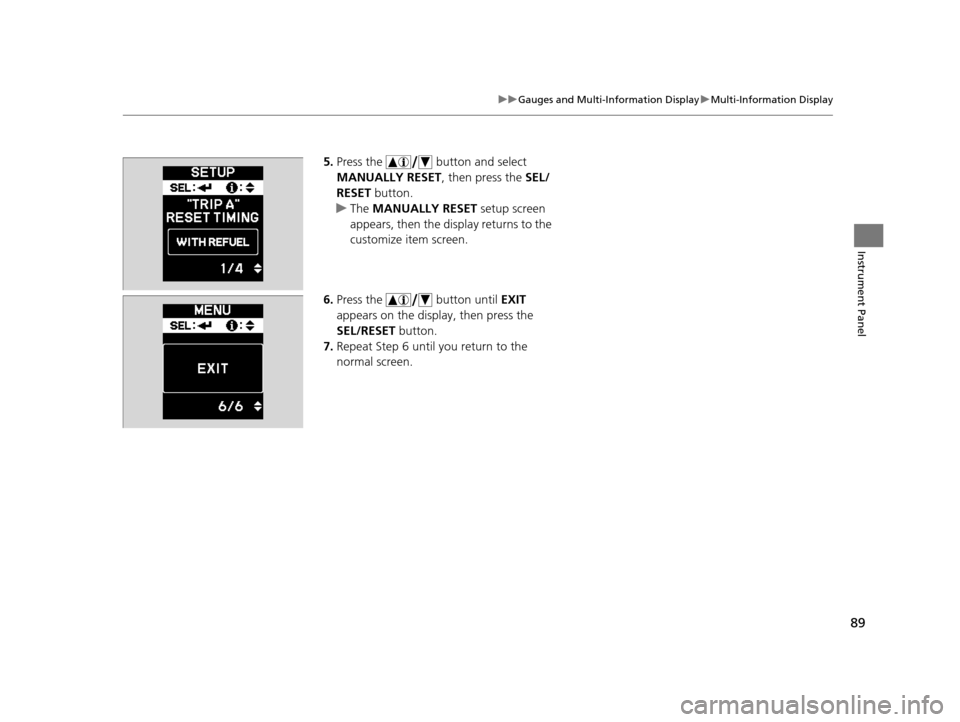
5. Press the button and select
MANUALLY RESET , then press the SEL/
RESET button.
u The MANUALLY RESET setup screen
appears, then the di splay returns to the
customize item screen.
6. Press the button until EXIT
appears on the display, then press the
SEL/RESET button.
7. Repeat Step 6 until you return to the
normal screen.
15 ACURA ILX-31TX66200.book 89 ページ 2014年3月27日 木曜日 午前10時34分
Page 120 of 353
119
uuOperating the Switches Around the Steering Wheel uBrightness Control
Controls
Brightness Control
When the power mode is in ON, you can use
the brightness control knob to adjust
instrument panel brightness.
Brighten: Turn the knob to the right.
Dim: Turn the knob to the left.
You will hear a beep when the brightness
reaches minimum or maximum. The multi-
information display will return to its original
state several seconds after you adjust the
brightness.
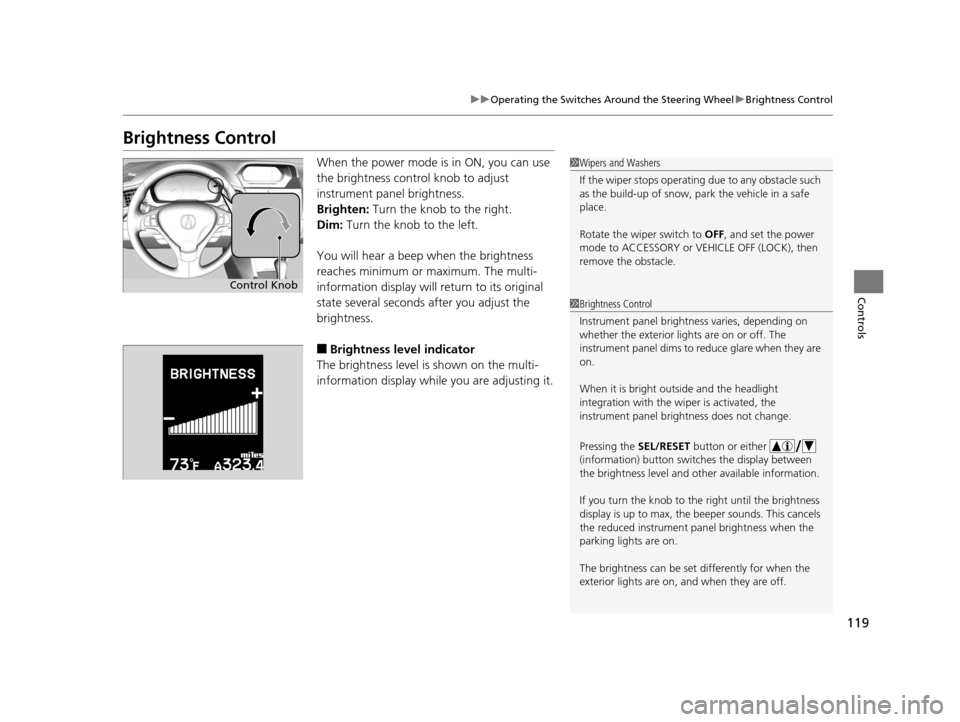
■Brightness level indicator
The brightness level is shown on the multi-
information display whil e you are adjusting it.
1Wipers and Washers
If the wiper stops operating due to any obstacle such
as the build-up of snow, pa rk the vehicle in a safe
place.
Rotate the wiper switch to OFF, and set the power
mode to ACCESSORY or VEHICLE OFF (LOCK), then
remove the obstacle.
1 Brightness Control
Instrument panel brightne ss varies, depending on
whether the exterior lights are on or off. The
instrument panel dims to reduce glare when they are
on.
When it is bright out side and the headlight
integration with the wi per is activated, the
instrument panel bri ghtness does not change.
Pressing the SEL/RESET button or either
(information) button switch es the display between
the brightness level and ot her available information.
If you turn the knob to the right until the brightness
display is up to max, the beeper sounds. This cancels
the reduced instrument panel brightness when the
parking lights are on.
The brightness can be set differently for when the
exterior lights are on, and when they are off.
Control Knob
15 ACURA ILX-31TX66200.book 119 ページ 2014年3月27日 木曜日 午前10時34分
Page 145 of 353
144
uuAudio System uAudio System Theft Protection
Features
Audio System Theft Protection
The audio system is disabled when it is di sconnected from the power source, such as
when the battery is disconnected or goes dead.
■Reactivating the audio system
1. Set the power mode to ON, and turn on the audio system.
u You will be requested to enter th e audio security code. See step 3.
2. Press and hold the power button ag ain for more than two seconds.
u The audio system is reactivated when the system’s control unit recognizes that
the system is in your vehicle.
If the control unit fails to recognize, ENTER CODE appears on the audio/
information screen.
3. Enter the audio security code using the pr eset buttons. If you enter an incorrect
digit, continue to the last digit, then try again. If you do not enter the code
correctly after 10 tries, leave the system for one hour before trying again, or visit
a dealer to have the system reset.
1 Audio System Theft Protection
Find the audio system's se curity code and serial
number label in your owner’s manual kit.
We recommend that you write down the serial
number in this owner’s manual.
Do not store the label in your vehicle. If you lose the
label, you must first retrie ve the serial number, and
then obtain the code.
You can find out about your serial number and
security code from a dealer.
You can register the securi ty code at Acura Owners
(owners.acura.com.) , and find information on how to
retrieve the serial numbe r and obtain the code at
radio-navicode.acura.com.
U.S. models
15 ACURA ILX-31TX66200.book 144 ページ 2014年3月27日 木曜日 午前10時34分
Page 150 of 353
149
uuAudio System Basic Operation uAudio Remote Controls
Features
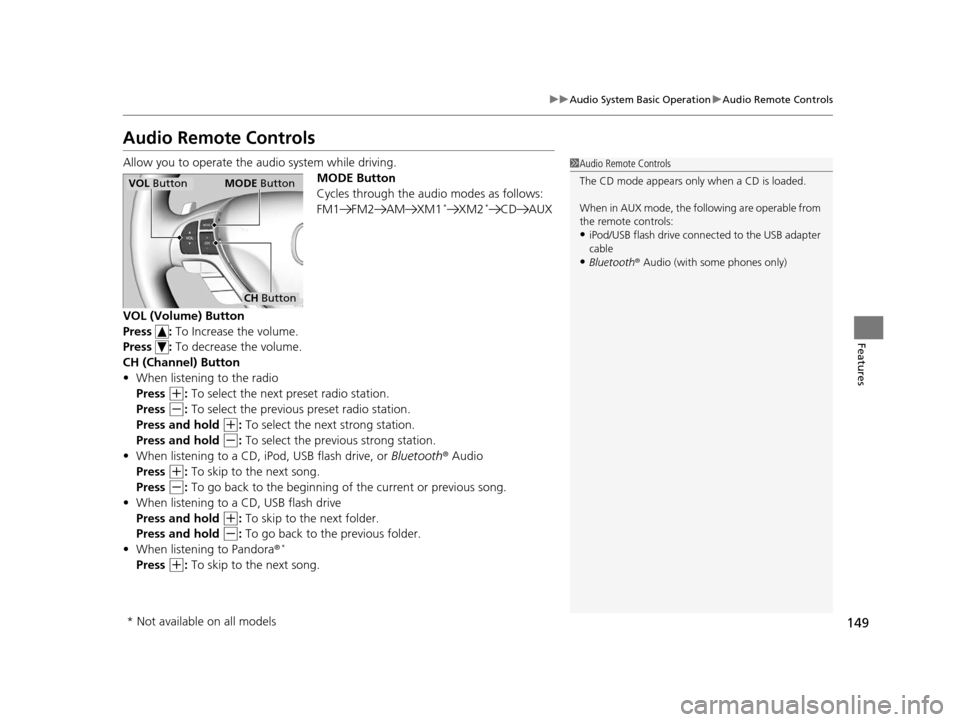
Audio Remote Controls
Allow you to operate the au dio system while driving.
MODE Button
Cycles through the audio modes as follows:
FM1 FM2 AM XM1
*XM2*CD AUX
VOL (Volume) Button
Press : To Increase the volume.
Press : To decrease the volume.
CH (Channel) Button
• When listening to the radio
Press
(+: To select the next preset radio station.
Press
(-: To select the previous preset radio station.
Press and hold
(+: To select the next strong station.
Press and hold
(-: To select the previous strong station.
• When listening to a CD, iPod, USB flash drive, or Bluetooth® Audio
Press
(+: To skip to the next song.
Press
(-: To go back to the beginning of the current or previous song.
• When listening to a CD, USB flash drive
Press and hold
(+: To skip to the next folder.
Press and hold
(-: To go back to the previous folder.
• When listening to Pandora ®*
Press (+: To skip to the next song.
1 Audio Remote Controls
The CD mode appears only when a CD is loaded.
When in AUX mode, the following are operable from
the remote controls:
•iPod/USB flash drive connect ed to the USB adapter
cable
•Bluetooth ® Audio (with some phones only)
VOL Button MODE Button
CH Button
* Not available on all models
15 ACURA ILX-31TX66200.book 149 ページ 2014年3月27日 木曜日 午前10時34分
Page 152 of 353
151
uuAudio System Basic Operation uPlaying AM/FM Radio
Continued
Features
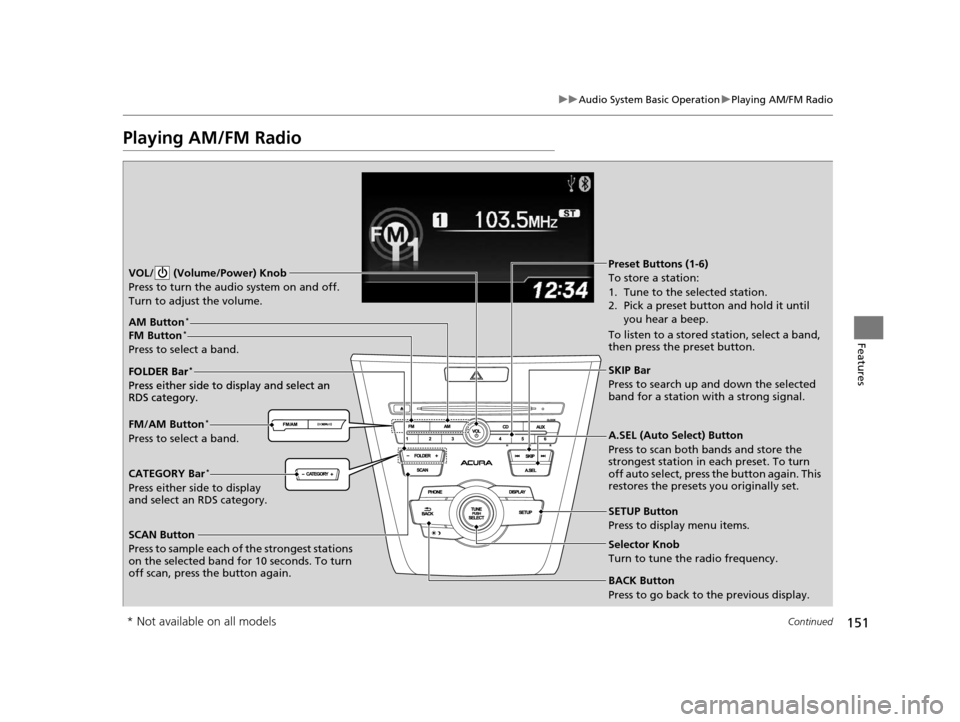
Playing AM/FM Radio
SCAN Button
Press to sample each of the strongest stations
on the selected band for 10 seconds. To turn
off scan, press the button again. VOL/ (Volume/Power) Knob
Press to turn the audi o system on and off.
Turn to adjust the volume.
A.SEL (Auto Select) Button
Press to scan both bands and store the
strongest station in each preset. To turn
off auto select, press the button again. This
restores the presets you originally set.
SETUP Button
Press to display menu items.
Selector Knob
Turn to tune the radio frequency.
CATEGORY Bar*
Press either side to display
and select an RDS category. FM/AM Button
*
Press to select a band. FOLDER Bar
*
Press either side to display and select an
RDS category.
FM Button*
Press to select a band.
AM Button*
BACK Button
Press to go back to the previous display.
SKIP Bar
Press to search up and down the selected
band for a station with a strong signal.
Preset Buttons (1-6)
To store a station:
1. Tune to the selected station.
2. Pick a preset button and hold it until you hear a beep.
To listen to a stored station, select a band,
then press the preset button.
FOLDER Bar
*
Press either side to display and select an
RDS category.
* Not available on all models
15 ACURA ILX-31TX66200.book 151 ページ 2014年3月27日 木曜日 午前10時34分
Page 153 of 353
uuAudio System Basic Operation uPlaying AM/FM Radio
152
Features
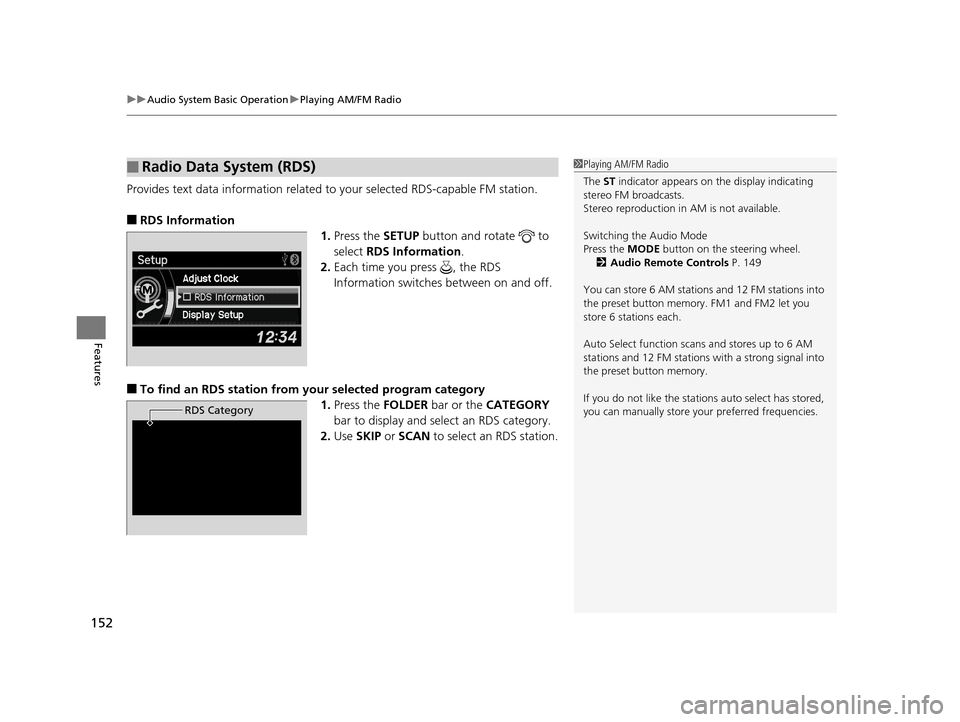
Provides text data information related to your selected RDS-capable FM station.
■RDS Information
1.Press the SETUP button and rotate to
select RDS Information .
2. Each time you press , the RDS
Information switches between on and off.
■To find an RDS station from your selected program category
1.Press the FOLDER bar or the CATEGORY
bar to display and select an RDS category.
2. Use SKIP or SCAN to select an RDS station.
■Radio Data System (RDS)
RDS Category
1Playing AM/FM Radio
The ST indicator appears on the display indicating
stereo FM broadcasts.
Stereo reproduction in AM is not available.
Switching the Audio Mode
Press the MODE button on the steering wheel.
2 Audio Remote Controls P. 149
You can store 6 AM stations and 12 FM stations into
the preset button memory. FM1 and FM2 let you
store 6 stations each.
Auto Select function scans and stores up to 6 AM
stations and 12 FM stations with a strong signal into
the preset button memory.
If you do not like the stati ons auto select has stored,
you can manually store your preferred frequencies.
15 ACURA ILX-31TX66200.book 152 ページ 2014年3月27日 木曜日 午前10時34分
Page 154 of 353
153
uuAudio System Basic Operation uPlaying XM ® Radio*
Continued
Features
Playing XM ® Radio*
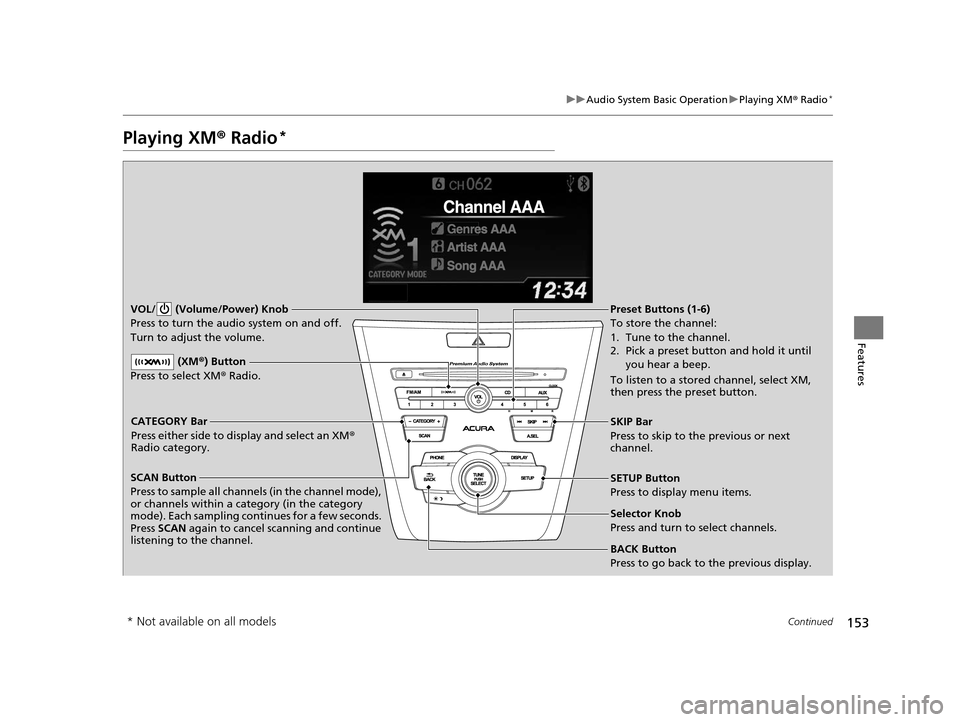
SCAN Button
Press to sample all channels (in the channel mode),
or channels within a category (in the category
mode). Each sampling contin ues for a few seconds.
Press SCAN again to cancel scanning and continue
listening to the channel. VOL/ (Volume/Power) Knob
Press to turn the audio system on and off.
Turn to adjust the volume.SETUP Button
Press to display menu items.
Selector Knob
Press and turn to select channels.
CATEGORY Bar
Press either side to display and select an XM
®
Radio category. SKIP Bar
Press to skip to the previous or next
channel.
(XM
®) Button
Press to select XM ® Radio.
Preset Buttons (1-6)
To store the channel:
1. Tune to the channel.
2. Pick a preset button and hold it until
you hear a beep.
To listen to a stored channel, select XM,
then press the preset button.
BACK Button
Press to go back to the previous display.
* Not available on all models
15 ACURA ILX-31TX66200.book 153 ページ 2014年3月27日 木曜日 午前10時34分
Page 155 of 353
uuAudio System Basic Operation uPlaying XM ® Radio*
154
Features
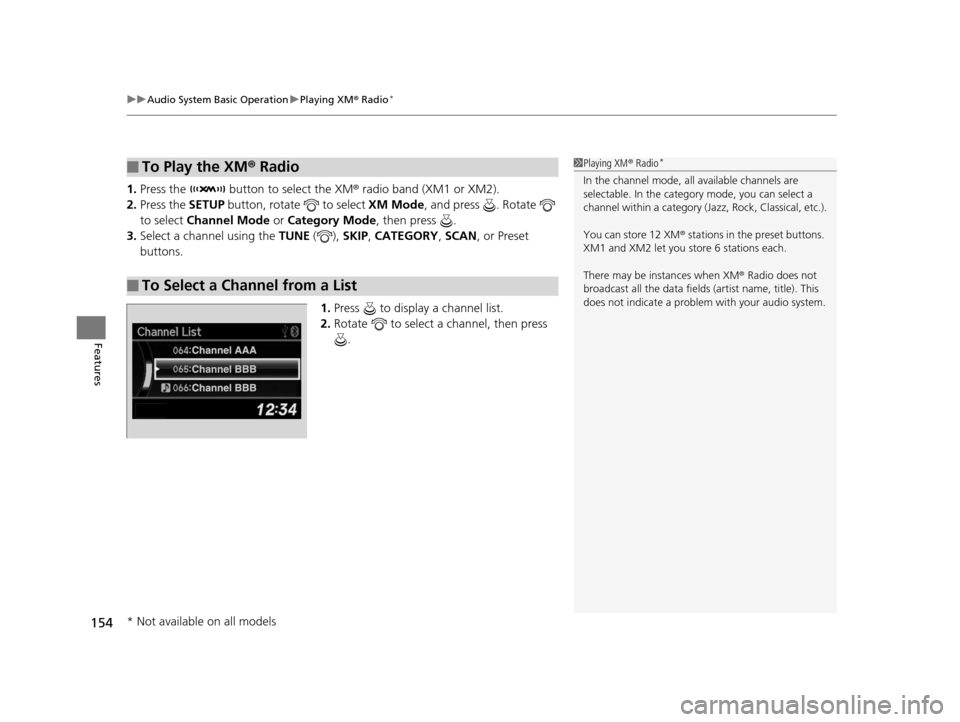
1. Press the button to select the XM ® radio band (XM1 or XM2).
2. Press the SETUP button, rotate to select XM Mode, and press . Rotate
to select Channel Mode or Category Mode , then press .
3. Select a channel using the TUNE ( ), SKIP, CATEGORY , SCAN, or Preset
buttons.
1.Press to display a channel list.
2. Rotate to select a channel, then press
.
■To Play the XM ® Radio
■To Select a Channel from a List
1 Playing XM ® Radio*
In the channel mode, all available channels are
selectable. In the categor y mode, you can select a
channel within a ca tegory (Jazz, Rock, Classical, etc.).
You can store 12 XM ® stations in the preset buttons.
XM1 and XM2 let you store 6 stations each.
There may be instances when XM ® Radio does not
broadcast all the data fields (artist name, title). This
does not indicate a problem with your audio system.
* Not available on all models
15 ACURA ILX-31TX66200.book 154 ページ 2014年3月27日 木曜日 午前10時34分