ECO mode Acura ILX 2015 Owner's Guide
[x] Cancel search | Manufacturer: ACURA, Model Year: 2015, Model line: ILX, Model: Acura ILX 2015Pages: 353, PDF Size: 16.19 MB
Page 142 of 353
141
Features
This chapter describes how to operate technology features.
Audio SystemAbout Your Audio System ................ 142
USB Adapter Cable .......................... 143
Auxiliary Input Jack .......................... 143
Audio System Theft Protection ......... 144
Audio System Basic Operation ........ 145
Audio/Information Screen ................ 146
Audio Remote Controls .................... 149
Adjusting the Sound ........................ 150
Playing AM/FM Radio ....................... 151
Playing XM ® Radio
*......................... 153
Playing a CD .................................... 155
Playing an iPod ................................ 158 Playing Internet Radio ...................... 161
Playing a USB Flash Drive ................. 163
Playing
Bluetooth ® Audio................. 166
Wallpaper Setup .............................. 168
Audio Error Messages
*
CD Player ......................................... 170
iPod/USB Flash Drive ........................ 171
Pandora ®......................................... 172
General Information on the Audio
System XM ® Radio Service
*......................... 173
Recommended CDs ......................... 174 Compatible iPod, iP
hone, and USB Flash
Drives ............................................ 176
HomeLink® Universal Transceiver*......177Training HomeLink........................... 177
Bluetooth ® HandsFreeLink®
Using HFL ........................................ 179
HFL Menus ...................................... 181
* Not available on all models
15 ACURA ILX-31TX66200.book 141 ページ 2014年3月27日 木曜日 午前10時34分
Page 144 of 353
143
uuAudio System uUSB Adapter Cable
Features
USB Adapter Cable
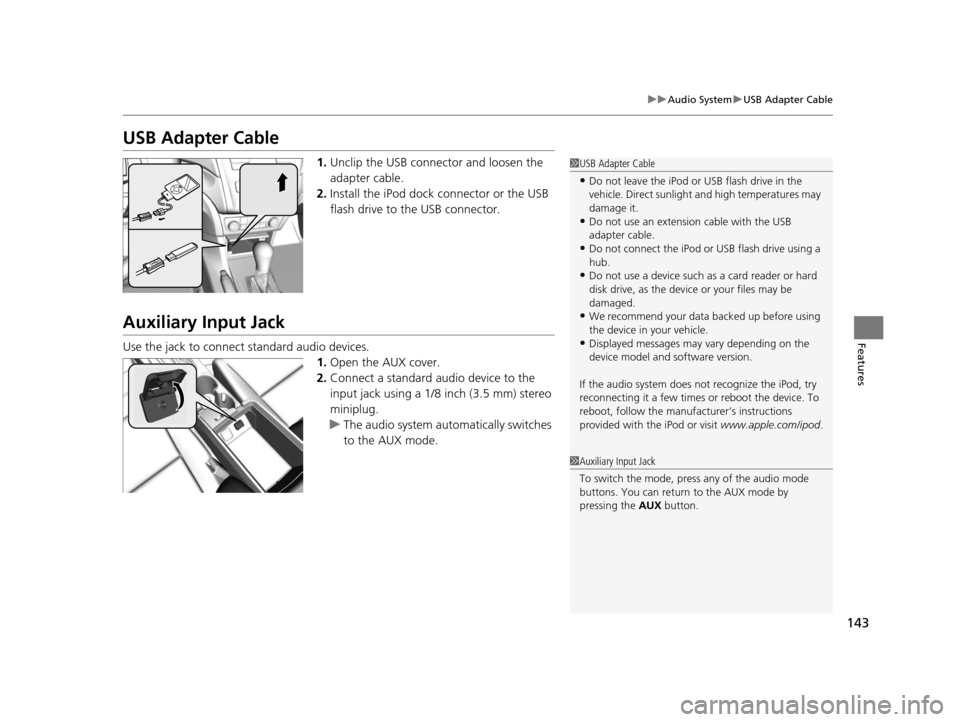
1. Unclip the USB connec tor and loosen the
adapter cable.
2. Install the iPod dock connector or the USB
flash drive to the USB connector.
Auxiliary Input Jack
Use the jack to connect standard audio devices.
1.Open the AUX cover.
2. Connect a standard audio device to the
input jack using a 1/8 inch (3.5 mm) stereo
miniplug.
u The audio system auto matically switches
to the AUX mode.
1 USB Adapter Cable
•Do not leave the iPod or USB flash drive in the
vehicle. Direct sunlight and high temperatures may
damage it.
•Do not use an extension cable with the USB
adapter cable.
•Do not connect the iPod or USB flash drive using a
hub.
•Do not use a device such as a card reader or hard
disk drive, as the device or your files may be
damaged.
•We recommend your data backed up before using
the device in your vehicle.
•Displayed messages may vary depending on the
device model and software version.
If the audio system does not recognize the iPod, try
reconnecting it a few times or reboot the device. To
reboot, follow the manufac turer’s instructions
provided with the iPod or visit www.apple.com/ipod.
1Auxiliary Input Jack
To switch the mode, pres s any of the audio mode
buttons. You can return to the AUX mode by
pressing the AUX button.
15 ACURA ILX-31TX66200.book 143 ページ 2014年3月27日 木曜日 午前10時34分
Page 145 of 353
144
uuAudio System uAudio System Theft Protection
Features
Audio System Theft Protection
The audio system is disabled when it is di sconnected from the power source, such as
when the battery is disconnected or goes dead.
■Reactivating the audio system
1. Set the power mode to ON, and turn on the audio system.
u You will be requested to enter th e audio security code. See step 3.
2. Press and hold the power button ag ain for more than two seconds.
u The audio system is reactivated when the system’s control unit recognizes that
the system is in your vehicle.
If the control unit fails to recognize, ENTER CODE appears on the audio/
information screen.
3. Enter the audio security code using the pr eset buttons. If you enter an incorrect
digit, continue to the last digit, then try again. If you do not enter the code
correctly after 10 tries, leave the system for one hour before trying again, or visit
a dealer to have the system reset.
1 Audio System Theft Protection
Find the audio system's se curity code and serial
number label in your owner’s manual kit.
We recommend that you write down the serial
number in this owner’s manual.
Do not store the label in your vehicle. If you lose the
label, you must first retrie ve the serial number, and
then obtain the code.
You can find out about your serial number and
security code from a dealer.
You can register the securi ty code at Acura Owners
(owners.acura.com.) , and find information on how to
retrieve the serial numbe r and obtain the code at
radio-navicode.acura.com.
U.S. models
15 ACURA ILX-31TX66200.book 144 ページ 2014年3月27日 木曜日 午前10時34分
Page 152 of 353
151
uuAudio System Basic Operation uPlaying AM/FM Radio
Continued
Features
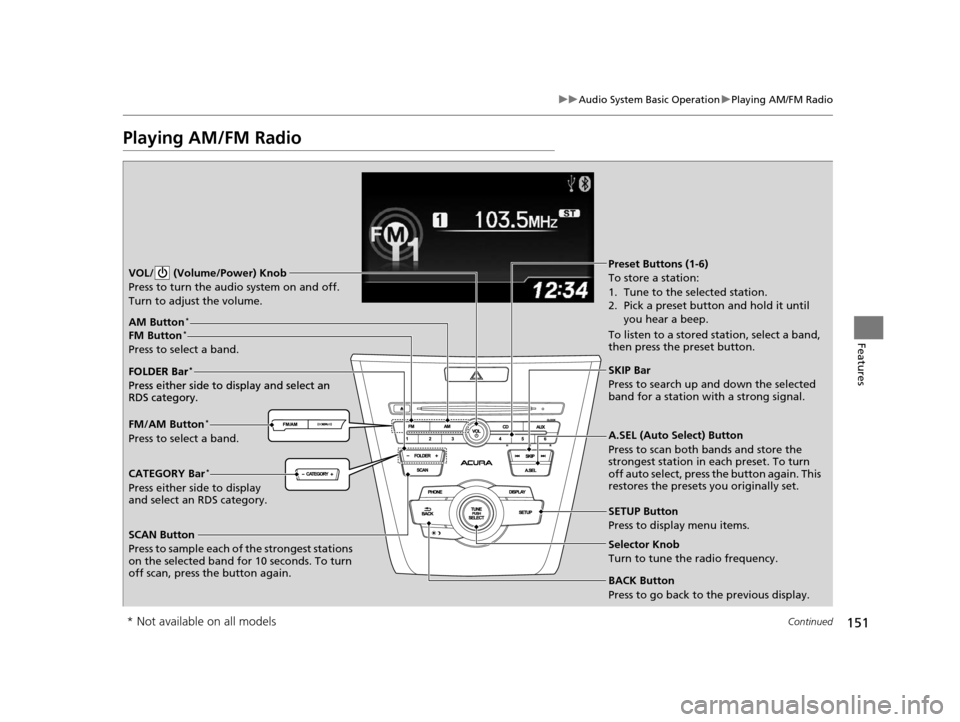
Playing AM/FM Radio
SCAN Button
Press to sample each of the strongest stations
on the selected band for 10 seconds. To turn
off scan, press the button again. VOL/ (Volume/Power) Knob
Press to turn the audi o system on and off.
Turn to adjust the volume.
A.SEL (Auto Select) Button
Press to scan both bands and store the
strongest station in each preset. To turn
off auto select, press the button again. This
restores the presets you originally set.
SETUP Button
Press to display menu items.
Selector Knob
Turn to tune the radio frequency.
CATEGORY Bar*
Press either side to display
and select an RDS category. FM/AM Button
*
Press to select a band. FOLDER Bar
*
Press either side to display and select an
RDS category.
FM Button*
Press to select a band.
AM Button*
BACK Button
Press to go back to the previous display.
SKIP Bar
Press to search up and down the selected
band for a station with a strong signal.
Preset Buttons (1-6)
To store a station:
1. Tune to the selected station.
2. Pick a preset button and hold it until you hear a beep.
To listen to a stored station, select a band,
then press the preset button.
FOLDER Bar
*
Press either side to display and select an
RDS category.
* Not available on all models
15 ACURA ILX-31TX66200.book 151 ページ 2014年3月27日 木曜日 午前10時34分
Page 154 of 353
153
uuAudio System Basic Operation uPlaying XM ® Radio*
Continued
Features
Playing XM ® Radio*
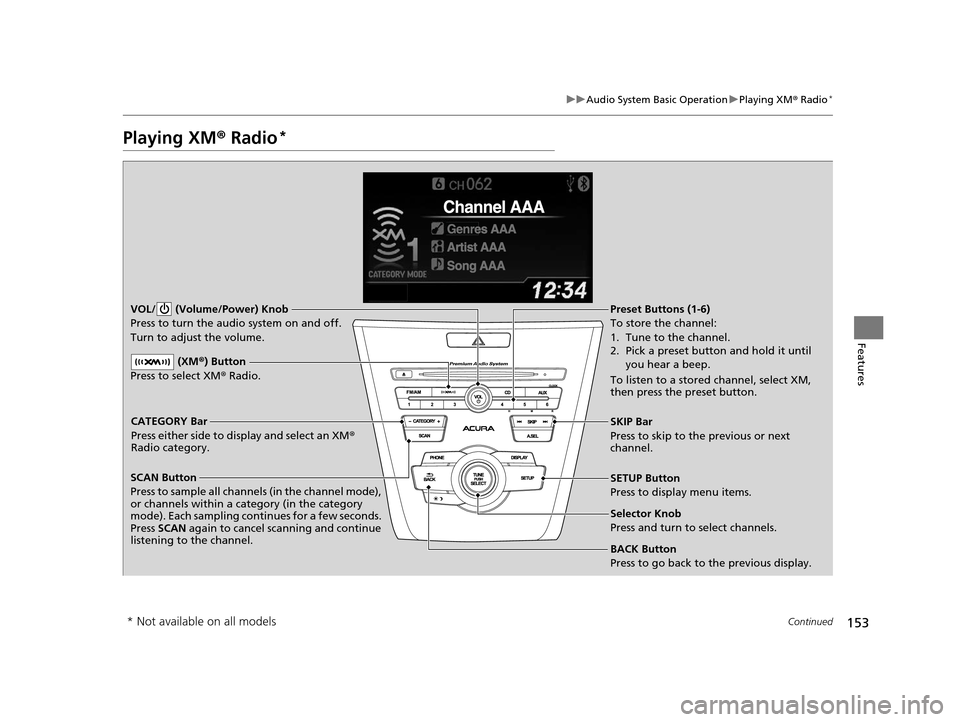
SCAN Button
Press to sample all channels (in the channel mode),
or channels within a category (in the category
mode). Each sampling contin ues for a few seconds.
Press SCAN again to cancel scanning and continue
listening to the channel. VOL/ (Volume/Power) Knob
Press to turn the audio system on and off.
Turn to adjust the volume.SETUP Button
Press to display menu items.
Selector Knob
Press and turn to select channels.
CATEGORY Bar
Press either side to display and select an XM
®
Radio category. SKIP Bar
Press to skip to the previous or next
channel.
(XM
®) Button
Press to select XM ® Radio.
Preset Buttons (1-6)
To store the channel:
1. Tune to the channel.
2. Pick a preset button and hold it until
you hear a beep.
To listen to a stored channel, select XM,
then press the preset button.
BACK Button
Press to go back to the previous display.
* Not available on all models
15 ACURA ILX-31TX66200.book 153 ページ 2014年3月27日 木曜日 午前10時34分
Page 156 of 353
155
uuAudio System Basic Operation uPlaying a CD
Continued
Features
Playing a CD
Your audio system supports audio CDs, CD-Rs and CD-RWs in either MP3, WMA or
AAC format. With the CD loaded, press the CD button.
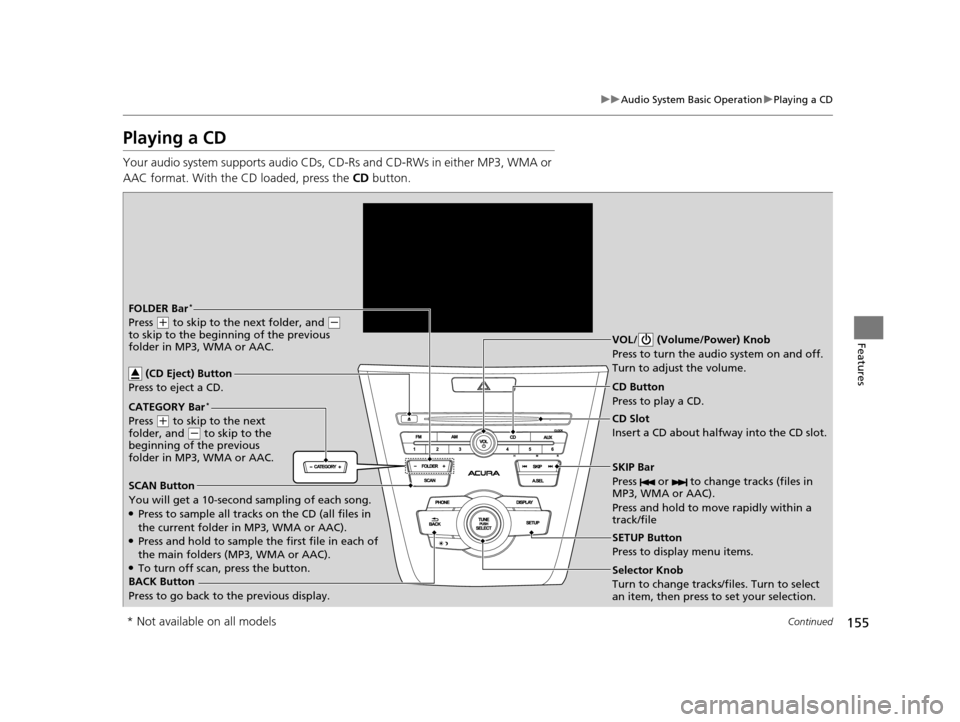
SCAN Button
You will get a 10-second sampling of each song.
●Press to sample all tracks on the CD (all files in
the current folder in MP3, WMA or AAC).
●Press and hold to sample the first file in each of
the main folders (MP3, WMA or AAC).
●To turn off scan, press the button. CD Slot
Insert a CD about halfway into the CD slot.
SKIP Bar
Press or to change tracks (files in
MP3, WMA or AAC).
Press and hold to move rapidly within a
track/fileSelector Knob
Turn to change tracks/files. Turn to select
an item, then press to set your selection. CD Button
Press to play a CD.
(CD Eject) Button
Press to eject a CD.BACK Button
Press to go back to the previous display.
CATEGORY Bar
*
Press (
+ to skip to the next
folder, and ( - to skip to the
beginning of the previous
folder in MP3, WMA or AAC.
FOLDER Bar*
Press ( + to skip to the next folder, and ( -
to skip to the beginning of the previous
folder in MP3, WMA or AAC. VOL/ (Volume/Power) Knob
Press to turn the audi
o system on and off.
Turn to adjust the volume.
SETUP Button
Press to display menu items.
* Not available on all models
15 ACURA ILX-31TX66200.book 155 ページ 2014年3月27日 木曜日 午前10時34分
Page 157 of 353
uuAudio System Basic Operation uPlaying a CD
156
Features
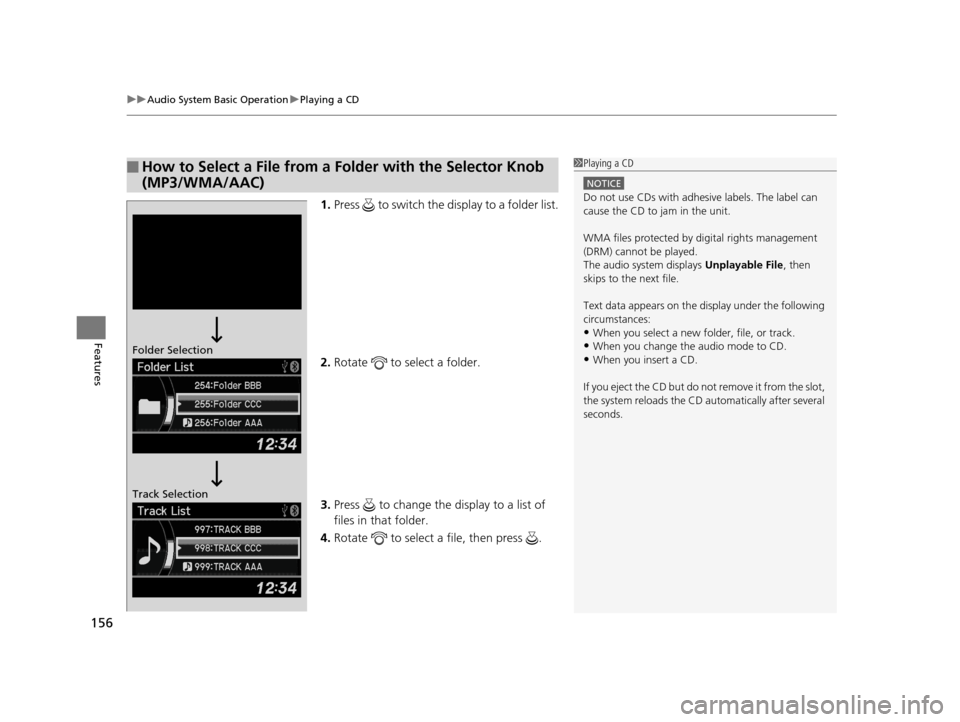
1. Press to switch the display to a folder list.
2. Rotate to select a folder.
3. Press to change the display to a list of
files in that folder.
4. Rotate to select a file, then press .
■How to Select a File from a Fo lder with the Selector Knob
(MP3/WMA/AAC)1 Playing a CD
NOTICE
Do not use CDs with adhesive labels. The label can
cause the CD to jam in the unit.
WMA files protected by di gital rights management
(DRM) cannot be played.
The audio system displays Unplayable File, then
skips to the next file.
Text data appears on the di splay under the following
circumstances:
•When you select a new folder, file, or track.
•When you change the audio mode to CD.
•When you insert a CD.
If you eject the CD but do not remove it from the slot,
the system reloads the CD automatically after several
seconds.Folder Selection
Track Selection
15 ACURA ILX-31TX66200.book 156 ページ 2014年3月27日 木曜日 午前10時34分
Page 164 of 353
163
uuAudio System Basic Operation uPlaying a USB Flash Drive
Continued
Features
Playing a USB Flash Drive
Your audio system reads and plays sound files on a USB flash drive in either MP3,
WMA or AAC*1 format.
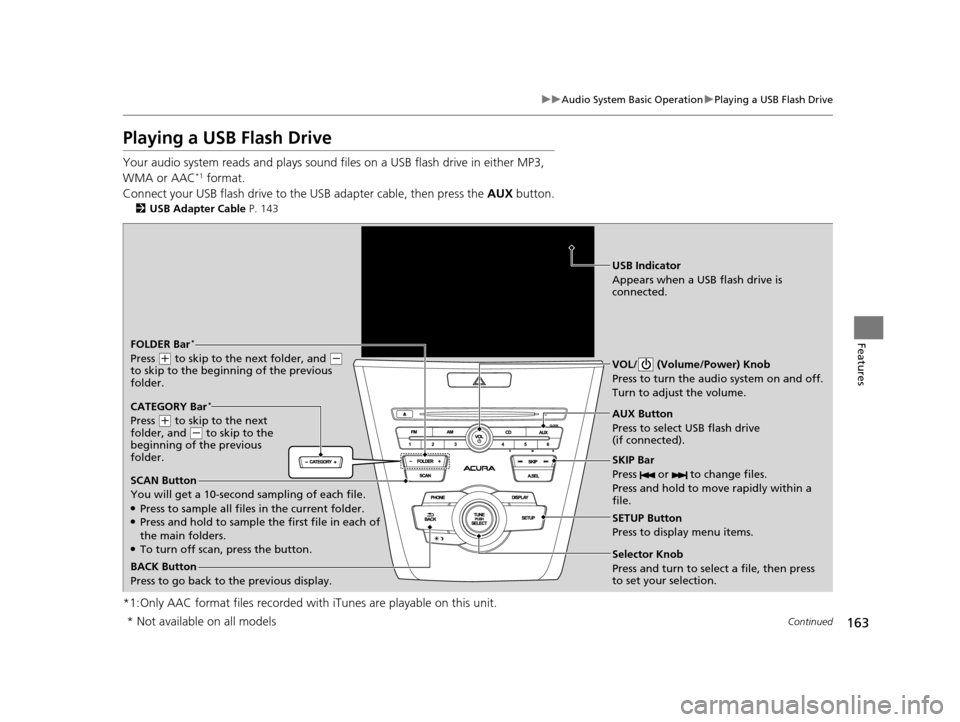
Connect your USB flash drive to the USB adapter cable, then press the AUX button.
2USB Adapter Cable P. 143
*1:Only AAC format files recorded with iTunes are playable on this unit.
BACK Button
Press to go back to the previous display. SKIP Bar
Press or to change files.
Press and hold to move rapidly within a
file.
SETUP Button
Press to display menu items.
Selector Knob
Press and turn to select a file, then press
to set your selection. AUX Button
Press to select USB flash drive
(if connected). VOL/ (Volume/Power) Knob
Press to turn the audi
o system on and off.
Turn to adjust the volume.
FOLDER Bar*
Press ( + to skip to the next folder, and (-
to skip to the beginning of the previous
folder.
CATEGORY Bar
*
Press ( + to skip to the next
folder, and ( - to skip to the
beginning of the previous
folder.
SCAN Button
You will get a 10-second sampling of each file.
●Press to sample all files in the current folder.●Press and hold to sample the first file in each of
the main folders.
●To turn off scan, press the button.
USB Indicator
Appears when a USB flash drive is
connected.
* Not available on all models
15 ACURA ILX-31TX66200.book 163 ページ 2014年3月27日 木曜日 午前10時34分
Page 168 of 353
167
uuAudio System Basic Operation uPlaying Bluetooth ® Audio
Features
1. Make sure that your phone is paired and
linked to HFL.
2. Press the AUX button.
If the phone is not recognized, another HFL-
compatible phone, which is not compatible
for Bluetooth ® Audio, may be already linked.
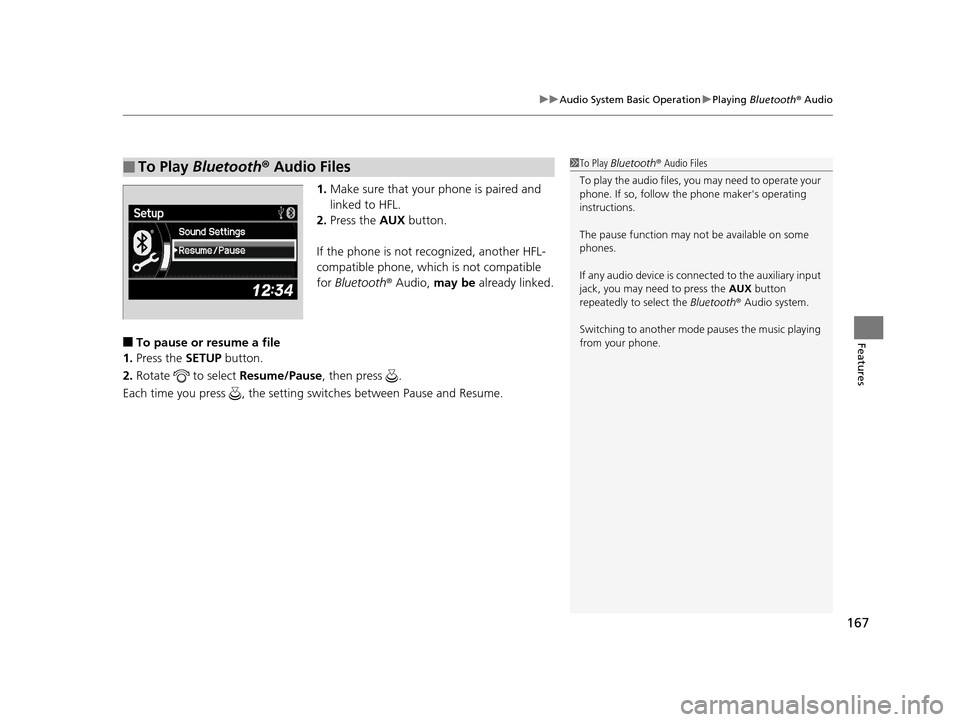
■To pause or resume a file
1. Press the SETUP button.
2. Rotate to select Resume/Pause, then press .
Each time you press , the setting switches between Pause and Resume.
■To Play Bluetooth ® Audio Files1 To Play Bluetooth ® Audio Files
To play the audio files, y ou may need to operate your
phone. If so, follow the phone maker's operating
instructions.
The pause function may no t be available on some
phones.
If any audio device is conne cted to the auxiliary input
jack, you may need to press the AUX button
repeatedly to select the Bluetooth® Audio system.
Switching to another mode pauses the music playing
from your phone.
15 ACURA ILX-31TX66200.book 167 ページ 2014年3月27日 木曜日 午前10時34分
Page 177 of 353
176
uuGeneral Information on the Audio System uCompatible iPod, iPhone, and USB Flash Drives
Features
Compatible iPod, iPhone, and USB Flash Drives
• Use a recommended USB flash drive of 256 MB or higher.
• Some digital audio players may not be compatible.
• Some USB flash drives (e.g., a device with security lockout) may not work.
• Some software files may not allow for audio play or text data display.
• Some versions of MP3, WMA, or AAC formats may be unsupported.
■iPod and iPhone Model Compatibility
Model
iPod (5th generation)
iPod classic 80/160GB (launched in 2007)
iPod classic 120GB (launched in 2008)
iPod classic 160GB (launched in 2009)
iPod nano (launched in 2010)
iPod touch (launched in 2010)
iPhone 3G/iPhone 3GS/iPhone 4
■USB Flash Drives
1iPod and iPhone Model Compatibility
This system may not work with all software versions
of these devices.
1USB Flash Drives
Files on the USB flash drive are played in their stored
order. This order may be different from the order
displayed on your PC or device.
15 ACURA ILX-31TX66200.book 176 ページ 2014年3月27日 木曜日 午前10時34分