ECO mode Acura ILX 2015 Workshop Manual
[x] Cancel search | Manufacturer: ACURA, Model Year: 2015, Model line: ILX, Model: Acura ILX 2015Pages: 353, PDF Size: 16.19 MB
Page 249 of 353
248
Maintenance
Before Performing Maintenance
Inspection and Maintenance
For your safety, perform all listed inspections and maintenance to keep your vehicle
in good condition. If you become aware of any abnormality (noise, smell, insufficient
brake fluid, oil residue on the ground, etc.), have your vehicle inspected by a dealer.
(Note, however, that service at a dealer is not mandatory to keep your warranties in
effect.) Refer to the separate maintena nce booklet for detailed maintenance and
inspection information.
■Daily inspections
Perform inspections before long distance trips, when washing the vehicle, or when
refueling.
■Periodic inspections
• Check the automatic transmi ssion fluid level monthly.
2Automatic Transmission Fluid P. 270
•Check the brake fluid level monthly.
2 Brake/Clutch Fluid P. 272
•Check the tire pressure monthly. Examin e the tread for wear and foreign objects.
2Checking and Maintaining Tires P. 286
•Check the operation of the exterior lights monthly.
2 Replacing Light Bulbs P. 274
•Check the condition of the wiper bl ades at least every six months.
2Checking and Maintaining Wiper Blades P. 284
■Types of Inspection and Maintenance
1Inspection and Maintenance
Maintenance, replacement, or repair of
emissions control devices and systems may be
done by any automotive repair establishment or
individuals using parts that are “certified” to
EPA standards.
According to state and fede ral regulations, failure to
perform maintenance on the maintenance main
items marked with # will not void your emissions
warranties. However, all ma intenance services should
be performed in accordan ce with the intervals
indicated by the mult i-information display.
2 Maintenance Service Items P. 254
If you want to perform complex maintenance tasks
that require more skills a nd tools, you can purchase a
subscription to the Service Express website at
www.techinfo.honda.com .
2 Authorized Manuals P. 341
If you want to perform ma intenance yourself, make
sure that you have the necessary tools and skills first.
After performing ma intenance, update the records in
the separate maintenance booklet.
U.S. models
15 ACURA ILX-31TX66200.book 248 ページ 2014年3月27日 木曜日 午前10時34分
Page 263 of 353

262
uuMaintenance Under the Hood uOil Check
Maintenance
Oil Check
We recommend that you check the engi ne oil level every time you refuel.
Park the vehicle on level ground.
Wait approximately three minu tes after turning the engine off before you check the
oil. 1.Remove the dipstick (orange).
2. Wipe the dipstick with a clean cloth or
paper towel.
3. Insert the dipstick back all the way into its
hole.1Oil Check
If the oil level is near or below the lower mark, slowly
add oil being careful not to overfill.
2.0 ℓ engine models
2.4 ℓ engine models
15 ACURA ILX-31TX66200.book 262 ページ 2014年3月27日 木曜日 午前10時34分
Page 268 of 353
267
uuMaintenance Under the Hood uChanging the Engine Oil and Oil Filter
Maintenance
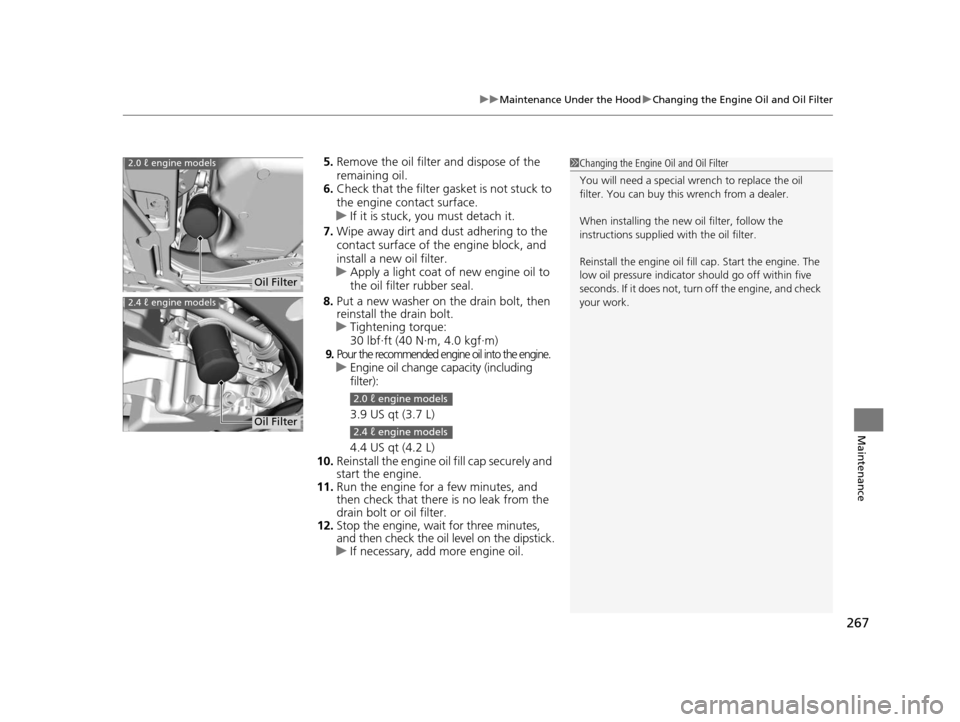
5. Remove the oil filter and dispose of the
remaining oil.
6. Check that the filter gasket is not stuck to
the engine contact surface.
u If it is stuck, you must detach it.
7. Wipe away dirt and dust adhering to the
contact surface of the engine block, and
install a new oil filter.
u Apply a light coat of new engine oil to
the oil filter rubber seal.
8. Put a new washer on the drain bolt, then
reinstall the drain bolt.
u Tightening torque:
30 lbf∙ft (40 N∙m, 4.0 kgf∙m)
9.Pour the recommended engine oil into the engine.uEngine oil change capacity (including
filter):
3.9 US qt (3.7 L)
4.4 US qt (4.2 L)
10. Reinstall the engine oil fill cap securely and
start the engine.
11. Run the engine for a few minutes, and
then check that there is no leak from the
drain bolt or oil filter.
12. Stop the engine, wait for three minutes,
and then check the oil level on the dipstick.
u If necessary, add more engine oil.
1Changing the Engine Oil and Oil Filter
You will need a special wrench to replace the oil
filter. You can buy this wrench from a dealer.
When installing the new oil filter, follow the
instructions supplied with the oil filter.
Reinstall the engine oil fill cap. Start the engine. The
low oil pressure indicator should go off within five
seconds. If it does not, turn off the engine, and check
your work.2.0 ℓ engine models
Oil Filter
2.4 ℓ engine models
Oil Filter
2.0 ℓ engine models
2.4 ℓ engine models
15 ACURA ILX-31TX66200.book 267 ページ 2014年3月27日 木曜日 午前10時34分
Page 293 of 353
292
uuChecking and Maintaining Tires uTire and Wheel Replacement
Maintenance
Tire and Wheel Replacement
Replace your tires with radials of the sa me size, load range, speed rating, and
maximum cold tire pressure ra ting (as shown on the tire’s sidewall). Using tires of a
different size or construction can cause the ABS and VSA ® (vehicle stability assist)
system to work incorrectly.
It is best to replace all four tires at the same time. If that isn’t possible, replace the
front or rear tires in pairs.
Make sure that the wheel’s specifications match thos e of the original wheels.
If you replace a wheel, only use TPMS sp ecified wheels approved for your vehicle.1Tire and Wheel Replacement
3WARNING
Installing improper tires on your vehicle can
affect handling and stability. This can cause
a crash in which you can be seriously hurt or
killed.
Always use the size and type of tires
recommended in this owner’s manual.
U.S. models only
15 ACURA ILX-31TX66200.book 292 ページ 2014年3月27日 木曜日 午前10時34分
Page 296 of 353
295
Maintenance
Battery
Checking the Battery
The battery condition is being monitored by the sensor on the negative terminal. If
there is a problem with the sensor, the warning message on multi-information
display will let you know. Have your vehicle checked by a dealer.
If your vehicle's battery is disconnected or goes dead:
• The audio system is disabled.
2 Reactivating the audio system P. 144
•The clock resets.
2 Setting the Clock P. 92
•The navigation system* is disabled.
2 Refer to the navigation system manual
Charging the Battery
Disconnect both battery cables to prevent damaging your vehicle's electrical system.
Always disconnect the negative (–) cable first, and reconnect it last.
1Battery
WARNING: Battery post, terminals,
and related accessories contain lead
and lead compounds.
Wash your hands after handling.
When you find corrosion, cl ean the battery terminals
by applying a baking powder and water solution.
Rinse the terminals with water. Cloth/towel dry the
battery. Coat the terminals with grease to help
prevent future corrosion.
When replacing the battery, the replacement must be
of the same specifications.
Please consult a dealer for more information.
3WARNING
The battery gives off explosive hydrogen
gas during normal operation.
A spark or flame can cause the battery to
explode with enough force to kill or
seriously hurt you.
When conducting any battery
maintenance, wear prot ective clothing and
a face shield, or have a skilled technician do
it.
* Not available on all models
15 ACURA ILX-31TX66200.book 295 ページ 2014年3月27日 木曜日 午前10時34分
Page 313 of 353
312
uuEngine Does Not Start uIf the Keyless Access Remote Battery is Weak
Handling the Unexpected
If the Keyless Access Re mote Battery is Weak
If the beeper sounds, the TO START, HOLD REMO TE NEAR START BUTTON
message appears on the multi-information display, the indicator on the ENGINE
START/STOP button flashes, and the engine wo n’t start. Start the engine as
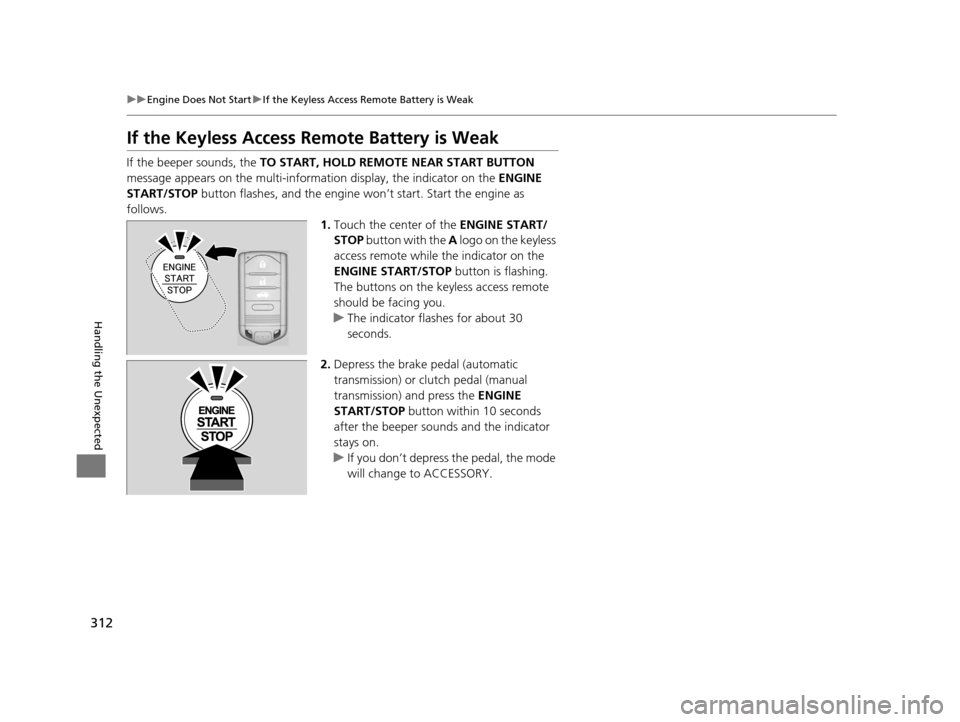
follows. 1.Touch the center of the ENGINE START/
STOP button with the A logo on the keyless
access remote while the indicator on the
ENGINE START/STOP button is flashing.
The buttons on the keyle ss access remote
should be facing you.
u The indicator flashes for about 30
seconds.
2. Depress the brake pedal (automatic
transmission) or clutch pedal (manual
transmission) and press the ENGINE
START/STOP button within 10 seconds
after the beeper sounds and the indicator
stays on.
u If you don’t depress the pedal, the mode
will change to ACCESSORY.
15 ACURA ILX-31TX66200.book 312 ページ 2014年3月27日 木曜日 午前10時34分
Page 314 of 353
313
uuEngine Does Not Start uEmergency Engine Stop
Handling the Unexpected
Emergency Engine Stop
The ENGINE START/STOP button may be used to stop the engine due to an
emergency situation even while driving. If you must stop the engine, do either of the
following operations:
• Press and hold the ENGINE START/STOP button for about three seconds.
• Firmly press the ENGINE START/STOP button three times.
The steering wheel will not lock. However, because turning off the engine disables
the power assist the engine provides to the steering and braking systems, it will
require significantly more physical effort an d time to steer and slow the vehicle. Use
both feet on the brake pedal to slow down the vehicle and stop immediately in a
safe place. With manual transmission models you can also downshift the
transmission to utilize engine braking.
The power mode is in ACCESSORY when the engine is stopped.
To change the mode to VEHICLE OFF, move the shift lever to
(P after the vehicle
comes to a complete stop. Then press the ENGINE START/STOP button twice
without depressing the brake pedal.
The power mode changes to VEHICLE OFF.
1 Emergency Engine Stop
Do not press the button while driving unless it is
absolutely necessary for th e engine to be switched
off.
Automatic transmission models
Manual transmission models
15 ACURA ILX-31TX66200.book 313 ページ 2014年3月27日 木曜日 午前10時34分
Page 315 of 353
314
Handling the Unexpected
Jump Starting
Turn off the power to electric devices, such as audio and lights. Turn off the engine,
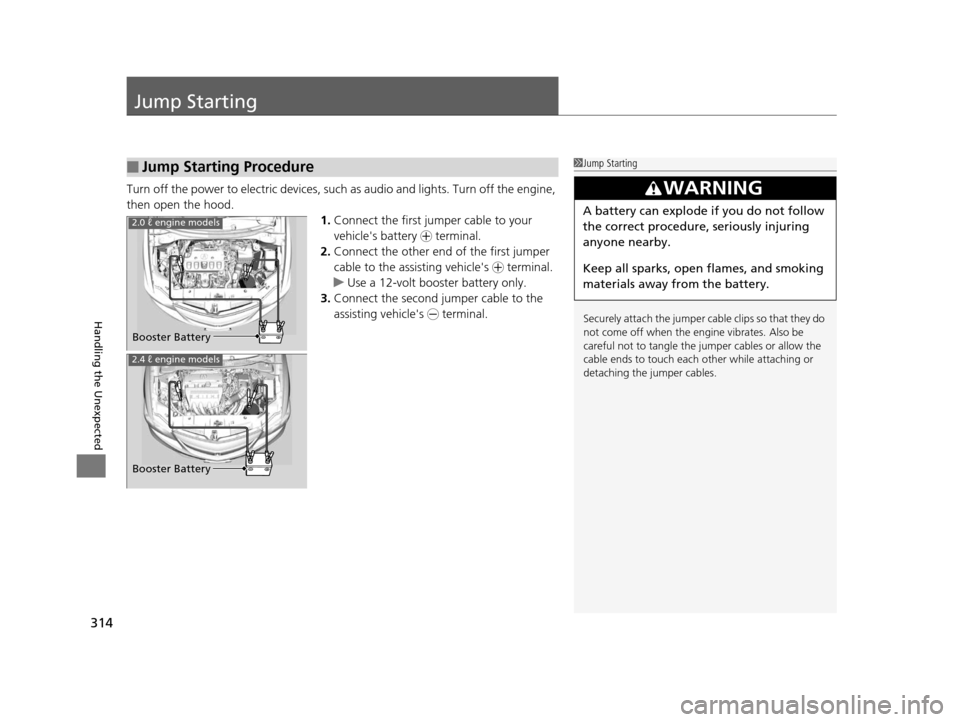
then open the hood. 1.Connect the first jump er cable to your
vehicle's battery + terminal.
2. Connect the other end of the first jumper
cable to the assisting vehicle's + terminal.
u Use a 12-volt booster battery only.
3. Connect the second jumper cable to the
assisting vehicle's - terminal.
■Jump Starting Procedure1Jump Starting
Securely attach the jumper cable clips so that they do
not come off when the engine vibrates. Also be
careful not to tangle the ju mper cables or allow the
cable ends to touch each other while attaching or
detaching the jumper cables.
3WARNING
A battery can explode if you do not follow
the correct procedure, seriously injuring
anyone nearby.
Keep all sparks, open flames, and smoking
materials away from the battery.2.0 ℓ engine models
Booster Battery
Booster Battery
2.4 ℓ engine models
15 ACURA ILX-31TX66200.book 314 ページ 2014年3月27日 木曜日 午前10時34分
Page 316 of 353
Continued315
uuJump Starting u
Handling the Unexpected
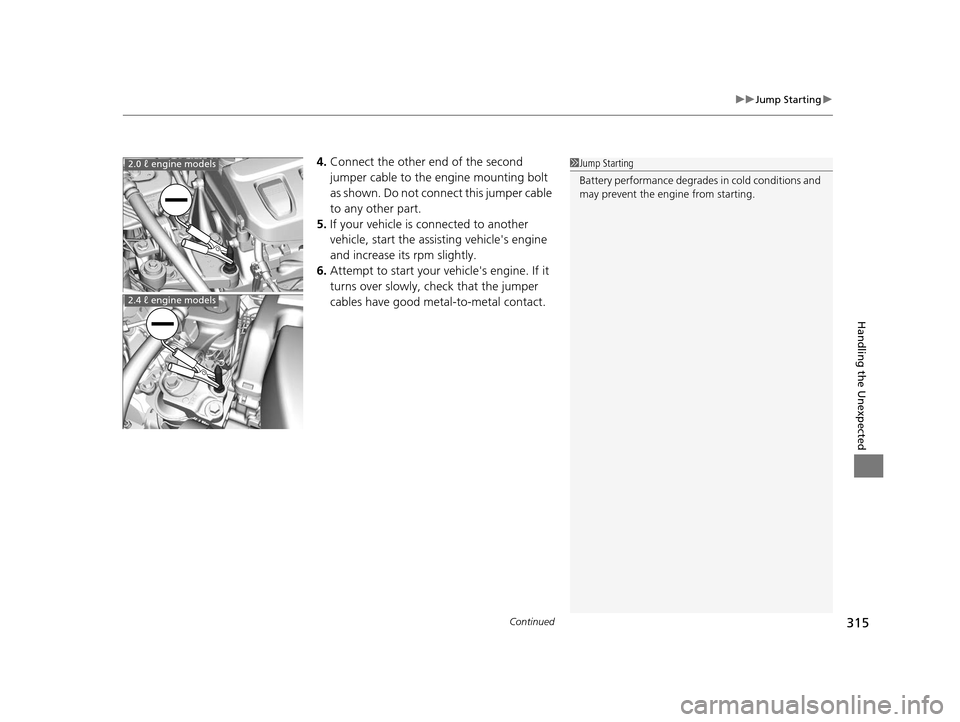
4.Connect the other end of the second
jumper cable to the engine mounting bolt
as shown. Do not connect this jumper cable
to any other part.
5. If your vehicle is connected to another
vehicle, start the assisting vehicle's engine
and increase its rpm slightly.
6. Attempt to start your ve hicle's engine. If it
turns over slowly, check that the jumper
cables have good metal-to-metal contact.1 Jump Starting
Battery performance degrades in cold conditions and
may prevent the engi ne from starting.2.0 ℓ engine models
2.4 ℓ engine models
15 ACURA ILX-31TX66200.book 315 ページ 2014年3月27日 木曜日 午前10時34分
Page 344 of 353
Index
343
Index
Index
A
ABS (Anti-lock Brake System).................. 239
Accessories and Modifications ................ 246
Accessory Power Sockets ......................... 134
Additives
Coolant .................................................. 268
Engine Oil ............................................... 261
Washer ................................................... 273
Additives, Engine Oil ............................... 261
Adjusting Armrest .................................................. 130
Front Seats.............................................. 123
Head Restraints ....................................... 126
Mirrors.................................................... 121
Rear Seat ................................................ 129
Steering Wheel ....................................... 120
Temperature ............................................. 81
Air Conditioning System (Climate Control System) .................................................... 136
Changing the Mode................................ 136
Defrosting the Windshield and Windows .............................................. 137
Dust and Pollen Filter .............................. 297
Recirculation/Fresh Air Mode................... 136
Sensors ................................................... 139
Synchronized Mode ................................ 138
Using Automatic Climate Control............ 136
Air Pressure .............................. 287, 331, 333
Airbags ....................................................... 33
Advanced Airbags ..................................... 39
After a Collision ........................................ 36 Airbag Care ............................................... 47
Event Data Recorder .................................... 0
Front Airbags (SRS) .................................... 36
Indicator ........................................ 44, 67, 71
Passenger Airbag Off Indicator .................. 45
Sensors ...................................................... 33
Side Airbag Cutoff System ......................... 42
Side Airbag Off Indicator ........................... 46
Side Airbags .............................................. 40
Side Curtain Airbags .................................. 43
AM/FM Radio ............................................ 151
Anti-lock Brake System (ABS) .................. 239
Indicator .................................................... 67
Armrest ..................................................... 130
Audio Remote Controls ............................ 149
Audio System ............................................ 142
Adjusting the Sound ................................ 150
Auxiliary Input Jack .................................. 143
Error Messages ........................................ 170
General Information ................................ 173
iPhone ..................................................... 176
iPod ......................................................... 158
MP3/WMA/AAC ...................................... 163
Pandora ®................................................. 161
Reactivating ............................................. 144
Recommended CDs ................................. 174
Recommended Devices ............................ 176
Security Code .......................................... 144
Theft Protection ....................................... 144
USB Adapter Cable .................................. 143
USB Flash Drives ...................................... 176 Audio/Information Screen
....................... 146
Authorized Manuals ................................ 341
Auto Door Locking/Unlocking ................. 101
Customize ................................................. 86
Automatic Lighting .................................. 115
Automatic Transmission ........................... 221
Creeping ................................................. 221
Fluid ........................................................ 270
Kickdown ................................................ 221
Operating the Shift Lever................... 15, 223
Shift Lever Does Not Move ...................... 317
Shifting ................................................... 222
Auxiliary Input Jack .................................. 143
Average Fuel Economy .............................. 81
Average Speed ........................................... 82
B
Battery...................................................... 295
Charging System Indicator................. 65, 320
Jump Starting .......................................... 314
Maintenance (Checki ng the Battery) ........ 295
Maintenance (Replacing) ......................... 296
Belts (Seat) .................................................. 26
Beverage Holders ..................................... 133
Bluetooth ® Audio ..................................... 166
Bluetooth ® HandsFreeLink ®..................... 179
Booster Seats (For Children) ...................... 59
15 ACURA ILX-31TX66200.book 343 ページ 2014年3月27日 木曜日 午前10時34分