reset Acura ILX 2016 Owner's Guide
[x] Cancel search | Manufacturer: ACURA, Model Year: 2016, Model line: ILX, Model: Acura ILX 2016Pages: 521, PDF Size: 24.09 MB
Page 213 of 521
uuAudio System Basic Operation uPlaying SiriusXM ® Radio
212
Features
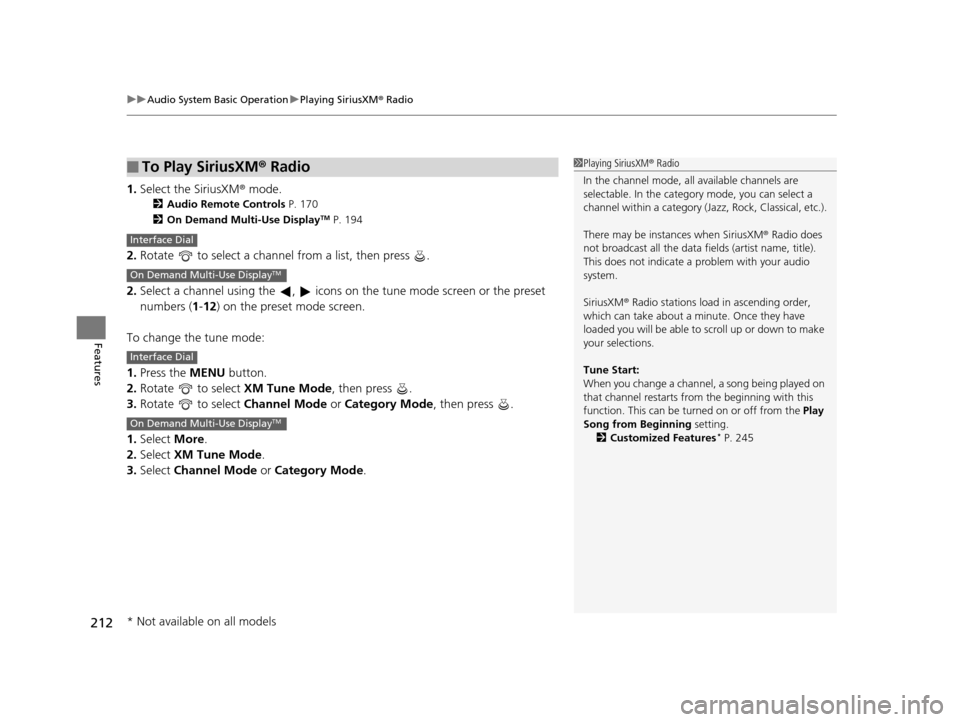
1. Select the SiriusXM® mode.
2 Audio Remote Controls P. 170
2 On Demand Multi-Use DisplayTM P. 194
2.Rotate to select a channel from a list, then press .
2. Select a channel using the , icons on the tune mode screen or the preset
numbers ( 1-12 ) on the preset mode screen.
To change the tune mode:
1. Press the MENU button.
2. Rotate to select XM Tune Mode, then press .
3. Rotate to select Channel Mode or Category Mode , then press .
1. Select More.
2. Select XM Tune Mode .
3. Select Channel Mode or Category Mode .
■To Play SiriusXM ® Radio1 Playing SiriusXM ® Radio
In the channel mode, all available channels are
selectable. In the categor y mode, you can select a
channel within a ca tegory (Jazz, Rock, Classical, etc.).
There may be instances when SiriusXM ® Radio does
not broadcast all the data fi elds (artist name, title).
This does not indicate a problem with your audio
system.
SiriusXM ® Radio stations load in ascending order,
which can take about a minute. Once they have
loaded you will be able to scroll up or down to make
your selections.
Tune Start:
When you change a channel, a song being played on
that channel restarts from the beginning with this
function. This can be turned on or off from the Play
Song from Beginning setting. 2 Customized Features
* P. 245
Interface Dial
On Demand Multi-Use DisplayTM
Interface Dial
On Demand Multi-Use DisplayTM
* Not available on all models
16 ACURA ILX-31TX66300.book 212 ページ 2014年12月22日 月曜日 午後10時15分
Page 214 of 521
Continued213
uuAudio System Basic Operation uPlaying SiriusXM ® Radio
Features
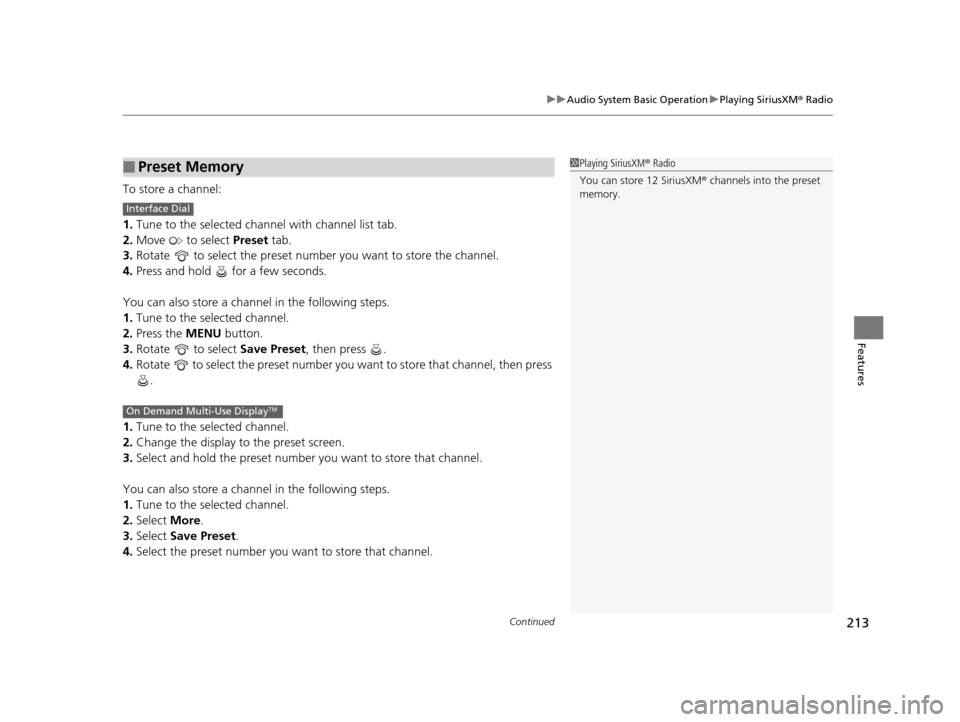
To store a channel:
1. Tune to the selected channel with channel list tab.
2. Move to select Preset tab.
3. Rotate to select the preset number you want to store the channel.
4. Press and hold for a few seconds.
You can also store a channel in the following steps.
1. Tune to the selected channel.
2. Press the MENU button.
3. Rotate to select Save Preset, then press .
4. Rotate to select the preset number you want to store that channel, then press
.
1. Tune to the selected channel.
2. Change the display to the preset screen.
3. Select and hold the preset number you want to store that channel.
You can also store a channel in the following steps.
1. Tune to the selected channel.
2. Select More.
3. Select Save Preset .
4. Select the preset number you want to store that channel.
■Preset Memory1Playing SiriusXM ® Radio
You can store 12 SiriusXM ® channels into the preset
memory.
Interface Dial
On Demand Multi-Use DisplayTM
16 ACURA ILX-31TX66300.book 213 ページ 2014年12月22日 月曜日 午後10時15分
Page 215 of 521
uuAudio System Basic Operation uPlaying SiriusXM ® Radio
214
Features
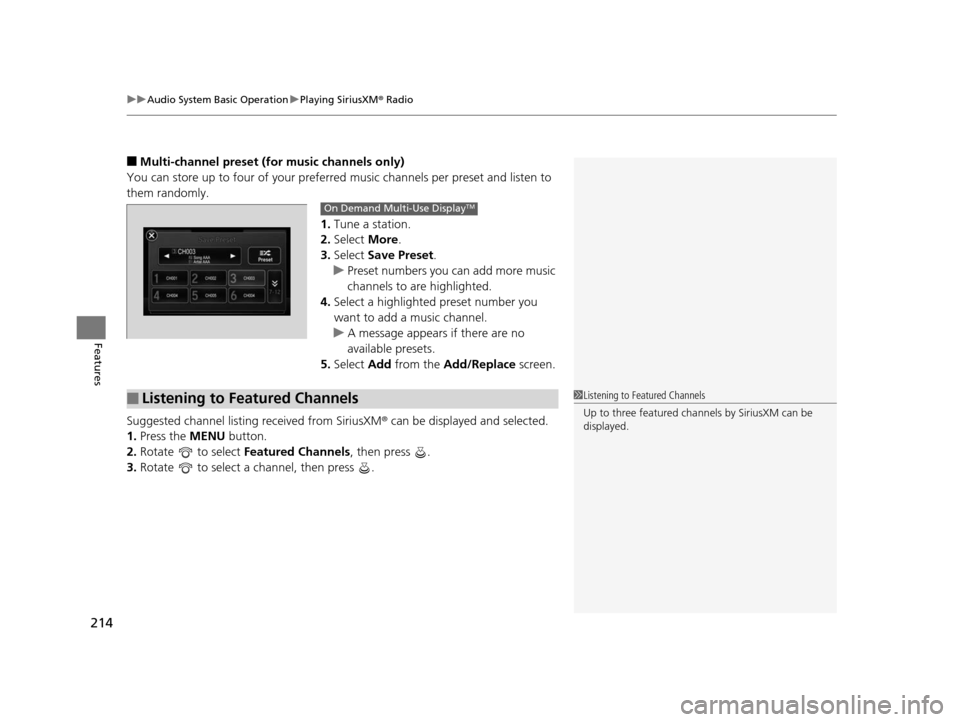
■Multi-channel preset (for music channels only)
You can store up to four of your preferred music channels per preset and listen to
them randomly.
1.Tune a station.
2. Select More.
3. Select Save Preset.
u Preset numbers you can add more music
channels to are highlighted.
4. Select a highlighted preset number you
want to add a music channel.
u A message appears if there are no
available presets.
5. Select Add from the Add/Replace screen.
Suggested channel listing received from SiriusXM ® can be displayed and selected.
1. Press the MENU button.
2. Rotate to select Featured Channels , then press .
3. Rotate to select a channel, then press .
On Demand Multi-Use DisplayTM
■Listening to Featured Channels1Listening to Featured Channels
Up to three featured cha nnels by SiriusXM can be
displayed.
16 ACURA ILX-31TX66300.book 214 ページ 2014年12月22日 月曜日 午後10時15分
Page 216 of 521
Continued215
uuAudio System Basic Operation uPlaying SiriusXM ® Radio
Features
The system constantly records up to the last 60 minutes of your currently tuned
channel and all the preset channel broadc ast, starting from the moment you turn
the power mode to ON. You can rewind and replay the last 60 minutes of each
broadcast.
1. Press the MENU button.
2. Rotate to select Playback, then press .
3. Rotate to select a channel then press .
To play or pause in playback mode:
Select icon.
1. Press the MENU button.
2. Rotate to select Play/Pause, then press .
■Returning to real-time broadcast
Select and hold the icon or select More then, select Go to Live.
1. Press the MENU button.
2. Rotate to select Go to Live, then press .
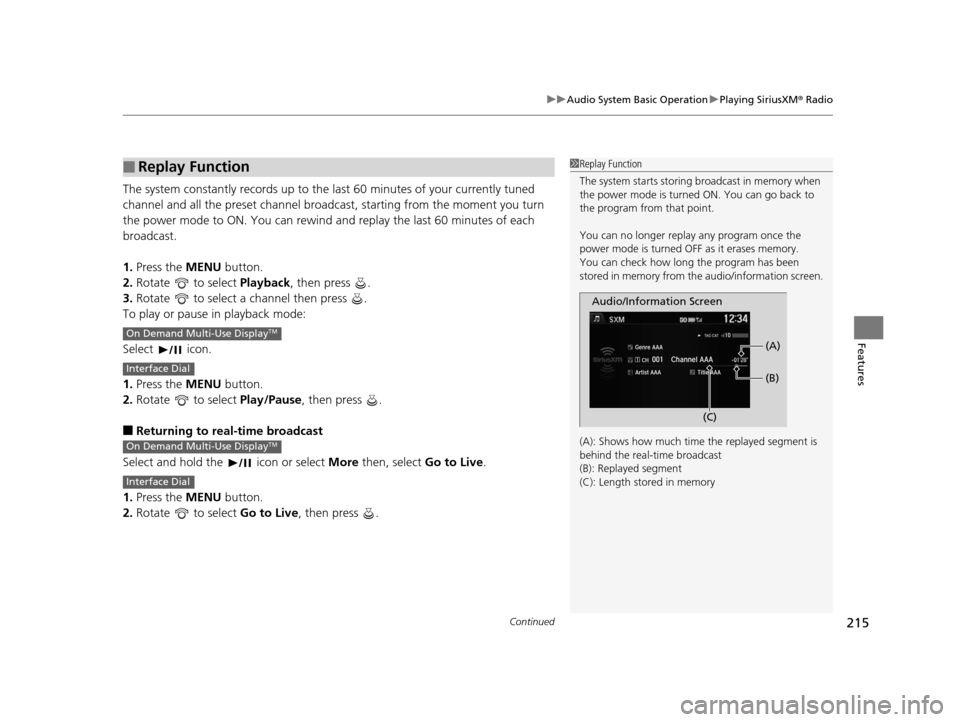
■Replay Function1Replay Function
The system starts storing broadcast in memory when
the power mode is turned ON. You can go back to
the program from that point.
You can no longer repl ay any program once the
power mode is turned OFF as it erases memory.
You can check how long the program has been
stored in memory from th e audio/information screen.
(A): Shows how much time the replayed segment is
behind the real-time broadcast
(B): Replayed segment
(C): Length stored in memory
Audio/Information Screen (C)(B) (A)
On Demand Multi-Use DisplayTM
Interface Dial
On Demand Multi-Use DisplayTM
Interface Dial
16 ACURA ILX-31TX66300.book 215 ページ 2014年12月22日 月曜日 午後10時15分
Page 218 of 521
217
uuAudio System Basic Operation uPlaying SiriusXM ® Radio
Features
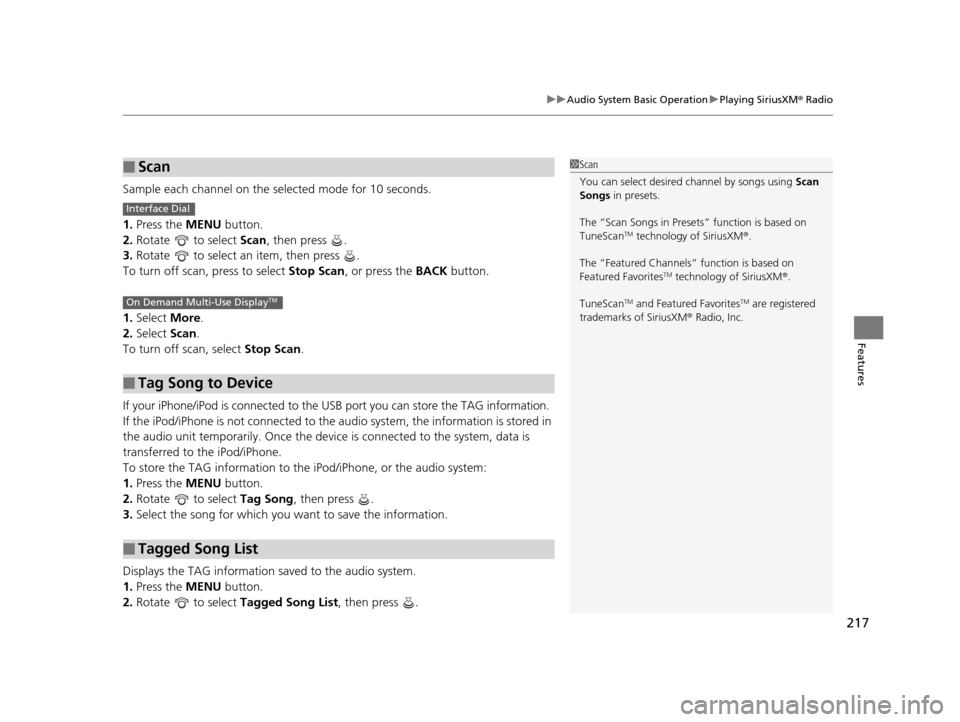
Sample each channel on the selected mode for 10 seconds.
1. Press the MENU button.
2. Rotate to select Scan, then press .
3. Rotate to select an item, then press .
To turn off scan, press to select Stop Scan, or press the BACK button.
1. Select More.
2. Select Scan.
To turn off scan, select Stop Scan.
If your iPhone/iPod is connected to the USB port you can store the TAG information.
If the iPod/iPhone is not connected to the audio system, the information is stored in
the audio unit temporarily. Once the device is connected to the system, data is
transferred to the iPod/iPhone.
To store the TAG information to th e iPod/iPhone, or the audio system:
1. Press the MENU button.
2. Rotate to select Tag Song, then press .
3. Select the song for which you wa nt to save the information.
Displays the TAG information saved to the audio system.
1. Press the MENU button.
2. Rotate to select Tagged Song List, then press .
■Scan
■Tag Song to Device
■Tagged Song List
1Scan
You can select desired channel by songs using Scan
Songs in presets.
The “Scan Songs in Preset s” function is based on
TuneScan
TM technology of SiriusXM ®.
The “Featured Channels ” function is based on
Featured Favorites
TM technology of SiriusXM ®.
TuneScan
TM and Featured FavoritesTM are registered
trademarks of SiriusXM ® Radio, Inc.
Interface Dial
On Demand Multi-Use DisplayTM
16 ACURA ILX-31TX66300.book 217 ページ 2014年12月22日 月曜日 午後10時15分
Page 247 of 521
246
uuCustomized Features*u
Features
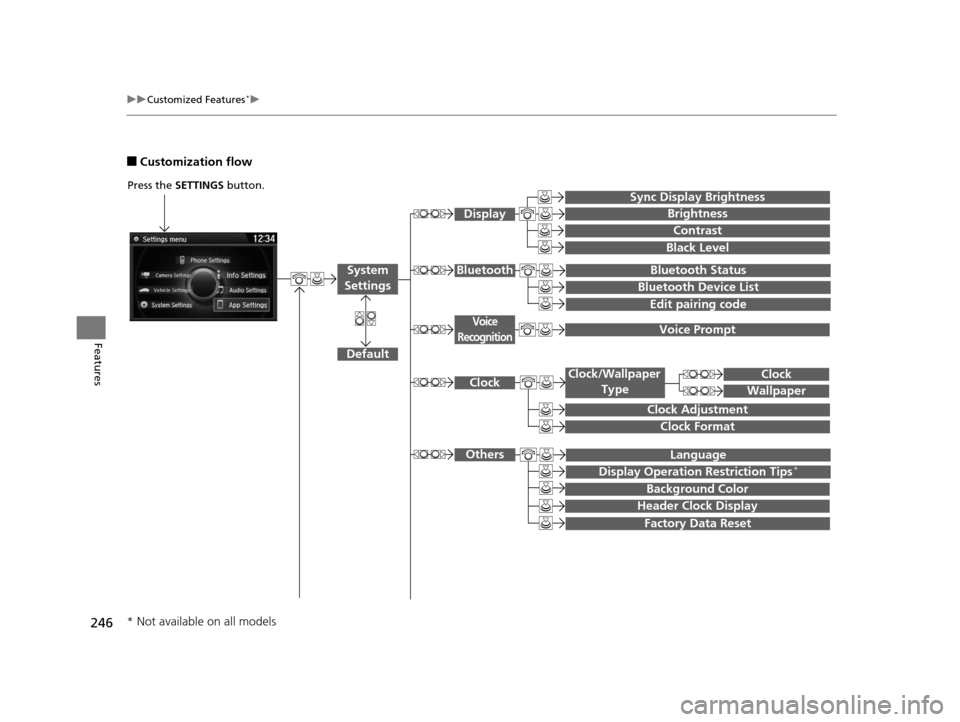
■Customization flow
Press the SETTINGS button.
Voice Prompt
Brightness
Contrast
Black Level
Bluetooth Status
Bluetooth Device List
Edit pairing code
Default
Display
System
SettingsBluetooth
Voice
Recognition
Sync Display Brightness
Factory Data Reset
Background Color
Header Clock Display
Clock
Clock Adjustment
Clock Format
Clock
Language
Display Operation Restriction Tips*
Others
Wallpaper
Clock/Wallpaper Type
* Not available on all models
16 ACURA ILX-31TX66300.book 246 ページ 2014年12月22日 月曜日 午後10時15分
Page 248 of 521
247
uuCustomized Features*u
Continued
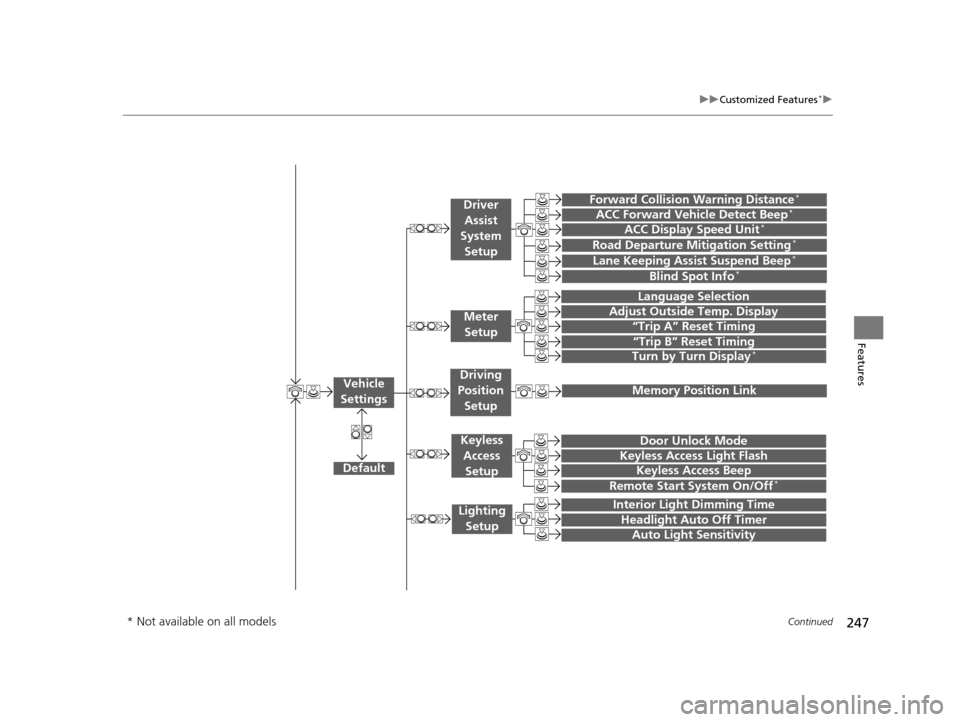
Features“Trip A” Reset Timing
“Trip B” Reset Timing
Language Selection
Adjust Outside Temp. Display
Forward Collision Warning Distance*
ACC Forward Vehicle Detect Beep*
Turn by Turn Display*
Default
Door Unlock Mode
Keyless Access Light Flash
Interior Light Dimming Time
Headlight Auto Off Timer
Auto Light Sensitivity
Vehicle
Settings
Driver Assist
System
Setup
Keyless Access
Setup
Lighting Setup
Keyless Access Beep
Lane Keeping Assist Suspend Beep*
Blind Spot Info*
Driving
Position Setup
Road Departure Mitigation Setting*ACC Display Speed Unit*
Remote Start System On/Off*
Memory Position Link
Meter Setup
* Not available on all models
16 ACURA ILX-31TX66300.book 247 ページ 2014年12月22日 月曜日 午後10時15分
Page 249 of 521
248
uuCustomized Features*u
Features
Default
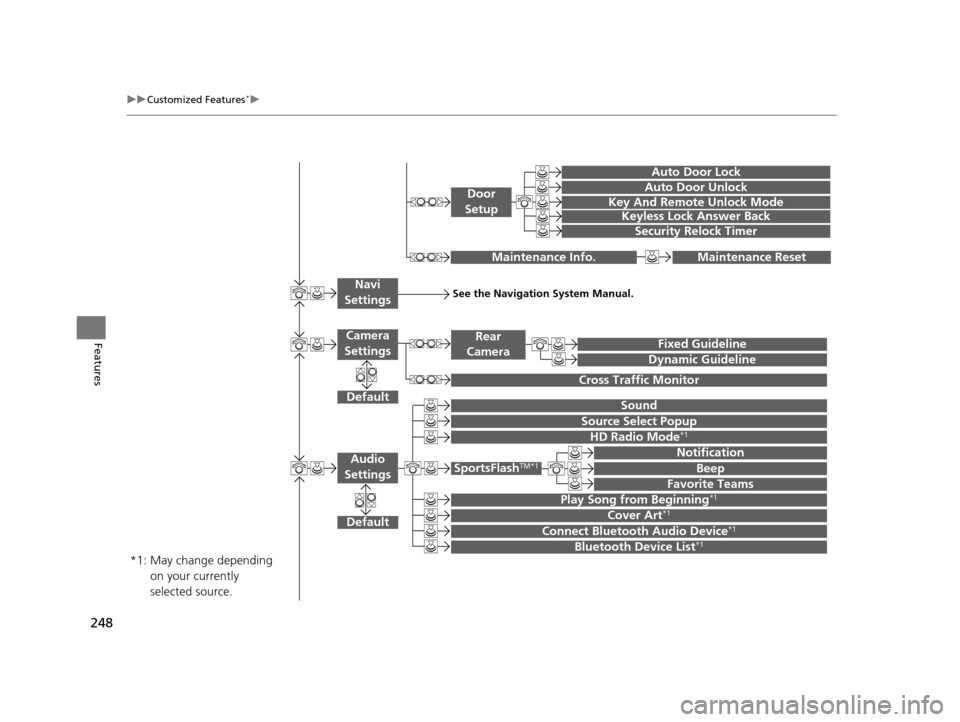
Sound
Source Select Popup
Audio
Settings
Maintenance ResetMaintenance Info.
Fixed Guideline
Dynamic Guideline
Rear
Camera
Cross Traffic Monitor
*1:
See the Navigation System Manual.Navi
Settings
Key And Remote Unlock Mode
Keyless Lock Answer Back
Security Relock Timer
Auto Door Lock
Auto Door Unlock
Door
Setup
Cover Art*1
Connect Bluetooth Audio Device*1
Bluetooth Device List*1
May change depending
on your currently
selected source.
HD Radio Mode*1
SportsFlashTM*1
Notification
Beep
Favorite Teams
Play Song from Beginning*1
Default
Camera
Settings
16 ACURA ILX-31TX66300.book 248 ページ 2014年12月22日 月曜日 午後10時15分
Page 254 of 521
253
uuCustomized Features*u
Continued
Features
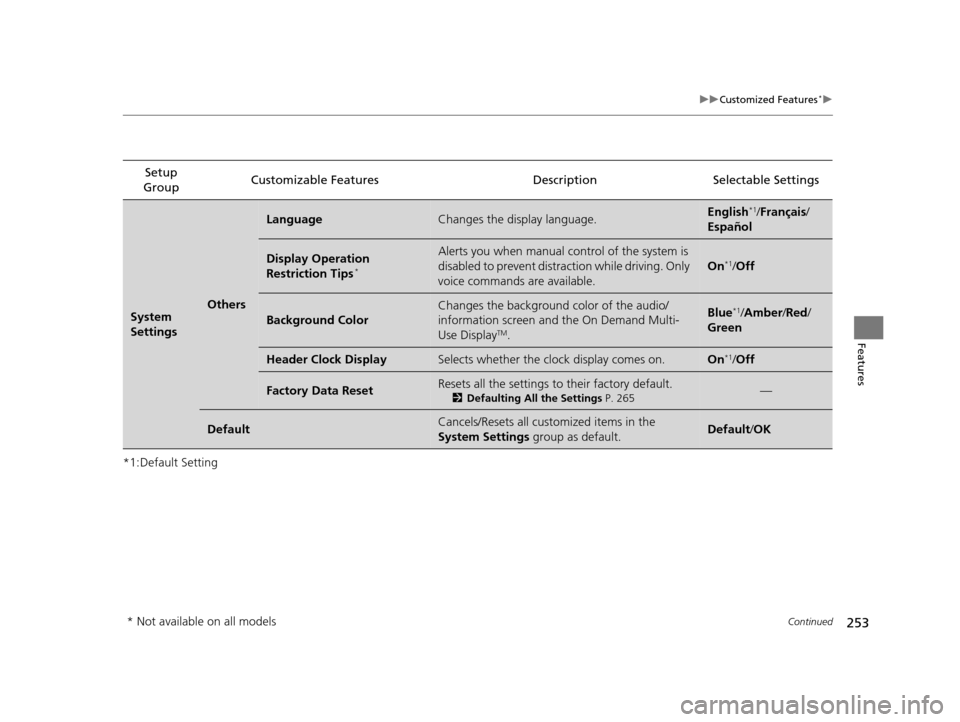
*1:Default SettingSetup
Group Customizable Features Description Selectable Settings
System
SettingsOthers
LanguageChanges the display language.English*1/
Français /
Español
Display Operation
Restriction Tips*
Alerts you when manual co ntrol of the system is
disabled to prevent distraction while driving. Only
voice commands are available.
On*1/ Off
Background Color
Changes the background color of the audio/
information screen an d the On Demand Multi-
Use Display
TM.
Blue*1/ Amber /Red /
Green
Header Clock DisplaySelects whether the clock display comes on.On*1/ Off
Factory Data ResetResets all the settings to their factory default.
2 Defaulting All the Settings P. 265—
DefaultCancels/Resets all customized items in the
System Settings group as default.Default/OK
* Not available on all models
16 ACURA ILX-31TX66300.book 253 ページ 2014年12月22日 月曜日 午後10時15分
Page 256 of 521
255
uuCustomized Features*u
Continued
Features
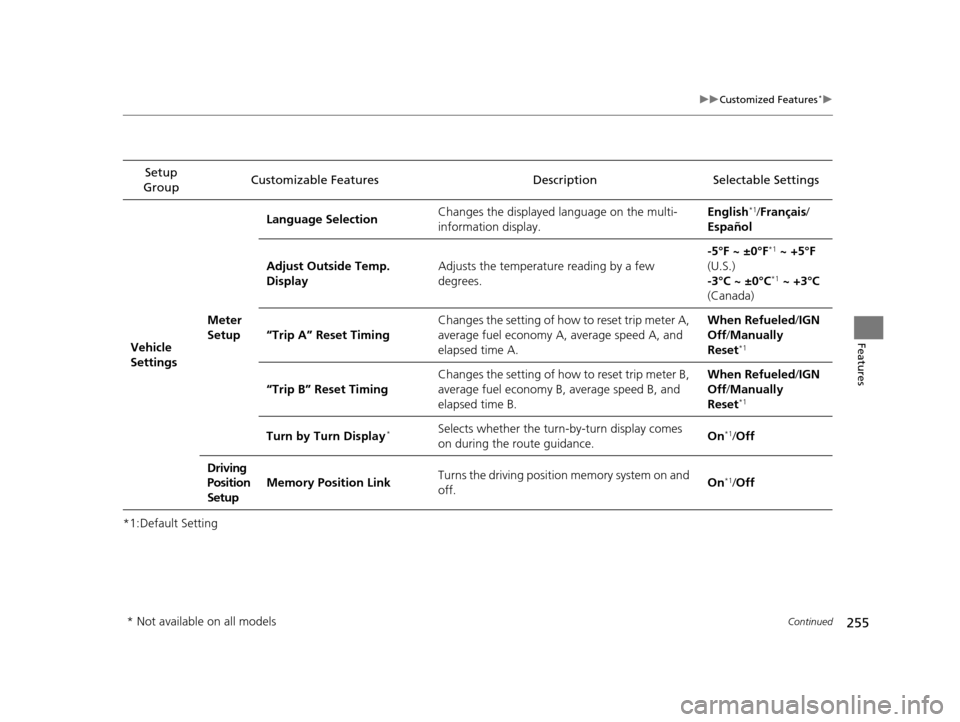
*1:Default SettingSetup
Group Customizable Features Description Selectable Settings
Vehicle
Settings Meter
SetupLanguage Selection
Changes the displayed language on the multi-
information display. English
*1/
Français /
Español
Adjust Outside Temp.
Display Adjusts the temperature reading by a few
degrees. -5°F ~ ±0°F
*1
~ +5°F
(U.S.)
-3°C ~ ±0°C
*1 ~ +3°C
(Canada)
“Trip A” Reset Timing Changes the setting of how to reset trip meter A,
average fuel economy A, average speed A, and
elapsed time A. When Refueled
/IGN
Off /Manually
Reset
*1
“Trip B” Reset Timing Changes the setting of how to reset trip meter B,
average fuel economy B, average speed B, and
elapsed time B. When Refueled
/IGN
Off /Manually
Reset*1
Turn by Turn Display*Selects whether the turn-by-turn display comes
on during the route guidance. On*1/
Off
Driving
Position
Setup Memory Position Link
Turns the driving position memory system on and
off. On
*1/
Off
* Not available on all models
16 ACURA ILX-31TX66300.book 255 ページ 2014年12月22日 月曜日 午後10時15分