reset Acura ILX 2016 Service Manual
[x] Cancel search | Manufacturer: ACURA, Model Year: 2016, Model line: ILX, Model: Acura ILX 2016Pages: 521, PDF Size: 24.09 MB
Page 259 of 521
258
uuCustomized Features*u
Features
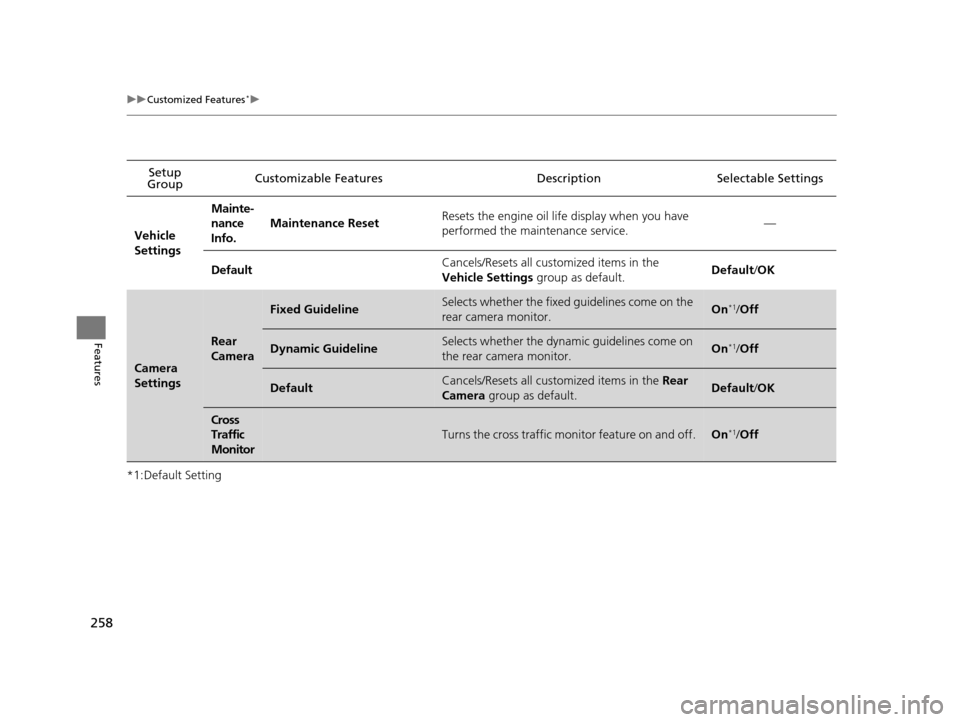
*1:Default SettingSetup
Group Customizable Features Descri
ption Selectable Settings
Vehicle
Settings Mainte-
nance
Info.
Maintenance Reset
Resets the engine oil life display when you have
performed the maintenance service. —
Default Cancels/Resets all cust
omized items in the
Vehicle Settings group as default. Default
/OK
Camera
Settings
Rear
Camera
Fixed GuidelineSelects whether the fixed guidelines come on the
rear camera monitor.On*1/ Off
Dynamic GuidelineSelects whether the dynamic guidelines come on
the rear camera monitor.On*1/Off
DefaultCancels/Resets all cust omized items in the Rear
Camera group as default.Default/OK
Cross
Traffic
Monitor
Turns the cross traffic m onitor feature on and off.On*1/Off
16 ACURA ILX-31TX66300.book 258 ページ 2014年12月22日 月曜日 午後10時15分
Page 261 of 521
260
uuCustomized Features*u
Features
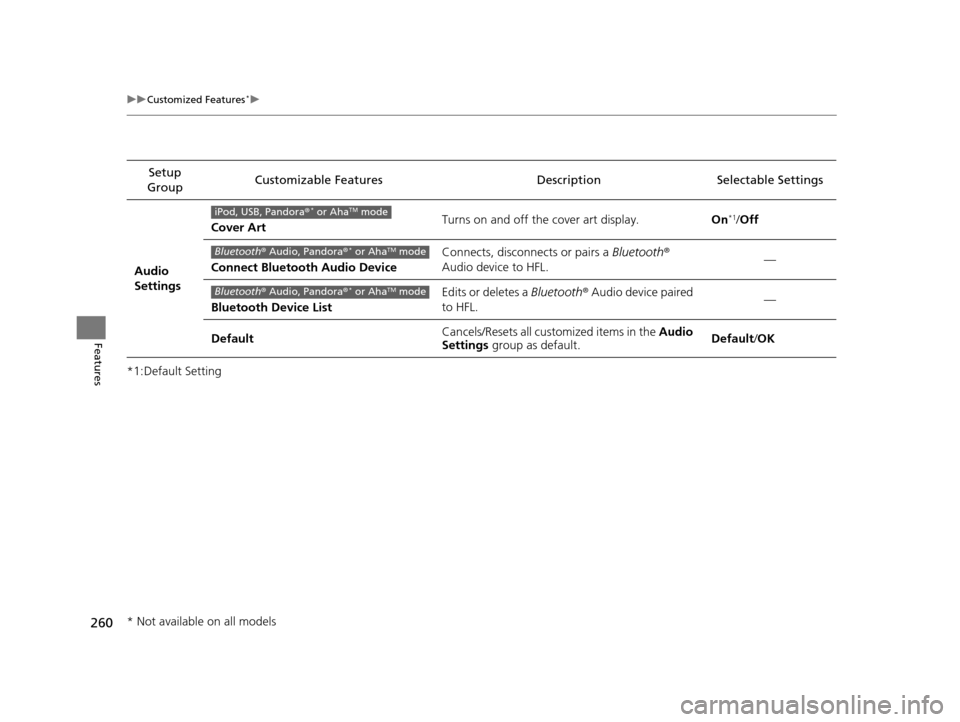
*1:Default SettingSetup
Group Customizable Features
Description Selectable Settings
Audio
SettingsCover Art
Turns on and off the cover art display.
On
*1/Off
Connect Bluetooth Audio Device Connects, disconnects or pairs a
Bluetooth®
Audio device to HFL. —
Bluetooth Device List Edits or deletes a
Bluetooth® Audio device paired
to HFL. —
Default Cancels/Resets all cust
omized items in the Audio
Settings group as default. Default
/OKiPod, USB, Pandora ®* or AhaTM mode
Bluetooth® Audio, Pandora ®* or AhaTM mode
Bluetooth® Audio, Pandora ®* or AhaTM mode
* Not available on all models
16 ACURA ILX-31TX66300.book 260 ページ 2014年12月22日 月曜日 午後10時15分
Page 263 of 521
262
uuCustomized Features*u
Features
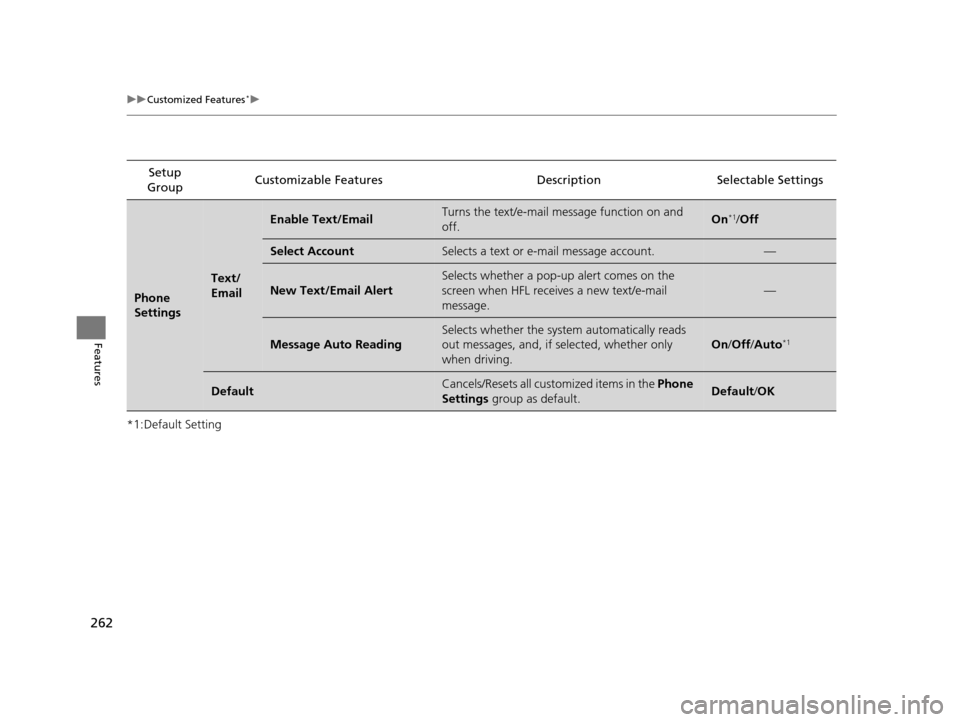
*1:Default SettingSetup
Group Customizable Features Descri
ption Selectable Settings
Phone
Settings
Text/
Email
Enable Text/EmailTurns the text/e-mail message function on and
off.On*1/ Off
Select AccountSelects a text or e-mail message account.—
New Text/Email Alert
Selects whether a pop-up alert comes on the
screen when HFL receiv es a new text/e-mail
message.
—
Message Auto Reading
Selects whether the system automatically reads
out messages, and, if selected, whether only
when driving.
On /Off /Auto*1
DefaultCancels/Resets all customized items in the Phone
Settings group as default.Default/OK
16 ACURA ILX-31TX66300.book 262 ページ 2014年12月22日 月曜日 午後10時15分
Page 264 of 521

263
uuCustomized Features*u
Continued
Features
*1:Default SettingSetup
Group Customizable Features Description Selectable Settings
Info
SettingsClock
Clock/
Wallpaper
Type
Clock
See System Settings on P. 251 to P. 253.
Wallpaper
Clock Adjustment
Clock Format
Other Info Screen Preference Selects the top menu when the
INFO button is
pressed.
●Info Top - A brief menu pops up.●Info Menu - A full menu pops up.●Off- A menu does not pop up. Info Top
/Info
Menu
*1/ Off
Default Cancels/Resets all customized items in the
Info
Settings group as default. Default/
OK
16 ACURA ILX-31TX66300.book 263 ページ 2014年12月22日 月曜日 午後10時15分
Page 265 of 521

264
uuCustomized Features*u
Features
*1:Default SettingSetup
Group Customizable Features Descri
ption Selectable Settings
App
SettingsDisplay Adjustment Brightness
Changes the brightness of the audio/information
screen. —
Contrast Changes the contrast of the audio/information
screen.
—
Black Level Changes the black level of the audio/information
screen. —
Color Changes the color of the audio/information
screen. —
Tint Changes the tint of the audio/information screen. —
Guidance Volume Adjusts the guidance volume level with
navigation app.
0
~ 9
*1 ~ 11
Sync Clock w/ Smartphone Selects whether the clock links to the device you
connect. On
/Off
*1
Default Cancels/Resets all cust
omized items in the App
Settings group as default. Default
/OK
16 ACURA ILX-31TX66300.book 264 ページ 2014年12月22日 月曜日 午後10時15分
Page 266 of 521
265
uuCustomized Features*uDefaulting All the Settings
Features
Defaulting All the Settings
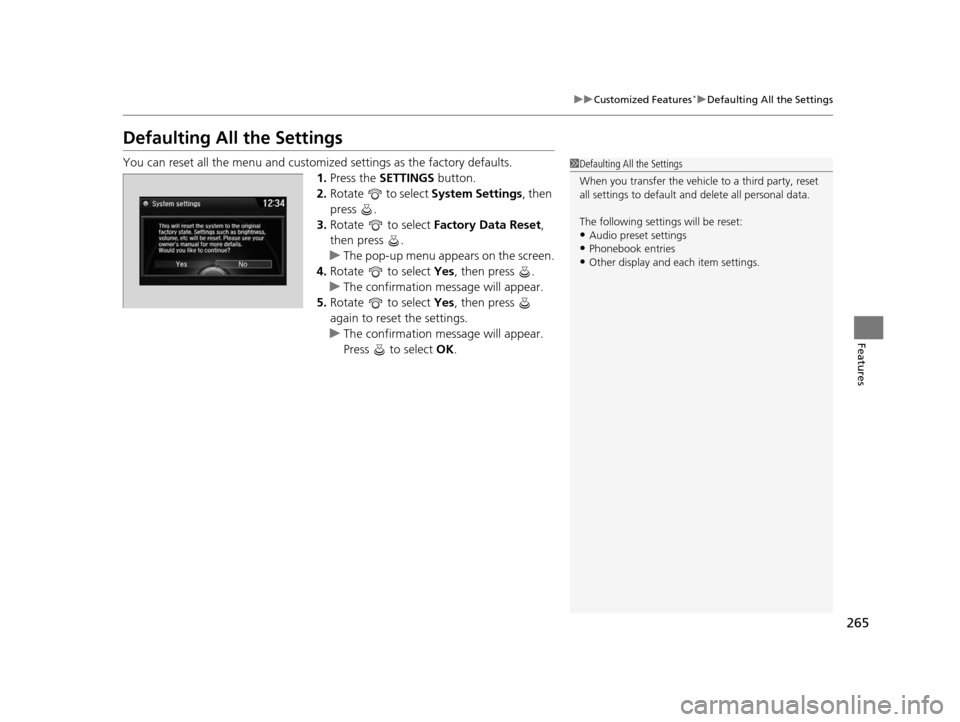
You can reset all the menu and customiz ed settings as the factory defaults.
1. Press the SETTINGS button.
2. Rotate to select System Settings, then
press .
3. Rotate to select Factory Data Reset ,
then press .
u The pop-up menu appears on the screen.
4. Rotate to select Yes, then press .
u The confirmation message will appear.
5. Rotate to select Yes, then press
again to reset the settings.
u The confirmation message will appear.
Press to select OK.1Defaulting All the Settings
When you transfer the vehicle to a third party, reset
all settings to default a nd delete all personal data.
The following settin gs will be reset:
•Audio preset settings•Phonebook entries
•Other display and each item settings.
16 ACURA ILX-31TX66300.book 265 ページ 2014年12月22日 月曜日 午後10時15分
Page 286 of 521
Continued285
uuBluetooth ® HandsFreeLink ®u HFL Menus
Features
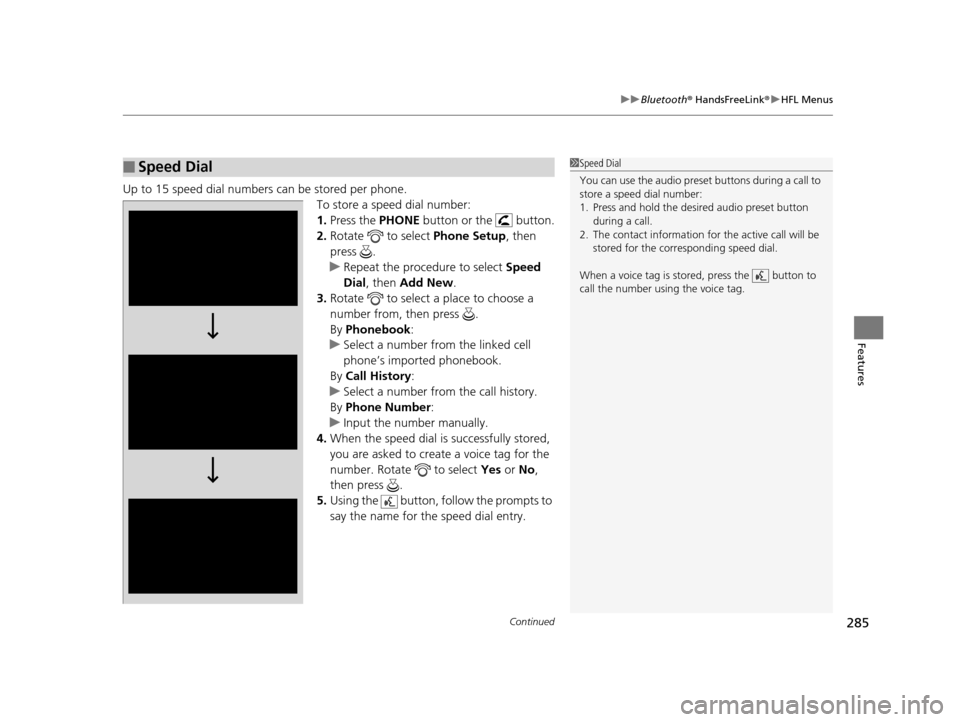
Up to 15 speed dial numbers can be stored per phone.
To store a speed dial number:
1.Press the PHONE button or the button.
2. Rotate to select Phone Setup, then
press .
u Repeat the procedure to select Speed
Dial , then Add New .
3. Rotate to select a place to choose a
number from, then press .
By Phonebook :
u Select a number from the linked cell
phone’s imported phonebook.
By Call History :
u Select a number from the call history.
By Phone Number :
u Input the number manually.
4. When the speed dial is successfully stored,
you are asked to create a voice tag for the
number. Rotate to select Yes or No,
then press .
5. Using the button, follow the prompts to
say the name for the speed dial entry.
■Speed Dial1Speed Dial
You can use the audio preset buttons during a call to
store a speed dial number:
1. Press and hold the desired audio preset button
during a call.
2. The contact information for the active call will be
stored for the corresponding speed dial.
When a voice tag is stored, press the button to
call the number using the voice tag.
16 ACURA ILX-31TX66300.book 285 ページ 2014年12月22日 月曜日 午後10時15分
Page 290 of 521
Continued289
uuBluetooth ® HandsFreeLink ®u HFL Menus
Features
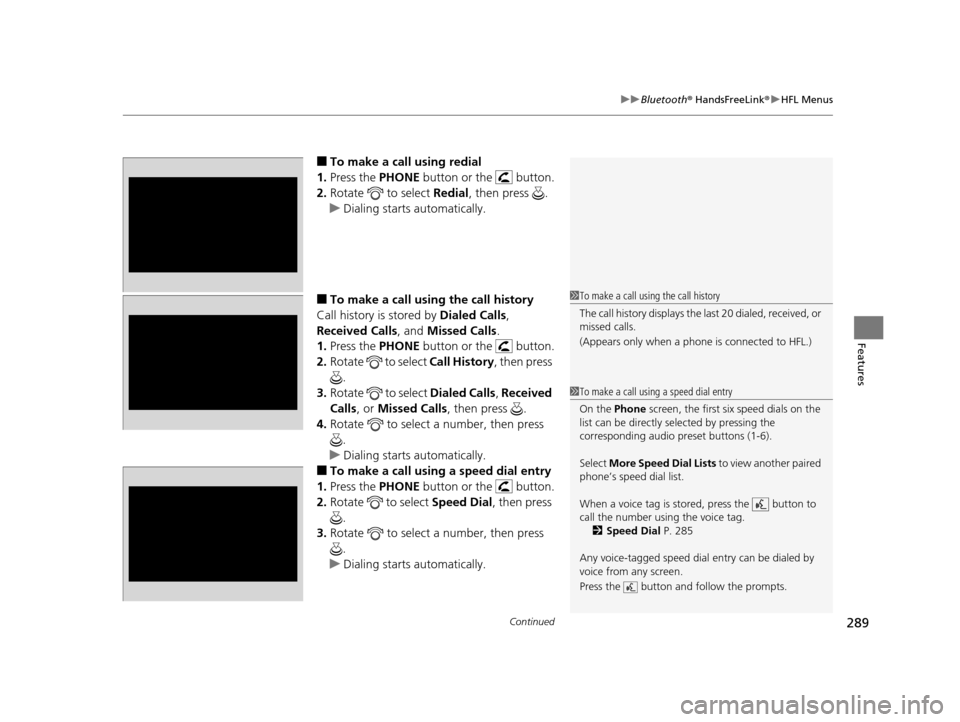
■To make a call using redial
1. Press the PHONE button or the button.
2. Rotate to select Redial, then press .
u Dialing starts automatically.
■To make a call usin g the call history
Call history is stored by Dialed Calls,
Received Calls , and Missed Calls .
1. Press the PHONE button or the button.
2. Rotate to select Call History, then press
.
3. Rotate to select Dialed Calls, Received
Calls , or Missed Calls , then press .
4. Rotate to select a number, then press
.
u Dialing starts automatically.
■To make a call using a speed dial entry
1. Press the PHONE button or the button.
2. Rotate to select Speed Dial , then press
.
3. Rotate to select a number, then press
.
u Dialing starts automatically.
1To make a call using the call history
The call history disp lays the last 20 dialed, received, or
missed calls.
(Appears only when a phone is connected to HFL.)
1 To make a call using a speed dial entry
On the Phone screen, the first six speed dials on the
list can be directly selected by pressing the
corresponding audio preset buttons (1-6).
Select More Speed Dial Lists to view another paired
phone’s speed dial list.
When a voice tag is stored, press the button to
call the number using the voice tag. 2 Speed Dial P. 285
Any voice-tagged speed dial entry can be dialed by
voice from any screen.
Press the button and follow the prompts.
16 ACURA ILX-31TX66300.book 289 ページ 2014年12月22日 月曜日 午後10時15分
Page 301 of 521
300
uuBluetooth ® HandsFreeLink ®u HFL Menus
Features
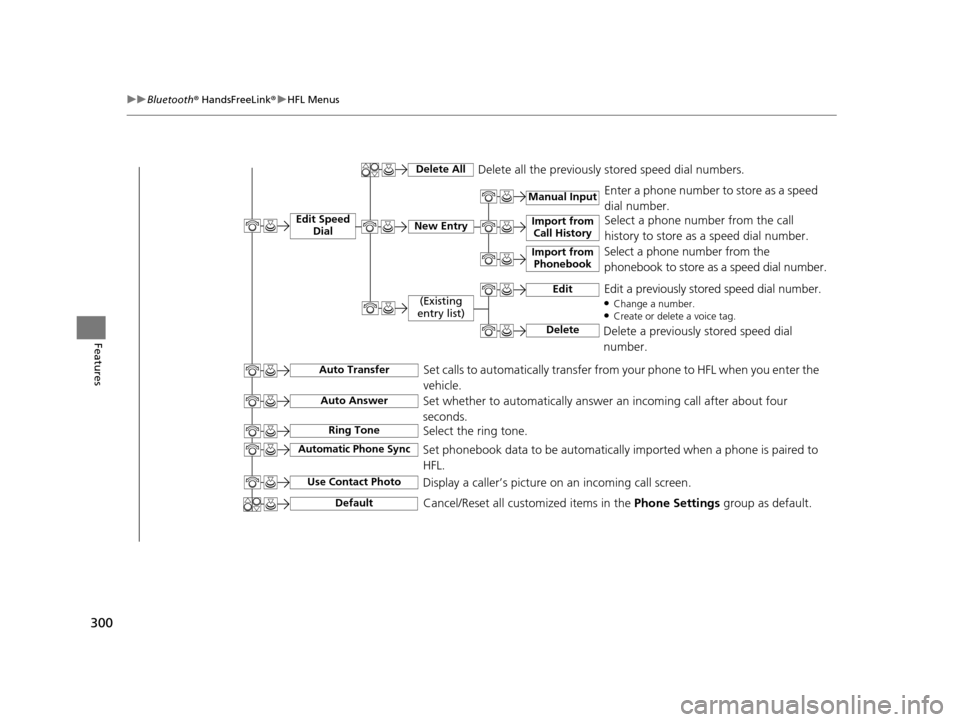
Manual Input
Edit Speed
DialNew Entry
Import from Call History
Import from Phonebook
Delete AllDelete all the previously stored speed dial numbers.
Select a phone number from the call
history to store as a speed dial number.
Select a phone number from the
phonebook to store as a speed dial number. Enter a phone number to store as a speed
dial number.
Edit
Delete
(Existing
entry list)Edit a previously stored speed dial number.●Change a number.●Create or delete a voice tag.
Delete a previously stored speed dial
number.
Set calls to automatically transfer from your phone to HFL when you enter the
vehicle.Auto Transfer
Auto Answer
Ring Tone
Set whether to automatically answer an incoming call after about four
seconds.
Select the ring tone.
Use Contact Photo
Set phonebook data to be automatically imported when a phone is paired to
HFL.
Display a caller’s picture on an incoming call screen.Automatic Phone Sync
Cancel/Reset all customized items in the Phone Settings group as default.Default
16 ACURA ILX-31TX66300.book 300 ページ 2014年12月22日 月曜日 午後10時15分
Page 419 of 521
418
uuMaintenance MinderTMuTo Use Maintenance MinderTM
Maintenance
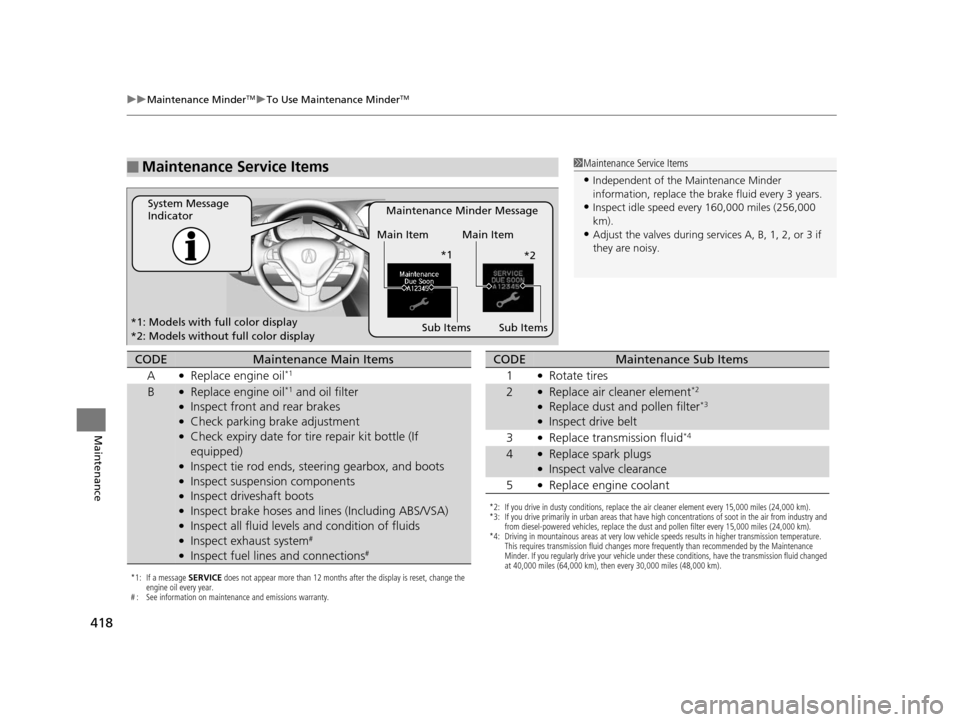
■Maintenance Service Items1Maintenance Service Items
•Independent of the Maintenance Minder
information, replace the brake fluid every 3 years.
•Inspect idle speed every 160,000 miles (256,000
km).
•Adjust the valves during services A, B, 1, 2, or 3 if
they are noisy.
Maintenance Minder Message
System Message
Indicator
Sub Items
Main Item Main Item
Sub Items
*1: Models with full color display
*2: Models without full color display *1
*2
*1: If a message SERVICE does not appear more than 12 months after the display is reset, change the
engine oil every year.
# : See information on maintenance and emissions warranty.
CODEMaintenance Main Items
A
●Replace engine oil*1
B●Replace engine oil*1 and oil filter●Inspect front and rear brakes●Check parking brake adjustment●Check expiry date for ti re repair kit bottle (If
equipped)
●Inspect tie rod ends, steering gearbox, and boots●Inspect suspension components●Inspect driveshaft boots●Inspect brake hoses and li nes (Including ABS/VSA)●Inspect all fluid levels and condition of fluids●Inspect exhaust system#
●Inspect fuel lines and connections#
*2: If you drive in dusty conditions, replace the air cleaner element every 15,000 miles (24,000 km).
*3: If you drive primarily in urban areas that have high concentrations of soot in the air from industry and
from diesel-powered vehicles, replace the dust and pollen filter every 15,000 miles (24,000 km).
*4: Driving in mountainous areas at very low vehicle speeds results in higher transmission temperature. This requires transmission fluid changes more frequently than recommended by the Maintenance
Minder. If you regularly drive your vehicle under these conditions, have the transmission fluid changed
at 40,000 miles (64,000 km), then every 30,000 miles (48,000 km).
CODEMaintenance Sub Items
1
●Rotate tires
2●Replace air cleaner element*2
●Replace dust and pollen filter*3
●Inspect drive belt
3
●Replace transmission fluid*4
4●Replace spark plugs●Inspect valve clearance
5
●Replace engine coolant
16 ACURA ILX-31TX66300.book 418 ページ 2014年12月22日 月曜日 午後10時15分