Adjustment Acura ILX 2016 Owner's Manual
[x] Cancel search | Manufacturer: ACURA, Model Year: 2016, Model line: ILX, Model: Acura ILX 2016Pages: 521, PDF Size: 24.09 MB
Page 5 of 521
4
Quick Reference Guide
Quick Reference Guide
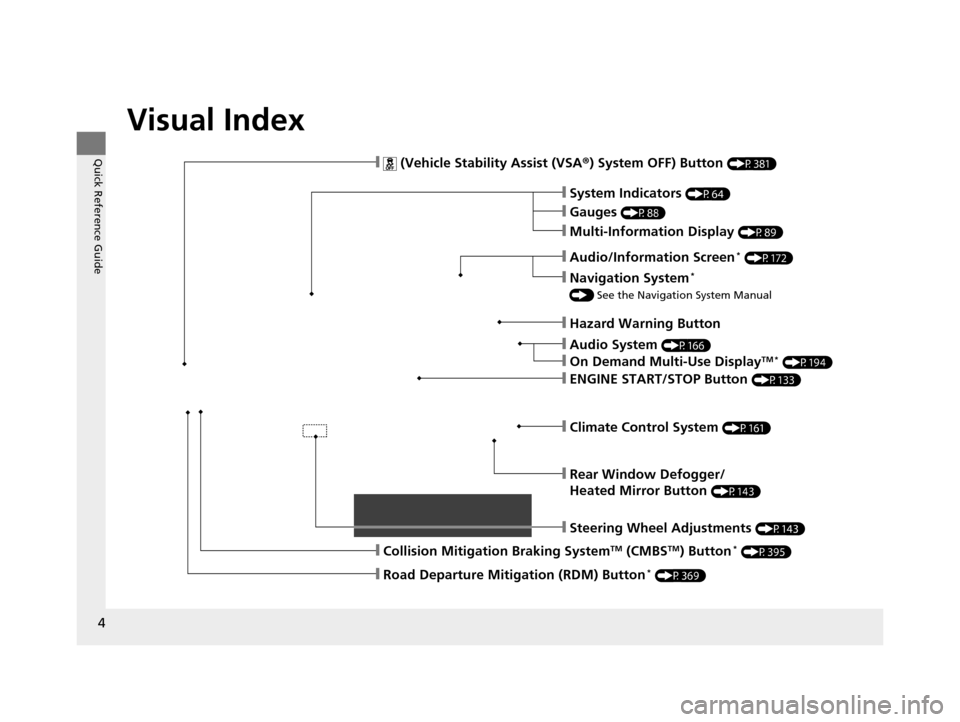
Visual Index
❙Audio System (P166)
❙Rear Window Defogger/
Heated Mirror Button
(P143)
❙Steering Wheel Adjustments (P143)
❙ (Vehicle Stability Assist (VSA®) System OFF) Button (P381)
❙Climate Control System (P161)
❙System Indicators (P64)
❙Gauges (P88)
❙Multi-Information Display (P89)
❙Hazard Warning Button
❙ENGINE START/STOP Button (P133)
❙Navigation System*
() See the Navigation System Manual
❙Audio/Information Screen* (P172)
❙On Demand Multi-Use DisplayTM * (P194)
❙Collision Mitigation Braking SystemTM (CMBSTM) Button* (P395)
❙Road Departure Mitigation (RDM) Button* (P369)
16 ACURA ILX-31TX66300.book 4 ページ 2014年12月22日 月曜日 午後10時15分
Page 12 of 521
11
Quick Reference Guide
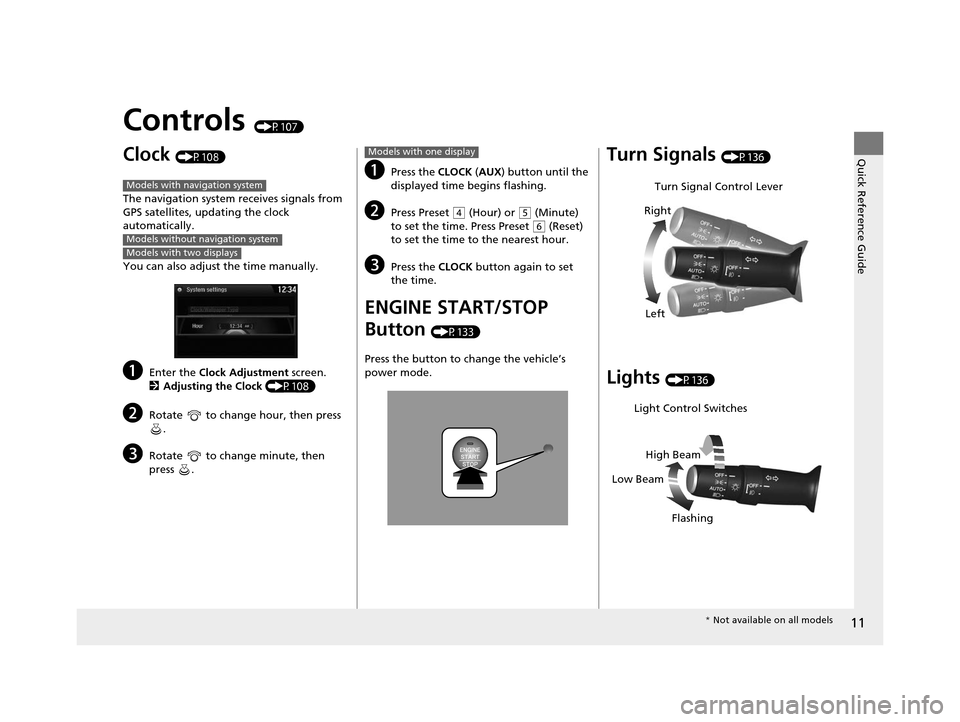
Controls (P107)
Clock (P108)
The navigation system receives signals from
GPS satellites, updating the clock
automatically.
You can also adjust the time manually.
aEnter the Clock Adjustment screen.
2 Adjusting the Clock (P108)
bRotate to change hour, then press
.
cRotate to change minute, then
press .
Models with navigation system
Models without navigation system
Models with two displays
aPress the CLOCK (AUX ) button until the
displayed time begins flashing.
bPress Preset ( 4 (Hour) or (5 (Minute)
to set the time. Press Preset ( 6 (Reset)
to set the time to the nearest hour.
cPress the CLOCK button again to set
the time.
ENGINE START/STOP
Button
(P133)
Press the button to ch ange the vehicle’s
power mode.
Models with one displayTurn Signals (P136)
Lights (P136)
Turn Signal Control Lever
Right
Left
Light Control Switches
Low Beam High Beam
Flashing
* Not available on all models
16 ACURA ILX-31TX66300.book 11 ページ 2014年12月22日 月曜日 午後10時15分
Page 13 of 521
12
Quick Reference Guide
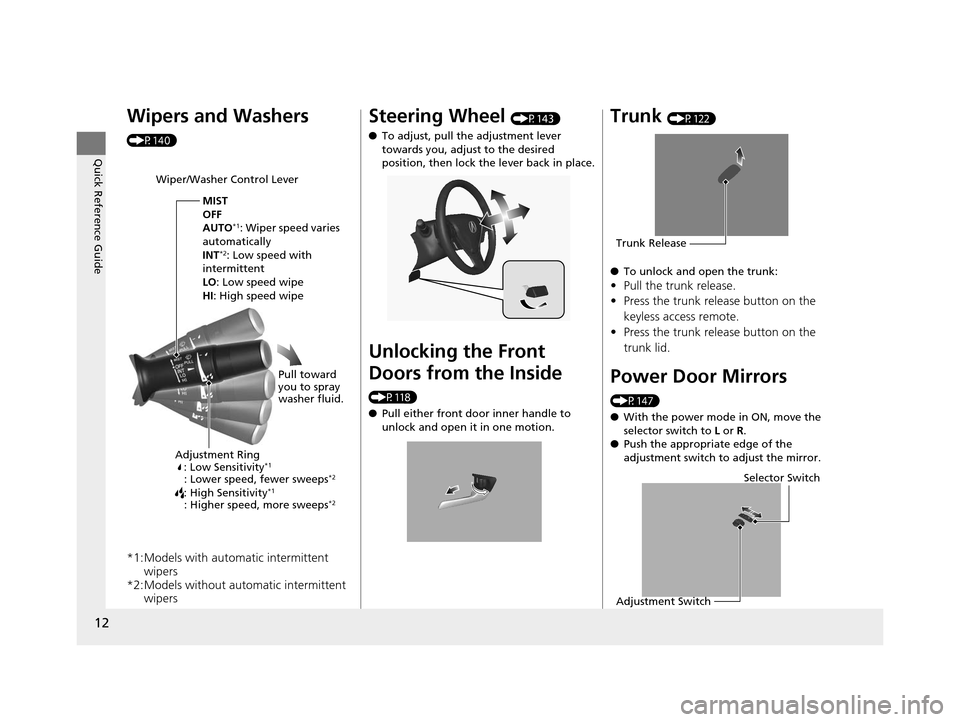
Wipers and Washers
(P140)
*1:Models with automatic intermittent wipers
*2:Models without automatic intermittent wipers
Wiper/Washer Control Lever
Adjustment Ring: Low Sensitivity
*1
: Lower speed, fewer sweeps*2
: High Sensitivity*1
: Higher speed, more sweeps*2
MIST
OFF
AUTO
*1: Wiper speed varies
automatically
INT
*2: Low speed with
intermittent
LO : Low speed wipe
HI: High speed wipe
Pull toward
you to spray
washer fluid.
Steering Wheel (P143)
● To adjust, pull the adjustment lever
towards you, adjust to the desired
position, then lock the lever back in place.
Unlocking the Front
Doors from the Inside
(P118)
●Pull either front door inner handle to
unlock and open it in one motion.
Trunk (P122)
● To unlock and open the trunk:
•Pull the trunk release.
• Press the trunk release button on the
keyless access remote.
• Press the trunk release button on the
trunk lid.
Power Door Mirrors
(P147)
● With the power mode in ON, move the
selector switch to L or R .
● Push the appropriate edge of the
adjustment switch to adjust the mirror.
Trunk Release
Selector Switch
Adjustment Switch
16 ACURA ILX-31TX66300.book 12 ページ 2014年12月22日 月曜日 午後10時15分
Page 33 of 521
uuSeat Belts uFastening a Seat Belt
32
Safe Driving
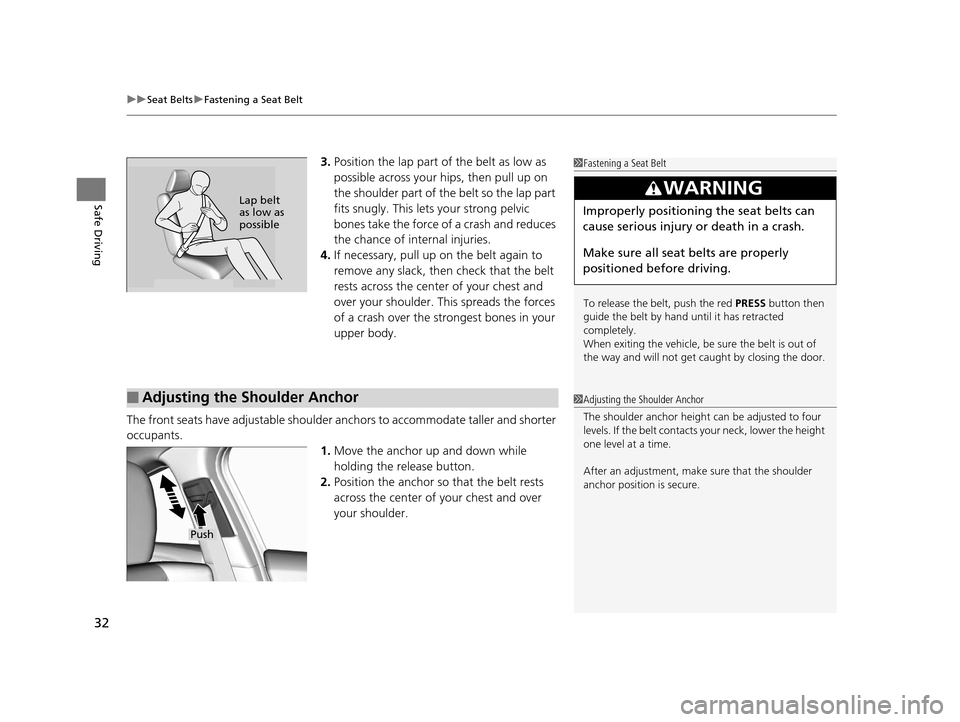
3. Position the lap part of the belt as low as
possible across your hips, then pull up on
the shoulder part of the belt so the lap part
fits snugly. This lets your strong pelvic
bones take the force of a crash and reduces
the chance of internal injuries.
4. If necessary, pull up on the belt again to
remove any slack, then check that the belt
rests across the center of your chest and
over your shoulder. Th is spreads the forces
of a crash over the strongest bones in your
upper body.
The front seats have adjustable shoulder anchors to accommodate taller and shorter
occupants. 1.Move the anchor up and down while
holding the release button.
2. Position the anchor so that the belt rests
across the center of your chest and over
your shoulder.1Fastening a Seat Belt
To release the belt, push the red PRESS button then
guide the belt by hand until it has retracted
completely.
When exiting the vehicle, be sure the belt is out of
the way and will not get ca ught by closing the door.
3WARNING
Improperly positioning the seat belts can
cause serious injury or death in a crash.
Make sure all seat belts are properly
positioned before driving.Lap belt
as low as
possible
■Adjusting the Shoulder Anchor1Adjusting the Shoulder Anchor
The shoulder anchor height can be adjusted to four
levels. If the belt contacts your neck, lower the height
one level at a time.
After an adjustment, make sure that the shoulder
anchor position is secure.
Push
16 ACURA ILX-31TX66300.book 32 ページ 2014年12月22日 月曜日 午後10時15分
Page 50 of 521
49
uuChild Safety uProtecting Child Passengers
Safe Driving
• Any child who is too small to wear a seat belt correctly must be restrained in an
approved child seat that is properly secured to the vehicle using either the lap belt
portion of the lap/shoulder belt or the lower anchors of the LATCH system.
• Never hold a child on your lap because it is impossible to protect them in the
event of a collision.
• Never put a seat belt over yourself and a child. During a crash, the belt would
likely press deep into the child and cause serious or fatal injuries.
• Never let two children use the same seat belt. Both children could be very
seriously injured in a crash.
• Do not allow children to operate the doors, windows or seat adjustments.
• Do not leave children in the vehicle unatte nded, especially in hot weather when
the inside of the vehicle can get hot enough to kill them. They could also activate
vehicle controls causing it to move unexpectedly.1 Protecting Child Passengers
To deactivate a lockable retractor, release the buckle
and allow the seat belt to wind up all the way.
To remind you of the pa ssenger's front airbag
hazards and child safety, your vehicle has warning
labels on the dashboard (U.S. models) and on the
front visors. Please read and follow the instructions
on these labels. 2 Safety Labels P. 61
3WARNING
Allowing a child to play with a seat belt or
wrap one around their neck can result in
serious injury or death.
Instruct children not to play with any seat
belt and make sure any unused seat belt a
child can reach is buckled, fully retracted,
and locked.
16 ACURA ILX-31TX66300.book 49 ページ 2014年12月22日 月曜日 午後10時15分
Page 109 of 521
108
Controls
Clock
You can adjust the time in the clock display, with the power mode in ON.
Adjusting the Clock
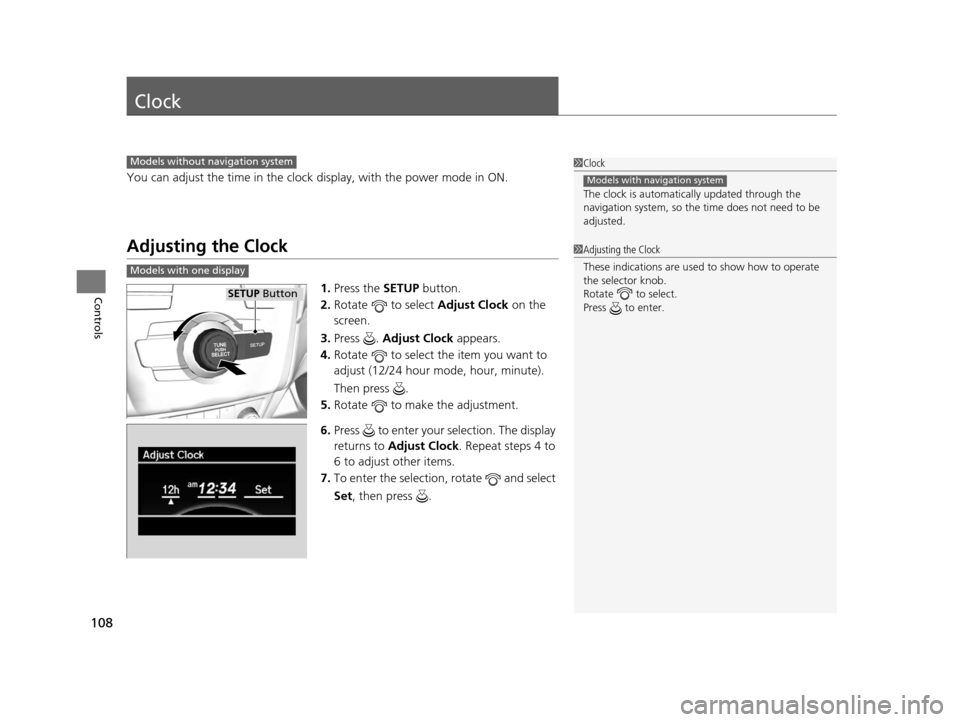
1.Press the SETUP button.
2. Rotate to select Adjust Clock on the
screen.
3. Press . Adjust Clock appears.
4. Rotate to select the item you want to
adjust (12/24 hour mode, hour, minute).
Then press .
5. Rotate to make the adjustment.
6. Press to enter your selection. The display
returns to Adjust Clock . Repeat steps 4 to
6 to adjust other items.
7. To enter the selection, rotate and select
Set , then press .
1Clock
The clock is automatica lly updated through the
navigation system, so the ti me does not need to be
adjusted.
Models with navigation system
Models without navigation system
1 Adjusting the Clock
These indications are used to show how to operate
the selector knob.
Rotate to select.
Press to enter.
Models with one display
SETUP Button
16 ACURA ILX-31TX66300.book 108 ページ 2014年12月22日 月曜日 午後10時15分
Page 110 of 521
109
uuClock uAdjusting the Clock
Controls
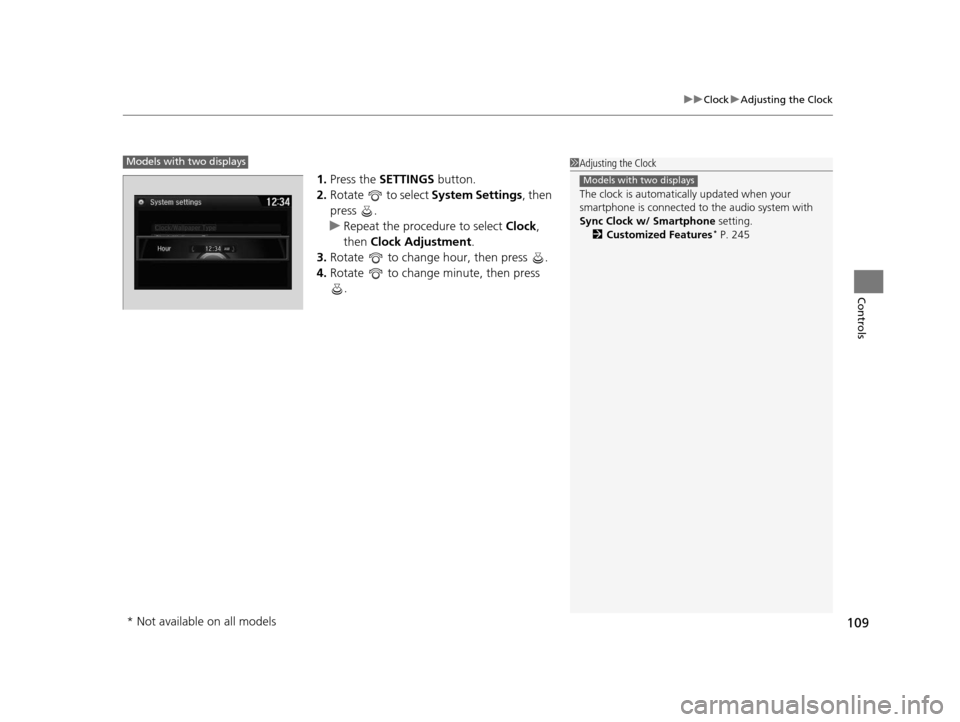
1. Press the SETTINGS button.
2. Rotate to select System Settings, then
press .
u Repeat the procedure to select Clock,
then Clock Adjustment .
3. Rotate to change hour, then press .
4. Rotate to change minute, then press
.
1Adjusting the Clock
The clock is automatica lly updated when your
smartphone is connected to the audio system with
Sync Clock w/ Smartphone setting.
2 Customized Features
* P. 245
Models with two displays
Models with two displays
* Not available on all models
16 ACURA ILX-31TX66300.book 109 ページ 2014年12月22日 月曜日 午後10時15分
Page 132 of 521

131
uuOpening and Closing the Windows uOpening/Closing the Power Windows
Controls
To open: Unlock the driver’s door with the
key. Within 10 seconds of returning the key to
the central position, turn the key in the unlock
direction and hold it there.
To close: Lock the driver’s door with the key.
Within 10 seconds of re turning the key to the
central position, turn the key in the lock
direction and hold it there.
Release the key to stop the windows/
moonroof at the desired position. If you want
further adjustment, repeat the same
operation.
■Opening/Closing the Windows/Moonroof with the Key
Close
Open
16 ACURA ILX-31TX66300.book 131 ページ 2014年12月22日 月曜日 午後10時15分
Page 141 of 521
140
uuOperating the Switches Around the Steering Wheel uWipers and Washers
Controls
Wipers and Washers
The windshield wipers and washers can be
used when the power mode is in ON.
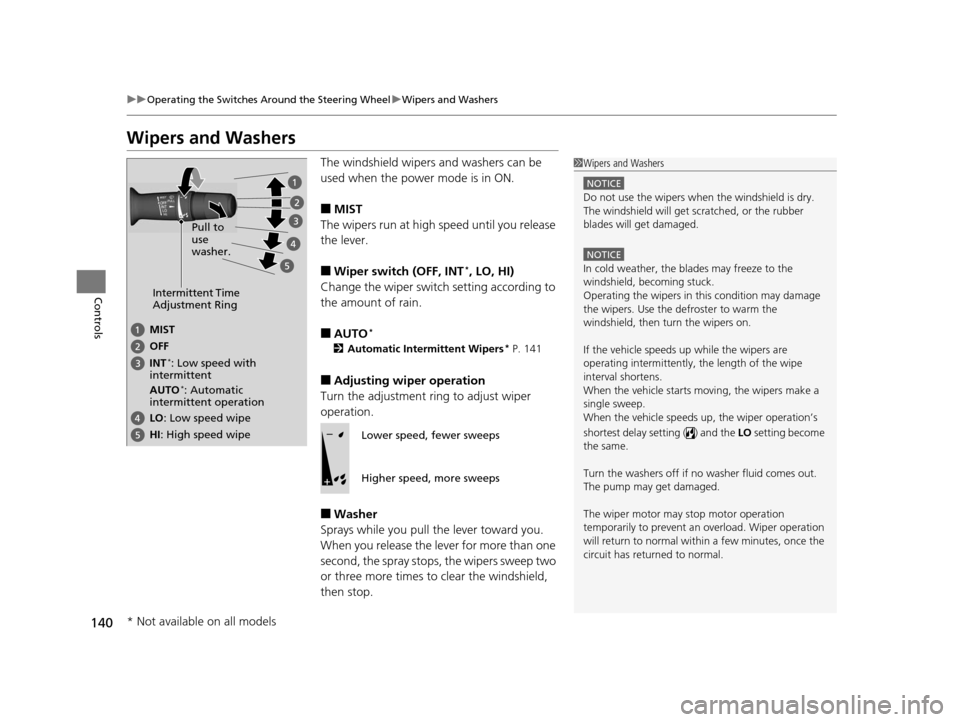
■MIST
The wipers run at high speed until you release
the lever.
■Wiper switch (OFF, INT*, LO, HI)
Change the wiper switch setting according to
the amount of rain.
■AUTO*
2 Automatic Intermittent Wipers* P. 141
■Adjusting wiper operation
Turn the adjustment ri ng to adjust wiper
operation.
■Washer
Sprays while you pull the lever toward you.
When you release the lever for more than one
second, the spray stops, the wipers sweep two
or three more times to clear the windshield,
then stop.
1 Wipers and Washers
NOTICE
Do not use the wipers when the windshield is dry.
The windshield will get sc ratched, or the rubber
blades will get damaged.
NOTICE
In cold weather, the blades may freeze to the
windshield, becoming stuck.
Operating the wipers in th is condition may damage
the wipers. Use the defroster to warm the
windshield, then turn the wipers on.
If the vehicle speeds up while the wipers are
operating intermittently, the length of the wipe
interval shortens.
When the vehicle starts moving, the wipers make a
single sweep.
When the vehicle speeds up, the wiper operation’s
shortest delay setting ( ) and the LO setting become
the same.
Turn the washers off if no washer fluid comes out.
The pump may get damaged.
The wiper motor may stop motor operation
temporarily to prevent an overload. Wiper operation
will return to normal within a few minutes, once the
circuit has returned to normal.
Intermittent Time
Adjustment Ring
MIST
INT
*: Low speed with
intermittent OFF
LO: Low speed wipe
HI: High speed wipe Pull to
use
washer.
AUTO*: Automatic
intermittent operation
Lower speed, fewer sweeps
Higher speed, more sweeps
* Not available on all models
16 ACURA ILX-31TX66300.book 140 ページ 2014年12月22日 月曜日 午後10時15分
Page 142 of 521
141
uuOperating the Switches Around the Steering Wheel uWipers and Washers
Controls
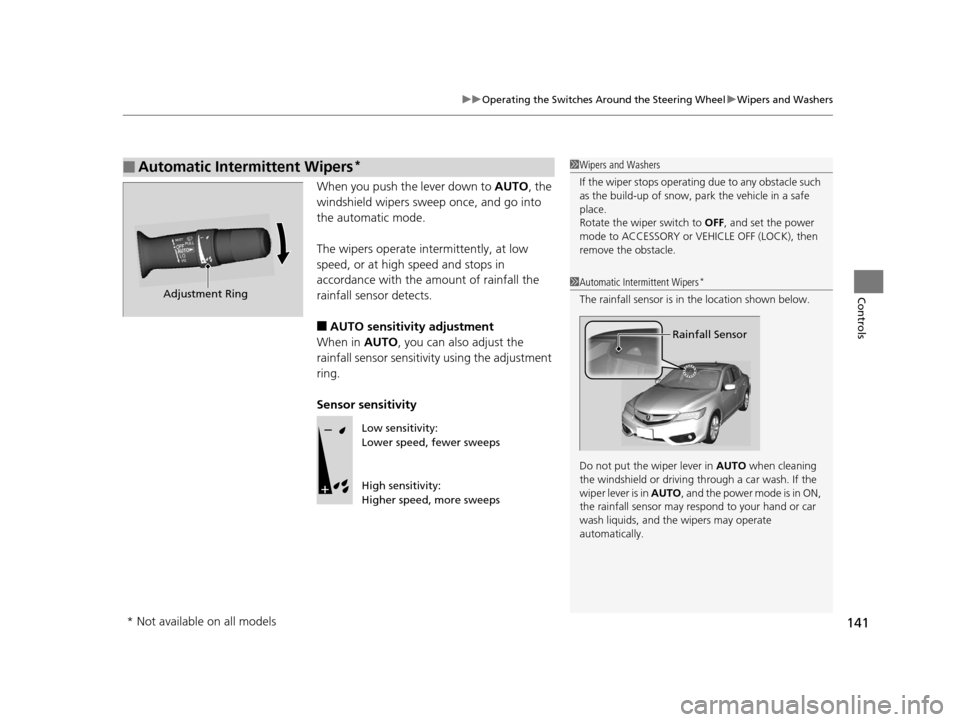
When you push the lever down to AUTO, the
windshield wipers sweep once, and go into
the automatic mode.
The wipers operate intermittently, at low
speed, or at high speed and stops in
accordance with the amount of rainfall the
rainfall sensor detects.
■AUTO sensitivity adjustment
When in AUTO, you can also adjust the
rainfall sensor sensitivity using the adjustment
ring.
Sensor sensitivity
■Automatic Intermittent Wipers*1 Wipers and Washers
If the wiper stops operating due to any obstacle such
as the build-up of snow, pa rk the vehicle in a safe
place.
Rotate the wiper switch to OFF, and set the power
mode to ACCESSORY or VEHICLE OFF (LOCK), then
remove the obstacle.
1 Automatic Intermittent Wipers*
The rainfall sensor is in the location shown below.
Do not put the wiper lever in AUTO when cleaning
the windshield or driving through a car wash. If the
wiper lever is in AUTO , and the power mode is in ON,
the rainfall sensor may re spond to your hand or car
wash liquids, and the wipers may operate
automatically.
Rainfall Sensor
Adjustment Ring
Low sensitivity:
Lower speed, fewer sweeps
High sensitivity:
Higher speed, more sweeps
* Not available on all models
16 ACURA ILX-31TX66300.book 141 ページ 2014年12月22日 月曜日 午後10時15分