brake Acura ILX 2017 User Guide
[x] Cancel search | Manufacturer: ACURA, Model Year: 2017, Model line: ILX, Model: Acura ILX 2017Pages: 521, PDF Size: 29.65 MB
Page 70 of 521
69
uuIndicators u
Continued
Instrument Panel
*1:On the left: Models wi thout full color display
On the right: Models with full color display
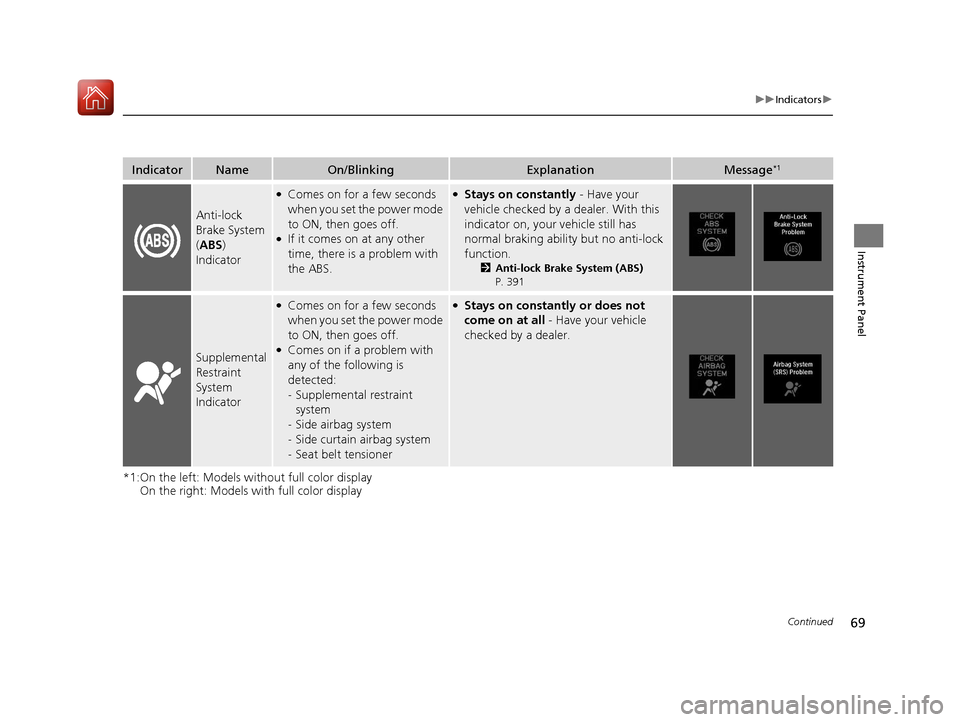
IndicatorNameOn/BlinkingExplanationMessage*1
Anti-lock
Brake System
( ABS )
Indicator
●Comes on for a few seconds
when you set the power mode
to ON, then goes off.
●If it comes on at any other
time, there is a problem with
the ABS.
●Stays on constantly - Have your
vehicle checked by a dealer. With this
indicator on, your vehicle still has
normal braking abili ty but no anti-lock
function.
2 Anti-lock Brake System (ABS)
P. 391
Supplemental
Restraint
System
Indicator
●Comes on for a few seconds
when you set the power mode
to ON, then goes off.
●Comes on if a problem with
any of the following is
detected:
- Supplemental restraint
system
- Side airbag system
- Side curtain airbag system
- Seat belt tensioner
●Stays on constantly or does not
come on at all - Have your vehicle
checked by a dealer.
17 ACURA ILX-31TX66400.book 69 ページ 2016年3月15日 火曜日 午後5時0分
Page 84 of 521
83
uuIndicators uMulti-Information Display Warning and Information Messages
Continued
Instrument Panel
*1:On the left: Models wi thout full color display
On the right: Models with full color display
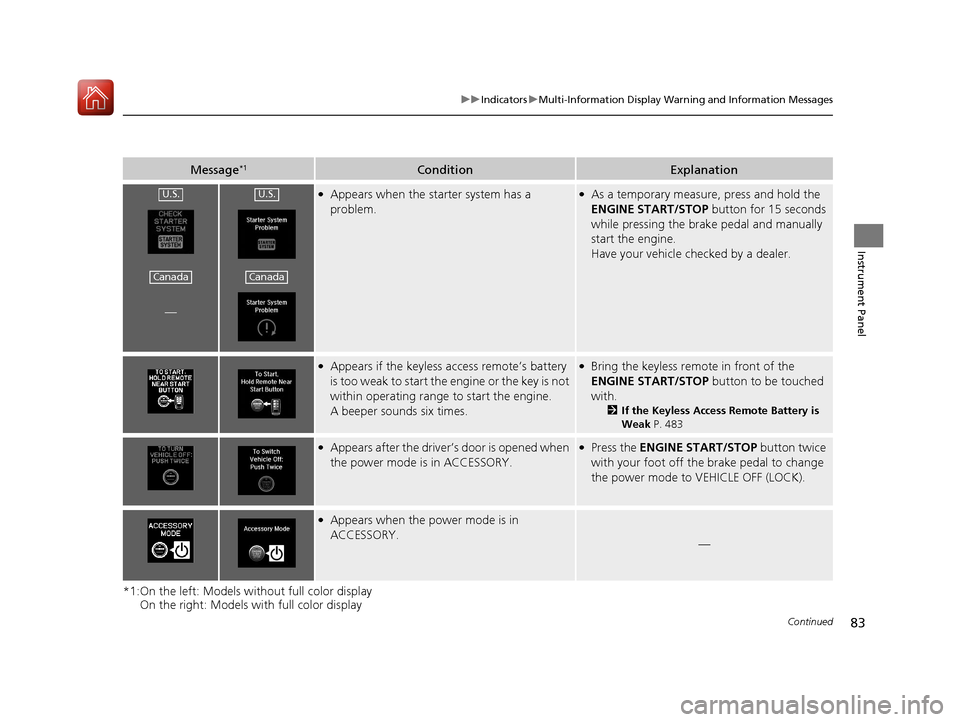
Message*1ConditionExplanation
—
●Appears when the starter system has a
problem.●As a temporary measure, press and hold the
ENGINE START/STOP button for 15 seconds
while pressing the brake pedal and manually
start the engine.
Have your vehicle checked by a dealer.
●Appears if the keyless access remote’s battery
is too weak to start the engine or the key is not
within operating range to start the engine.
A beeper sounds six times.●Bring the keyless remote in front of the
ENGINE START/STOP button to be touched
with.
2 If the Keyless Access Remote Battery is
Weak P. 483
●Appears after the driver’s door is opened when
the power mode is in ACCESSORY.●Press the ENGINE START/STOP button twice
with your foot off the brake pedal to change
the power mode to VEHICLE OFF (LOCK).
●Appears when the power mode is in
ACCESSORY.
—
U.S.
Canada
U.S.
Canada
17 ACURA ILX-31TX66400.book 83 ページ 2016年3月15日 火曜日 午後5時0分
Page 87 of 521
86
uuIndicators uMulti-Information Display Warn ing and Information Messages
Instrument Panel
MessageConditionExplanation
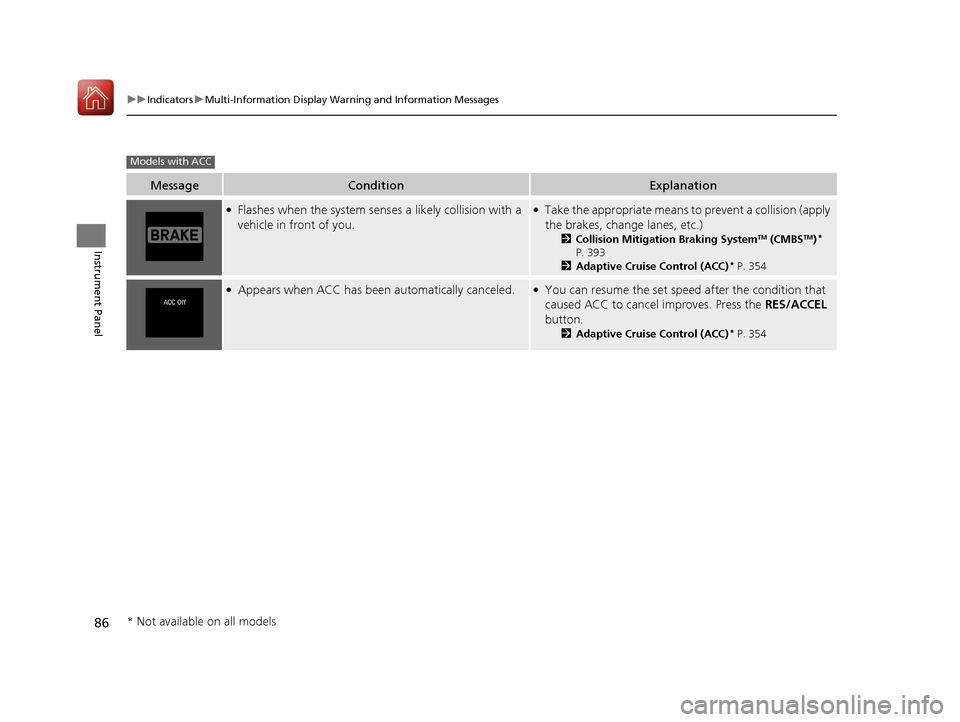
●Flashes when the system senses a likely collision with a
vehicle in front of you.●Take the appropriate means to prevent a collision (apply
the brakes, change lanes, etc.)
2 Collision Mitigation Braking SystemTM (CMBSTM)*
P. 393
2 Adaptive Cruise Control (ACC)
* P. 354
●Appears when ACC has been automatically canceled.●You can resume the set speed after the condition that
caused ACC to cancel improves. Press the RES/ACCEL
button.
2 Adaptive Cruise Control (ACC)* P. 354
Models with ACC
* Not available on all models
17 ACURA ILX-31TX66400.book 86 ページ 2016年3月15日 火曜日 午後5時0分
Page 88 of 521
87
uuIndicators uMulti-Information Display Warning and Information Messages
Instrument Panel
MessageConditionExplanation
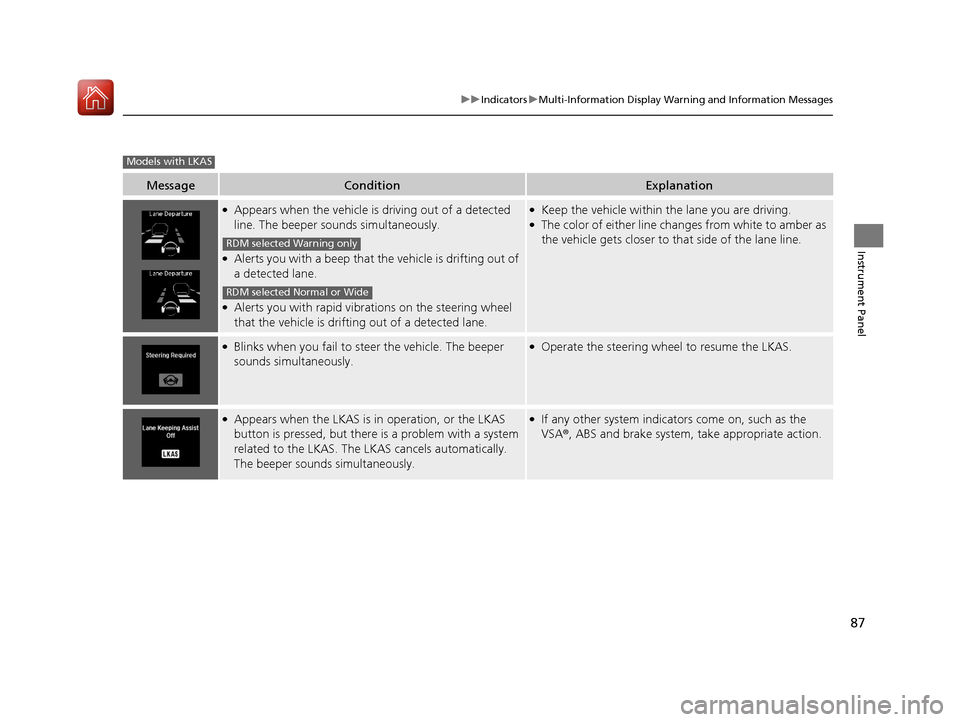
●Appears when the vehicle is driving out of a detected
line. The beeper sounds simultaneously.
●Alerts you with a beep that th e vehicle is drifting out of
a detected lane.
●Alerts you with rapid vibrat ions on the steering wheel
that the vehicle is drifting out of a detected lane.
●Keep the vehicle within the lane you are driving.●The color of either line changes from white to amber as
the vehicle gets closer to that side of the lane line.
●Blinks when you fail to steer the vehicle. The beeper
sounds simultaneously.●Operate the steering wheel to resume the LKAS.
●Appears when the LKAS is in operation, or the LKAS
button is pressed, but there is a problem with a system
related to the LKAS. The LKAS cancels automatically.
The beeper sounds simultaneously.●If any other system indicators come on, such as the
VSA ®, ABS and brake system, take appropriate action.
Models with LKAS
RDM selected Warning only
RDM selected Normal or Wide
17 ACURA ILX-31TX66400.book 87 ページ 2016年3月15日 火曜日 午後5時0分
Page 134 of 521
133Continued
Controls
Operating the Switches Around the Steering Wheel
ENGINE START/STOP Button
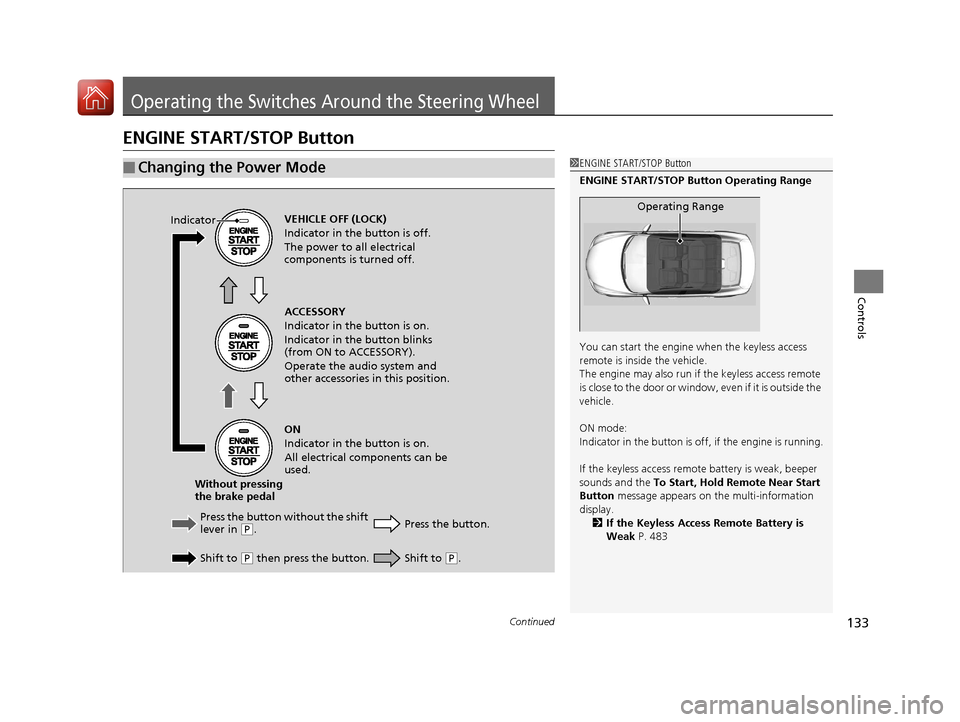
■Changing the Power Mode1ENGINE START/STOP Button
ENGINE START/STOP Button Operating Range
You can start the engine when the keyless access
remote is inside the vehicle.
The engine may also run if the keyless access remote
is close to the door or window, even if it is outside the
vehicle.
ON mode:
Indicator in the button is of f, if the engine is running.
If the keyless access remote battery is weak, beeper
sounds and the To Start, Hold Remote Near Start
Button message appears on the multi-information
display. 2 If the Keyless Access Remote Battery is
Weak P. 483
Operating RangeVEHICLE OFF (LOCK)
Indicator in the button is off.
The power to all electrical
components is turned off.
Press the button without the shift
lever in
( P.
Shift to
( P then press the button. Press the button.
Without pressing
the brake pedal ACCESSORY
Indicator in the button is on.
Indicator in the button blinks
(from ON to ACCESSORY).
Operate the audio system and
other accessories in this position.
ON
Indicator in the button is on.
All electrical components can be
used.
IndicatorShift to (
P.
17 ACURA ILX-31TX66400.book 133 ページ 2016年3月15日 火曜日 午後5時0分
Page 140 of 521
139
uuOperating the Switches Around the Steering Wheel uFog Lights*
Controls
Fog Lights*
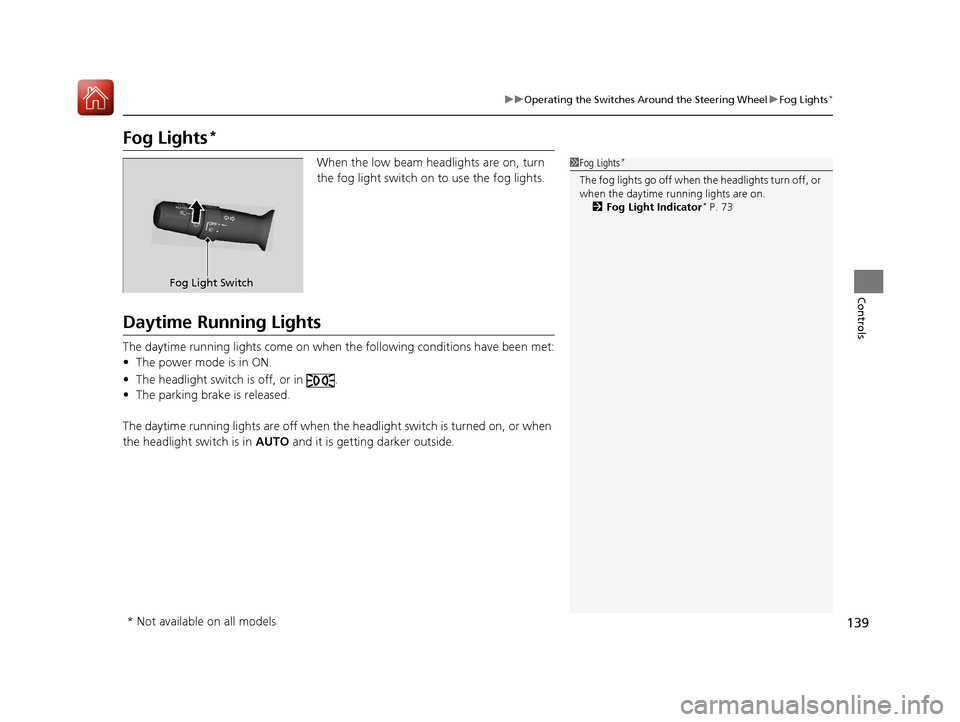
When the low beam headlights are on, turn
the fog light switch on to use the fog lights.
Daytime Running Lights
The daytime running lights come on when th e following conditions have been met:
• The power mode is in ON.
• The headlight switch is off, or in .
• The parking brake is released.
The daytime running lights are off when the headlight switch is turned on, or when
the headlight switch is in AUTO and it is getting darker outside.
1Fog Lights*
The fog lights go off when th e headlights turn off, or
when the daytime running lights are on. 2 Fog Light Indicator
* P. 73
Fog Light Switch
* Not available on all models
17 ACURA ILX-31TX66400.book 139 ページ 2016年3月15日 火曜日 午後5時0分
Page 146 of 521
145
uuOperating the Switches Around the Steering Wheel uDriving Position Memory System*
Controls
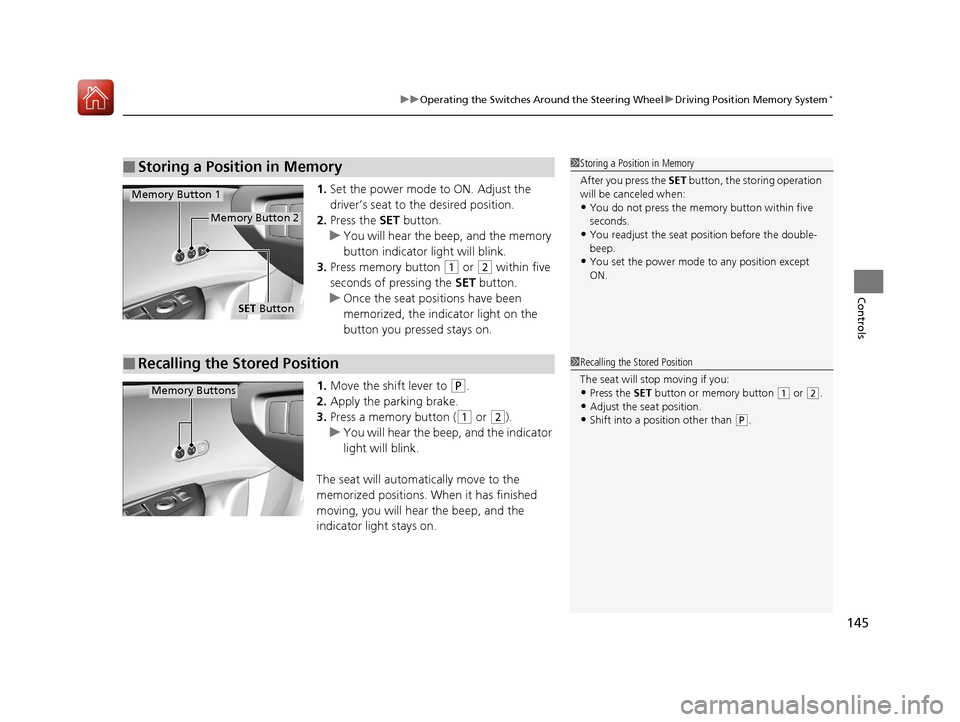
1. Set the power mode to ON. Adjust the
driver’s seat to the desired position.
2. Press the SET button.
u You will hear the beep, and the memory
button indicator light will blink.
3. Press memory button
(1 or (2 within five
seconds of pressing the SET button.
u Once the seat positions have been
memorized, the indicator light on the
button you pressed stays on.
1. Move the shift lever to
(P.
2. Apply the parking brake.
3. Press a memory button (
(1 or (2).
u You will hear the beep, and the indicator
light will blink.
The seat will automatically move to the
memorized positions. When it has finished
moving, you will hear the beep, and the
indicator light stays on.
■Storing a Position in Memory1 Storing a Position in Memory
After you press the SET button, the storing operation
will be canceled when:
•You do not press the memory button within five
seconds.
•You readjust the seat position before the double-
beep.
•You set the power mode to any position except
ON.
SET Button
Memory Button 1
Memory Button 2
■Recalling the Stored Position1Recalling the Stored Position
The seat will st op moving if you:
•Press the SET button or memory button (1 or (2.
•Adjust the seat position.•Shift into a position other than (P.
Memory Buttons
17 ACURA ILX-31TX66400.book 145 ページ 2016年3月15日 火曜日 午後5時0分
Page 155 of 521
154
uuAdjusting the Seats uRear Seat
Controls
Rear Seat
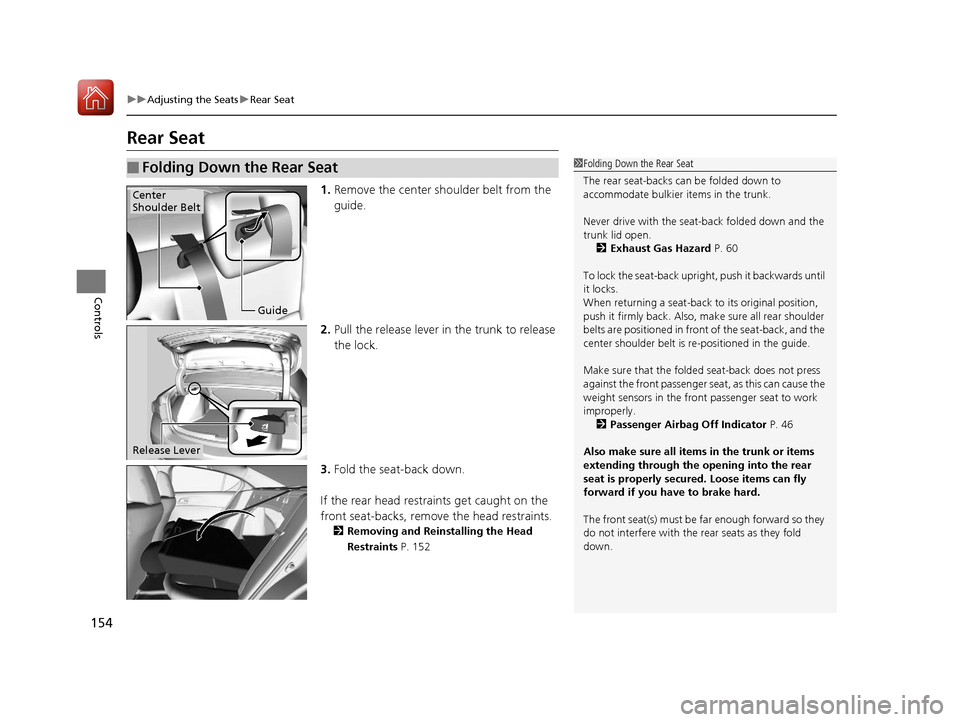
1. Remove the center shoulder belt from the
guide.
2. Pull the release lever in the trunk to release
the lock.
3. Fold the seat-back down.
If the rear head restraints get caught on the
front seat-backs, remove the head restraints.
2 Removing and Reinstalling the Head
Restraints P. 152
■Folding Down the Rear Seat1Folding Down the Rear Seat
The rear seat-backs can be folded down to
accommodate bulkier items in the trunk.
Never drive with the seat-back folded down and the
trunk lid open. 2 Exhaust Gas Hazard P. 60
To lock the seat-back upri ght, push it backwards until
it locks.
When returning a seat-back to its original position,
push it firmly back. Also, m ake sure all rear shoulder
belts are positioned in front of the seat-back, and the
center shoulder belt is re -positioned in the guide.
Make sure that the folded seat-back does not press
against the front passenger seat, as this can cause the
weight sensors in the front passenger seat to work
improperly.
2 Passenger Airbag Off Indicator P. 46
Also make sure all items in the trunk or items
extending through the opening into the rear
seat is properly secured. Loose items can fly
forward if you have to brake hard.
The front seat(s) must be far enough forward so they
do not interfere with the rear seats as they fold
down.
Guide
Center
Shoulder Belt
Release Lever
17 ACURA ILX-31TX66400.book 154 ページ 2016年3月15日 火曜日 午後5時0分
Page 332 of 521
331
Driving
This chapter discusses driving, refueling, and information on items such as accessories.
Before Driving................................... 332
Maximum Load Limit........................ 335
Towing a Trailer ................................ 337
When Driving Starting the Engine .......................... 338
Dual Clutch Transmission ................. 344
Shifting ............................................ 345
Cruise Control
*................................ 349
Front Sensor Camera*...................... 352
Adaptive Cruise Control (ACC)*....... 354
Road Departure Mi tigation (RDM)
System*...................................... 368
Lane Keeping Assist System (LKAS)*.... 373
Vehicle Stability Assist (VSA®), aka Electronic
Stability Control (ESC), System ...............381
Blind Spot Information (BSI) System*... 383
Tire Pressure Monitoring System (TPMS) ... 385
Tire Pressure Monitoring System (TPMS) - Required Federal Explanation ......... 387
Braking Brake System ................................... 389
Anti-lock Brake System (ABS) ........... 391
Collision Mitigati on Braking System
TM
(CMBSTM)*..................................... 393 Parking Your Vehicle
When Stopped ................................ 402
Cross Traffic Monitor
*..................... 403
Multi-View Rear Camera .................. 406
Refueling Fuel Information .............................. 407
How to Refuel ................................. 408
Fuel Economy and CO
2 Emissions .... 409
Improving Fuel Economy and Reducing CO
2 Emissions ................................ 409
* Not available on all models
17 ACURA ILX-31TX66400.book 331 ページ 2016年3月15日 火曜日 午後5時0分
Page 334 of 521
Continued333
uuBefore Driving uDriving Preparation
Driving
• Store or secure all items on board properly.
u Carrying too much cargo, or improperly storing it, can affect your vehicle's
handling, stability, sto pping distance, and tires, and make it unsafe.
2Maximum Load Limit P. 335
•Do not pile items higher than the seat height.
u They can block your view and may be thrown forward in the event of sudden
braking.
• Do not place anything in the front seat footwells. Make sure to secure the floor
mat.
u An object or unsecured floor mat can in terfere with your brake and accelerator
pedal operation while driving.
• If you have any animals on board, do not let them move around in the vehicle.
u They may interfere with driv ing and a crash could occur.
• Securely close and lock all doors and the trunk.
2 Locking/Unlocking the Doors from the Inside P. 118
•Adjust your seating position properly.
u Adjust the head restraint, too.
2Adjusting the Seats P. 148
2 Adjusting the Front and Rear Outer Head Restraint Positions P. 151
•Adjust the mirrors and steering wh eel properly for your driving.
u Adjust them while sitting in the proper driving position.
2 Adjusting the Mirrors P. 146
2 Adjusting the Steering Wheel P. 143
■Interior Checks1Interior Checks
The headlight aim is set by the factory, and does not
need to be adjusted. Howeve r, if you regularly carry
heavy items in the trunk ha ve the aiming readjusted
at a dealer or by a qualified technician.
17 ACURA ILX-31TX66400.book 333 ページ 2016年3月15日 火曜日 午後5時0分