brake light Acura ILX 2017 User Guide
[x] Cancel search | Manufacturer: ACURA, Model Year: 2017, Model line: ILX, Model: Acura ILX 2017Pages: 521, PDF Size: 29.65 MB
Page 347 of 521
uuWhen Driving uShifting
346
Driving
■Shift Lever Operation1Shift Lever Operation
NOTICE
When you change the shift lever from (D to (R and
vice versa, come to a complete stop and keep the
brake pedal depressed.
Operating the shift lever be fore the vehicle has come
to a complete standstill can damage the transmission.
Use the shift lever positi on indicator to check the
lever position befo re pulling away.
Whichever position the shift lever is in when driving,
a blinking transmission indicator indicates a
transmission problem.
Avoid sudden acceleration and have the transmission
checked by a dealer as soon as possible.
The fuel supply may be cut of f if you drive at engine
speeds in or over the tachometer's red zone (engine
speed limit). If this happe ns, you may experience a
slight jolt.
When the engine speed is increased while the shift
lever is in
( N, (P or (R, the fuel supply may be cut
off even without the engine speed entering the
tachometer’s red zone.
It may not be possible to operate the shift lever if the
brake pedal is applied while the shift lever release
button is held down.
Depress the brake pedal first.
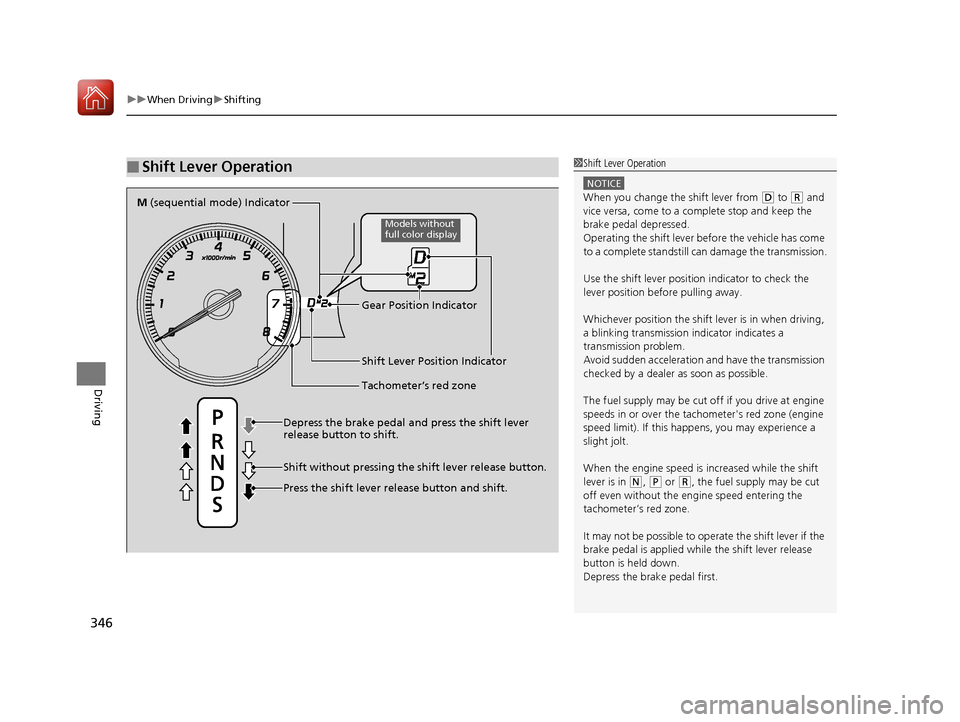
Shift Lever Position Indicator
Depress the brake pedal and press the shift lever
release button to shift.
Shift without pressing the shift lever release button.
Press the shift lever re lease button and shift.
Tachometer’s red zone
Gear Position Indicator
M (sequential mode) Indicator
Models without
full color display
17 ACURA ILX-31TX66400.book 346 ページ 2016年3月15日 火曜日 午後5時0分
Page 355 of 521
354
uuWhen Driving uAdaptive Cruise Control (ACC)*
Driving
Adaptive Cruise Control (ACC)*
Helps maintain a constant vehicle speed and a set following-distance behind a
vehicle detected ahead of yours, without you having to keep your foot on the brake
or the accelerator.
When ACC slows your vehicle by applying the brakes, your vehicle’s brake lights will
illuminate.1 Adaptive Cruise Control (ACC)*
Important Reminder
As with any system, there are limits to ACC. Use the
brake pedal whenever necessary, and always keep a
safe distance between your vehicle and other
vehicles.
3WARNING
Improper use of ACC can lead to a crash.
Use ACC only when traveling on open
highways in good weather.
3WARNING
ACC has limited braking capability.
When your vehicle speed drops below 22
mph, ACC will automatically cancel and no
longer will apply your vehicle’s brakes.
Always be prepared to apply the brake
pedal when conditions require.
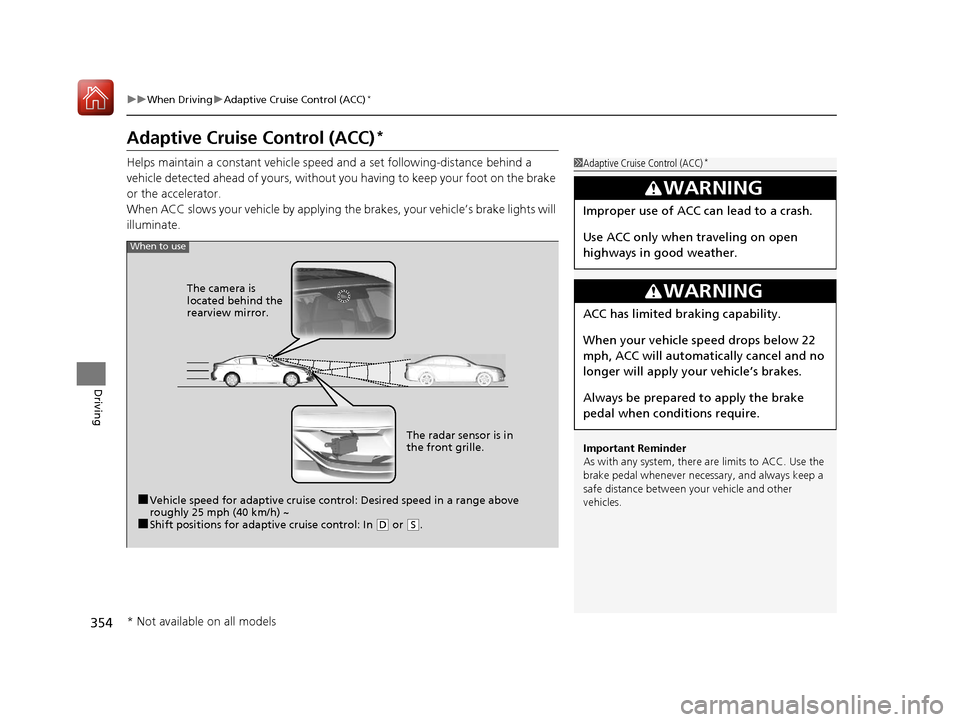
When to use
■Vehicle speed for adaptive cruise control: Desired speed in a range above
roughly 25 mph (40 km/h) ~
■Shift positions for adaptive cruise control: In (D or (S.
The radar sensor is in
the front grille.
The camera is
located behind the
rearview mirror.
* Not available on all models
17 ACURA ILX-31TX66400.book 354 ページ 2016年3月15日 火曜日 午後5時0分
Page 359 of 521
uuWhen Driving uAdaptive Cruise Control (ACC)*
358
Driving
■There is no vehicle ahead
Your vehicle cruises at the set speed.
■A vehicle ahead is within ACC range and going slower than the set speed
Your vehicle slows down, and maintains the same speed as the speed of the vehicle
ahead to maintain the set following distance.
■A vehicle ahead is within ACC ra nge and going at a steady speed
Your vehicle follows the vehicle ahead of it, keeping a constant distance, without
going beyond the set speed.
■A vehicle ahead goes out of range
ACC accelerates your vehicle to the set speed, and then maintains it.
■When you depress the accelerator pedal
You can temporarily increase th e vehicle speed. In this case, there is no audible or
visual alerts even if a vehicle is in ACC range.
ACC stays on unless you cancel it. Once you release the accelerator pedal, the
system resumes the set speed.
There are times when the vehicle speed will decrease when the accelerator pedal is
lightly applied.
1 When in Operation
Limitations
You may need to use the brake to maintain a safe
distance when using ACC. Additionally, ACC may
not work properly under certain conditions.
2 ACC Conditions and Limitations P. 359
17 ACURA ILX-31TX66400.book 358 ページ 2016年3月15日 火曜日 午後5時0分
Page 360 of 521
Continued359
uuWhen Driving uAdaptive Cruise Control (ACC)*
Driving
The system may automatically shut off and the ACC indicator will come on under
certain conditions. Some examples of thes e conditions are listed below. Other
conditions may reduce some of the ACC functions.
2 Front Sensor Camera* P. 352
■Environmental conditions
Driving in bad weather (r ain, fog, snow, etc.).
■Roadway conditions
Driving on a snowy or wet roadway (obscure d lane marking, vehicle tracks, reflected
lights, road spra y, high contrast).
■Vehicle conditions
• The outside of the windshield is blocked by dirt, mud, leaves, wet snow, etc.
• An abnormal tire or wheel condition (wro ng sized, varied size or construction,
improperly inflated, compact spare tire
*, etc.).
• The camera temperature gets too hot.
• The parking brake is applied.
• When the front grille is dirty.
• When the front of the vehicle tilts up due to heavy cargo in the trunk or rear seats.
• When tire chains are installed.
■ACC Conditions and Limitations1ACC Conditions and Limitations
The radar sensor for ACC is shared with the Collision
Mitigation Braking System
TM (CMBSTM).
2 Collision Mitigation Braking SystemTM
(CMBSTM)* P. 393
You can read about handling information for the
camera equipped with this system. 2 Front Sensor Camera
* P. 352
* Not available on all models
17 ACURA ILX-31TX66400.book 359 ページ 2016年3月15日 火曜日 午後5時0分
Page 370 of 521
Continued369
uuWhen Driving uRoad Departure Mitigation (RDM) System*
Driving
The system becomes ready to start sear ching for lane markings when all the
following conditions are met:
• The vehicle is traveling between about 45 and 90 mph (72 and 145 km/h).
• The vehicle is on a straight or slightly curved road.
• The turn signals are off.
• The brake pedal is not depressed.
• The wipers are not in continuous operation.
• The system makes a determination that th e driver is not actively accelerating,
braking or steering.
■How the System Activates1 How the System Activates
The RDM system may automa tically shut off and the
indicator comes and stays on.
2 Indicators P. 75
RDM system function can be impacted when the
vehicle is:
•Not driven within a traffic lane.
•Driven on the inside edge of a curve, or outside of
a lane.
•Driven in a narrow lane.
17 ACURA ILX-31TX66400.book 369 ページ 2016年3月15日 火曜日 午後5時0分
Page 376 of 521
Continued375
uuWhen Driving uLane Keeping Assist System (LKAS)*
Driving
The system can be used when th e following conditions are met.
• The lane in which you are driving has detectable lane markers on both sides, and
your vehicle is in the center of the lane.
• The vehicle speed is between about 45 and 90 mph (72 and 145 km/h).
• You are driving on a straight or slightly curved road.
• The turn signals are off.
• The brake pedal is not depressed.
• The wipers are not in continuous operation.
■How to activate the system
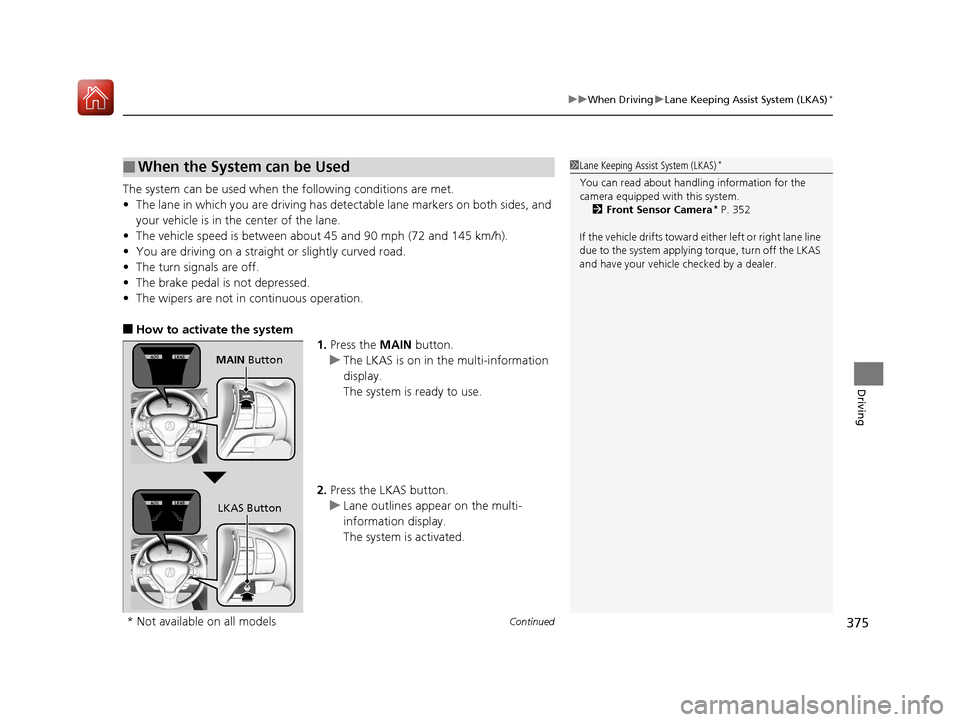
1.Press the MAIN button.
u The LKAS is on in the multi-information
display.
The system is ready to use.
2. Press the LKAS button.
u Lane outlines appear on the multi-
information display.
The system is activated.
■When the System can be Used1Lane Keeping Assist System (LKAS)*
You can read about handling information for the
camera equipped with this system.
2 Front Sensor Camera
* P. 352
If the vehicle drifts toward ei ther left or right lane line
due to the system applying torque, turn off the LKAS
and have your vehicle checked by a dealer.
MAIN Button
LKAS Button
* Not available on all models
17 ACURA ILX-31TX66400.book 375 ページ 2016年3月15日 火曜日 午後5時0分
Page 390 of 521
389Continued
Driving
Braking
Brake System
Use the parking brake to keep the vehicle stationary when parking.
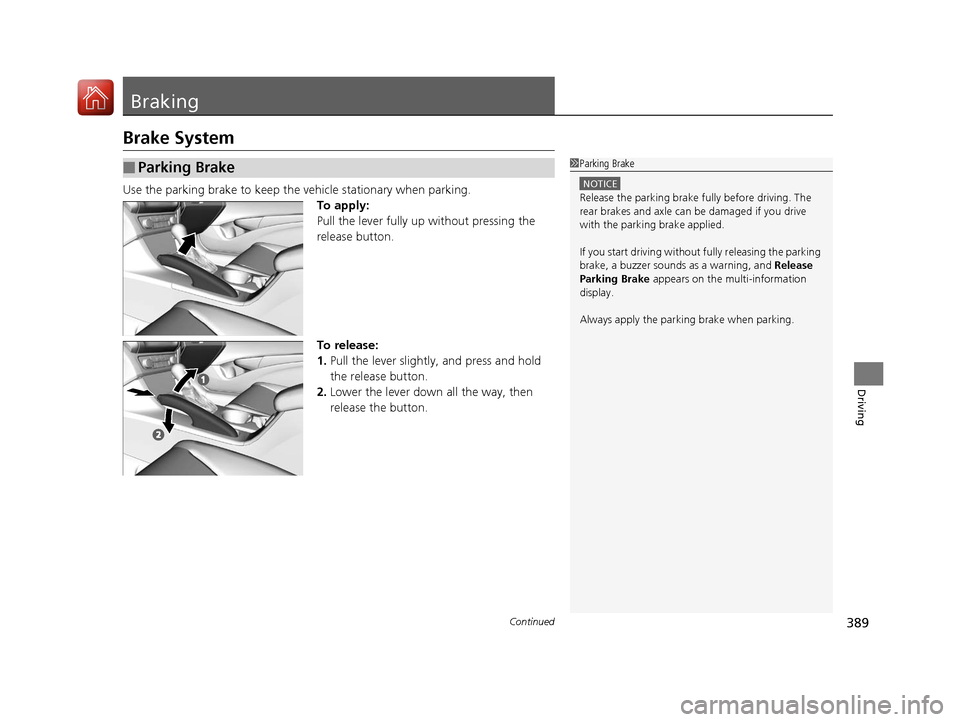
To apply:
Pull the lever fully up without pressing the
release button.
To release:
1. Pull the lever slightly, and press and hold
the release button.
2. Lower the lever down all the way, then
release the button.
■Parking Brake1Parking Brake
NOTICE
Release the parking brake fu lly before driving. The
rear brakes and axle can be damaged if you drive
with the parki ng brake applied.
If you start driving without fully releasing the parking
brake, a buzzer sounds as a warning, and Release
Parking Brake appears on the multi-information
display.
Always apply the parki ng brake when parking.
17 ACURA ILX-31TX66400.book 389 ページ 2016年3月15日 火曜日 午後5時0分
Page 391 of 521
uuBraking uBrake System
390
Driving
Your vehicle is equipped with disc brakes at all four wheels. A vacuum power assist
helps reduce the effort needed on the brake pedal. The brake assist system increases
the stopping force when you depress th e brake pedal hard in an emergency
situation. The anti-lock brake system (ABS ) helps you retain steering control when
braking very hard.
2 Brake Assist System P. 392
2 Anti-lock Brake System (ABS) P. 391
■Foot Brake1Foot Brake
Check the brakes after driving through deep water,
or if there is a buildup of road surface water. If
necessary, dry the brakes by lightly depressing the
pedal several times.
If you hear a continuous me tallic friction sound when
applying the brakes, this is caused by the brake wear
indicator rubbing on the brake rotor and indicates
that the brake pads need to be replaced. Have the
vehicle checked by a deal er. If you hear only an
occasional squeak or squeal when you initially apply
the brake pedal, this may be normal and caused by
high frequency vibration of the brake pads against
the rotating brake disc.
Constantly using the brak e pedal while going down a
long hill builds up heat, which reduces the brake
effectiveness. Apply engine braking by taking your
foot off the accelerator pe dal and downshifting to a
lower gear.
Do not rest your foot on the brake pedal while
driving, as it will lightly apply the brakes and cause
them to lose effectiveness over time and reduce pad
life. It will also conf use drivers behind you.
17 ACURA ILX-31TX66400.book 390 ページ 2016年3月15日 火曜日 午後5時0分
Page 392 of 521
391
uuBraking uAnti-lock Brake System (ABS)
Driving
Anti-lock Brake System (ABS)
Helps prevent the wheels from locking up, and helps you retain steering control by
pumping the brakes rapidly, much faster than you.
The electronic brake distribu tion (EBD) system, which is part of the ABS, also
balances the front-to-rear braking distribution according to vehicle loading.
You should never pu mp the brake pedal. Let the ABS work for you by always
keeping firm, steady pressure on the brake pe dal. This is sometimes referred to as
“stomp and steer.”
■ABS operation
The brake pedal may pulsate slightly when the ABS is working. Keep holding the
pedal firmly down. On dry pavement, you w ill need to press on the brake pedal very
hard before the ABS activates. However, you may feel the ABS activate immediately
if you are trying to stop on snow or ice.
When the vehicle speed goes unde r 6 mph (10 km/h), the ABS stops.
■ABS1Anti-lock Brake System (ABS)
NOTICE
The ABS may not function correctly if you use an
incorrect tire type and size.
When the ABS indicator comes on while driving,
there may be a problem with the system.
While normal braking is not affected, there is a
possibility of the ABS not operating. Have the vehicle
checked by a dealer immediately.
The ABS does not reduce the ti me or distance it takes
to stop the vehicle. It only helps with steering control
during hard braking.
In the following cases, yo ur vehicle may need more
stopping distance than a vehicle without the ABS:
•When driving on rough road surfaces, including
when driving on uneven surf aces, such as gravel or
snow.
•When tire chains are installed.
You may hear a motor sound coming from the
engine compartment while system checks are being
performed immediately after starting the engine or
while driving. This is normal.
17 ACURA ILX-31TX66400.book 391 ページ 2016年3月15日 火曜日 午後5時0分
Page 393 of 521
392
uuBraking uBrake Assist System
Driving
Brake Assist System
Designed to assist the driver by generati ng greater braking force when you depress
the brake pedal hard during emergency braking.
■Brake assist system operation
Press the brake pedal firmly for more powerful braking.
When brake assist operates, the pedal ma y wiggle slightly and an operating noise
may be heard. This is normal. Keep holding the brake pedal firmly down.
■Brake Assist System
17 ACURA ILX-31TX66400.book 392 ページ 2016年3月15日 火曜日 午後5時0分