brake light Acura ILX 2017 Owner's Guide
[x] Cancel search | Manufacturer: ACURA, Model Year: 2017, Model line: ILX, Model: Acura ILX 2017Pages: 521, PDF Size: 29.65 MB
Page 399 of 521
398
uuBraking uCollision Mitigation Braking SystemTM (CMBSTM)*
Driving
■Vehicle conditions
• Headlight lenses are dirty or the headlights are not properly adjusted.
• The outside of the windshie ld is blocked by dirt, mud, leaves, wet snow, etc.
• The inside of the windshield is fogged.
• An abnormal tire or wheel condition (wrong sized, varied size or construction,
improperly inflated, compact spare tire
*, etc.).
• When tire chains are installed.
• The vehicle is tilted due to a heav y load or suspension modifications.
• The camera temperature gets too hot.
• Driving with the parking brake applied.
• When the radar sensor in the front grille gets dirty.
* Not available on all models
17 ACURA ILX-31TX66400.book 398 ページ 2016年3月15日 火曜日 午後5時0分
Page 412 of 521
411
Maintenance
This chapter discusses basic maintenance.
Before Performing MaintenanceInspection and Maintenance ............ 412
Safety When Performing Maintenance ..413
Parts and Fluids Used in Maintenance Service ........................................... 414
Maintenance Minder
TM..................... 415
Maintenance Under the Hood Maintenance Items Under the Hood .. 420
Opening the Hood ........................... 421
Recommended Engine Oil ................ 422
Oil Check ......................................... 423
Adding Engine Oil ............................ 424
Changing the Engine Oil and Oil Filter ...425
Engine Coolant ................................ 427
Transmission Fluid ............................ 429
Brake Fluid ....................................... 430
Refilling Window Washer Fluid......... 430
Replacing Light Bulbs ....................... 431
Checking and Maintaining Wiper
Blades .......................................... 440
Checking and Maintaining Tires
Checking Tires ................................. 442
Tire and Loading Information Label .. 443
Tire Labeling .................................... 443
DOT Tire Quality Grading (U.S. Vehicles) ..445Wear Indicators................................ 447 Tire Service Life ................................ 447
Tire and Wheel Replacement ........... 448
Tire Rotation .................................... 449
Winter Tires ..................................... 450
Battery ............................................... 451
Remote Transmitter Care
Replacing the Button Battery ........... 452
Climate Control System Maintenance.. 454Cleaning
Interior Care .................................... 455
Exterior Care.................................... 457
Accessories and Modifications ........ 460
17 ACURA ILX-31TX66400.book 411 ページ 2016年3月15日 火曜日 午後5時0分
Page 413 of 521
412
Maintenance
Before Performing Maintenance
Inspection and Maintenance
For your safety, perform all listed inspections and maintenance to keep your vehicle
in good condition. If you become aware of any abnormality (noise, smell, insufficient
brake fluid, oil residue on the ground, etc.), have your vehicle inspected by a dealer.
(Note, however, that service at a dealer is not mandatory to keep your warranties in
effect.) Refer to the separate maintena nce booklet for detailed maintenance and
inspection information.
■Daily inspections
Perform inspections before long distance trips, when washing the vehicle, or when
refueling.
■Periodic inspections
• Check the brake fluid level monthly.
2 Brake Fluid P. 430
•Check the tire pressure monthly. Examin e the tread for wear and foreign objects.
2Checking and Maintaining Tires P. 442
•Check the operation of the exterior lights monthly.
2 Replacing Light Bulbs P. 431
•Check the condition of the wiper bl ades at least every six months.
2Checking and Maintaining Wiper Blades P. 440
■Types of Inspection and Maintenance
1Inspection and Maintenance
Maintenance, replacement, or repair of
emissions control devices and systems may be
done by any automotive repair establishment or
individuals using parts that are “certified” to
EPA standards.
According to state and fede ral regulations, failure to
perform maintenance on the maintenance main
items marked with # will not void your emissions
warranties. However, all maintenance services should
be performed in accordan ce with the intervals
indicated by the multi-information display (MID).
2 Maintenance Service Items P. 418
If you want to perform complex maintenance tasks
that require more skills a nd tools, you can purchase a
subscription to the Service Express website at
www.techinfo.honda.com .
2 Authorized Manuals P. 509
If you want to perform ma intenance yourself, make
sure that you have the necessary tools and skills first.
After performing ma intenance, update the records in
the separate maintenance booklet.
U.S. models
17 ACURA ILX-31TX66400.book 412 ページ 2016年3月15日 火曜日 午後5時0分
Page 422 of 521
421
uuMaintenance Under the Hood uOpening the Hood
Maintenance
Opening the Hood
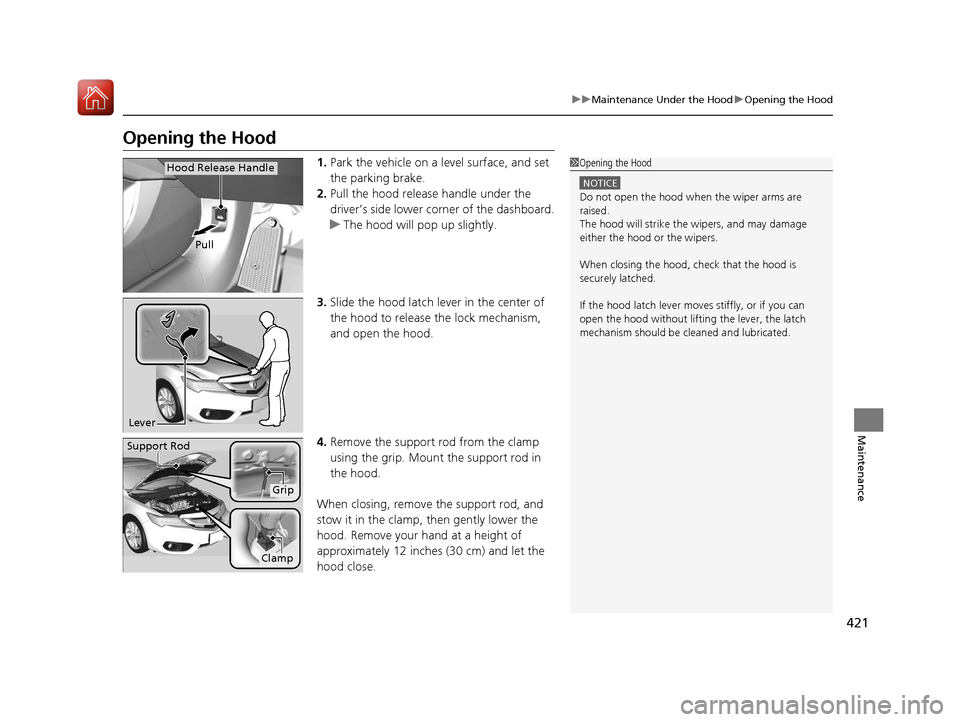
1. Park the vehicle on a level surface, and set
the parking brake.
2. Pull the hood release handle under the
driver’s side lower corner of the dashboard.
u The hood will pop up slightly.
3. Slide the hood latch lever in the center of
the hood to release the lock mechanism,
and open the hood.
4. Remove the support rod from the clamp
using the grip. Mount the support rod in
the hood.
When closing, remove the support rod, and
stow it in the clamp, then gently lower the
hood. Remove your hand at a height of
approximately 12 inches (30 cm) and let the
hood close.1 Opening the Hood
NOTICE
Do not open the hood when the wiper arms are
raised.
The hood will strike the wipers, and may damage
either the hood or the wipers.
When closing the hood, check that the hood is
securely latched.
If the hood latch lever moves stiffly, or if you can
open the hood without lifti ng the lever, the latch
mechanism should be cleaned and lubricated.
Pull
Hood Release Handle
Lever
Support Rod
Grip
Clamp
17 ACURA ILX-31TX66400.book 421 ページ 2016年3月15日 火曜日 午後5時0分
Page 437 of 521
436
uuReplacing Light Bulbs uBrake Light, Taillight and Rear Side Marker Lights
Maintenance
Brake Light, Taillight and Rear Side Marker Lights
Brake light, taillight and rear side marker lights are LED type. Have an authorized
Acura dealer inspect and re place the light assembly.
Rear Turn Signal Light Bulbs
When replacing, use the following bulbs.
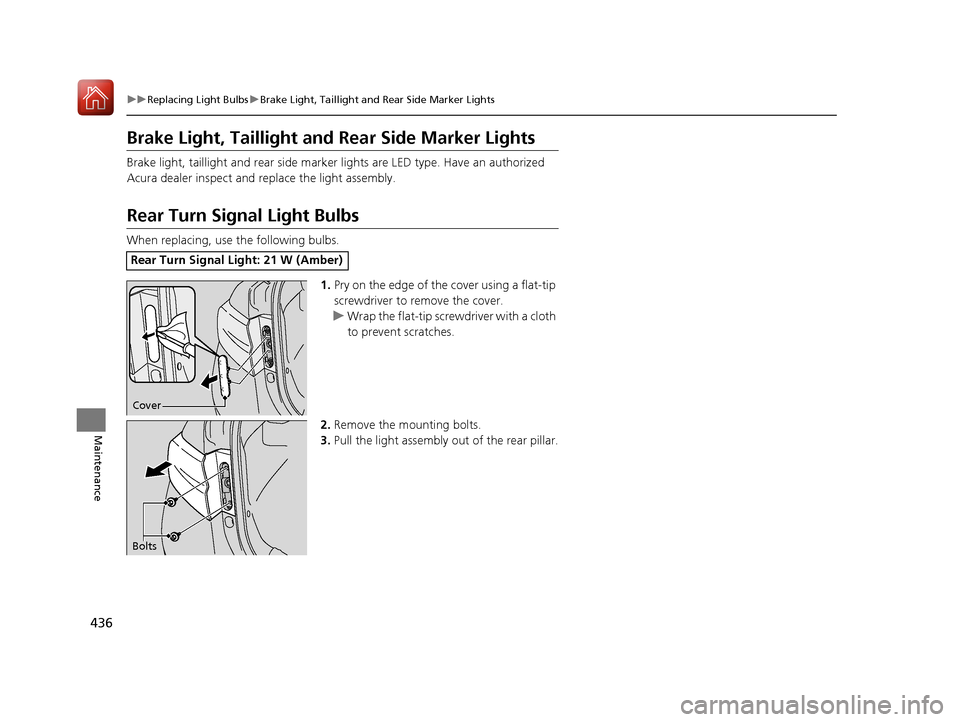
1.Pry on the edge of the cover using a flat-tip
screwdriver to remove the cover.
u Wrap the flat-tip screwdriver with a cloth
to prevent scratches.
2. Remove the mounting bolts.
3. Pull the light assembly out of the rear pillar.
Rear Turn Signal Light: 21 W (Amber)
Cover
Bolts
17 ACURA ILX-31TX66400.book 436 ページ 2016年3月15日 火曜日 午後5時0分
Page 440 of 521
439
uuReplacing Light Bulbs uRear License Plate Light Bulbs
Maintenance
Rear License Plate Light Bulbs
When replacing, use the following bulbs.
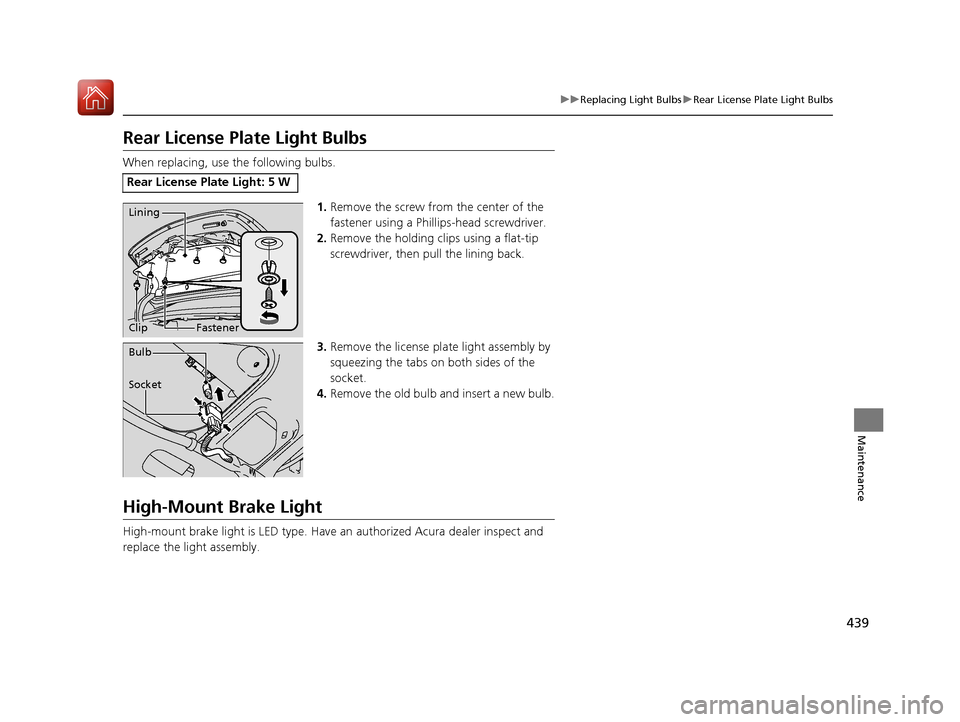
1.Remove the screw from the center of the
fastener using a Phillips-head screwdriver.
2. Remove the holding cl ips using a flat-tip
screwdriver, then pull the lining back.
3. Remove the license plat e light assembly by
squeezing the tabs on both sides of the
socket.
4. Remove the old bulb and insert a new bulb.
High-Mount Brake Light
High-mount brake light is LED type. Have an authorized Acura dealer inspect and
replace the light assembly.
Rear License Plate Light: 5 W
Fastener
LiningClip
Socket Bulb
17 ACURA ILX-31TX66400.book 439 ページ 2016年3月15日 火曜日 午後5時0分
Page 460 of 521
459
uuCleaning uExterior Care
Maintenance
The inside lenses of exterior lights (headlights, brake light s, etc.) may fog temporarily
if you have driven in the rain, or after the vehicle has been run through a car wash.
Dew condensation also may build up inside the lenses when there is a significant
enough difference between the ambient and inside lens temperatures (similar to
vehicle windows fogging up in rainy conditions). These conditions are natural
processes, not structural design problems in the exterior lights.
Lens design characteristics ma y result in moisture developing on the light lens frame
surfaces. This also is not a malfunction.
However, if you see large amounts of wa ter accumulation, or large water drops
building up inside the lenses, have your vehicle inspected by a dealer.
■Fogged Exterior Light Lenses
17 ACURA ILX-31TX66400.book 459 ページ 2016年3月15日 火曜日 午後5時0分
Page 464 of 521
463Continued
Handling the Unexpected
If a Tire Goes Flat
Temporarily Repairing a Flat Tire
If the tire has a large cut or is otherwise severely damaged, you will need to have the
vehicle towed. If the tire only has a small puncture, from a nail for instance, you can
use the temporary tire repair kit so that you can drive to the nearest service station
for a more permanent repair.
If a tire goes flat while driving, grasp the steering wheel firmly, and brake gradually
to reduce speed. Then stop in a safe place.
1. Park the vehicle on a firm, level, and n on-slippery surface and apply the parking
brake.
2. Move the shift lever to
(P.
3. Turn on the hazard warning lights an d set the power mode to VEHICLE OFF
(LOCK).
1 Temporarily Repairing a Flat Tire
The kit should not be used in the following situations.
Instead, contact a dealer or a roadside assistant to
have the vehicle towed.
•The tire sealant has expired.
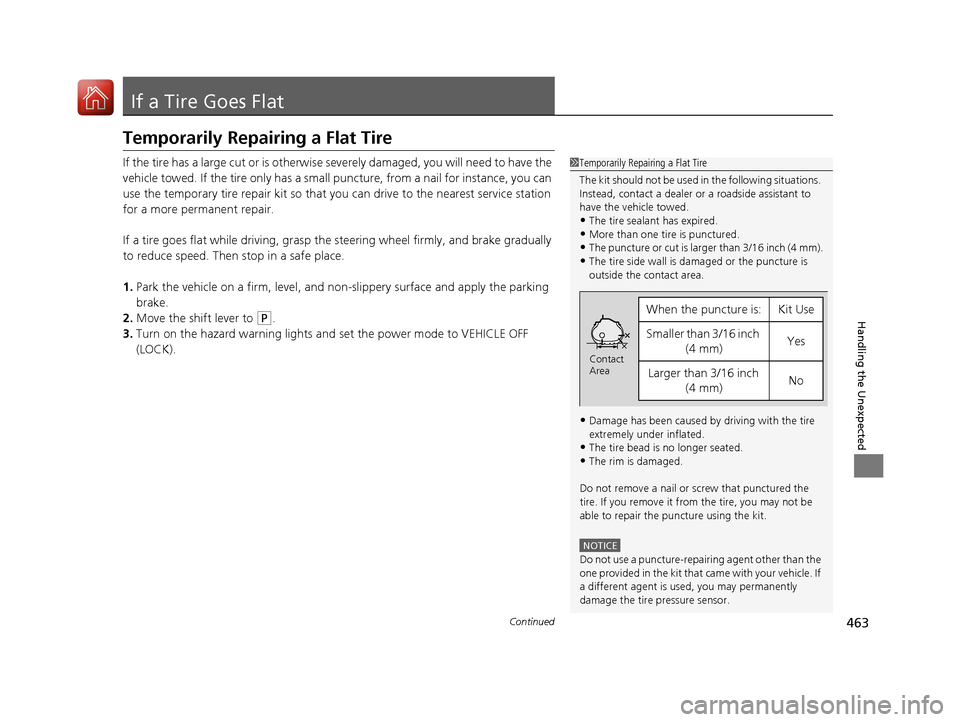
•More than one tire is punctured.•The puncture or cut is larger than 3/16 inch (4 mm).
•The tire side wall is da maged or the puncture is
outside the contact area.
•Damage has been caused by driving with the tire
extremely under inflated.
•The tire bead is no longer seated.
•The rim is damaged.
Do not remove a nail or screw that punctured the
tire. If you remove it from the tire, you may not be
able to repair the puncture using the kit.
NOTICE
Do not use a puncture-repairing agent other than the
one provided in the kit that came with your vehicle. If
a different agent is used, you may permanently
damage the tire pressure sensor.
When the puncture is:Kit Use
Smaller than 3/16 inch (4 mm)Yes
Larger than 3/16 inch (4 mm)No
Contact
Area
17 ACURA ILX-31TX66400.book 463 ページ 2016年3月15日 火曜日 午後5時0分
Page 476 of 521
475
uuIf a Tire Goes Flat uChanging a Flat Tire
Continued
Handling the Unexpected
Changing a Flat Tire
If a tire goes flat while driving, grasp the steering wheel firmly, and brake gradually
to reduce speed. Then, stop in a safe plac e. Replace the flat tire with a compact
spare tire. Go to a dealer as soon as possib le to have the full size tire repaired or
replaced.
1. Park the vehicle on firm, level, and non- slippery surface and apply the parking
brake.
2. Move the shift lever in
(P.
3. Turn on the hazard warning lights an d set the power mode to VEHICLE OFF
(LOCK).
Vehicles with optional spare tire
1 Changing a Flat Tire
Periodically check the tire pressure of the compact
spare. It should be set to the specified pressure.
Specified Pressure: 60 psi (420 kPa, 4.2 kgf/cm
2)
When driving with the compact spare tire, keep the
vehicle speed under 50 mph (80 km/h). Replace with
a full size tire as soon as possible.
The compact spare tire and wheel in your vehicle are
specifically for this model. Do not use them with
another vehicle. Do not us e another type of compact
spare tire or wheel with your vehicle.
Do not mount tire chains on a compact spare tire.
If a chain-mounted front tire goes flat, remove one of
the full-size rear tires and replace it with the compact
spare tire. Remove the flat front tire and replace it
with the full size tire that was removed from the rear.
Mount the tire chains on the front tire.
Do not use a puncture-repairi ng agent on a flat tire,
as it can damage the tire pressure sensor.
17 ACURA ILX-31TX66400.book 475 ページ 2016年3月15日 火曜日 午後5時0分
Page 494 of 521
493
uuIndicator, Comin g On/BlinkinguIf the Brake System Indicator (Red) Comes On
Handling the Unexpected
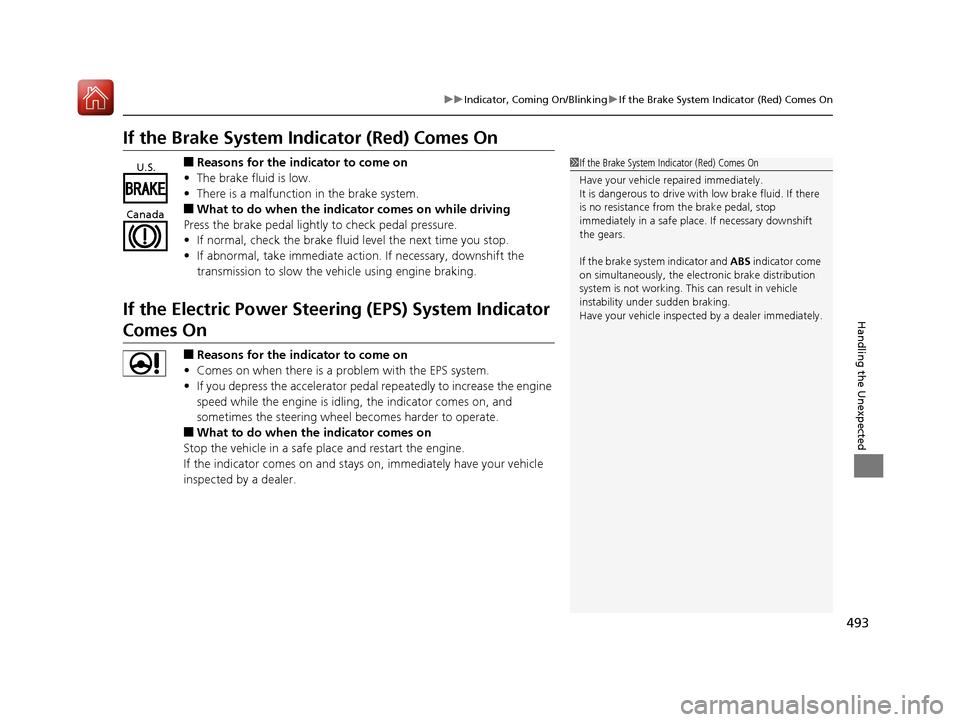
If the Brake System Indicator (Red) Comes On
■Reasons for the indicator to come on
• The brake fluid is low.
• There is a malfunction in the brake system.
■What to do when the indica tor comes on while driving
Press the brake pedal lightly to check pedal pressure.
• If normal, check the brake fluid level the next time you stop.
• If abnormal, take immediate acti on. If necessary, downshift the
transmission to slow the vehicle using engine braking.
If the Electric Power Steeri ng (EPS) System Indicator
Comes On
■Reasons for the indicator to come on
• Comes on when there is a problem with the EPS system.
• If you depress the accelerator pedal repeatedly to increase the engine
speed while the engine is idling, the indicator comes on, and
sometimes the steering wheel becomes harder to operate.
■What to do when th e indicator comes on
Stop the vehicle in a safe place and restart the engine.
If the indicator comes on and stays on, immediately have your vehicle
inspected by a dealer.
1 If the Brake System Indicator (Red) Comes On
Have your vehicle re paired immediately.
It is dangerous to drive with low brake fluid. If there
is no resistance from the brake pedal, stop
immediately in a safe plac e. If necessary downshift
the gears.
If the brake system indicator and ABS indicator come
on simultaneously, the elec tronic brake distribution
system is not working. Th is can result in vehicle
instability under sudden braking.
Have your vehicle inspecte d by a dealer immediately.U.S.
Canada
17 ACURA ILX-31TX66400.book 493 ページ 2016年3月15日 火曜日 午後5時0分