fuel Acura ILX 2017 User Guide
[x] Cancel search | Manufacturer: ACURA, Model Year: 2017, Model line: ILX, Model: Acura ILX 2017Pages: 521, PDF Size: 29.65 MB
Page 92 of 521
91
uuGauges and Multi-Information Display uMulti-Information Display
Continued
Instrument Panel
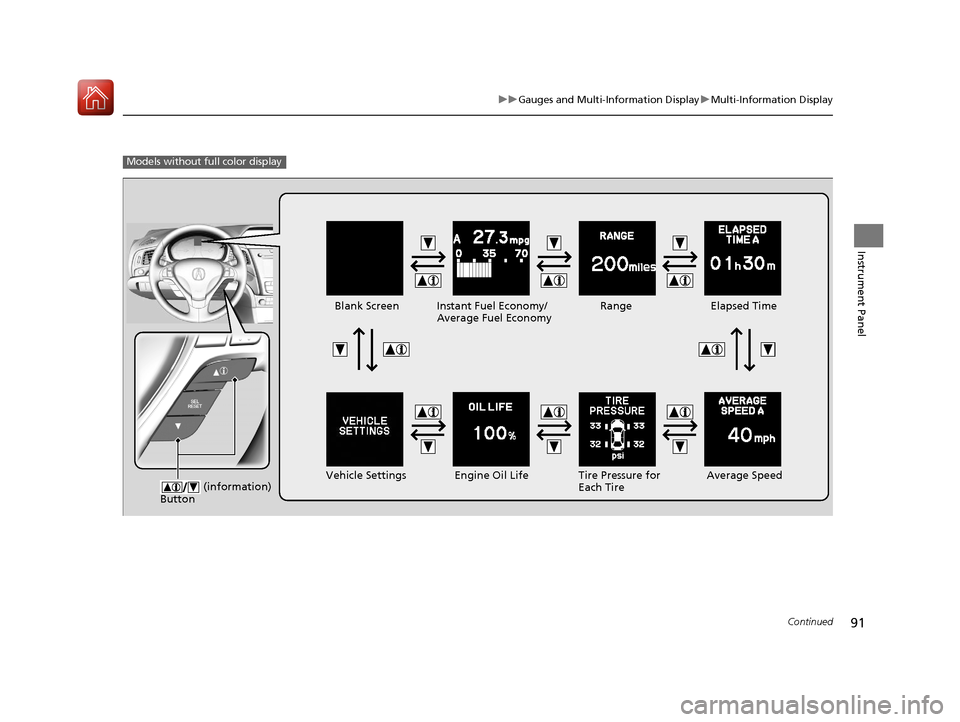
Models without fu ll color display
Engine Oil Life
Vehicle Settings Elapsed Time
Blank Screen
Average Speed
Range
Instant Fuel Economy/
Average Fuel Economy
Tire Pressure for
Each Tire
(information)
Button
17 ACURA ILX-31TX66400.book 91 ページ 2016年3月15日 火曜日 午後5時0分
Page 95 of 521
uuGauges and Multi-Information Display uMulti-Information Display
94
Instrument Panel
Shows the total number of miles or kilome ters that your vehicle has accumulated.
Shows the total number of miles or kilomete rs driven since the last reset. Meters A
and B can be used to measure two separate trips.
■Resetting a trip meter
To reset a trip meter, display it, then press and hold the SEL/RESET button. The trip
meter is reset to 0.0.
Shows the outside temperature in Fahr enheit (U.S.) or Celsius (Canada).
■Adjusting the outside temperature display
Adjust the temperature reading up to ± 5°F (U.S.) or ± 3°C (Canada) if the
temperature reading seems incorrect.
Shows the estimated average fuel econom y of each trip meter in mpg (U.S.) or
l/100 km (Canada). The display is updated at set intervals. When a trip meter is reset,
the average fuel economy is also reset.
■Odometer
■Trip Meter
■Outside Temperature
■Average Fuel Economy
1 Trip Meter
Switch between trip meter A and trip meter B by
pressing the SEL/RESET button.
1Outside Temperature
The temperature sensor is in the front bumper.
Road heat and exhaust fr om another vehicle can
affect the temperature reading when your vehicle
speed is less than 19 mph (30 km/h).
It may take several minutes for the display to be
updated after the temperature reading has stabilized.
Use the multi-information display’s customized
features to correct the temperature.
2 Customized Features P. 97, 245
1Average Fuel Economy
You can change when to reset the average fuel
economy.
2 Customized Features P. 97, 245
17 ACURA ILX-31TX66400.book 94 ページ 2016年3月15日 火曜日 午後5時0分
Page 96 of 521
Continued95
uuGauges and Multi-Information Display uMulti-Information Display
Instrument Panel
Shows the instant fuel economy as a bar gr aph in mpg (U.S.) or l/100 km (Canada).
Shows the estimated distance you can travel on the remaining power and fuel. This
distance is estimated from the fuel economy of your previous trips.
Shows the time elapsed since the Trip A or Trip B was reset.
Shows the average speed in mph (U.S.) or km /h (Canada) since the Trip A or Trip B
was reset.
Shows you turn-by-turn driv ing directions to your destination linked with the
navigation system.
2 Refer to the Navigation System Manual
■Instant Fuel Economy
■Range
■Elapsed Time
■Average Speed
■Turn-by-Turn Directions*
1Elapsed Time
You can change when to reset the elapsed time.
2 Customized Features P. 97, 245
1Average Speed
You can change when to reset the average speed.
2 Customized Features P. 97, 245
1Turn-by-Turn Directions*
The multi-information disp lay shows a compass when
the route guidance is not used.
You can select whether the turn-by-turn display
comes on or not during the route guidance. 2 Customized Features P. 97, 245
* Not available on all models
17 ACURA ILX-31TX66400.book 95 ページ 2016年3月15日 火曜日 午後5時0分
Page 102 of 521
101
uuGauges and Multi-Information Display uMulti-Information Display
Continued
Instrument Panel
*1:Default SettingSetup Group Customizable Features
Description Selectable Settings
Meter Setup Language Selection
Changes the displayed language. English
*1/
Français /
Español
Adjust Outside Temp.
Display Adjusts the temperature r
eading by a few degrees. -5°F ~
±0°F
*1 ~ +5°F
(U.S.)
-3°C ~ ±0°C
*1 ~ +3°C
(Canada)
“Trip A” Reset Timing Changes the setting of how to reset trip meter A,
average fuel economy A, av
erage speed A, and elapsed
time A. When Refueled
/IGN Off /
Manually Reset
*1
“Trip B” Reset Timing Changes the setting of ho
w to reset trip meter B,
average fuel economy B, av erage speed B, and elapsed
time B. When Refueled
/IGN Off /
Manually Reset*1
Turn by Turn Display*Selects whether the turn-b y-turn display comes on
during the route guidance. On*1/
Off
* Not available on all models
17 ACURA ILX-31TX66400.book 101 ページ 2016年3月15日 火曜日 午後5時0分
Page 106 of 521
105
uuGauges and Multi-Information Display uMulti-Information Display
Continued
Instrument Panel
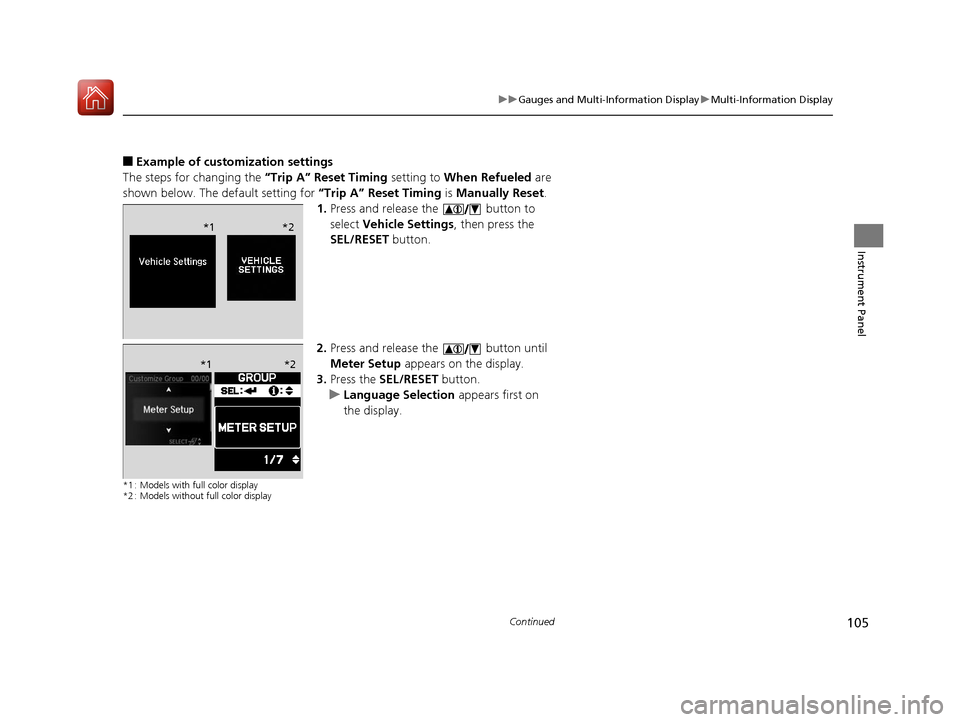
■Example of customization settings
The steps for changing the “Trip A” Reset Timing setting to When Refueled are
shown below. The default setting for “Trip A” Reset Timing is Manually Reset.
1. Press and release the button to
select Vehicle Settings , then press the
SEL/RESET button.
2. Press and release the button until
Meter Setup appears on the display.
3. Press the SEL/RESET button.
u Language Selection appears first on
the display.
*1 : Models with full color display
*2 : Models without full color display
*1 *2
*1 *2
17 ACURA ILX-31TX66400.book 105 ページ 2016年3月15日 火曜日 午後5時0分
Page 107 of 521
106
uuGauges and Multi-Information Display uMulti-Information Display
Instrument Panel
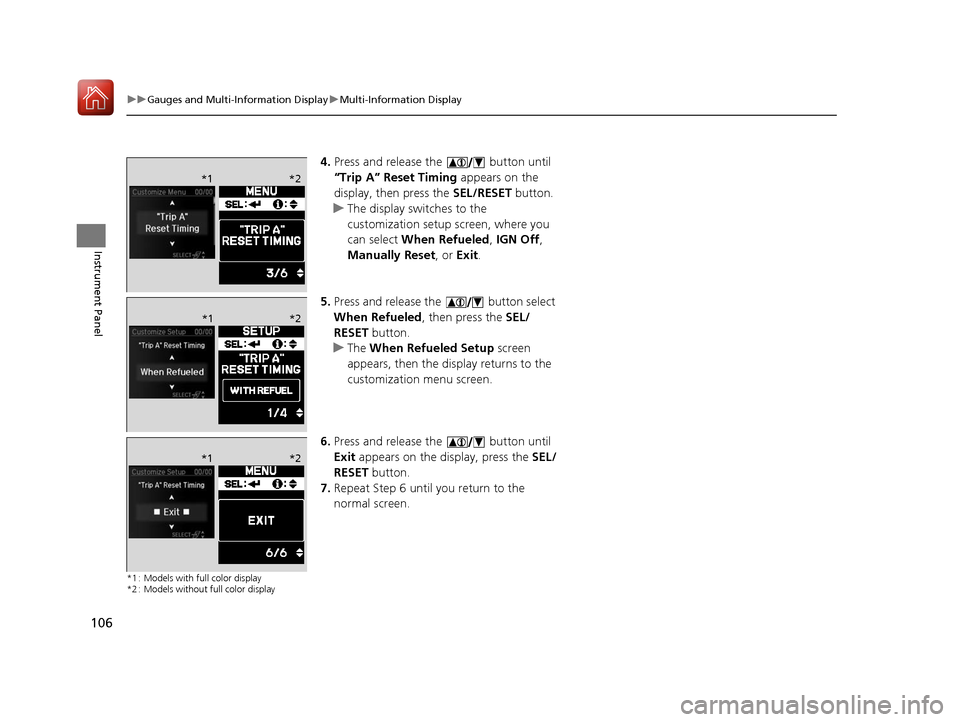
4. Press and release the button until
“Trip A” Reset Timing appears on the
display, then press the SEL/RESET button.
u The display switches to the
customization setup screen, where you
can select When Refueled , IGN Off,
Manually Reset , or Exit .
5. Press and release the button select
When Refueled , then press the SEL/
RESET button.
u The When Refueled Setup screen
appears, then the di splay returns to the
customization menu screen.
6. Press and release the button until
Exit appears on the display, press the SEL/
RESET button.
7. Repeat Step 6 until you return to the
normal screen.
*1 : Models with full color display
*2 : Models without full color display
*1 *2
*1*2
*1 *2
17 ACURA ILX-31TX66400.book 106 ページ 2016年3月15日 火曜日 午後5時0分
Page 202 of 521
201
uuAudio System Basic Operation uAudio/Information Screen
Continued
Features
■Phone
Shows the HFL information.
2 Bluetooth ® HandsFreeLink® P. 269
■Info
Shows the Trip Computer or Clock/Wallpaper and other information. Rotate
to select an item, then press .
■Trip computer (Current Drive)
Shows the range and instant and average fu el economy of the current trip, as well
as the average fuel economy from your last trip.
■Trip computer (History of Trip A)
Shows the range, average fuel economy and distances traveled for the current trip,
as well as the average fuel economy and distances traveled during the last three
driving cycles.
Each time you reset the trip meter A, th e information on the display updates. The
history of the previous three driving cycles is kept.
■Deleting the history manually
1. Move on the History of Trip A screen to select Delete History , then press .
2. A confirmation message appears on the screen. Rotate to select Yes, then
press .
■Clock/Wallpaper
Shows a clock screen or an image you import.
■App
Connects with your smartphone to start the navigation app.
2 Smartphone Navi Apps P. 233
17 ACURA ILX-31TX66400.book 201 ページ 2016年3月15日 火曜日 午後5時0分
Page 256 of 521
255
uuCustomized Features*u
Continued
Features
*1:Default SettingSetup
Group Customizable Features Description Selectable Settings
Vehicle
Settings Meter
SetupLanguage Selection
Changes the displayed language on the multi-
information display. English
*1/
Français /
Español
Adjust Outside Temp.
Display Adjusts the temperature reading by a few
degrees. -5°F ~ ±0°F
*1
~ +5°F
(U.S.)
-3°C ~ ±0°C
*1 ~ +3°C
(Canada)
“Trip A” Reset Timing Changes the setting of how to reset trip meter A,
average fuel economy A, average speed A, and
elapsed time A. When Refueled
/IGN
Off /Manually
Reset
*1
“Trip B” Reset Timing Changes the setting of how to reset trip meter B,
average fuel economy B, average speed B, and
elapsed time B. When Refueled
/IGN
Off /Manually
Reset*1
Turn by Turn Display*Selects whether the turn-by-turn display comes
on during the route guidance. On*1/
Off
Driving
Position
Setup Memory Position Link
Turns the driving position memory system on and
off. On
*1/
Off
* Not available on all models
17 ACURA ILX-31TX66400.book 255 ページ 2016年3月15日 火曜日 午後5時0分
Page 332 of 521
331
Driving
This chapter discusses driving, refueling, and information on items such as accessories.
Before Driving................................... 332
Maximum Load Limit........................ 335
Towing a Trailer ................................ 337
When Driving Starting the Engine .......................... 338
Dual Clutch Transmission ................. 344
Shifting ............................................ 345
Cruise Control
*................................ 349
Front Sensor Camera*...................... 352
Adaptive Cruise Control (ACC)*....... 354
Road Departure Mi tigation (RDM)
System*...................................... 368
Lane Keeping Assist System (LKAS)*.... 373
Vehicle Stability Assist (VSA®), aka Electronic
Stability Control (ESC), System ...............381
Blind Spot Information (BSI) System*... 383
Tire Pressure Monitoring System (TPMS) ... 385
Tire Pressure Monitoring System (TPMS) - Required Federal Explanation ......... 387
Braking Brake System ................................... 389
Anti-lock Brake System (ABS) ........... 391
Collision Mitigati on Braking System
TM
(CMBSTM)*..................................... 393 Parking Your Vehicle
When Stopped ................................ 402
Cross Traffic Monitor
*..................... 403
Multi-View Rear Camera .................. 406
Refueling Fuel Information .............................. 407
How to Refuel ................................. 408
Fuel Economy and CO
2 Emissions .... 409
Improving Fuel Economy and Reducing CO
2 Emissions ................................ 409
* Not available on all models
17 ACURA ILX-31TX66400.book 331 ページ 2016年3月15日 火曜日 午後5時0分
Page 339 of 521
338
Driving
When Driving
Starting the Engine
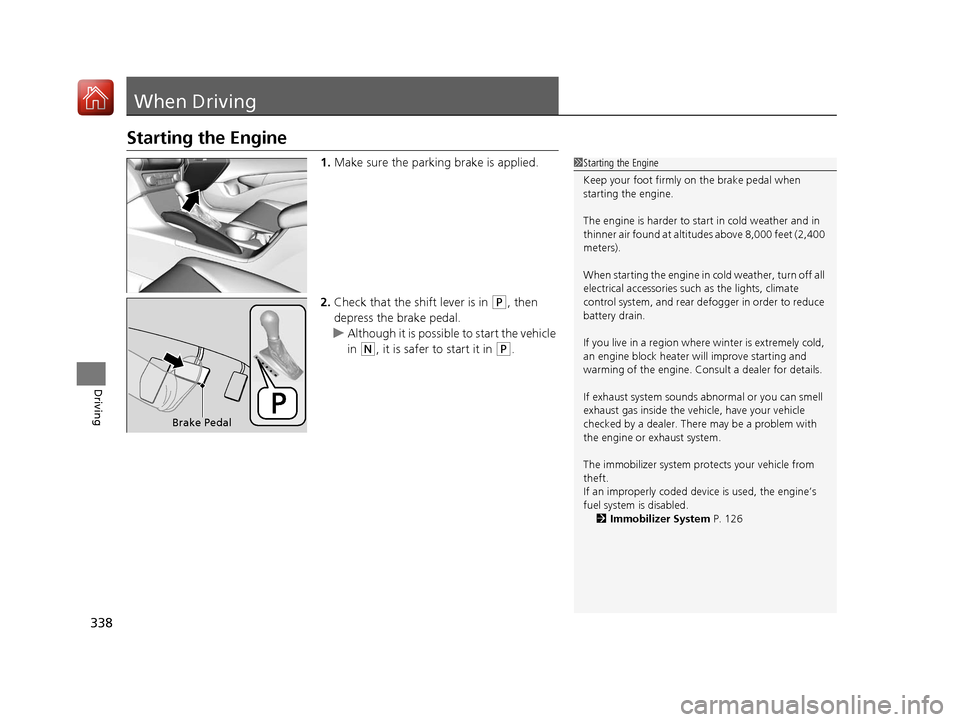
1.Make sure the parking brake is applied.
2. Check that the shift lever is in
(P, then
depress the brake pedal.
u Although it is possibl e to start the vehicle
in
(N, it is safer to start it in (P.
1 Starting the Engine
Keep your foot firmly on the brake pedal when
starting the engine.
The engine is harder to st art in cold weather and in
thinner air found at altitudes above 8,000 feet (2,400
meters).
When starting the engine in cold weather, turn off all
electrical accessories such as the lights, climate
control system, and rear de fogger in order to reduce
battery drain.
If you live in a region where winter is extremely cold,
an engine block heater will improve starting and
warming of the engine. Cons ult a dealer for details.
If exhaust system sounds abnormal or you can smell
exhaust gas inside the vehi cle, have your vehicle
checked by a dealer. There may be a problem with
the engine or exhaust system.
The immobilizer system pr otects your vehicle from
theft.
If an improperly c oded device is used, the engine’s
fuel system is disabled.
2 Immobilizer System P. 126
Brake Pedal
17 ACURA ILX-31TX66400.book 338 ページ 2016年3月15日 火曜日 午後5時0分