ACC Acura ILX 2017 Workshop Manual
[x] Cancel search | Manufacturer: ACURA, Model Year: 2017, Model line: ILX, Model: Acura ILX 2017Pages: 521, PDF Size: 29.65 MB
Page 155 of 521
154
uuAdjusting the Seats uRear Seat
Controls
Rear Seat
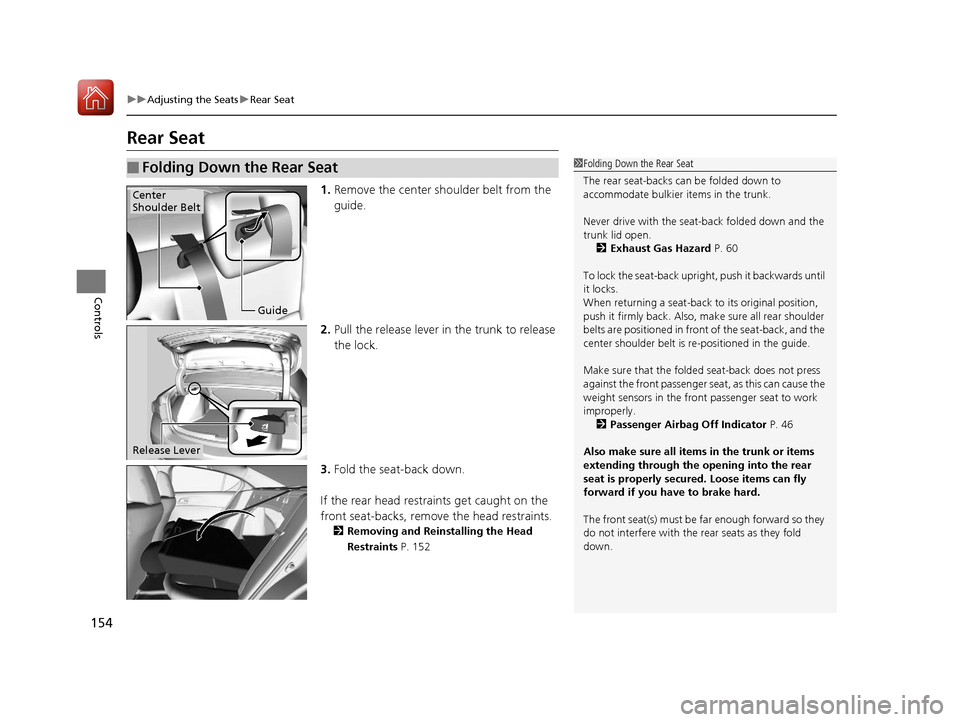
1. Remove the center shoulder belt from the
guide.
2. Pull the release lever in the trunk to release
the lock.
3. Fold the seat-back down.
If the rear head restraints get caught on the
front seat-backs, remove the head restraints.
2 Removing and Reinstalling the Head
Restraints P. 152
■Folding Down the Rear Seat1Folding Down the Rear Seat
The rear seat-backs can be folded down to
accommodate bulkier items in the trunk.
Never drive with the seat-back folded down and the
trunk lid open. 2 Exhaust Gas Hazard P. 60
To lock the seat-back upri ght, push it backwards until
it locks.
When returning a seat-back to its original position,
push it firmly back. Also, m ake sure all rear shoulder
belts are positioned in front of the seat-back, and the
center shoulder belt is re -positioned in the guide.
Make sure that the folded seat-back does not press
against the front passenger seat, as this can cause the
weight sensors in the front passenger seat to work
improperly.
2 Passenger Airbag Off Indicator P. 46
Also make sure all items in the trunk or items
extending through the opening into the rear
seat is properly secured. Loose items can fly
forward if you have to brake hard.
The front seat(s) must be far enough forward so they
do not interfere with the rear seats as they fold
down.
Guide
Center
Shoulder Belt
Release Lever
17 ACURA ILX-31TX66400.book 154 ページ 2016年3月15日 火曜日 午後5時0分
Page 160 of 521
Continued159
uuInterior Lights/Interior Convenience Items uInterior Convenience Items
Controls
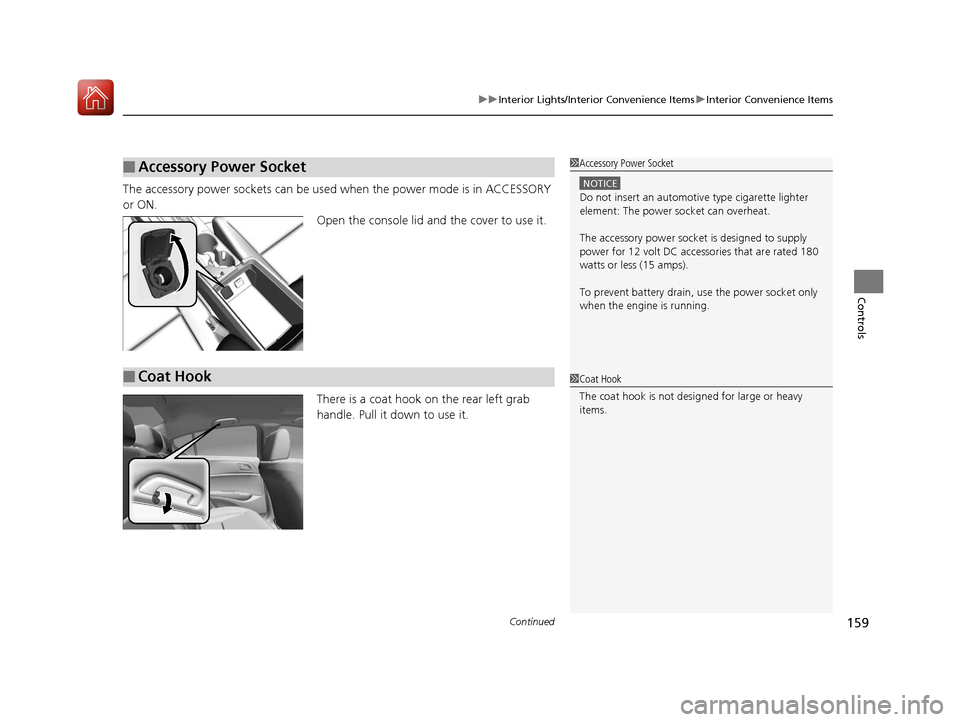
The accessory power sockets can be used when the power mode is in ACCESSORY
or ON. Open the console lid and the cover to use it.
There is a coat hook on the rear left grab
handle. Pull it down to use it.
■Accessory Power Socket1Accessory Power Socket
NOTICE
Do not insert an automotive type cigarette lighter
element: The power socket can overheat.
The accessory power socket is designed to supply
power for 12 volt DC access ories that are rated 180
watts or less (15 amps).
To prevent battery drain, use the power socket only
when the engine is running.
■Coat Hook1 Coat Hook
The coat hook is not desi gned for large or heavy
items.
17 ACURA ILX-31TX66400.book 159 ページ 2016年3月15日 火曜日 午後5時0分
Page 172 of 521
171
Features
Audio System Basic Operation
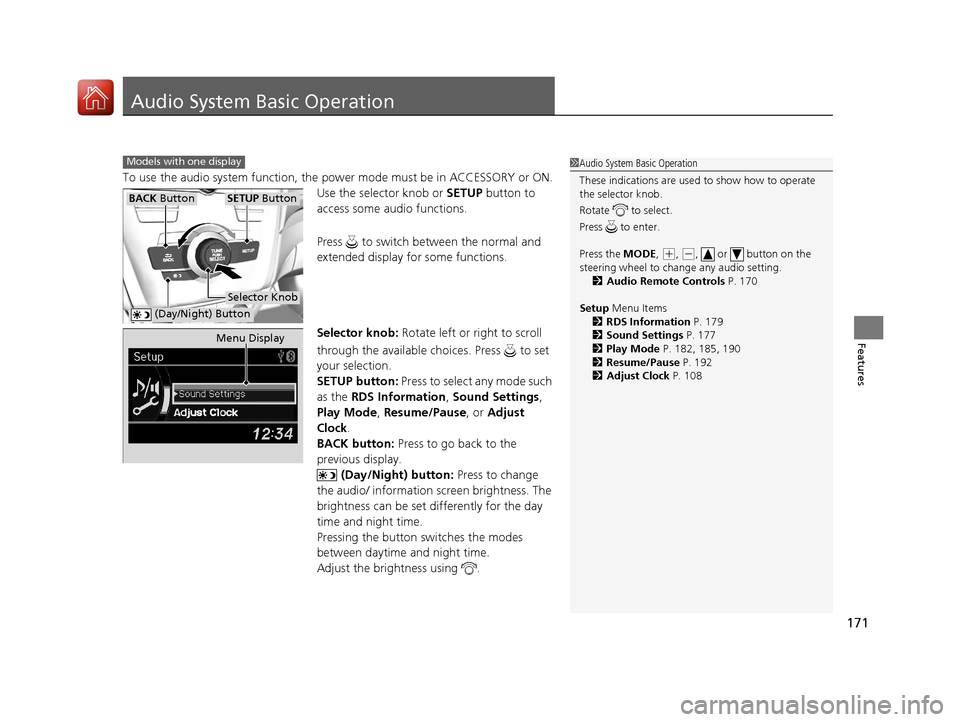
To use the audio system function, the power mode must be in ACCESSORY or ON.
Use the selector knob or SETUP button to
access some audio functions.
Press to switch between the normal and
extended display fo r some functions.
Selector knob: Rotate left or right to scroll
through the available ch oices. Press to set
your selection.
SETUP button: Press to select any mode such
as the RDS Information , Sound Settings,
Play Mode , Resume/Pause , or Adjust
Clock .
BACK button: Press to go back to the
previous display.
(Day/Night) button: Press to change
the audio/ information screen brightness. The
brightness can be set differently for the day
time and night time.
Pressing the button switches the modes
between daytime and night time.
Adjust the brightness using .
Models with one display1 Audio System Basic Operation
These indications are used to show how to operate
the selector knob.
Rotate to select.
Press to enter.
Press the MODE,
( +, (-, or button on the
steering wheel to cha nge any audio setting.
2 Audio Remote Controls P. 170
Setup Menu Items
2 RDS Information P. 179
2 Sound Settings P. 177
2 Play Mode P. 182, 185, 190
2 Resume/Pause P. 192
2 Adjust Clock P. 108
BACK ButtonSETUP Button
Selector Knob
(Day/Night) Button
Menu Display
17 ACURA ILX-31TX66400.book 171 ページ 2016年3月15日 火曜日 午後5時0分
Page 194 of 521
193
Features
Audio System Basic Operation
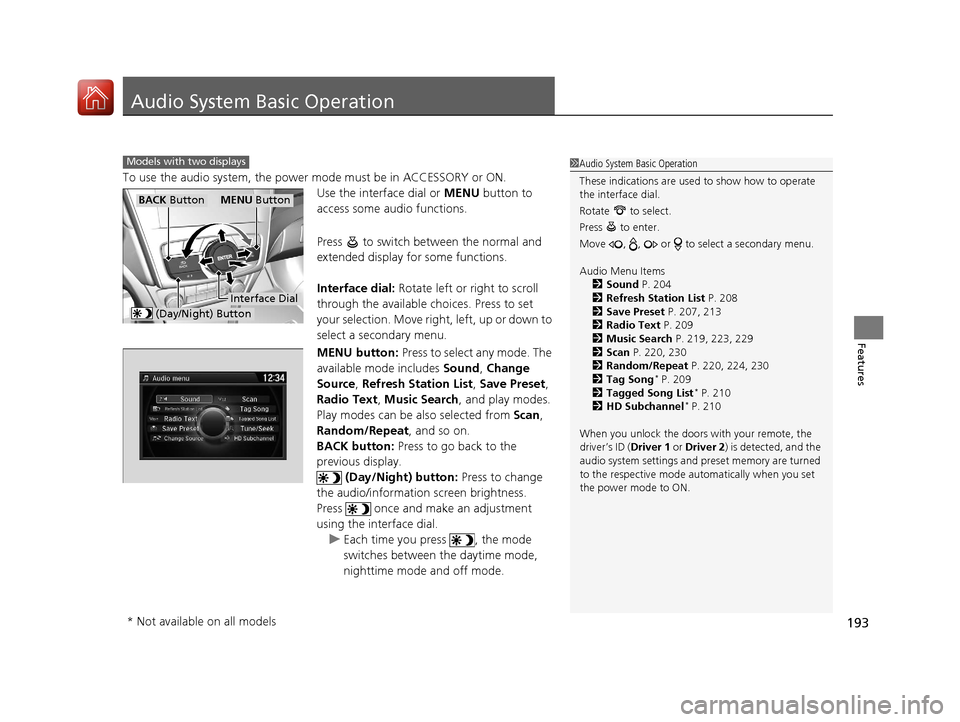
To use the audio system, the power mode must be in ACCESSORY or ON.Use the interface dial or MENU button to
access some audio functions.
Press to switch between the normal and
extended display fo r some functions.
Interface dial: Rotate left or right to scroll
through the available ch oices. Press to set
your selection. Move right, left, up or down to
select a secondary menu.
MENU button: Press to select any mode. The
available mode includes Sound, Change
Source, Refresh Station List , Save Preset,
Radio Text , Music Search , and play modes.
Play modes can be also selected from Scan,
Random/Repeat , and so on.
BACK button: Press to go back to the
previous display.
(Day/Night) button: Press to change
the audio/information screen brightness.
Press once and make an adjustment
using the interface dial. u Each time you press , the mode
switches between the daytime mode,
nighttime mode and off mode.
Models with two displays1Audio System Basic Operation
These indications are used to show how to operate
the interface dial.
Rotate to select.
Press to enter.
Move , , or to se lect a secondary menu.
Audio Menu Items 2 Sound P. 204
2 Refresh Station List P. 208
2 Save Preset P. 207, 213
2 Radio Text P. 209
2 Music Search P. 219, 223, 229
2 Scan P. 220, 230
2 Random/Repeat P. 220, 224, 230
2 Tag Song
* P. 209
2 Tagged Song List* P. 210
2 HD Subchannel* P. 210
When you unlock the doors with your remote, the
driver’s ID ( Driver 1 or Driver 2) is detected, and the
audio system settings and pr eset memory are turned
to the respective mode automatically when you set
the power mode to ON.
MENU ButtonBACK Button
(Day/Night) Button
Interface Dial
* Not available on all models
17 ACURA ILX-31TX66400.book 193 ページ 2016年3月15日 火曜日 午後5時0分
Page 228 of 521
227
uuAudio System Basic Operation uPlaying Internet Radio
Features
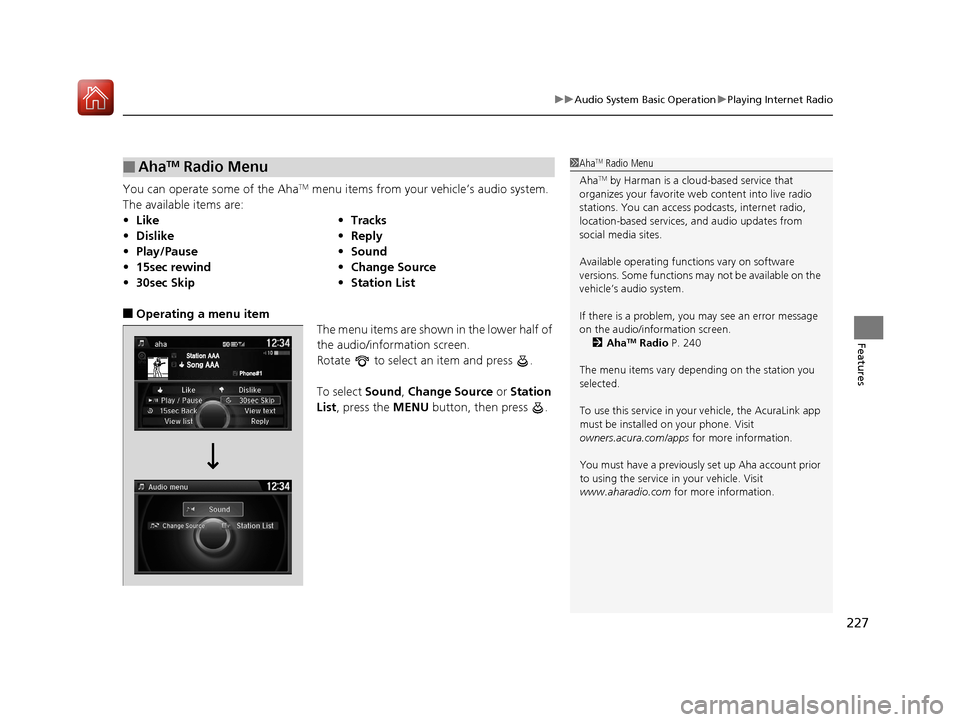
You can operate some of the AhaTM menu items from your vehicle’s audio system.
The available items are:
■Operating a menu item The menu items are shown in the lower half of
the audio/information screen.
Rotate to select an item and press .
To select Sound, Change Source or Station
List , press the MENU button, then press .
■AhaTM Radio Menu
•Like •Tracks
• Dislike •Reply
• Play/Pause •Sound
• 15sec rewind •Change Source
• 30sec Skip •Station List
1AhaTM Radio Menu
Aha
TM by Harman is a clou d-based service that
organizes your favorite we b content into live radio
stations. You can access podcasts, internet radio,
location-based services , and audio updates from
social media sites.
Available operating functi ons vary on software
versions. Some functions ma y not be available on the
vehicle’s audio system.
If there is a problem, you may see an error message
on the audio/information screen. 2 Aha
TM Radio P. 240
The menu items vary depending on the station you
selected.
To use this service in your vehicle, the AcuraLink app
must be installed on your phone. Visit
owners.acura.com/apps for more information.
You must have a previously set up Aha account prior
to using the service in your vehicle. Visit
www.aharadio.com for more information.
17 ACURA ILX-31TX66400.book 227 ページ 2016年3月15日 火曜日 午後5時0分
Page 248 of 521
247
uuCustomized Features*u
Continued
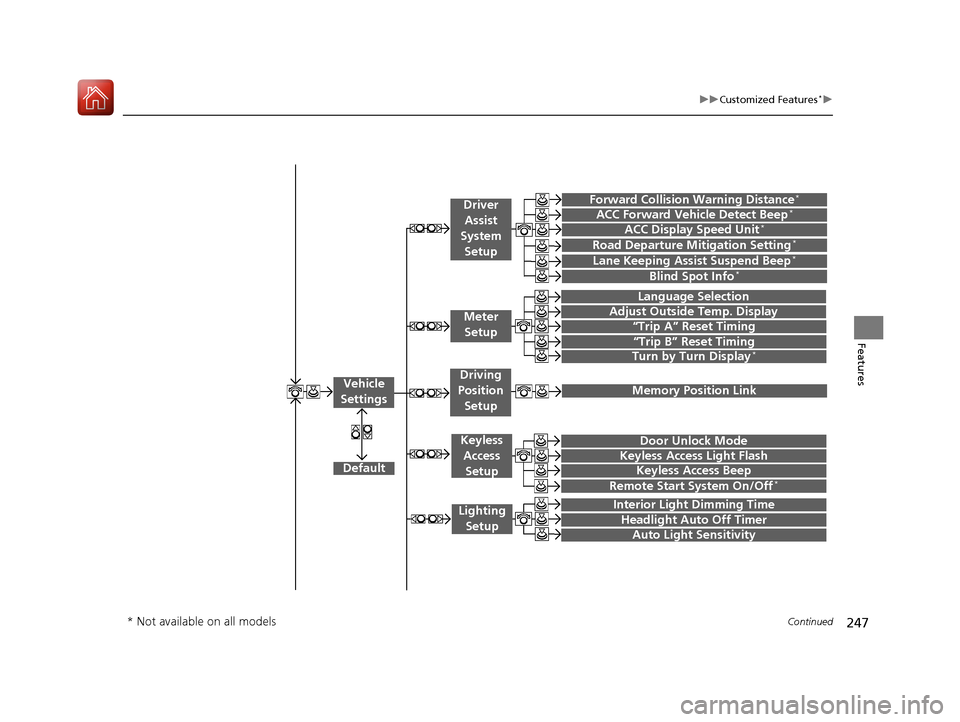
Features“Trip A” Reset Timing
“Trip B” Reset Timing
Language Selection
Adjust Outside Temp. Display
Forward Collision Warning Distance*
ACC Forward Vehicle Detect Beep*
Turn by Turn Display*
Default
Door Unlock Mode
Keyless Access Light Flash
Interior Light Dimming Time
Headlight Auto Off Timer
Auto Light Sensitivity
Vehicle
Settings
Driver Assist
System
Setup
Keyless Access
Setup
Lighting Setup
Keyless Access Beep
Lane Keeping Assist Suspend Beep*
Blind Spot Info*
Driving
Position Setup
Road Departure Mitigation Setting*ACC Display Speed Unit*
Remote Start System On/Off*
Memory Position Link
Meter Setup
* Not available on all models
17 ACURA ILX-31TX66400.book 247 ページ 2016年3月15日 火曜日 午後5時0分
Page 250 of 521
249
uuCustomized Features*u
Continued
Features
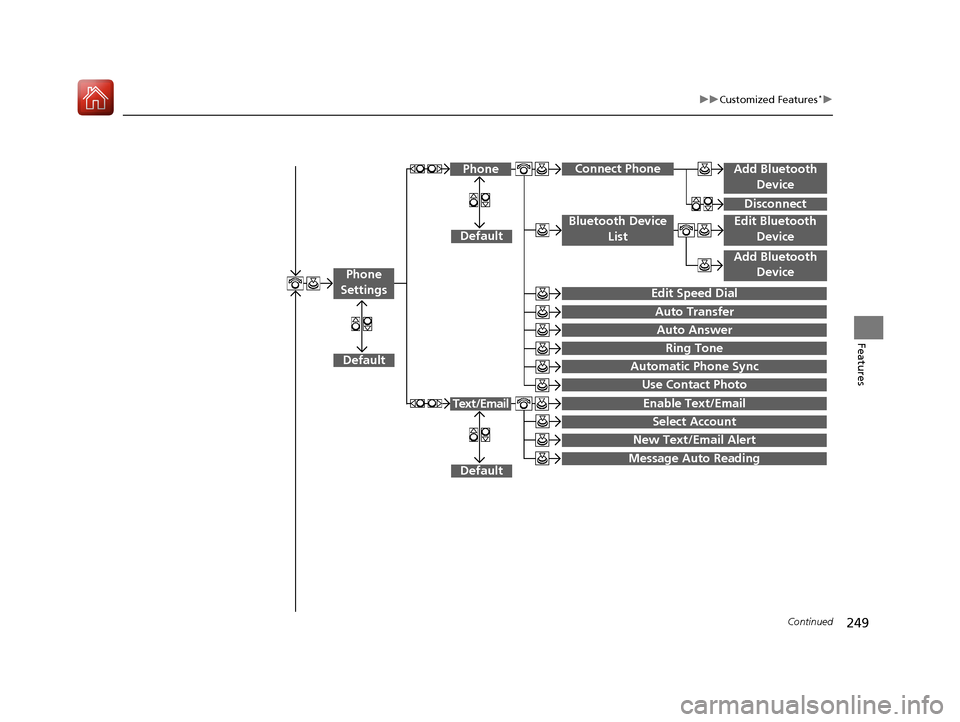
Add Bluetooth
Device
Disconnect
Default
PhoneConnect Phone
Edit Bluetooth Device
Add Bluetooth Device
Bluetooth Device
List
Edit Speed Dial
Auto Transfer
Auto Answer
Ring Tone
Automatic Phone Sync
Use Contact Photo
Default
Default
Enable Text/Email
Select Account
New Text/Email Alert
Text/Email
Phone
Settings
Message Auto Reading
17 ACURA ILX-31TX66400.book 249 ページ 2016年3月15日 火曜日 午後5時0分
Page 255 of 521
254
uuCustomized Features*u
Features
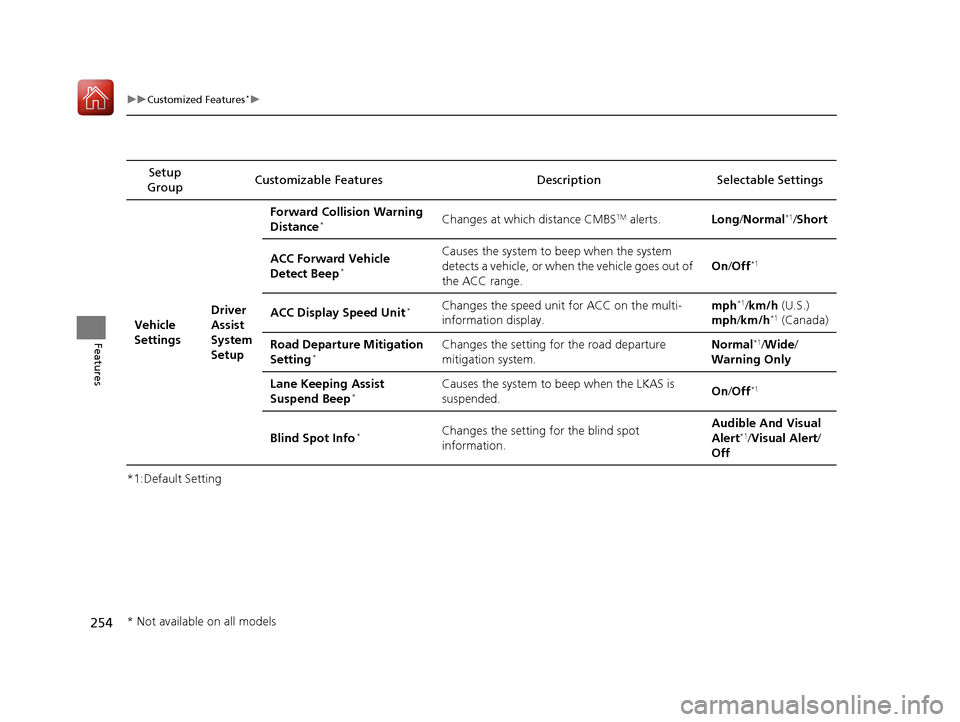
*1:Default SettingSetup
Group Customizable Features Descri
ption Selectable Settings
Vehicle
Settings Driver
Assist
System
SetupForward Collision Warning
Distance
*Changes at which distance CMBSTM alerts.
Long/Normal*1/ Short
ACC Forward Vehicle
Detect Beep
*
Causes the system to beep when the system
detects a vehicle, or when the vehicle goes out of
the ACC range. On
/Off*1
ACC Display Speed Unit*Changes the speed unit for ACC on the multi-
information display. mph*1/
km/h (U.S.)
mph /km/h*1 (Canada)
Road Departure Mitigation
Setting
*Changes the setting for the road departure
mitigation system. Normal*1/
Wide /
Warning Only
Lane Keeping Assist
Suspend Beep
*Causes the system to b eep when the LKAS is
suspended. On
/Off*1
Blind Spot Info*Changes the setting for the blind spot
information. Audible And Visual
Alert*1/
Visual Alert /
Off
* Not available on all models
17 ACURA ILX-31TX66400.book 254 ページ 2016年3月15日 火曜日 午後5時0分
Page 257 of 521
256
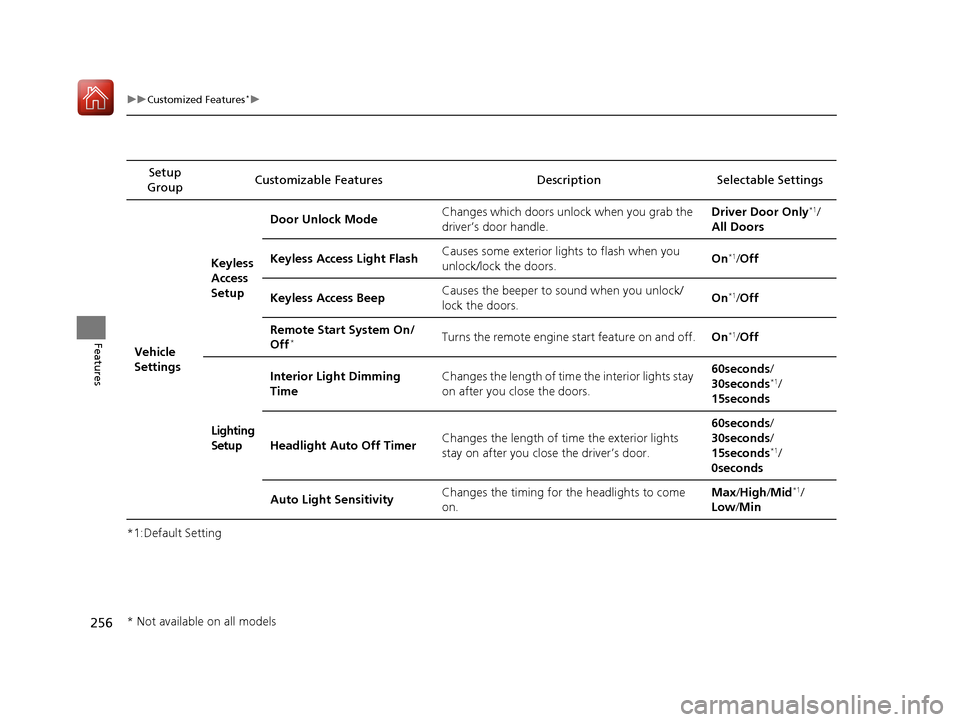
uuCustomized Features*u
Features
*1:Default SettingSetup
Group Customizable Features Descri
ption Selectable Settings
Vehicle
SettingsKeyless
Access
Setup
Door Unlock Mode
Changes which doors unlock when you grab the
driver’s door handle. Driver Door Only
*1/
All Doors
Keyless Access Light Flash Causes some exterior lig
hts to flash when you
unlock/lock the doors. On
*1/
Off
Keyless Access Beep Causes the beeper to sound when you unlock/
lock the doors. On
*1/
Off
Remote Start System On/
Off
*Turns the remote engine start feature on and off. On*1/Off
Lighting
Setup Interior Light Dimming
Time
Changes the length of time the interior lights stay
on after you close the doors. 60seconds/
30seconds
*1/
15seconds
Headlight Auto Off Timer Changes the length of time the exterior lights
stay on after you close the driver’s door. 60seconds/
30seconds/
15seconds
*1/
0seconds
Auto Light Sensitivity Changes the timing for the headlights to come
on. Max
/High /Mid
*1/
Low /Min
* Not available on all models
17 ACURA ILX-31TX66400.book 256 ページ 2016年3月15日 火曜日 午後5時0分
Page 263 of 521
262
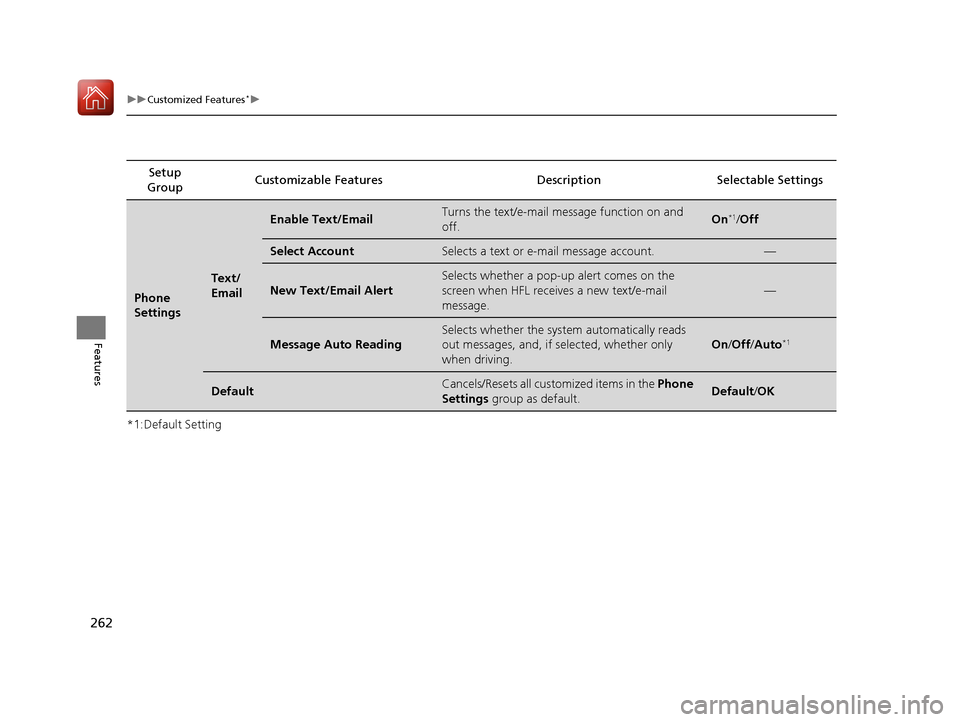
uuCustomized Features*u
Features
*1:Default SettingSetup
Group Customizable Features Descri
ption Selectable Settings
Phone
Settings
Text/
Email
Enable Text/EmailTurns the text/e-mail message function on and
off.On*1/ Off
Select AccountSelects a text or e-mail message account.—
New Text/Email Alert
Selects whether a pop-up alert comes on the
screen when HFL receiv es a new text/e-mail
message.
—
Message Auto Reading
Selects whether the system automatically reads
out messages, and, if selected, whether only
when driving.
On /Off /Auto*1
DefaultCancels/Resets all customized items in the Phone
Settings group as default.Default/OK
17 ACURA ILX-31TX66400.book 262 ページ 2016年3月15日 火曜日 午後5時0分