ACC Acura ILX 2017 Repair Manual
[x] Cancel search | Manufacturer: ACURA, Model Year: 2017, Model line: ILX, Model: Acura ILX 2017Pages: 521, PDF Size: 29.65 MB
Page 272 of 521
271
uuBluetooth ® HandsFreeLink ®u HFL Menus
Continued
Features
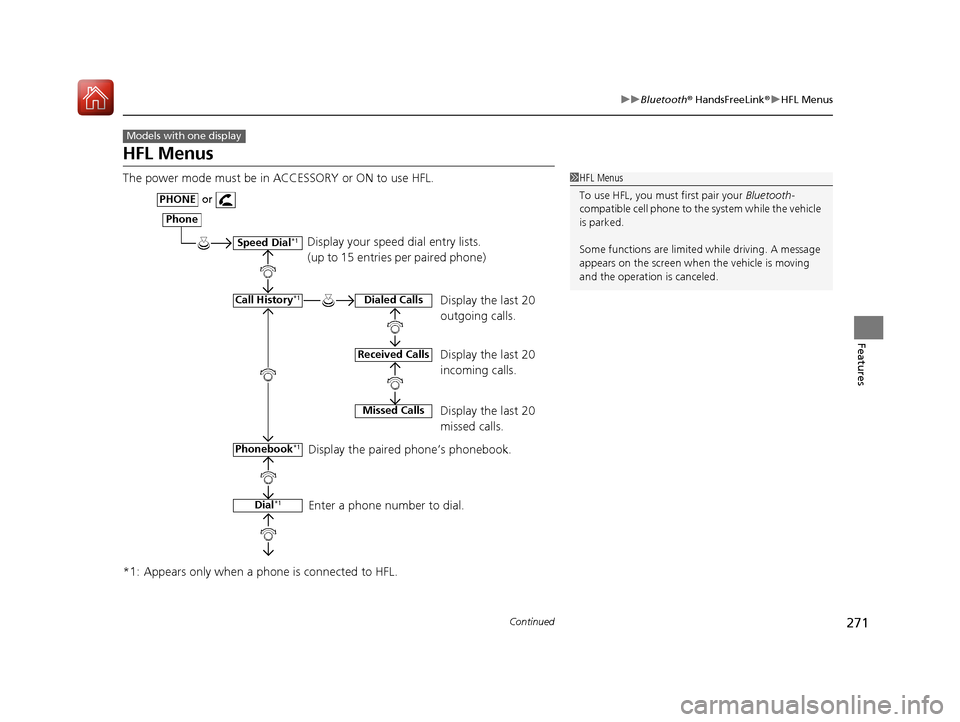
HFL Menus
The power mode must be in ACCESSORY or ON to use HFL.
*1: Appears only when a phone is connected to HFL.
Models with one display
1HFL Menus
To use HFL, you must first pair your Bluetooth-
compatible cell phone to th e system while the vehicle
is parked.
Some functions are limited while driving. A message
appears on the screen when the vehicle is moving
and the operation is canceled.
Display your speed dial entry lists.
(up to 15 entries per paired phone)
Display the last 20
outgoing calls.
Display the last 20
incoming calls.
Display the last 20
missed calls.
Display the paired phone’s phonebook.
Enter a phone number to dial.
Phone
Speed Dial*1
Call History*1
PHONEor
Phonebook
*1
Dial*1
Dialed Calls
Received Calls
Missed Calls
17 ACURA ILX-31TX66400.book 271 ページ 2016年3月15日 火曜日 午後5時0分
Page 301 of 521
300
uuBluetooth ® HandsFreeLink ®u HFL Menus
Features
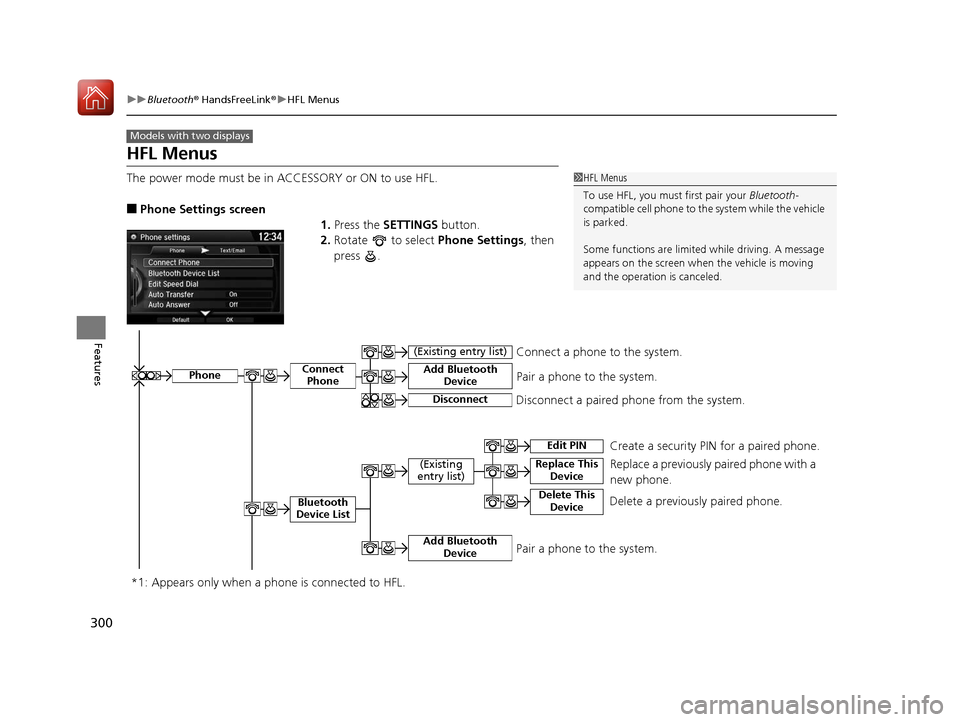
HFL Menus
The power mode must be in ACCESSORY or ON to use HFL.
■Phone Settings screen
1.Press the SETTINGS button.
2. Rotate to select Phone Settings, then
press .
Models with two displays
1 HFL Menus
To use HFL, you must first pair your Bluetooth-
compatible cell phone to th e system while the vehicle
is parked.
Some functions are limited while driving. A message
appears on the screen when the vehicle is moving
and the operation is canceled.
PhoneConnect Phone
Bluetooth
Device List
(Existing
entry list)Replace This Device
Add Bluetooth Device
Disconnect a paired phone from the system.Connect a phone to the system.
*1: Appears only when a pho ne is connected to HFL.Disconnect
(Existing entry list)
Pair a phone to the system.
Edit PIN Create a security PIN for a paired phone.
Replace a previously paired phone with a
new phone.
Delete This DeviceDelete a previously paired phone.
Add Bluetooth DevicePair a phone to the system.
17 ACURA ILX-31TX66400.book 300 ページ 2016年3月15日 火曜日 午後5時0分
Page 303 of 521
302
uuBluetooth ® HandsFreeLink ®u HFL Menus
Features
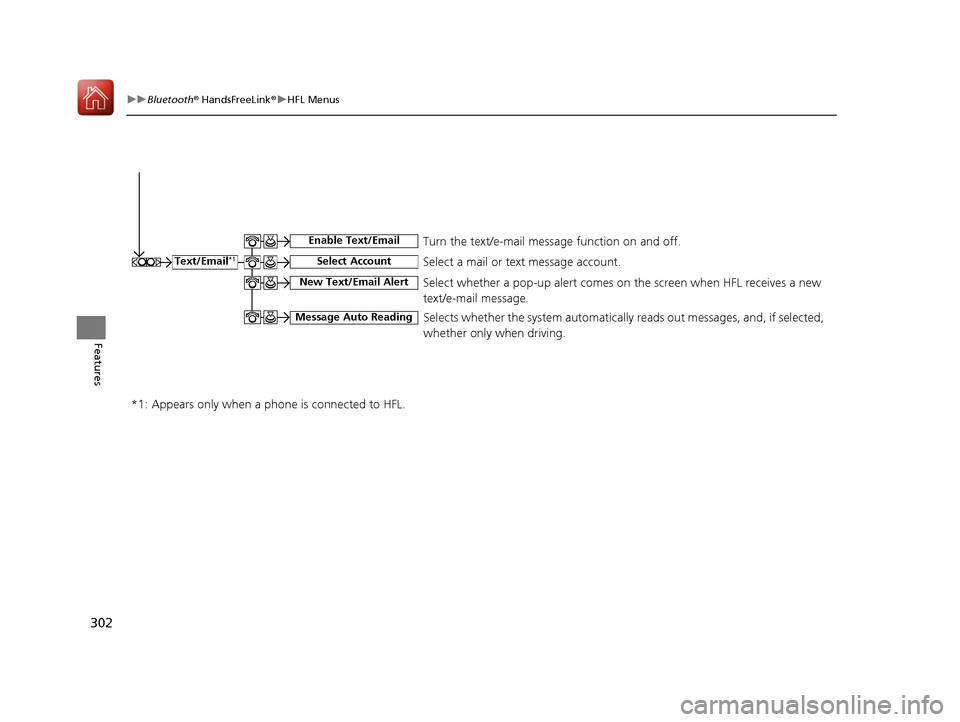
Select a mail or text message account.Text/Email*1
*1: Appears only when a pho ne is connected to HFL.
Select Account
Enable Text/EmailTurn the text/e-mail message function on and off.
New Text/Email AlertSelect whether a pop-up alert comes on the screen when HFL receives a new
text/e-mail message.
Message Auto ReadingSelects whether the system automatically reads out messages, and, if selected,
whether only when driving.
17 ACURA ILX-31TX66400.book 302 ページ 2016年3月15日 火曜日 午後5時0分
Page 305 of 521
304
uuBluetooth ® HandsFreeLink ®u HFL Menus
Features
Text/Email*1
Message is
read aloud.See the previous message.
(Read/Stop)
Previous
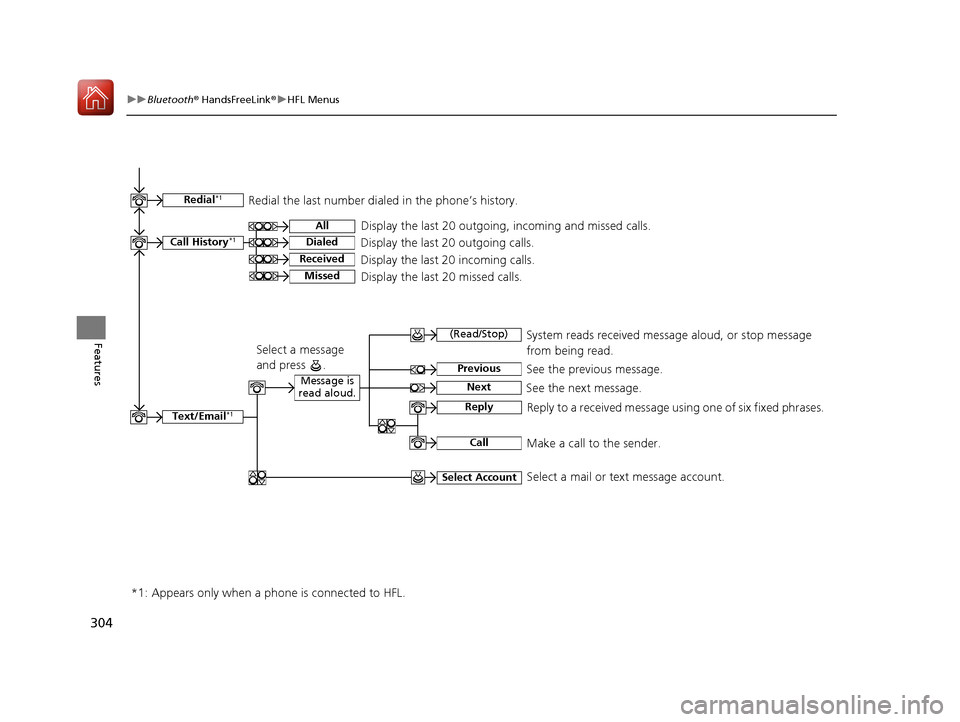
NextSee the next message. System reads received message aloud, or stop message
from being read.
Reply
Call
Reply to a received message using one of six fixed phrases.
Make a call to the sender.
Select Account
Select a message
and press .
Select a mail or text message account.
Redial*1Redial the last number dialed in the phone’s history.
Display the last 20 outgoing, incoming and missed calls.
Call History*1All
Dialed
Received
Display the last 20 outgoing calls.
Display the last 20 incoming calls.
MissedDisplay the last 20 missed calls.
*1: Appears only when a pho ne is connected to HFL.
17 ACURA ILX-31TX66400.book 304 ページ 2016年3月15日 火曜日 午後5時0分
Page 327 of 521
uuBluetooth ® HandsFreeLink ®u HFL Menus
326
Features
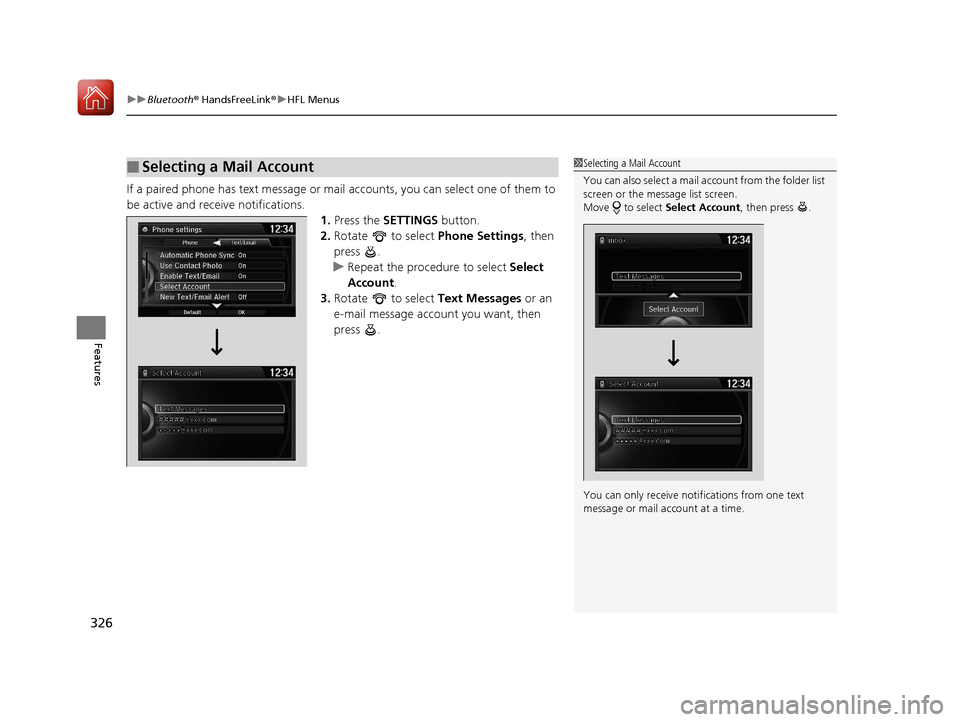
If a paired phone has text message or mail accounts, you can select one of them to
be active and receive notifications. 1.Press the SETTINGS button.
2. Rotate to select Phone Settings, then
press .
u Repeat the procedure to select Select
Account .
3. Rotate to select Text Messages or an
e-mail message account you want, then
press .
■Selecting a Mail Account1 Selecting a Mail Account
You can also select a mail account from the folder list
screen or the message list screen.
Move to select Select Account, then press .
You can only receive notif ications from one text
message or mail a ccount at a time.
17 ACURA ILX-31TX66400.book 326 ページ 2016年3月15日 火曜日 午後5時0分
Page 328 of 521
Continued327
uuBluetooth ® HandsFreeLink ®u HFL Menus
Features
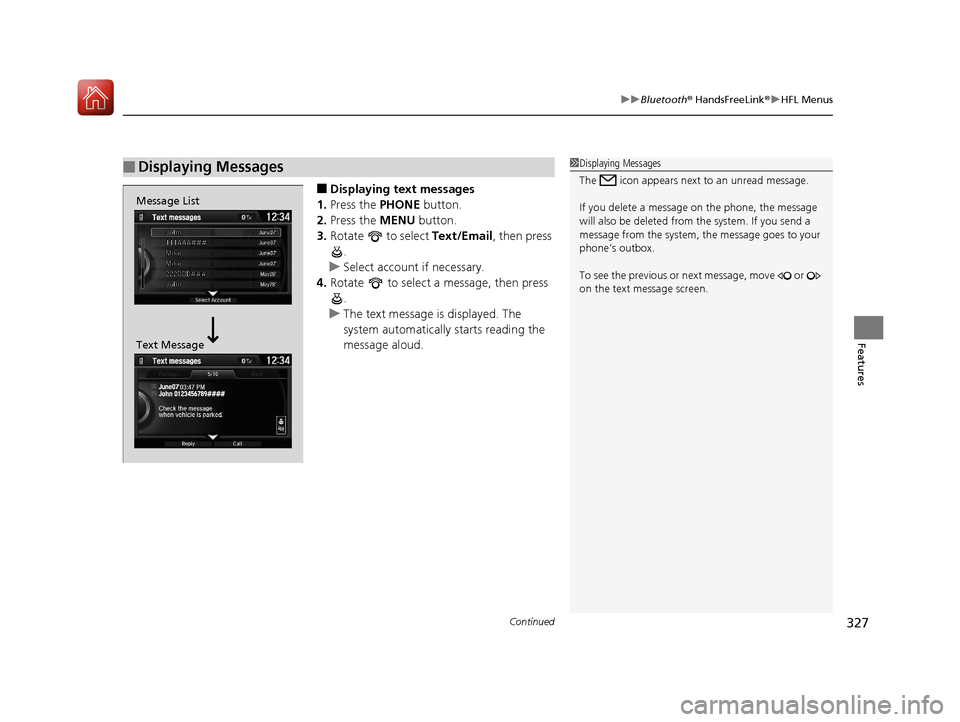
■Displaying text messages
1. Press the PHONE button.
2. Press the MENU button.
3. Rotate to select Text/Email , then press
.
u Select account if necessary.
4. Rotate to select a message, then press
.
u The text message is displayed. The
system automatically starts reading the
message aloud.
■Displaying Messages1Displaying Messages
The icon appears next to an unread message.
If you delete a message on the phone, the message
will also be dele ted from the system. If you send a
message from the system, the message goes to your
phone’s outbox.
To see the previous or ne xt message, move or
on the text message screen.
Message List
Text Message
17 ACURA ILX-31TX66400.book 327 ページ 2016年3月15日 火曜日 午後5時0分
Page 332 of 521
331
Driving
This chapter discusses driving, refueling, and information on items such as accessories.
Before Driving................................... 332
Maximum Load Limit........................ 335
Towing a Trailer ................................ 337
When Driving Starting the Engine .......................... 338
Dual Clutch Transmission ................. 344
Shifting ............................................ 345
Cruise Control
*................................ 349
Front Sensor Camera*...................... 352
Adaptive Cruise Control (ACC)*....... 354
Road Departure Mi tigation (RDM)
System*...................................... 368
Lane Keeping Assist System (LKAS)*.... 373
Vehicle Stability Assist (VSA®), aka Electronic
Stability Control (ESC), System ...............381
Blind Spot Information (BSI) System*... 383
Tire Pressure Monitoring System (TPMS) ... 385
Tire Pressure Monitoring System (TPMS) - Required Federal Explanation ......... 387
Braking Brake System ................................... 389
Anti-lock Brake System (ABS) ........... 391
Collision Mitigati on Braking System
TM
(CMBSTM)*..................................... 393 Parking Your Vehicle
When Stopped ................................ 402
Cross Traffic Monitor
*..................... 403
Multi-View Rear Camera .................. 406
Refueling Fuel Information .............................. 407
How to Refuel ................................. 408
Fuel Economy and CO
2 Emissions .... 409
Improving Fuel Economy and Reducing CO
2 Emissions ................................ 409
* Not available on all models
17 ACURA ILX-31TX66400.book 331 ページ 2016年3月15日 火曜日 午後5時0分
Page 334 of 521
Continued333
uuBefore Driving uDriving Preparation
Driving
• Store or secure all items on board properly.
u Carrying too much cargo, or improperly storing it, can affect your vehicle's
handling, stability, sto pping distance, and tires, and make it unsafe.
2Maximum Load Limit P. 335
•Do not pile items higher than the seat height.
u They can block your view and may be thrown forward in the event of sudden
braking.
• Do not place anything in the front seat footwells. Make sure to secure the floor
mat.
u An object or unsecured floor mat can in terfere with your brake and accelerator
pedal operation while driving.
• If you have any animals on board, do not let them move around in the vehicle.
u They may interfere with driv ing and a crash could occur.
• Securely close and lock all doors and the trunk.
2 Locking/Unlocking the Doors from the Inside P. 118
•Adjust your seating position properly.
u Adjust the head restraint, too.
2Adjusting the Seats P. 148
2 Adjusting the Front and Rear Outer Head Restraint Positions P. 151
•Adjust the mirrors and steering wh eel properly for your driving.
u Adjust them while sitting in the proper driving position.
2 Adjusting the Mirrors P. 146
2 Adjusting the Steering Wheel P. 143
■Interior Checks1Interior Checks
The headlight aim is set by the factory, and does not
need to be adjusted. Howeve r, if you regularly carry
heavy items in the trunk ha ve the aiming readjusted
at a dealer or by a qualified technician.
17 ACURA ILX-31TX66400.book 333 ページ 2016年3月15日 火曜日 午後5時0分
Page 336 of 521
335
uuBefore Driving uMaximum Load Limit
Continued
Driving
Maximum Load Limit
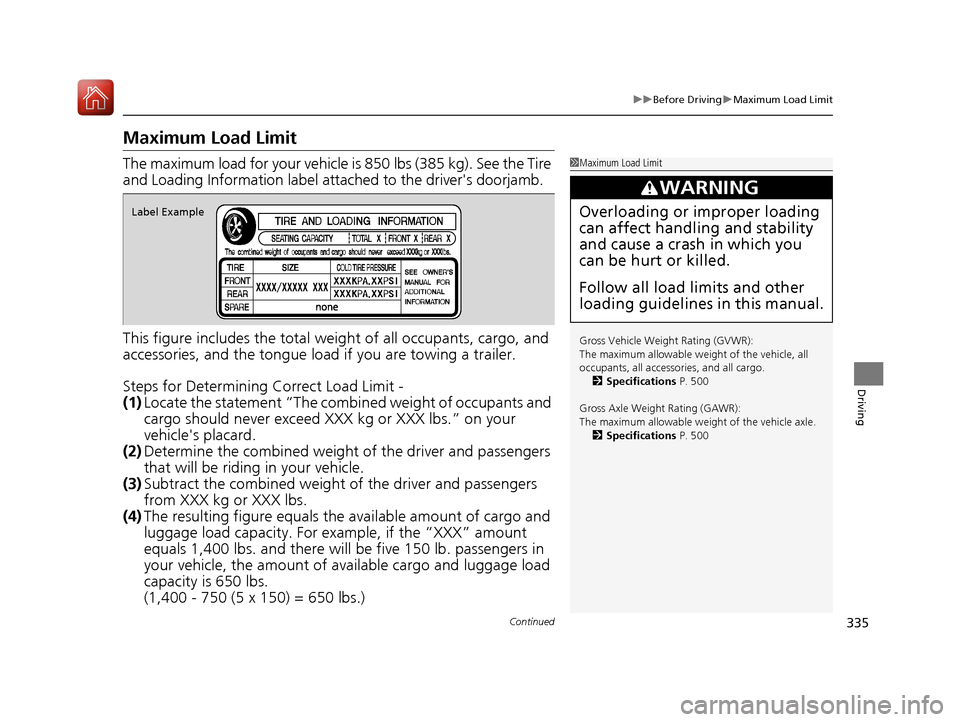
The maximum load for your vehicle is 850 lbs (385 kg). See the Tire
and Loading Information label atta ched to the driver's doorjamb.
This figure includes the total weig ht of all occupants, cargo, and
accessories, and the tongue load if you are towing a trailer.
Steps for Determining Correct Load Limit -
(1) Locate the statement “The comb ined weight of occupants and
cargo should never exceed XXX kg or XXX lbs.” on your
vehicle's placard.
(2) Determine the combined weight of the driver and passengers
that will be riding in your vehicle.
(3) Subtract the combined weight of the driver and passengers
from XXX kg or XXX lbs.
(4) The resulting figure equals the available amount of cargo and
luggage load capacity. For example, if the “XXX” amount
equals 1,400 lbs. and there will be five 150 lb. passengers in
your vehicle, the am ount of available cargo and luggage load
capacity is 650 lbs.
(1,400 - 750 (5 x 150) = 650 lbs.)1 Maximum Load Limit
Gross Vehicle Weight Rating (GVWR):
The maximum allowable weight of the vehicle, all
occupants, all accesso ries, and all cargo.
2 Specifications P. 500
Gross Axle Weight Rating (GAWR):
The maximum allowable weight of the vehicle axle. 2 Specifications P. 500
3WARNING
Overloading or improper loading
can affect handling and stability
and cause a crash in which you
can be hurt or killed.
Follow all load limits and other
loading guidelines in this manual.Label Example
17 ACURA ILX-31TX66400.book 335 ページ 2016年3月15日 火曜日 午後5時0分
Page 337 of 521
336
uuBefore Driving uMaximum Load Limit
Driving
(5) Determine the combined weight of luggage and cargo being
loaded on the vehicle. That we ight may not safely exceed the
available cargo and luggage load capacity calculated in step 4.
(6) If your vehicle will be towing a tra iler, load from your trailer will
be transferred to your vehicl e. Consult this manual to
determine how this reduces the available cargo and luggage
load capacity of your vehicle.
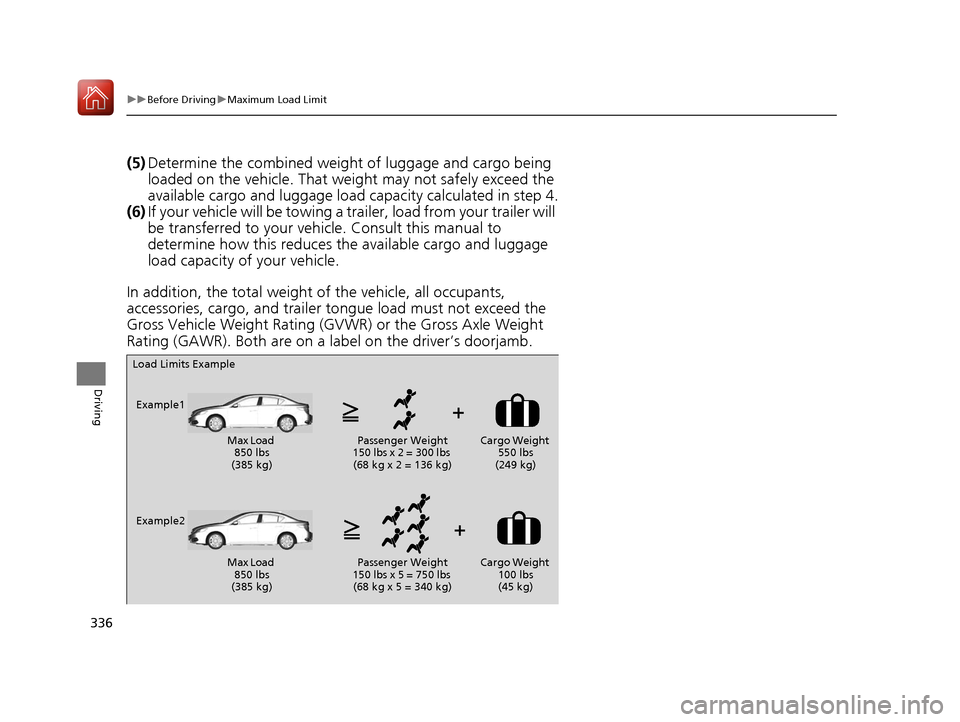
In addition, the total weight of the vehicle, all occupants,
accessories, cargo, and trailer tongue load must not exceed the
Gross Vehicle Weight Rating (GVW R) or the Gross Axle Weight
Rating (GAWR). Both are on a label on the driver’s doorjamb.
Load Limits Example
Example1 Max Load 850 lbs
(385 kg) Passenger Weight
150 lbs x 2 = 300 lbs (68 kg x 2 = 136 kg) Cargo Weight
550 lbs
(249 kg)
Example2 Max Load 850 lbs
(385 kg) Passenger Weight
150 lbs x 5 = 750 lbs (68 kg x 5 = 340 kg) Cargo Weight
100 lbs
(45 kg)
17 ACURA ILX-31TX66400.book 336 ページ 2016年3月15日 火曜日 午後5時0分