lock Acura ILX 2017 Manual Online
[x] Cancel search | Manufacturer: ACURA, Model Year: 2017, Model line: ILX, Model: Acura ILX 2017Pages: 521, PDF Size: 29.65 MB
Page 249 of 521
248
uuCustomized Features*u
Features
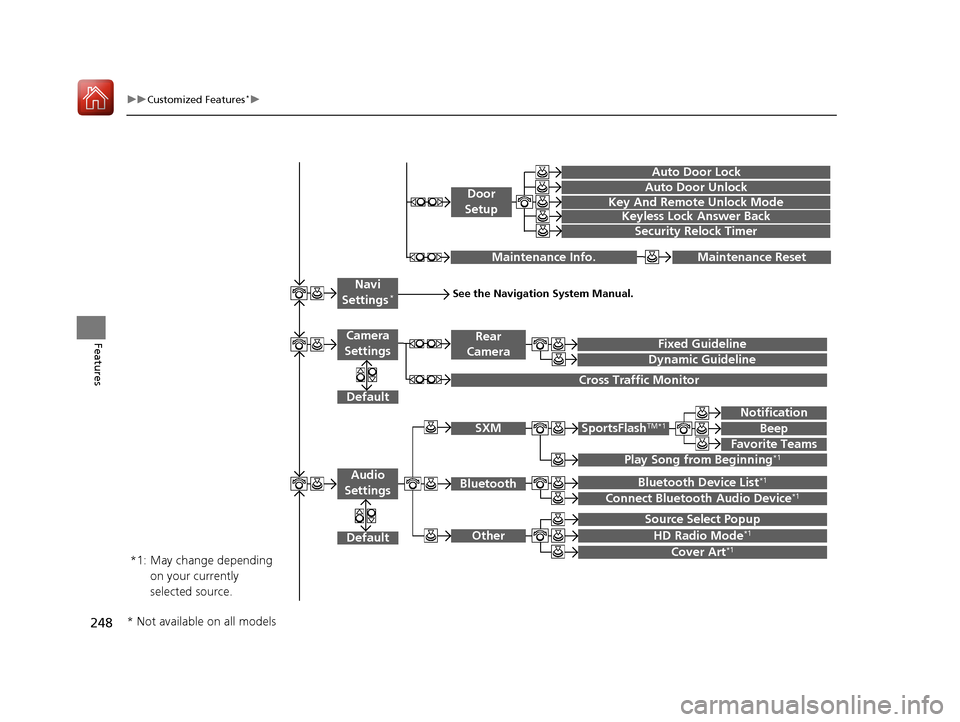
Play Song from Beginning*1
Default
Source Select Popup
Maintenance ResetMaintenance Info.
Fixed Guideline
Dynamic Guideline
Rear
Camera
Cross Traffic Monitor
*1:
See the Navigation System Manual.Navi
Settings*
Key And Remote Unlock Mode
Keyless Lock Answer Back
Security Relock Timer
Auto Door Lock
Auto Door Unlock
Door
Setup
Cover Art*1
Bluetooth Device List*1
Connect Bluetooth Audio Device*1
May change depending
on your currently
selected source.
HD Radio Mode*1
SportsFlashTM*1
Notification
Beep
Favorite Teams
Default
Camera
Settings
SXM
Bluetooth
Other
Audio
Settings
* Not available on all models
17 ACURA ILX-31TX66400.book 248 ページ 2016年3月15日 火曜日 午後5時0分
Page 251 of 521
250
uuCustomized Features*u
Features
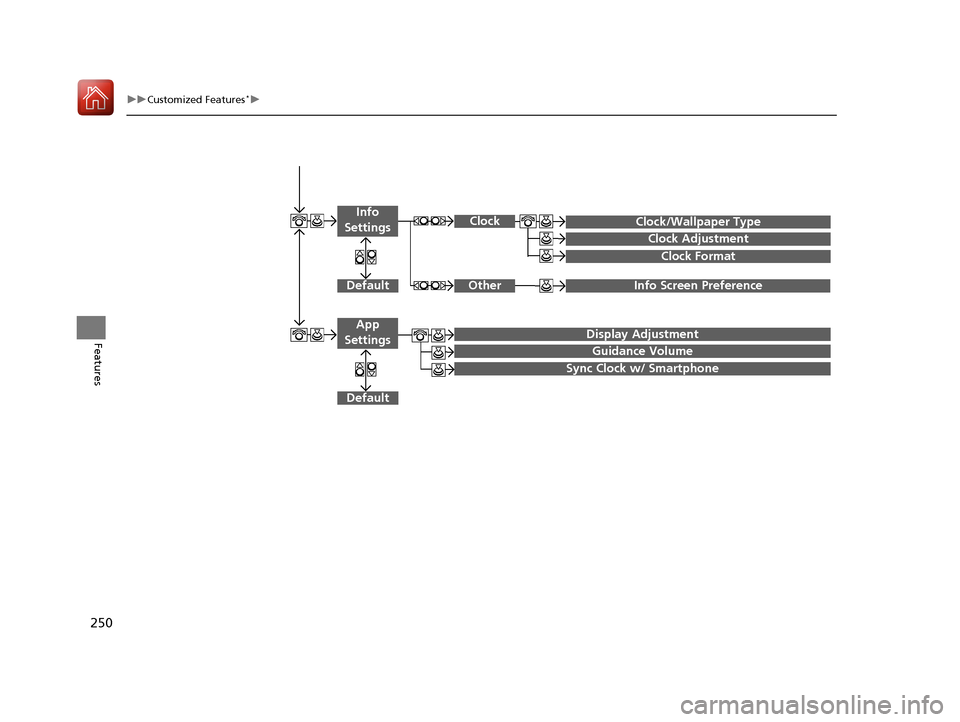
Info Screen Preference
Clock/Wallpaper Type
Clock Adjustment
Clock
DefaultOther
Info
Settings
Clock Format
Display Adjustment
Guidance Volume
Default
Sync Clock w/ Smartphone
App
Settings
17 ACURA ILX-31TX66400.book 250 ページ 2016年3月15日 火曜日 午後5時0分
Page 253 of 521
252
uuCustomized Features*u
Features
*1:Default SettingSetup
Group Customizable Features Descri
ption Selectable Settings
System
Settings
Voice
Recog-
nition
Voice Prompt•Beginner: Explains each option.
• Expert: Turns off voice prompts.Beginner*1/Expert
Clock
Clock/
Wallpaper
Type
ClockChanges the clock display type.Analog /Digital*1/
Small Digital /Off
Wallpaper
●Changes the wallpaper type.●Imports an image file for a new wallpaper.●Deletes an image file for a wallpaper.
2 Wallpaper Setup P. 202
Blank/Galaxy*1/
Metallic /Add New
Clock AdjustmentAdjusts Clock.
2 Clock P. 108—
Clock FormatSelects the digital clock display from 12H to 24H.12H*1/24H
17 ACURA ILX-31TX66400.book 252 ページ 2016年3月15日 火曜日 午後5時0分
Page 254 of 521
253
uuCustomized Features*u
Continued
Features
*1:Default SettingSetup
Group Customizable Features Description Selectable Settings
System
SettingsOthers
LanguageChanges the display language.English*1/
Français /
Español
Display Operation
Restriction Tips*
Alerts you when manual co ntrol of the system is
disabled to prevent distraction while driving. Only
voice commands are available.
On*1/ Off
Background Color
Changes the background color of the audio/
information screen an d the On Demand Multi-
Use Display
TM.
Blue*1/ Amber /Red /
Green
Header Clock DisplaySelects whether the clock display comes on.On*1/ Off
Factory Data ResetResets all the settings to their factory default.
2 Defaulting All the Settings P. 265—
DefaultCancels/Resets all customized items in the
System Settings group as default.Default/OK
* Not available on all models
17 ACURA ILX-31TX66400.book 253 ページ 2016年3月15日 火曜日 午後5時0分
Page 257 of 521
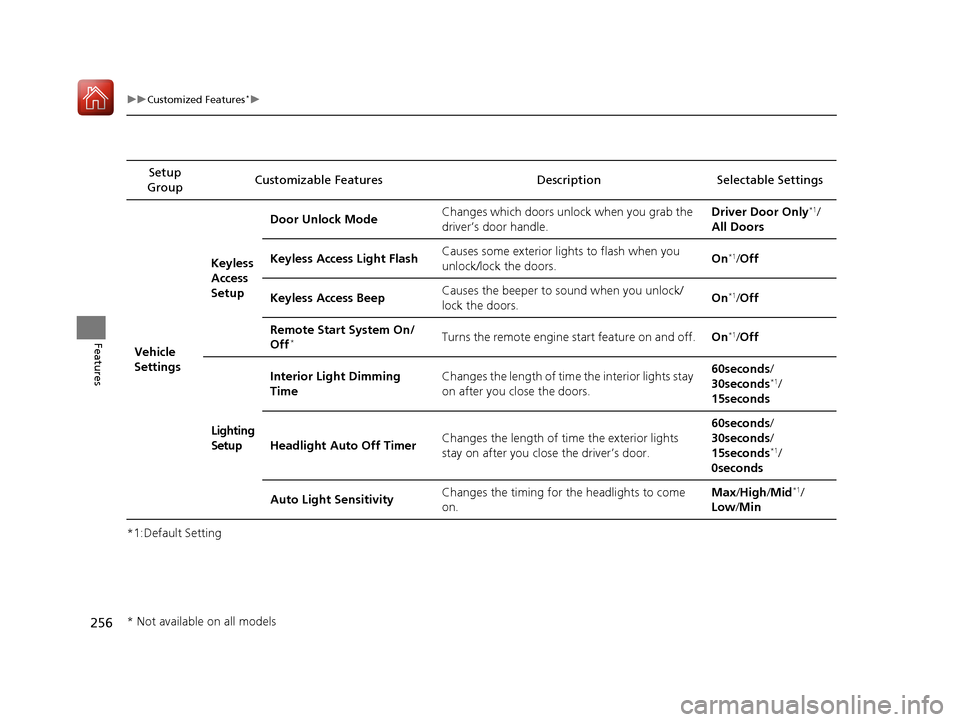
256
uuCustomized Features*u
Features
*1:Default SettingSetup
Group Customizable Features Descri
ption Selectable Settings
Vehicle
SettingsKeyless
Access
Setup
Door Unlock Mode
Changes which doors unlock when you grab the
driver’s door handle. Driver Door Only
*1/
All Doors
Keyless Access Light Flash Causes some exterior lig
hts to flash when you
unlock/lock the doors. On
*1/
Off
Keyless Access Beep Causes the beeper to sound when you unlock/
lock the doors. On
*1/
Off
Remote Start System On/
Off
*Turns the remote engine start feature on and off. On*1/Off
Lighting
Setup Interior Light Dimming
Time
Changes the length of time the interior lights stay
on after you close the doors. 60seconds/
30seconds
*1/
15seconds
Headlight Auto Off Timer Changes the length of time the exterior lights
stay on after you close the driver’s door. 60seconds/
30seconds/
15seconds
*1/
0seconds
Auto Light Sensitivity Changes the timing for the headlights to come
on. Max
/High /Mid
*1/
Low /Min
* Not available on all models
17 ACURA ILX-31TX66400.book 256 ページ 2016年3月15日 火曜日 午後5時0分
Page 258 of 521
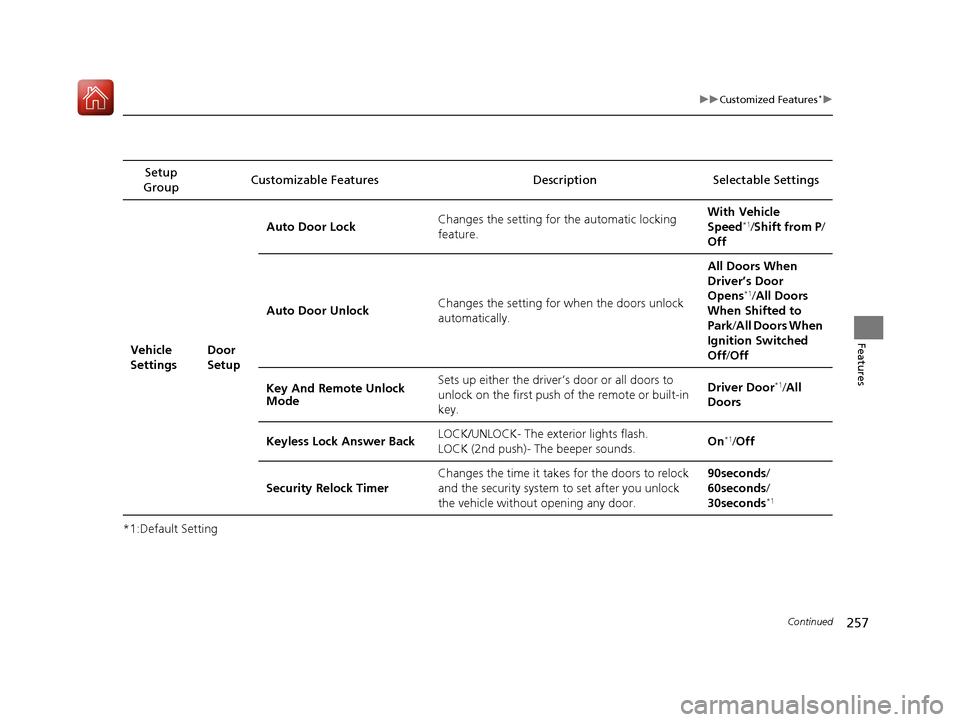
257
uuCustomized Features*u
Continued
Features
*1:Default SettingSetup
Group Customizable Features Description Selectable Settings
Vehicle
Settings Door
SetupAuto Door Lock
Changes the setting for the automatic locking
feature. With Ve
hicle
Speed
*1/ Shift from P /
Off
Auto Door Unlock Changes the setting for
when the doors unlock
automatically. All Doors When
Driver’s Door
Opens
*1/
All Doors
When Shifted to
Park/ All Doors When
Ignition Switched
Off /Off
Key And Remote Unlock
Mode Sets up either the driver’s door or all doors to
unlock on the first push of the remote or built-in
key. Driver Door
*1/
All
Doors
Keyless Lock Answer Back LOCK/UNLOCK- The exterior lights flash.
LOCK (2nd push)- The beeper sounds.
On
*1/
Off
Security Relock Timer Changes the time it takes for the doors to relock
and the security system to set after you unlock
the vehicle without opening any door. 90seconds
/
60seconds /
30seconds
*1
17 ACURA ILX-31TX66400.book 257 ページ 2016年3月15日 火曜日 午後5時0分
Page 264 of 521
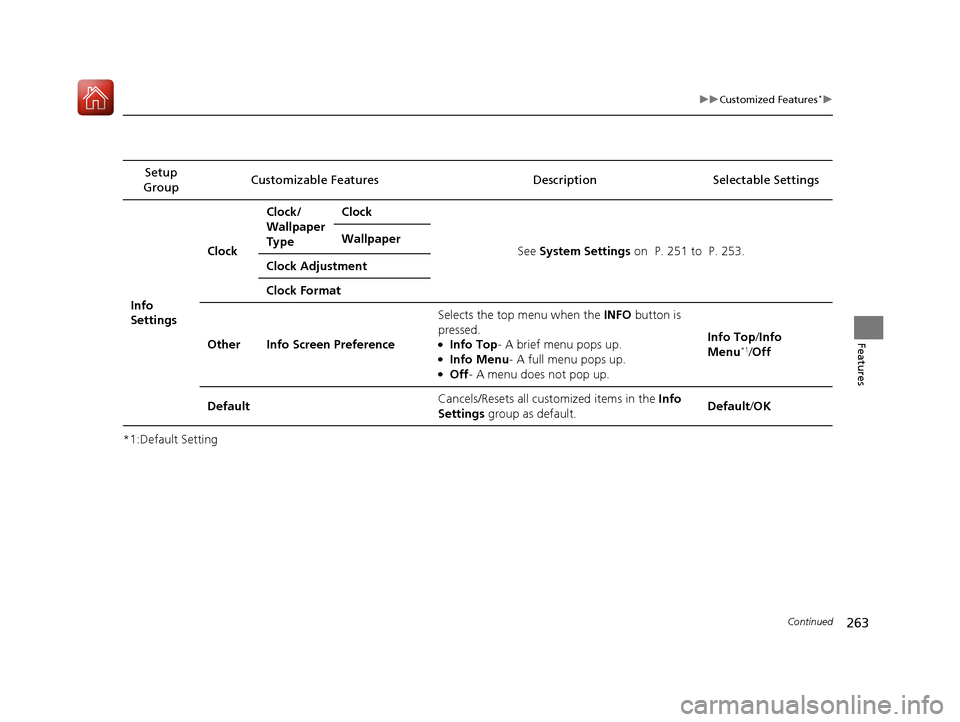
263
uuCustomized Features*u
Continued
Features
*1:Default SettingSetup
Group Customizable Features Description Selectable Settings
Info
SettingsClock
Clock/
Wallpaper
Type
Clock
See System Settings on P. 251 to P. 253.
Wallpaper
Clock Adjustment
Clock Format
Other Info Screen Preference Selects the top menu when the
INFO button is
pressed.
●Info Top- A brief menu pops up.●Info Menu - A full menu pops up.●Off- A menu does not pop up. Info Top/
Info
Menu
*1/ Off
Default Cancels/Resets all customized items in the
Info
Settings group as default. Default/
OK
17 ACURA ILX-31TX66400.book 263 ページ 2016年3月15日 火曜日 午後5時0分
Page 265 of 521
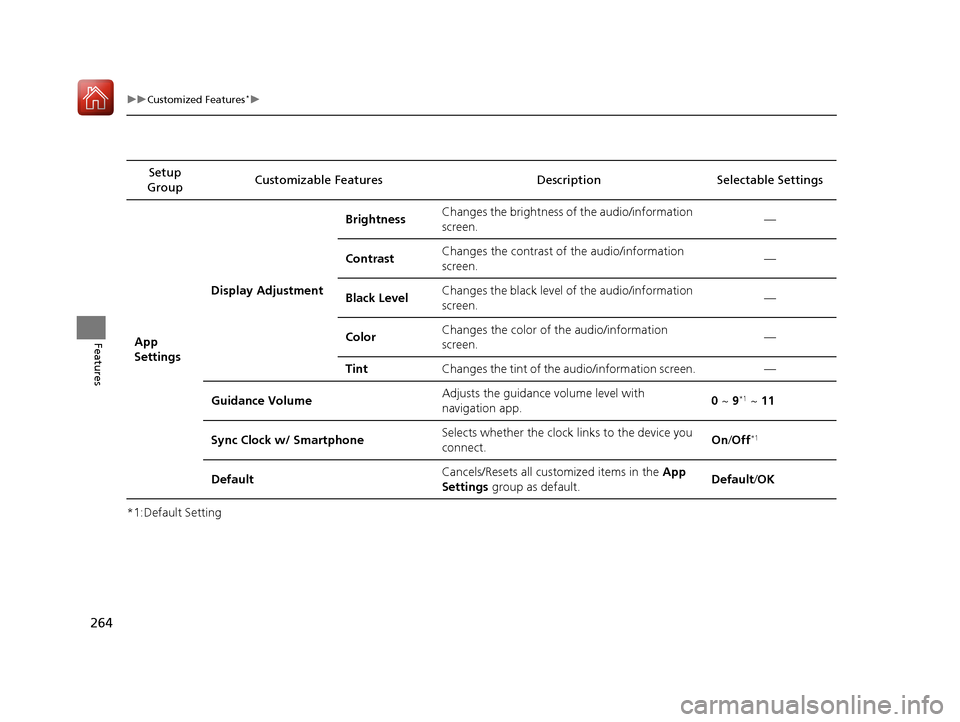
264
uuCustomized Features*u
Features
*1:Default SettingSetup
Group Customizable Features Descri
ption Selectable Settings
App
SettingsDisplay Adjustment Brightness
Changes the brightness of the audio/information
screen. —
Contrast Changes the contrast of the audio/information
screen.
—
Black Level Changes the black level of the audio/information
screen. —
Color Changes the color of the audio/information
screen. —
Tint Changes the tint of the audio/information screen. —
Guidance Volume Adjusts the guidance volume level with
navigation app.
0
~ 9
*1 ~ 11
Sync Clock w/ Smartphone Selects whether the clock links to the device you
connect. On
/Off
*1
Default Cancels/Resets all cust
omized items in the App
Settings group as default. Default
/OK
17 ACURA ILX-31TX66400.book 264 ページ 2016年3月15日 火曜日 午後5時0分
Page 332 of 521
331
Driving
This chapter discusses driving, refueling, and information on items such as accessories.
Before Driving................................... 332
Maximum Load Limit........................ 335
Towing a Trailer ................................ 337
When Driving Starting the Engine .......................... 338
Dual Clutch Transmission ................. 344
Shifting ............................................ 345
Cruise Control
*................................ 349
Front Sensor Camera*...................... 352
Adaptive Cruise Control (ACC)*....... 354
Road Departure Mi tigation (RDM)
System*...................................... 368
Lane Keeping Assist System (LKAS)*.... 373
Vehicle Stability Assist (VSA®), aka Electronic
Stability Control (ESC), System ...............381
Blind Spot Information (BSI) System*... 383
Tire Pressure Monitoring System (TPMS) ... 385
Tire Pressure Monitoring System (TPMS) - Required Federal Explanation ......... 387
Braking Brake System ................................... 389
Anti-lock Brake System (ABS) ........... 391
Collision Mitigati on Braking System
TM
(CMBSTM)*..................................... 393 Parking Your Vehicle
When Stopped ................................ 402
Cross Traffic Monitor
*..................... 403
Multi-View Rear Camera .................. 406
Refueling Fuel Information .............................. 407
How to Refuel ................................. 408
Fuel Economy and CO
2 Emissions .... 409
Improving Fuel Economy and Reducing CO
2 Emissions ................................ 409
* Not available on all models
17 ACURA ILX-31TX66400.book 331 ページ 2016年3月15日 火曜日 午後5時0分
Page 333 of 521
332
Driving
Before Driving
Driving Preparation
Check the following items before you start driving.
• Make sure there are no obstructions on th e windows, door mirrors, exterior
lights, or other parts of the vehicle.
u Remove any frost, snow, or ice.
u Remove any snow on the roof, as this can slip down and obstruct your field of
vision while driving. If frozen solid , remove ice once it has softened.
u When removing ice from around the wheel s, be sure not to damage the wheel
or wheel components.
• Make sure the hood is securely closed.
u If the hood opens while driving, your front view will be blocked.
• Make sure the tires are in good condition.
u Check air pressures, and check for damage and excessive wear.
2Checking and Maintaining Tires P. 442
•Make sure there are no people or ob jects behind or around the vehicle.
u There are blind spots from the inside.
■Exterior Checks1Exterior Checks
NOTICE
When doors are frozen s hut, use warm water around
the door edges to melt any ice. Do not try to force
them open, as this can damage the rubber trim
around the doors. When done, wipe dry to avoid
further freezing.
Do not pour warm water into the key cylinder.
You will be unable to insert the key if the water
freezes in the hole.
Heat from the engine and exhaust can ignite
flammable material s left under the hood, causing a
fire. If you've parked y our vehicle for an extended
period, inspect and remove any debris that may have
collected, such as dried grass and leaves that have
fallen or have been carried in for use as a nest by a
small animal. Also check under the hood for leftover
flammable materials after you or someone else has
performed maintenance on your vehicle.
17 ACURA ILX-31TX66400.book 332 ページ 2016年3月15日 火曜日 午後5時0分