USB port Acura ILX 2017 Owner's Manual
[x] Cancel search | Manufacturer: ACURA, Model Year: 2017, Model line: ILX, Model: Acura ILX 2017Pages: 521, PDF Size: 29.65 MB
Page 7 of 521
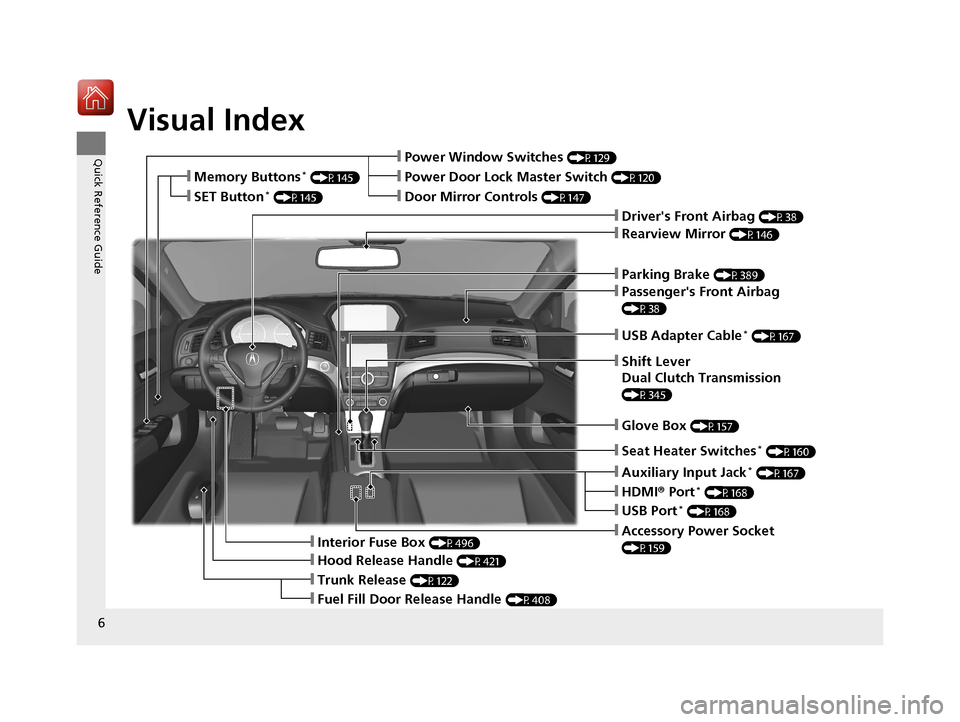
Visual Index
6
Quick Reference Guide
❙Parking Brake (P389)
❙Power Window Switches (P129)
❙Driver's Front Airbag (P38)
❙Trunk Release (P122)
❙Hood Release Handle (P421)
❙Interior Fuse Box (P496)
❙Passenger's Front Airbag
(P38)
❙USB Adapter Cable* (P167)
❙Shift Lever
Dual Clutch Transmission
(P345)
❙Glove Box (P157)
❙Accessory Power Socket
(P159)
❙Rearview Mirror (P146)
❙Auxiliary Input Jack* (P167)
❙Door Mirror Controls (P147)
❙Power Door Lock Master Switch (P120)❙Memory Buttons* (P145)
❙SET Button* (P145)
❙Fuel Fill Door Release Handle (P408)
❙USB Port* (P168)
❙HDMI® Port* (P168)
❙Seat Heater Switches* (P160)
17 ACURA ILX-31TX66400.book 6 ページ 2016年3月15日 火曜日 午後5時0分
Page 166 of 521
165
Features
This chapter describes how to operate technology features.
Audio System.................................... 166
USB Adapter Cable*........................ 167
Auxiliary Input Jack*........................ 167
USB Port*........................................ 168
HDMI ® Port*.................................... 168
Audio System Theft Protection ......... 169
Audio Remote Controls .................... 170
Audio System Basic Operation ........ 171
Audio/Information Screen ................ 172
Playing AM/FM Radio ....................... 178
Playing a CD .................................... 180
Playing an iPod ................................ 183
Models with one display
Playing Internet Radio ...................... 186
Playing a USB Flash Drive ................. 188
Playing Bluetooth ® Audio................. 191
Audio System Basic Operation ........ 193
On Demand Multi-Use Display
TM...... 194
Audio/Information Screen ................ 200
Display Setup ................................... 205
Playing AM/FM Radio ....................... 206
Playing SiriusXM ® Radio ................... 211
Playing a CD .................................... 218
Playing an iPod ................................ 221
Playing Internet Radio ...................... 225
Models with two displays
Playing a USB Flash Drive ................. 228
Playing Bluetooth ® Audio ................ 231
Smartphone Navi Apps .................... 233
Siri Eyes Free .................................... 234
Audio Error Messages ...................... 235
General Information on the Audio System.. 241Customized Features*..........................245HomeLink® Universal Transceiver*......266
Bluetooth® HandsFreeLink® ............. 269
Bluetooth ® HandsFreeLink® ............. 298Models with one display
Models with two displays
* Not available on all models
17 ACURA ILX-31TX66400.book 165 ページ 2016年3月15日 火曜日 午後5時0分
Page 167 of 521
166
Features
Audio System
About Your Audio System
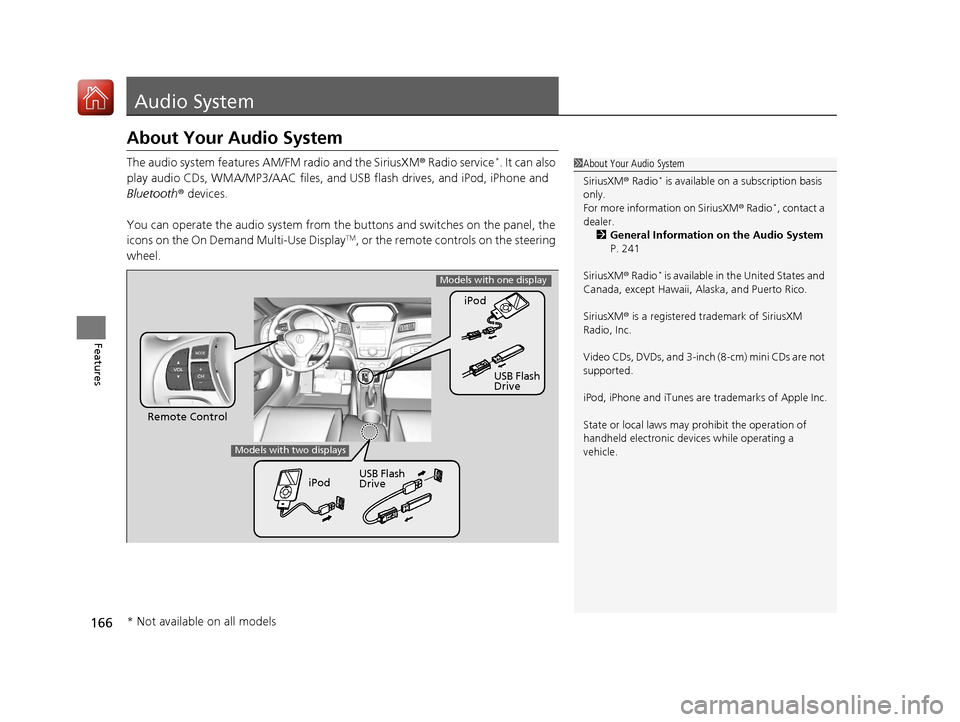
The audio system features AM/FM radio and the SiriusXM ® Radio service*. It can also
play audio CDs, WMA/MP3/AAC files, and USB flash drives, and iPod, iPhone and
Bluetooth ® devices.
You can operate the audio system from the buttons and switches on the panel, the
icons on the On Demand Multi-Use Display
TM, or the remote controls on the steering
wheel.
1 About Your Audio System
SiriusXM ® Radio
* is available on a subscription basis
only.
For more information on SiriusXM ® Radio
*, contact a
dealer. 2 General Information on the Audio System
P. 241
SiriusXM ® Radio
* is available in the United States and
Canada, except Ha waii, Alaska, and Puerto Rico.
SiriusXM ® is a registered trademark of SiriusXM
Radio, Inc.
Video CDs, DVDs, and 3-inch (8-cm) mini CDs are not
supported.
iPod, iPhone and iTunes are trademarks of Apple Inc.
State or local laws may pr ohibit the operation of
handheld electronic devi ces while operating a
vehicle.
Remote Control iPod
USB Flash
Drive
iPod USB Flash
Drive
Models with one display
Models with two displays
* Not available on all models
17 ACURA ILX-31TX66400.book 166 ページ 2016年3月15日 火曜日 午後5時0分
Page 169 of 521
168
uuAudio System uUSB Port*
Features
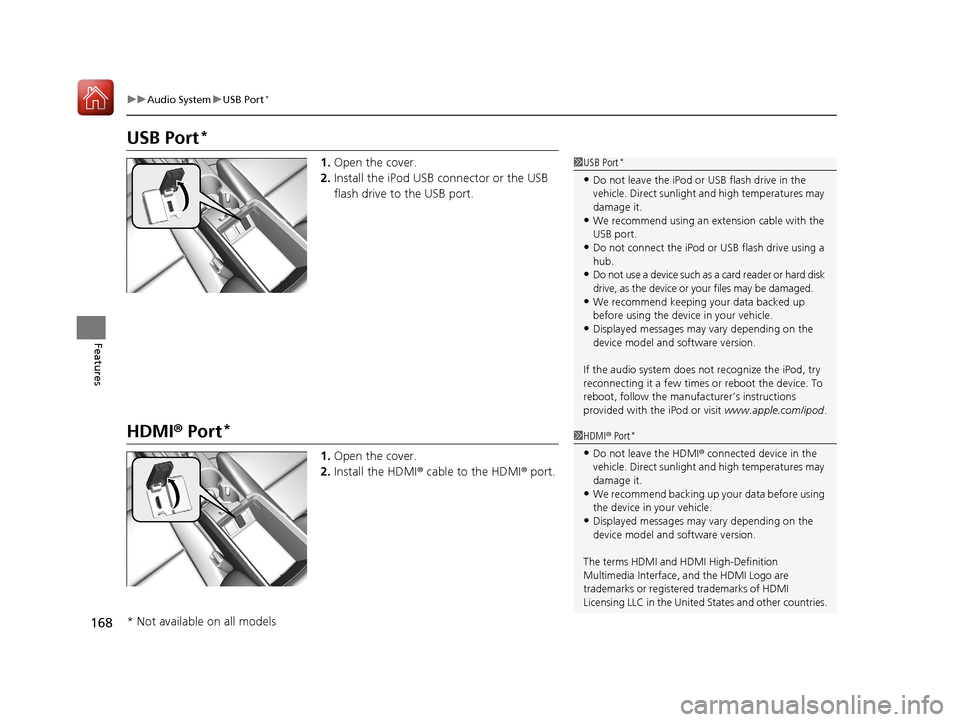
USB Port*
1. Open the cover.
2. Install the iPod USB connector or the USB
flash drive to the USB port.
HDMI ® Port*
1. Open the cover.
2. Install the HDMI ® cable to the HDMI ® port.
1 USB Port*
•Do not leave the iPod or USB flash drive in the
vehicle. Direct sunlight and high temperatures may
damage it.
•We recommend using an extension cable with the
USB port.
•Do not connect the iPod or USB flash drive using a
hub.
•Do not use a device such as a card reader or hard disk
drive, as the device or your files may be damaged.
•We recommend keeping y our data backed up
before using the device in your vehicle.
•Displayed messages may vary depending on the
device model and software version.
If the audio system does not recognize the iPod, try
reconnecting it a few times or reboot the device. To
reboot, follow the manufac turer’s instructions
provided with the iPod or visit www.apple.com/ipod.
1HDMI ® Port*
•Do not leave the HDMI ® connected device in the
vehicle. Direct sunlight and high temperatures may
damage it.
•We recommend backing up yo ur data before using
the device in your vehicle.
•Displayed messages may vary depending on the
device model and software version.
The terms HDMI and HDMI High-Definition
Multimedia Interface, and the HDMI Logo are
trademarks or registered trademarks of HDMI
Licensing LLC in the United States and other countries.
* Not available on all models
17 ACURA ILX-31TX66400.book 168 ページ 2016年3月15日 火曜日 午後5時0分
Page 176 of 521
175
uuAudio System Basic Operation uWallpaper Setup
Continued
Features
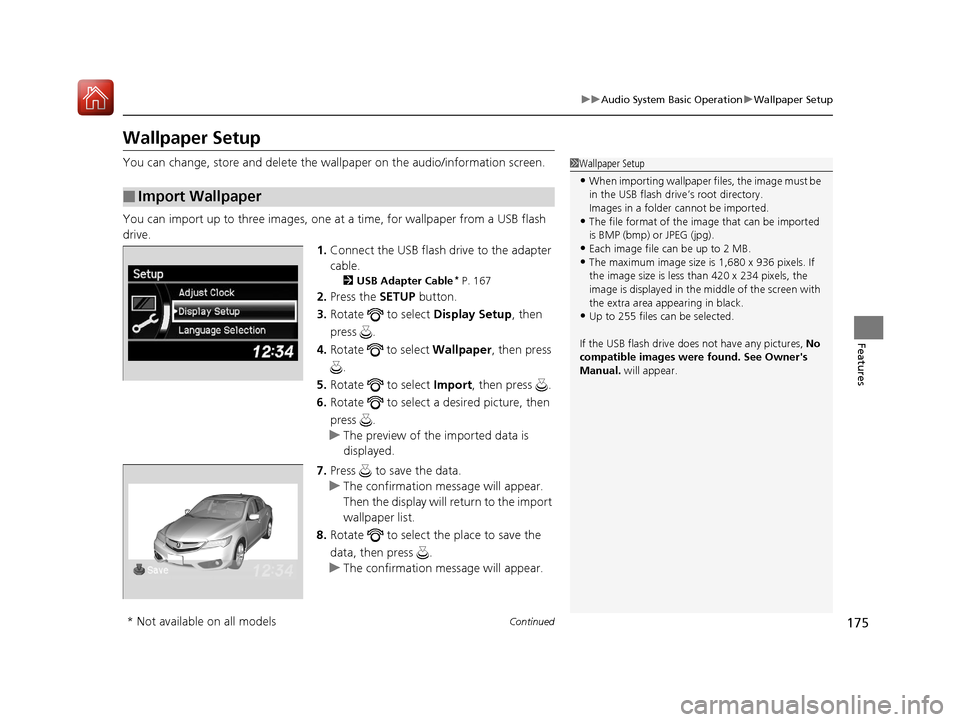
Wallpaper Setup
You can change, store and delete the wall paper on the audio/information screen.
You can import up to three images, one at a time, for wallpaper from a USB flash
drive.
1.Connect the USB flash drive to the adapter
cable.
2 USB Adapter Cable* P. 167
2.Press the SETUP button.
3. Rotate to select Display Setup, then
press .
4. Rotate to select Wallpaper, then press
.
5. Rotate to select Import, then press .
6. Rotate to select a desired picture, then
press .
u The preview of the imported data is
displayed.
7. Press to save the data.
u The confirmation message will appear.
Then the display will return to the import
wallpaper list.
8. Rotate to select the place to save the
data, then press .
u The confirmation message will appear.
■Import Wallpaper
1Wallpaper Setup
•When importing wallpaper files, the image must be
in the USB flash drive’s root directory.
Images in a folder cannot be imported.
•The file format of the im age that can be imported
is BMP (bmp) or JPEG (jpg).
•Each image file can be up to 2 MB.
•The maximum image size is 1,680 x 936 pixels. If
the image size is less than 420 x 234 pixels, the
image is displayed in the middle of the screen with
the extra area appearing in black.
•Up to 255 files can be selected.
If the USB flash drive doe s not have any pictures, No
compatible images were found. See Owner's
Manual. will appear.
* Not available on all models
17 ACURA ILX-31TX66400.book 175 ページ 2016年3月15日 火曜日 午後5時0分
Page 203 of 521
uuAudio System Basic Operation uAudio/Information Screen
202
Features
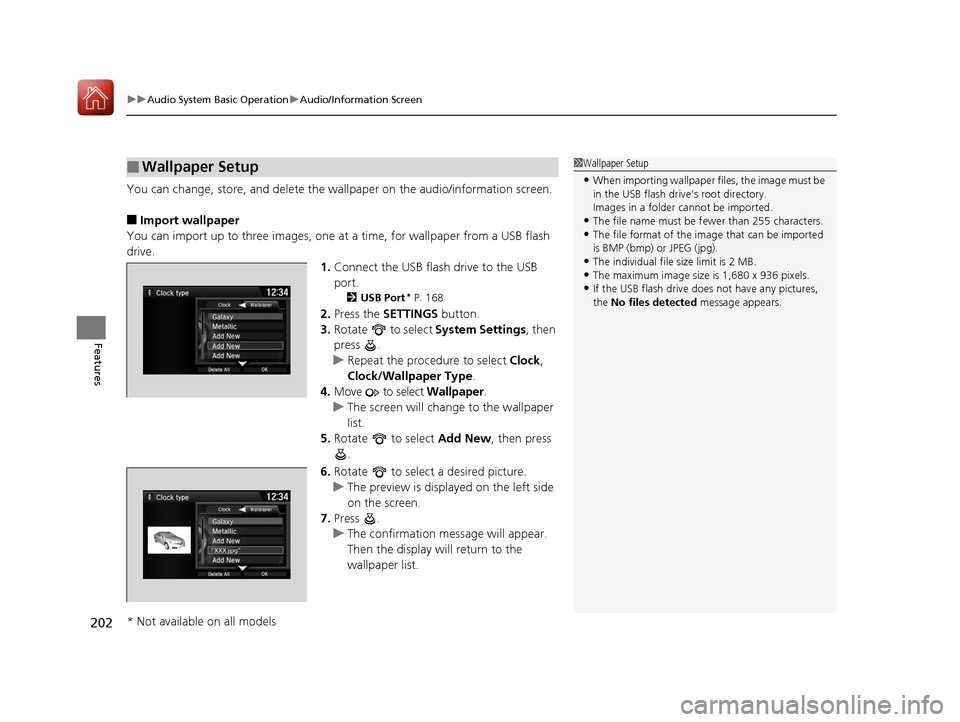
You can change, store, and delete the wa llpaper on the audio/information screen.
■Import wallpaper
You can import up to three images, one at a time, for wallpaper from a USB flash
drive.
1.Connect the USB flash drive to the USB
port.
2 USB Port* P. 168
2.Press the SETTINGS button.
3. Rotate to select System Settings, then
press .
u Repeat the procedure to select Clock,
Clock/Wallpaper Type .
4. Move to select Wallpaper.
u The screen will change to the wallpaper
list.
5. Rotate to select Add New, then press
.
6. Rotate to select a desired picture.
u The preview is displayed on the left side
on the screen.
7. Press .
u The confirmation message will appear.
Then the display will return to the
wallpaper list.
■Wallpaper Setup1Wallpaper Setup
•When importing wallpaper files, the image must be
in the USB flash drive’s root directory.
Images in a folder cannot be imported.
•The file name must be fewer than 255 characters.•The file format of the im age that can be imported
is BMP (bmp) or JPEG (jpg).
•The individual file size limit is 2 MB.•The maximum image size is 1,680 x 936 pixels.
•If the USB flash drive doe s not have any pictures,
the No files detected message appears.
* Not available on all models
17 ACURA ILX-31TX66400.book 202 ページ 2016年3月15日 火曜日 午後5時0分
Page 210 of 521
209
uuAudio System Basic Operation uPlaying AM/FM Radio
Continued
Features
■Radio text
Display the radio text information of the selected RDS station.
1. Press the MENU button.
2. Rotate to select Radio Text, then press .
■Scan
Samples each of the strongest stations on the selected band for 10 seconds.
1. Press the MENU button.
2. Rotate to select Scan, then press .
To turn off scan, press to select Stop Scan, or press the BACK button.
2Playing AM/FM Radio P. 206
To turn off scan, select Stop Scan.
■Tag song to device
If your a iPhone/iPod is connected to the USB port you can store the TAG
information.
If the iPod/iPhone is not connected to the audio system, the information is stored in
the audio unit temporarily, then once the de vice is connected to the system, data is
transferred to the iPod/iPhone.
To store the TAG information to th e iPod/iPhone, or the audio system:
1. Press the MENU button.
2. Rotate to select Tag Song, then press .
3. Select the song for which you want to save the information.
Interface Dial
On Demand Multi-Use DisplayTM
Models with HD RadioTM feature
17 ACURA ILX-31TX66400.book 209 ページ 2016年3月15日 火曜日 午後5時0分
Page 218 of 521
217
uuAudio System Basic Operation uPlaying SiriusXM ® Radio
Features
Sample each channel on the selected mode for 10 seconds.
1. Press the MENU button.
2. Rotate to select Scan, then press .
3. Rotate to select an item, then press .
To turn off scan, press to select Stop Scan, or press the BACK button.
1. Select More.
2. Select Scan.
To turn off scan, select Stop Scan.
If your iPhone/iPod is connected to the USB port you can store the TAG information.
If the iPod/iPhone is not connected to the audio system, the information is stored in
the audio unit temporarily. Once the device is connected to the system, data is
transferred to the iPod/iPhone.
To store the TAG information to th e iPod/iPhone, or the audio system:
1. Press the MENU button.
2. Rotate to select Tag Song, then press .
3. Select the song for which you want to save the information.
Displays the TAG information saved to the audio system.
1. Press the MENU button.
2. Rotate to select Tagged Song List, then press .
■Scan
■Tag Song to Device
■Tagged Song List
1Scan
You can select desired channel by songs using Scan
Songs in presets.
The “Scan Songs in Preset s” function is based on
TuneScan
TM technology of SiriusXM ®.
The “Featured Channels ” function is based on
Featured Favorites
TM technology of SiriusXM ®.
TuneScan
TM and Featured FavoritesTM are registered
trademarks of SiriusXM ® Radio, Inc.
Interface Dial
On Demand Multi-Use DisplayTM
17 ACURA ILX-31TX66400.book 217 ページ 2016年3月15日 火曜日 午後5時0分
Page 222 of 521
221
uuAudio System Basic Operation uPlaying an iPod
Continued
Features
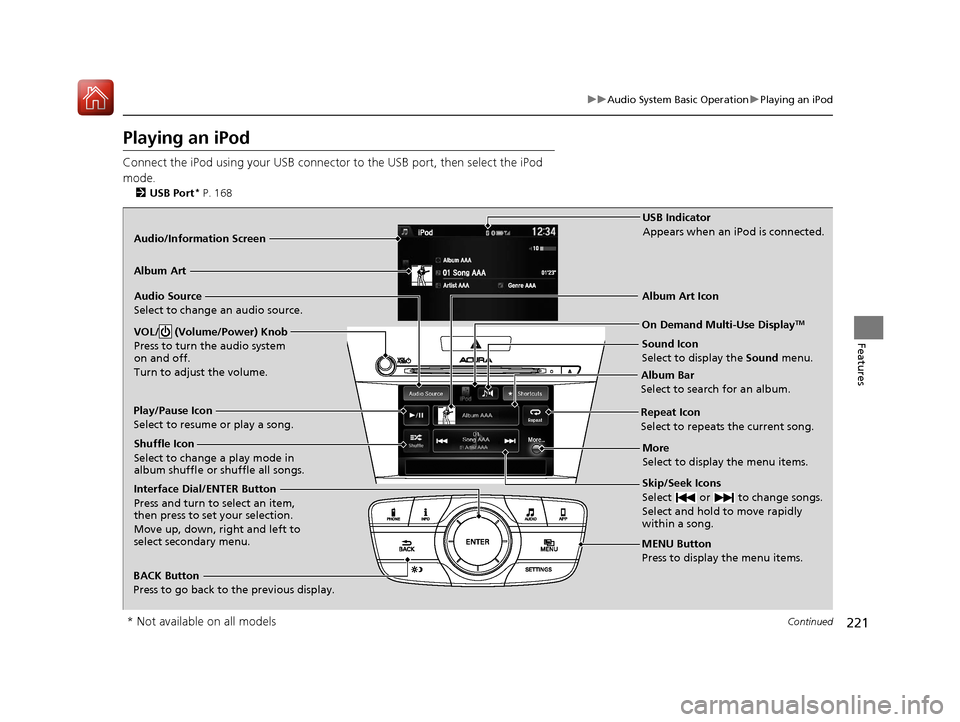
Playing an iPod
Connect the iPod using your USB connector to the USB port, then select the iPod
mode.
2 USB Port* P. 168
Audio/Information Screen
MENU Button
Press to display the menu items.
Album Bar
Select to search for an album.
Audio Source
Select to change an audio source.
Skip/Seek Icons
Select or to change songs.
Select and hold to move rapidly
within a song.
More
Select to display the menu items.
BACK Button
Press to go back to the previous display.
Interface Dial/ENTER Button
Press and turn to select an item,
then press to set your selection.
Move up, down, right and left to
select secondary menu. USB Indicator
Appears when an iPod is connected.
Album Art
On Demand Multi-Use DisplayTM
Album Art Icon
Play/Pause Icon
Select to resume or play a song.
VOL/ (Volume/Power) Knob
Press to turn the audio system
on and off.
Turn to adjust the volume.
Repeat Icon
Select to repeats the current song.
Shuffle Icon
Select to change a play mode in
album shuffle or shuffle all songs.
Sound Icon
Select to display the Sound menu.
* Not available on all models
17 ACURA ILX-31TX66400.book 221 ページ 2016年3月15日 火曜日 午後5時0分
Page 226 of 521
225
uuAudio System Basic Operation uPlaying Internet Radio
Continued
Features
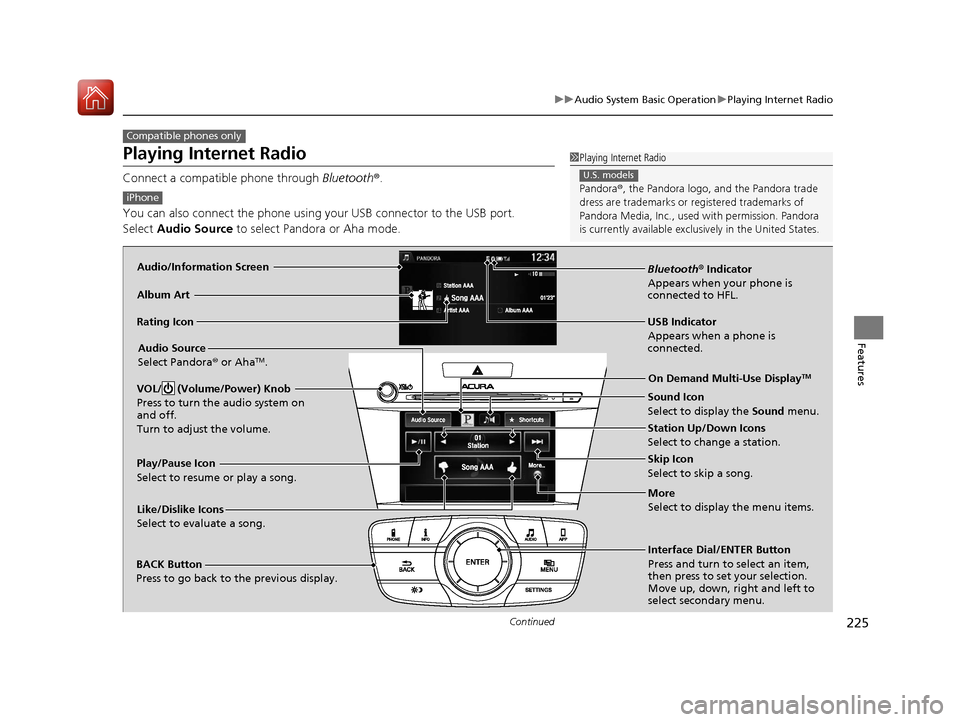
Playing Internet Radio
Connect a compatible phone through Bluetooth®.
You can also connect the phone using your USB connector to the USB port.
Select Audio Source to select Pandora or Aha mode.
Compatible phones only
1Playing Internet Radio
Pandora ®, the Pandora logo, and the Pandora trade
dress are trademarks or registered trademarks of
Pandora Media, Inc., used with permission. Pandora
is currently available exclusively in the United States.
U.S. models
iPhone
Audio/Information Screen
Album Art
USB Indicator
Appears when a phone is
connected.Rating Icon
BACK Button
Press to go back to the previous display.
Skip Icon
Select to skip a song.
More
Select to display the menu items.
Station Up/Down Icons
Select to change a station.
Audio Source
Select Pandora
® or Aha
TM.
Play/Pause Icon
Select to resume or play a song.
Like/Dislike Icons
Select to evaluate a song. Interface Dial/ENTER Button
Press and turn to select an item,
then press to set your selection.
Move up, down, right and left to
select secondary menu.On Demand Multi-Use Display
TM
Bluetooth
® Indicator
Appears when your phone is
connected to HFL.
VOL/ (Volume/Power) Knob
Press to turn the audio system on
and off.
Turn to adjust the volume.
Sound Icon
Select to display the Sound menu.
17 ACURA ILX-31TX66400.book 225 ページ 2016年3月15日 火曜日 午後5時0分