Acc Acura ILX 2019 Owner's Manual
[x] Cancel search | Manufacturer: ACURA, Model Year: 2019, Model line: ILX, Model: Acura ILX 2019Pages: 621, PDF Size: 34.8 MB
Page 1 of 621
Event Data Recorders
This vehicle is equipped with an event data recorder (EDR).
The main purpose of an EDR is to record, in certain crash or near
crash-like situations, such as an air bag deployment or hitting a
road obstacle, data that will assist in understanding how a vehicle’s
systems performed. The EDR is designed to record data related
to vehicle dynamics and safety systems for a short period of
time, typically 30 seconds or le ss. The EDR in this vehicle is
designed to record such data as:
• How various systems in your vehicle were operating;
• Whether or not the driver and passenger safety belts were
buckled/fastened;
3WARNING
California Proposition 65 Warning
Operating, servicing and maintaining a
passenger vehicle or off-highway motor
vehicle can expose you to chemicals including
engine exhaust, carbon monoxide,
phthalates, and lead, which are known to the
State of California to cause cancer and birth
defects or other reproductive harm. To
minimize exposure, avoid breathing exhaust,
do not idle the engine except as necessary,
service your vehicle in a well-ventilated area
and wear gloves or wash your hands
frequently when servicing your vehicle. For
more information go to
www.P65Warnings.ca.gov/passenger-vehicle.
• How far (if at all) the driver was depressing the accelerator
and/or brake pedal; and,
• How fast the vehicle was traveling.
These data can help provide a better understanding of the
circumstances in which crashes and injuries occur. NOTE: EDR data
are recorded by your vehicle only if a non-trivial crash situation
occurs; no data are recorded by the EDR under normal driving
conditions and no personal data (e.g., name, gender, age, and
crash location) are recorded. Howeve r, other parties, such as law
enforcement, could co mbine the EDR data with the type of
personally identifying data rout inely acquired during a crash
investigation.
To read data recorded by an ED R, special equipment is required,
and access to the vehicle or the EDR is needed. In addition to the
vehicle manufacturer, other parties, such as law enforcement, that
have the special equipment, can re ad the information if they have
access to the vehicle or the EDR.
The data belongs to the vehicle ow ner and may not be accessed by
anyone else except as legally requir ed or with the permission of the
vehicle owner.
Service Diagnostic Recorders
This vehicle is equipped with se rvice-related devices that record
information about powertrain perfo rmance. The data can be used
to verify emissions law requirem ents and/or help technicians
diagnose and solve service problems. It may also be combined with
data from other sources for res earch purposes, but it remains
confidential. Some diagnostic and maintenance information is
uploaded to Acura upon vehicle start up.
19 ACURA ILX-31TX66610.book 0 ページ 2020年4月17日 金曜日 午前8時52分
Page 4 of 621
Contents
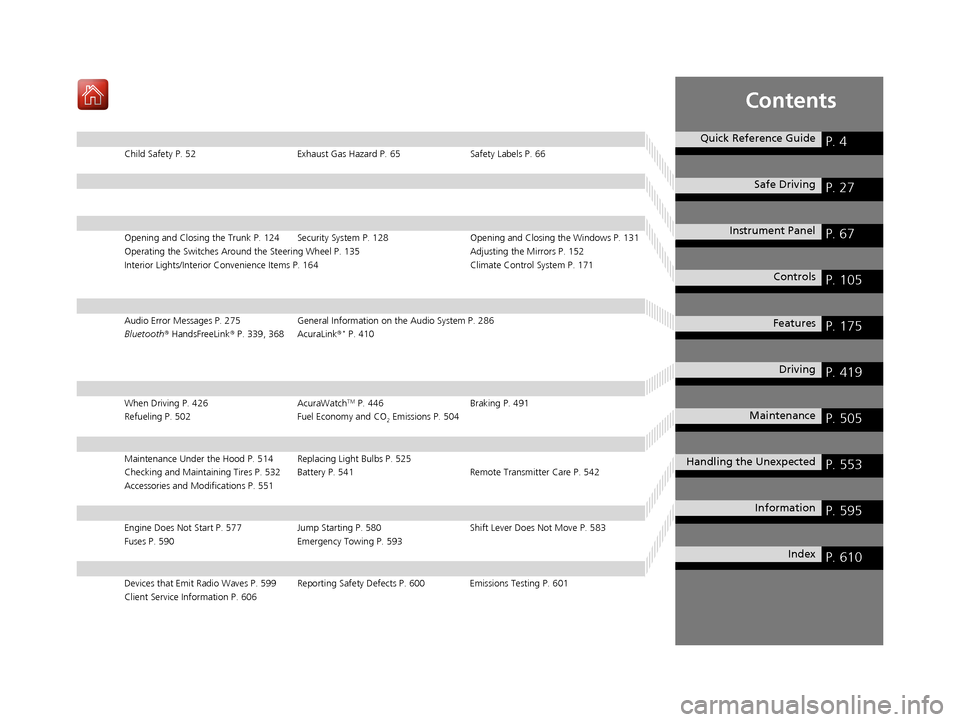
Child Safety P. 52Exhaust Gas Hazard P. 65Safety Labels P. 66
Opening and Closing the Trunk P. 124 Security System P. 128 Opening and Closing the Windows P. 131
Operating the Switches Around the Steering Wheel P. 135 Adjusting the Mirrors P. 152
Interior Lights/Interior Convenience It ems P. 164 Climate Control System P. 171
Audio Error Messages P. 275General Information on the Audio System P. 286
Bluetooth ® HandsFreeLink ® P. 339, 368 AcuraLink ®* P. 410
When Driving P. 426 AcuraWatchTM P. 446Braking P. 491
Refueling P. 502 Fuel Economy and CO
2 Emissions P. 504
Maintenance Under the Hood P. 514 Replacing Light Bulbs P. 525
Checking and Maintaining Tires P. 532 Battery P. 541 Remote Transmitter Care P. 542
Accessories and Modifications P. 551
Engine Does Not Start P. 577Jump Starting P. 580 Shift Lever Does Not Move P. 583
Fuses P. 590 Emergency Towing P. 593
Devices that Emit Radio Waves P. 599 Reporting Safety Defects P. 600 Emissions Testing P. 601
Client Service Information P. 606
Quick Reference GuideP. 4
Safe DrivingP. 27
Instrument PanelP. 67
ControlsP. 105
FeaturesP. 175
DrivingP. 419
MaintenanceP. 505
Handling the UnexpectedP. 553
InformationP. 595
IndexP. 610
19 ACURA ILX-31TX66610.book 3 ページ 2020年4月17日 金曜日 午前8時52分
Page 6 of 621
5
Quick Reference Guide
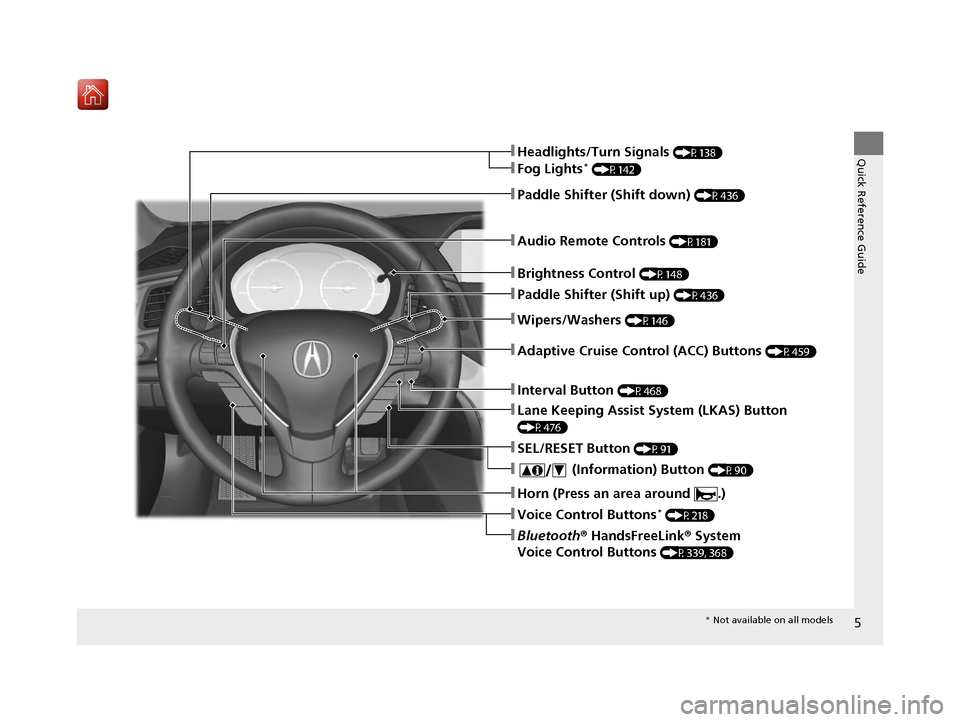
❚Wipers/Washers (P146)
❚Audio Remote Controls (P181)
❚Brightness Control (P148)
❚Headlights/Turn Signals (P138)
❚Fog Lights* (P142)
❚Paddle Shifter (Shift down) (P436)
❚Paddle Shifter (Shift up) (P436)
❚Horn (Press an area around .)
❚Voice Control Buttons* (P218)
❚Bluetooth® HandsFreeLink ® System
Voice Control Buttons
(P339, 368)
❚SEL/RESET Button (P91)
❚ (Information) Button (P90)
❚Lane Keeping Assist System (LKAS) Button
(P476)
❚Adaptive Cruise Control (ACC) Buttons (P459)
❚Interval Button (P468)
* Not available on all models
19 ACURA ILX-31TX66610.book 5 ページ 2020年4月17日 金曜日 午前8時52分
Page 7 of 621
Visual Index
6
Quick Reference Guide
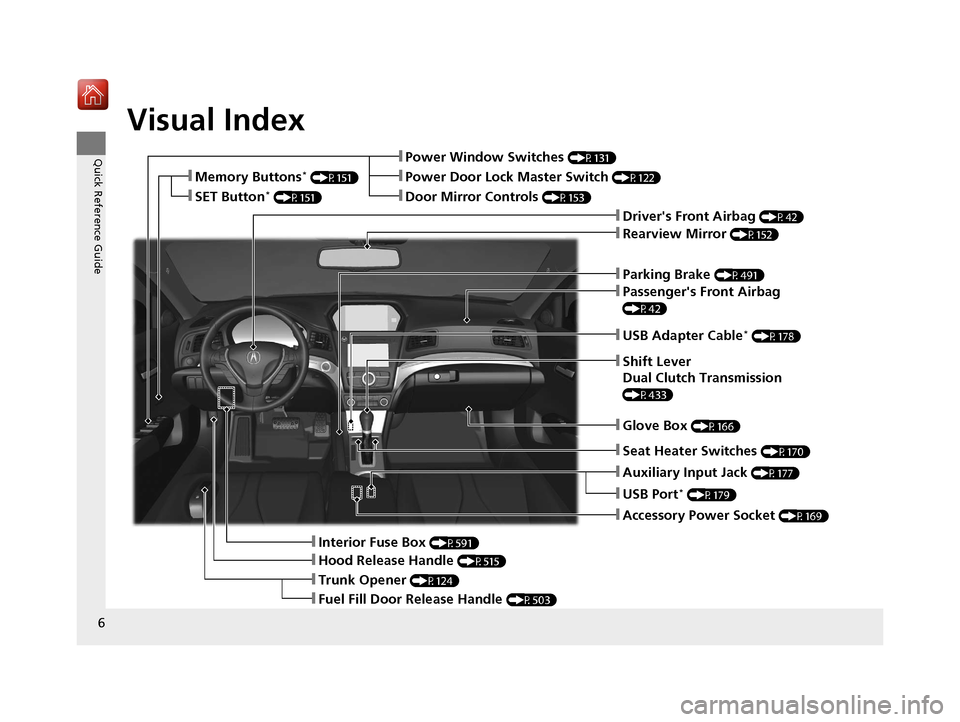
❚Parking Brake (P491)
❚Power Window Switches (P131)
❚Driver's Front Airbag (P42)
❚Trunk Opener (P124)
❚Hood Release Handle (P515)
❚Interior Fuse Box (P591)
❚Passenger's Front Airbag
(P42)
❚USB Adapter Cable* (P178)
❚Shift Lever
Dual Clutch Transmission
(P433)
❚Glove Box (P166)
❚Accessory Power Socket (P169)
❚Rearview Mirror (P152)
❚Auxiliary Input Jack (P177)
❚Door Mirror Controls (P153)
❚Power Door Lock Master Switch (P122)❚Memory Buttons* (P151)
❚SET Button* (P151)
❚Fuel Fill Door Release Handle (P503)
❚USB Port* (P179)
❚Seat Heater Switches (P170)
19 ACURA ILX-31TX66610.book 6 ページ 2020年4月17日 金曜日 午前8時52分
Page 10 of 621
9
Quick Reference Guide
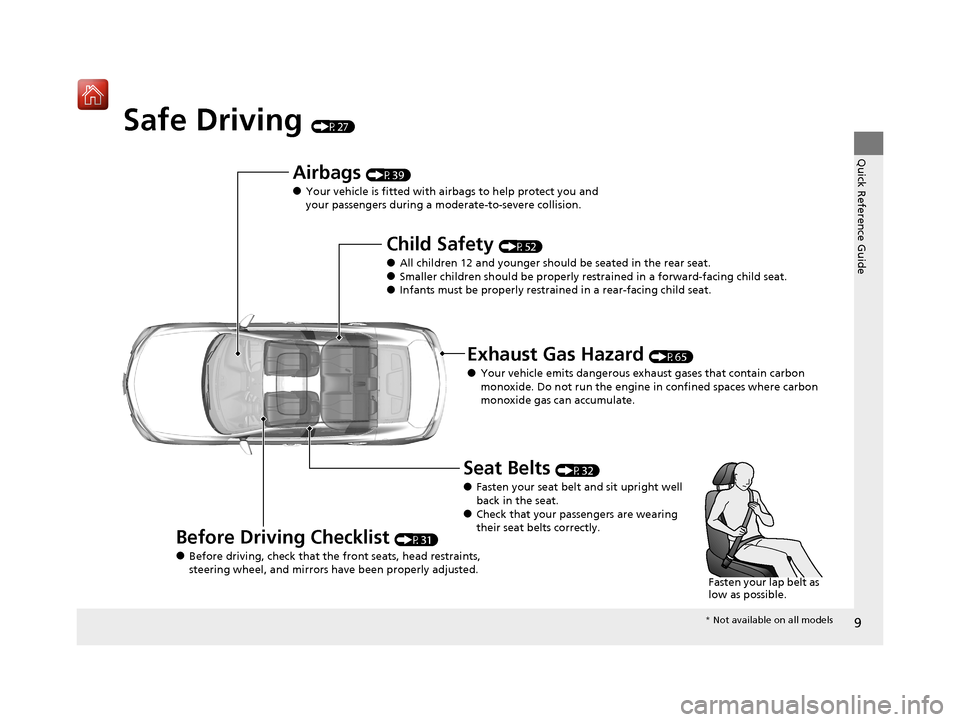
Safe Driving (P27)
Airbags (P39)
●Your vehicle is fitted with airbags to help protect you and
your passengers during a moderate-to-severe collision.
Child Safety (P52)
●All children 12 and younger should be seated in the rear seat.●Smaller children should be properly restra ined in a forward-facing child seat.●Infants must be properly restrained in a rear-facing child seat.
Exhaust Gas Hazard (P65)
●Your vehicle emits dangerous exhaust gases that contain carbon
monoxide. Do not run the engine in confined spaces where carbon
monoxide gas can accumulate.
Before Driving Checklist (P31)
●Before driving, check that the front seats, head restraints,
steering wheel, and mirrors have been properly adjusted.
Seat Belts (P32)
●Fasten your seat belt and sit upright well
back in the seat.
●Check that your passengers are wearing
their seat belts correctly.
Fasten your lap belt as
low as possible.
* Not available on all models
19 ACURA ILX-31TX66610.book 9 ページ 2020年4月17日 金曜日 午前8時52分
Page 11 of 621
10
Quick Reference Guide
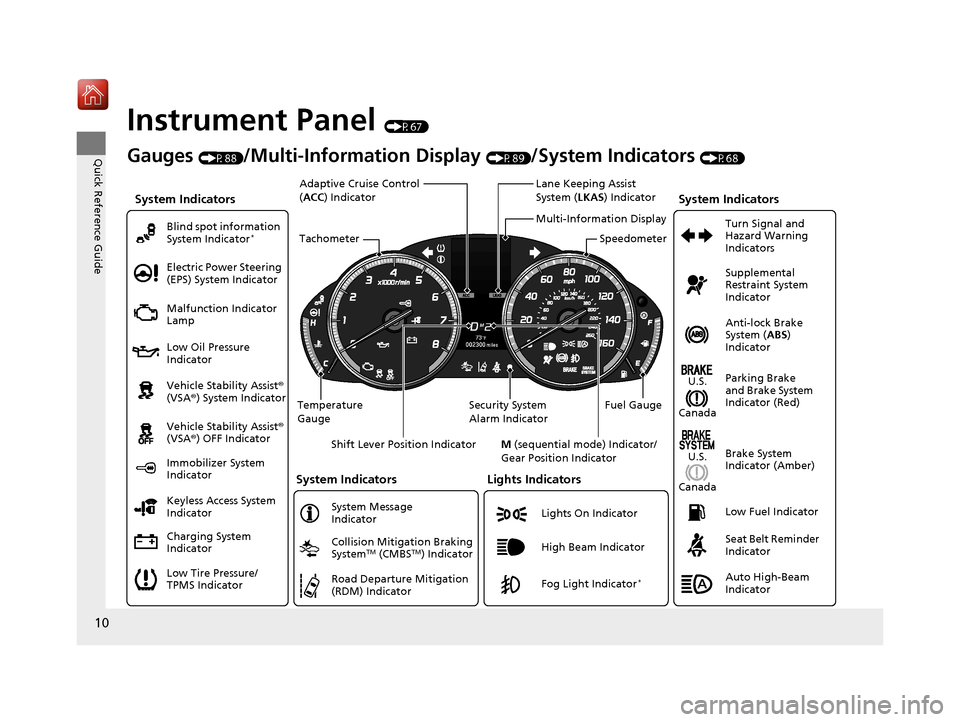
Instrument Panel (P67)
System Indicators
Malfunction Indicator
Lamp
Low Oil Pressure
Indicator
Charging System
Indicator Vehicle Stability Assist®
(VSA ®) System Indicator
Vehicle Stability Assist ®
(VSA ®) OFF Indicator
Electric Power Steering
(EPS) System Indicator
Lights Indicators
Lights On Indicator
High Beam Indicator
Immobilizer System
Indicator
System Indicators
System Message
Indicator
Gauges (P88)/Multi-Information Display (P89)/System Indicators (P68)
Low Tire Pressure/
TPMS Indicator Keyless Access System
Indicator Blind spot information
System Indicator
*
Collision Mitigation Braking
SystemTM (CMBSTM) Indicator
Road Departure Mitigation
(RDM) IndicatorFog Light Indicator*
Temperature
Gauge Security System
Alarm IndicatorFuel Gauge
Tachometer
Multi-Information Display
Speedometer
Shift Lever Position Indicator M (sequential mode) Indicator/
Gear Position Indicator
System Indicators
Lane Keeping Assist
System ( LKAS) Indicator
Adaptive Cruise Control
(
ACC ) Indicator
Anti-lock Brake
System ( ABS)
Indicator
Seat Belt Reminder
Indicator Parking Brake
and Brake System
Indicator (Red) Supplemental
Restraint System
Indicator
Low Fuel Indicator Turn Signal and
Hazard Warning
Indicators
Brake System
Indicator (Amber)
U.S.
Canada
U.S.
Canada
Auto High-Beam
Indicator
19 ACURA ILX-31TX66610.book 10 ページ 2020年4月17日 金曜日 午前8時52分
Page 14 of 621
13
Quick Reference Guide
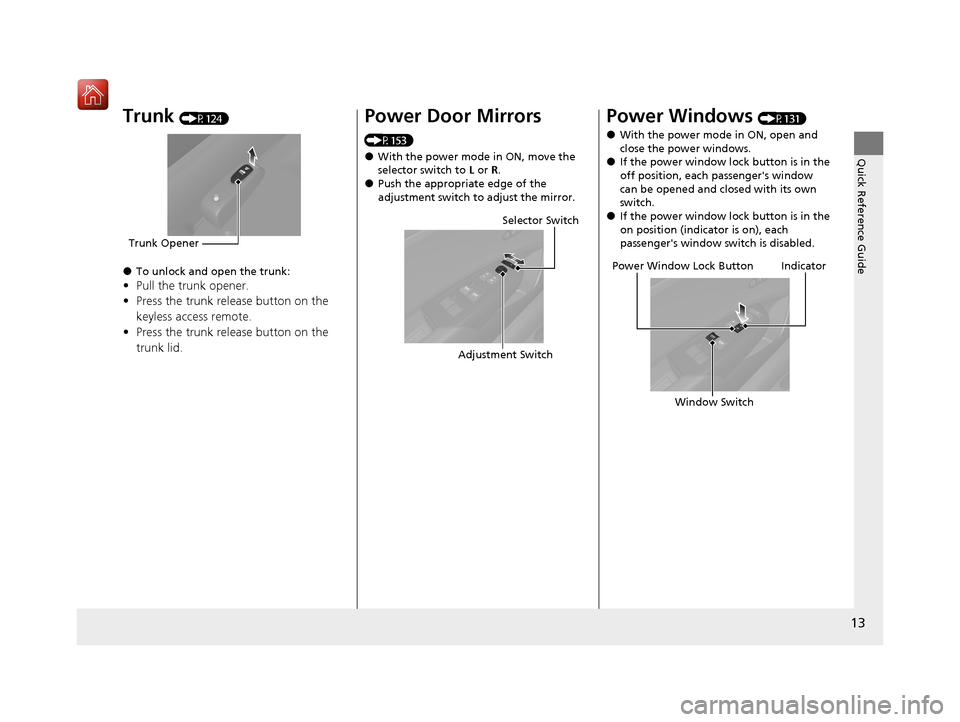
Trunk (P124)
●To unlock and open the trunk:
•Pull the trunk opener.
• Press the trunk release button on the
keyless access remote.
• Press the trunk release button on the
trunk lid.
Trunk Opener
Power Door Mirrors
(P153)
●With the power mode in ON, move the
selector switch to L or R.
●Push the appropriate edge of the
adjustment switch to adjust the mirror.
Selector Switch
Adjustment Switch
Power Windows (P131)
●With the power mode in ON, open and
close the power windows.
●If the power window lock button is in the
off position, each passenger's window
can be opened and closed with its own
switch.
●If the power window lock button is in the
on position (indicator is on), each
passenger's window switch is disabled.
Power Window Lock Button
Window SwitchIndicator
19 ACURA ILX-31TX66610.book 13 ページ 2020年4月17日 金曜日 午前8時52分
Page 20 of 621
19
Quick Reference Guide
CMBSTM On and Off
(P449)
●When a possible collision is likely
unavoidable, the CMBSTM can help you to
reduce the vehicle speed and the severity
of the collision.
●The CMBSTM is turned on every time you
start the engine.
●To turn the CMBSTM on or off, press and
hold the button until you hear a beep.
VSA ® On and Off (P438)
●The Vehicle Stability Assist ® (VSA ®) system
helps stabilize the vehicle during
cornering, and helps maintain traction
while accelerating on loose or slippery
road surfaces.
●VSA ® comes on automatically every time
you start the engine.
●To partially disable or fully restore VSA ®
function, press and ho ld the button until
you hear a beep.
Tire Pressure Monitoring
System (TPMS)
(P442)
●The TPMS monitors tire pressure.●The TPMS is turned on automatically
every time you start the engine.
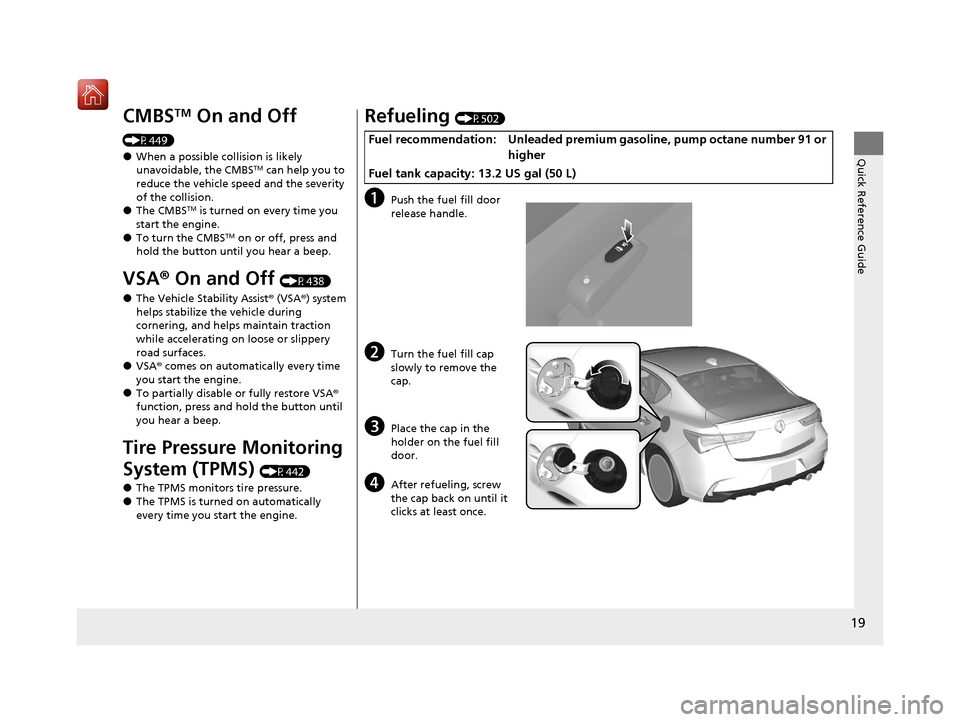
Refueling (P502)
aPush the fuel fill door
release handle.
bTurn the fuel fill cap
slowly to remove the
cap.
cPlace the cap in the
holder on the fuel fill
door.
dAfter refueling, screw
the cap back on until it
clicks at least once.
Fuel recommendation: Unleaded premium gasoline, pump octane number 91 or
higher
Fuel tank capacity: 13.2 US gal (50 L)
19 ACURA ILX-31TX66610.book 19 ページ 2020年4月17日 金曜日 午前8時52分
Page 21 of 621
20
Quick Reference Guide
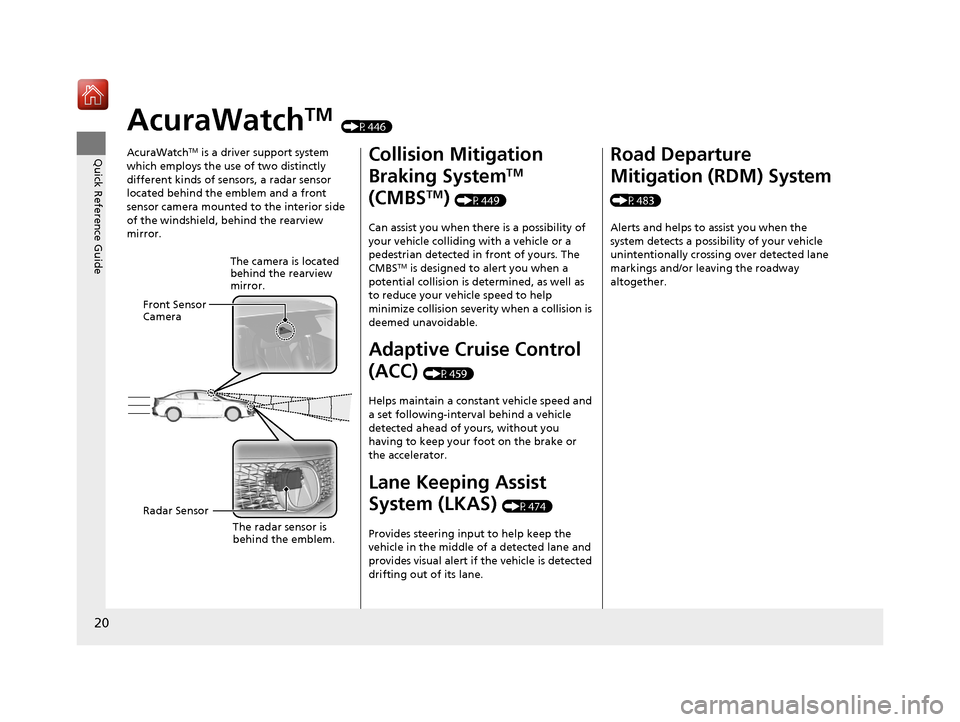
AcuraWatchTM (P446)
AcuraWatch
TM is a driver support system
which employs the use of two distinctly
different kinds of sensors, a radar sensor
located behind the emblem and a front
sensor camera mounted to the interior side
of the windshield, behind the rearview
mirror.
The camera is located
behind the rearview
mirror.
Front Sensor
Camera
Radar Sensor
The radar sensor is
behind the emblem.
Collision Mitigation
Braking System
TM
(CMBS
TM) (P449)
Can assist you when there is a possibility of
your vehicle colliding with a vehicle or a
pedestrian detected in front of yours. The
CMBS
TM is designed to alert you when a
potential collision is determined, as well as
to reduce your vehicle speed to help
minimize collision severity when a collision is
deemed unavoidable.
Adaptive Cruise Control
(ACC)
(P459)
Helps maintain a constant vehicle speed and
a set following-interval behind a vehicle
detected ahead of yours, without you
having to keep your foot on the brake or
the accelerator.
Lane Keeping Assist
System (LKAS)
(P474)
Provides steering input to help keep the
vehicle in the middle of a detected lane and
provides visual alert if the vehicle is detected
drifting out of its lane.
Road Departure
Mitigation (RDM) System
(P483) Alerts and helps to assist you when the
system detects a possibility of your vehicle
unintentionally crossing over detected lane
markings and/or leaving the roadway
altogether.
19 ACURA ILX-31TX66610.book 20 ページ 2020年4月17日 金曜日 午前8時52分
Page 24 of 621
23
Quick Reference Guide
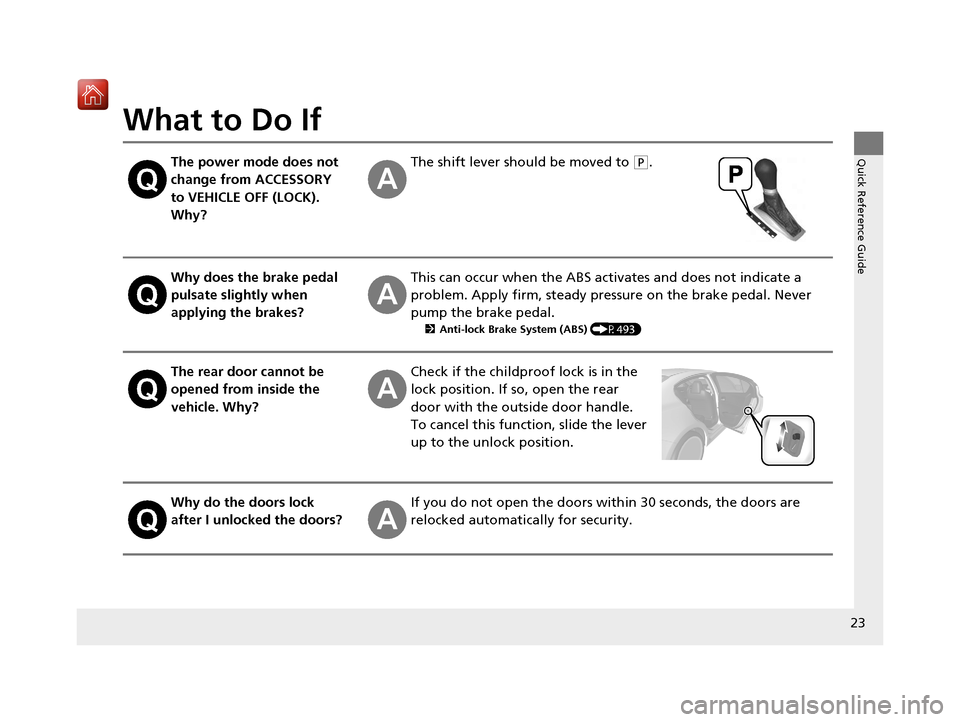
What to Do If
The power mode does not
change from ACCESSORY
to VEHICLE OFF (LOCK).
Why?The shift lever should be moved to (P.
Why does the brake pedal
pulsate slightly when
applying the brakes?This can occur when the ABS activates and does not indicate a
problem. Apply firm, steady pressure on the brake pedal. Never
pump the brake pedal.
2Anti-lock Brake System (ABS) (P493)
The rear door cannot be
opened from inside the
vehicle. Why?Check if the childproof lock is in the
lock position. If so, open the rear
door with the outside door handle.
To cancel this function, slide the lever
up to the unlock position.
Why do the doors lock
after I unlocked the doors?If you do not open the doors within 30 seconds, the doors are
relocked automatically for security.
19 ACURA ILX-31TX66610.book 23 ページ 2020年4月17日 金曜日 午前8時52分