Acc Acura ILX 2019 Owner's Guide
[x] Cancel search | Manufacturer: ACURA, Model Year: 2019, Model line: ILX, Model: Acura ILX 2019Pages: 621, PDF Size: 34.8 MB
Page 65 of 621

uuChild Safety uSafety of Larger Children
64
Safe DrivingIf a lap/shoulder seat belt cannot be used
properly, position the child in a booster seat in
the rear seat. For the ch ild’s safety, check that
the child meets the booster seat
manufacturer’s recommendations.
Your vehicle has a rear seat where children can be properly restrained. If you ever
have to carry a group of children, and a child must ride in front:
• Make sure you read and fully understand the instructions and safety information
in this manual.
• Move the front passenger seat as far back as possible.
• Have the child sit upright and well back in the seat.
• Check that the seat belt is properly positi oned so that the child is secure in the
seat.
■Monitoring child passengers
We strongly recommend that you keep an eye on child passengers. Even older, more
mature children sometimes need to be remind ed to fasten their seat belts and sit up
properly.
■Booster Seats1 Booster Seats
When installing a booster seat , make sure to read the
instructions that came with it, and install the seat
accordingly.
There are high- and low-type booster seats. Choose a
booster seat that allows the child to wear the seat
belt correctly.
Some U.S. states and Canadian provinces and
territories require children to use a booster seat until
they reach a given age or weight (e.g. 6 years or 60
lbs). Be sure to check current laws in the state or
province, or territory where you intend to drive.
■Protecting Larger Children Final Checks
19 ACURA ILX-31TX66610.book 64 ページ 2020年4月17日 金曜日 午前8時52分
Page 70 of 621
69
uuIndicators u
Continued
Instrument Panel
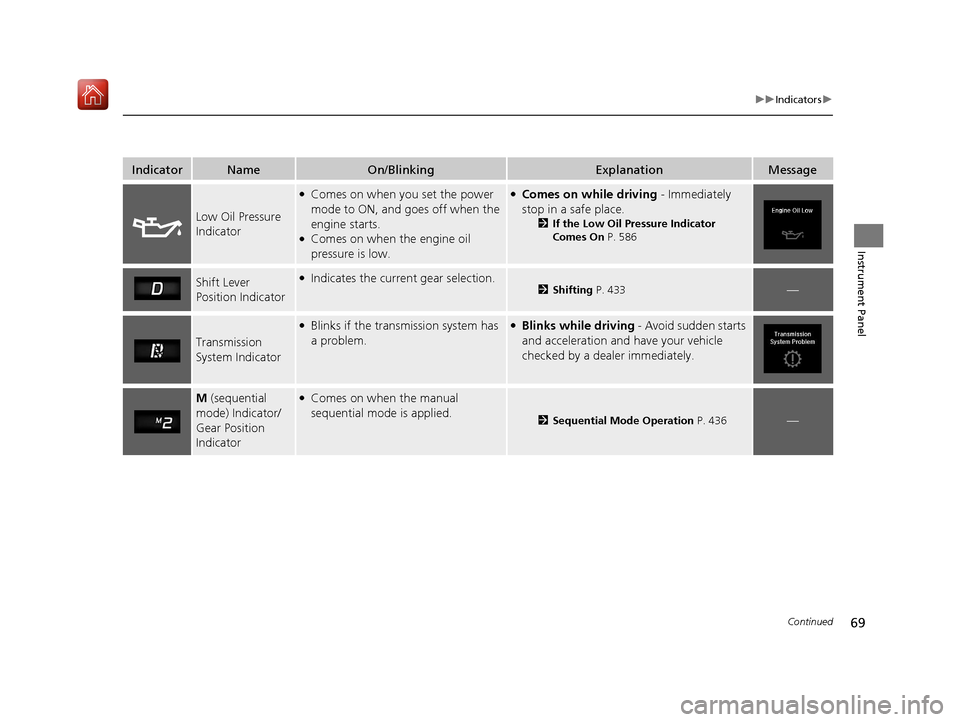
IndicatorNameOn/BlinkingExplanationMessage
Low Oil Pressure
Indicator
●Comes on when you set the power
mode to ON, and goes off when the
engine starts.
●Comes on when the engine oil
pressure is low.
●Comes on while driving - Immediately
stop in a safe place.
2 If the Low Oil Pressure Indicator
Comes On P. 586
Shift Lever
Position Indicator●Indicates the current gear selection.2Shifting P. 433—
Transmission
System Indicator
●Blinks if the transmission system has
a problem.●Blinks while driving - Avoid sudden starts
and acceleration and have your vehicle
checked by a dealer immediately.
M (sequential
mode) Indicator/
Gear Position
Indicator●Comes on when the manual
sequential mode is applied.
2 Sequential Mode Operation P. 436—
19 ACURA ILX-31TX66610.book 69 ページ 2020年4月17日 金曜日 午前8時52分
Page 76 of 621
75
uuIndicators u
Continued
Instrument Panel
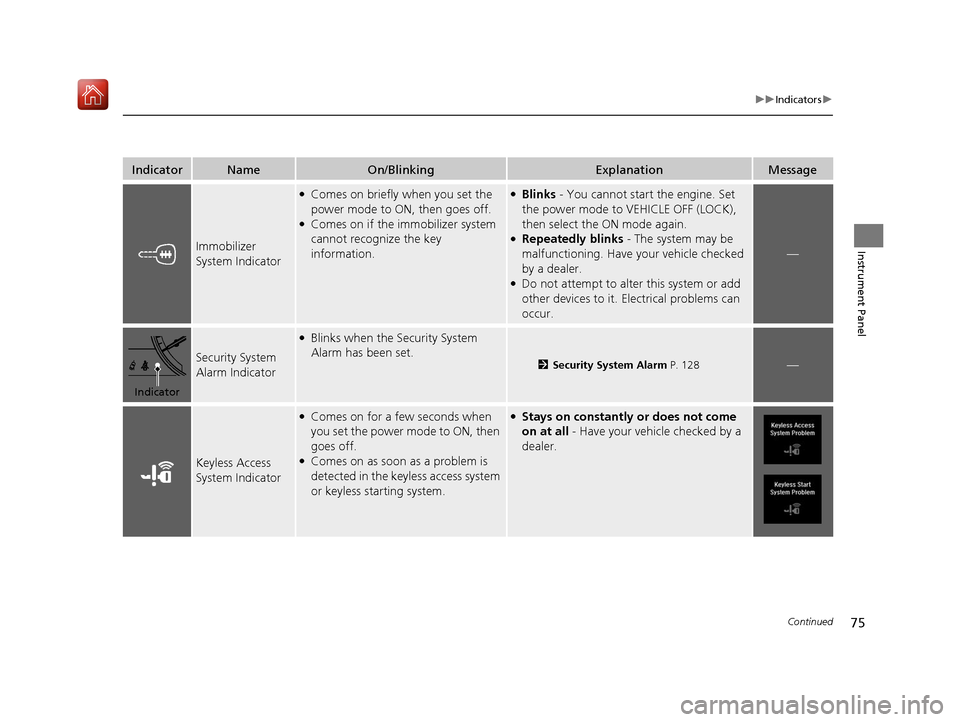
IndicatorNameOn/BlinkingExplanationMessage
Immobilizer
System Indicator
●Comes on briefly when you set the
power mode to ON, then goes off.
●Comes on if the immobilizer system
cannot recognize the key
information.
●Blinks - You cannot start the engine. Set
the power mode to VEHICLE OFF (LOCK),
then select the ON mode again.
●Repeatedly blinks - The system may be
malfunctioning. Have your vehicle checked
by a dealer.
●Do not attempt to alter this system or add
other devices to it. Electrical problems can
occur.
—
Security System
Alarm Indicator
●Blinks when the Security System
Alarm has been set.
2 Security System Alarm P. 128—
Keyless Access
System Indicator
●Comes on for a few seconds when
you set the power mode to ON, then
goes off.
●Comes on as soon as a problem is
detected in the keyless access system
or keyless starting system.
●Stays on constantly or does not come
on at all - Have your vehicle checked by a
dealer.
Indicator
19 ACURA ILX-31TX66610.book 75 ページ 2020年4月17日 金曜日 午前8時52分
Page 77 of 621

76
uuIndicators u
Instrument Panel
IndicatorNameOn/BlinkingExplanationMessage
Road Departure
Mitigation (RDM)
Indicator
●Comes on for a few seconds when
you change the power mode to ON,
then goes off.
●Comes on if there is a problem with
the RDM system.
●Stays on constantly - Have your vehicle
checked by a dealer.
●Comes on when the RDM system
shuts itself off.●Stays on - The temperature inside the
camera is too high.
Use the climate control system to cool down
the camera.
The system activates when the temperature
inside the camera cools down.
2 Front Sensor Camera P. 488
●Stays on - The area around the camera is
blocked by dirt, mud, etc. Stop your vehicle
in a safe place, and wipe it off with a soft
cloth.
●Have your vehicle checked by a dealer if the
indicator and message come back on after
you cleaned the area around the camera.
2 Front Sensor Camera P. 488
Adaptive Cruise
Control (ACC)
Indicator (Amber)
●Comes on for a few seconds when
you set the power mode to ON, then
goes off.
●Comes on if there is a problem with
ACC.
●Comes on while driving - Have your
vehicle checked by a dealer.
19 ACURA ILX-31TX66610.book 76 ページ 2020年4月17日 金曜日 午前8時52分
Page 78 of 621

77
uuIndicators u
Continued
Instrument Panel
IndicatorNameOn/BlinkingExplanationMessage
Adaptive Cruise
Control (ACC)
Indicator (Green)
●Comes on when you press the MAIN
button.2 Adaptive Cruise Control (ACC) P. 459—
●Comes on if anything covers the
radar sensor cover and prevents the
sensor from detecting a vehicle in
front.
●May come on when driving in bad
weather (rain, snow, fog, etc.)
●ACC has been automatically
canceled.
●When the radar sensor gets dirty, stop your
vehicle in a safe place, and wipe off dirt
using a soft cloth.
●Have your vehicle checked by a dealer if the
message does not disappear even after you
clean the sensor cover.
●Comes on when ACC is in operation,
but the temperature inside the front
sensor camera is too high. ACC
cancels automatically. The beeper
sounds simultaneously.●Use the climate control system to cool down
the camera.
●Goes off - The camera has been cooled
down and the system activates normally.
●Comes on when the area around the
camera is blocked by dirt, mud, etc.
Stop your vehicle in a safe place, and
wipe it off with a soft cloth.
●May come on when driving in bad
weather (rain, snow, fog, etc.)
●Have your vehicle checked by a dealer if the
indicator and message come back on after
you cleaned the area around the camera.
19 ACURA ILX-31TX66610.book 77 ページ 2020年4月17日 金曜日 午前8時52分
Page 80 of 621

79
uuIndicators u
Continued
Instrument Panel
IndicatorNameOn/BlinkingExplanationMessage
Blind spot
information
System Indicator
*
●Comes on for a few seconds when
you change the power mode to ON,
then goes off.
●Stays on while blind spot information
system is turned off.
2Customized Features P. 95
●Comes on when mud, snow, or ice
accumulates in the vicinity of sensor.●Comes on while driving - Remove the
obstacle in the vicinity of sensor.
2 Blind spot information System* P. 439
●Comes on if there is a problem with
the system.●Comes on while driving - Have your
vehicle checked by a dealer.
Collision
Mitigation Braking
System
TM
(CMBSTM)
Indicator
●Comes on for a few seconds when
you change the power mode to ON,
then goes off.
●Comes on when you deactivate the
CMBSTM. A multi-information display
message appears for five seconds.
●Comes on if there is a problem with
the CMBSTM.
●Stays on constantly without the
CMBSTM off - Have your vehicle checked by
a dealer.
2 Collision Mitigation Braking SystemTM
(CMBSTM) P. 449
* Not available on all models
19 ACURA ILX-31TX66610.book 79 ページ 2020年4月17日 金曜日 午前8時52分
Page 85 of 621
84
uuIndicators uMulti-Information Display Warn ing and Information Messages
Instrument Panel
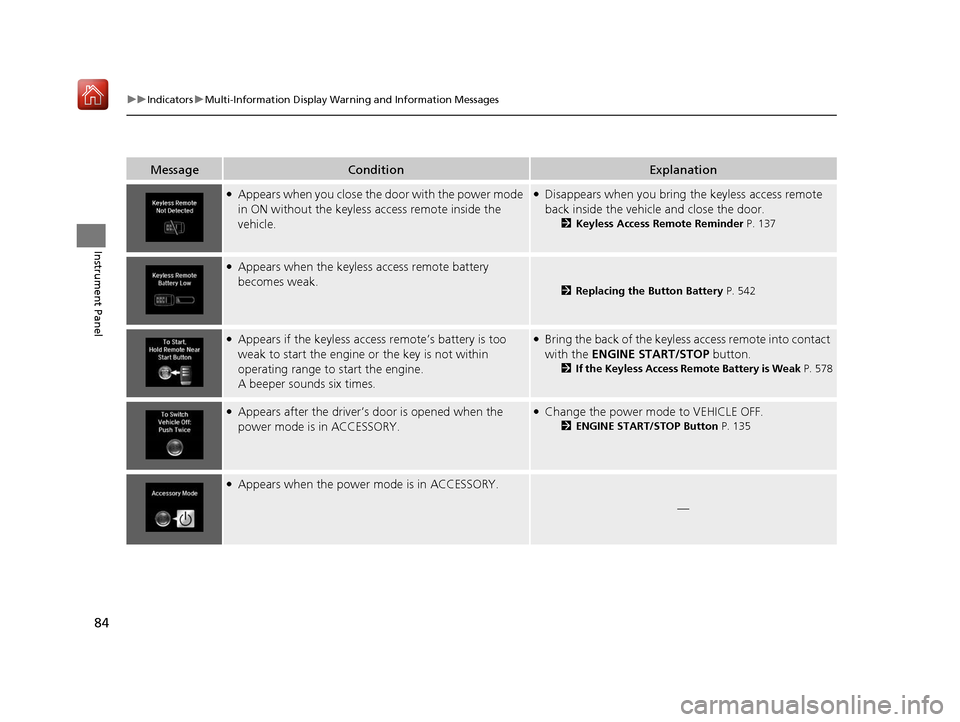
MessageConditionExplanation
●Appears when you close the door with the power mode
in ON without the keyless access remote inside the
vehicle.●Disappears when you bring the keyless access remote
back inside the vehicle and close the door.
2Keyless Access Remote Reminder P. 137
●Appears when the keyless access remote battery
becomes weak.
2Replacing the Button Battery P. 542
●Appears if the keyless access remote’s battery is too
weak to start the engine or the key is not within
operating range to start the engine.
A beeper sounds six times.●Bring the back of the keyless access remote into contact
with the ENGINE START/STOP button.
2If the Keyless Access Remote Battery is Weak P. 578
●Appears after the driver’s door is opened when the
power mode is in ACCESSORY.●Change the power mode to VEHICLE OFF.
2 ENGINE START/STOP Button P. 135
●Appears when the power mode is in ACCESSORY.
—
19 ACURA ILX-31TX66610.book 84 ページ 2020年4月17日 金曜日 午前8時52分
Page 86 of 621
85
uuIndicators uMulti-Information Display Warning and Information Messages
Continued
Instrument Panel
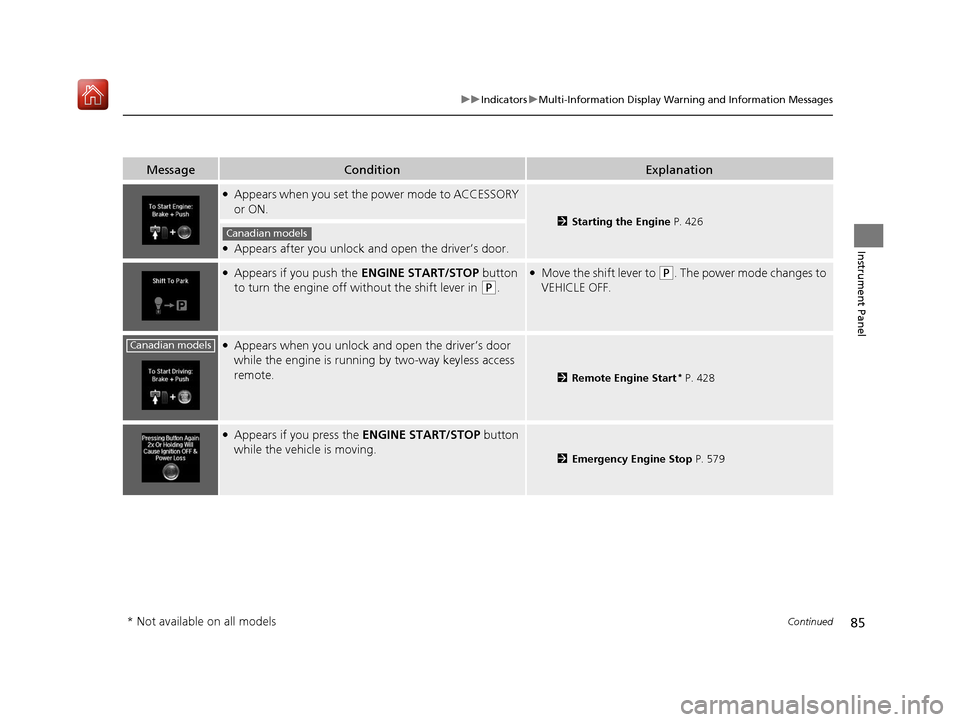
MessageConditionExplanation
●Appears when you set the power mode to ACCESSORY
or ON.
2 Starting the Engine P. 426
●Appears after you unlock and open the driver’s door.
●Appears if you push the ENGINE START/STOP button
to turn the engine off wi thout the shift lever in
(P.
●Move the shift lever to (P. The power mode changes to
VEHICLE OFF.
●Appears when you unlock an d open the driver’s door
while the engine is running by two-way keyless access
remote.
2 Remote Engine Start* P. 428
●Appears if you press the ENGINE START/STOP button
while the vehicle is moving.
2 Emergency Engine Stop P. 579
Canadian models
Canadian models
* Not available on all models
19 ACURA ILX-31TX66610.book 85 ページ 2020年4月17日 金曜日 午前8時52分
Page 87 of 621
86
uuIndicators uMulti-Information Display Warn ing and Information Messages
Instrument Panel
MessageConditionExplanation
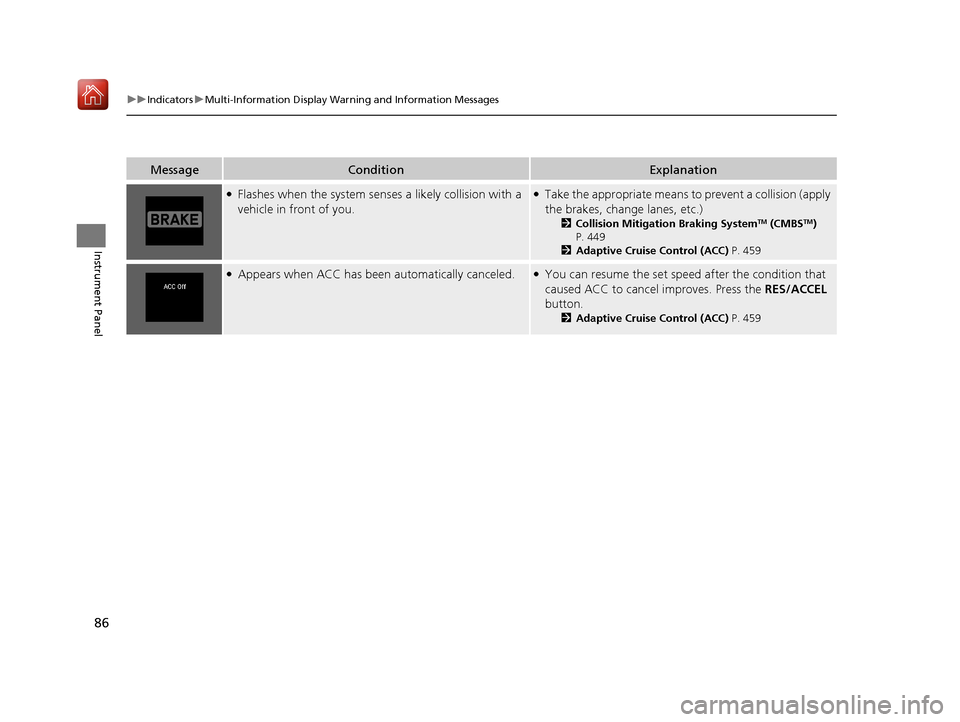
●Flashes when the system senses a likely collision with a
vehicle in front of you.●Take the appropriate means to prevent a collision (apply
the brakes, change lanes, etc.)
2 Collision Mitigation Braking SystemTM (CMBSTM)
P. 449
2 Adaptive Cruise Control (ACC) P. 459
●Appears when ACC has been automatically canceled.●You can resume the set speed after the condition that
caused ACC to cancel improves. Press the RES/ACCEL
button.
2 Adaptive Cruise Control (ACC) P. 459
19 ACURA ILX-31TX66610.book 86 ページ 2020年4月17日 金曜日 午前8時52分
Page 93 of 621
uuGauges and Multi-Information Display uMulti-Information Display
92
Instrument Panel
Shows the total number of miles or kilome ters that your vehicle has accumulated.
Shows the total number of miles or kilomete rs driven since the last reset. Meters A
and B can be used to measure two separate trips.
■Resetting a trip meter
To reset a trip meter, display it, then press and hold the SEL/RESET button. The trip
meter is reset to 0.0.
Shows the outside temperature in Fahr enheit (U.S.) or Celsius (Canada).
■Adjusting the outside temperature display
Adjust the temperature reading up to ± 5°F (U.S.) or ± 3°C (Canada) if the
temperature reading seems incorrect.
Shows the estimated average fuel econom y of each trip meter in mpg (U.S.) or
l/100 km (Canada). The display is updated at set intervals. When a trip meter is reset,
the average fuel economy is also reset.
■Odometer
■Trip Meter
■Outside Temperature
■Average Fuel Economy
1 Trip Meter
Switch between trip meter A and trip meter B by
pressing the SEL/RESET button.
1Outside Temperature
The temperature sensor is in the front bumper.
Road heat and exhaust fr om another vehicle can
affect the temperature reading when your vehicle
speed is less than 19 mph (30 km/h).
It may take several minutes for the display to be
updated after the temperature reading has stabilized.
Use the multi-information display’s customized
features to correct the temperature.
2 Customized Features P. 95, 310
1Average Fuel Economy
You can change when to reset the average fuel
economy.
2 Customized Features P. 95, 310
19 ACURA ILX-31TX66610.book 92 ページ 2020年4月17日 金曜日 午前8時52分