radio Acura ILX 2020 Owner's Guide
[x] Cancel search | Manufacturer: ACURA, Model Year: 2020, Model line: ILX, Model: Acura ILX 2020Pages: 621, PDF Size: 34.94 MB
Page 287 of 621

286
Features
General Information on the Audio System
SiriusXM® Radio Service*
1. You need your radio ID ready before regist ering for subscription. To see the ID in
the On Demand Multi-Use DisplayTM, select channel up/down icons until CH 000
and the radio ID appears.
2. Have your radio ID and credit card num ber ready, and either call or visit the
SiriusXM ® website to subscribe.
Switch to the SiriusXM ® mode by pressing the MODE button on the steering wheel,
or through the On Demand Multi-Use Display
TM, and stay in this mode for about 30
minutes until the service is activated. Make sure your vehicle is in an open area with
good reception.
Loading...:
SiriusXM ® is loading the audio or program information.
No Signal:
The signal is too weak in the current location.
Unsubscribed channel:
You are not subscribed to the channel selected.
Unavailable channel:
No such channel exists, the channel is not pa rt of your subscription, or the artist or
title information is unavailable.
Check the antenna, Disconnect ed antenna, Shorted antenna:
There is a problem with the SiriusXM ® antenna. Contact a dealer.
■Subscribing to SiriusXM® Radio
■Receiving SiriusXM ® Radio
■SiriusXM ® Radio Display Messages
1 Subscribing to SiriusXM ® Radio
Contact Information for SiriusXM ® Radio:
•U.S.: SiriusXM ® Radio at www.siriusxm.com/
subscribenow , or 1-866-635-2349.
•Canada: SiriusXM ® Canada at www.siriusxm.ca/
subscribe-now , or 1-877-209-0079.
1Receiving SiriusXM ® Radio
The SiriusXM ® satellites are in orbit over the equator;
therefore, objects south of the vehicle may cause
satellite rece ption interruptions. Sa tellite signals are
more likely to be blocked by tall buildings and
mountains the farther north you travel from the
equator.
You may experience rece ption problems under the
following circumstances:
•In a location with an obstruction to the south of
your vehicle.
•In tunnels
•On the lower level of a multi-tiered road
•Large items carried on the roof rack
* Not available on all models
20 ACURA ILX-31TX66710.book 286 ページ 2020年4月16日 木曜日 午後8時46分
Page 332 of 621

331
uuCustomized Features u
Continued
Features
Sync Display Brightness
Brightness
Contrast
Black Level
Beep
Keyboard
Screen Settings
HD Radio Mode*Other
Cover Art
* Not available on all models
20 ACURA ILX-31TX66710.book 331 ページ 2020年4月16日 木曜日 午後8時46分
Page 335 of 621

334
uuCustomized Features u
Features
*1:Default SettingSetup
Group Customizable Features
Description Selectable Settings
Audio
SettingsOtherHD Radio Mode*Selects whether the audio system automatically
switches to the digital radio waves or receives the
analog waves only. Auto*1/
Analog
Cover Art Turns on and off the cover art display. On
*1/Off
Screen Settings
Sync Display Brightness
Selects whether the screen brightness
synchronizes with the instruments panel
brightness.
Off /On*1
BrightnessChanges the brightness of the On Demand Multi-
Use DisplayTM.—
ContrastChanges the contrast of the On Demand Multi-
Use DisplayTM.—
Black LevelChanges the black level of the On Demand Multi-
Use DisplayTM.—
BeepMutes a beep that sounds every time you touch
the screen.Off /On*1
KeyboardChanges the on-screen keyboard from the
alphabetical order to the qwerty type.Alphabet /QWERTY*1
* Not available on all models
20 ACURA ILX-31TX66710.book 334 ページ 2020年4月16日 木曜日 午後8時46分
Page 428 of 621

Continued427
uuWhen Driving uStarting the Engine
Driving
3. Press the ENGINE START/STOP button
without depressing the accelerator pedal.
You can turn the engine off when the vehicle is completely stopped.
1. Put the transmission into
(P.
2. Press the ENGINE START/STOP button.
■Stopping the Engine
1Starting the Engine
Bring the keyless access remote close to the ENGINE
START/STOP button if the batte ry in the keyless
access remote is weak. 2 If the Keyless Access Remote Battery is
Weak P. 580
The engine may not start if the keyless access remote
is subjected to strong radio waves.
Do not hold the ENGINE START/STOP button to
start the engine.
If the engine does not start, wait at least 30 seconds
before starting the engine again.
The immobilizer system pr otects your vehicle from
theft.
If an improperly c oded device is used, the engine’s
fuel system is disabled. 2 Immobilizer System P. 128
20 ACURA ILX-31TX66710.book 427 ページ 2020年4月16日 木曜日 午後8時46分
Page 441 of 621
uuWhen Driving uBlind spot information System*
440
Driving
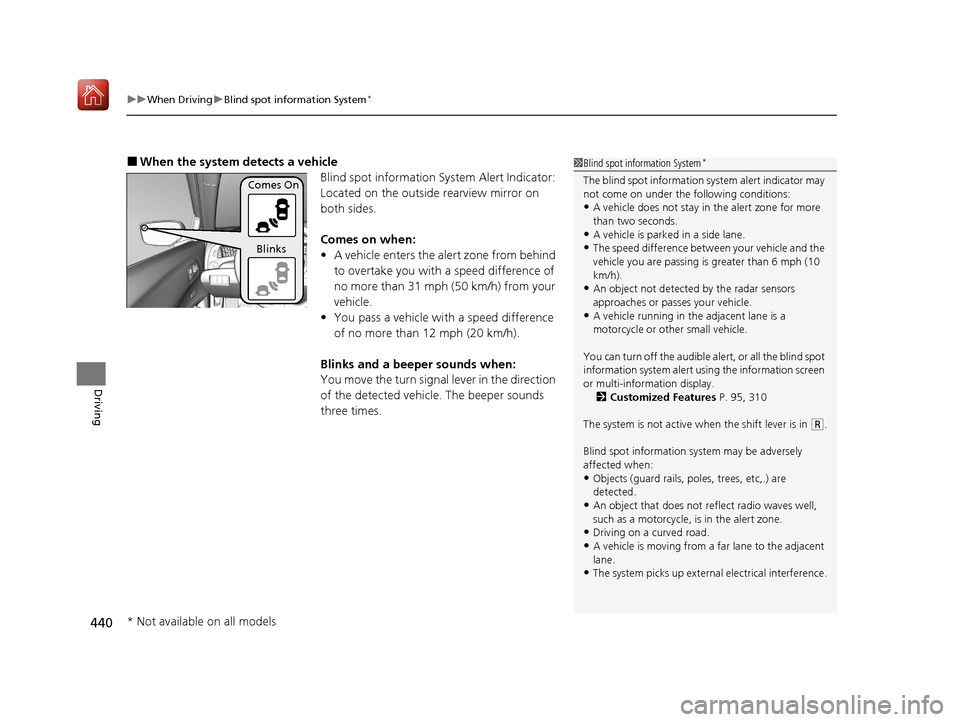
■When the system detects a vehicle
Blind spot information System Alert Indicator:
Located on the outside rearview mirror on
both sides.
Comes on when:
•A vehicle enters the alert zone from behind
to overtake you with a speed difference of
no more than 31 mph (50 km/h) from your
vehicle.
• You pass a vehicle with a speed difference
of no more than 12 mph (20 km/h).
Blinks and a beeper sounds when:
You move the turn signal lever in the direction
of the detected vehicle. The beeper sounds
three times.1 Blind spot information System*
The blind spot information system alert indicator may
not come on under the following conditions:
•A vehicle does not stay in the alert zone for more
than two seconds.
•A vehicle is parked in a side lane.
•The speed difference betw een your vehicle and the
vehicle you are passing is greater than 6 mph (10
km/h).
•An object not detected by the radar sensors
approaches or passes your vehicle.
•A vehicle running in the adjacent lane is a
motorcycle or other small vehicle.
You can turn off the audible al ert, or all the blind spot
information system alert us ing the information screen
or multi-information display. 2 Customized Features P. 95, 310
The system is not active when the shift lever is in
( R.
Blind spot information sy stem may be adversely
affected when:
•Objects (guard rails, poles, trees, etc,.) are
detected.
•An object that does not re flect radio waves well,
such as a motorcycle, is in the alert zone.
•Driving on a curved road.
•A vehicle is moving from a far lane to the adjacent
lane.
•The system picks up external electrical interference.
Comes On
Blinks
* Not available on all models
20 ACURA ILX-31TX66710.book 440 ページ 2020年4月16日 木曜日 午後8時46分
Page 500 of 621
Continued499
uuParking Your Vehicle uCross Traffic Monitor*
Driving
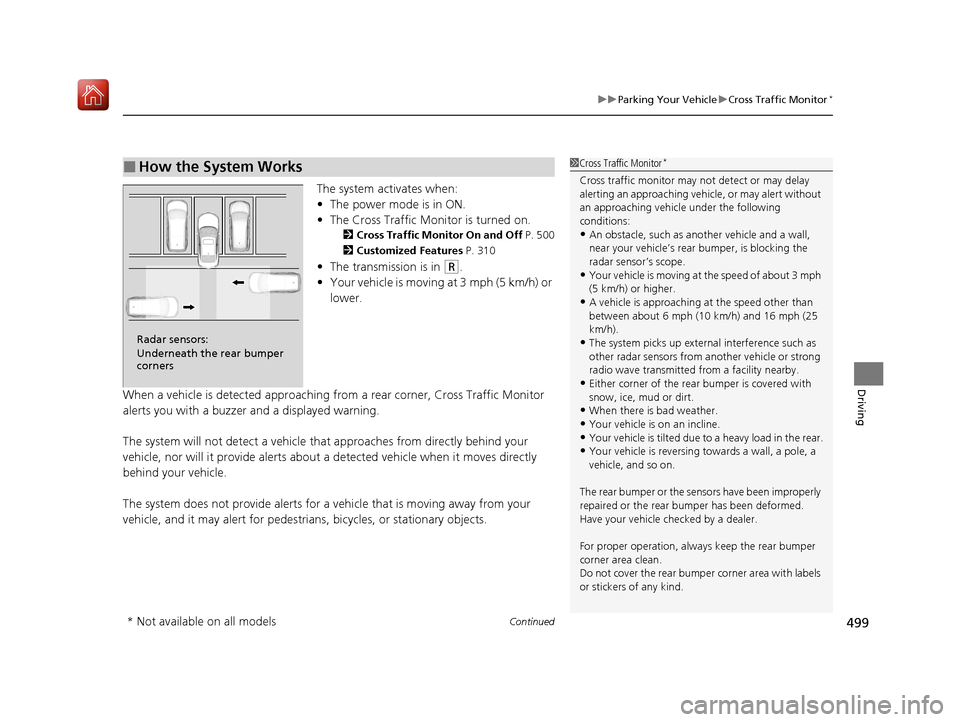
The system activates when:
• The power mode is in ON.
• The Cross Traffic Monitor is turned on.
2 Cross Traffic Monitor On and Off P. 500
2 Customized Features P. 310
•The transmission is in (R.
• Your vehicle is moving at 3 mph (5 km/h) or
lower.
When a vehicle is detected approaching from a rear corner, Cross Traffic Monitor
alerts you with a buzzer and a displayed warning.
The system will not detect a vehicle that approaches from directly behind your
vehicle, nor will it provide alerts about a detected vehicle when it moves directly
behind your vehicle.
The system does not provide alerts for a vehicle that is moving away from your
vehicle, and it may alert for pedestrians, bicycles, or stationary objects.
■How the System Works1 Cross Traffic Monitor*
Cross traffic monitor may not detect or may delay
alerting an approaching vehi cle, or may alert without
an approaching vehicle under the following
conditions:
•An obstacle, such as a nother vehicle and a wall,
near your vehicle’s rear bumper, is blocking the
radar sensor’s scope.
•Your vehicle is moving at the speed of about 3 mph
(5 km/h) or higher.
•A vehicle is approaching at the speed other than
between about 6 mph (10 km/h) and 16 mph (25
km/h).
•The system picks up external interference such as
other radar sensors from an other vehicle or strong
radio wave transmitted fr om a facility nearby.
•Either corner of the rear bumper is covered with
snow, ice, mud or dirt.
•When there is bad weather.
•Your vehicle is on an incline.
•Your vehicle is tilted due to a heavy load in the rear.•Your vehicle is reversing towards a wall, a pole, a
vehicle, and so on.
The rear bumper or the sens ors have been improperly
repaired or the rear bum per has been deformed.
Have your vehicle checked by a dealer.
For proper operation, always keep the rear bumper
corner area clean.
Do not cover the rear bumper corner area with labels
or stickers of any kind.
Radar sensors:
Underneath the rear bumper
corners
* Not available on all models
20 ACURA ILX-31TX66710.book 499 ページ 2020年4月16日 木曜日 午後8時46分
Page 598 of 621
597
Information
This chapter includes your vehicle's specifications, locations of identification numbers, and other
information required by regulation.
Specifications.................................... 598
Identification Numbers Vehicle Identification Number (VIN), Engine Number, and Transmission
Number ......................................... 600
Devices that Emit Radio Waves ....... 601
Reporting Safety Defects ................. 602Emissions Testing
Testing of Readiness Codes.............. 603
Warranty Coverages ........................ 605
Authorized Manuals ......................... 607
Client Service Information ............... 608
20 ACURA ILX-31TX66710.book 597 ページ 2020年4月16日 木曜日 午後8時46分
Page 602 of 621
601
Information
Devices that Emit Radio Waves
Each radio frequency device installed in the vehicle conforms to the requirements
and standards of the regulation listed below:
As required by the FCC:
This device complies with Part 15 of the FCC rules. Operation is
subject to the following two cond itions: (1) This device may not
cause harmful interferenc e, and (2) this device must accept any
interference received, including interference that may cause
undesired operation.
Changes or modifications not ex pressly approved by the party
responsible for compliance could void the user's authority to
operate the equipment.
This device complies with Industry Canada licence-exempt RSS standard(s).
Operation is subject to the following two conditions: (1) this device may not cause
interference, and (2) this device must acce pt any interference, including interference
that may cause undesired operation of the device.
20 ACURA ILX-31TX66710.book 601 ページ 2020年4月16日 木曜日 午後8時46分
Page 612 of 621
611
uuClient Service Information u
Information
Requirements to access Pandora ®
• Latest version of the Pandora app
installed on your Android, Blackberry, or
iPhone.
• Registered Pandora account (you can
create a free account at
www.pandora.com
smartphone)
• Connection to the in ternet via Wi-Fi or
cellular data network.
■Disclaimer of Pandora ®*Limitations
•Access to Pandora requires an active
internet connection
• Ability to access Pandora through this
system is subject to change without
notice
• Certain functionality of Pandora service is
not available when accessing the service
through this system including, but not
limited to, creating ne w stations, deleting
stations, emailing current stations,
buying tracks, viewing additional text
information, logging in to Pandora, and
adjusting Cell Network Audio Quality.
Pandora internet radio is a music service
not affiliated with HONDA. More
information is available at http://
www.pandora.com
Pandora logo, and the Pandora trade
dress are trademarks or registered
trademarks of Pandora Media, Inc., used
with permission.
• Mobile access requires a smartphone
with an active data plan. Standard data
rates may apply.
• Pandora is only avai lable in the United
States.
* Not available on all models
20 ACURA ILX-31TX66710.book 611 ページ 2020年4月16日 木曜日 午後8時46分
Page 613 of 621
Index
612
Index
Index
A
AAC.................................................... 235, 260
ABS (Anti-lock Brake System) ................... 494
Accessories and Modifications ................. 553
Accessory Power Sockets .......................... 169
AcuraLink .................................................. 410
AcuraWatch
TM..................................... 20, 446
Adaptive Cruise Control (ACC) ........... 76, 459
Additives Coolant ................................................... 523
Engine Oil ................................................ 518
Washer .................................................... 526
Additives, Engine Oil ................................ 518
Adjusting
Armrest ................................................... 163
Front Seats .............................................. 154
Head Restraints........................................ 158
Mirrors .................................................... 152
Rear Seat ................................................. 162
Steering Wheel ........................................ 149
Temperature .............................................. 92
Air Conditioning System (Climate Control
System) .................................................... 171
Changing the Mode ................................ 171
Defrosting the Windshield and
Windows ............................................... 172
Maintenance ........................................... 546
Recirculation/Fresh Air Mode ................... 171
Sensors .................................................... 174
Synchronization Mode ............................. 173
Using Automatic Climate Control ............ 171 Air Pressure
....................................... 535, 599
Airbags ........................................................ 39
Advanced Airbags ..................................... 45
After a Collision ........................................ 42
Airbag Care............................................... 51
Event Data Recorder .................................... 0
Front Airbags (SRS) .................................... 42
Indicator.............................................. 49, 72
Passenger Airbag Off Indicator .................. 50
Sensors ..................................................... 39
Side Airbags .............................................. 46
Side Curtain Airbags.................................. 48
AM/FM Radio .................................... 190, 221
Android Auto ........................................... 270
Anti-lock Brake System (ABS) .................. 494
Indicator.................................................... 71
Apple CarPlay ........................................... 266
Armrest ..................................................... 163
Audio Remote Controls ........................... 181
Audio System ............................................ 176
Adjusting the Sound........................ 188, 216
Auxiliary Input Jack.................................. 179
Bluetooth ® Audio ............................ 204, 263
CD .................................................. 192, 235
Display Setup .................................. 189, 217
Error Messages ........................................ 275
General Information ................................ 286
HDD ........................................................ 238
iPhone............................................. 258, 289
iPod ................................................ 195, 251
MP3/WMA/AAC ...................... 201, 235, 260 Pandora
®...................................... 198, 258
Reactivating ............................................ 180
Recommended CDs ................................ 287
Recommended Devices ........................... 289
Security Code ......................................... 180
Siri Eyes Free ........................................... 265
SiriusXM ® Radio ...................................... 224
Song By VoiceTM (SBV) ............................. 254
Theft Protection ...................................... 180
USB Adapter Cable ................................. 177
USB Flash Drives...................... 201, 260, 289
USB Port ................................................. 178
Audio/Information Screen ....................... 184
Authorized Manuals ................................ 607
Auto Door Locking/Unlocking ................ 123
Customize ...................................... 101, 323
Auto High-Beam ...................................... 143
Automatic Lighting .................................. 140
Auxiliary Input Jack ................................. 179
Average Fuel Economy .............................. 92
Average Speed ........................................... 93
B
Battery...................................................... 543
Charging System Indicator ................ 70, 588
Jump Starting ......................................... 582
Maintenance (Checking the Battery) ....... 543
Maintenance (Replacing) ......................... 544
Belts (Seat) .................................................. 32
Beverage Holders ..................................... 168
20 ACURA ILX-31TX66710.book 612 ページ 2020年4月16日 木曜日 午後8時46分