service Acura ILX 2020 Workshop Manual
[x] Cancel search | Manufacturer: ACURA, Model Year: 2020, Model line: ILX, Model: Acura ILX 2020Pages: 621, PDF Size: 34.94 MB
Page 568 of 621

Continued567
uuIf a Tire Goes Flat uTemporarily Repairing a Flat Tire
Handling the Unexpected
• Greater than 25 psi (175 kPa), but less
than front: 35 psi (240 kPa)/rear: 33 psi
(230 kPa):
Turn the air compressor on to inflate the
tire until the tire pressure reaches to front:
35 psi (240 kPa)/rear: 33 psi (230 kPa).
• Greater than 25 psi (175 kPa), but less
than front: 33 psi (230 kPa)/rear: 32 psi
(220 kPa):
Turn the air compressor on to inflate the
tire until the tire pressure reaches to front:
33 psi (230 kPa)/rear: 32 psi (220 kPa).
2 Inflating an Under-inflated Tire P. 569
Then drive carefully for 10 more minutes
or until you reach the nearest service
station. Do not exceed 50 mph (80 km/h).
u You should repeat this procedure as
long as the air pressu re is within this
range.
Models with P215/45R17 87V tires
Models with 225/40R18 92V tires
1 Distributing the Sealant in the Tire
3WARNING
Running the engine with the vehicle in an
enclosed or even partly enclosed area can
cause a rapid build-up of toxic carbon
monoxide.
Breathing this colorless, odorless gas can
cause unconsciousness and even death.
Only run the engine to power the air
compressor with th e vehicle outdoors.
20 ACURA ILX-31TX66710.book 567 ページ 2020年4月16日 木曜日 午後8時46分
Page 574 of 621
Continued573
uuIf a Tire Goes Flat uChanging a Flat Tire
Handling the Unexpected
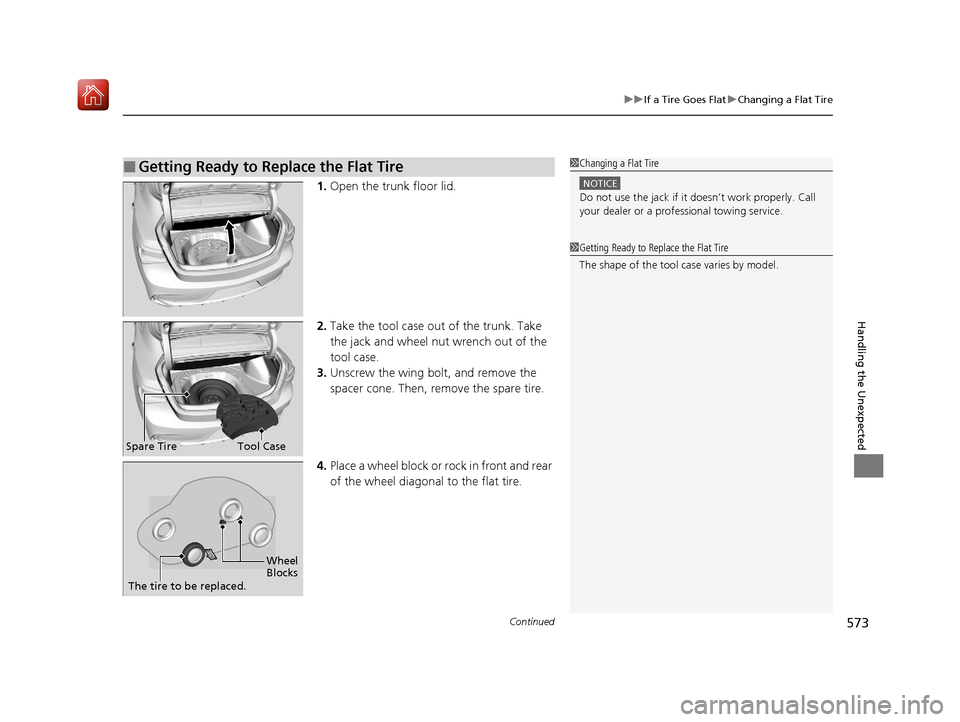
1. Open the trunk floor lid.
2. Take the tool case out of the trunk. Take
the jack and wheel nut wrench out of the
tool case.
3. Unscrew the wing bolt, and remove the
spacer cone. Then, remove the spare tire.
4. Place a wheel block or rock in front and rear
of the wheel diagonal to the flat tire.
■Getting Ready to Replace the Flat Tire1Changing a Flat Tire
NOTICE
Do not use the jack if it doesn’t work properly. Call
your dealer or a prof essional towing service.
1Getting Ready to Replace the Flat Tire
The shape of the tool case varies by model.
Spare TireTool Case
Wheel
Blocks
The tire to be replaced.
20 ACURA ILX-31TX66710.book 573 ページ 2020年4月16日 木曜日 午後8時46分
Page 585 of 621
584
uuJump Starting u
Handling the Unexpected
Once your vehicle's engine has started, re move the jumper cables in the following
order.
1. Disconnect the jumper cable from your vehicle's ground.
2. Disconnect the other end of the jumper cable from the booster battery -
terminal.
3. Disconnect the jumper cable from your vehicle's battery + terminal.
4. Disconnect the other end of the jumper cable from the booster battery +
terminal.
Have your vehicle inspected by a n earby service station or a dealer.
■What to Do After the Engine Starts
20 ACURA ILX-31TX66710.book 584 ページ 2020年4月16日 木曜日 午後8時46分
Page 596 of 621
595
Handling the Unexpected
Emergency Towing
Call a professional towing service if you need to tow your vehicle.
■Flat bed equipment
The operator loads your vehicle on the back of a truck.
This is the best way to transport your vehicle.
■Wheel lift equipment
The tow truck uses two pivoti ng arms that go under the front tires and lift them off
the ground. The rear tires remain on the ground. This is an acceptable way to
tow your vehicle.
1 Emergency Towing
NOTICE
Trying to lift or tow your vehicle by the bumpers will
cause serious damage. The bumpers are not designed
to support the vehicle's weight.
NOTICE
Improper towing such as towing behind a
motorhome or other motor vehicle can damage the
transmission.
Never tow your vehicle with just a rope or chain.
It is very dangerous since ropes or chains may shift
from side to side or break.
20 ACURA ILX-31TX66710.book 595 ページ 2020年4月16日 木曜日 午後8時46分
Page 598 of 621
597
Information
This chapter includes your vehicle's specifications, locations of identification numbers, and other
information required by regulation.
Specifications.................................... 598
Identification Numbers Vehicle Identification Number (VIN), Engine Number, and Transmission
Number ......................................... 600
Devices that Emit Radio Waves ....... 601
Reporting Safety Defects ................. 602Emissions Testing
Testing of Readiness Codes.............. 603
Warranty Coverages ........................ 605
Authorized Manuals ......................... 607
Client Service Information ............... 608
20 ACURA ILX-31TX66710.book 597 ページ 2020年4月16日 木曜日 午後8時46分
Page 608 of 621
607
Information
Authorized Manuals
■Service Express
For electronic copies of service publications, you can purchase a subscription to
Service Express. Visit www.techinfo.honda.com for pricing and options.
■For U.S. Owners
Manuals can be purchased from Helm Incorporated. You can order a manual by
phone at 1 (800) 782-4356 (credit ca rd orders only), or online at www.helminc.com.
■For Canadian Owners
Please contact a dealer to order any manuals that you may require.
20 ACURA ILX-31TX66710.book 607 ページ 2020年4月16日 木曜日 午後8時46分
Page 609 of 621

608
Information
Client Service Information
Acura dealership personnel are trained professionals who should be able to deal
with any problems you may encounter with your vehicle. If, however, you are faced
with a problem that they cannot resolve to your satisfaction, contact Acura Client
Relations/Services.
U.S. Owners
American Honda Motor Co., Inc.
Acura Client Relations
Mail Stop 100-5E-8F 1919 Torrance Blvd.
Torrance, CA 90501-2746
Tel: 1 (800) 382-2238 Canadian Owners
Honda Canada Inc.
Acura Client Services
180 Honda Boulevard
Markham, ON
L6C 0H9
Tel: 1-888-9-ACURA-9
Fax: 1-877-939-0909
E-mail: acura_c
[email protected]
In Puerto Rico and the U.S. Virgin Islands
Bella International
P.O. Box 190816
San Juan, PR 00919-0816
Tel: 1 (787) 620-75461 Client Service Information
When you call or write, pl ease give us the following
information:
•Vehicle Identification Number
2Vehicle Identification Number (VIN),
Engine Number, and Transmission
Number P. 600
•Date of purchase•Odometer reading of your vehicle
•Your name, address, and telephone number
•A detailed description of the problem•Name of the dealer who sold the vehicle to you
20 ACURA ILX-31TX66710.book 608 ページ 2020年4月16日 木曜日 午後8時46分
Page 610 of 621
609
uuClient Service Information u
Continued
Information
Music recognition technology and related
data are provided by Gracenote ®.
Gracenote is the indus try standard in music
recognition technology and related content
delivery.
For more information, visit
www.gracenote.com.
When music is recorded to the HDD from a
CD, information such as the recording artist
and track name are retrieved from the
Gracenote Database and displayed (when
available).
Gracenote may not contain information for
all albums.
Gracenote is an in ternet-based music
recognition service that allows artist, album,
and track information from CDs to display
on the HDD.
Gracenote users are allowed 4 free updates
a year. More information about Gracenote,
its features, and downloads are available at
■Gracenote Music Recognition
Service (CDDB)*
www.acura.com (in U.S.) or www.acura.ca
(in Canada).
CD and music-related data from Gracenote,
Inc., copyright © 2000 to present
Gracenote. Gracenote Software, copyright
© 2000 to present Gracenote.
One or more patents owned by Gracenote
apply to this produc t and service. See the
Gracenote website for a non-exhaustive list
of applicable Gracenote patents.
Gracenote, CDDB, MusicID, MediaVOCS,
the Gracenote logo and logotype, and the
“Powered by Gracenote” logo are either
registered trademarks or trademarks of
Gracenote in the United States and/or other
countries.
This application or device contains software
from Gracenote, Inc. of Emeryville,
California (“Grace note”). The software
from Gracenote (the “Gracenote
Software”) enables this application to
perform disc and/or f ile identification and
obtain music- related information, including
name, artist, track, and title information
(“Gracenote Data”) from online servers or
■Gracenote® END USER
LICENSE AGREEMENT*
embedded databases (collectively,
“Gracenote Servers”) and to perform other
functions. You may use Gracenote Data
only by means of th e intended End-User
functions or this application or device.
You agree that you will use Gracenote Data,
the Gracenote Software, and Gracenote
Servers for your own personal non-
commercial use only.
You agree not to assign, copy, transfer, or
transmit the Gracenote Software or any
Gracenote Data to any third party.
YOU AGREE NOT TO USE OR EXPLOIT
GRACENOTE DATA, THE GRACENOTE
SOFTWARE, OR GRACENOTE SERVERS,
EXCEPT AS EXPRESSLY PERMITTED HEREIN.
You agree that your non-exclusive license to
use the Gracenote Data, the Gracenote
Software, and Gracenote Servers will
terminate if you violate these restrictions. If
your license terminates , you agree to cease
any and all use of the Gracenote Data, the
Gracenote Software, and Gracenote
Servers.
* Not available on all models
20 ACURA ILX-31TX66710.book 609 ページ 2020年4月16日 木曜日 午後8時46分
Page 611 of 621
610
uuClient Service Information u
Information
Gracenote reserves all rights in Gracenote
Data, the Gracenote Software, and the
Gracenote Servers, including all ownership
rights. Under no circumstances will
Gracenote become liable for any payment
to you for any information that you provide.
You agree that Gracenot e, Inc. may enforce
its rights under this Agreement against you
directly in its own name.
The Gracenote service uses a unique
identifier to track que ries for statistical
purposes. The purpose of a randomly
assigned numeric identifi er is to allow the
Gracenote service to count queries without
knowing anything about who you are. For
more information, see the web page for the
Gracenote Privacy Polic y for the Gracenote
service.
The Gracenote Software and each item of
Gracenote Data are licensed to you “AS IS.”
Gracenote makes no representations or
warranties, express or implied, regarding
the accuracy of any Gracenote Data from in
the Gracenote Servers. Gracenote reserves
the right to delete data from the Gracenote
Servers or to change data categories for any cause that Gracenote deems sufficient. No
warranty is made that the Gracenote
Software or Gracenote Servers are error-
free or that functioning of Gracenote
Software or Gracenote Servers will be
uninterrupted.
Gracenote is not oblig
ated to provide you
with new enhanced or additional data types
or categories that Gracenote may provide in
the future and is fr ee to discontinue its
services at any time.
GRACENOTE DISCLAIMS ALL WARRANTIES
EXPRESS OR IMPLIED, INCLUDING, BUT
NOT LIMITED TO, IMPLIED WARRANTIES OF
MERCHANTABILITY, FITNESS FOR A
PARTICULAR PURPOSE, TITLE, AND
NONINFRINGEMENT. GRACENOTE DOES
NOT WARRANT THE RESULTS THAT WILL BE
OBTAINED BY YOUR USE OF THE
GRACENOTE SOFTWARE OR ANY
GRACENOTE SERVER. IN NO CASE WILL
GRACENOTE BE LIABLE FOR ANY
CONSEQUENTIAL OR INCIDENTAL
DAMAGES OR FOR ANY LOST PROFITS OR
LOST REVENUES.
© Gracenote 2009
20 ACURA ILX-31TX66710.book 610 ページ 2020年4月16日 木曜日 午後8時46分
Page 612 of 621
611
uuClient Service Information u
Information
Requirements to access Pandora ®
• Latest version of the Pandora app
installed on your Android, Blackberry, or
iPhone.
• Registered Pandora account (you can
create a free account at
www.pandora.com
smartphone)
• Connection to the in ternet via Wi-Fi or
cellular data network.
■Disclaimer of Pandora ®*Limitations
•Access to Pandora requires an active
internet connection
• Ability to access Pandora through this
system is subject to change without
notice
• Certain functionality of Pandora service is
not available when accessing the service
through this system including, but not
limited to, creating ne w stations, deleting
stations, emailing current stations,
buying tracks, viewing additional text
information, logging in to Pandora, and
adjusting Cell Network Audio Quality.
Pandora internet radio is a music service
not affiliated with HONDA. More
information is available at http://
www.pandora.com
Pandora logo, and the Pandora trade
dress are trademarks or registered
trademarks of Pandora Media, Inc., used
with permission.
• Mobile access requires a smartphone
with an active data plan. Standard data
rates may apply.
• Pandora is only avai lable in the United
States.
* Not available on all models
20 ACURA ILX-31TX66710.book 611 ページ 2020年4月16日 木曜日 午後8時46分