carplay ACURA ILX 2022 User Guide
[x] Cancel search | Manufacturer: ACURA, Model Year: 2022, Model line: ILX, Model: ACURA ILX 2022Pages: 632, PDF Size: 20.56 MB
Page 274 of 632
uuAudio System Basic Operation uApple CarPlay
272
Features
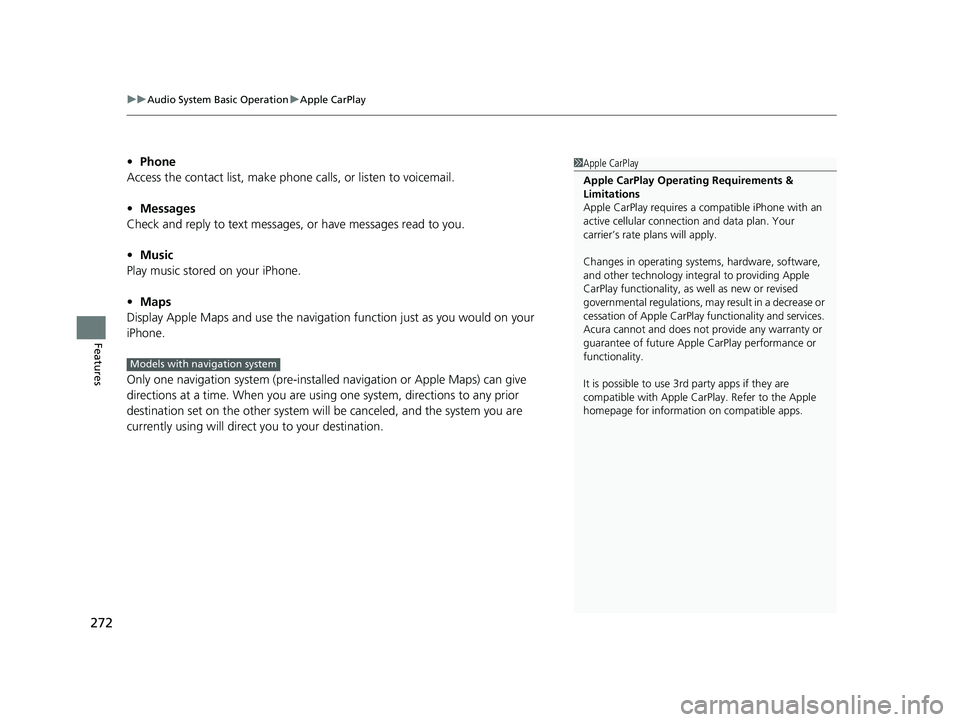
• Phone
Access the contact list, make phone calls, or listen to voicemail.
• Messages
Check and reply to text messages, or have messages read to you.
• Music
Play music stored on your iPhone.
• Maps
Display Apple Maps and use the navigation function just as you would on your
iPhone.
Only one navigation system (pre-installe d navigation or Apple Maps) can give
directions at a time. When you are using one system, directions to any prior
destination set on the other system will be canceled, and the system you are
currently using will direct you to your destination.1 Apple CarPlay
Apple CarPlay Operating Requirements &
Limitations
Apple CarPlay requi res a compatible iPhone with an
active cellular connecti on and data plan. Your
carrier’s rate plans will apply.
Changes in operating systems, hardware, software,
and other technology integral to providing Apple
CarPlay functionality, as well as new or revised
governmental regulations, may result in a decrease or
cessation of Apple CarPlay functionality and services.
Acura cannot and does not provide any warranty or
guarantee of future Appl e CarPlay performance or
functionality.
It is possible to use 3r d party apps if they are
compatible with Apple CarPlay. Refer to the Apple
homepage for information on compatible apps.
Models with navigation system
22 ACURA ILX-31TX66900.book 272 ページ 2021年4月26日 月曜日 午前11時27分
Page 275 of 632
Continued273
uuAudio System Basic Operation uApple CarPlay
Features
After you have connected your iPhone to the system via the USB port, use the
following procedure to set up Apple CarPlay. Use of Apple CarPlay will result in the
transmission of certain user and vehicle information (such as vehicle location, speed,
and status) to your iPhone to enhance the Apple CarPlay experience. You will need
to consent to the sharing of this information on the information screen.
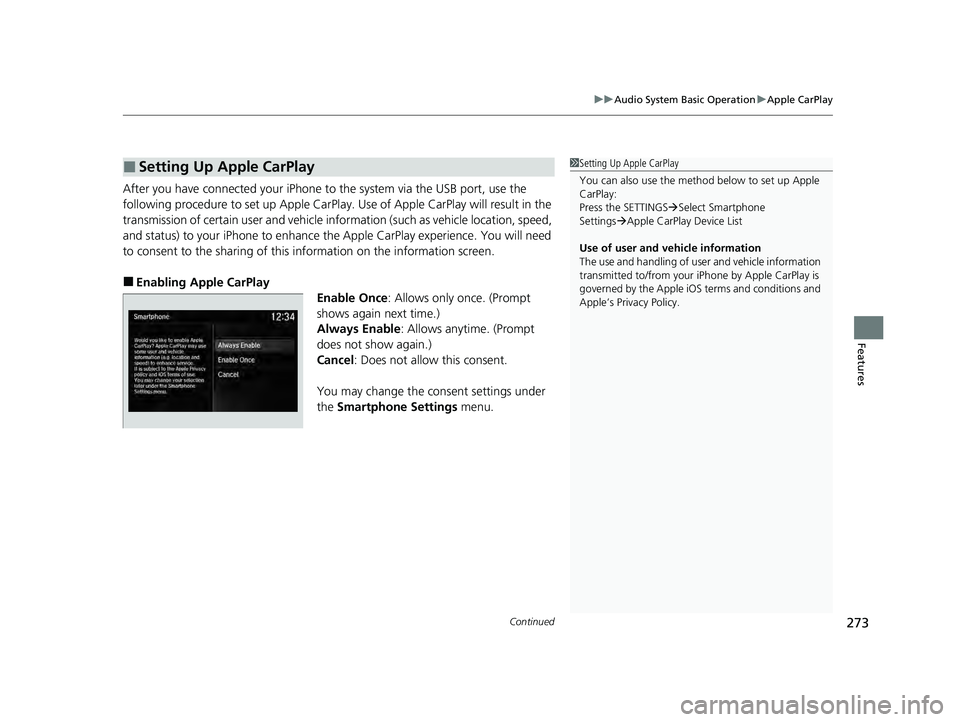
■Enabling Apple CarPlay
Enable Once: Allows only once. (Prompt
shows again next time.)
Always Enable: Allows anytime. (Prompt
does not show again.)
Cancel : Does not allow this consent.
You may change the consent settings under
the Smartphone Settings menu.
■Setting Up Apple CarPlay1Setting Up Apple CarPlay
You can also use the method below to set up Apple
CarPlay:
Press the SETTINGS Select Smartphone
Settings Apple CarPlay Device List
Use of user and vehicle information
The use and handling of user and vehicle information
transmitted to/from your iP hone by Apple CarPlay is
governed by the Apple iOS terms and conditions and
Apple’s Privacy Policy.
22 ACURA ILX-31TX66900.book 273 ページ 2021年4月26日 月曜日 午前11時27分
Page 276 of 632
uuAudio System Basic Operation uApple CarPlay
274
Features
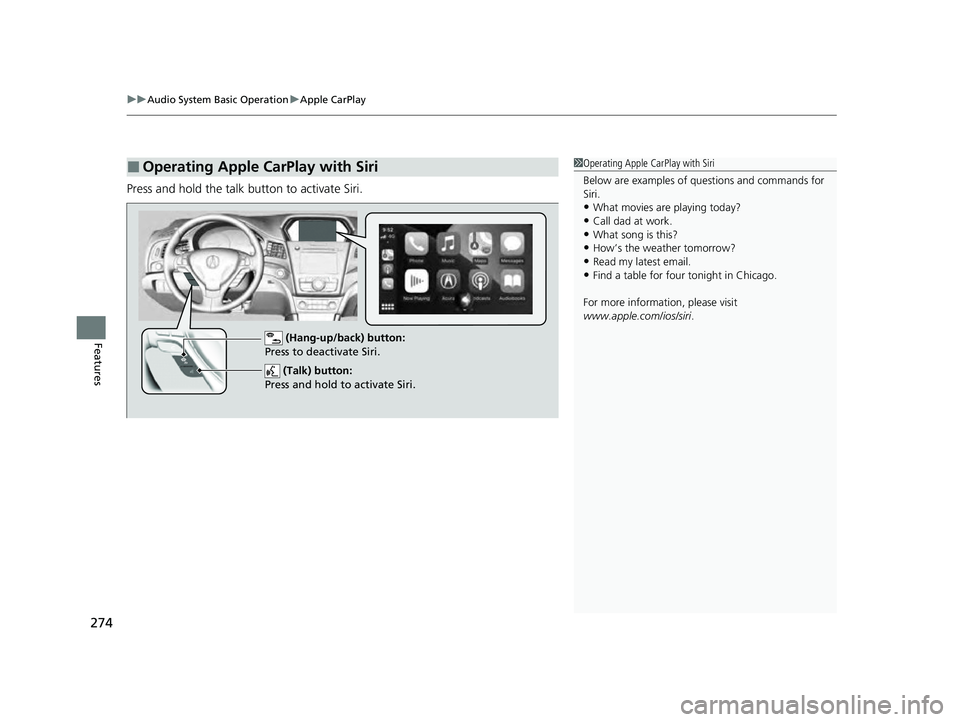
Press and hold the talk button to activate Siri.
■Operating Apple CarPlay with Siri1Operating Apple CarPlay with Siri
Below are examples of questions and commands for
Siri.
•What movies are playing today?
•Call dad at work.•What song is this?
•How’s the weather tomorrow?
•Read my latest email.•Find a table for four tonight in Chicago.
For more information, please visit
www.apple.com/ios/siri .
(Talk) button:
Press and hold to activate Siri.
(Hang-up/back) buttonY
Press to deactivate Siri.
22 ACURA ILX-31TX66900.book 274 ページ 2021年4月26日 月曜日 午前11時27分
Page 291 of 632

289
uuAudio Error Messages uApple CarPlay/Android Auto
Continued
Features
Apple CarPlay/Android Auto
If an error occurs while using the Apple CarPlay or Android Auto, you may see the
following error messages. If you cannot cl ear the error message, contact a dealer.
Error MessageSolution
A charging error has occurred with the connected device.
When safe, please check the comp atibility of the device and
USB cable. Please see your owner's manual for more details.
This USB device is incompat ible. Please see your owner's
manual for more details.
Appears when an incompatible device is connected. Disconnect
the device. Then, turn the audio sy stem off and turn it again. Do
not reconnect the device that caused the error.
Unable to start Apple CarPlay. When safe, please confirm the
USB connection.Appears when Apple CarPlay or Android Auto fails to recognize
your device.
Check if your device is compatible with Apple CarPlay or Android
Auto, or the latest version of the app is installed on your device.
Unable to start Android Auto. When safe, please confirm the
USB connection.
Unable to start Apple CarPlay. When safe, please try again.Appears when Apple CarPlay or Android Auto fails to recognize
your device.
Reconnect your device and try again.
Unable to start Android Auto. When safe, please try again.
Unable to start Apple CarPlay with your device. Your device is
connected in digital audio mode.Appears when your connected devi ce is incompatible with Apple
CarPlay.
Check if your device is comp atible with Apple CarPlay.
Models with two displays
Information Screen
On Demand Multi-Use DisplayTM
22 ACURA ILX-31TX66900.book 289 ページ 2021年4月26日 月曜日 午前11時27分
Page 292 of 632

290
uuAudio Error Messages uApple CarPlay/Android Auto
Features
Error MessageSolution
This device is not compatible with Android Auto.
Appears when your connected device is incompatible with
Android Auto.
Check if your device is compatible with Android Auto or the latest
version of the app is installed on your device.
Please update to the latest version of Android Auto.Appears when your version of the Android Auto is not supported.
Update Android Auto to the latest version.
Connection failed. Please confirm Bluetooth connection
status and try again.Appears when Bluetooth® connection is failed.
Check the Bluetooth® connection of this audio system and your
connected device.
22 ACURA ILX-31TX66900.book 290 ページ 2021年4月26日 月曜日 午前11時27分
Page 323 of 632
321
uuCustomized Features u
Continued
Features
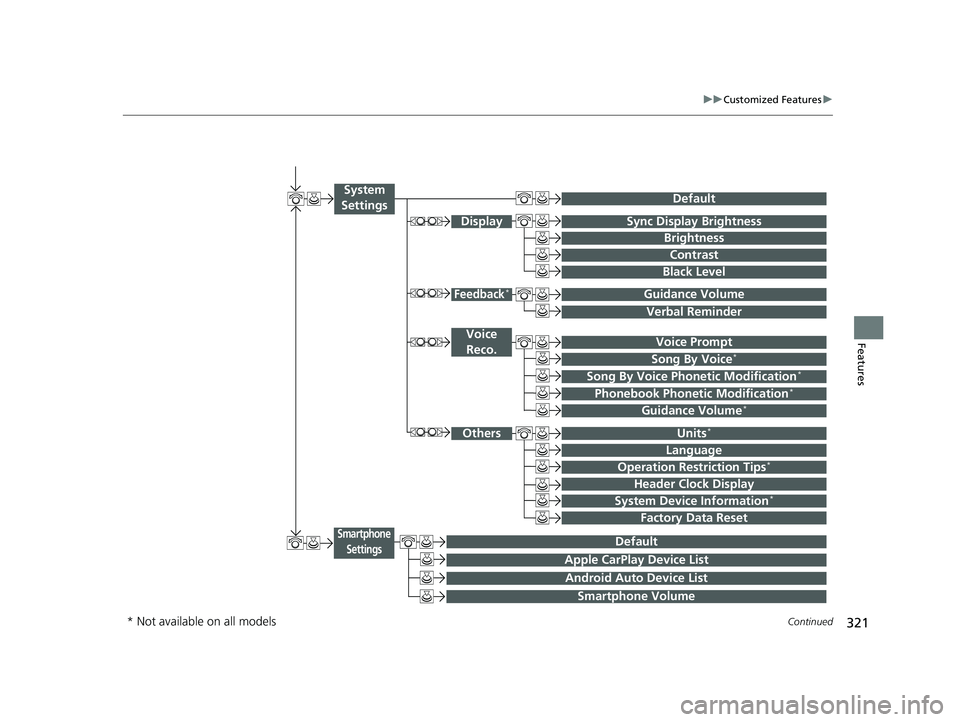
Voice Prompt
Brightness
Contrast
Black Level
Default
Display
System
Settings
Voice Reco.
Sync Display Brightness
System Device Information*Header Clock Display
Language
Operation Restriction Tips*
Others
Default
Apple CarPlay Device List
Android Auto Device List
Smartphone
Settings
Smartphone Volume
Factory Data Reset
Units*
Song By Voice*
Song By Voice Phonetic Modification*
Phonebook Phoneti c Modification*
Guidance Volume*
Feedback*Guidance Volume
Verbal Reminder
* Not available on all models
22 ACURA ILX-31TX66900.book 321 ページ 2021年4月26日 月曜日 午前11時27分
Page 336 of 632

334
uuCustomized Features u
Features
*1:Default SettingSetup
Group Customizable Features Desc
ription Selectable Settings
System
Settings OthersUnits
*Changes the distance unit on the navigation map
screen.
mile*1/
km (U.S.)
mile /km*1 (Canada)
Language Changes the display language. English
*1/
Français /
Español
Operation Restriction
Tips
*
Alerts you when manual control of the system is
disabled to prevent distraction while driving. Only
voice commands are available. On*1/
Off
Header Clock Display Selects whether the clock display comes on. On
*1/Off
System Device
Information
*Displays the system/device information. —
Factory Data Reset Resets all the settings to their factory default.
2
Defaulting All the Settings P. 341—
Smartphone
Settings
DefaultCancels/Resets all customized items in the
Smartphone Settings group as default.Yes/No
Apple CarPlay Device ListSets up the Apple CarPlay connection.—
Android Auto Device ListSets up the Android Auto connection.—
Smartphone VolumeAdjusts the volume of the smartphone function.1 ~8*1~11
VersionShows software version of Apple CarPlay and
Android Auto unit.—
* Not available on all models
22 ACURA ILX-31TX66900.book 334 ページ 2021年4月26日 月曜日 午前11時27分
Page 376 of 632

374
Features
Bluetooth® HandsFreeLink ®
Bluetooth® HandsFreeLink ® (HFL) allows you to place and receive phone calls using
your vehicle’s audio system, without handling your cell phone.
Using HFL
(Pick-up) button: Press to go directly to the phone menu screen, to dial a call or
to answer an incoming call. Press and hold to redial the last number dialed in the
phone’s history.
(Hang-up/back) button: Press to end a call, or to cancel a command.
(Talk) button: Press to give HFL voice commands.
PHONE button: Press to go directly to the phone menu screen.
Interface dial (ENTER/MENU button): Rotate to select an item on the screen,
then press . Move , , or to select secondary menu.
■HFL Buttons
1Bluetooth ® HandsFreeLink ®
Place your phone where y ou can get good reception.
To use HFL, you need a Bluetooth-compatible cell
phone. For a list of compatible phones, pairing
procedures, and special feature capabilities:
•U.S.: Visit www.handsfreeli nk.com/Acura, or call 1-
888-528-7876.
•Canada: For more info rmation on smartphone
compatibility, call 1-855-490-7351.
To use the system, the Bluetooth setting must be
On . If there is an active c onnection to Apple CarPlay,
HFL is unavailable. 2 Customized Features P. 316
Voice control tips:
•Aim the vents away from the ceiling and close the
windows, as noise coming from them may interfere
with the microphone.
•Press and release the but ton when you want to
call a number using a stored voice tag, a
phonebook name, or a numbe r. Speak clearly and
naturally after a beep.
•If the microphone picks up vo ices other than yours,
the command may be misinterpreted.
State or local laws may pr ohibit the operation of
handheld electronic devices while operating a
vehicle.
Models with two displays
Talk Button Volume up
Microphone
Hang-up/Back Button
Pick-up Button
Volume down
Interface
Dial PHONE
Button
22 ACURA ILX-31TX66900.book 374 ページ 2021年4月26日 月曜日 午前11時27分
Page 384 of 632

uuBluetooth ® HandsFreeLink ®u HFL Menus
382
Features
■To pair a cell phone (when there is no
phone paired to the system)
1. Press the PHONE button.
2. Rotate to select Yes, then press .
3. Make sure your phone is search or
discoverable mode, then press .
u HFL automatically searches for a
Bluetooth device.
4. When your phone appears on the list, select
it by pressing .
u If your phone does not appear, you can
select Options... and Refresh to search
again.
u If your phone still does not appear, select
Options... to select Device Not Found?
and search for Bluetooth devices using
your phone. From your phone, select
HandsFreeLink .
5. HFL gives you a pairing code on the
information screen.
u Confirm if the pairing code on the screen
and your phone match.
This may vary by phone.
6. A notification appears on the screen if
pairing is successful.
■Phone Setup1 Phone Setup
Your Bluetooth -compatible phone must be paired to
HFL before you can make and receive hands-free
calls.
Phone Pairing Tips:
•You cannot pair your phone while the vehicle is
moving.
•Up to six phones can be paired.
•Your phone’s battery may dr ain faster when it is
connected to HFL.
•If your phone is not ready for pairing or not found
by the system within three minutes, the system will
time out and returns to idle.
Once you have paired a phone, you can see it
displayed on the screen with one or two icons on the
right side.
These icons indicate the following: : The phone can be used with HFL.
: The phone is compatible with Bluetooth® Audio.
When pairing is completed, an Automatic Phone
Sync prompt appears. Select On if you want your call
history and phonebook au tomatically imported to
HFL. 2 Changing the Automatic Phone Sync
setting P. 393
If there is an active c onnection to Apple CarPlay,
pairing of additional Bluetooth -compatible devices is
unavailable.
22 ACURA ILX-31TX66900.book 382 ページ 2021年4月26日 月曜日 午前11時27分
Page 404 of 632

uuBluetooth ® HandsFreeLink ®u HFL Menus
402
Features
You can make calls by inputting any phone
number, or by using the imported
phonebook, call history, speed dial entries, or
redial.
■Making a Call1Making a Call
Any voice-tagged speed di al entry, phonebook name,
or number can be dialed by voice from most screens.
Press the button and say “Call” and the voice tag
name, “Call by name” and the phonebook name, or
“Call” and the phone number.
The maximum range be tween your phone and
vehicles is 30 fe et (10 meters).
Once a call is connected, you can hear the voice of
the person you are call ing through the audio
speakers.
While there is an active connection with Apple
CarPlay, phone calls ca nnot be made with
HandsFreeLink ® and are only made from Apple
CarPlay.
22 ACURA ILX-31TX66900.book 402 ページ 2021年4月26日 月曜日 午前11時27分