change wheel ACURA ILX 2022 User Guide
[x] Cancel search | Manufacturer: ACURA, Model Year: 2022, Model line: ILX, Model: ACURA ILX 2022Pages: 632, PDF Size: 20.56 MB
Page 492 of 632
490
uuAcuraWatchTMuLane Keeping Assist System (LKAS)
Driving
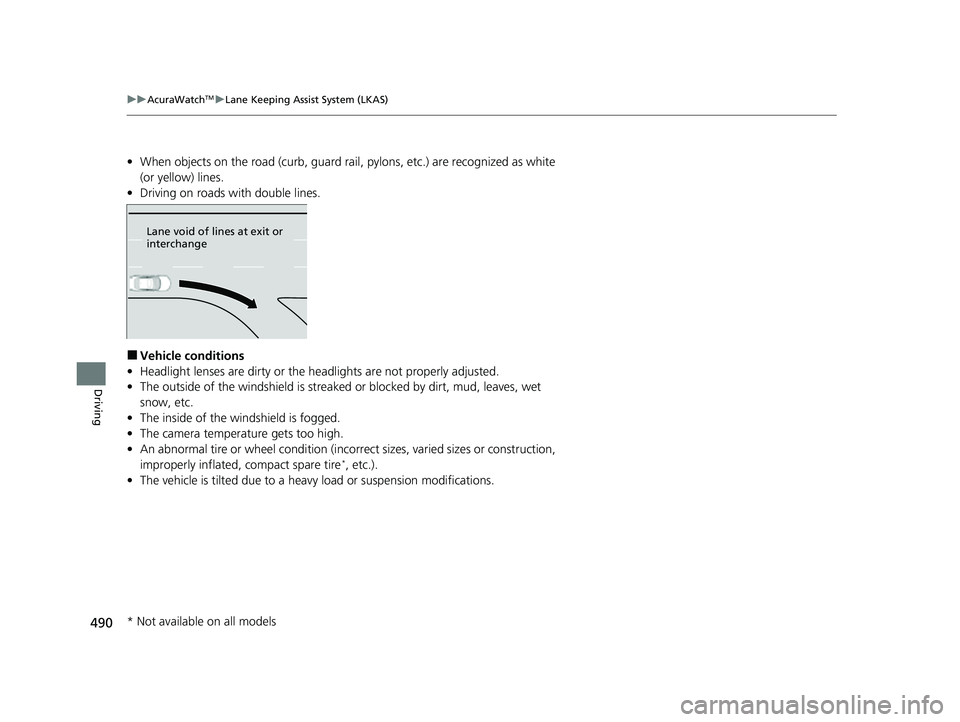
• When objects on the road (curb, guard rail, pylons, etc.) are recognized as white
(or yellow) lines.
• Driving on roads with double lines.
■Vehicle conditions
• Headlight lenses are dirty or the headlights are not properly adjusted.
• The outside of the windshield is streake d or blocked by dirt, mud, leaves, wet
snow, etc.
• The inside of the windshield is fogged.
• The camera temperature gets too high.
• An abnormal tire or wheel condition (incorre ct sizes, varied sizes or construction,
improperly inflated, compact spare tire
*, etc.).
• The vehicle is tilted due to a heav y load or suspension modifications.
Lane void of lines at exit or
interchange
* Not available on all models
22 ACURA ILX-31TX66900.book 490 ページ 2021年4月26日 月曜日 午前11時27分
Page 510 of 632

508
Driving
Multi-View Rear Camera
About Your Multi-View Rear Camera
The audio/information screen* or information screen* can display your vehicle’s rear
view. The display automatically changes to the rear view when the transmission is
put into
(R.
■Multi-View Rear Camera Display Area
1 About Your Multi-View Rear Camera
The rear camera view is restricted. You cannot see
the corner ends of the bumper or what is underneath
the bumper. Its unique le ns also makes objects
appear closer or farther than they actually are.
Visually confirm that it is safe to drive before backing
up. Certain conditions (such as weather, lighting, and
high temperatures) may also restrict the rear view. Do
not rely on the rearview display which does not give
you all information about conditions at the back of
your vehicle.
If the camera lens is cove red with dirt or moisture,
use a soft, moist cloth to keep the lens clean and free
of debris.
You can change the Fixed Guideline and Dynamic
Guideline settings. 2 Customized Features P. 316
Fixed Guideline
On: Guidelines appear when you put the
transmission into
( R.
Off: Guidelines do not appear.
Dynamic Guideline
On: Guidelines move accordi ng to the steering wheel
direction.
Off: Guidelines do not move.
Models with two displaysTop Down View Mode Normal View Mode Wide View Mode
Guidelines
Bumper
Camera
Approx. 39 inches (1 m)
Approx. 20 inches (50 cm)
Approx. 39 inches
(1 m)
Approx. 20 inches
(50 cm)
* Not available on all models
22 ACURA ILX-31TX66900.book 508 ページ 2021年4月26日 月曜日 午前11時27分
Page 585 of 632

Continued583
uuIf a Tire Goes Flat uChanging a Flat Tire
Handling the Unexpected
1. Place the jack under the jacking point
closest to the tire to be changed.
2. Turn the end bracket cl ockwise as shown in
the image until the top of the jack contacts
the jacking point.
u Make sure that the jacking point tab is
resting in the jack notch.
3. Raise the vehicle, using the jack handle bar
and the jack handle, until the tire is off the
ground.
■How to Set Up the Jack1How to Set Up the Jack
Do not use the jack with people or luggage in the
vehicle.
Use the jack provided in your vehicle.
Other jacks may not support the weight (“load”) or
may not fit the jacking point.
The following instructions must be followed to use
the jack safely:
•Do not use while the engine is running.
•Use only where the ground is firm and level.
•Use only at the jacking points.•Do not get in the vehicl e while using the jack.
•Do not put anything on top of or underneath the
jack.
3WARNING
The vehicle can easily roll off the jack,
seriously injuring anyone underneath.
Follow the directions for changing a tire
exactly, and never get under the vehicle
when it is supported only by the jack.
Jacking Points
Jack
Handle
Bar Wheel Nut
Wrench as Jack Handle
22 ACURA ILX-31TX66900.book 583 ページ 2021年4月26日 月曜日 午前11時27分
Page 591 of 632

589
uuEngine Does Not Start uEmergency Engine Stop
Handling the Unexpected
Emergency Engine Stop
The ENGINE START/STOP button may be used to stop the engine due to an
emergency situation even while driving. If you must stop the engine, do either of the
following operations:
• Press and hold the ENGINE START/STOP button for about two seconds.
• Firmly press the ENGINE START/STOP button three times.
The steering wheel will not lock. However, because turning off the engine disables
the power assist the engine provides to the steering and braking systems, it will
require significantly more physical effort an d time to steer and slow the vehicle. Use
both feet on the brake pedal to slow down the vehicle and stop immediately in a
safe place.
The power mode is in ACCESSORY when the engine is stopped.
To change the mode to VEHICLE OFF, put the transmission into
(P after the vehicle
comes to a complete stop.
1 Emergency Engine Stop
Do not press the ENGINE START/STOP button while
driving unless it is absolute ly necessary for the engine
to be turned off.
If you press the ENGINE START/STOP button while
driving, the beeper sounds.
22 ACURA ILX-31TX66900.book 589 ページ 2021年4月26日 月曜日 午前11時27分
Page 609 of 632
607
uuSpecifications u
Information
■
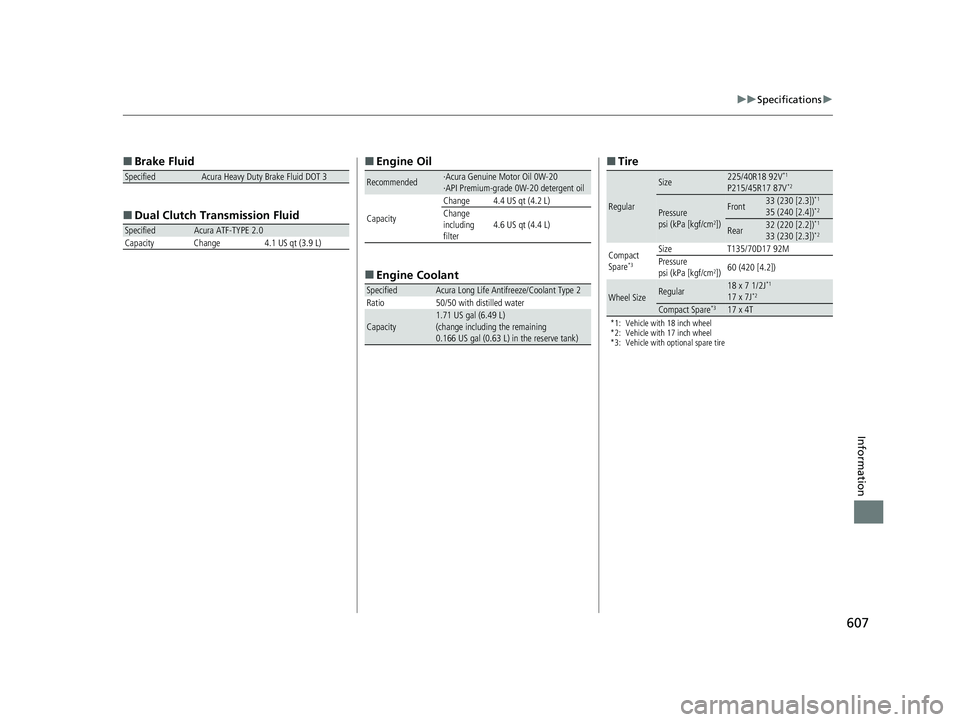
Brake Fluid
■ Dual Clutch Transmission Fluid
SpecifiedAcura Heavy Duty Brake Fluid DOT 3
SpecifiedAcura ATF-TYPE 2.0
Capacity Change 4.1 US qt (3.9 L)
■ Engine Oil
■ Engine Coolant
Recommended·Acura Genuine Motor Oil 0W-20
·API Premium-grade 0W-20 detergent oil
Capacity Change 4.4 US qt (4.2 L)
Change
including
filter
4.6 US qt (4.4 L)
SpecifiedAcura Long Life Antifreeze/Coolant Type 2
Ratio 50/50 with distilled water
Capacity1.71 US gal (6.49 L)
(change including the remaining
0.166 US gal (0.63 L) in the reserve tank)
■ Tire
*1: Vehicle with 18 inch wheel
*2: Vehicle with 17 inch wheel
*3: Vehicle with optional spare tire
Regular
Size225/40R18 92V*1
P215/45R17 87V*2
Pressure
psi (kPa [kgf/cm2])
Front33 (230 [2.3])*1
35 (240 [2.4])*2
Rear32 (220 [2.2])*1
33 (230 [2.3])*2
Compact
Spare*3
Size T135/70D17 92M
Pressure
psi (kPa [kgf/cm
2]) 60 (420 [4.2])
Wheel SizeRegular18 x 7 1/2J*1
17 x 7J*2
Compact Spare*317 x 4T
22 ACURA ILX-31TX66900.book 607 ページ 2021年4月26日 月曜日 午前11時27分