climate control ACURA ILX 2022 User Guide
[x] Cancel search | Manufacturer: ACURA, Model Year: 2022, Model line: ILX, Model: ACURA ILX 2022Pages: 632, PDF Size: 20.56 MB
Page 86 of 632
84
uuIndicators u
Instrument Panel
IndicatorNameOn/BlinkingExplanationMessage
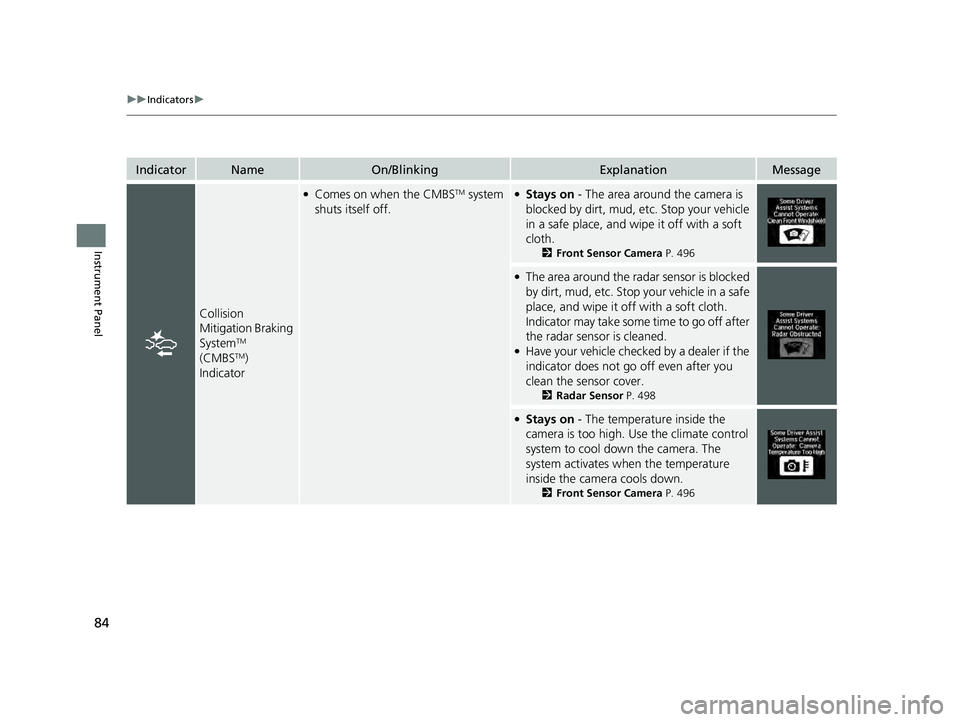
Collision
Mitigation Braking
System
TM
(CMBSTM)
Indicator
●Comes on when the CMBSTM system
shuts itself off.●Stays on - The area around the camera is
blocked by dirt, mud, etc. Stop your vehicle
in a safe place, and wipe it off with a soft
cloth.
2 Front Sensor Camera P. 496
●The area around the radar sensor is blocked
by dirt, mud, etc. Stop your vehicle in a safe
place, and wipe it off with a soft cloth.
Indicator may take some time to go off after
the radar sensor is cleaned.
●Have your vehicle checked by a dealer if the
indicator does not go off even after you
clean the sensor cover.
2Radar Sensor P. 498
●Stays on - The temperature inside the
camera is too high. Use the climate control
system to cool down the camera. The
system activates wh en the temperature
inside the camera cools down.
2 Front Sensor Camera P. 496
22 ACURA ILX-31TX66900.book 84 ページ 2021年4月26日 月曜日 午前11時27分
Page 111 of 632
109
Controls
This chapter explains how to operate the various controls necessary for driving.
Clock.................................................. 110
Locking and Unlocking the Doors
Key .................................................. 112
Low Keyless Remote Signal Strength ... 114
Locking/Unlocking the Doors from the Outside .......................................... 115
Locking/Unlocking the Doors from the Inside ............................................. 124
Childproof Door Locks ..................... 126
Auto Door Locking/Unlocking .......... 127
Opening and Closing the Trunk ....... 128
Security System ................................ 132
Immobilizer System .......................... 132
Security System Alarm ...................... 132 Windows
........................................... 135Moonroof............................................. 138Operating the Switches Around the
Steering Wheel ENGINE START/STOP Button............. 139
Turn Signals ..................................... 142
Light Switches.................................. 143
Fog Lights
*...................................... 146
Daytime Running Lights ................... 146
Auto High-Beam .............................. 147
Wipers and Washers ........................ 150
Brightness Control ........................... 152
Rear Defogger/Heated Door Mirror Button ..153
Adjusting the Steering Wheel........... 153 Driving Position Memory System
*.... 154
Mirrors ............................................... 156
Interior Rearview Mirror ................... 156
Power Door Mirrors ......................... 157
Adjusting the Seats .......................... 158
Front Seats ...................................... 158
Interior Convenience Items .............. 168
Interior Lights .................................. 168
Storage Items .................................. 170
Other Interior Convenience Items..... 173
Climate Control System ................... 175
Using Automatic Climate Control .... 175
Automatic Climate Control Sensors......178
* Not available on all models
22 ACURA ILX-31TX66900.book 109 ページ 2021年4月26日 月曜日 午前11時27分
Page 151 of 632
149
uuOperating the Switches Around the Steering Wheel uAuto High-Beam
Controls
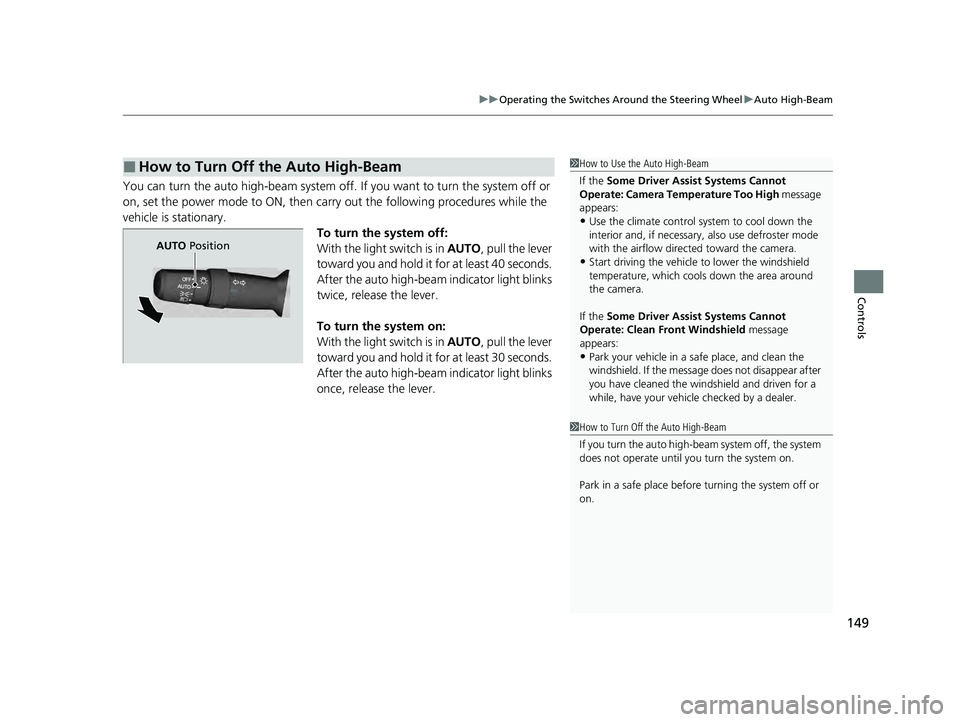
You can turn the auto high-beam system off. If you want to turn the system off or
on, set the power mode to ON, then carry out the following procedures while the
vehicle is stationary. To turn the system off:
With the light switch is in AUTO, pull the lever
toward you and hold it for at least 40 seconds.
After the auto high-beam indicator light blinks
twice, release the lever.
To turn the system on:
With the light switch is in AUTO, pull the lever
toward you and hold it for at least 30 seconds.
After the auto high-beam indicator light blinks
once, release the lever.
■How to Turn Off the Auto High-Beam1 How to Use the Auto High-Beam
If the Some Driver Assist Systems Cannot
Operate: Camera Temperature Too High message
appears:
•Use the climate control system to cool down the
interior and, if necessary, also use defroster mode
with the airflow directed toward the camera.
•Start driving the vehicle to lower the windshield
temperature, which cool s down the area around
the camera.
If the Some Driver Assist Systems Cannot
Operate: Clean Front Windshield message
appears:
•Park your vehicle in a sa fe place, and clean the
windshield. If the message does not disappear after
you have cleaned the windshield and driven for a
while, have your vehicle checked by a dealer.
1 How to Turn Off the Auto High-Beam
If you turn the au to high-beam system off, the system
does not operate until you turn the system on.
Park in a safe place before turning the system off or
on.
AUTO Position
22 ACURA ILX-31TX66900.book 149 ページ 2021年4月26日 月曜日 午前11時27分
Page 177 of 632

175Continued
Controls
Climate Control System
Using Automatic Climate Control
The automatic climate control system maintains the interior temperature you select.
The system also selects the proper mix of heat ed or cooled air that raises or lowers
the interior temperature to your pr eference as quickly as possible.
Use the system when the engine is running.
1. Press the AUTO button.
2. Adjust the interior temperature using the driver’s side or passenger’s side
temperature control dial.
3. Press the (ON/OFF) button to cancel.
■Switching between the recirculation and fresh air modes
Press the (recirculation) button and switch the mode depending on
environmental conditions.
Recirculation Mode (indicator on): Recirculates air from the vehicle’s interior through
the system.
Fresh Air Mode (indicator off): Maintains outside ventilation. Keep the system in
fresh air mode in normal situations.
1 Using Automatic Climate Control
If any buttons are presse d while using the climate
control system in auto, the function of the button
that was pressed will take priority.
The AUTO indicator will go off, but functions
unrelated to the button th at was pressed will be
controlled automatically.
To prevent cold air from bl owing in from outside, the
fan may not start i mmediately when the AUTO
button is pressed.
If the interior is very warm, you can cool it down
more rapidly by partial ly opening the windows,
turning the system on auto, and setting the
temperature to low. Change the fresh air mode to
recirculation mode until the temperature cools down.
When you set the temperat ure to the lower or upper
limit, Lo or Hi is displayed.
Pressing the button switches the climate
control system between on and off. When turned on,
the system returns to your last selection.
Floor and
defroster
vents Floor vents
Dashboard
and floor
ventsDashboard
vents
(ON/OFF) Button
(Recirculation) ButtonAUTO
Button
A/C (Air Conditioning) Button SYNC
(Synchronization)
Button
/ (Fan Control)
Buttons
Driver’s Side Temperature
Control Dial
Passenger's Side
Temperature
Control Dial
22 ACURA ILX-31TX66900.book 175 ページ 2021年4月26日 月曜日 午前11時27分
Page 178 of 632
uuClimate Control System uUsing Automatic Climate Control
176
Controls
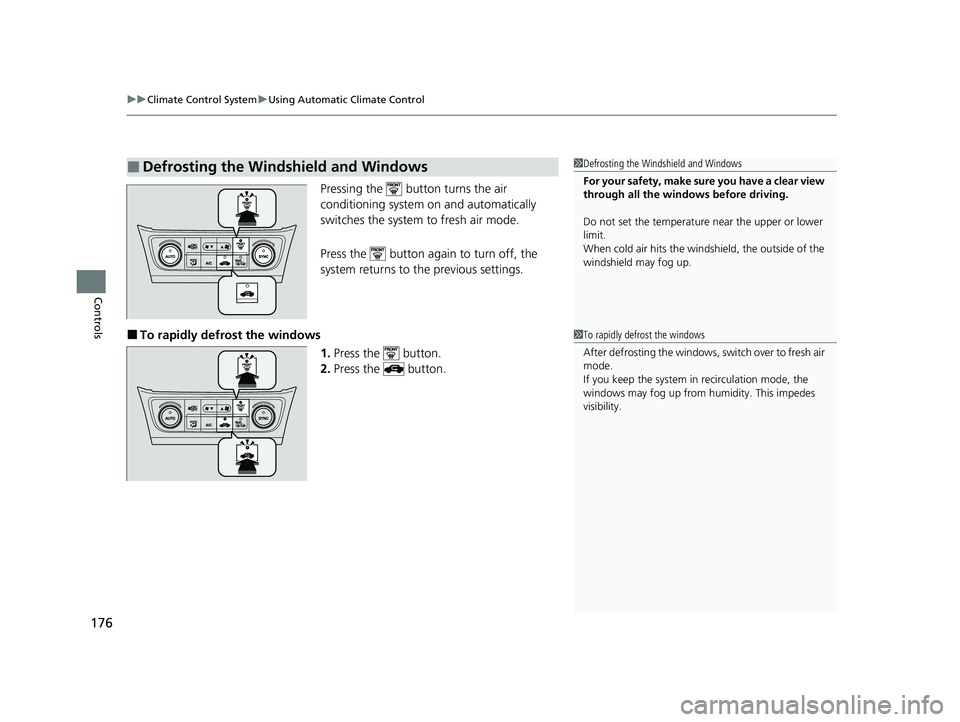
Pressing the button turns the air
conditioning system on and automatically
switches the system to fresh air mode.
Press the button again to turn off, the
system returns to the previous settings.
■To rapidly defro st the windows
1.Press the button.
2. Press the button.
■Defrosting the Windshield and Windows1Defrosting the Windshield and Windows
For your safety, make sure you have a clear view
through all the windows before driving.
Do not set the temperatur e near the upper or lower
limit.
When cold air hits the windshield, the outside of the
windshield may fog up.
1 To rapidly defrost the windows
After defrosting the windows, switch over to fresh air
mode.
If you keep the system in recirculation mode, the
windows may fog up from humidity. This impedes
visibility.
22 ACURA ILX-31TX66900.book 176 ページ 2021年4月26日 月曜日 午前11時27分
Page 179 of 632
177
uuClimate Control System uUsing Automatic Climate Control
Controls
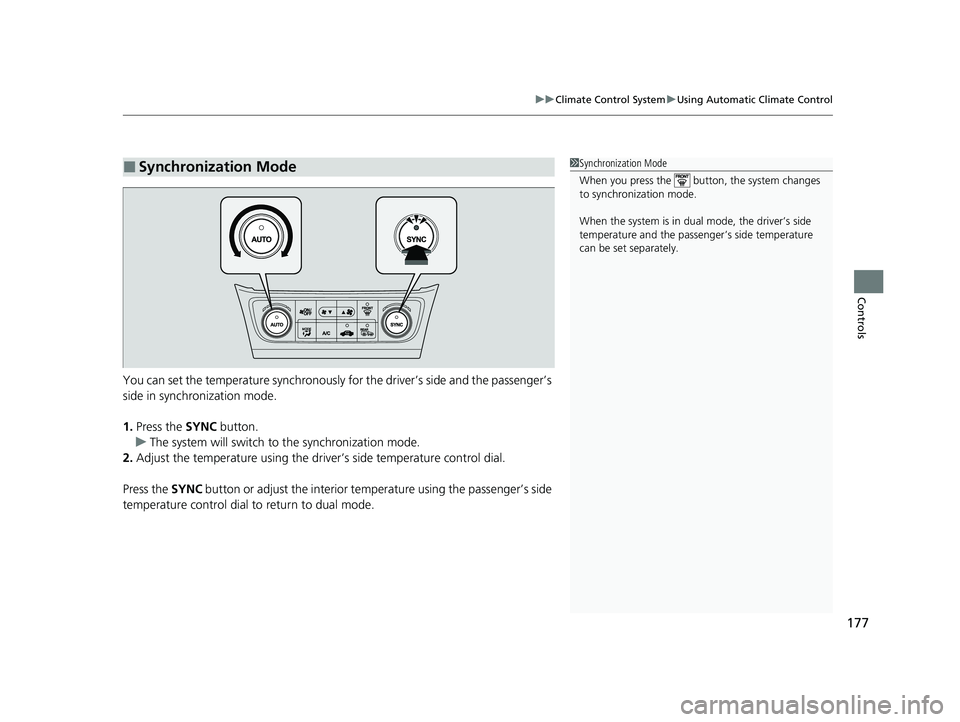
You can set the temperature synchronously for the driver’s side and the passenger’s
side in synchronization mode.
1. Press the SYNC button.
u The system will switch to the synchronization mode.
2. Adjust the temperature using the driv er’s side temperature control dial.
Press the SYNC button or adjust the interior temp erature using the passenger’s side
temperature control dial to return to dual mode.
■Synchronization Mode1 Synchronization Mode
When you press the button, the system changes
to synchronization mode.
When the system is in dua l mode, the driver’s side
temperature and the passe nger’s side temperature
can be set separately.
22 ACURA ILX-31TX66900.book 177 ページ 2021年4月26日 月曜日 午前11時27分
Page 180 of 632
178
uuClimate Control System uAutomatic Climate Control Sensors
Controls
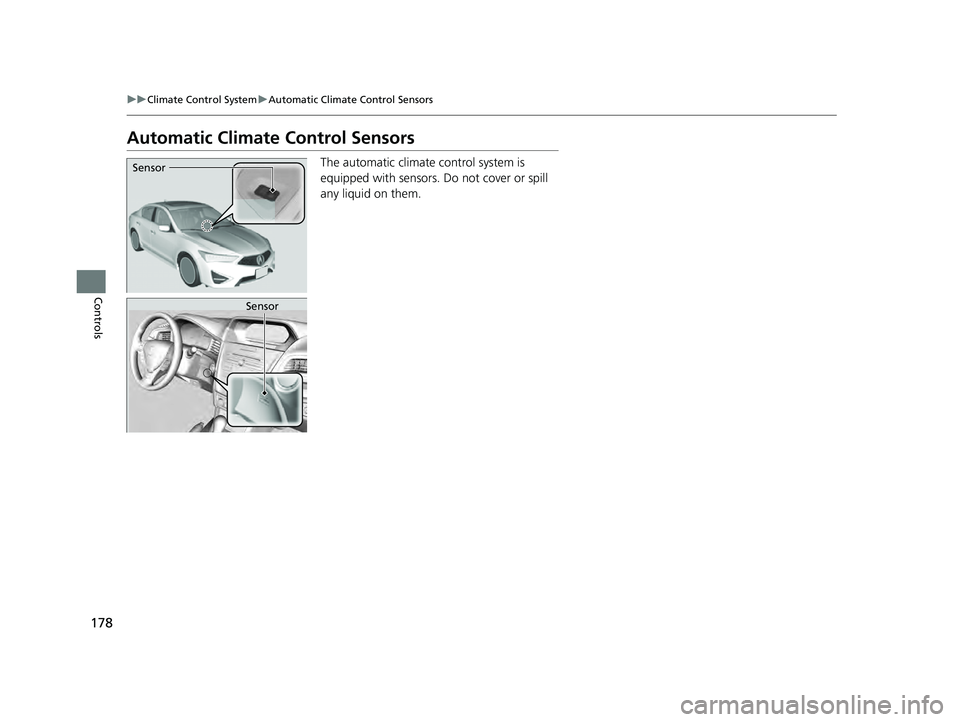
Automatic Climate Control Sensors
The automatic climate control system is
equipped with sensors. Do not cover or spill
any liquid on them.Sensor
Sensor
22 ACURA ILX-31TX66900.book 178 ページ 2021年4月26日 月曜日 午前11時27分
Page 434 of 632

432
Driving
When Driving
Starting the Engine
1.Make sure the parking brake is applied.
2. Check that the tr ansmission is in
(P, then
depress the brake pedal.
u Although it is possible to start the vehicle
in
(N, it is safer to start it in (P.
1Starting the Engine
Keep your foot firmly on the brake pedal when
starting the engine.
The engine is harder to st art in cold weather and in
thinner air found at altit udes above 8,000 feet (2,400
meters).
When starting the engine in cold weather, turn off all
electrical accessories such as the lights, climate
control system, and rear de fogger in order to reduce
battery drain.
If you live in a region where winter is extremely cold,
an engine block heater will improve starting and
warming of the engine. Consult a dealer for details.
If exhaust system sounds abnormal or you can smell
exhaust gas inside the vehi cle, have your vehicle
checked by a dealer. There may be a problem with
the engine or exhaust system.
Brake Pedal
22 ACURA ILX-31TX66900.book 432 ページ 2021年4月26日 月曜日 午前11時27分
Page 437 of 632

Continued435
uuWhen Driving uStarting the Engine
Driving
■To stop the engine1Remote Engine Start*
•You have already used the remote twice to start
the engine.
•Another registered keyless remote is in the vehicle.
•There is any antenna failure.•The door is unlocked with the built-in key.
•The engine oil pressure is low.
•The engine coolant temper ature is extremely high.•The telematics* unit malfunctions.
•The security system alarm is not set.
Before starting the engine, make sure to check the
door lock status using the remote. When you press
the button, wait for the green LED to blink. If
the red LED turns on, the doors and trunk did not
lock, and the engine does not start.
While the engine is running, the vehicle will
automatically preconditi on inside the vehicle.
When it is warm outside:
•The climate control system is activated in
recirculation mode.
When it is cold outside:
•The defroster is activated at a moderately warm
temperature.
•The rear defogger and door mirror heaters are
activated.
•The seat heater is activated. 2Seat Heaters P. 174
Press and hold the button
for one second.
Go within the range,
and try again.
Amber LED: Blinks when any
button is pressed. Red LED:
●Comes on for one second to let you
know that the engine has stopped.
●Blinks when the remote is out of
the keyless access system range.
The engine will not stop.
* Not available on all models
22 ACURA ILX-31TX66900.book 435 ページ 2021年4月26日 月曜日 午前11時27分
Page 499 of 632
497
uuAcuraWatchTMuFront Sensor Camera
Driving
1Front Sensor Camera
If the Some Driver Assist Systems Cannot
Operate: Camera Temperature Too High message
appears:
•Use the climate control system to cool down the
interior and, if necessary, also use defroster mode
with the airflow directed towards the camera.
•Start driving the vehicle to lower the windshield
temperature, which cool s down the area around
the camera.
If the Some Driver Assist Systems Cannot
Operate: Clean Front Windshield message
appears:
•Park your vehicle in a safe place, and make sure the
windshield is clean. Clean the windshield if it is
dirty. If the message doe s not disappear after
driven for a while, have your vehicle checked by a
dealer.
22 ACURA ILX-31TX66900.book 497 ページ 2021年4月26日 月曜日 午前11時27分