warning lights ACURA ILX 2022 Owners Manual
[x] Cancel search | Manufacturer: ACURA, Model Year: 2022, Model line: ILX, Model: ACURA ILX 2022Pages: 632, PDF Size: 20.56 MB
Page 14 of 632
12
Quick Reference Guide
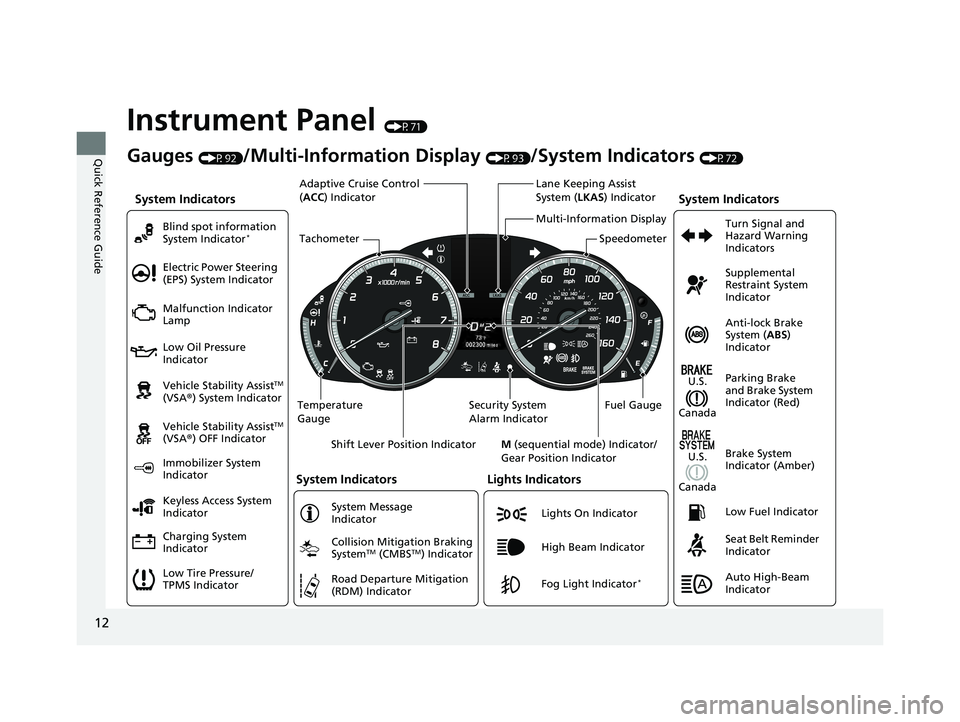
Instrument Panel (P71)
System Indicators
Malfunction Indicator
Lamp
Low Oil Pressure
Indicator
Charging System
Indicator Vehicle Stability Assist
TM
(VSA ®) System Indicator
Vehicle Stability Assist
TM
(VSA ®) OFF Indicator
Electric Power Steering
(EPS) System Indicator
Lights Indicators
Lights On Indicator
High Beam Indicator
Immobilizer System
Indicator
System Indicators
System Message
Indicator
Gauges (P92)/Multi-Information Display (P93)/System Indicators (P72)
Low Tire Pressure/
TPMS Indicator Keyless Access System
Indicator Blind spot information
System Indicator
*
Collision Mitigation Braking
SystemTM (CMBSTM) Indicator
Road Departure Mitigation
(RDM) IndicatorFog Light Indicator*
Temperature
Gauge Security System
Alarm IndicatorFuel Gauge
Tachometer
Multi-Information Display
Speedometer
Shift Lever Position Indicator M (sequential mode) Indicator/
Gear Position Indicator
System Indicators
Lane Keeping Assist
System ( LKAS) Indicator
Adaptive Cruise Control
(
ACC ) Indicator
Anti-lock Brake
System ( ABS)
Indicator
Seat Belt Reminder
Indicator Parking Brake
and Brake System
Indicator (Red) Supplemental
Restraint System
Indicator
Low Fuel Indicator Turn Signal and
Hazard Warning
Indicators
Brake System
Indicator (Amber)
U.S.
Canada
U.S.
Canada
Auto High-Beam
Indicator
22 ACURA ILX-31TX66900.book 12 ページ 2021年4月26日 月曜日 午前11時27分
Page 80 of 632

78
uuIndicators u
Instrument Panel
IndicatorNameOn/BlinkingExplanationMessage
Turn Signal
Indicators
●Blinks when you operate the turn
signal lever.
●Blink along with all turn signals when
you press the hazard warning
button.
●Does not blink or blinks rapidly
2Replacing Light Bulbs P. 535
—
High Beam
Indicator●Comes on when the high beam
headlights are on.——
Auto High-Beam
Indicator●Comes on when all the operating
conditions of the Auto high-beam
are met.
2Auto High-Beam P. 147—
Lights On
Indicator●Comes on when the parking, tail,
and other external lights are on.2Light Switches P. 143—
Fog Light
Indicator*
●Comes on when the fog lights are
on.2Fog Lights* P. 146—
* Not available on all models
22 ACURA ILX-31TX66900.book 78 ページ 2021年4月26日 月曜日 午前11時27分
Page 89 of 632

87
uuIndicators uMulti-Information Display Warning and Information Messages
Continued
Instrument Panel
MessageConditionExplanation
●Appears when the transmission system temperature is
too high. The vehicle no longer moves.●Immediately stop in a safe place in (P.●Let the engine idle until the message disappears.
●Appears if any door or the trunk is not completely
closed.
●Appears if any door or the trunk is opened while driving.
The beeper sounds.
●Disappears when all doors and the trunk are closed.
●Appears when there is a problem with the headlights.●Appears while driving - The headlights may not be
on. When conditions allow you to drive safely, have
your vehicle checked by a dealer as soon as possible.
●Appears if there is a problem with the Auto high-beam.●Manually operate the headlight switch.●If you are driving with the high-beam headlights when
this happens, the headlights are changed to low beams.
22 ACURA ILX-31TX66900.book 87 ページ 2021年4月26日 月曜日 午前11時27分
Page 172 of 632
170
uuInterior Convenience Items uStorage Items
Controls
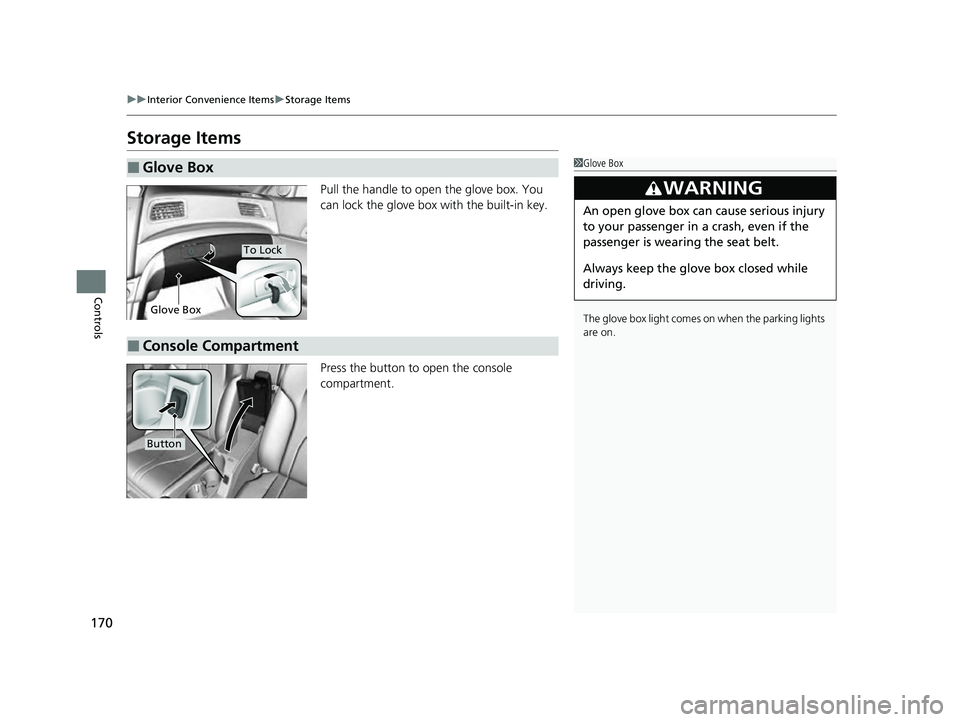
Storage Items
Pull the handle to open the glove box. You
can lock the glove box with the built-in key.
Press the button to open the console
compartment.
■Glove Box1Glove Box
The glove box light comes on when the parking lights
are on.
3WARNING
An open glove box can cause serious injury
to your passenger in a crash, even if the
passenger is wearing the seat belt.
Always keep the glove box closed while
driving.
Glove Box
To Lock
■Console Compartment
Button
22 ACURA ILX-31TX66900.book 170 ページ 2021年4月26日 月曜日 午前11時27分
Page 462 of 632
uuAcuraWatchTMuCollision Mitigation Braking SystemTM (CMBSTM)
460
Driving
The system may automatically shut off and the CMBSTM indicator will come on under
certain conditions. Some examples of th ese conditions are listed below. Other
conditions may reduce some of the CMBS
TM functions.
2 Front Sensor Camera P. 496
2 Radar Sensor P. 498
■Environmental conditions
• Driving in bad weather (rain, fog, snow, etc.).
• Sudden changes between light and dark, such as an entrance or exit of a tunnel.
• There is little contrast between objects and the background.
• Driving into low sunlight (e.g., at dawn or dusk).
• Strong light is reflected onto the roadway.
• Driving in the shadows of trees, buildings, etc.
• Roadway objects or structures are misint erpreted as vehicles and pedestrians.
• Reflections on the interi or of the windshield.
• Driving at night or in a dark condition such as a tunnel.
■Roadway conditions
• Driving on a snowy or wet roadway (obs cured lane marking, vehicle tracks,
reflected lights, road spray, high contrast).
• Driving on curvy, winding, or undulating roads.
• The road is hilly or the vehicle is approaching the crest of a hill.
■CMBSTM Conditions and Limitations1CMBSTM Conditions and Limitations
Have your vehicle checked by a dealer if you find any
unusual behavior of the system (e.g., the warning
message appears too frequently).
22 ACURA ILX-31TX66900.book 460 ページ 2021年4月26日 月曜日 午前11時27分
Page 468 of 632
466
uuAcuraWatchTMuAdaptive Cruise Control (ACC)
Driving
Adaptive Cruise Control (ACC)
Helps maintain a constant vehicle speed a nd a set following-interval behind a vehicle
detected ahead of yours, without you havi ng to keep your foot on the brake or the
accelerator.
When ACC slows your vehicle by applying the brakes, your vehicle’s brake lights will
illuminate.1 Adaptive Cruise Control (ACC)
Important Reminder
As with any system, there are limits to ACC. Use the
brake pedal whenever necessary, and always keep a
safe interval betw een your vehicle and other vehicles.
For directions on the prop er handling of the radar
sensor, refer to the following page. 2 Radar Sensor P. 498
3WARNING
Improper use of ACC can lead to a crash.
Use ACC only when driving on expressways
or freeways and in go od road and weather
conditions.
3WARNING
ACC has limited braking capability.
When your vehicle speed drops below 22
mph (35 km/h), ACC will automatically
cancel and no longer will apply your
vehicle’s brakes.
Always be prepared to apply the brake
pedal when conditions require.
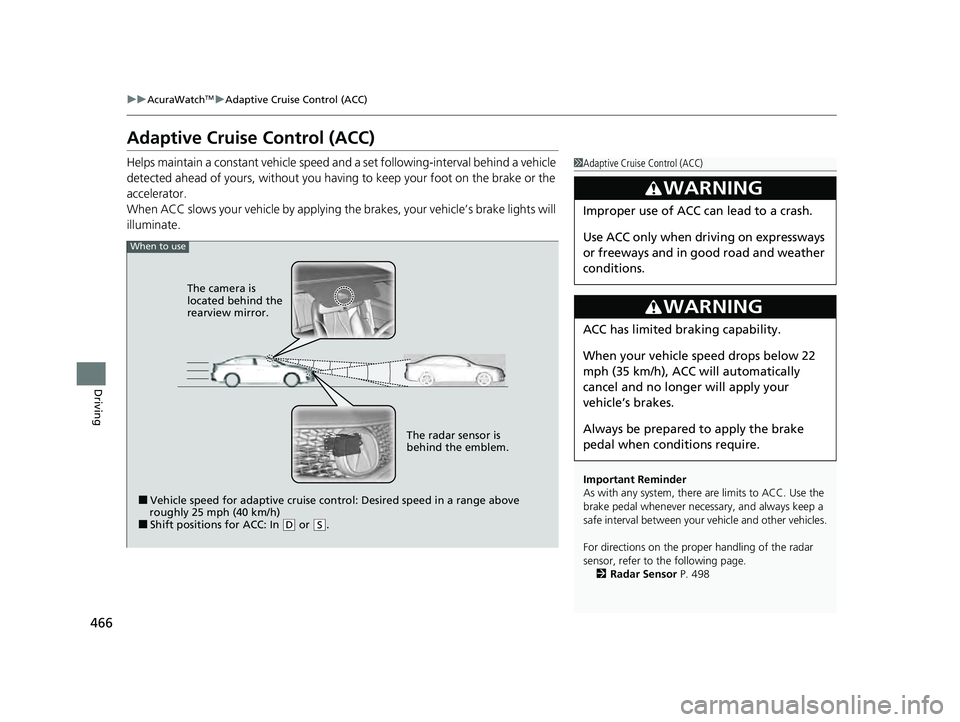
When to use
■Vehicle speed for adaptive cruise control: Desired speed in a range above
roughly 25 mph (40 km/h)
■Shift positions for ACC: In ( D or (S. The radar sensor is
behind the emblem.
The camera is
located behind the
rearview mirror.
22 ACURA ILX-31TX66900.book 466 ページ 2021年4月26日 月曜日 午前11時27分
Page 473 of 632

Continued471
uuAcuraWatchTMuAdaptive Cruise Control (ACC)
Driving
The system may automatically shut off and the ACC indicator will come on under
certain conditions. Some examples of these conditions are listed below. Other
conditions may reduce some of the ACC functions.
2 Front Sensor Camera P. 496
2 Radar Sensor P. 498
■Environmental conditions
Driving in bad weather (r ain, fog, snow, etc.).
■Roadway conditions
Driving on a snowy or wet roadway (obscured lane marking, vehicle tracks, reflected
lights, road spra y, high contrast).
■Vehicle conditions
• The outside of the windshield is blocked by dirt, mud, leaves, wet snow, etc.
• An abnormal tire or wheel condition (inco rrect sizes, varied sizes or construction,
improperly inflated, compact spare tire
*, etc.).
• The camera temperature gets too high.
• The parking brake is applied.
• When the front grille is dirty.
• The vehicle is tilted due to a heavy load or suspension modifications.
• When tire chains are installed.
■ACC Conditions and Limitations1ACC Conditions and Limitations
Have your vehicle checked by a dealer if you find any
unusual behavior of the system (e.g., the warning
message appears too frequently).
* Not available on all models
22 ACURA ILX-31TX66900.book 471 ページ 2021年4月26日 月曜日 午前11時27分
Page 567 of 632
565Continued
Handling the Unexpected
If a Tire Goes Flat
Temporarily Repairing a Flat Tire
If the tire has a large cut or is otherwise severely damaged, you will need to have the
vehicle towed. If the tire only has a small puncture, from a nail for instance, you can
use the temporary tire repair kit so that you can drive to the nearest service station
for a more permanent repair.
If a tire goes flat while driving, grasp the steering wheel firmly, and brake gradually
to reduce speed. Then, stop in a safe place.
1. Park the vehicle on a firm, level, and n on-slippery surface and apply the parking
brake.
2. Put the transmission into
(P.
3. Turn on the hazard warning lights an d set the power mode to VEHICLE OFF
(LOCK).
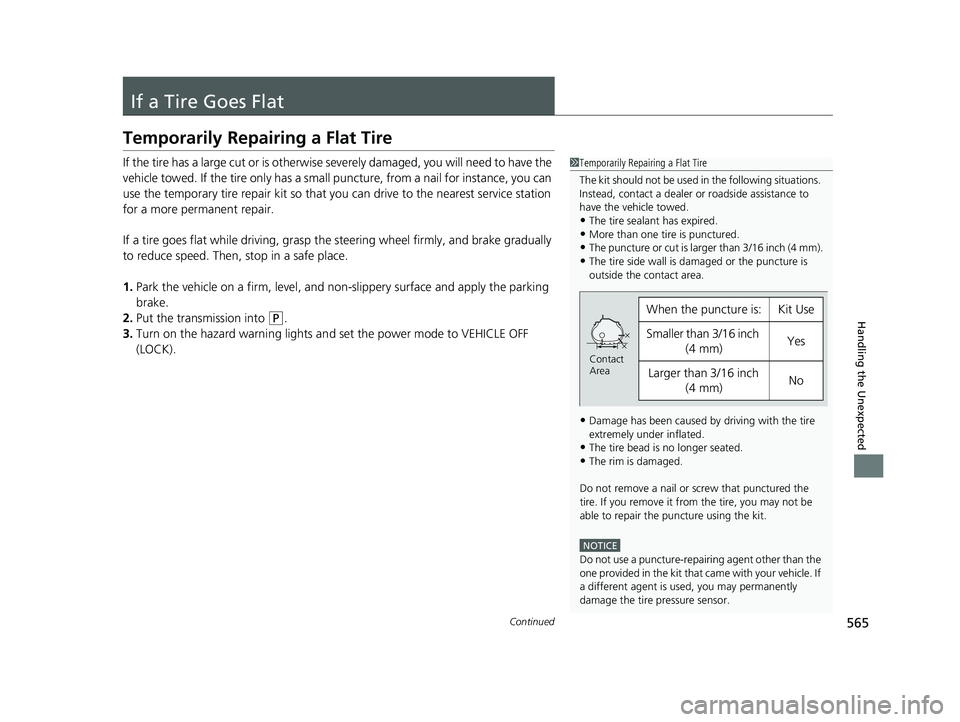
1 Temporarily Repairing a Flat Tire
The kit should not be used in the following situations.
Instead, contact a dealer or roadside assistance to
have the vehicle towed.
•The tire sealant has expired.
•More than one tire is punctured.•The puncture or cut is larger than 3/16 inch (4 mm).
•The tire side wall is da maged or the puncture is
outside the contact area.
•Damage has been caused by driving with the tire
extremely under inflated.
•The tire bead is no longer seated.
•The rim is damaged.
Do not remove a nail or screw that punctured the
tire. If you remove it from the tire, you may not be
able to repair the puncture using the kit.
NOTICE
Do not use a puncture-repairing agent other than the
one provided in the kit that came with your vehicle. If
a different agent is used, you may permanently
damage the tire pressure sensor.
When the puncture isYKit Use
Smaller than 3/16 inch (4 mm)Yes
Larger than 3/16 inch (4 mm)No
Contact
Area
22 ACURA ILX-31TX66900.book 565 ページ 2021年4月26日 月曜日 午前11時27分
Page 582 of 632
580
uuIf a Tire Goes Flat uChanging a Flat Tire
Handling the Unexpected
Changing a Flat Tire
If a tire goes flat while driving, grasp the steering wheel firmly, and brake gradually
to reduce speed. Then, stop in a safe place. Replace the flat tire with a compact
spare tire. Go to a dealer as soon as possibl e to have the full-size tire repaired or
replaced.
1. Park the vehicle on a firm, level, non-slippery surface and apply the parking brake.
2. Put the transmission into
(P.
3. Turn on the hazard warning lights an d set the power mode to VEHICLE OFF
(LOCK).
Models with a compact spare tire
1 Changing a Flat Tire
Follow compact spare precautions:
Periodically check the tire pressure of the compact
spare. It should be set to the specified pressure.
Specified Pressure: 60 psi (420 kPa)
When driving with the compact spare tire, keep the
vehicle speed under 50 mph (80 km/h). Replace with
a full-size tire as soon as possible.
The compact spare tire and wheel in your vehicle are
specifically for this model. Do not use them with
another vehicle. Do not us e another type of compact
spare tire or wheel with your vehicle.
Do not mount tire chains on a compact spare tire.
If a chain-mounted front tire goes flat, remove one of
the full-size rear tires and replace it with the compact
spare tire. Remove the flat front tire and replace it
with the full-size tire that was removed from the rear.
Mount the tire chains on the front tire.
Do not use a puncture-repairi ng agent on a flat tire,
as it can damage the tire pressure sensor.
Do not mount the compact spare on the front. If
mounted on the front, the compact spare, smaller in
size than the full-size tire, may damage the
differential.
If either front tire goes flat, remove the rear tire on
the same side, and mount the compact spare on the
rear and the rear tire on the front.
22 ACURA ILX-31TX66900.book 580 ページ 2021年4月26日 月曜日 午前11時27分
Page 592 of 632

590
Handling the Unexpected
If the Battery Is Dead
Jump Starting Procedure
Turn off the power to electric devices, such as audio and lights. Turn off the engine,
then open the hood. 1.Connect the first jump er cable to your
vehicle's battery + terminal.
2. Connect the other end of the first jumper
cable to the assisting vehicle's + terminal.
u Use a 12-volt booster battery only.
u When using an automotive battery
charger to boost your 12-volt battery,
select a lower charging voltage than 15-
volt. Check the charger manual for the
proper setting.
3. Connect the second jumper cable to the
assisting vehicle's - terminal.1If the Battery Is Dead
Securely attach the jumper cables clips so that they
do not come off when the e ngine vibrates. Be careful
not to tangle the jumper cables or allow the cable
ends to touch each other while attaching or
detaching the jumper cables.
3WARNING
A battery can explode if you do not follow
the correct procedure, seriously injuring
anyone nearby.
Keep all sparks, open flames, and smoking
materials away from the battery.
Booster Battery
22 ACURA ILX-31TX66900.book 590 ページ 2021年4月26日 月曜日 午前11時27分