USB ACURA ILX 2022 Owner's Manual
[x] Cancel search | Manufacturer: ACURA, Model Year: 2022, Model line: ILX, Model: ACURA ILX 2022Pages: 632, PDF Size: 20.56 MB
Page 266 of 632
264
uuAudio System Basic Operation uPlaying a USB Flash Drive
Features
Playing a USB Flash Drive
Your audio system reads and plays sound files on a USB flash drive in either MP3,
WMA, or AAC*1 format.
Connect your USB flash drive to the USB port, then select the USB mode.
2USB Port* P. 182
*1:Only AAC format files recorded with iTunes are playable on this unit.
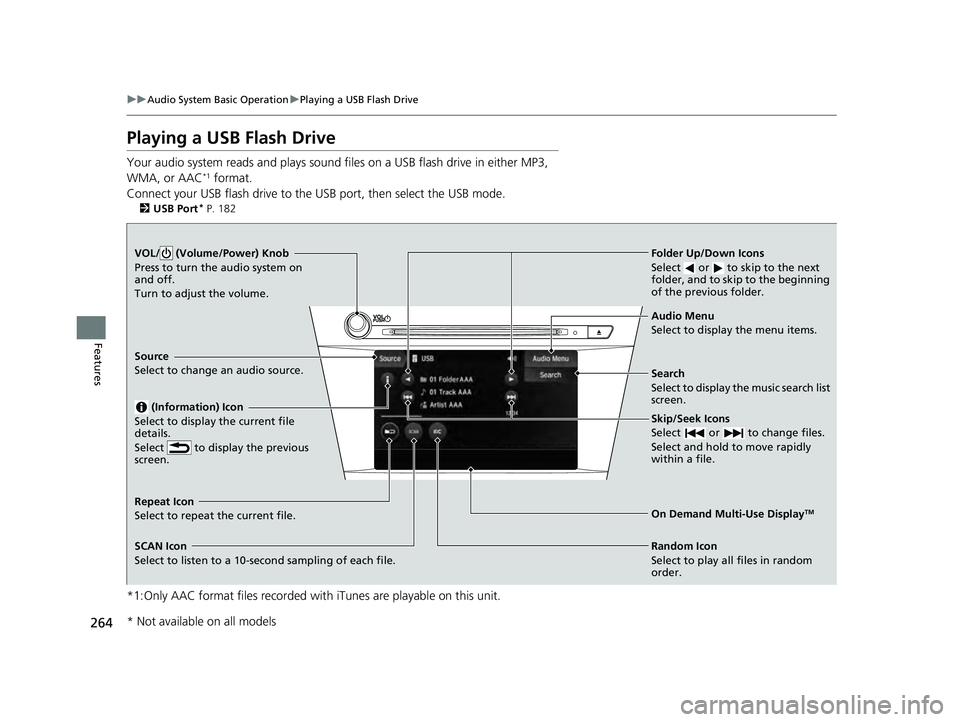
VOL/ (Volume/Power) Knob
Press to turn the audio system on
and off.
Turn to adjust the volume.
Skip/Seek Icons
Select or to change files.
Select and hold to move rapidly
within a file.
Audio Menu
Select to display the menu items.
Source
Select to change an audio source.
(Information) Icon
Select to display the current file
details.
Select to display the previous
screen.
Search
Select to display the music search list
screen.
Folder Up/Down Icons
Select or to skip to the next
folder, and to skip to the beginning
of the previous folder.
On Demand Multi-Use DisplayTMRepeat Icon
Select to repeat the current file.
SCAN Icon
Select to listen to a 10-second sampling of each file. Random Icon
Select to play all files in random
order.
* Not available on all models
22 ACURA ILX-31TX66900.book 264 ページ 2021年4月26日 月曜日 午前11時27分
Page 267 of 632
Continued265
uuAudio System Basic Operation uPlaying a USB Flash Drive
Features
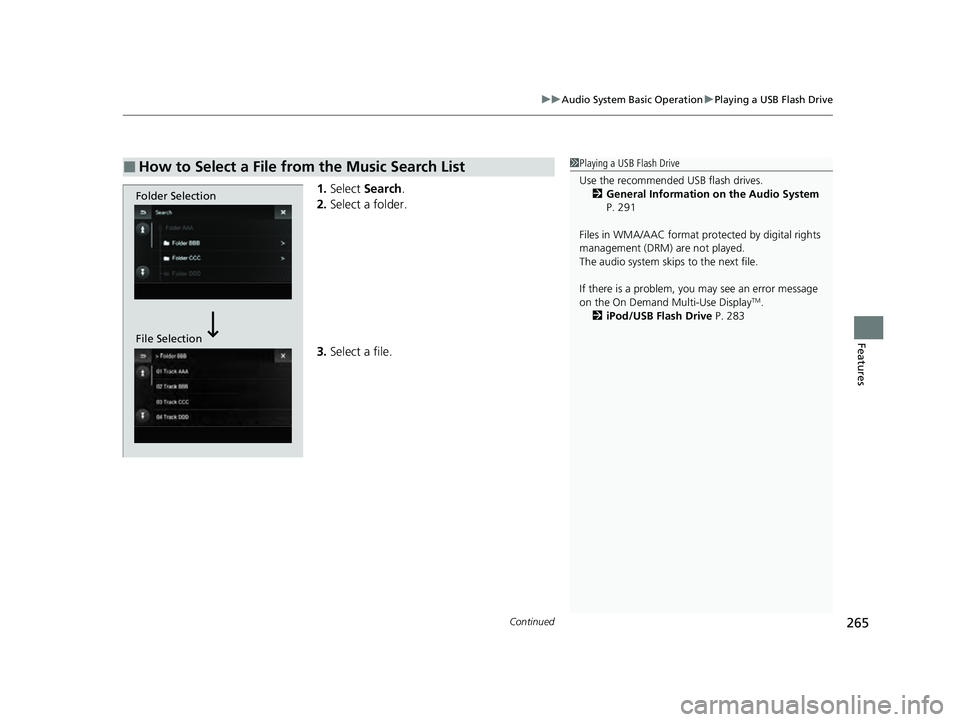
1. Select Search .
2. Select a folder.
3. Select a file.
■How to Select a File from the Music Search List1Playing a USB Flash Drive
Use the recommended USB flash drives.
2 General Information on the Audio System
P. 291
Files in WMA/AAC format protected by digital rights
management (DRM) are not played.
The audio system skips to the next file.
If there is a problem, you may see an error message
on the On Demand Multi-Use Display
TM.
2 iPod/USB Flash Drive P. 283
Folder Selection
File Selection
22 ACURA ILX-31TX66900.book 265 ページ 2021年4月26日 月曜日 午前11時27分
Page 268 of 632
uuAudio System Basic Operation uPlaying a USB Flash Drive
266
Features
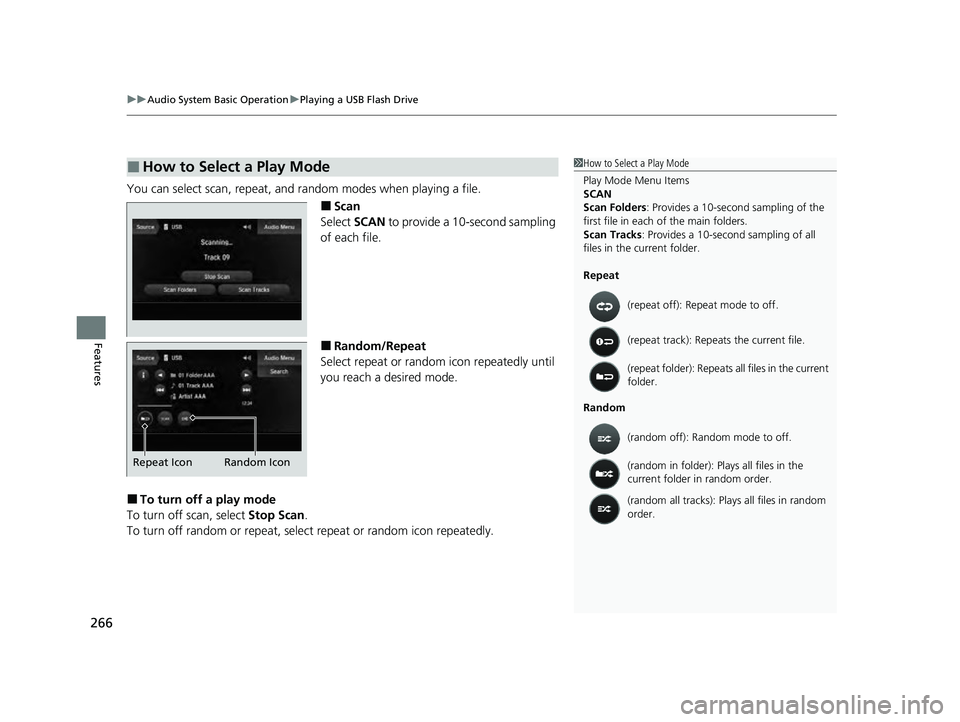
You can select scan, repeat, and random modes when playing a file.
■Scan
Select SCAN to provide a 10-second sampling
of each file.
■Random/Repeat
Select repeat or random icon repeatedly until
you reach a desired mode.
■To turn off a play mode
To turn off scan, select Stop Scan.
To turn off random or repeat, sele ct repeat or random icon repeatedly.
■How to Select a Play Mode1How to Select a Play Mode
Play Mode Menu Items
SCAN
Scan Folders : Provides a 10-second sampling of the
first file in each of the main folders.
Scan Tracks: Provides a 10-second sampling of all
files in the current folder.
Repeat
Random (repeat off): Repe
at mode to off.
(repeat track): Repeats the current file.
(repeat folder): Repeats all files in the current
folder.
(random off): Random mode to off.
(random in folder): Plays all files in the
current folder in random order.
(random all tracks): Play s all files in random
order.
Random Icon
Repeat Icon
22 ACURA ILX-31TX66900.book 266 ページ 2021年4月26日 月曜日 午前11時27分
Page 272 of 632
270
uuAudio System Basic Operation uApple CarPlay
Features
Apple CarPlay
If you connect an Apple CarPlay-compatible iPhone to the system via the USB port,
you can use the information screen, instead of the iPhone display, to make a phone
call, listen to music, view maps (navigation), and access messages.
2USB Port* P. 182
1Apple CarPlay
Only iPhone 5 or newer versi ons with iOS 8.4 or later
are compatible with Apple CarPlay.
Park in a safe place before connecting your iPhone to
Apple CarPlay and when launching any compatible
apps.
To use Apple CarPlay, connect the USB cable to the
USB port. 2 USB Port
* P. 182
To directly access the Appl e CarPlay phone function,
press the PHONE button. While connected to Apple
CarPlay, calls are only made through Apple CarPlay. If
you want to make a call with Bluetooth®
HandsFreeLink ®, turn Apple CarPlay OFF or detach
the USB cable from your iPhone.
2 Setting Up Apple CarPlay P. 273
When your iPhone is connected to Apple CarPlay, it is
not possible to use the Bluetooth® Audio or
Bluetooth ® HandsFreeLink ®. However, other
previously paired phones can stream audio via
Bluetooth ® while Apple CarPlay is connected.
2 Phone Setup P. 382
For details on c ountries and regions where Apple
CarPlay is available, as well as information pertaining
to function, refer to the Apple homepage.
* Not available on all models
22 ACURA ILX-31TX66900.book 270 ページ 2021年4月26日 月曜日 午前11時27分
Page 275 of 632
Continued273
uuAudio System Basic Operation uApple CarPlay
Features
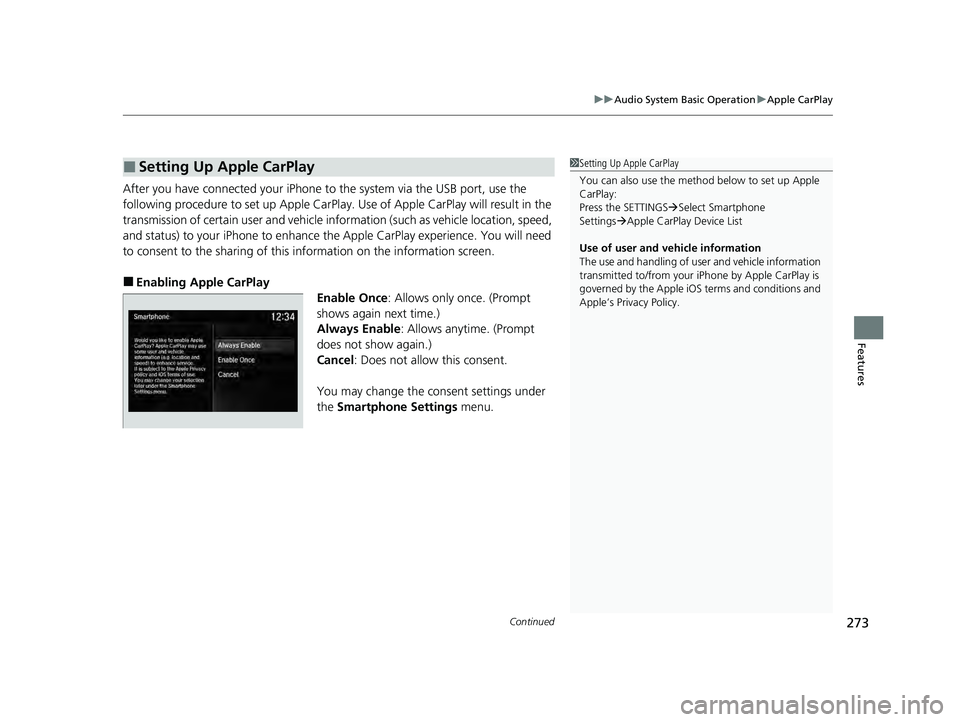
After you have connected your iPhone to the system via the USB port, use the
following procedure to set up Apple CarPlay. Use of Apple CarPlay will result in the
transmission of certain user and vehicle information (such as vehicle location, speed,
and status) to your iPhone to enhance the Apple CarPlay experience. You will need
to consent to the sharing of this information on the information screen.
■Enabling Apple CarPlay
Enable Once: Allows only once. (Prompt
shows again next time.)
Always Enable: Allows anytime. (Prompt
does not show again.)
Cancel : Does not allow this consent.
You may change the consent settings under
the Smartphone Settings menu.
■Setting Up Apple CarPlay1Setting Up Apple CarPlay
You can also use the method below to set up Apple
CarPlay:
Press the SETTINGS Select Smartphone
Settings Apple CarPlay Device List
Use of user and vehicle information
The use and handling of user and vehicle information
transmitted to/from your iP hone by Apple CarPlay is
governed by the Apple iOS terms and conditions and
Apple’s Privacy Policy.
22 ACURA ILX-31TX66900.book 273 ページ 2021年4月26日 月曜日 午前11時27分
Page 277 of 632
275
uuAudio System Basic Operation uAndroid Auto
Continued
Features
Android Auto
When you connect an Android phone to the audio system via the USB port, Android
Auto is automatically initiated. When connected via Android Auto, you can use the
information screen to access the Phone, Google Maps (Navigation), and Google
Now functions. When you first use Andr oid Auto, a tutorial will appear on the
screen.
We recommend that you complete this tuto rial while safely parked before using
Android Auto.
2 USB Port* P. 182
2 Auto Pairing Connection P. 278
1Android Auto
We recommend that you upda te Android OS to the
latest version when using Android Auto.
Bluetooth A2DP cannot be used while your phone is
connected to Android Auto.
To use Android Auto on a smartphone with Android
9.0 (Pie) or earl ier, you need to download the
Android Auto app from Google Play to your
smartphone.
Park in a safe place befo re connecting your Android
phone to Android Auto and when launching any
compatible apps.
To use Android Auto, connect the USB cable to the
USB port. 2 USB Port
* P. 182
When your Android phone is connected to Android
Auto, it is not possible to use the Bluetooth® Audio.
However, other previously paired phones can stream
audio via Bluetooth ® while Android Auto is
connected.
2 Phone Setup P. 382
* Not available on all models
22 ACURA ILX-31TX66900.book 275 ページ 2021年4月26日 月曜日 午前11時27分
Page 280 of 632
uuAudio System Basic Operation uAndroid Auto
278
Features
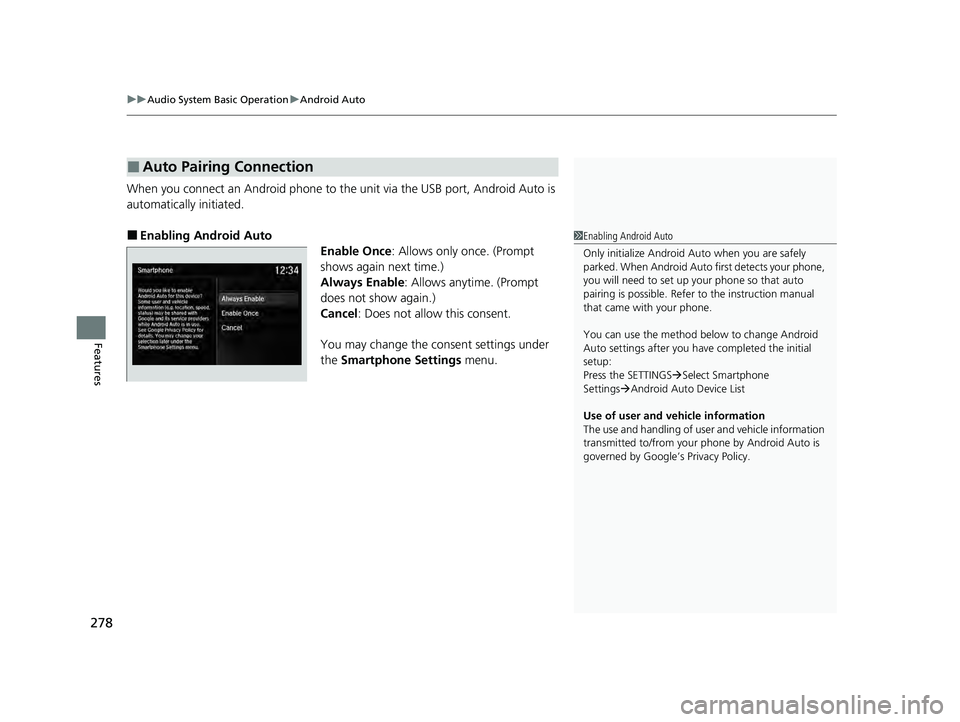
When you connect an Android phone to the unit via the USB port, Android Auto is
automatically initiated.
■Enabling Android Auto
Enable Once: Allows only once. (Prompt
shows again next time.)
Always Enable : Allows anytime. (Prompt
does not show again.)
Cancel : Does not allow this consent.
You may change the consent settings under
the Smartphone Settings menu.
■Auto Pairing Connection
1Enabling Android Auto
Only initialize Android Auto when you are safely
parked. When Android Auto first detects your phone,
you will need to set up your phone so that auto
pairing is possibl e. Refer to the instruction manual
that came with your phone.
You can use the method below to change Android
Auto settings after you ha ve completed the initial
setup:
Press the SETTINGS Select Smartphone
Settings Android Auto Device List
Use of user and vehicle information
The use and handling of user and vehicle information
transmitted to/from your phone by Android Auto is
governed by Google’s Privacy Policy.
22 ACURA ILX-31TX66900.book 278 ページ 2021年4月26日 月曜日 午前11時27分
Page 285 of 632
283
uuAudio Error Messages uiPod/USB Flash Drive
Continued
Features
iPod/USB Flash Drive
If an error occurs while playing an iPod or USB flash drive, you may see the following
error messages. If you cannot clear the error message, contact a dealer.
*1:Models with one display
*2:Models with two displays
Error MessageSolution
USB Error*1
Appears when there is a problem with the USB adapter unit*1 or audio unit*2. Check if the device is
compatible with the USB adapter unit*1 or audio unit*2.Communication error
detected. When safe, please
reconnect your device.
*2
Bad USB Device
Please check owners
manual.
*1
Appears when an incompat ible device is connected. Disconnec t the device. Then, turn the audio
system off and turn it on again. Do not reconnect the device that caused the error.This USB device is
incompatible. Please see
your owner’s manual for
more details.
*2
No Song*1Appears when the iPod is empty. Check that compatible files are stored on the device.
Unsupported Ver*1
Appears when an unsupported iPod is connected. If it appears when a supported iPod is connected,
update the iPod software to the newer version.This version of iOS is not
supported.*2
22 ACURA ILX-31TX66900.book 283 ページ 2021年4月26日 月曜日 午前11時27分
Page 286 of 632
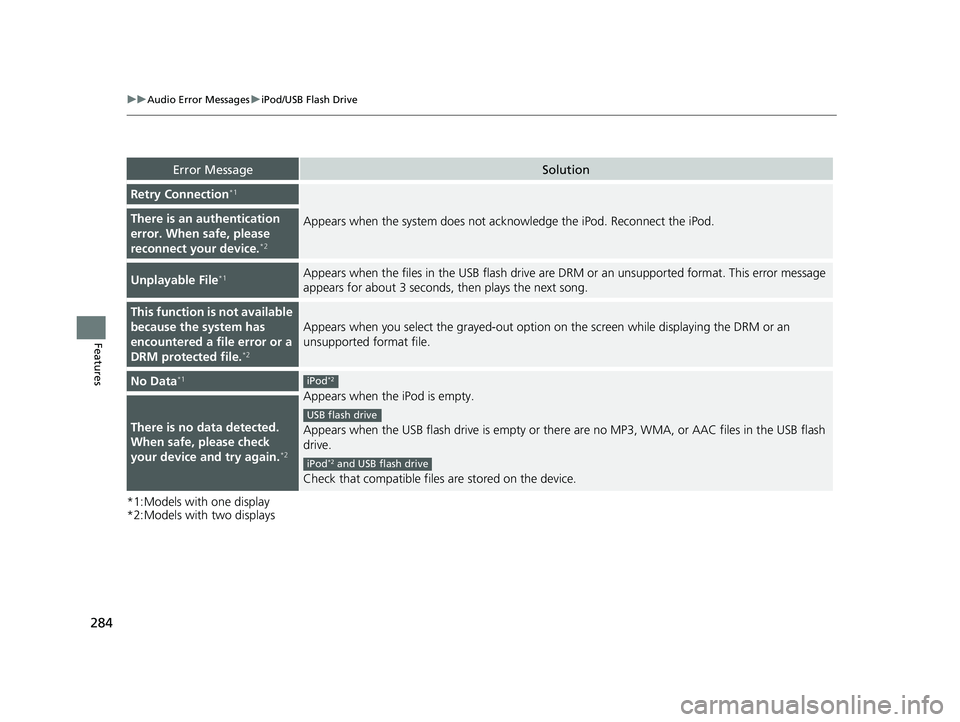
284
uuAudio Error Messages uiPod/USB Flash Drive
Features
*1:Models with one display
*2:Models with two displays
Error MessageSolution
Retry Connection*1
Appears when the system does not acknowledge the iPod. Reconnect the iPod.There is an authentication
error. When safe, please
reconnect your device.
*2
Unplayable File*1Appears when the files in the USB flash drive are DRM or an unsupported format. This error message
appears for about 3 seconds, then plays the next song.
This function is not available
because the system has
encountered a file error or a
DRM protected file.
*2
Appears when you select the grayed-out option on the screen while displaying the DRM or an
unsupported format file.
No Data*1
Appears when the iPod is empty.
Appears when the USB flash drive is empty or ther e are no MP3, WMA, or AAC files in the USB flash
drive.
Check that compatible files are stored on the device.
There is no data detected.
When safe, please check
your device and try again.
*2
iPod*2
USB flash drive
iPod*2 and USB flash drive
22 ACURA ILX-31TX66900.book 284 ページ 2021年4月26日 月曜日 午前11時27分
Page 287 of 632

285
uuAudio Error Messages u
Continued
Features
*2:Models with two displays
Error MessageSolution
UnsupportedAppears when an unsupported device is connected. If it appears when a supported device is
connected, reconnect the device.
USB hubs are not supported.
To listen to audio, directly
connect device to USB port.
*2
Appears when the USB device is connected via the USB hubs. Disconnect the USB hubs and directly
connect the device to the USB port.
22 ACURA ILX-31TX66900.book 285 ページ 2021年4月26日 月曜日 午前11時27分