sensor ACURA ILX 2022 Owner's Manual
[x] Cancel search | Manufacturer: ACURA, Model Year: 2022, Model line: ILX, Model: ACURA ILX 2022Pages: 632, PDF Size: 20.56 MB
Page 111 of 632
109
Controls
This chapter explains how to operate the various controls necessary for driving.
Clock.................................................. 110
Locking and Unlocking the Doors
Key .................................................. 112
Low Keyless Remote Signal Strength ... 114
Locking/Unlocking the Doors from the Outside .......................................... 115
Locking/Unlocking the Doors from the Inside ............................................. 124
Childproof Door Locks ..................... 126
Auto Door Locking/Unlocking .......... 127
Opening and Closing the Trunk ....... 128
Security System ................................ 132
Immobilizer System .......................... 132
Security System Alarm ...................... 132 Windows
........................................... 135Moonroof............................................. 138Operating the Switches Around the
Steering Wheel ENGINE START/STOP Button............. 139
Turn Signals ..................................... 142
Light Switches.................................. 143
Fog Lights
*...................................... 146
Daytime Running Lights ................... 146
Auto High-Beam .............................. 147
Wipers and Washers ........................ 150
Brightness Control ........................... 152
Rear Defogger/Heated Door Mirror Button ..153
Adjusting the Steering Wheel........... 153 Driving Position Memory System
*.... 154
Mirrors ............................................... 156
Interior Rearview Mirror ................... 156
Power Door Mirrors ......................... 157
Adjusting the Seats .......................... 158
Front Seats ...................................... 158
Interior Convenience Items .............. 168
Interior Lights .................................. 168
Storage Items .................................. 170
Other Interior Convenience Items..... 173
Climate Control System ................... 175
Using Automatic Climate Control .... 175
Automatic Climate Control Sensors......178
* Not available on all models
22 ACURA ILX-31TX66900.book 109 ページ 2021年4月26日 月曜日 午前11時27分
Page 117 of 632

115
uuLocking and Unlocking the Doors uLocking/Unlocking the Doors from the Outside
Continued
Controls
Locking/Unlocking the Doors from the Outside
When you carry the keyless remote, you can
lock/unlock the doors and open the trunk.
You can lock/unlock the doors within a radius
of about 32 inches (80 cm) of the outside door
handle. You can open the trunk within about
32 inches (80 cm) radius from the trunk
release button.
■Locking the doors
Press the door lock button on the front door.u Some exterior lights flash; the beeper
sounds; all the doors lock; and the
security system sets.
■Using the Keyless Access System1Locking/Unlocking the Doors from the Outside
If the interior light switch is in the door activated
position, the interior light comes on when you unlock
the doors.
No doors opened: The li ght fades out after 30
seconds.
Doors relocked: The light goes off immediately.
2 Interior Lights P. 168
Door Lock Button
1Using the Keyless Access System
If you do not open a door within 30 seconds of
unlocking the vehicle with the keyless access system,
the doors will automatically relock.
You can lock or unlock doors using the keyless access
system only when the power mode is in VEHICLE OFF.
The keyless access system will not lock the vehicle
when a door is open.
•Do not leave the keyless remote in the vehicle
when you get out. Carry it with you.
•Even if you are not carrying the keyless remote, you
can lock/unlock the doors while someone else with
the remote is within range.
•The door may be unlocked if the door handle is
covered with water in heavy rain or in a car wash if
the keyless remote is within range.
•If you grip a front door handle wearing gloves, the
door sensor may be slow to respond or may not
respond by unlocking the doors.
22 ACURA ILX-31TX66900.book 115 ページ 2021年4月26日 月曜日 午前11時27分
Page 146 of 632
uuOperating the Switches Around the Steering Wheel uLight Switches
144
Controls
Automatic lighting control can be used when
the power mode is in ON.
When the light switch is in AUTO, the
headlights and other exterior lights will switch
on and off automatically depending on the
ambient brightness.
The headlights come on when you unlock a
door in dark areas with the headlight switch in
AUTO .
u Once you lock the door, the headlights
will go off.
■Automatic Operation (automatic lighting control)1Automatic Operation (aut omatic lighting control)
We recommend that you tu rn on the lights manually
when driving at night, in a de nse fog, or in dark areas
such as long tunnels or parking facilities.
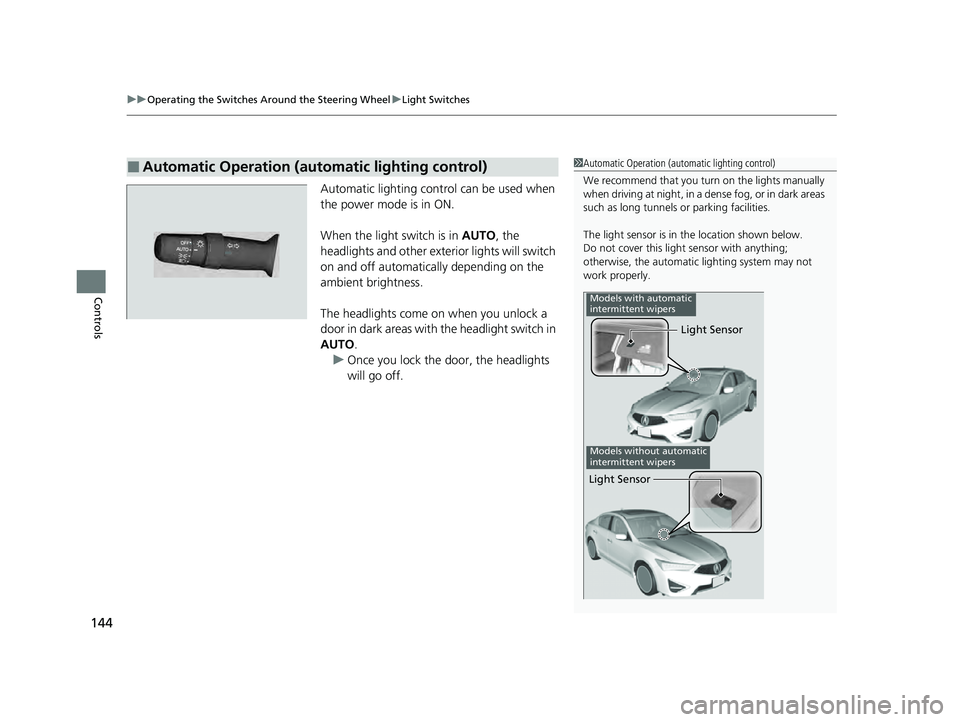
The light sensor is in the location shown below.
Do not cover this light sensor with anything;
otherwise, the automatic lighting system may not
work properly.
Light Sensor
Models with automatic
intermittent wipers
Models without automatic
intermittent wipers
Light Sensor
22 ACURA ILX-31TX66900.book 144 ページ 2021年4月26日 月曜日 午前11時27分
Page 149 of 632

147
uuOperating the Switches Around the Steering Wheel uAuto High-Beam
Continued
Controls
Auto High-Beam
The front sensor camera detects the light sources ahead of the vehicle such as the
lights of a preceding or oncoming vehicle, or street lights. When you are driving at
night, the system automatically switches the headlights between low beam and high
beam depending on the situation.
When all of the following conditions have been met, the auto high-beam indicator
comes on and the auto high-beam is activated. •The power mode is in ON.
• The light switch is in AUTO.
• The lever is in the low beam position.
• The headlights have been automatically
activated.
• It is dark outside the vehicle.
If the auto high-beam indica tor does not come on even when all the conditions have
been met, carry out the following procedure and the indicator will come on.
• Pull the lever toward you for flashing the high beams then release it while driving.1Auto High-Beam
The auto high-beam system does not always operate
in every situation. This syst em is just for assisting the
driver. Always observe your surroundings and switch
the headlights between high beam and low beam
manually if necessary.
If you find the timing of beam changes inconvenient
for driving, change the headlight beams manually.
The range and the distance at which the camera can
recognize varies de pending on conditions
surrounding your vehicle.
Regarding the handling of the camera mounted to
the inside of the windshiel d, refer to the following.
2 Front Sensor Camera P. 496
For the auto high-beam to work properly:
•Do not place an object that reflects light on the
dashboard.
•Keep the windshield around the camera clean.
•When cleaning the windshield, be careful not to
apply the windshield cleans er to the camera lens.
•Do not attach an object, sticker or film to the area
around the camera.
•Do not touch the camera lens.
If the camera receives a st rong impact, or repairing of
the area near the camera is required, consult a dealer.
■How to Use the Auto High-Beam
Front Sensor Camera
Auto High-Beam
IndicatorLight Switch
22 ACURA ILX-31TX66900.book 147 ページ 2021年4月26日 月曜日 午前11時27分
Page 153 of 632
151
uuOperating the Switches Around the Steering Wheel uWipers and Washers
Controls
When you push the lever down to AUTO, the
windshield wipers sweep once, and go into
the automatic mode.
The wipers operate intermittently, at low
speed, or at high speed and stop in
accordance with the amount of rainfall the
rainfall sensor detects.
■AUTO sensitivity adjustment
When the wiper function is set to AUTO, you
can adjust the sensitivity of the rainfall sensor
(using the adjustment ring) so that wipers will
operate in accordance with your preference.
Sensor sensitivity
■Automatic Intermittent Wipers*1 Wipers and Washers
If the wipers st op operating due to an obstacle such
as the buildup of snow, park the vehicle in a safe
place.
Rotate the wiper switch to OFF, and set the power
mode to ACCESSORY or VEHICLE OFF (LOCK), then
remove the obstacle.
1 Automatic Intermittent Wipers*
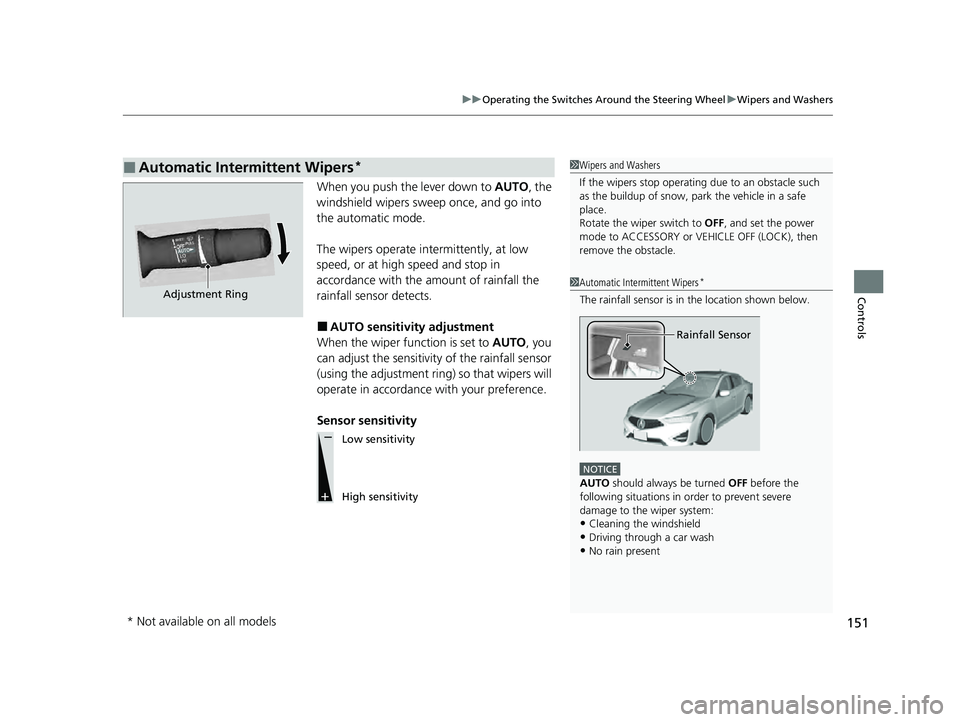
The rainfall sensor is in the location shown below.
NOTICE
AUTO should always be turned OFF before the
following situations in order to prevent severe
damage to the wiper system:
•Cleaning the windshield•Driving through a car wash
•No rain present
Rainfall Sensor
Adjustment Ring
Low sensitivity
High sensitivity
* Not available on all models
22 ACURA ILX-31TX66900.book 151 ページ 2021年4月26日 月曜日 午前11時27分
Page 158 of 632
156
Controls
Mirrors
Interior Rearview Mirror
Adjust the angle of the rearview mirror when you are sitting in the correct driving
position.
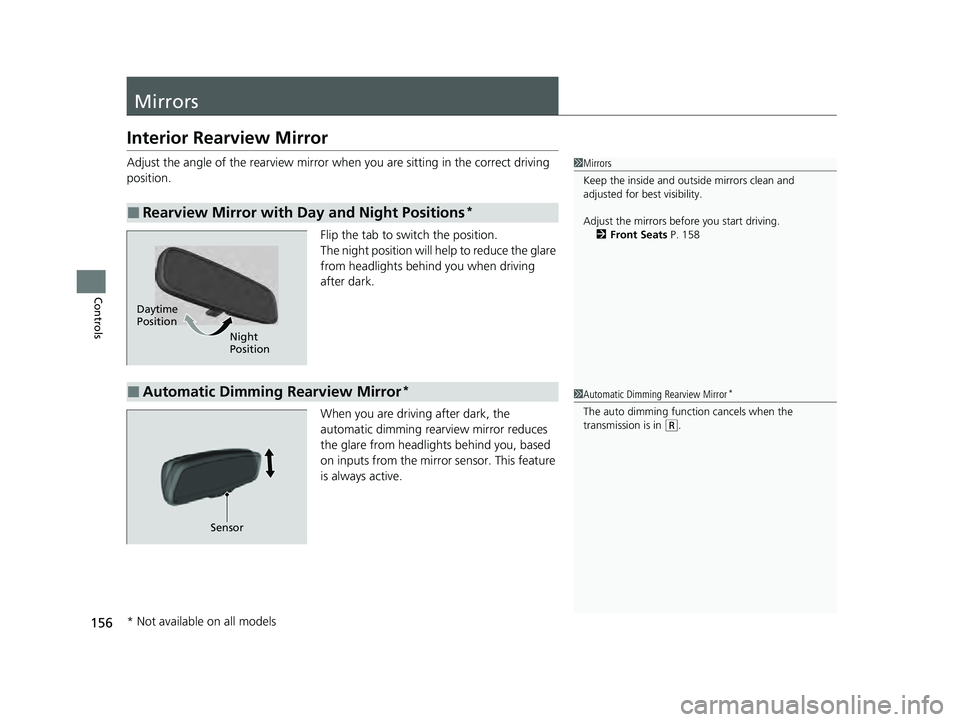
Flip the tab to switch the position.
The night position will help to reduce the glare
from headlights behind you when driving
after dark.
When you are driving after dark, the
automatic dimming rearview mirror reduces
the glare from headlights behind you, based
on inputs from the mirror sensor. This feature
is always active.
■Rearview Mirror with Day and Night Positions*
1Mirrors
Keep the inside and out side mirrors clean and
adjusted for best visibility.
Adjust the mirrors before you start driving. 2 Front Seats P. 158
Daytime
Position
Night
Position
■Automatic Dimming Rearview Mirror*1Automatic Dimming Rearview Mirror*
The auto dimming function cancels when the
transmission is in
(R.
Sensor
* Not available on all models
22 ACURA ILX-31TX66900.book 156 ページ 2021年4月26日 月曜日 午前11時27分
Page 168 of 632
166
uuAdjusting the Seats uRear Seat
Controls
Rear Seat
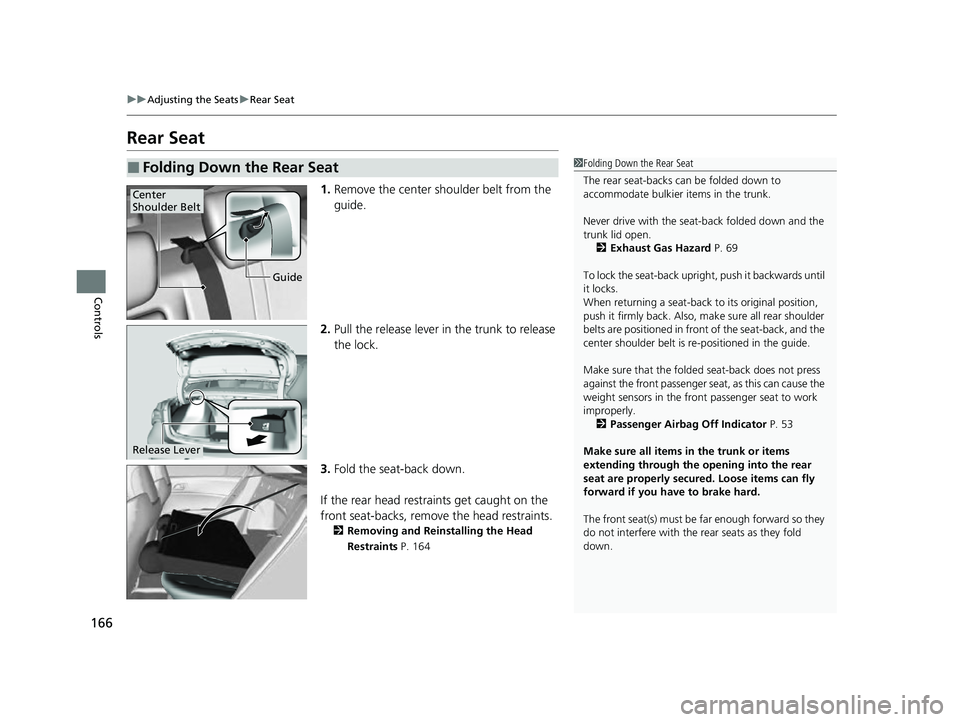
1. Remove the center shoulder belt from the
guide.
2. Pull the release lever in the trunk to release
the lock.
3. Fold the seat-back down.
If the rear head restraints get caught on the
front seat-backs, remove the head restraints.
2 Removing and Reinstalling the Head
Restraints P. 164
■Folding Down the Rear Seat1Folding Down the Rear Seat
The rear seat-backs can be folded down to
accommodate bulkier items in the trunk.
Never drive with the seat-back folded down and the
trunk lid open.
2 Exhaust Gas Hazard P. 69
To lock the seat-back upri ght, push it backwards until
it locks.
When returning a seat-back to its original position,
push it firmly back. Also, m ake sure all rear shoulder
belts are positioned in front of the seat-back, and the
center shoulder belt is re -positioned in the guide.
Make sure that the folded seat-back does not press
against the front passenger seat, as this can cause the
weight sensors in the front passenger seat to work
improperly. 2 Passenger Airbag Off Indicator P. 53
Make sure all items in the trunk or items
extending through the opening into the rear
seat are properly secured. Loose items can fly
forward if you have to brake hard.
The front seat(s) must be far enough forward so they
do not interfere with the rear seats as they fold
down.
Guide
Center
Shoulder Belt
Release Lever
22 ACURA ILX-31TX66900.book 166 ページ 2021年4月26日 月曜日 午前11時27分
Page 180 of 632
178
uuClimate Control System uAutomatic Climate Control Sensors
Controls
Automatic Climate Control Sensors
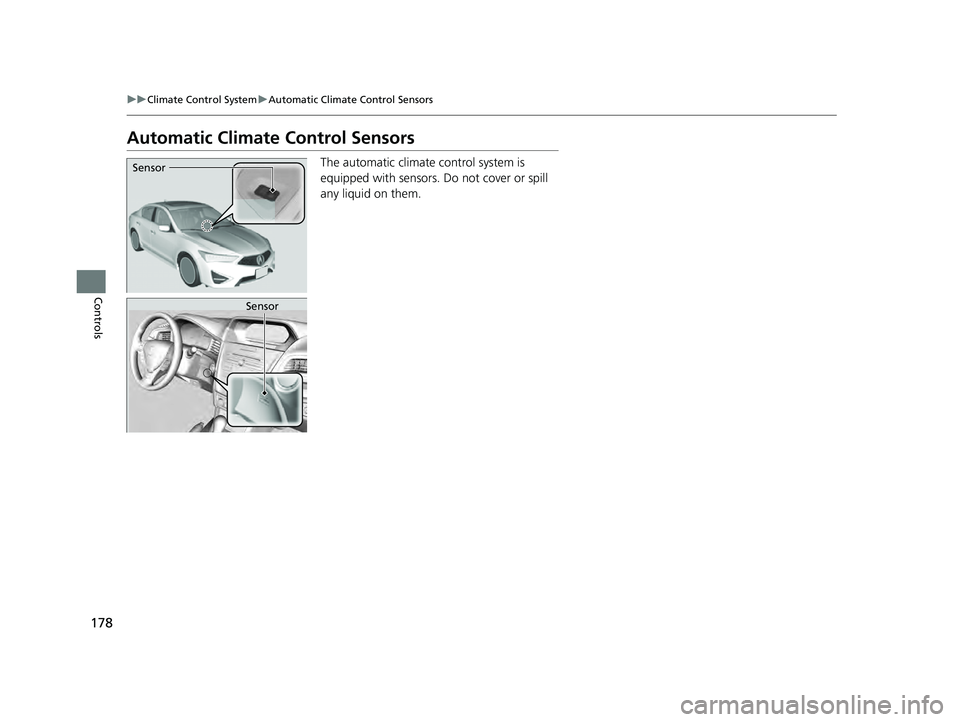
The automatic climate control system is
equipped with sensors. Do not cover or spill
any liquid on them.Sensor
Sensor
22 ACURA ILX-31TX66900.book 178 ページ 2021年4月26日 月曜日 午前11時27分
Page 427 of 632
425
Driving
This chapter discusses driving and refueling.
Before Driving................................... 426
Maximum Load Limit........................ 429
Towing a Trailer ................................ 431
When Driving Starting the Engine .......................... 432
Dual Clutch Transmission ................. 438
Shifting ............................................ 439
Vehicle Stability AssistTM (VSA ®), aka Electronic
Stability Control (ESC), System ............... 443
Blind spot information System*........... 445
Tire Pressure Monitoring System (TPMS) .. 448
Tire Pressure Monitoring System (TPMS) - Required Federal Explanation ......... 450
AcuraWatch
TM................................... 452
Collision Mitigati on Braking SystemTM
(CMBSTM) ....................................... 455
Adaptive Cruise Control (ACC)......... 466
Lane Keeping Assist System (LKAS).... 481
Road Departure Mitigation (RDM) System . 491
Front Sensor Camera ....................... 496
Radar Sensor.................................... 498
Braking Brake System ................................... 499 Anti-lock Brake System (ABS) ........... 501
Parking Your Vehicle When Stopped ................................ 503
Cross Traffic Monitor
*..................... 505
Multi-View Rear Camera .................. 508
Refueling Fuel Information .............................. 510
How to Refuel ................................. 511
Fuel Economy and CO
2 Emissions .... 513
Improving Fuel Economy and Reducing CO
2 Emissions ................................ 513
* Not available on all models
22 ACURA ILX-31TX66900.book 425 ページ 2021年4月26日 月曜日 午前11時27分
Page 430 of 632
428
uuBefore Driving uDriving Preparation
Driving
• Be sure items placed on the floor behind the front seats cannot roll under the
seats.
u They can interfere with the driver's ability to operate the pedals, the operation
of the seats, or the operation of the sensors under the seats.
• Everyone in the vehicle must fasten their seat belt.
2Fastening a Seat Belt P. 37
•Make sure that the indicators in the instrument panel come on when you start the
vehicle, and go off soon after.
u Always have a dealer check the vehicle if a problem is indicated.
2 Indicators P. 72
22 ACURA ILX-31TX66900.book 428 ページ 2021年4月26日 月曜日 午前11時27分